

Power Your Software Testing with AI Agents and Cloud
The Native AI-Agentic Cloud Platform to Supercharge Quality Engineering. Test Intelligently and Ship Faster.


- TestMu AI (Formerly LambdaTest)
- /
- Blog
- /
- 9 Browser Compatibility Issues That Break Sites in 2026
9 Browser Compatibility Issues That Break Sites in 2026
The browser compatibility issues developers hit most often, what each one looks like in Chrome, Firefox, and Safari, and how to reproduce them.
Last Updated on:
A browser compatibility issue is a bug that appears in one browser and not another, caused by the engine underneath rather than by your code being wrong. The page still loads, but a control changes size, a layout wraps early, or a script calls an API that one engine never shipped.
This guide covers the nine issues that account for most of those bugs, what each one looks like in Chrome, Firefox, and Safari, and how to reproduce it before a user does. For the fixes in code, see the companion guide on how to solve cross browser compatibility issues, and for the underlying concepts, the cross browser compatibility guide.
TL;DR
Browser compatibility issues are bugs that appear in one rendering engine and not another, because Blink, Gecko, and WebKit implement standards on different schedules. This guide covers nine, of which CSS default styles, Safari feature gaps, missing JavaScript APIs, and viewport-unit layout bugs produce the most reports.
- CSS default styles: Every engine ships its own user-agent stylesheet. The same unstyled text input measured Chrome 177px, Edge 177px, Firefox 164.7px, Safari 155.9px.
- Safari feature gaps: Affected engine WebKit. Safari 26.4 lacked Temporal and requestIdleCallback, while Chrome 153 and Edge 152 supported all 41 newer features checked.
- Missing JavaScript APIs: A call to an API a browser engine never shipped throws a TypeError and stops the rest of that handler, where an unrecognized CSS property is ignored silently instead.
- Viewport-unit layout: On mobile browsers 100vh is measured as though the address bar were collapsed, so a full-height hero hides its bottom edge until the user scrolls. The dvh unit fixes it.
Reproduce any browser compatibility bug on the exact browser and version from the report with TestMu AI, which opens your URL on 3,000+ browser and OS combinations.
Why Is CSS a Major Cause of Browser Compatibility Issues?
CSS causes compatibility issues because every engine ships its own user-agent stylesheet, so your page inherits different margins, font sizes, and control dimensions before a single line of your own CSS runs.
The effect is measurable on an unstyled page. In a four-browser test published in our cross browser compatibility guide, the same default text input rendered 177px wide in Chrome and Edge, 164.7px in Firefox, and 155.9px in Safari. Nothing in the markup changed between runs. That 21px spread is enough to push a label onto a second line or wrap a form row early.
Two sub-areas of CSS produce most of the reports. Newer layout primitives land at different times across engines, and properties that were once experimental still carry vendor prefixes in shipping browsers. The CSS browser compatibility issues guide catalogues the specific properties.
What Breaks in Safari and WebKit?
Safari breaks differently from other browsers because it is the only major browser running WebKit, and it ships some JavaScript APIs later than Chromium does.
In the same four-browser test, Safari 26.4 had no support for Temporal or requestIdleCallback, while Chrome 153 and Edge 152 supported every one of the 41 newer features checked. Safari also rendered the narrowest default form controls of the four and used overlay scrollbars that take no layout width, against the 15px both Blink browsers reserve.
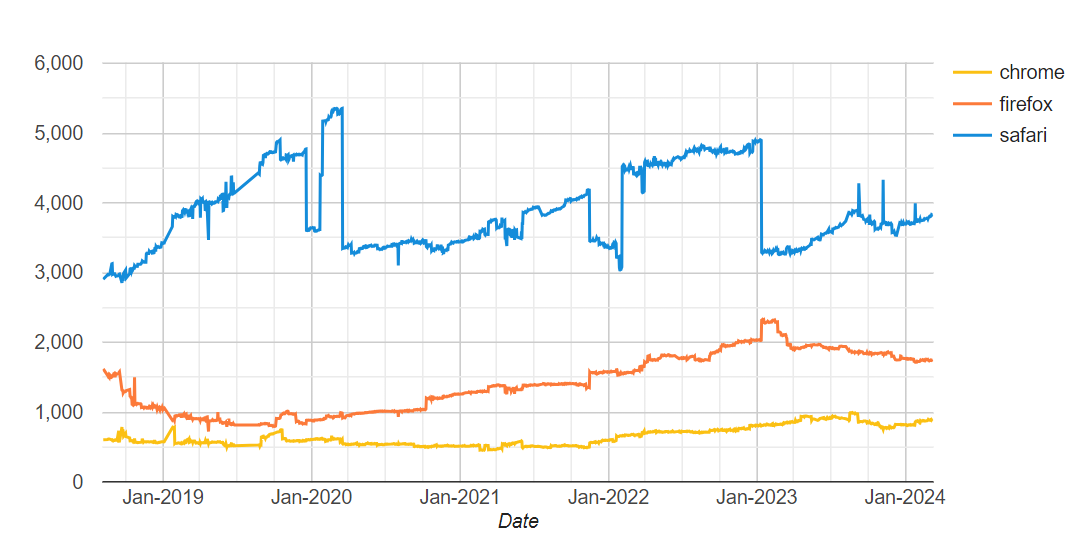
Safari bugs carry more weight than its desktop share suggests. Apple's App Review Guideline 2.5.6 requires apps that browse the web on iOS to use WebKit, so Chrome and Firefox on iPhone and iPad generally render pages with Safari's engine. One WebKit fix reaches most of your iOS traffic whichever browser icon the visitor tapped. Check the Safari latest version page before filing a bug, since the behavior may already have changed.
What Are the JavaScript Browser Compatibility Issues?
JavaScript compatibility issues appear when an engine has not shipped an API your code calls, so the script throws at runtime instead of degrading. Syntax is rarely the problem now; missing APIs are.
The symptoms cluster into four patterns:
- Missing API - the method exists in your dev browser and is undefined elsewhere, so the call throws a TypeError and everything after it in that handler stops.
- Partial implementation - the API exists but ignores an option or argument, so the code runs without error and produces the wrong result.
- Version drift - an older browser version in your matrix lacks a feature the current version has, so the bug only reproduces on specific builds.
- Transpiler gaps - Babel converts new syntax but not missing APIs, so a build that compiles cleanly still fails at runtime without a polyfill.
Identifying which pattern you have decides the fix. A missing API needs a polyfill or a guarded fallback, while a partial implementation needs a different approach entirely. The step-by-step remedies are covered in fixing JavaScript cross browser compatibility issues.

What Are the Layout and Flexbox Issues?
Layout issues show up as designs that hold in one engine and collapse in another, most often in Flexbox and Grid containers, responsive breakpoints, and any height expressed in viewport units.
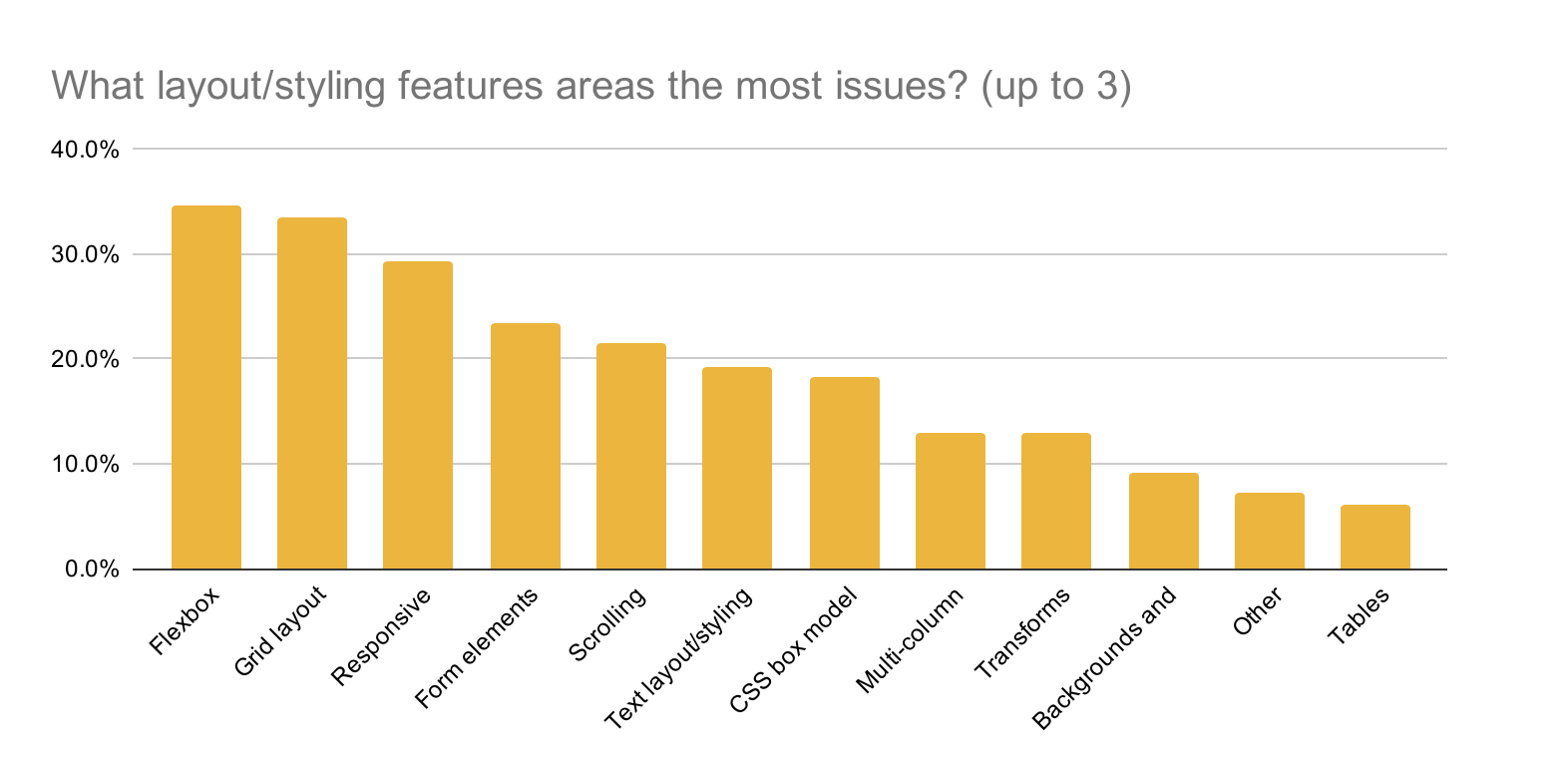
Flexbox draws the most reports because almost every modern layout uses it somewhere, so a single inconsistency surfaces across many pages at once. Vertical alignment and images used directly as flex items were the historical trouble spots.
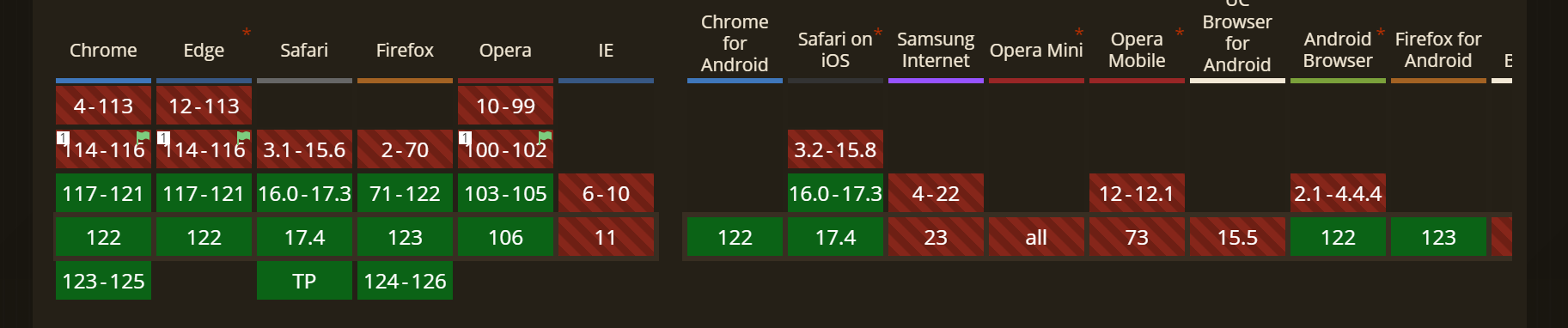
Viewport height is the other reliable failure. On mobile browsers, 100vh is measured as though the address bar were collapsed, so a full-height hero hides its bottom edge behind the toolbar until the user scrolls. The dynamic viewport units fix it, and dvh was supported in all four browsers tested. Start from the CSS Flexbox tutorial if you are auditing an existing layout, and the responsive testing guide for breakpoint coverage.
What Are the Rendering Issues in Browsers?
Rendering issues happen when an engine does not recognize a property and silently falls back to a default value rather than reporting an error, so the page looks wrong with a clean console.
CSS writing modes show the pattern clearly. The sideways-lr and sideways-rl values are recognized by some engines and ignored by others, and an engine that ignores them renders horizontal text with no warning that anything was dropped.

Fonts and text metrics differ for the same reason. Before any web font loads, the default body font resolves to a different family per engine, so line lengths and wrap points shift even when your CSS is identical. The CSS writing mode compatibility guide covers the property in depth, and browser engines explains why the engines diverge.
What Breaks on Old Browser Versions?
Old browser versions break on features that shipped after the version your visitor is running, and the problem is now about outdated versions of current browsers rather than about retired browsers.
Microsoft retired Internet Explorer 11 on June 15, 2022, and Edge covers the remaining legacy cases through IE mode. The live problem is a user several Chrome or Firefox releases behind, often because an enterprise image pins the version. Those users do not appear in your local testing and they do not report the bug; they leave.
Pull the version spread from your own analytics rather than a global chart. Global share tells you what the world runs; your analytics tell you what your paying users run, and the two rarely match.
Why Do Browsers Adopt New Features Slowly?
Engines implement specifications on their own roadmaps, so a feature can be stable in one browser and unimplemented in another for years. That gap is the single largest source of new compatibility bugs.
CSS subgrid is the standard illustration: it solves a real nesting problem for front-end layout, and support arrived on very different schedules across engines. Any feature in that state is a bug waiting to be filed by whoever adopts it first.
WebKit's Interop 2025 review reports that 29% of the selected tests passed across all browsers at the start of 2025, and that the Interop score reached a 97% pass rate by the end of the year.
That still leaves the newest properties uneven. Check caniuse and a feature's Baseline status before you adopt it, not after the bug report. The CSS subgrid guide covers the property itself.

Note: Reproduce a browser-specific bug on the exact engine and version your user reported it on, without installing anything. Try TestMu AI free!
What Are the Browser Compatibility Issues With PWAs?
Progressive Web Apps break across browsers because they depend on Service Workers, Web App Manifests, and push notifications, and each of those has its own support timeline per engine.
A Progressive Web App cannot reach device hardware directly the way a native app can. Every camera, file, or notification capability arrives through a browser API instead, and that API may or may not be present in the engine your visitor is using.
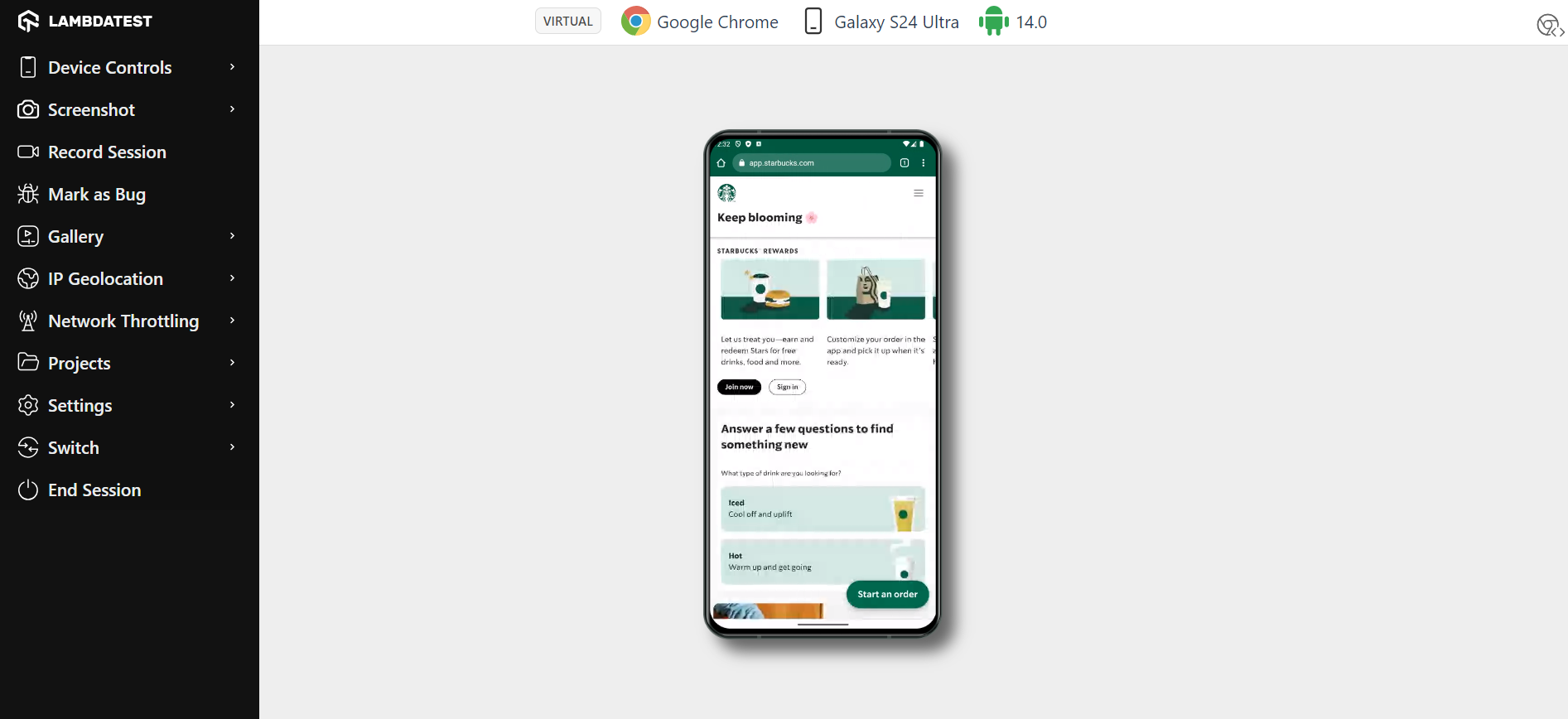
Installation is where the differences bite hardest. Manifest handling, icon dimension rules, and the install prompt itself vary by browser, so a Progressive Web App that installs cleanly on Android may offer no prompt at all on iOS. Test installation and offline mode per browser rather than once. The types of mobile apps guide compares the app models.
Why Are Polyfills Tedious to Maintain?
A polyfill reimplements a missing feature in JavaScript so older engines can run code written for newer ones. The cost is that you now maintain two implementations of the same behavior and ship bytes that most visitors never execute.
The maintenance burden compounds. Each polyfill needs a support check to decide whether to load it, its own upgrade path as the native API stabilizes, and a removal date once your browser matrix moves past the versions that needed it. Teams routinely ship polyfills for browsers they stopped supporting years earlier because nobody owns the removal.
Write the feature the straightforward way first, confirm where it fails, and add the polyfill only for the versions in your matrix. A documented browser matrix is what makes that call possible.
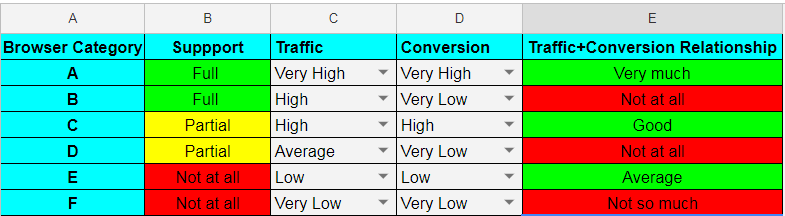
The test strategy guide covers turning that matrix into a repeatable plan.
How to Reproduce a Browser Compatibility Issue
Confirm an issue is a compatibility bug by opening the same URL in one browser per engine and comparing. If it appears in one engine and not the others, it is a compatibility issue; if it appears in all three, the bug is in your code.
Work through it in this order:
- Reproduce on the exact browser and version from the bug report, not just the latest release of that browser.
- Open the same URL in one browser from each of the other two engines to establish whether the failure is engine-specific.
- Inspect the element in the failing browser's own DevTools, since computed styles are what differ, not your source.
- Check the feature on caniuse and read its Baseline status to separate a missing feature from a genuine bug.
- Record the failing configuration in your browser matrix so the fix gets a regression test.
Installing every browser and version locally is not practical past a handful of configurations. TestMu AI's cross browser testing cloud opens your URL on 3,000+ browser and OS combinations with that browser's own DevTools in the session, alongside network logs, console logs, and session video for the run. Geolocation routing across 180+ countries and network throttling cover the bugs that only appear under specific conditions.
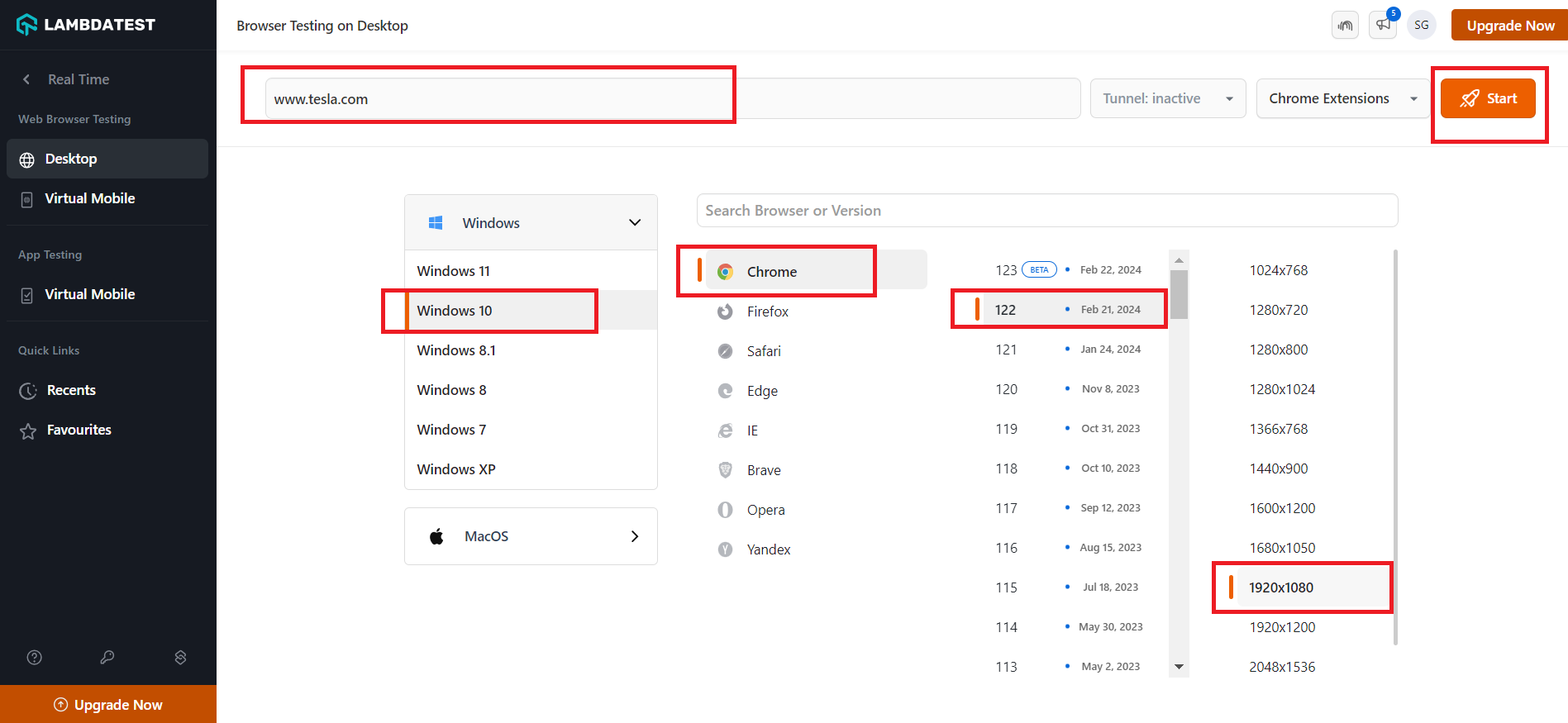
For responsive breakpoints specifically, LT Browser shows several device viewports side by side while you work. Once you have a reproducible case, the real time browser testing documentation covers launching the first session.

How Do AI Agents Catch Browser Compatibility Bugs in 2026?
No single AI agent catches every browser compatibility bug in 2026. Code-focused agents flag known patterns before you ship; only a browser automation agent that actually renders the page in each engine catches the rest.
- Code-review agents: GitHub Copilot, Cursor, and Claude Code read your CSS and JavaScript inline and can flag a vendor-prefixed property or a JavaScript API without a fallback, the same class of bug covered in the CSS and JavaScript sections above. They never load a browser, so they cannot tell you that Safari renders a control 21px narrower than Chrome.
- Browser automation agents: The Playwright MCP server and similar tools let an agent open a URL and act on it through Chromium, Firefox, or WebKit, the same three engines this guide tests against. Pointed at all three, an agent can diff a screenshot or the computed styles between engines and report where they diverge.
The gap between the two is the limitation. An automation agent only checks the engines you tell it to launch, so a setup that defaults to a single Chromium instance passes every run and still ships a Safari-only bug. Reviewing code and rendering it in every engine both stay necessary.
Conclusion
Take your highest-traffic page and open it in Chrome, Firefox, and Safari before your next release, then walk its main flow in each. Most of the nine issues above surface in that one pass, and each one you find becomes a test case for your automated matrix.
Once you know what is broken, the companion guide on solving cross browser compatibility issues covers the code-level fixes for each pattern.
Author

Harish Rajora
Blogs: 102


Harish Rajora is a Software Developer 2 at Oracle India with over 6 years of hands-on experience in Python and cross-platform application development across Windows, macOS, and Linux. He has authored 800 + technical articles published across reputed platforms. He has also worked on several large-scale projects, including GenAI applications, and contributed to core engineering teams responsible for designing and implementing features used by millions. Harish has worked extensively with Django, shell scripting, and has led DevOps initiatives, building CI/CD pipelines using Jenkins, AWS, GitLab, and GitHub. He has completed his post-graduation with an M.Tech in Software Engineering from the Indian Institute of Information Technology (IIIT) Allahabad. Over the years, he has emphasized the importance of planning, documentation, ER diagrams, and system design to write clean, scalable, and maintainable code beyond just implementation.
Reviewer

Shahzeb Hoda
Reviewer
Shahzeb Hoda is the Associate Director of Marketing and a Community Contributor at TestMu AI, leading strategic initiatives in developer marketing, content, and community growth. With 10+ years of experience in quality engineering, software testing, automation testing, and e-learning, he has authored and reviewed 70+ technical articles on software testing and automation. Shahzeb holds an M.Tech in Computer Science from BIT, Mesra, and is certified in Selenium, Cypress, Playwright, Appium, and KaneAI. He brings deep expertise in CI/CD pipeline automation, cross-browser testing, AI-driven testing practices, and framework documentation. On LinkedIn, he is followed by 3,700+ engineers, developers, DevOps professionals, tech leaders, and enthusiasts.


Browser Compatibility Issues FAQs
Did you find this page helpful?
More Related Blogs
TestMu AI forEnterprise
Get access to solutions built on Enterprise
grade security, privacy, & compliance
- Advanced access controls
- Advanced data retention rules
- Advanced Local Testing
- Premium Support options
- Early access to beta features
- Private Slack Channel
- Unlimited Manual Accessibility DevTools Tests