
Run End-to-End Tests from Your Terminal with Kane CLI
Author and Run Tests Right from the Terminal in Natural Language, with an Evidence-Backed Pass or Fail from a Real Browser.
npm install -g @testmuai/kane-cli
Self-Improving Agents Need an Outside Judge: A LoopForge Teardown
Self-improving agents get better at whatever they are scored on.
Published on:
Self-improving agents are agents that use the feedback they get from their own prior runs to alter how they operate on the next run - their prompts, their rules, their retry limits, their checks, etc. They get better at whatever it is that the feedback is measuring.
For coding agents, that feedback has to include a check that the software actually works - that check has to be performed by something that can't edit the code. LoopForge from Tencent is an example of both sides of the coin - its own reference run does include that check, but the starter templates it ships do not.
TL;DR
Self-improving agents, including self-improving AI agents that write code, use feedback from each run to change their own prompts, rules, retry limits and checks. They get better at whatever that feedback measures, so a coding loop also needs an outside judge: a tester that cannot edit the code and returns an exit code your pipeline reads.
Key Takeaways
- Process score: LoopForge's run score (out of 100, pass at 70) is a score on the following criteria: loops, time, tool calls, tokens, recovery, and whether the expected outputs are present. It's not a measure of whether the code is correct.
- LoopForge Test step: In the three code delivery starter SOPs, Test is an agent step with no command check. The prompt instructs it to fix any issues and retest, and it will report its own pass/fail.
- LoopForge reference run: Tencent's own reference run takes a different approach: a script runs the unit tests, the reviewer is expressly told not to touch the code, and the code is hashed before and after human approval.
- Outside judge: A loop that is self-improving on the basis of a process score requires a product verdict from somewhere else (an exit code from a tester that can't alter the code).
How to Verify Self-Improving AI Agents
- Exit-code gate: Kane CLI by TestMu AI runs a plain-English test in a real browser and returns exit code 0 on a pass, 1 on a fail, 2 when the run did not start and 3 on a timeout, so any loop that reads an exit code can call it as the outside judge. Free to install: Yes, and runs use KaneAI credits.
- Two judges: Keep a process grader, such as LoopForge's run score, for pipeline health, and a separate tester that cannot edit the code for product correctness. The first reads traces and token counts; the second reads what the app actually did.
What Is a Self-Improving Agent?
A self-improving agent takes the results of its own runs and turns those into changes for the next run. In most actual working systems today, the model weights themselves don't change. What changes is everything else about the model: the prompt, the rules it's running under, the number of retries it gets, the checks it has to pass, etc.
Every such loop has three parts:
- A signal. A test result (a score, a human rating, an LLM's judgment of the run).
- A change. A new prompt line, a new rule, a different gate, a tighter or a looser gate.
- A filter. Who decides whether the change is accepted? The agent? A script? A person?
The signal determines where the loop ends up. If it's measuring the outcome you care about, then the agent will drift towards better work.
If it's measuring something adjacent to that outcome (e.g. speed, token cost, number of retries), then the agent will drift towards that instead. For a coding agent, the outcome is really clear: does the software do what the requirement asked?
What Is LoopForge?
LoopForge is Tencent's open-source, self-hosted workspace for running coding agents as a team. It's MIT-licensed.
The first tagged release (v0.1.0) was in August 2026, and the self-hosted platform release (v0.3.0) was tagged on 6th November 2026.
Work flows through the SOPs (Standard Operating Procedures), which are built from five step types: Agent, Script (a deterministic shell step), Human gate, Sub-SOP, and Preview build. Each role has its own prompt, executor, and rules.
Agent steps run on the coding agent CLIs, and LoopForge supports ten of these: CodeBuddy, Codex, Claude Code, OpenCode, Cursor CLI, Antigravity, Kimi Code, Pi, DeepSeek Harness and ZCode. Each role can select its own CLI, with the built-in roles defaulting to CodeBuddy.
Roles can have verification gates of three types: command, manual, and mr (internal/domain/verification.go). A command gate executes a shell command and fails if the command returns a non-zero exit code. On failure, the step can then loop, send work back, fail or wait for a person.
Chinese launch coverage (Woshipm, November 11, 2026) summed it up as "Code was never the bottleneck. The handoff is." That's fair enough. Our view is that for agent-written code, the bottleneck is the verdict.
How Does LoopForge Improve Its Own SOPs?
LoopForge has a run evaluation feature. Once a run has finished, you can have an LLM grade it for a signed-in user. Run evals at the moment are restricted to CodeBuddy models only.
The default policy in internal/domain/run_eval.go is:
| Dimension | Weight | What the grader asks |
|---|---|---|
| Control flow | 25 | Did steps loop, rework or bounce back (A to B to A) many times? Did attempts or rework exceed the step's limits? |
| Latency | 20 | Did one step take most of the time? Was there idle waiting? |
| Tool waste | 20 | Repeated failing tool calls, or reads and searches with no progress? |
| Token efficiency | 15 | Were tokens concentrated in one step? Was cache use low with large inputs? |
| Error recovery | 10 | Did the same error repeat? Did gates fail many times before passing? |
| Delivery completeness | 10 | Did the run end in success? Are the expected outputs and verification/delivery signals present? |
A run passes at 70, and a project can edit the policy. The grader can also return four types of suggestions: change a step's retries or failure handling, add a gate, remove a gate, or append text onto a role's prompt.
It is explicitly told not to change edges or delete steps (internal/runeval/prompt.go). A signed-in user then selects which of the suggestions they'd like to apply (internal/httpapi/run_eval.go, internal/runeval/apply.go).
That's a self-improvement loop with a human as the filter. Having a human approve each change is the right thing to do.
What Does the LoopForge Score Miss?
The score is a decent operations report in that it shows where the pipeline is wasting time, tokens, and tool calls. It doesn't tell you whether the code actually works.
- Delivery completeness checks for the existence of signals, not what they prove. A Test agent's own 'pass' is a signal.
- Control flow (the heavyweight dimension) treats the rework as a health issue. The grader isn't being asked to tell the difference between a wasteful loop and a reviewer spotting a genuine bug. To the process score, both of those are just extra rounds.
- No dimension asks whether the feature meets its acceptance criteria. That question is completely irrelevant to the score.
None of that is a flaw in a process score. It's simply a limitation of what a process score can see.
Does LoopForge Test the Code That Its Agents Produce?
Yes, in the starter templates, the tester is an agent which can also alter the code.
LoopForge ships four built-in SOPs. One of them (the product proposal) generates documents only.
The other three (backend delivery, frontend delivery and bug fix) follow this sequence as of commit 69e4bf0: Clarify, Design, Implement, Review, Test, Accept (human), Open MR, Deliver (migrations/seed/001_public_catalog.sql). All three of those:
- Test is an Agent step with no command gate. The only things that are enforced are that test-report.md exists and that the agent submits a result.
- The test agent is instructed to fix and retest. Its prompt is to run the project's actual tests, builds, and the required end-to-end scenarios against the acceptance criteria, "fix if needed and retest" (必要时修复问题并复测), write the commands, exit codes, results, and untested areas to test-report.md, and then report pass/fail via the
submit_gate_resulttool. - Review runs before Test. Any code that the Test agent changes is never seen by the Review agent. The first independent look at it is the human at Accept.
- The only automated gates are on the Open MR step. One command check confirms the branch has been committed and pushed; one MR check confirms the MR exists. Tencent added this step on 16th November 2026. They check the delivery, not the product.
- The guard against faked results is a prompt line. There's a shared rule which states that no one is to fake test or delivery evidence (不得伪造测试或交付证据).
- The acceptance criteria come from the Clarify agent. So the bar the tests are held to is also baked into the pipeline.
The README's flow diagram labels the step as "Test (script)".
In the shipped templates, it's an agent. You can, of course, change that as script steps and command gates are both built in, though most teams will just run the templates first and the defaults will then become their habit.
What Does LoopForge's Own Reference Run Do Differently?
The README refers to a real delivery that Tencent did run, with an acceptance test (e2e/api/45-delivery-model.test.mjs) to go with it.
That test creates its own SOP and gets the verdict spot on.
- The Review agent is instructed: do not alter the code (do not modify the code).
- A script step runs
python3 -m unittest, checks that the review says APPROVED, and saves a SHA-256 hash of the code. - Once human approval has been given, a second Script step runs the tests again and verifies the hash, so it's the code that the person approved that actually gets shipped.
That's the correct pattern: the verdict is derived from an exit code, the reviewer can't edit, and the final check runs after the last change. Tencent has proved it works. The templates that the majority of users start from don't have it.
Why Does a Self-Improving Loop Need an Outside Judge?
When one agent can both edit the code and decide whether the tests have passed, then a misread requirement ends up in the fix and in the check. The tests go green, and the feature is still wrong. We covered that failure in Can Coding Agents Test Their Own Code?.
Put a self-improvement loop on top, and the gap is even more significant. The person will accept every suggestion, which in itself limits the damage.
That person, however, only sees the suggestions from a grader who was asked about loops, time, tools, and tokens. Over a number of runs, the suggestions will tend to result in smoother runs.
A smooth run is good when the code is correct. A smooth run is a problem when it's masking a wrong total on a checkout page.
So keep two verdicts, with two judges:
| Question | Judge | Evidence |
|---|---|---|
| Did the pipeline run well? | A process grader, such as LoopForge's run score | Traces, timings, token counts, gate history |
| Does the software do what was asked? | An independent tester that cannot edit the code | An exit code from a real test run, plus steps, screenshots, network and console logs |
Neither one can stand in for the other.
How Do You Keep a Self-Improving Coding Agent Honest?
Five rules, whatever orchestrator you use:
- The tester can't edit the code. If it finds a bug, it fails the run and hands it back. It will never patch and pass.
- The verdict is an exit code. Pass/fail comes from the result of a process that your pipeline reads, not from a message that says "all tests passed".
- Acceptance criteria are fixed prior to the fix. A retry could alter how the test gets to the screen. It might not in any way alter what is considered to be correct.
- Every run leaves evidence. Steps, screenshots, network and console logs, kept where a person can check them later.
- The final automated check runs after the last code change. It's run straight before human sign-off so the person doing the sign-off sees the result on the exact code they're signing off.
Rule 1 and Rule 5 are the two that the LoopForge starter templates are missing. Their own reference run satisfies both.
An Exit-Code Gate for Any Agent Loop
This gate works anywhere you can run a shell command and read its exit code: a CI job, a pre-merge hook, or a script step in an orchestrator. It uses Kane CLI, TestMu AI's end-to-end testing agent for developers and their coding agents (Claude Code, Cursor, Codex, Gemini CLI).
We have not built or tested a LoopForge-specific integration. Treat this as a generic gate.
#!/usr/bin/env bash
# Independent UI check. To be run after the final code change.
kane-cli run "Sign in as a standard user, add one blue mug to the cart, \
open the cart, and check the order total shows \$18.00" \
  --url "https://staging.example.com" \
  --headless --agent --timeout 300 \
  --name checkout-total \
  --username "$LT_USERNAME" --access-key "$LT_ACCESS_KEY"

code=$?

case $code in
  0) echo "PASS: every acceptance criterion met, evidence saved" ;;
  1) echo "FAIL: run did not pass, or evidence upload failed (send back to Implement)" ;;
  2) echo "SETUP: run did not start (sign-in, config, start URL, Chrome or network)" ;;
  3) echo "TIMEOUT: run timed out or was cancelled" ;;
esac

exit $code
The exit codes are as per the Kane CLI CI/CD guide: 0 = passed, 1 = run didn't pass or upload failed, 2 = run didn't start (no credits used), 3 = timeout or canceled. The same guide covers the GitHub Action and suite runs.
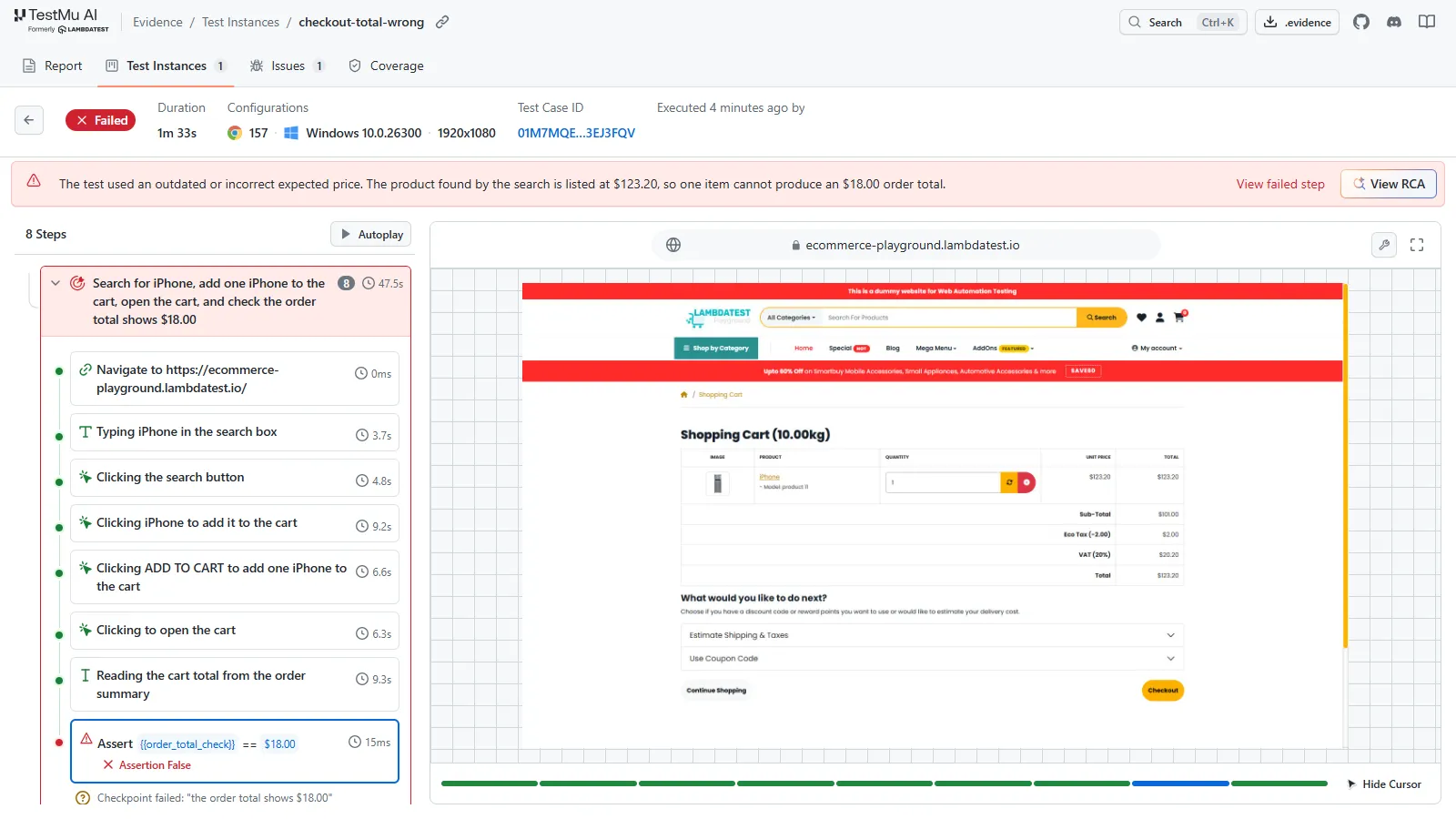
Point the same gate at TestMu AI's ecommerce playground, with an iPhone in place of the mug, and the exit code carries the verdict. With the cart's real total of $123.20 in the objective, the run exits 0 and the script prints PASS. Change the expected total to $18.00 and the run exits 1:
$ ./gate.sh
{"type":"run_end","status":"failed",...,"reason":"Final verification failed: \"the order total shows $18.00\"",...,"result_code":710,"reason_code":"assertion_error.final_verification",...}
FAIL: run did not pass, or evidence upload failed (send back to Implement)
$ echo $?
1
The run's evidence pack, opened in the TestMu AI evidence viewer, shows the failed check: the cart holds one iPhone at $123.20, and the final assertion against $18.00 comes back false.
Why the verdict stays independent:
- Reasoning finds the path; the actual step made is what determines the verdict. A pass is simply a pass, as every acceptance criterion for the scenario has been met. The model's own description of the run is of no relevance.
- Author, Replay, Heal. The model works out the path once. The unchanged steps then just replay from cache with no agent and no LLM cost. If the page has changed, then the broken step re-authors and the change is recorded. Healing touches the path, not the acceptance criteria. A wrong total will be reported as a bug rather than being healed into a pass.
- Evidence for every run. Each run saves out a .evidence file containing the steps, screenshots, console and network logs, plus the verdict.
What to know before you go ahead and adopt it: Kane CLI is pre-1.0 (npm @testmuai/kane-cli 0.10.5). It will consume your KaneAI credits even when you're running it on your own machine, and by default it will upload the results to the Test Manager.
Recorded flows can be exported as Playwright code if you want plain test files. For the trade-offs against a scripted runner, see Playwright CLI vs Kane CLI.
LoopForge Starter SOPs vs an Independent Tester
| LoopForge starter SOPs | Independent tester | |
|---|---|---|
| Who runs the tests | Test agent (CodeBuddy by default) | A separate testing agent with a separate verdict step |
| Can the tester edit code? | Yes: "fix problems if needed and retest" | No: it reports failures and hands them back |
| How pass/fail is decided | Agent reports via submit_gate_result | Process exit code (0, 1, 2, 3) |
| What gets scored | Process: control flow, latency, tools, tokens, recovery, delivery | Product behavior against fixed acceptance criteria |
| Evidence | test-report.md, written by the Test agent | .evidence file: steps, screenshots, console, network, verdict |
| Hosting | Self-hosted, MIT | Runs locally or in CI; uses KaneAI credits; uploads to Test Manager by default |
One does the delivery. The other checks the result. You want both.
Where TestMu AI Fits
TestMu AI builds the independent verification layer for software developed by agents. The fundamental rule underpinning every product is that no model ever verifies its own work, and every verdict is accompanied by evidence.
Owning that outside check is the job of the verification engineer.
- Kane CLI for developers and coding agents (in the terminal and CI).
- KaneAI for testers and product managers who write their tests in plain English.
- Agent Assurance, run with the Rook CLI, which grades what an AI agent actually changed, not what it says it did, with three verdicts: pass, fail, and unable to verify.
Building your own loop? Read Loop Engineering: Close the Verify Loop, CI/CD for Agent-Written Code and Agentic SDLC vs STLC.
Conclusion
Before a self-improving loop starts changing your prompts, gates and retry limits, add one check it cannot change: a tester that can't edit the code, run after the last code change, with an exit code your pipeline reads. Start with the flow where a wrong result costs the most, such as checkout.

Give your loop an outside judge.
Note: Install Kane CLI with npm install -g @testmuai/kane-cli, run one plain-English test against your staging app, and gate on the exit code. Get started with Kane CLI.
Testing from the terminal? Kane CLI by TestMu AI lets SDETs and developers plan, write, run and debug tests from the command line.
Author

Vipul Verma
Blogs: 14

Vipul Verma is Group Senior Vice President of Engineering at TestMu AI, where he heads the entire engineering organization that builds KaneAI, HyperExecute, and the broader testing cloud. He brings 15+ years architecting, securing, and scaling large enterprise applications across multiple sites. Before TestMu AI he was India Head at LogicHub, where he built the India R&D site from the first employee to a 30-plus engineering team, and Principal Software Engineer at Sumo Logic, where he was the first engineer in the India office and shipped search-performance and pricing-model initiatives. Earlier he worked on trading platforms at Portware and D. E. Shaw. Vipul holds a B.Tech in Computer Science from IIT Kharagpur.
Reviewer

Maneesh Sharma
Reviewer
Maneesh Sharma is Chief Operating Officer at TestMu AI, where he leads the company's revenue functions across go-to-market, sales, RevOps, customer success, and the partner ecosystem, driving its global expansion. He brings over 28 years of experience across product, go-to-market, and business operations. Before TestMu AI he was Managing Director and General Manager for GitHub across India and APAC, Head of Partner Sales and Ecosystem at Adobe, Chief Revenue Officer at WizIQ, and Head of Products and Solutions at SAP India. Maneesh holds an MBA from IIM Bangalore and a B.E. in Electronics and Communications from NIT Surat.


FAQs
Did you find this page helpful?
More Related Blogs





TestMu AI forEnterprise
Get access to solutions built on Enterprise
grade security, privacy, & compliance
- Advanced access controls
- Advanced data retention rules
- Advanced Local Testing
- Premium Support options
- Early access to beta features
- Private Slack Channel
- Unlimited Manual Accessibility DevTools Tests