
Run Tests Up to 70% Faster than Traditional Test Grids
HyperExecute Is an AI-Native Test Orchestration Platform to Run Your Automation Test Suites with Blazing Fast Speed.

pytest-xdist: How to Run pytest Tests in Parallel Without Breaking Them
Set up pytest-xdist: -n auto, every --dist mode, worker_id, fixtures that run once, coverage, and a checklist for tests that fail only in CI.
Published on:
On This Page
pytest-xdist is the plugin for pytest that will run your tests in several worker processes at the same time. Install it via pip install pytest-xdist and then run pytest -n auto to get one worker per physical CPU core. Choose a --dist mode to determine how the tests are grouped and have each worker have its own databases, accounts and files.
TL;DR
To run pytest tests in parallel, install pytest-xdist and run pytest -n auto, which starts one worker process per physical CPU core. Parallel runs stay reliable when each worker gets its own databases, ports and files keyed on the worker_id fixture, and when once-only setup runs under a lock file.
pytest Parallel Execution on One Machine
- -n auto: Starts one pytest-xdist worker per physical CPU core, and --maxprocesses caps the count in CI. The -n logical option counts logical cores instead. Needs psutil for -n logical: Yes.
- --dist load: The default pytest-xdist distribution mode once -n is passed, where any pending test goes to any free worker. The worksteal mode rebalances the queues when test durations vary a lot.
- worker_id: The pytest-xdist fixture that returns gw0, gw1 and so on, or master when xdist is off, so each worker can get its own database name and server port.
- FileLock: A session-scoped pytest fixture runs once per pytest-xdist worker, so one-time setup such as a database migration needs a lock file and a marker in the temp directory all workers share.
- pytest-randomly: Shuffles the test order on serial runs and prints the seed, which exposes the hidden order dependence that breaks a suite under pytest-xdist.
How to Split a pytest Suite Across CI Machines
- pytest-split: Splits a pytest suite into groups of roughly equal duration from a stored .test_durations file, so each CI job runs one group. Works with pytest-randomly under the default algorithm: No.
- pytest-parallel: Runs concurrent pytest tests inside each process, but its last release, 0.1.1, came out in October 2021 and the project is marked Alpha. New releases since 2021: None.
- HyperExecute: The TestMu AI test orchestration platform auto-splits discovered pytest test files across parallel cloud machines from one YAML file.
What Is pytest-xdist?
pytest-xdist is a plugin (maintained by pytest-dev) that will distribute your tests across multiple worker processes. Each worker is a separate Python process (named gw0, gw1, gw2, etc.) which collects the suite and runs the portion of tests that the controller sends it.
It's built for the cores of one machine - remote --tx execution environments do exist, but you have to set those up manually. CI teams will typically just split across jobs rather than use the plugin. The current release is 3.8.0 (1 July 2025) and requires Python 3.9+.
Because the workers are separate processes, they share nothing in memory. That's what makes pytest-xdist so fast, and it's also why tests that are quietly dependent on each other start to fail the very first time you add -n.
pytest-xdist is by far the most common way of getting parallel testing into a pytest suite on a single machine. The rest of this guide is about the settings and isolation patterns that keep it all working reliably.
If you're after a first walkthrough with Selenium, then start with either our pytest and Selenium Grid tutorial or the pytest-xdist video walkthrough and then come back to this for the bits that they don't cover.
How Do You Install and Run pytest-xdist?
Install the plugin, then pass -n with a worker count:
pip install pytest-xdist
# optional: needed for -n logical
pip install "pytest-xdist[psutil]"| Command | What it does |
|---|---|
pytest -n auto | One worker per physical CPU core; with --pdb, falls back to -n 0 |
pytest -n logical | One worker per logical core; needs psutil, otherwise falls back to auto |
pytest -n 4 | Exactly four workers |
pytest -n auto --maxprocesses=4 | Upper limit on workers, whatever the core count |
pytest -n 0 | Turns distribution off and runs everything in the main process |
pytest -n 4 --max-worker-restart=0 | Doesn't restart workers that crash |
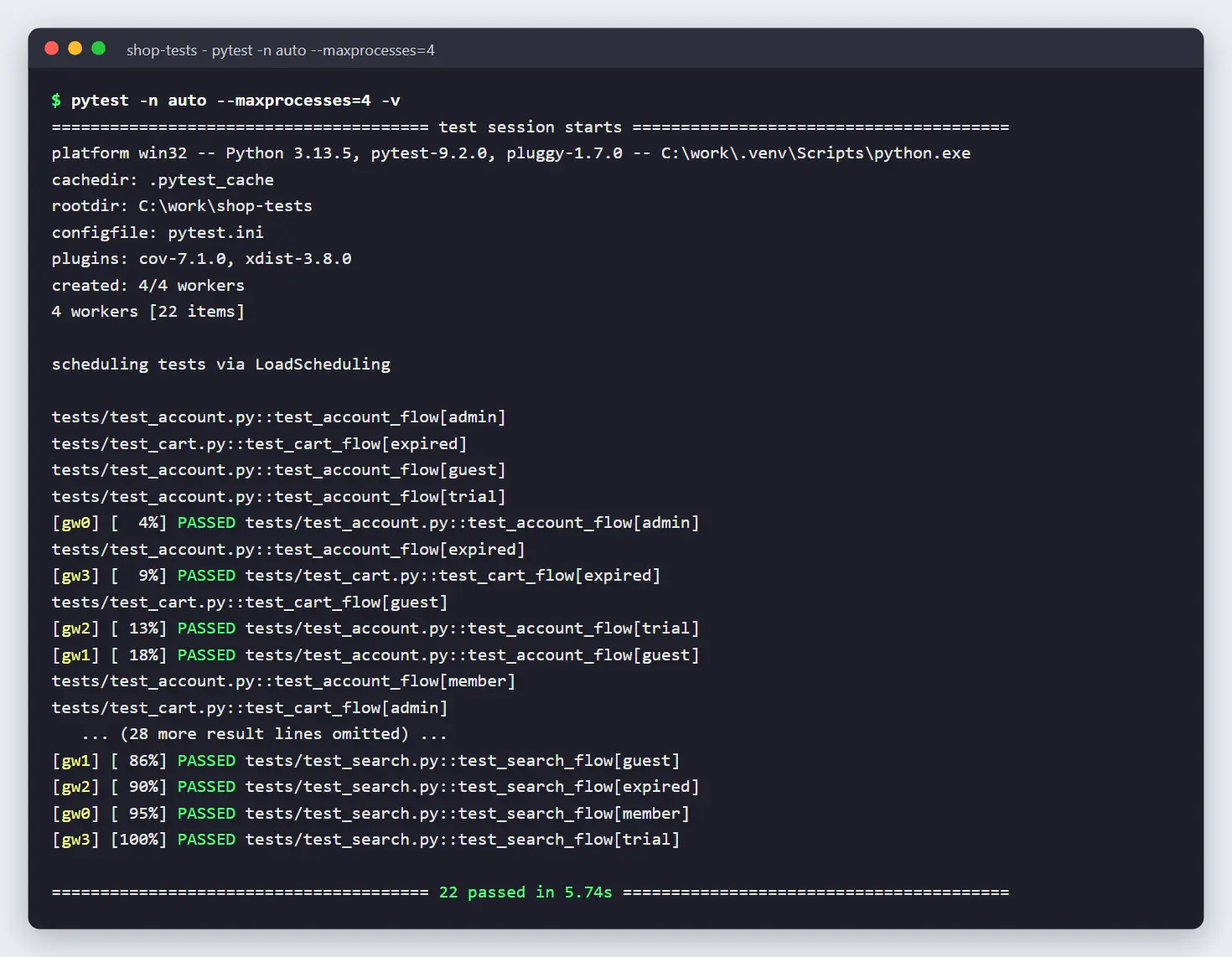
To make parallel runs the default for the whole team, put the flag in your config file:
# pytest.ini
[pytest]
addopts = -n auto
In CI, a hard upper limit on the number of workers keeps the worker count stable as the runner sizes change. Each worker also starts up and picks up the suite prior to running its first test. So time it with 2, 4 and 8 workers on your own suite before you decide on a number.
Which --dist Mode Should You Use?
The --dist option determines how pytest-xdist distributes the tests to the workers. The default on the command line is 'no'. If you pass in -n, then you're in 'load' mode.
| Mode | How tests are grouped | Use it when |
|---|---|---|
| load (default) | Any pending test goes to any free worker; no order guarantee | Tests are independent and similar in length |
| worksteal | Rebalances during the run: a worker with nothing left takes queued tests from another worker | Test durations vary a lot |
| loadscope | Test functions grouped by module, test methods by class | Module- or class-scoped fixtures are expensive |
| loadfile | All tests in one file run on the same worker | Tests in a file share setup or data |
| loadgroup | Tests with the same xdist_group mark run on the same worker; unmarked tests behave like load | A few tests must share one resource |
| each | Every worker runs the full suite (listed in the 3.8.0 --dist choices; described in the pytest-cov docs) | The same suite must run in several environments |
| no | Normal pytest, one test at a time | Temporarily disabling distribution |
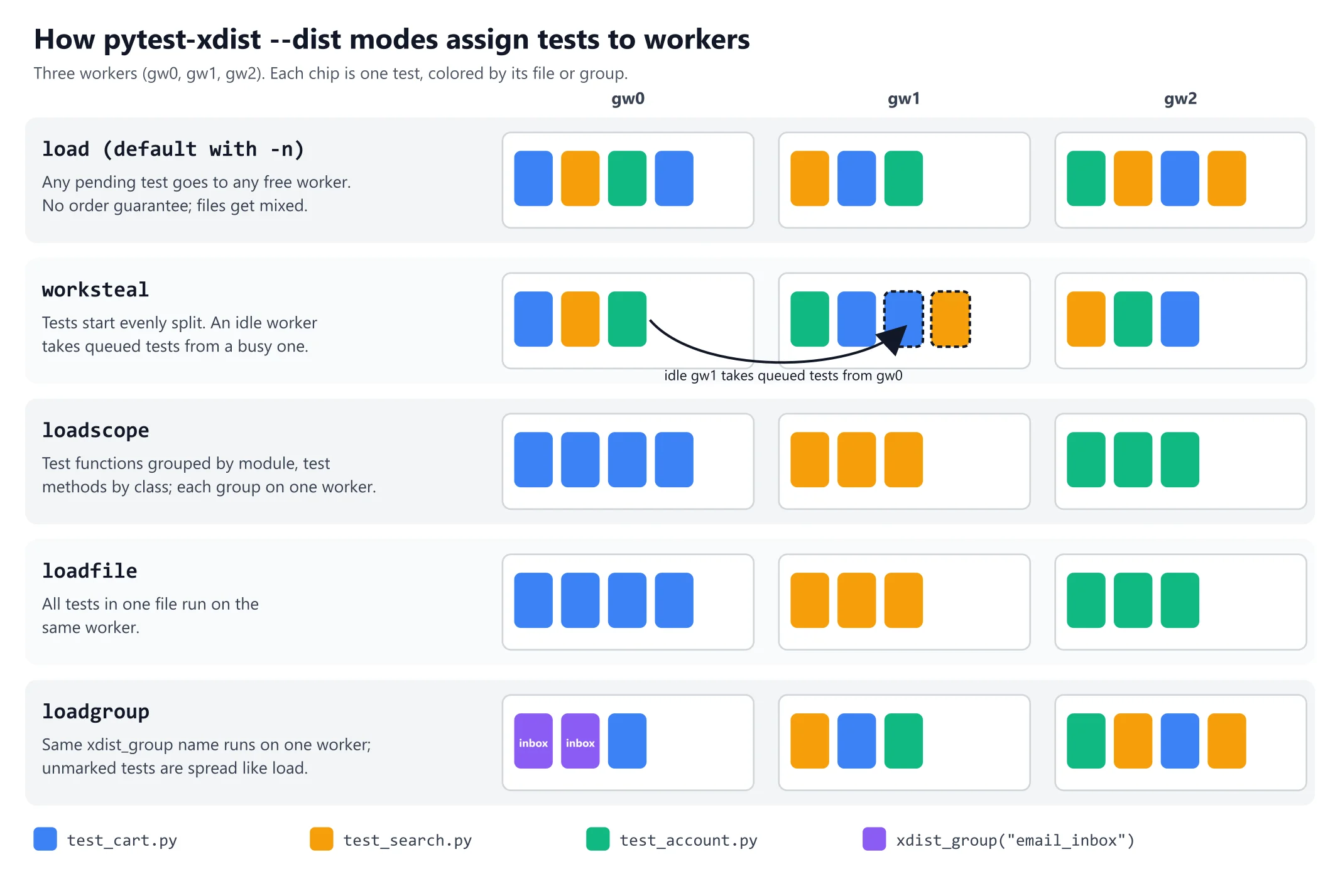
A practical rule of thumb: start with load, go to worksteal if one operator finishes a long time after the others, and use loadscope or loadfile only if the fixture setup cost justifies it.
How Do You Give Each Worker Its Own Resources?
pytest-xdist tells each test what worker it's on. The worker_id fixture returns gw0, gw1, etc or master if xdist is off. The environment variables PYTEST_XDIST_WORKER and PYTEST_XDIST_WORKER_COUNT contain the name of the worker and the total number of workers, respectively.
Use the worker ID to give each worker its own database and port so that parallel tests never end up writing to the same place.
# conftest.py
import os

import pytest


@pytest.fixture(scope="session")
def test_db_name(worker_id):
    """One database per worker, for example shop_test_gw0 and shop_test_gw1."""
    base = os.environ.get("TEST_DB_BASENAME", "shop_test")
    return base if worker_id == "master" else f"{base}_{worker_id}"


@pytest.fixture(scope="session")
def server_port(worker_id):
    """A different local server port for each worker."""
    base = int(os.environ.get("TEST_BASE_PORT", "8100"))
    offset = 0 if worker_id == "master" else int(worker_id.removeprefix("gw"))
    return base + offset
For files, go with pytest's built-in tmp_path fixture rather than hard-coded paths. Each test gets its own directory so two workers won't be overwriting each other's output. When all the workers in a run need to have a unique name (e.g., a run-scoped database), then pytest-xdist also provides a testrun_uid fixture and the PYTEST_XDIST_TESTRUNUID environment variable.

Out of cores on one machine?
Note: pytest-xdist is built for the cores of one runner, and its remote --tx setup is manual. HyperExecute by TestMu AI takes your pytest files and auto-splits them across parallel cloud machines via Auto-Split from a single YAML file. See how HyperExecute does the test orchestration.
How Do You Run a Session Fixture Only Once With pytest-xdist?
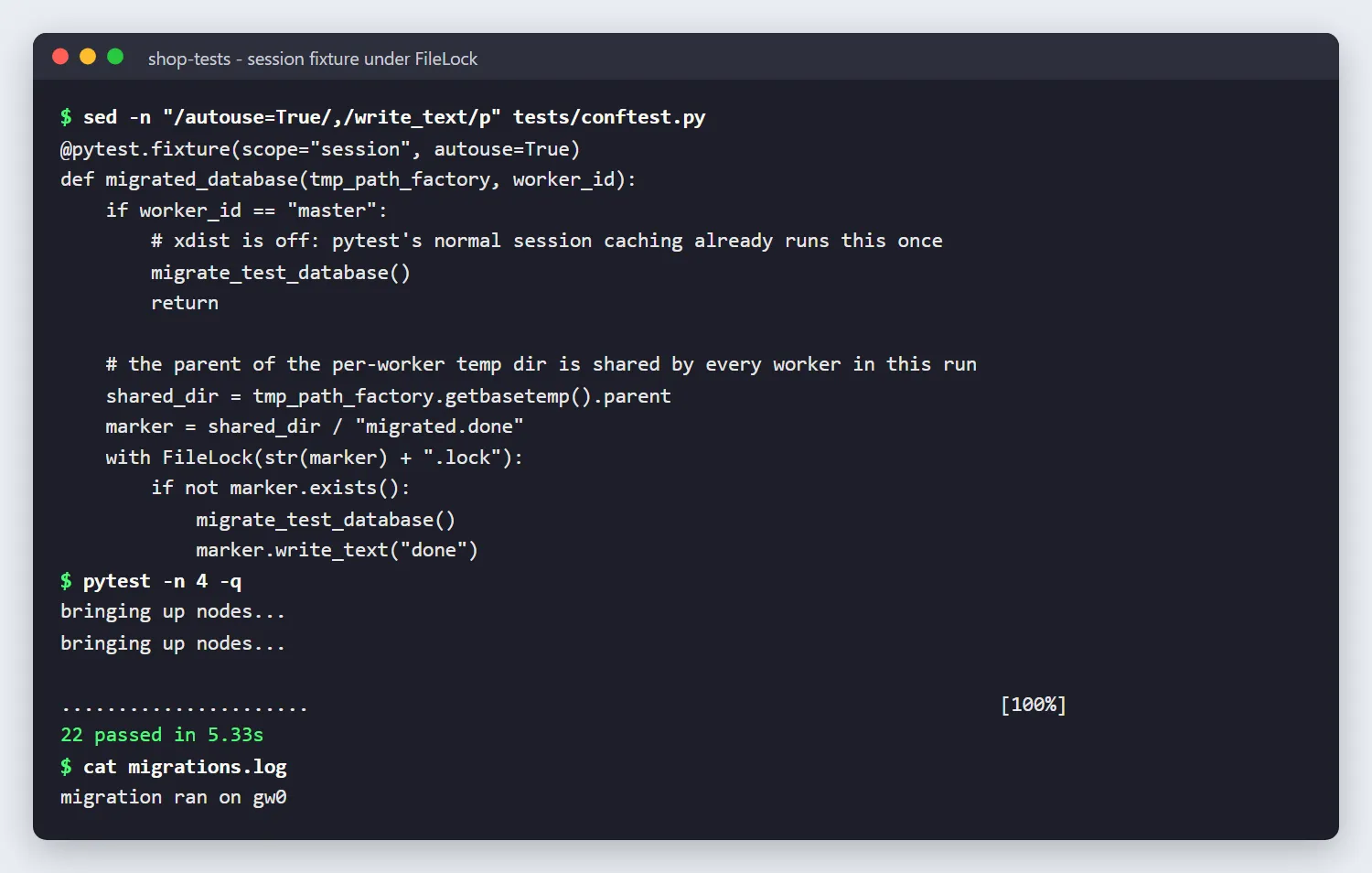
A session-scoped fixture runs once per worker (not once per run), as each worker is its own pytest session. With -n 8, that would mean a session-scoped fixture that migrates the database would run 8 times (often at the same time). The pytest-xdist how-to guide has a recommendation of a lock file for anything that needs to happen exactly once:
# conftest.py
import subprocess

import pytest
from filelock import FileLock  # pip install filelock


def migrate_test_database():
    subprocess.run(["alembic", "upgrade", "head"], check=True)


@pytest.fixture(scope="session", autouse=True)
def migrated_database(tmp_path_factory, worker_id):
    if worker_id == "master":
        # xdist is off: pytest's normal session caching already runs this once
        migrate_test_database()
        return

    # the parent of the per-worker temp dir is shared by every worker in this run
    shared_dir = tmp_path_factory.getbasetemp().parent
    marker = shared_dir / "migrated.done"
    with FileLock(str(marker) + ".lock"):
        if not marker.exists():
            migrate_test_database()
            marker.write_text("done")
The first worker to take the lock does the migration and writes the marker. All the other workers just wait, see the marker, and skip the work. Read your database settings from the environment within the migration tool's own config (not from values hard-coded in the fixture).
Why Do the Tests Pass When Run Alone but Fail When Run Under pytest-xdist?
Tests that pass in serial and fail with -n almost invariably have something in common. These are the usual causes, in the order in which you should check them:
- Shared data. Two tests create or delete the same database row, file or account. Fix it by using per-worker resources keyed on worker_id.
- Hidden order dependence. A test will only pass because an earlier test has set up the state. This is masked in serial runs, and becomes apparent in parallel runs.
- Session fixtures which assume they're running once. Guard them with a lock file as shown above.
- Unordered parametrized values. pytest-xdist requires every worker to collect the same tests in the same order. Values from a set or generator can be in a different order on different workers, and that will cause a collection error. Use a list or wrap the values in
sorted(). - Module-level globals. A cache or singleton populated by one test will be empty in another worker's process.
# breaks under xdist: set order can differ between workers
@pytest.mark.parametrize("currency", {"USD", "EUR", "INR"})

# works: a stable order on every worker
@pytest.mark.parametrize("currency", sorted({"USD", "EUR", "INR"}))
How Do You Debug a Test That Only Fails in Parallel?
Debug a parallel-only failure in two steps: catch it with pytest-xdist and then reproduce it without it. The approach is subject to three known limitations:
-s(--capture=no) does not show output from workers, because the transport library can't forward their stdout and stderr.--pdbis disabled when tests are distributed. With-n autoor-n logicalit just quietly falls back to-n 0; with a fixed number (e.g.-n 4) it just gives a usage error.- Workers see a default terminal size, so output that is dependent on terminal width can be different.
Write one log file per worker so you can see what each process did:
# conftest.py
import logging
import os


def pytest_configure(config):
    worker_id = os.environ.get("PYTEST_XDIST_WORKER")
    if worker_id is not None:
        logging.basicConfig(
            format=config.getini("log_file_format"),
            filename=f"tests_{worker_id}.log",
            level=config.getini("log_file_level"),
        )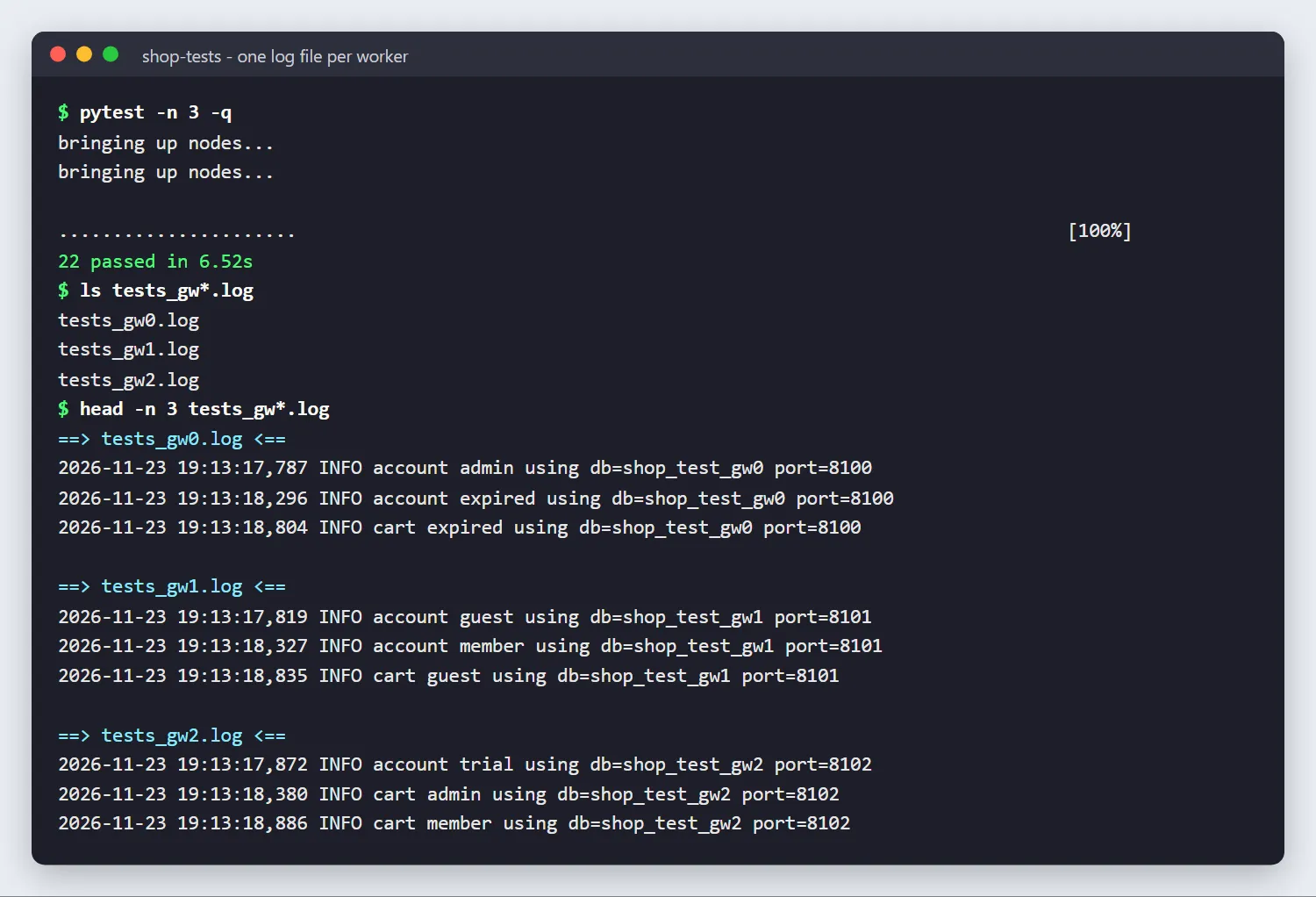
Then re-run the failing test serially with pytest -n 0 path/to/test_file.py::test_name. If it passes when run alone, then the issue is shared state or order. Add pytest-randomly to the mix to shuffle the order on serial runs as well (it prints out a seed on every run, has a --randomly-seed=last option to replay the previous order, and claims to be compatible with pytest-xdist).
Does Code Coverage Work With pytest-xdist?
Yes. pytest-cov detects pytest-xdist and reports the combined coverage of all workers, so the command barely changes:
pytest --cov=src -n autopytest-xdist vs pytest-split vs pytest-parallel vs HyperExecute
These four are frequently compared, but they in fact address different problems (checked Nov 22 2026 on each project's individual page).
| Option | How it parallelises | Scope | Latest release | Checked | Best for |
|---|---|---|---|---|---|
| pytest-xdist | Worker processes; --dist modes control grouping | Built for one machine; remote --tx environments need manual setup | 3.8.0, July 2025; Python 3.9+ | PyPI, Nov 22, 2026 | Using every core on a developer laptop or CI runner |
| pytest-split | Splits the suite into groups of roughly equal duration from a stored .test_durations file | Across CI jobs (one group per job) | 0.11.0, Feb 2026; Python 3.10+ | PyPI, Nov 22, 2026 | Spreading a slow suite over several CI machines |
| pytest-parallel | Processes plus concurrent tests per worker | One machine | 0.1.1, Oct 2021; marked Alpha | PyPI, Nov 22, 2026 | Legacy suites already using it; --workers needs Unix or macOS |
| HyperExecute (TestMu AI) | Auto-Split spreads discovered tests across parallel cloud machines; Matrix and Hybrid modes too | Many machines, orchestrated | Managed platform (no version) | HyperExecute page, Nov 22, 2026 | Large suites that outgrow one runner, with fail-fast and Re-Run of failed tests |
pytest-xdist and pytest-split are complementary. xdist uses the cores that are available on the machine; pytest-split decides which tests go to which machine.
How Do You Split a pytest Suite Across CI Machines?
Split across machines once one runner's cores aren't enough. With pytest-split you record the run durations from a full run, commit the file, and then each CI job gets its own group:
# once, after a full run; commit .test_durations to the repo
pytest --store-durations

# CI job 1 of 3 (jobs 2 and 3 pass --group 2 and --group 3)
pytest --splits 3 --group 1 --junit-xml=results-1.xml
pytest-split's default algorithm keeps the existing test order and does not work with random-order plugins such as pytest-randomly; switch to --splitting-algorithm least_duration if you use one. Its documentation doesn't say whether to combine it with -n, so measure before you add pytest-xdist inside each job.
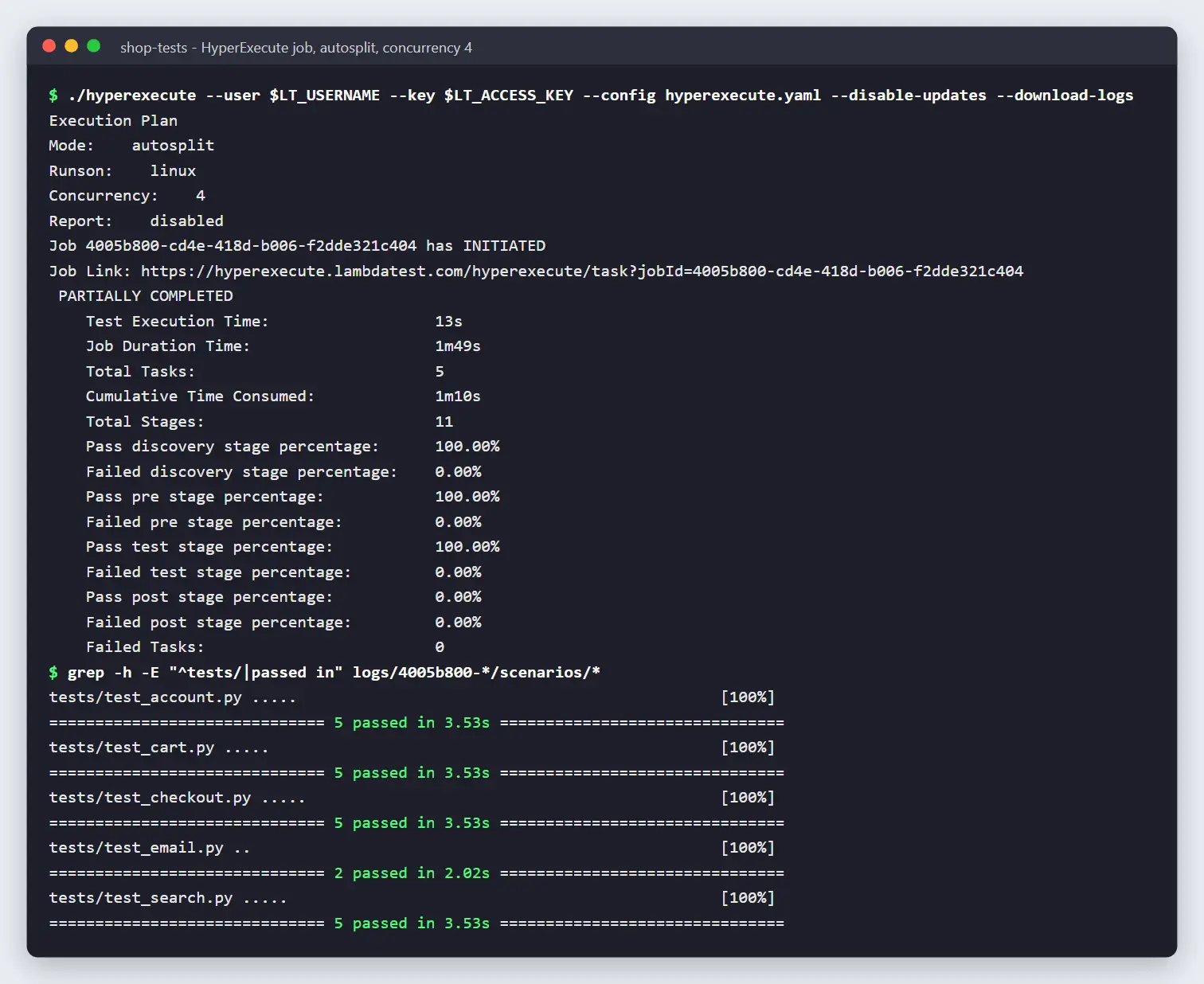
With HyperExecute, one YAML file replaces the per-job wiring. This configuration follows the pytest on HyperExecute documentation: a shell command discovers the test files, and HyperExecute runs pytest on each one, spread over four parallel machines.
Changes from the doc's sample: concurrency goes from 1 to 4, the discovery command is narrowed to test_*.py files, and the env, cache (cacheKey, cacheDirectories), post, Playwright install, and retry settings are dropped.
---
version: "0.1"
globalTimeout: 90
testSuiteTimeout: 90
testSuiteStep: 90
runson: linux
autosplit: true
concurrency: 4
pre:
  - pip install -r requirements.txt
testDiscovery:
  type: raw
  mode: remote
  command: grep -rl --include='test_*.py' 'def test_' tests
testRunnerCommand: pytest $test
jobLabel: [pytest, linux, autosplit]
Export LT_USERNAME and LT_ACCESS_KEY from your CI secrets store, keep the HyperExecute CLI binary in the project root, and start the job with ./hyperexecute --config hyperexecute.yaml. The HyperExecute page shows Boomi's full suite runs going from 9.5 hours down to under 4 hours on first runs (results will vary by suite).
The Parallel-Safe pytest Checklist
Run this checklist before you turn on -n auto in CI:
- No shared writes. No test reads data that another test writes (rows, files, accounts or environment variables).
- Per-worker resources. Databases, ports and accounts are all keyed on worker_id. Files go in tmp_path.
- Once only setup is locked. The expensive session fixtures use a lock file and a marker.
- Stable collection. Every parametrize uses lists or sorted() values.
- Deliberate grouping. Any tests that need to share a resource will have xdist_group, and the run will use --dist loadgroup.
- Order independence proven. The suite passes under pytest-randomly with the seed recorded.
- Debuggable failures. Per-worker log files are on, and every parallel-only failure is reproduced with -n 0.
Watch: Running pytest in Parallel
For a quick visual walkthrough of this concept, watch the video below from TestMu AI.
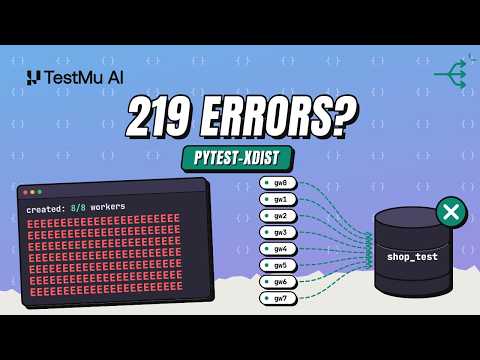
Subscribe to the TestMu AI YouTube channel for more tutorials on testing and automation.
Conclusion
pytest-xdist will turn a slow pytest suite into a fast one with a single flag (provided the tests are isolated, of course). Start with -n auto, cap the number of workers with --maxprocesses in CI, pick the appropriate --dist mode for your fixtures, and key each of the shared resources on worker_id. If one machine is no longer sufficient, then split by duration across jobs or hand the splitting off to an orchestrator.
Ready to go past one machine? Run your existing pytest suite on HyperExecute with Auto-Split and see where the time goes. Create a free TestMu AI account and point the HyperExecute CLI at your YAML file.
Author

Japneet Singh Chawla
Blogs: 11

Japneet Singh Chawla is an Engineering Manager at TestMu AI, where he leads a team driving HyperExecute, the AI-native Test Orchestration Cloud Platform, and integrations with Cypress, Provar, Tosca, and Selenium, improving test execution efficiency and driving adoption across 500+ enterprise clients. He also spearheaded zero-downtime deployments that cut release-related downtime by 90%, and mentors new engineers into productive contributors. He brings 9+ years of experience building and scaling distributed systems, SaaS platforms, and developer tools, with deep hands-on backend engineering across Golang, Python, Node.js, Kafka, and Redis. Earlier at Sumo Logic he built award-winning developer tools, including a VS Code Parser Linter, and at Indus Valley Partners he was a founding member of the Sentiment Analyzer team, building ML-powered solutions for financial clients. Japneet holds an MCA in Computer Science from GGSIPU.
Reviewer

Mayank Bhola
Reviewer
Mayank Bhola is Co-Founder and Head of Products at TestMu AI, where he leads the entire product portfolio across KaneAI, Kane CLI, HyperExecute, SmartUI, the Real Device Cloud, Accessibility, and other software testing product lines. As an early Lead Architect he designed and built the company's flagship Tunnel technology from scratch, created the React-based automation platform, and architected the data-intensive pipelines and FAAS services that scale it. He brings more than 10 years of experience in software development and product engineering, with earlier roles as Head of Technology at Juggernaut Books and Senior Software Engineer at PressPlay TV and Zomato. Mayank holds a B.Tech in Computer Engineering from JIIT Noida.


pytest-xdist FAQs
Did you find this page helpful?
More Related Blogs



TestMu AI forEnterprise
Get access to solutions built on Enterprise
grade security, privacy, & compliance
- Advanced access controls
- Advanced data retention rules
- Advanced Local Testing
- Premium Support options
- Early access to beta features
- Private Slack Channel
- Unlimited Manual Accessibility DevTools Tests