

Power Your Software Testing with AI Agents and Cloud
The Native AI-Agentic Cloud Platform to Supercharge Quality Engineering. Test Intelligently and Ship Faster.


- TestMu AI (Formerly LambdaTest)
- /
- Blog
- /
- What Is Oracle Redwood? A Complete Guide to Redwood in Oracle Fusion
What Is Oracle Redwood? A Complete Guide to Redwood in Oracle Fusion
Oracle Redwood is Oracle's design system for Fusion, rebuilt on VB Studio and Oracle JET. How to enable, disable and identify Redwood pages, plus test impact.
Last Updated on:
Overview
Oracle Redwood is Oracle's design system and user experience for Fusion Cloud Applications. Oracle states that a Redwood application is built using Oracle Visual Builder Studio and Oracle JET components, which makes a Redwood page a different page technology from the classic ADF interface rather than a visual reskin. Most Redwood pages are switched on individually through a profile option.
What Does "Oracle Redwood" Actually Refer To?
- Redwood Design System: Oracle's shared design language and component library for its applications. It defines how Oracle products should look and behave, and it is the layer people usually mean when they call Redwood a design system.
- Redwood theme: a styling layer that Oracle describes as the Oracle JET implementation of the Redwood Design System. Fusion's Appearance work area can theme classic pages too, so a themed page is not necessarily a rebuilt one.
- Redwood pages: screens rebuilt on Visual Builder Studio and Oracle JET. Redwood pages change the underlying markup, which is why they, and not the theme, are what affects an existing automated test suite.
- Profile option control: Oracle enables most Redwood pages through a per-page profile option set in Manage Administrator Profile Values, and states that the change takes effect the next time a user signs in.
- Locator impact: on a live Oracle JET 18.1.0 page we inspected, generated element ids stayed stable across reloads but took the form inputSearch|input, which a CSS id selector cannot parse.
- Oracle has not published one suite-wide date after which all of Fusion becomes Redwood. The only hard removal Oracle has published applies to the Classic interface for sales and service at update 27A.
What Should a QA Team Do About It?
Audit which of your tests point at classic pages and which point at rebuilt ones, because a single Fusion environment runs both at the same time. Redwood arrives page by page across mandatory quarterly updates, so regression against it is a recurring commitment rather than a one-time migration project, and it is the kind of repeated cross-browser run that TestMu AI is built to absorb.
Verified against Oracle Fusion Cloud Applications update 26A documentation and a live Oracle JET 18.1.0 session, last checked 9 August 2026.
What Is Oracle Redwood?
Oracle Redwood is Oracle's design system and user experience for Oracle Fusion Cloud Applications. Oracle's guide to extending a Redwood application states that your application is built using Oracle Visual Builder Studio and Oracle JET components, so a Redwood page is a different page technology from the classic ADF interface rather than a restyled version of it.
That distinction is the one that matters for everything below. The rendering framework itself changes, which is why a rebuilt Redwood page is not the old page with new styling on top.
Oracle applies updates to Fusion Cloud Applications four times a year, and its Oracle Cloud Infrastructure documentation states plainly that these updates are mandatory for all customers. In most regions, non-production environments are updated on the weekend following the first Friday of the month, and production on the weekend following the third Friday.
Redwood lands inside that cycle rather than in a single cutover, replacing the classic interface screen by screen.
The Three Things People Mean by "Oracle Redwood"
Most confusion about Redwood comes from one word covering three separate things. Separating them tells you whether the screen in front of you is genuinely rebuilt or simply restyled.
| Layer | What it is | Does it change the markup? |
|---|---|---|
| Design system | Oracle's shared design language and component library governing how its applications look and behave. | No. It is a specification, not an implementation on your instance. |
| Redwood theme | The Oracle JET implementation of the design system. Fusion's Appearance work area applies theming to Redwood and classic pages alike. | Cosmetically. A themed classic page is still an ADF page underneath. |
| Redwood pages | Screens rebuilt on Visual Builder Studio and Oracle JET, which Oracle describes as built from the ground up. | Yes. Different framework, different DOM, different locators. |
The practical consequence: a team that switched on the Redwood theme has not migrated. Only the third row affects your test suite.
What Is the Oracle Redwood Theme?
The Oracle Redwood theme is the Oracle JET implementation of the Oracle Redwood Design System. It is a styling layer, and Fusion's Appearance work area can apply theming to both Redwood and classic pages, so applying the theme to a classic page does not turn it into a Redwood page.
What Are Redwood Pages in Oracle Fusion?
Redwood pages in Oracle Fusion are individual screens rebuilt on Oracle Visual Builder Studio and Oracle JET. Unlike the theme, they change the underlying markup, which is why Redwood pages, and not Redwood theming, are what affect an existing automated test suite.
What Is Redwood in Oracle Fusion?
Inside Fusion, Redwood lands as individual pages delivered across quarterly updates. Oracle's Supply Chain and Manufacturing documentation on enabling Redwood pages states that most pages are enabled by using a profile option to turn them on or off, and that at some point, each Redwood page is turned on by default.
That is why Redwood behaves like a rolling program rather than a project with an end date. Each quarterly update can flip another page's default, which changes what your regression suite meets when it next runs.
Customization follows the same split. Classic pages are extended with Application Composer, while Redwood pages are edited in Visual Builder Studio, so personalizations do not automatically carry across when a page is rebuilt.
Redwood UI vs the Classic ADF Interface
What Is Redwood UI in Oracle Fusion?
Redwood UI in Oracle Fusion is the interface produced by Redwood pages, rendered client-side from Oracle JET custom elements rather than served as ADF markup. The classic Fusion interface is built on Oracle ADF, so the two run side by side in the same environment until every page is rebuilt.
The differences that matter to a test engineer are structural rather than visual.
| Aspect | Classic (ADF) | Redwood (VB Studio + JET) |
|---|---|---|
| Rendering | Server-rendered markup with a client-side peer layer. | Client-side custom elements that expand into generated markup in the browser. |
| Element model | Standard HTML produced by ADF components. | Custom oj- elements that own their internal DOM. |
| Readiness | Page load broadly signals readiness. | Components upgrade asynchronously after the tag appears in the DOM. |
| Extension tooling | Application Composer and Page Composer. | Visual Builder Studio. |
How to Tell Whether a Fusion Page Is Redwood or Classic
Oracle documents a URL rule in its Fusion Applications common documentation: if the third segment contains faces, the page is built using ADF, and if the third segment contains redwood, the page is built using VB Studio.
Reading the URL is therefore faster than inspecting the DOM, and it scales to a whole suite. The operational point is that both kinds of page coexist: your tests are not migrating from one stack to another, they have to straddle both, potentially for years.
Use the rule to inventory your existing regression testing coverage before changing any of it:
- Export the target URL from every test in your Fusion regression suite.
- Bucket each URL by its third segment into ADF, Redwood, or APEX.
- Cross-check the Redwood bucket against the profile options your administrators have already switched on.
- Rank what remains by business criticality, and rework the highest-value flows first.
Which Oracle Products Have Redwood
Oracle publishes Redwood adoption material across its Fusion Cloud Applications families, including ERP, SCM, HCM, Sales, and Service. Maturity differs sharply between them, which is why a blanket statement about "Redwood readiness" is rarely useful.
The question worth answering internally is narrower: for the pillar and release your organization runs, which specific pages have Redwood versions available, and which have already had their defaults flipped. Oracle's per-family release readiness documentation is the source for both, and it changes every quarter.
Enterprise rollouts of this shape rarely stay inside one application, which is why teams running Oracle alongside other business systems usually standardize the approach in a broader enterprise application testing strategy rather than treating each vendor's UI refresh as a separate fire drill.

How to Enable Redwood in Oracle Fusion
Oracle documents the enablement path directly. Its guide to enabling and setting up Redwood pages states that Yes = Enables the feature and No = Disables the feature, and that changes to the profile value affect users the next time they sign in.
How to Enable Redwood in Oracle Fusion Using a Profile Option
To enable a Redwood page in Oracle Fusion, use the profile option method:
- Step 1. Open the Setup and Maintenance work area.
- Step 2. Go to Manage Administrator Profile Values.
- Step 3. Search for the profile option code that governs the page you want.
- Step 4. Set the Site level profile value to Yes.
- Step 5. Save and close, then have an affected user sign out and back in.
Profile option codes are page-specific and vary by pillar, and Oracle publishes them in the release readiness note for each feature. Treat any list you find online as a starting point and confirm the code against your own release documentation, because defaults change quarterly.
Features delivered through Opt In instead
Not every Redwood capability is controlled by a profile option. Some arrive as opt-in features reached through the Navigator under My Enterprise and New Features, where each feature row shows whether opting in can later be reversed.
Check that column before enabling anything in a production instance. It is the difference between a reversible experiment and a permanent change.
How to Disable Redwood in Oracle Fusion
For a page governed by a profile option, reverting is the same procedure with the value set to No. Oracle's enablement documentation defines No as disabling the feature, and the change again takes effect at next sign-in.
To disable a Redwood page in Oracle Fusion:
- Step 1. Confirm the page is reversible. If the feature came from the Opt In page and its Allows Opt-In column is blank, Oracle states it stays always enabled and cannot be turned off.
- Step 2. Open the Setup and Maintenance work area.
- Step 3. Go to Manage Administrator Profile Values.
- Step 4. Search for the profile option code that governs the page.
- Step 5. Set the Site level profile value to No.
- Step 6. Save and close, then have an affected user sign out and back in.
What You Give Up by Reverting to Classic
Two limits make reverting a pause rather than a strategy.
- Support is withdrawn from some superseded classic pages. Oracle's HCM 25D readiness note for Document Records states that the responsive pages it replaces will no longer be supported for any bug fixes, nor will they be enhanced.
- Some opt-ins are one-way. Where the Allows Opt-In column is blank on a feature, Oracle's common applications documentation states that once the feature is enabled it remains always enabled and you cannot opt out of it.
- Reverting buys scheduling room, not exemption, because Oracle turns Redwood pages on by default over time regardless of the value you set today.
The reasonable use of the off switch is to control when a page change hits your users and your suite, so that a rebuilt screen does not land in the same sprint as a major functional release.
Is Oracle Redwood Mandatory?
You will find confident claims online that all non-Redwood pages stop being supported after a specific release. Checked against Oracle's own readiness documentation, that framing is broader than what Oracle has actually published.
What Oracle has published is a product-scoped end of life, in its End of Life Notice for the Classic Sales and Service Experience: beginning with the 26D update, the Classic interface will enter deprecation status, followed by full removal in the 27A release. That applies to sales and service workflows on the Classic interface, not to Fusion as a whole.
For every other pillar, adoption is enforced gradually instead: Oracle flips individual page defaults over successive quarterly updates. The honest planning answer is that there is no single date to work back from, so the roadmap you should trust is your own pillar's readiness documentation, read every quarter.
Oracle Redwood Roadmap: What Oracle Has Actually Dated
Oracle has not published a suite-wide date after which all of Fusion becomes Redwood. It has published dated commitments for specific products and a fixed update cadence. The table below lists only dates stated in Oracle's own documentation.
| What Oracle has dated | Release or timing | Source |
|---|---|---|
| Fusion updates applied to all customers | Four per year, mandatory | Oracle Cloud Infrastructure Fusion environment docs |
| Non-production update window | Weekend after the first Friday, most regions | Oracle Cloud Infrastructure Fusion environment docs |
| Production update window | Weekend after the third Friday, most regions | Oracle Cloud Infrastructure Fusion environment docs |
| Classic interface for sales and service enters deprecation | Update 26D | Oracle End of Life Notice, Classic Sales and Service |
| Classic interface for sales and service removed | Update 27A | Oracle End of Life Notice, Classic Sales and Service |
| HCM Document Records: superseded responsive pages stop receiving bug fixes and enhancements | Update 25D | Oracle HCM 25D release readiness note |
| Suite-wide Redwood cutoff for Fusion Cloud Applications | None published | No Oracle source states one |
Anything you read that gives a single Fusion-wide Redwood deadline is extrapolating from the sales and service notice. Plan against your own pillar's readiness documentation instead, and re-read it each quarter.
What Redwood Changes for Your Existing Test Automation
To check how JET components actually behave rather than reasoning from documentation alone, we ran a live inspection on the public Oracle JET Developer Cookbook using a real Chrome browser on Windows 11 through TestMu AI Browser Cloud. The runtime reported Oracle JET 18.1.0. The findings below come from that session.
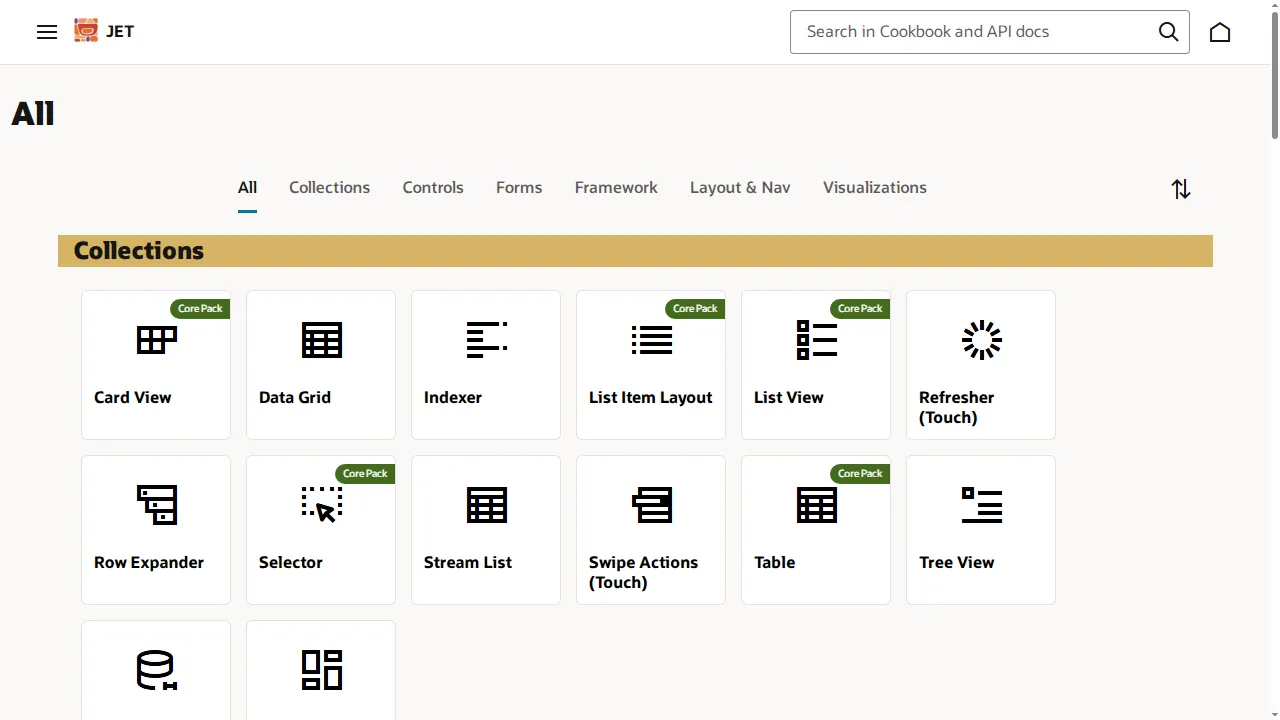
Locators: the IDs are stable, but hostile to CSS
A widely repeated claim holds that Redwood randomizes element identifiers. That is not what we observed. Reloading the page twice produced byte-identical IDs both times, so the generated identifiers were deterministic, not random.
The real problem is the shape of those IDs. A component authored as oj-combobox-one with the id inputSearch expanded into 13 generated descendant nodes, and its inner input received the derived id inputSearch|input. That pipe character is not valid in a CSS identifier, so the first locator most engineers reach for throws instead of failing a normal assertion:
// Observed live on Oracle JET 18.1.0 via TestMu AI Browser Cloud.
document.querySelector('#inputSearch|input');
// SyntaxError: Failed to execute 'querySelector' on 'Document':
// '#inputSearch|input' is not a valid selector.

// These three located the same element without error:
document.querySelector('[id="inputSearch|input"]');   // attribute selector
document.querySelector('#' + CSS.escape('inputSearch|input'));
document.getElementById('inputSearch|input');
In Selenium terms, a By.id or XPath locator resolves the element while the equivalent CSS selector raises an invalid-selector error. If your Fusion suite standardized on CSS selectors, that is the first thing to re-check. Our guide to Selenium locators covers the alternatives in depth.
Waits: presence is not readiness
Oracle's JET custom element documentation states that all JET component upgrades will occur asynchronously regardless of whether a binding provider is used, and that an application should not interact with the element until that upgrade completes.
This is why a migrated suite tends to produce flaky tests rather than failing loudly. The oj- tag exists in the DOM well before it is interactive, so a wait for element presence passes too early and the click that follows lands on a component that has not finished upgrading.
Two readiness signals were available in our session. Every upgraded component carried the oj-complete class, and the JET runtime exposed oj.Context.getPageContext(), the documented busy-context API for waiting on outstanding component work.
Assertions: attributes stop tracking values
Oracle's same custom element documentation states that property sets will not result in DOM attribute updates, and that applications should read the component's properties rather than its attributes. We confirmed the behaviour directly: after setting the component's value property, getAttribute("value") still returned null.
This is the most dangerous of the three changes, because it produces false passes rather than errors. An assertion that reads an attribute sees stale or empty markup and reports success while the component holds a completely different value.
The same documentation notes that slot content is moved to designated component slots after bindings are applied, so positional XPath written against authored markup describes a tree that no longer exists at runtime.

Note: Oracle pushes mandatory updates four times a year, so Redwood regression is a recurring run rather than a one-off project. TestMu AI gives you 3,000+ browser and OS combinations to run it on. Try it free!
How to Re-baseline a Fusion Regression Suite for Redwood
Rework the suite in the order that removes risk fastest, rather than rewriting every test at once.
- Inventory tests by URL segment so you know exactly which ones target rebuilt pages.
- Replace CSS id selectors on generated JET ids with
By.id, XPath, or an escaped attribute selector. - Swap element-presence waits for a readiness check on the
oj-completeclass or the JET busy context. - Change attribute-reading assertions to property reads so a stale attribute cannot produce a false pass.
- Re-verify personalizations per environment, since logic built in Application Composer does not carry into a rebuilt page automatically.
- Add a visual check on the rebuilt screens, because a layout regression on a redesigned page will not fail a functional assertion.
The last two points are where tooling helps most. KaneAI authors tests from natural-language prompts and re-anchors steps through smart element detection when the UI shifts, which converts a Redwood page rebuild from "rewrite the test" into "review the heal" - the specific failure mode this article has been describing. It exports to Selenium, Playwright, Cypress, and Appium, so adopting it does not strand your existing framework.
For the visual half, SmartUI compares screenshots across browsers and filters rendering noise, which is what makes a redesign diff reviewable instead of a wall of false positives. Teams new to that workflow can start with visual regression testing fundamentals.

Conclusion
Start by exporting the target URLs from your Fusion regression suite and bucketing them by third URL segment. That one pass tells you how much of your suite meets ADF today and how much already meets rebuilt Redwood pages, and it takes an afternoon rather than a planning cycle.
From there, fix the three mechanical issues in order: CSS selectors that cannot parse generated ids, waits that confuse presence with readiness, and assertions that read attributes instead of properties. Those account for most of what breaks, and none of them require waiting for Oracle to announce a deadline that, for most pillars, does not exist.
Because the updates are quarterly and mandatory, the run itself needs to be cheap to repeat. Running that regression on test automation cloud removes the grid maintenance from the equation, and the Selenium 4 documentation covers the setup. If you want the suite to survive the next page rebuild with less rework, the KaneAI documentation is the place to start. For the wider Oracle picture beyond Redwood, our guide to Oracle testing covers update-window strategy and environment planning.
Author

Himanshu Sheth
Blogs: 140


Himanshu Sheth is the Director of Marketing (Technical Content) at TestMu AI, with over 8 years of hands-on experience in Selenium, Cypress, and other test automation frameworks. He has authored more than 130 technical blogs for TestMu AI, covering software testing, automation strategy, and CI/CD. At TestMu AI, he leads the technical content efforts across blogs, YouTube, and social media, while closely collaborating with contributors to enhance content quality and product feedback loops. He has done his graduation with a B.E. in Computer Engineering from Mumbai University. Before TestMu AI, Himanshu led engineering teams in embedded software domains at companies like Samsung Research, Motorola, and NXP Semiconductors. He is a core member of DZone and has been a speaker at several unconferences focused on technical writing and software quality.
Reviewer

Shahzeb Hoda
Reviewer
Shahzeb Hoda is the Associate Director of Marketing and a Community Contributor at TestMu AI, leading strategic initiatives in developer marketing, content, and community growth. With 10+ years of experience in quality engineering, software testing, automation testing, and e-learning, he has authored and reviewed 70+ technical articles on software testing and automation. Shahzeb holds an M.Tech in Computer Science from BIT, Mesra, and is certified in Selenium, Cypress, Playwright, Appium, and KaneAI. He brings deep expertise in CI/CD pipeline automation, cross-browser testing, AI-driven testing practices, and framework documentation. On LinkedIn, he is followed by 3,700+ engineers, developers, DevOps professionals, tech leaders, and enthusiasts.


Oracle Redwood FAQs
Did you find this page helpful?
More Related Blogs
TestMu AI forEnterprise
Get access to solutions built on Enterprise
grade security, privacy, & compliance
- Advanced access controls
- Advanced data retention rules
- Advanced Local Testing
- Premium Support options
- Early access to beta features
- Private Slack Channel
- Unlimited Manual Accessibility DevTools Tests