

Power Your Software Testing with AI Agents and Cloud
The Native AI-Agentic Cloud Platform to Supercharge Quality Engineering. Test Intelligently and Ship Faster.


- TestMu AI (Formerly LambdaTest)
- /
- Blog
- /
- Boost Developer Productivity With TestMu AI and Netlify Integration
Boost Developer Productivity With TestMu AI and Netlify Integration
Streamline developer workflows with visual testing through TestMu AI and Netlify integration, ensuring consistent, professional, and user-friendly website deployments.
Last Updated on:
When making a website live, it's crucial to test its visual aesthetics to ensure it looks consistent and professional. Visual discrepancies can impact user experience, leading to the potential loss of customers.
Maintaining visual integrity helps uphold brand standards and deliver a smooth interface. This consistency enhances user engagement and boosts conversion rates. When it comes to hosting websites, cloud computing services like Netlify offer hosting and serverless backend solutions for static and dynamic web applications and static sites.
TestMu AI now integrates directly with Netlify's continuous deployment (CD) pipeline, so you can run visual tests against Netlify Deploy Previews automatically, catching layout regressions on every pull request before they ever reach production.
The step-by-step setup is covered in the documentation call-out later in this guide.
What Is Netlify?
Netlify is a composable web platform that streamlines orchestration, unifies workflows, and provides real-time updates across infrastructure, websites, and teams.
It offers managed cloud hosting, eliminating the need for backend server managem ent, and enables automated updates through Git-based version control integration. Netlify has a unique file storage system that supports dynamic functionalities with frequent updates.
This system ensures simultaneous updates to both Git providers and Netlify by connecting directly to the repository, streamlining the deployment process efficiently and quickly.
Why Test Visual Aesthetics of Netlify Websites?
Visual testing of Netlify websites ensures a consistent and professional appearance, decreasing user churn rate, which usually happens due to inconsistencies in the UI layouts.
Any visual discrepancies can lead to user frustration and potential loss of customers. Therefore, it is imperative to maintain visual integrity to uphold brand standards and deliver a smooth, visually appealing interface.
This consistency enhances user engagement and boosts conversion rates. Additionally, integrating visual testing into the deployment process helps catch visual issues early, reducing time and effort spent on post-deployment fixes. \
Therefore, visual testing ensures your website looks and functions as intended, leading to better user satisfaction and business success.

Note: Automate visual tests of Netlify websites. Try TestMu AI Now!
How Does TestMu AI SmartUI Help in Visual Testing?
Integrating TestMu AI with Netlify brings forth a powerful mechanism that empowers individuals to perform visual testing smoothly.
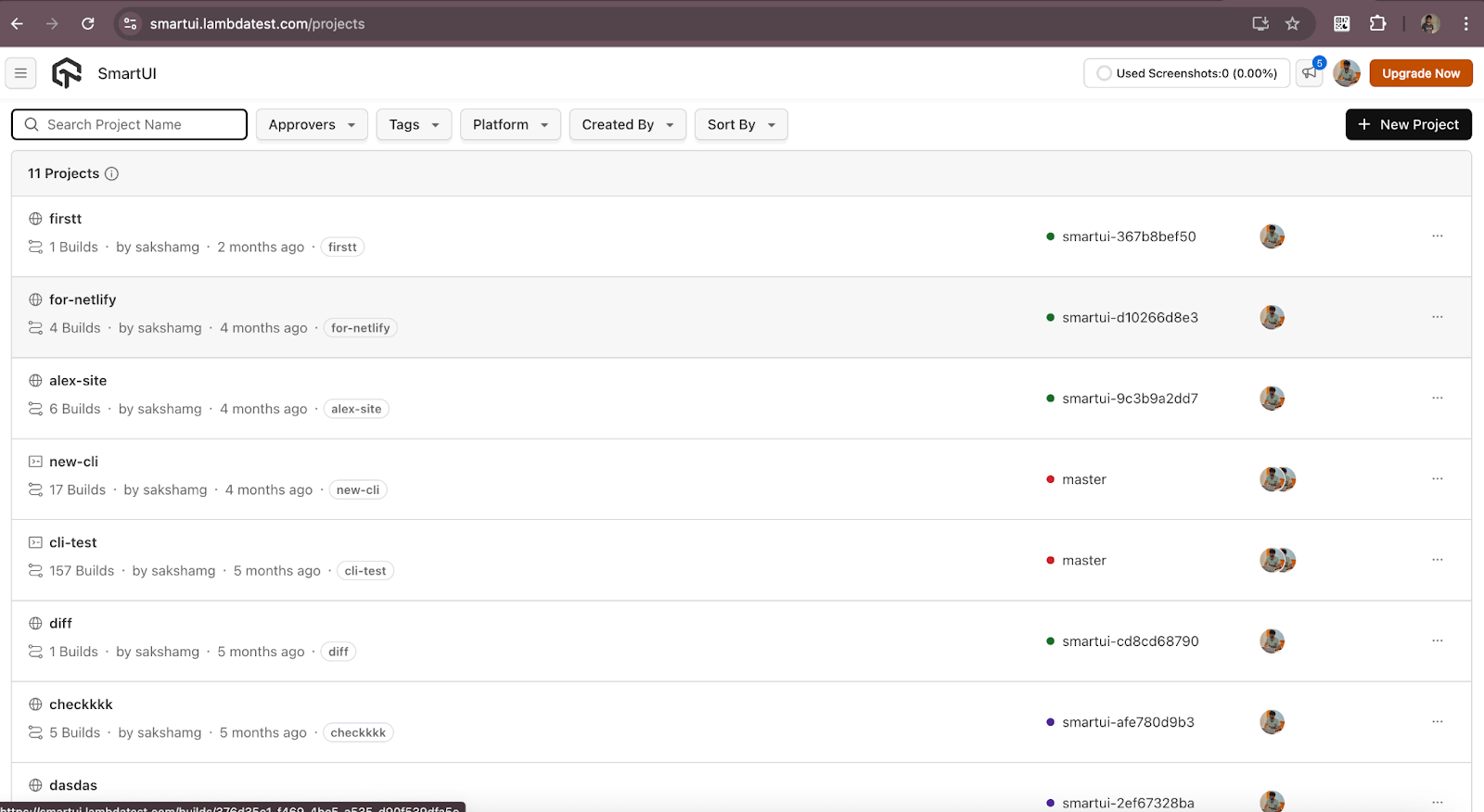
This integration facilitates the comparison of website snapshots before and after deployment, primarily when hosted on the Netlify platform, using the advanced capabilities of TestMu AI SmartUI and the Netlify SDK.
TestMu AI allows you to perform visual regression testing on an online browser farm of 3,000+ real browsers and operating system combinations to achieve greater test coverage.
Below is the snap of the visual test execution of Netlify websites on the TestMu AI SmartUI Dashboard.
Integrating Visual Testing into Your Netlify Continuous Deployment Workflow
The real value of this integration shows up inside Netlify's continuous deployment (CD) pipeline. Every time you open a pull request, Netlify builds a Deploy Preview, a live, isolated URL of your branch, and TestMu AI SmartUI can run visual regression tests against that preview automatically, before anything reaches production.
The end-to-end flow looks like this:
- A developer commits code and opens a pull request on their Git provider, such as GitHub or GitLab.
- Netlify automatically builds a Deploy Preview for that branch.
- TestMu AI SmartUI captures screenshots of the Deploy Preview and compares them pixel by pixel against the approved production baseline across 3,000+ real browsers and operating system combinations.
- The result is posted back to the pull request as a commit status check, so any visual regression appears right next to the code review and the team can approve or reject the change before merging.
Because the check runs on every preview, layout bugs are caught at review time instead of after release, which is exactly where they are cheapest to fix.
Note: Set this up with the step-by-step guide: TestMu AI integration with Netlify documentation.
Securing AI-Generated Code: TestMu AI + Netlify for AI-Native Workflows
AI coding assistants such as Windsurf, Claude, and Gemini now generate entire UI components in seconds. That speed is a productivity win, but AI-generated markup and styles can quietly shift a layout, break spacing, or regress a component that used to look right, and reviewing every pixel by hand defeats the purpose of generating code quickly.
Pairing TestMu AI SmartUI with Netlify Deploy Previews gives AI-native teams an automated visual safety net. When an assistant produces new UI and the change lands in a pull request, the Deploy Preview is visually tested automatically, so a regression introduced by generated code is flagged before a human ever merges it. The developer keeps the speed of AI generation while SmartUI confirms the output still matches the intended design.
Key Use Cases: When to Trigger TestMu AI on Netlify
Some changes are far more likely to cause visual regressions than others. These are the scenarios where running SmartUI on a Netlify Deploy Preview pays off most:
- Global CSS or Tailwind changes: A single edit to a shared utility class or design token can ripple across every page. Visual testing on the preview confirms the change did not break unrelated screens.
- Headless CMS content updates: When content from a headless CMS flows into templates, an unexpected content length or a missing image can break a layout. Testing the preview catches it before publishing.
- Cross-browser layout consistency: A component that looks correct in Chrome can shift in Safari or Firefox. Running the preview across 3,000+ real browsers verifies the layout holds everywhere, not just on the developer's machine.
All in All
In conclusion, the integration of TestMu AI with Netlify represents a significant advancement in web development and testing. Users can quickly gauge their website UI changes and perform smooth visual regression testing directly from their Netlify instance. We hope this new integration with Netlify will greatly benefit you while maximizing your productivity.
Try our new Netlify integration and share your thoughts on the TestMu AI Community. You can also contact us via our chat portal or at support@testmuai.com.
Happy Testing! 😀
Author

Devansh Bhardwaj
Blogs: 80


Devansh Bhardwaj is a Community Evangelist at TestMu AI with 4+ years of experience in the tech industry. He has authored 30+ technical blogs on web development and automation testing and holds certifications in Automation Testing, KaneAI, Selenium, Appium, Playwright, and Cypress. Devansh has contributed to end-to-end testing of a major banking application, spanning UI, API, mobile, visual, and cross-browser testing, demonstrating hands-on expertise across modern testing workflows.


Did you find this page helpful?
More Related Blogs
TestMu AI forEnterprise
Get access to solutions built on Enterprise
grade security, privacy, & compliance
- Advanced access controls
- Advanced data retention rules
- Advanced Local Testing
- Premium Support options
- Early access to beta features
- Private Slack Channel
- Unlimited Manual Accessibility DevTools Tests