
Power Your Software Testing with AI Agents and Cloud
The Native AI-Agentic Cloud Platform to Supercharge Quality Engineering. Test Intelligently and Ship Faster.

- TestMu AI (Formerly LambdaTest)
- /
- Blog
- /
- GitHub Copilot vs Claude Code: Plans, CLIs, and Agents
Picking between GitHub Copilot and Claude Code is harder than it looks, because Copilot now serves the same Claude Opus, Sonnet, Haiku, and Fable models and can run Anthropic's own Claude coding agent on GitHub. The real differences sit in the harness around the model, the way each one bills you, and where the agent runs.
Copilot's reach is wide. In the Stack Overflow AI coding agents data, 58.7% of 12,255 respondents had used GitHub Copilot as a coding agent in the past year.
Intent is moving toward Claude Code. The survey's Markdown export of the same question shows 41.4% of respondents want to use Claude Code in the next six months, against 19.6% for Copilot.
Both tools now also run in a terminal, in the cloud, and on pull requests, and they can share one repository's instructions and skills. That overlap is where most of the decision now sits.
TL;DR
GitHub Copilot vs Claude Code is a choice between a multi-model assistant built into GitHub and Anthropic's agent-first coding tool. Pick GitHub Copilot for completions in many IDEs, a free plan, and agents that work from GitHub issues. Pick Claude Code for long terminal sessions, scripted CI runs, and Claude Opus on the entry-level paid plan.
GitHub Copilot vs Claude Code at a Glance
- Best for teams that live on GitHub: GitHub Copilot - issues, pull requests, Copilot code review, and Copilot in the cloud run where the repository already lives. Third-party agents, including Anthropic Claude, also start from the Agents tab.
- Best for terminal and scripted work: Claude Code - claude -p runs headless with JSON output, a --bare mode skips local hooks and CLAUDE.md for reproducible runs, and an official GitHub Action answers @claude mentions.
- Free plan: GitHub Copilot: Yes. Claude Code: No. Copilot Free includes 2,000 code completions a month and an AI credit allowance, while Claude Code starts on the paid Pro plan.
- Claude Opus models: Claude Code: Pro and above. GitHub Copilot: Pro+ and above. Copilot Pro includes Claude Haiku and Sonnet models but not Opus or Fable.
- Shared repository setup: Supported by both: Yes. Copilot CLI and the Copilot cloud agent read CLAUDE.md and AGENTS.md, and Copilot loads project skills from .claude/skills/, so one repository can serve both agents.
- Independent UI check: Built into either tool: No. Copilot scans agent code with CodeQL and secret scanning. Neither tool runs the user flow from outside the agent that wrote it, so a check such as TestMu AI's Kane CLI fills the gap.
GitHub Copilot vs Claude Code at a Glance
GitHub Copilot is GitHub's AI coding assistant, spanning code completion in the IDE, chat, agents in the terminal and the cloud, and code review on pull requests. Claude Code is Anthropic's agentic coding tool, which reads your codebase, edits files, and runs commands from a terminal, IDE, desktop app, or browser.
GitHub's Copilot plans page states that all plans include Copilot CLI and the Copilot app, and its plan table runs from Copilot Free and Copilot Student up to Pro, Pro+, Max, Business, and Enterprise.
Anthropic's Claude Code overview describes an agentic coding tool that reads your codebase, edits files, runs commands, and integrates with your development tools, available in your terminal, IDE, desktop app, and browser.
| Dimension | GitHub Copilot | Claude Code |
|---|---|---|
| Maker | GitHub | Anthropic |
| Surfaces | VS Code, Visual Studio, JetBrains IDEs, Eclipse, Xcode, GitHub.com, GitHub Mobile, Copilot CLI, and the Copilot app | Terminal CLI, VS Code and JetBrains extensions, desktop app, web, and the Claude mobile app |
| Models | 24 models from Anthropic, OpenAI, xAI, Google, Microsoft, and Moonshot AI | Claude models only, from Haiku 5.5 to Fable 5.1 |
| Free plan | Yes, with 2,000 completions a month and auto model selection | No, Claude Code starts on Pro |
| Usage unit | Monthly GitHub AI Credits, with unlimited completions on paid plans | Rolling five-hour and weekly limits shared with Claude chat |
| Project instructions | .github/copilot-instructions.md, path-specific .instructions.md files, and AGENTS.md, CLAUDE.md, or GEMINI.md in the CLI and cloud agent | CLAUDE.md, or AGENTS.md when no CLAUDE.md exists |
| Project skills | .github/skills/, .claude/skills/, or .agents/skills/ | .claude/skills/ |
| Cloud agent | Copilot in the cloud, on every plan except Copilot Free | Cloud sessions on Pro, Max, Ultra, and Team, plus Enterprise premium seats |
| Pull request work | Copilot code review, issues assigned to Copilot, and Agent Merge | Claude Code GitHub Actions with @claude mentions, and auto-fix from cloud sessions |
The table shows the split: Copilot spreads across more editors and model providers, and Claude Code goes deeper on one agent and one model family. Installation, modes, and daily use of Anthropic's tool are covered in Claude Code.
Claude Models Inside GitHub Copilot
GitHub Copilot does use Claude. Anthropic models make up 11 of the 24 models in Copilot's supported list, and the Anthropic Claude coding agent runs inside Copilot on GitHub. What Copilot does not give you is Claude Code itself, with its CLI, CLAUDE.md memory, hooks, and plan-based usage limits.
GitHub's supported models reference lists Claude Haiku 4.5 and 5.5, Sonnet 4.6, 5, and 5.5, Opus 4.8, 5, and 5.5, and Fable 5 and 5.1 as generally available in Copilot.
- Copilot Free and Student - models through auto model selection only, so you cannot pick a Claude model by name.
- Copilot Pro - Claude Haiku and Sonnet models, without Opus or Fable.
- Copilot Pro+, Max, Business, and Enterprise - Opus and Fable models as well, while Sonnet 4.6 stays on Pro and Pro+ only.
GitHub's third-party agents docs say the Anthropic Claude coding agent uses the Claude Agent SDK and can be powered by your existing Copilot subscription. It is in public preview, supports Auto, Sonnet 4.6, Sonnet 5, Opus 4.8, Opus 5, and Fable 5.1, and is available on paid Copilot plans.
You start it from a repository's Agents tab, by assigning it an issue, by mentioning it on a pull request, from GitHub Mobile, or in VS Code. Each session consumes GitHub Actions minutes and AI credits, and GitHub scans the code it writes with CodeQL, secret scanning, and the GitHub Advisory Database before the pull request is finalized.
A Claude model picked in Copilot runs inside Copilot's agent, tools, and instruction files, billed in AI credits. The same model in Claude Code runs in Anthropic's harness, with CLAUDE.md memory, permission modes, and subagents, billed against your Claude plan. If you are weighing the models rather than the tools, best LLM for coding compares them directly.
Plans, AI Credits, and Usage Limits
GitHub Copilot meters usage in monthly AI credits that reset on the first day of each month, with code completions unlimited on paid plans. Claude Code draws on the same rolling five-hour and weekly limits as the rest of your Claude plan.
GitHub's AI credits billing docs list total monthly allowances of 1,500 AI credits on Copilot Pro, 7,000 on Pro+, and 20,000 on Max, each made of base credits plus a flex allotment. Allowances reset at 00:00 UTC on the first day of each calendar month, and unused credits do not carry over.
The Claude plans page says Claude Code is included in all paid plans and shares the same usage limits as the rest of the plan. Max gives 5x Pro usage every five hours and every week, and Ultra gives 10x Pro's weekly usage with no five-hour limit for verified accounts.
The table compares the structure of each plan line. Check both vendors' pages for current prices before you budget.
| Access question | GitHub Copilot | Claude Code |
|---|---|---|
| Free entry point | Copilot Free, with 2,000 completions a month, an AI credit allowance, and auto model selection only | None, Claude Code is not part of the Free plan |
| Individual paid tiers | Pro, Pro+, and Max | Pro, Max, and Ultra |
| Organization tiers | Business and Enterprise, plus Copilot access for eligible enterprises | Team and Enterprise |
| Included usage | Pro 1,500, Pro+ 7,000, and Max 20,000 AI credits a month; Business 1,900 and Enterprise 3,900 per user | Max at 5x Pro usage; Ultra at 10x Pro weekly usage |
| Reset cycle | Monthly, at 00:00 UTC on the first of the month | Rolling five-hour window plus weekly limits, with no five-hour limit on Ultra |
| Past the limit | Upgrade, or set a budget for additional usage | Wait for the reset, upgrade, or turn on usage credits at standard API rates |
| Cloud compute | Cloud sandbox and Actions compute draw on a monthly GitHub account allowance, separate from AI credits | No separate charge for the cloud VM; sessions count toward plan usage limits |
Budget on the reset cycle. A heavy agent week on Copilot drains a monthly pool that refills only on the first of the month, while a heavy afternoon in Claude Code hits a five-hour ceiling that resets within hours, unless the weekly limit binds first.
Copilot CLI vs Claude Code CLI
The two CLIs are closer than most comparisons suggest. Both run interactively or headless with -p, cycle into a plan mode with Shift+Tab, offer a local sandbox, compact long sessions, and start cloud sessions with a --cloud flag.
GitHub's Copilot CLI docs describe programmatic runs with -p or --prompt, approval flags such as --allow-tool, --deny-tool, and --allow-all-tools, a /sandbox enable command, and auto-compaction when a conversation approaches 95% of the token limit.
Anthropic's headless mode docs run Claude Code non-interactively with -p, auto-approve tools with --allowedTools, and add --bare to skip hooks, skills, plugins, MCP servers, auto memory, and CLAUDE.md for scripted calls.
| Capability | Copilot CLI | Claude Code CLI |
|---|---|---|
| Install | npm install -g @github/copilot, WinGet, Homebrew, or an install script | Native install script, Homebrew, WinGet, or Linux package managers |
| Plan mode | Shift+Tab cycles between ask/execute and plan mode | Shift+Tab cycles permission modes, including plan |
| Headless run | copilot -p "..." | claude -p "...", with text, json, or stream-json output |
| Tool approval | --allow-tool, --deny-tool, --allow-all-tools, and /permissions assisted, where a model approves requests it judges safe | --allowedTools, plus permission modes such as acceptEdits and auto |
| Local sandbox | /sandbox enable | /sandbox, or sandbox.enabled in settings |
| Long sessions | Auto-compaction at 95% of the token limit, /compact, and /context | Auto-compaction near the context limit, /compact, and /context |
| Cloud handoff | copilot --cloud starts a session in a GitHub-hosted cloud sandbox | claude --cloud starts a cloud session, and --teleport pulls one into the terminal |
| Models | /model or --model across Copilot's catalog, or your own provider, including Anthropic | Claude models through aliases such as opus, sonnet, haiku, and fable |
| MCP config | ~/.copilot/mcp-config.json, added with /mcp add | .mcp.json in the project, or ~/.claude.json |
| Hooks | .github/hooks/*.json | .claude/settings.json or ~/.claude/settings.json |
| Memory | Copilot Memory stores repository facts and personal preferences | Auto memory alongside CLAUDE.md files |
The headless forms of both, taken from each vendor's docs, look like this:
# Copilot CLI: allow git commands only, then summarize
copilot -p "Show me this week's commits and summarize them" --allow-tool='shell(git)'

# Claude Code: scripted run without local hooks, skills, MCP servers, or CLAUDE.md
claude --bare -p "Summarize README.md" --allowedTools "Read" --output-format json
Copilot CLI's model flexibility is its clearest edge in the terminal. Environment variables such as COPILOT_PROVIDER_BASE_URL and COPILOT_MODEL point it at an OpenAI-compatible endpoint, Azure OpenAI, or Anthropic, so the same CLI can run a Claude model on your own API key.
With --allow-all-tools, Copilot has the same file and shell access as you without asking first. What that means when a repository file carries hidden instructions is shown in Copilot CLI prompt injection.

Note: Run the test suites Copilot or Claude Code writes on TestMu AI's HyperExecute, an AI-native test orchestration cloud that runs suites up to 70% faster than traditional grids. Try free!
Cloud Agents and Pull Request Work
Both tools now run agent sessions off your machine. Copilot in the cloud continues one session across GitHub.com, the Copilot app, VS Code, the CLI, and mobile, while Claude Code cloud sessions start from the browser, the Claude app, the desktop app, or claude --cloud.
GitHub's Copilot in the cloud docs date the new experience to October 28 and keep Copilot Free users on the older Copilot Chat experience. Sessions run in a cloud sandbox, a GitHub Actions runner, or a remote custom environment.
- GitHub Actions sessions - a 59-minute maximum per session, changes limited to one repository per run, chat data kept for 28 days, and support for self-hosted runners.
- Cloud sandbox sessions - work across repositories and resume across clients, with chat data kept for the life of the account.
- Agent Merge - Copilot watches a pull request and works on failed GitHub Actions workflows, merge conflicts, or both.
Anthropic's Claude Code cloud docs list cloud sessions on Pro, Max, Ultra, and Team plans, and for Enterprise users with premium seats or Chat + Claude Code seats. A cloud session counts toward plan usage limits with no separate charge for the cloud VM.
For pull requests in your own workflows, Claude Code GitHub Actions runs Claude Code inside repository workflows, responds to @claude mentions in pull requests and issue comments, and can run a prompt automatically on any GitHub event.
If your team triages work in GitHub issues, Copilot's assign-to-agent flow needs no workflow file. If you want the agent's behavior versioned as YAML next to your code, the Claude Code Action fits better.
Verifying What Either Agent Ships
Neither tool's built-in checks confirm that the rendered app works. Copilot scans agent code for security issues, and both agents run your tests and linters, but the agent that wrote the change still decides when it is done.
GitHub's security validation for agent-written code looks for hardcoded secrets, insecure dependencies, and other vulnerabilities, and the Copilot cloud agent edits files and runs tests and linters in a cloud development environment. A broken redirect or a form that never submits can pass all of those checks.
TestMu AI's Kane CLI is a deterministic browser agent for developers, AI coding agents, and CI/CD pipelines that validates rendered UI in a real Chrome browser using natural language objectives. It grants a pass only when the expected state is verified through explicit evidence.
- Shareable evidence - every run uploads to TestMu AI Test Manager by default and prints a share link that stays public for 7 days, which suits the description of a pull request either agent opened.
- Exit codes for pipelines - 0 for a pass, 1 for a failed assertion, 2 for an error, and 3 for a timeout, so the same command can gate a merge in the GitHub Actions workflow behind Copilot or the Claude Code Action.
- Playwright export - a completed run can be exported as Playwright code with --code-export, so a check that started as one sentence can become a committed test.
Run One Kane CLI Check for Copilot and Claude Code
The Kane CLI with AI coding agents guide installs a skill for Claude Code with one npx command. That installer does not set up GitHub Copilot, so Copilot gets the Kane CLI instructions appended to AGENTS.md at the repository root instead.
npm install -g @testmuai/kane-cli
kane-cli login

# Claude Code: install the Kane CLI skill
npx @testmuai/kane-cli-skill

# GitHub Copilot: append the Kane CLI instructions to AGENTS.md at the repository root
curl -fsSL https://www.testmuai.com/kane-cli-agent/AGENTS.md >> AGENTS.md
The objective below checks a calculation on the TestMu AI Selenium Playground by its rendered result: the number on screen, not the function that computes it.
kane-cli run "Go to https://www.testmuai.com/selenium-playground/simple-form-demo/ and, in the Two Input Fields section, enter 12 as the first value and 30 as the second value, then click Get Sum. Verify that the Result shown below the button is exactly 42." --agent --headless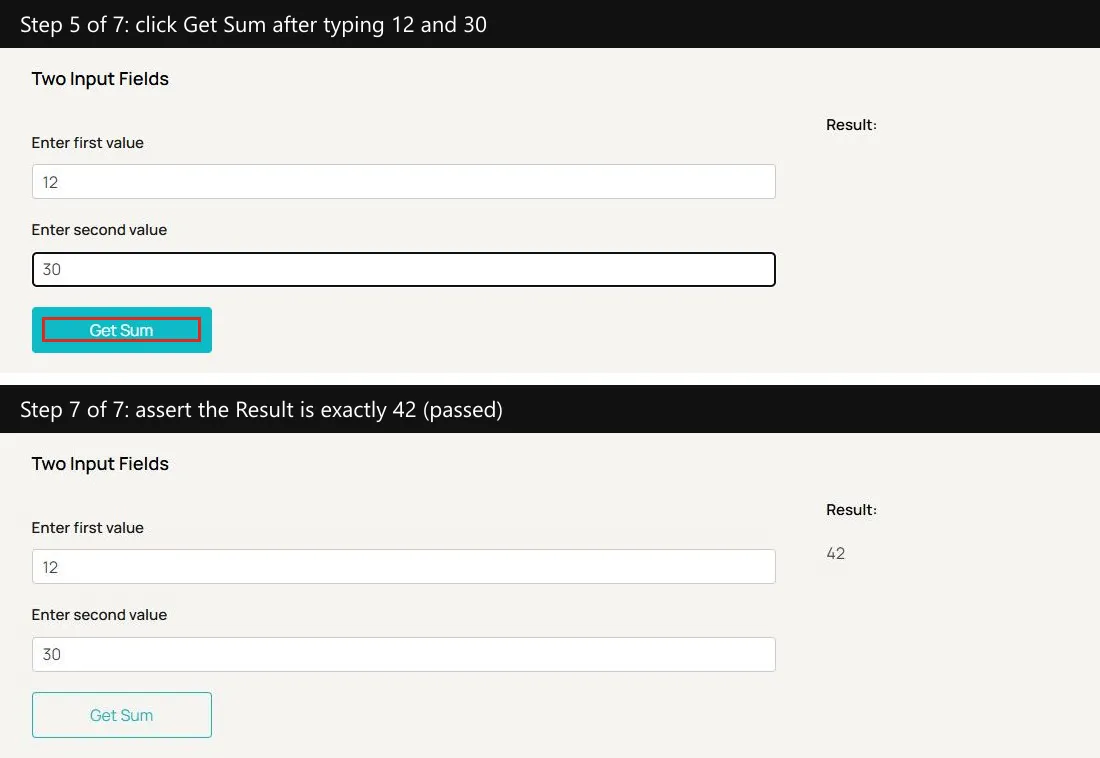
The run passed in seven steps and 63.1 seconds for about 17.6 KaneAI credits. Kane CLI read the Result element's text, compared 42 with the expected 42, and closed with a run_end event carrying result code 100, reason success.complete, and a Test Manager link.
An agent reading that event has a clear rule: status passed and exit code 0 mean continue, and anything else sends it back to the code with step screenshots in the session folder. Why the agent that wrote the code cannot be that judge is examined in can coding agents test their own code.
To run the same check on every pull request, connect Kane CLI to GitHub Actions walks through the workflow file.

Which Should You Choose: GitHub Copilot or Claude Code?
Choose GitHub Copilot if your team works across several IDEs, wants completions and agents in one subscription, or assigns work through GitHub issues. Choose Claude Code if your work is long, multi-file, and terminal-driven, or you want Claude Opus on the entry-level paid plan.
| Your situation | Pick | Why |
|---|---|---|
| Evaluating with no budget approved | GitHub Copilot | Copilot Free includes 2,000 completions a month and an AI credit allowance, while Claude Code needs a paid plan |
| Team spread across Visual Studio, Eclipse, and Xcode | GitHub Copilot | Copilot ships in all of them, while Claude Code's IDE extensions cover VS Code and JetBrains |
| Issue-to-pull-request work on GitHub | GitHub Copilot | Assign an issue to Copilot or the Anthropic Claude agent and review the pull request it opens |
| Long refactors from the terminal | Claude Code | Plan mode, subagents, and CLAUDE.md memory are built around long multi-file sessions |
| Claude Opus on a single entry plan | Claude Code | Claude Pro includes Opus, while Copilot keeps Opus and Fable for Pro+ and above |
| Reproducible scripted runs in CI | Claude Code | --bare skips local hooks, skills, MCP servers, and CLAUDE.md, and the Claude Code Action lives in your repository as YAML |
| Mixed team on both tools | Both | AGENTS.md and .claude/skills/ serve both agents from one repository |
The same decision with Cursor in place of Copilot is laid out in Claude Code vs Cursor, and wiring a test step into Copilot, Cursor, and Codex is covered in add testing to AI coding tools.
Conclusion
Decide by where your team already works. GitHub-centered teams that want completions, a choice of model providers, and agents that start from issues get more from Copilot. Terminal-first teams that hand long tasks to one agent get more from Claude Code.
Then put one check outside both agents. Point Kane CLI at your own app's most important flow, run it from the pull request workflow either agent triggers, and merge only on exit code 0. The Kane CLI introduction covers sign-in and the first run.
Testing from the terminal? Kane CLI by TestMu AI lets SDETs and developers plan, write, run and debug tests from the command line.
Author

Chaitanya Sharma
Blogs: 23

Chaitanya Sharma is an AI Product Manager at TestMu AI, where he builds agentic AI capabilities focused on computer vision and multi-modality, moving testing beyond static script execution toward autonomous, agent-driven workflows. Before TestMu AI he shipped 135+ features at Sprinklr for a no-code community and website builder used by Fortune 500 enterprises including Dell, Samsung, and Polestar. At Policybazaar he led the zero-to-one launch of a digital lending and insurance marketplace embedded in Bahrain's dominant payments app, building a risk-intelligence engine that compressed loan-approval times by 80%. He explored machine learning and NLP through research at the University of Cambridge, and holds a B.Tech from Delhi Technological University.
Reviewer

Saurabh Prakash
Reviewer
Saurabh Prakash is an Engineering Manager at TestMu AI, where he leads engineering on agentic AI development and scalable system architecture for the quality engineering platform. He has also contributed to Test at Scale, the company's open-source test intelligence platform. He brings over 9 years of experience across Node.js, Java, Spring, MVC, data structures, algorithms, and scalable system design, with earlier roles as SDE 2 at Zomato, Senior Software Engineer at LogicHub, and Software Development Engineer at Directi. Saurabh holds a B.Tech in Computer Science and Engineering from Delhi Technological University.


GitHub Copilot vs Claude Code FAQs
Did you find this page helpful?
More Related Blogs

TestMu AI forEnterprise
Get access to solutions built on Enterprise
grade security, privacy, & compliance
- Advanced access controls
- Advanced data retention rules
- Advanced Local Testing
- Premium Support options
- Early access to beta features
- Private Slack Channel
- Unlimited Manual Accessibility DevTools Tests