

Power Your Software Testing with AI Agents and Cloud
The Native AI-Agentic Cloud Platform to Supercharge Quality Engineering. Test Intelligently and Ship Faster.


- TestMu AI (Formerly LambdaTest)
- /
- Blog
- /
- Kane CLI Is CI/CD Ready Out of the Box
Most browser checks live outside the pipeline. Someone runs them by hand before a release, or a brittle suite runs somewhere else and reports back later. The deploy goes out before anyone confirms the real flow still works.
Kane CLI runs inside the pipeline. The same binary you use on your laptop runs in any CI runner, with no separate product and no change in syntax.
The Same Binary Runs on Your Laptop and in the Pipeline
One binary, one syntax. Headed on your machine while you build, headless in CI when it needs to run without a display. You do not learn a second tool to put browser verification in your pipeline.
That means the flow you debugged locally is the exact flow the pipeline runs. No translation step, no second source of truth.
What a Kane CLI Step Looks Like in Your Pipeline
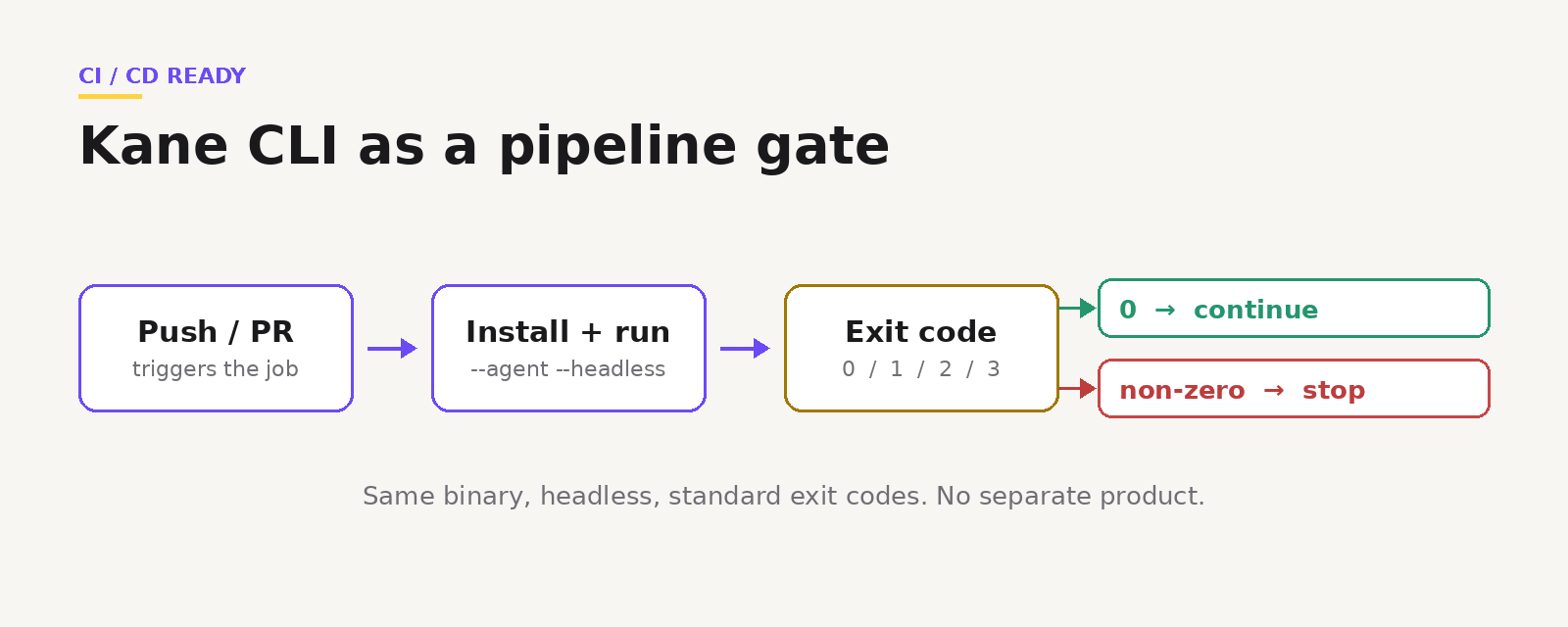
Install Kane CLI, authenticate from secrets, and run your objective in agent headless mode.
# .github/workflows/browser-tests.yml
name: Browser Tests
on: [push, pull_request]

jobs:
  kane-tests:
    runs-on: ubuntu-latest
    steps:
      - uses: actions/checkout@v4
      - uses: actions/setup-node@v4
        with:
          node-version: '20'
      - name: Install Chrome
        uses: browser-actions/setup-chrome@v1
      - name: Install Kane CLI
        run: npm install -g @testmuai/kane-cli
      - name: Run browser tests
        env:
          LT_USERNAME: ${{ secrets.LT_USERNAME }}
          LT_ACCESS_KEY: ${{ secrets.LT_ACCESS_KEY }}
        run: |
          kane-cli run "go to https://staging.myapp.com, log in, assert the dashboard shows 'Welcome'" \
            --headless --agent --timeout 300 \
            --username "$LT_USERNAME" --access-key "$LT_ACCESS_KEY"
A few rules cover every CI system. Always pass --headless, since runners have no display. Always set --timeout, so a hung run cannot block the pipeline. Authenticate with --username and --access-key from secrets rather than kane-cli login, which opens a browser. Load test data with --variables-file.

Note: Want to drop Kane CLI into your pipeline? Start free and try a run. Try Kane CLI
Standard Exit Codes That Gate the Pipeline Automatically
Kane CLI returns standard exit codes, so your pipeline reacts without custom scripting. 0 passed and the pipeline continues. 1 failed an assertion, 2 hit an error, 3 timed out, and any non-zero stops the run.
If the runner image cannot install Chrome, point Kane CLI at a remote browser with --ws-endpoint or --cdp-endpoint. Same command, no display required.
Note: Want the full CI recipes and flags? Read the Kane CLI docs. Read the docs
Every CI Run Becomes a Test Case You Can Reuse
By default, each run is logged to Test Manager when authenticated, so your test library fills in as the pipeline runs. The checks you wrote for a PR become a growing suite you can organize, schedule, and run nightly later, without rewriting anything.
Note: Building this into your workflow? Grab the examples in the repo. Open the repo
CI/CD is not a bolt-on for Kane CLI. It is the same tool, in the same syntax, doing the verification step right where the pipeline already decides whether to ship.
The Kane CLI Certification is free and shows you can run these verification steps from your terminal and from your pipeline.

Author

Bhawana
Blogs: 77


Bhawana is a Community Evangelist at TestMu AI with over 3 years of experience creating technically accurate, strategy-driven content in software testing. She has authored 50+ blogs on test automation, cross-browser testing, mobile testing, and real device testing. She also serves as Product Marketing Manager for Kane CLI, the command-line tool that runs browser automation from the terminal using natural-language flows in a real Chrome browser. Bhawana is certified in KaneAI, Selenium, Appium, Playwright, and Cypress, reflecting her hands-on knowledge of modern automation practices. On LinkedIn, she is followed by 6000+ QA engineers, testers, AI automation testers, and tech leaders.


Did you find this page helpful?
More Related Blogs
TestMu AI forEnterprise
Get access to solutions built on Enterprise
grade security, privacy, & compliance
- Advanced access controls
- Advanced data retention rules
- Advanced Local Testing
- Premium Support options
- Early access to beta features
- Private Slack Channel
- Unlimited Manual Accessibility DevTools Tests