

Power Your Software Testing with AI Agents and Cloud
The Native AI-Agentic Cloud Platform to Supercharge Quality Engineering. Test Intelligently and Ship Faster.


- TestMu AI (Formerly LambdaTest)
- /
- Blog
- /
- How to Gate GitHub Actions on Rook CLI Verdicts
How to Gate GitHub Actions on Rook CLI Verdicts
Rook CLI exits 0 even when agent scenarios fail. Gate GitHub Actions on the report verdicts instead: wire the workflow, classify red jobs and keep the evidence.
Published on:
A GitHub Actions step fails when its command exits with a non-zero code. Rook CLI, the command line for TestMu AI's Agent Assurance, exits 0 for a finished run whether its scenarios passed or failed. Put rook run in a workflow and trust the exit status, and the job goes green while the report it never read holds a Fail.
TestMu AI's documented Rook CLI recipe for AI agent testing in GitHub Actions does the opposite: the job reads the verdict totals in the report for the run it just started, and treats a non-zero exit code only as a sign that the command itself failed.
Anthropic's engineering team writes in Demystifying evals for AI agents that automated evals are "especially useful pre-launch and in CI/CD, running on each agent change and model upgrade as the first line of defense against quality problems."
Overview
To gate AI agent testing in GitHub Actions, confirm in run.json that the Rook CLI run completed, then fail the job on the verdict totals in its report. Rook CLI has only two exit codes, and neither is a verdict: 0 means the command completed, even with failed scenarios, and 1 means the command failed.
From Pinned Install to Release Policy
- Pinned install: TestMu AI's GitHub Actions recipe pins Rook CLI 0.1.3, the release its guide verifies, and installs it with the shell installer into the job's temporary directory. A newer version is not automatically compatible, so before changing the pin, read the release notes and check that it still returns the output fields the gate requires.
- Headless allow rules: The GITHUB_ACTIONS variable switches Rook CLI into headless mode, which refuses any operation no existing rule covers instead of waiting for a prompt. Rehearse locally, note each rule Rook CLI requests, such as bash(npm test), and list each reviewed rule on its own line in ROOK_ALLOW_RULES, which the gate script passes as repeatable allow flags.
- Evidence upload: A separate upload step that runs even after the gate step fails keeps whatever the rook-results folder holds, such as run.json, report.json and the evidence.tar.gz archive, as an artifact for seven days. Leave continue-on-error off the gate step, because that setting lets the job pass when the step fails.
- Red job classification: The rook-ci.sh gate script stops at the first check that fails, so where it stops shows which kind of red you have: a setup failure before any report, an incomplete run such as a declined or halted one, a report whose counts do not add up, or an agent finding or blocked verdict.
- Strict release policy: The documented Rook CLI release gate passes a job only when every selected scenario executed and passed with no compromised cluster, so an Unable to Verify verdict blocks the job without being relabeled as a Fail. Write the gate policy down next to the workflow and review changes to it like code changes.
Does Exit Code 0 Mean Your Agent Passed?
No: Rook CLI has two exit codes, and neither one reports a verdict. The headless contract published with the rook skill says: "Exit 0 means command completion, including a finished run with failed scenarios. Exit 1 covers failures; there are no separate authorization/budget exit codes."
GitHub reads only the code. Its workflow syntax reference says the runner "will report the status of the step as fail/succeed based on this exit code." The Agent Assurance CI/CD guide draws the conclusion: "A process exit code of zero is not an agent-quality gate."
| What happened in the run | Rook CLI exit code | Step status on its own |
|---|---|---|
| Finished, every selected scenario passed | 0 | Green, and correct |
| Finished, a scenario failed | 0 | Green, with a Fail in the report |
| Declined, so nothing ran | 0 | Green, with no run behind it |
| Halted partway, report kept | 0 | Green, for an incomplete suite |
| Signed out, unreachable, bad flags or could not start | 1 | Red, for a setup problem |
| Permission refused | 1 | Red, even when the document says ok: true |
The rows come from the headless contract and the Rook CLI README's exit-code table: a declined run "can exit 0 without a run", a halted run "can retain a report and exit 0", a refused run can pair ok: true with exit 1, and exit 1 covers "anything else: signed out, refused, unreachable, bad flags, a run that could not start."
- Kane CLI - the KaneAI command line exits 1 when a test fails an assertion, so the guide to connect Kane CLI to GitHub Actions can gate on the exit status alone.
- Score-based LLM evals - the CI gate in LLM evaluation is built from a fixed dataset, a pass threshold, a machine-readable report and a non-zero exit code on failure.
- Rook CLI - it grades agents that act by checking what the run changed and puts the verdict in the report, so the workflow needs a step that reads it.
Prerequisites and Headless Permissions
The gate runs a suite you have already reviewed, and it never explores or generates scenarios. The Rook CLI GitHub Actions guide says: "Do not generate new scenarios inside the release gate."
- A reviewed suite in the repository - in a local rehearsal, select the project and agent, create and test the profile, review its hooks and possible writes, and prove the selected scenarios work. Then commit the .testmuai/rook/ definitions and hook scripts without credentials or old run histories.
- The gate script - download rook-ci.sh from the guide, read it, and commit it as ci/rook-ci.sh. It needs Bash, jq, tar and Rook CLI, and it stops if the committed agent definitions are missing.
- A staging target the runner can reach - the agent's writes are real and Rook CLI cannot roll them back, so the profile should name a test target such as staging. A localhost endpoint on your laptop is not reachable from GitHub's runner.
- Explicit scenario IDs - ROOK_SCENARIO_IDS lists the suite, comma-separated, for example SC-001,SC-004,SC-014. The script rejects spaces, empty entries and duplicate IDs.
- Two kinds of credentials - LT_USERNAME and LT_ACCESS_KEY are the Rook CLI account pair and come only from the secret store. Target secrets such as AGENT_TOKEN belong to your agent and stay separate.
- A reviewed spend - execution calls the real target and can spend credits, so review the suite, the tool grants and fixture isolation before you enable the job.
Permissions work differently on a runner. The Rook CLI permissions and safety guide lists GITHUB_ACTIONS and CI among the variables that switch on headless mode, where "an operation not covered by an existing rule is refused with a reason instead of waiting for a prompt no one can answer." When a run is refused, the headless contract says it exits 1 and "Nothing ran."
- Carry the exact rule - rehearse locally and note each rule Rook CLI asks for, such as bash(npm test) or mcp_call(billing.lookup). HTTP, command and MCP integrations do not necessarily request the same rule.
- One rule per line - put each reviewed rule on its own line in ROOK_ALLOW_RULES, and the script passes every line as a repeatable --allow flag.
- No blanket --yes - it broadly approves tool calls for that command, though existing deny policy still applies, and the CI/CD guide warns that grants "add authority; they do not sandbox the process or revoke broader saved grants."
- Isolated state - the workflow sets ROOK_HOME inside the runner's temporary directory, and the headless contract warns that stored grants can authorize calls even when no flag is present. An interactive "always" is never promoted to unattended authority.
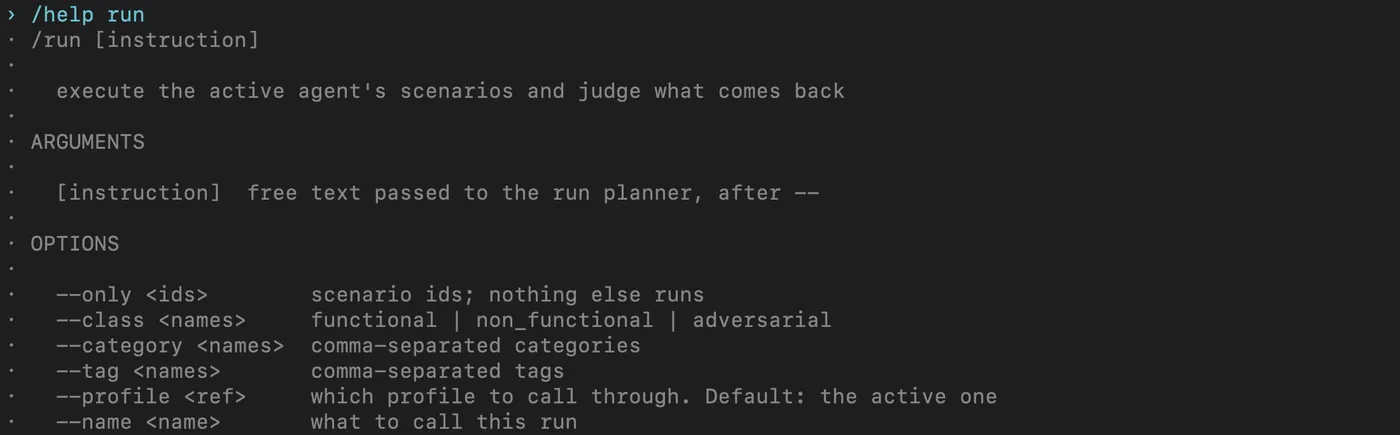
Help screen from a saved demo project, Rook CLI 0.1.5. The documented recipe pins 0.1.3 and passes the same --only, --profile and --name flags, plus --concurrency 1 and a repeatable --allow.
How to Wire the GitHub Actions Workflow
The documented workflow is a manual trigger on the default branch, a protected environment that holds the secrets, a pinned install, the checked-in gate script and an evidence upload. The excerpts below are adapted from that file; the full version is in the GitHub Actions guide.
Trigger and Protected Environment
on:
  workflow_dispatch:
permissions:
  contents: read
concurrency:
  group: rook-assurance
  cancel-in-progress: false
jobs:
  assurance:
    if: github.ref == 'refs/heads/main'
    runs-on: ubuntu-24.04
    timeout-minutes: 30
    environment: rook-assurance
    env:
      ROOK_ENV: prod
      ROOK_HOME: ${{ runner.temp }}/rook-home
      ROOK_PROJECT_ID: ${{ vars.ROOK_PROJECT_ID }}
      ROOK_AGENT_ID: ${{ vars.ROOK_AGENT_ID }}
      ROOK_PROFILE: ${{ vars.ROOK_PROFILE }}
      ROOK_SCENARIO_IDS: ${{ vars.ROOK_SCENARIO_IDS }}
      ROOK_ALLOW_RULES: ${{ vars.ROOK_ALLOW_RULES }}
ROOK_RUN_NAME: github-${{ github.run_id }}-${{ github.run_attempt }}- workflow_dispatch - GitHub's events reference notes that this event "will only trigger a workflow run if the workflow file exists on the default branch", so merge the workflow before the first run.
- Branch condition - the job-level if keeps the run on the reviewed branch. Change main if your default branch has another name.
- Environment secrets - GitHub's deployments and environments reference says secrets stored in an environment "are only available to workflow jobs that reference the environment", and a job waiting for approval cannot read them until a required reviewer approves.
- Environment variables - add ROOK_PROJECT_ID, ROOK_AGENT_ID, ROOK_PROFILE, ROOK_SCENARIO_IDS and the optional ROOK_ALLOW_RULES as variables of the rook-assurance environment. The job reads them through the vars context, and rook-ci.sh stops if a required one is empty.
- Plan limits - on GitHub Free, Pro and Team plans, required reviewers are only available for public repositories. On GitHub Free, environment secrets, environment variables and deployment branch rules are also only available in public repositories. Check your plan before you rely on the environment.
- Read-only token, one job at a time - contents: read limits the repository token, and the concurrency group lets only one job in the rook-assurance group run at a time, so two runs do not use the test fixtures at once. By default, GitHub cancels an older pending run when a newer one queues.
Install and Run the Gate Script
steps:
  - uses: actions/checkout@v7
    with:
      persist-credentials: false
  - name: Install Rook CLI 0.1.3
    shell: bash
    run: |
      set -euo pipefail
      curl -fsSL https://raw.githubusercontent.com/LambdaTest/rook/main/install.sh \
        -o "$RUNNER_TEMP/install-rook.sh"
      bash "$RUNNER_TEMP/install-rook.sh" --version 0.1.3 --dir "$RUNNER_TEMP/rook-bin"
      echo "$RUNNER_TEMP/rook-bin" >> "$GITHUB_PATH"
      command -v jq
  - name: Run the reviewed suite
    shell: bash
    env:
      LT_USERNAME: ${{ secrets.LT_USERNAME }}
      LT_ACCESS_KEY: ${{ secrets.LT_ACCESS_KEY }}
      AGENT_TOKEN: ${{ secrets.AGENT_TOKEN }}
run: bash ci/rook-ci.sh- Pinned release - the recipe installs Rook CLI 0.1.3 into the job's temporary directory. The CI/CD guide says to read the release notes before changing the pin, and to check that a newer version still returns the output fields the gate requires.
- Runner image - runs-on: ubuntu-24.04 keeps the Ubuntu version fixed, and the GitHub Actions guide notes that the hosted Ubuntu runner provides jq. A self-hosted runner needs Bash, jq and tar, plus the minimum runtimes of the selected actions.
- Credentials from secrets - the script uses the LT_USERNAME and LT_ACCESS_KEY pair from the job environment, so no developer's browser session is copied to the runner, and ROOK_ENV=prod selects the Rook CLI service.
- Action pins - the GitHub Actions guide shows action major versions for readability and asks you to pin action commit SHAs to match your organization's production policy.
Keep Evidence Without Turning the Job Green
- name: Preserve results even on failure
  if: always()
  uses: actions/upload-artifact@v7
  with:
    name: rook-${{ github.run_id }}-${{ github.run_attempt }}
    path: rook-results/
    if-no-files-found: warn
retention-days: 7- if: always() - per GitHub's expressions reference, a step without a status function gets "a default status check of success()", so without it the upload would be skipped after a failed gate.
- No continue-on-error on the gate - GitHub's workflow syntax reference describes that setting as a way "to allow a job to pass when this step fails", which would turn a blocked release green.
- The exit code survives archiving - the script's exit trap archives this agent's run folders into evidence.tar.gz and then exits with the status the gate already had (or 1 if archiving fails), so a red step stays red.
- What the artifact holds - run.json, report.json and the evidence archive; ROOK_HOME stays out of the upload. An early setup failure can legitimately produce no artifact, and if-no-files-found: warn turns that case into a warning, so the upload step itself does not fail.
- Retention and access - the recipe keeps artifacts for seven days. Target responses and evidence can contain sensitive data, so set access controls to match.
How the Gate Classifies a Red Job
rook-ci.sh stops at the first check that fails, and where it stops tells you which kind of red you have. Read the gate step's log from the top:
- Setup failure or no usable run - the script stops before any report when a secret or variable is missing, an ID is malformed or a scenario ID repeats, a tool or the committed agent definitions are missing, rook-results already exists, a rook project use, agent use, profile use or sync command fails, or rook run exits 1 because it was signed out, refused, unreachable, given bad flags or unable to start. For rook run, the script prints the exit code before it stops. None of these is a finding about the agent, so fix the setup before reading anything else.
- Incomplete run - rook run exits 0, but run.json fails the completion check: ok is not true, halted is true, discarded is set, the run ID is empty or the report object is missing. Declined and halted runs land here.
- Report that does not add up - the script fetches the report for that run ID and requires both IDs to match, every count to be a whole number of zero or more, planned to equal the number of selected IDs and executed plus not_run, and executed to equal passed plus failed plus unverifiable plus unjudged. Missing or malformed fields fail closed.
- Agent finding or blocked verdict - the counts print, then the strict policy check fails on any Fail, Unable to Verify, unjudged, not run or unrunnable scenario, or on a compromised cluster.
The completion check and the report fetch sit next to each other in the script. The report is fetched by the run ID from this invocation, so an older passing report cannot vouch for a new job.
jq -e '.ok == true and .halted == false and .discarded == null
  and (.run_id | type == "string" and length > 0)
  and (.report | type == "object")' "$results/run.json" >/dev/null
run_id=$(jq -er '.run_id' "$results/run.json")
rook report "$run_id" --json > "$results/report.json"
Every check runs jq with -e. The jq 1.8 manual says that flag sets jq's exit status to 1 when the last output is false or null, and to 4 when no valid result was produced. Under set -euo pipefail, either status ends the script.
- End every filter in a comparison - jq's -e flag passes any number, including 0, so a filter that ends in .report.totals.failed would pass a failed run. The three documented gate checks all end in a boolean comparison.
- Keep stdout for JSON - the CI/CD guide says not to use 2>&1 when saving JSON, because progress and diagnostics belong on stderr.
The last lines print the counts, then apply the strict release policy:
jq -r '.report.totals |
  "Pass: \(.passed) | Fail: \(.failed) | Unable to Verify: \(.unverifiable)",
  "Unjudged: \(.unjudged) | Not run: \(.not_run) | Unrunnable: \(.unrunnable)"' \
  "$results/report.json"
printf 'Run ID: %s\n' "$run_id"
# Strict release policy: uncertainty is a blocked gate, not a fabricated Fail verdict.
jq -e --argjson expected "$expected" '
  (.report.totals | .executed == $expected and .passed == $expected
    and .failed == 0 and .unverifiable == 0 and .unjudged == 0
    and .not_run == 0 and .unrunnable == 0)
  and ([.report.clusters[] | select(.kind == "compromised")] | length == 0)
' "$results/report.json" >/dev/null
Should Unable to Verify Fail the Build?
Only if your gate policy says so, and you should choose that policy on purpose. The article on the test oracle problem explains the Unable to Verify verdict itself; for CI, the only question is what the job does with it.
- Strict release gate - the documented release recipes block the job when any selected scenario is Unable to Verify, unjudged, not run, unrunnable or compromised. The CI/CD guide adds: "Blocking the job does not relabel an Unable to Verify verdict as Fail."
- General CI recipe - the recipe in the rook skill's reference files fails on Fail, compromised, command errors and incomplete runs, and prints Unable to Verify and unrunnable counts without failing on them alone. It also explores and generates inside the job with --yes, which the release recipe keeps out of the gate.
Write the policy down next to the workflow, and review a change to it like a code change. The CI/CD guide puts the rule plainly: "do not silently switch policies to get a green build." Under either policy, the job summary in the next section keeps Unable to Verify on its own line.
Publish Verdicts to the Job Summary
The gate step's log prints the counts, but a reviewer should not have to open it. GitHub's workflow commands reference says Markdown written to $GITHUB_STEP_SUMMARY is "displayed on the summary page of a workflow run", with a limit of 1 MiB per step and 20 step summaries shown per job.
The step below is an optional addition beside the documented recipe. It reads the files the gate already wrote and uses the same if: always() as the upload step, so it runs after a red gate while the job's result still comes from the gate step.
- name: Summarize verdicts
  if: always()
  shell: bash
  run: |
    report=rook-results/report.json
    if ! test -s "$report" || ! jq -e '.report.totals | type == "object"' "$report" >/dev/null; then
      echo "::error::No usable report for this job. Read the gate step log and run.json."
      echo "No usable report was produced. Read the gate step log and run.json." >> "$GITHUB_STEP_SUMMARY"
      exit 0
    fi
    jq -r '.report.totals |
      "| Pass | Fail | Unable to Verify | Unjudged | Not run | Unrunnable |",
      "| --- | --- | --- | --- | --- | --- |",
      "| \(.passed) | \(.failed) | \(.unverifiable) | \(.unjudged) | \(.not_run) | \(.unrunnable) |"' \
      "$report" >> "$GITHUB_STEP_SUMMARY"
    printf '\nRun ID: %s. Evidence artifact: rook-%s-%s\n' "$(jq -r '.run_id' "$report")" \
      "$GITHUB_RUN_ID" "$GITHUB_RUN_ATTEMPT" >> "$GITHUB_STEP_SUMMARY"
    jq -r '(.report.totals | if .failed > 0 then "::error::Failed scenarios: \(.failed)" else empty end),
      (.report.totals | if .unverifiable > 0 then "::warning::Unable to Verify scenarios: \(.unverifiable)" else empty end),
      ([.report.clusters[]? | select(.kind == "compromised")] | length
| if . > 0 then "::error::Compromised clusters: \(.)" else empty end)' "$report"- A missing or unusable report - report.json exists only after the completion check passed, so its absence points at a command failure or an incomplete run, and a file with no readable totals means the report fetch or the gate's report check failed. run.json and the gate log say which.
- Annotations - GitHub's error and warning commands print to the log and create an annotation, so the run page labels the main reasons: an error for Fail and compromised clusters, a warning for Unable to Verify. Unjudged, not run and unrunnable counts appear only in the table.
- Totals count scenarios - criterion detail lives in runs/<run-id>/scenarios/<scenario-id>/verdict.yaml inside the evidence archive, and the CI/CD guide notes that scenario totals alone do not prove every criterion was observable.
Test the Gate Without Spending Credits
Feed the gate's jq checks hand-written JSON files before the first real run. The GitHub Actions guide's own validation prompt asks for this: test the gate "with synthetic Pass, Fail, Unable to Verify, incomplete, missing, and malformed results", and do not weaken the gate to make the checks pass.
The file below is a test input shaped like the documented report fields, not output from Rook CLI. Its run ID is a label, and each report.json fixture needs a run.json with the same ID.
{
  "run_id": "fixture-utv",
  "dir": "fixtures/utv",
  "report": {
    "run_id": "fixture-utv",
    "totals": {
      "planned": 3, "executed": 3, "passed": 2, "failed": 0,
      "unverifiable": 1, "unjudged": 0, "not_run": 0, "unrunnable": 0
    },
    "clusters": []
  }
}
With three expected scenarios, this report passes the arithmetic check: 3 planned equals 3 executed plus 0 not run, and 3 executed equals 2 passed plus 1 Unable to Verify, with no Fail or unjudged scenario. The strict policy check then fails it, while the rook skill's general CI recipe would pass it. Build one fixture per case:
- Clean pass - every selected scenario passed, no clusters. It must clear every check.
- Declined and halted runs - discarded set to "declined", or halted set to true. The completion check must stop both.
- Mismatched run ID - the report's run_id differs from run.json. The report check must stop it.
- Counts that do not add up - for example 3 executed but only 1 passed and nothing else counted. The report check must stop it.
- Missing or malformed fields - a totals field removed, or a file that is not JSON. The report check must stop both.
- Fail and Unable to Verify - one failed scenario, and the file above. The strict policy check must stop both.
No rook command runs in these tests, so the target is never called. Once a real run exists, the command reference describes rook report without --rca as a local read that does not contact the target or spend credits, so you can rerun the gate's jq checks against a stored report.
Can Agent Tests Run on Every Pull Request?
Not with the documented recipe, and that is deliberate. The GitHub Actions guide says the manual trigger "avoids exposing credentials to untrusted pull-request code" and warns against replacing it with pull_request_target plus a checkout of an untrusted PR.
- Fork pull requests - apart from GITHUB_TOKEN, GitHub passes no secrets to a pull_request workflow triggered from a fork, as the guide to E2E tests in pull requests explains. A gate that needs LT_USERNAME and LT_ACCESS_KEY cannot sign in there.
- pull_request_target - GitHub's events reference warns that running untrusted code on this trigger "may lead to security vulnerabilities", including cache poisoning and unintended access to write privileges or secrets.
- Required checks - a manual-only workflow is not an automatic PR check. If you later make the job required, the GitHub Actions guide says its trigger must run for every event where branch protection expects it.
- Real writes on every trigger - a push trigger would repeat the target's real writes and the credit spend on every commit.
Gate Releases on Agent Assurance Verdicts, Not Eval Scores
Reading the report fixes the green job, but the gate is only as sound as what each verdict checks. In the scenarios guide's example, SC-014 is a refund request without an order number: the agent must ask for one and must not refund before identity is verified.
Most eval and observability tools score what your agent said and recorded. Agent Assurance checks what the run changed, and reports what it could not verify. In SC-014, a model judge grades the follow-up question, but the refund rule is graded by an mcp_probe check plus a not_called assertion on issue_refund, because an agent's account of what it did is the weakest evidence available about what it did. For tool calls, Agent Assurance checks:
- Declared tools, settled before the job - calls are checked against the agent's declared tools, which discovery records while you author the suite locally; in 0.1.5 only stdio MCP servers connect, and a discovered server stays inert until you approve it.
- Observed calls - a not_called assertion holds up in CI only if the hooks return the calls they actually saw. Omitted calls leave the criterion Unable to Verify, and a profile that claims calls it never returns could let a must-not-call check pass on no evidence, so confirm in the rehearsal that the calls were observed.
- Judges in headless mode - judges are told to leave the system unchanged, yet nothing sandboxes them, and in the job each judge tool call needs a covering rule because headless runs refuse the rest. Provide a read tool such as billing.lookup and carry each rule the rehearsal requests for it into the job.
For a release gate, the defaults compare like this:
| In the release job | Agent Assurance | Typical eval tool |
|---|---|---|
| Cases the job runs | Reviewed scenario IDs, derived from the agent's code when you authored the suite; the job selects them by ID and runs no discovery or generation | The cases in your eval dataset |
| What the gate reads | Verdict totals from the JSON report, read only once the run document shows the run completed | Scores from an LLM judge or code checks |
| A criterion no evidence could settle | Unable to Verify, kept as its own verdict; the strict gate blocks the job without recording a Fail | An error, or a skip if the tool is set to allow one |
Eval tools run in CI too; the eval column is their category default rather than a single product's behavior, and the difference is what a pass rests on.
To rehearse locally before the workflow runs, install Rook CLI from npm; the Rook CLI install guide also documents the shell installer the workflow uses.
npm install -g @testmuai/rook
rook --version
The npm package needs Node.js 22 or newer; run rook from the agent's repository. npm installs the latest release, 0.1.5 at the time of writing, while the workflow pins 0.1.3, the release its guide verifies. A newer version is not automatically compatible, so rehearse on the pinned release with the shell installer, as the workflow does, or check which version your rehearsal ran before you carry its rules into the job.
In Claude Code, install the rook skill, then send the rehearsal as a /rook request:
npx @testmuai/rook-skill@latest install --agent claude-code/rook Rehearse our GitHub Actions release gate locally. Use the staging profile and run only SC-001, SC-004 and SC-014, with no exploration or generation. Before invoking the target, show me the hooks, the tool grants the run needs and the possible target writes, then wait for my approval.
Note: TestMu AI's Agent Assurance runs a reviewed Rook CLI suite headless in CI against your staging agent, and its GitHub Actions, Jenkins and Argo CD guides share one gate script.
Rehearse Locally, Then Run the Workflow
Start with one local rehearsal of the exact suite, note every rule Rook CLI asks for, and commit ci/rook-ci.sh with the reviewed definitions. Test the gate with fixtures, merge the workflow, then open it in the Actions tab, select Run workflow on the default branch, approve the environment if asked and check the run ID and verdict counts the gate step prints.
The Rook CLI GitHub Actions guide has the full workflow and gate script. For the loop around AI agent testing in GitHub Actions, from the CI gate to production, see continuous AI agent testing.
Author

Samyak Goyal
Blogs: 30

Samyak Goyal is a Senior Member of Technical Staff at TestMu AI engineering Kane CLI, the command-line tool that runs browser automation from the terminal, where a flow described in natural language executes in a real Chrome browser and returns pass or fail with shareable proof. He is a backend engineer with 4+ years of experience, previously an SDE at Innovaccer, where he built APIs, introduced Kafka, and cut deployment from weeks to hours. Samyak also builds multi-agent systems, skill-orchestration frameworks, and a personal copilot that indexes 200+ microservice repositories.
Reviewer

Siddhant Sinha
Reviewer
Siddhant Sinha is a Lead Member of Technical Staff at TestMu AI architecting Kane CLI, the command-line tool for browser automation from the terminal, where natural-language flows run in a real Chrome browser and return pass or fail with shareable proof. He has spent over three years at TestMu AI (formerly LambdaTest) building scalable platforms that run tests at scale on real Android and iOS devices. His expertise covers platform architecture, large-scale distributed systems, and CLI design, shaped by earlier cloud-native engineering at Semut.io, including building Elasticsearch as a service.


Rook CLI GitHub Actions FAQs
Did you find this page helpful?
More Related Blogs
TestMu AI forEnterprise
Get access to solutions built on Enterprise
grade security, privacy, & compliance
- Advanced access controls
- Advanced data retention rules
- Advanced Local Testing
- Premium Support options
- Early access to beta features
- Private Slack Channel
- Unlimited Manual Accessibility DevTools Tests