
Gate Your Next Auto-Mode Session
Auto Mode Determines Which Actions Are Safe. Your Acceptance Criteria Will Determine When the Work Is Complete.
npm install -g @testmuai/kane-cli
Claude Code Auto Mode Checks the Action - Who Checks the Result?
Claude Code auto mode, Codex Auto and YOLO mode decide if an action is safe to run. None checks the feature works. Add a test gate with Kane CLI.
Published on:
On This Page
- What Auto Mode Checks
- Turn Auto Mode On and Off
- Auto Mode vs YOLO Mode
- Other Agents With Auto Mode
- False Passes by Agents
- What to Check in the Result
- Agent Tests vs a Gate
- How Kane CLI Verifies
- Stop Hook Acceptance Gate
- What a Gate Doesn't Replace
- Cost of Skipping the Gate
- Gate Your Next Session
- Conclusion
- Sources
Claude Code auto mode will approve the agent's actions without you having to ask, using your rules, your built-in checks and a classifier. Antigravity Auto, Codex Auto review and Cursor's Run Everything mode all do the same thing essentially: they make the decision as to whether an action is safe to run.
None of them will check that the feature actually matches your request. That's the job of an independent test gate where the only definition of 'done' is an exit code of 0.
TL;DR
Claude Code auto mode approves Claude's actions without asking you: your allow, ask and deny rules run first, in-project reads and edits are auto-approved, and a classifier model checks everything else against your request. Auto mode never checks that the finished feature works; an independent test gate outside the coding agent checks the result.
How Do Claude Auto Mode and YOLO Mode Compare?
- Claude auto mode: A classifier compares each action with your request, and auto mode pauses after 3 blocks in a row or 20 in a session. Auto mode can approve a test run, but nothing in auto mode reads what the code does after the action has run.
- Claude Code dangerously-skip-permissions: The claude --dangerously-skip-permissions flag, also called Claude Code YOLO mode, runs tool calls immediately, with only deny rules and a few protected actions still applying. Anthropic says to use it only in containers or VMs without internet access.
- Cursor YOLO mode: The name users give Cursor's Run Everything mode, in which every tool call runs automatically. Cursor's Auto-review mode instead sandboxes commands and sends the rest to a classifier.
- Independent test gate: A check outside the coding agent that runs the app against criteria a person approved and returns the same verdict for the same build. Kane CLI by TestMu AI runs the gate from a Claude Code Stop hook and in CI, where exit code 0 is the only definition of done.
What Does Claude Code Auto Mode Check?
In Claude Code auto mode, your allow/ask/deny rules are processed first, and any reads and file edits within your working directory are auto-approved. Everything else is sent to a separate classifier model prior to execution.
Anthropic's permission modes documentation states it will block "actions that go beyond your request", as well as actions that would be aimed at infrastructure it doesn't recognize and actions that appear to be driven by hostile content that Claude has read. Broad allow rules such as Bash(*) are dropped when you enter auto mode.
The classifier will compare the action against your request. Running a test suite is one of the actions it may be happy to approve. The documentation doesn't actually describe what auto mode does when it comes to checking what the code does after the action has run.
New interactive sessions now launch in auto mode wherever that's available. Since Claude Code v2.1.283, auto mode has been the default mode for interactive terminal and VS Code sessions.
It was announced as the default for Pro, Max and Team plans in August 2026. Anthropic also reports that users approve 97% of the permission prompts in Claude Code. For the loop these sessions go through, see the agentic coding explainer.
How Do You Turn Claude Code's Auto Mode On and Off?
You can switch to Claude Code auto mode during a session, at launch or in your user settings:
- During a session - press Shift+Tab to cycle through the modes. Auto is available when it's applicable to your plan, model and organization. From Auto, the first press will take you to default.
- At launch - run
claude --permission-mode auto - As your default - set
"defaultMode": "auto"under permissions in~/.claude/settings.json. Anthropic notes that auto won't take effect from a project's.claude/settings.jsonor.claude/settings.local.json. - Scripts and CI - from v2.1.302,
claude -pand the Agent SDK will run with no mode set in Manual. - Organizations - admins can turn it off by setting
permissions.disableAutoModeto "disable" in managed settings.
If auto mode is constantly asking, check your ask rules first. The classifier will also pause auto mode after 3 blocks in a row or 20 in total and then revert back to prompting. Those thresholds are not configurable.
Auto Mode vs --dangerously-skip-permissions (YOLO Mode)
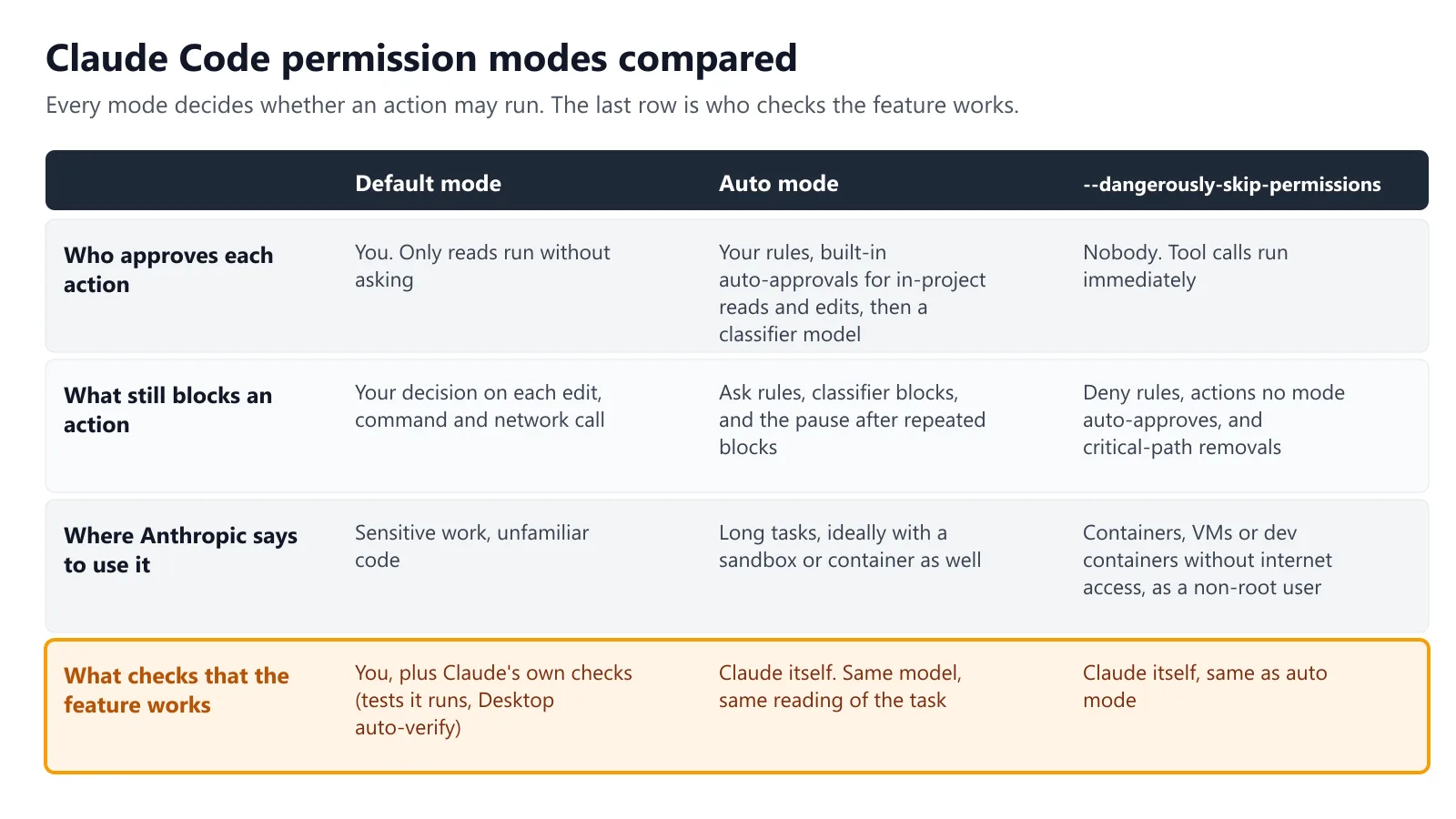
Auto mode and --dangerously-skip-permissions both strip out most of the prompts. The difference is what still prevents an action.
| Default mode | Auto mode | --dangerously-skip-permissions | |
|---|---|---|---|
| Who approves each action | You. Only reads run without asking | Your rules, built-in auto-approvals for in-project reads and edits, then a classifier model for everything else | Nobody. Tool calls run immediately |
| What still blocks an action | Your decision on each edit, command and network call | Ask rules, classifier blocks, and the pause after repeated blocks | Deny rules, actions no mode auto-approves, and critical-path removals |
| Where Anthropic says to use it | Sensitive work, unfamiliar code | Long tasks, ideally with a sandbox or container as well | Containers, VMs or dev containers without internet access, as a non-root user |
| What checks that the feature works | You, plus Claude's own checks (tests it runs, Desktop auto-verify) | Claude itself, if it runs tests or Desktop auto-verify. Same model, same reading of the task | Claude itself, same as auto mode |
In any mode, Claude Code can verify its own work. In Claude Code Desktop, auto-verify is on by default: after you've made a change, it takes a screenshot, checks for errors and confirms that the change actually works before it finishes. That verification comes from the same model that wrote the change, so it's entirely possible that a misread requirement could pass that check.

Try it on your next auto-mode session
Note: Install the Kane CLI and gate your first auto-mode session with npm install -g @testmuai/kane-cli. Write one plain English acceptance test and make exit code 0 the only definition of done. New accounts get 10k credits for 30 days. Start free with Kane CLI
Which Other Coding Agents Have an Auto Mode?
Codex, Cursor and Antigravity have similar modes, and each one decides whether an action may run:
| Agent | Mode | How it decides |
|---|---|---|
| Google Antigravity | Auto | Commands run in a sandbox, and Antigravity evaluates the rest so "safe, reversible commands run without prompting." Auto lost its Preview label in v2.30.0 on Nov 9. v2.35.0 on Nov 23 auto-approves file reads outside the project (changelog) |
| OpenAI Codex | Auto preset and Auto-review; --yolo | Codex auto mode, in practice, is the Auto preset: workspace-write sandboxing with on-request approvals. Auto-review (approvals_reviewer = "auto_review", off by default) sends approval requests to a reviewer agent. --yolo removes sandbox and approvals, and OpenAI doesn't recommend it. More in our Codex Auto-review guide |
| Cursor | Auto-review; Run Everything (often called YOLO mode) | Auto-review sandboxes commands and sends the rest to a classifier. In Run Everything, "every tool call runs automatically." Cloud Agents now open PRs "ready for review instead of as drafts" (week of Oct 19) |
Cognition's SWE-2.1 (Nov 24) does the vulnerability and exploitation work over several hours on its own. SWE-2.1 Cyber (a version of SWE-2.1 with more permissive safeguards) is being rolled out to Devin Security.
A sandbox blocks rm -rf and a classifier blocks an unrequested git push --force. Neither of them notices that checkout now charges the wrong total.
How Often Do Agents Mark Their Own Runs Incorrectly?
Agents that are grading their own browser runs are reporting false passes in measurable terms. We look at why coding agents can't be the last word on their own tests.
- TestMu AI's Verification Bench (October 2026, 25 workflows across four TestMu AI apps) compared each agent's reported result against the page. Claude Code and Codex both used Playwright MCP, and each reported a pass on a page that contradicted it in 16.8% and 13% of runs, respectively. Kane CLI reported a pass on a page that contradicted it in 0.8% of runs. TestMu AI built Kane CLI and designed, ran and graded the benchmark. The workflows themselves are not public, and the grader only counts the contradictions it found, so the true rates may be higher for all the setups.
- An arXiv preprint (June 2026) looked at 86,156 test file patches from 33,596 agent-authored PRs from Codex, Copilot, Devin, Cursor and Claude Code and found that 80.2% of them had either weak or no explicit checks on the result.
Kane CLI is built to run in conjunction with Claude Code. Claude Code will write and fix the code, and Kane CLI will tell you whether the criteria you approved have passed.
What Should We Check in the Result When the Agent Is Running in Auto?
An independent verification gate should verify the result. That is to say an independent check outside the coding agent that actually runs the app, against the acceptance criteria that a human has approved, should return the same verdict for the same build and should attach evidence that anyone can replay. Those are the properties we use for AI code verification.
- Separate judge with no write access. The coding agent cannot prompt the judge or alter its code, tests or criteria.
- Human-approved criteria. A human would have written or approved the criteria from the tickets, PRDs or specs prior to the merge decision. The tool can draft them. The coding agent under test cannot approve or change them.
- Repeatable verdict. Same build and same criteria give the same result, and the run will replay without another model call.
- Behavior in the running app. The gate drives the browser/device and looks at the outcome; it doesn't rely on the agent's summary at all.
- Evidence attached. Each verdict comes with replayable steps, screenshots and network/console logs.
- Never guesses green. A step the gate can't confirm either fails or is reported as unverified and is kept separate from passes.
Agent-only setups can't satisfy properties 1 and 2, as the agent writes the criteria and a model then assesses the result. A check that fails to satisfy one of those properties can still be of value. It wouldn't be the one that decides the merge.
Agent Tests vs Playwright vs AI Review vs an Independent Gate
Each check catches a different failure, and only the final one should have the power to decide whether the merge goes through.
| Agent tests | Playwright | AI review | Independent gate | |
|---|---|---|---|---|
| Who sets the criteria | The coding agent, in the same session | The coding agent, unless a person reviews each test | Verify can "generate test scenarios from your PR diff and run them against your application", with codebase context | Plain-English _test.md criteria a person writes or approves |
| What it runs | Unit and integration tests | A real browser via Playwright | Diff review. Verify runs generated scenarios against the app | The real app in a browser or on mobile |
| Repeatable replay | Yes | Yes. Playwright replays deterministically | Not applicable to review comments | Yes. Saved tests replay cached steps with no LLM call |
| When the UI changes | Tests may still pass | Someone updates selectors, often the same agent | n/a | Re-finds the element. Healing can't change the criteria |
| Evidence | Test logs | Traces and reports you configure | PR comments. Verify adds recordings, screenshots and logs | .evidence file: steps, screenshots, console, network, verdict |
When the same agent writes the code and the Playwright test, the test will inherit the agent's interpretation of the task. Kane CLI will export any recorded flow as Playwright code so you can keep Playwright as your runner and have a judge that the agent has no control over.
The difference between Verify and Kane CLI is who signs off on the scenarios: Verify produces the scenarios from the diff; Kane CLI runs the scenarios against criteria that a person has approved. Our page on runtime proof as a CodeRabbit alternative has a full comparison of the two.
Claude in Chrome allows Claude to drive your signed-in browser as you go, which is useful for exploring a change as you work. It's not intended to generate a saved, replayable test with a CI exit code.
How Does Kane CLI Verify the Result?
Kane CLI is TestMu AI's terminal native, end-to-end testing agent for coding agents. It runs your app in a real browser or on mobile and gives you pass/fail along with a .evidence file. It works with Claude Code, Cursor, Codex, Gemini CLI, Antigravity and any CI pipeline.
A Kane CLI test goes through three stages:
- Author. You describe the flow in plain English. The Kane CLI works out the path once, and that's the only stage that incurs the full model cost.
- Replay. Saved
_test.mdruns replay with the unchanged steps from cache (no LLM call). These are the runs that CI executes. - Heal. The model only comes back when replay can't find a target. Step-heal re-finds one element by what it is, and flow-heal is the last resort when the route has changed.
Kane CLI's rule is that reasoning owns the path and verification owns the verdict. Healing works on the path and not on the acceptance criteria. A wrong order total will therefore be reported as a bug.
There's a button that keeps its label but changes its behavior, and that is built to fail the step. That's what we call probabilistic execution with deterministic validation.
If the product managers or manual testers own the definition of done, then KaneAI takes the Jira tickets and the PRDs and turns them into structured test cases. A person then reviews those test cases before they go on to decide whether or not to merge.
How Do You Stop Claude Code Running Right Through to the Acceptance Tests Passing?
Add a Claude Code Stop hook that runs the Kane CLI and blocks on stop if a criterion fails, and then require the same suite in CI. The commands have been checked against the Kane CLI README and CLI reference, and the hook fields have been checked against the Claude Code hooks documentation on 26th November 2026.
Step 1. Write the criteria that the agent can't edit. Put them in acceptance/ and add a CODEOWNERS rule for that folder.
---
mode: testing
---

# Checkout applies a percentage coupon

## Add an item

Open https://staging.example.com and add "Trail Runner 2" to the cart.

## Apply the coupon

Apply coupon SAVE10 at checkout.

Verify the order total is 10% lower than the subtotal.
Step 2. Install Kane CLI and the agent skill.
npm install -g @testmuai/kane-cli
npx @testmuai/kane-cli-skill   # adds the skill for Claude Code, Codex CLI and Gemini CLI
kane-cli login
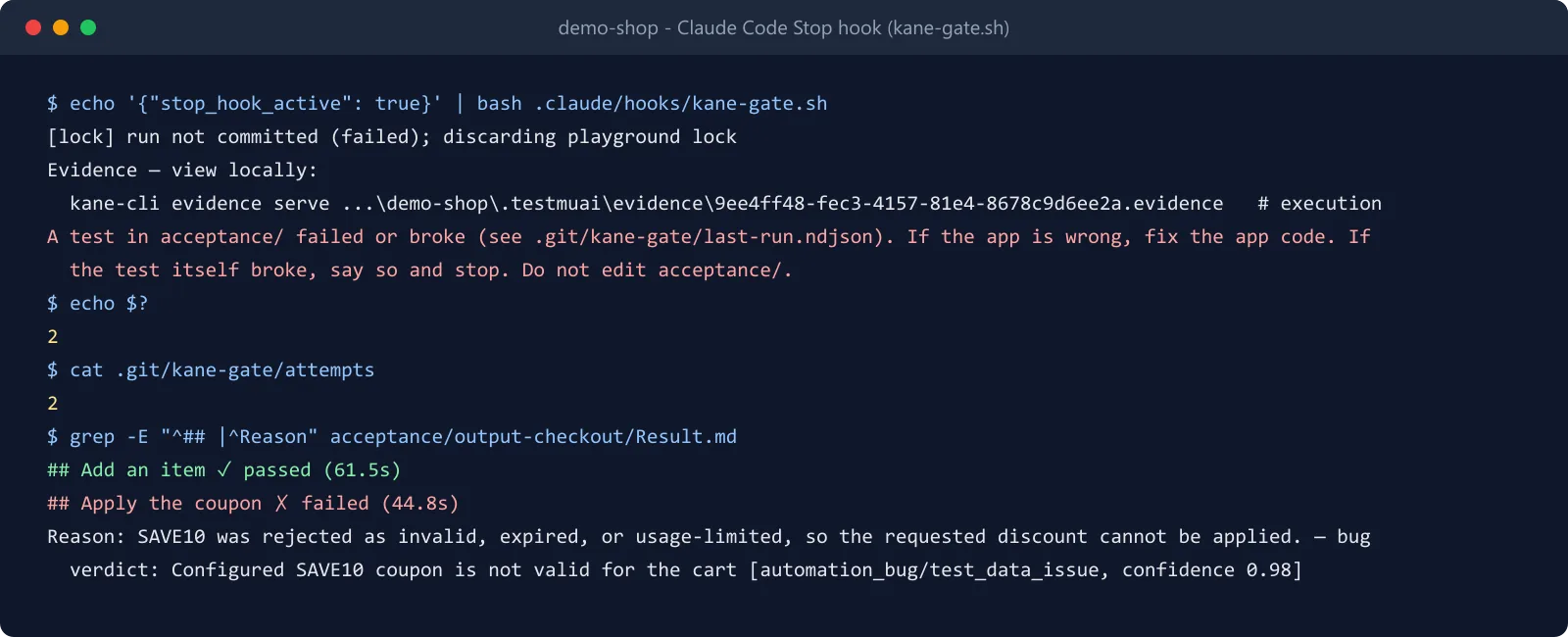
Step 3. Add the Stop hook. Stop hooks receive JSON with a stop_hook_active field, which is true when Claude is already continuing because of a stop hook. Exit code 2 keeps Claude working and sends it your message. The script skips the run when your code hasn't changed since the last passing run, and allows three fix attempts before handing back to you:
#!/usr/bin/env bash
# .claude/hooks/kane-gate.sh  (needs jq and git)
cd "${CLAUDE_PROJECT_DIR:-.}" || exit 1
command -v jq >/dev/null || { echo "kane-gate: jq not found, gate not run." >&2; exit 1; }
git rev-parse --git-dir >/dev/null 2>&1 || { echo "kane-gate: not a git repository, gate not run." >&2; exit 1; }
input=$(cat)
state="$(git rev-parse --git-dir)/kane-gate"; mkdir -p "$state"   # kept inside .git, nothing to gitignore

# Skip when the code is unchanged since the last passing run (tracked and untracked files),
# leaving out the evidence packs and output-*/ recordings that Kane CLI rewrites on every run
skip=(-- . ':(exclude).testmuai' ':(exclude)*/output-*')
sig=$( { git diff HEAD "${skip[@]}" 2>/dev/null; git ls-files -z --others --exclude-standard "${skip[@]}" | xargs -0 git hash-object 2>/dev/null; } | git hash-object --stdin )
[ "$sig" = "$(cat "$state/passed" 2>/dev/null)" ] && exit 0

active=$(echo "$input" | jq -r '.stop_hook_active')
[ "$active" != "true" ] && echo 0 > "$state/attempts"           # fresh stop: reset the counter
attempts=$(cat "$state/attempts" 2>/dev/null || echo 0)
if [ "$attempts" -ge 3 ]; then
  echo "Kane CLI gate still failing after 3 attempts. Handing back to a human." >&2
  exit 1                                                        # non-blocking: shown to the user
fi

kane-cli testrun run --match '^acceptance.' --agent > "$state/last-run.ndjson"   # '.' also matches Windows path separators
code=$?
case "$code" in
  0) echo "$sig" > "$state/passed"; exit 0 ;;
  1) echo $((attempts+1)) > "$state/attempts"
     echo "A test in acceptance/ failed or broke (see $state/last-run.ndjson). If the app is wrong, fix the app code. If the test itself broke, say so and stop. Do not edit acceptance/." >&2
     exit 2 ;;                                                  # blocks the stop; Claude keeps working
  *) echo "Kane CLI could not finish the suite (exit $code: setup, auth, or cancelled/timed out). A human should check." >&2
     exit 1 ;;
esac
Register it in .claude/settings.json:
{
  "hooks": {
    "Stop": [
      { "hooks": [ { "type": "command", "command": "${CLAUDE_PROJECT_DIR}/.claude/hooks/kane-gate.sh", "timeout": 900 } ] }
    ]
  }
}
For testrun run, exit 0 means every test passed. Exit 1 means a test failed or broke, so the message asks Claude to read the NDJSON before touching app code. Any other code (2 for usage, plan or auth errors; 3 for canceled) goes to a human.
Command hooks time out after 600 seconds by default, and a timed-out hook doesn't block, so set the timeout above your suite's run time. Claude Code also caps stop-hook continuations at eight in a row. That count resets whenever Claude calls a tool, and every fix attempt calls tools, so the script's counter is what actually hands control back.
Step 4. Require it in CI. The Stop hook only runs on your machine. A required CI check applies to all agents (including Cursor, Codex and Antigravity), where an AGENTS.md rule is a preference that the agent can choose to skip.
# .github/workflows/acceptance-gate.yml
name: acceptance-gate
on: [pull_request]
jobs:
  kane-gate:
    runs-on: ubuntu-latest
    steps:
      - uses: actions/checkout@v4
      - run: npm install -g @testmuai/kane-cli
      - run: kane-cli login --username "${{ secrets.LT_USERNAME }}" --access-key "${{ secrets.LT_ACCESS_KEY }}"
      - run: kane-cli testrun run --match '^acceptance.' --parallel 4 --headless --agent
      - if: always()
        uses: actions/upload-artifact@v4
        with:
          name: kane-evidence
          include-hidden-files: true
          path: "**/*.evidence"
Make kane-gate a required status check. The agent can open a PR that adds criteria, and a code owner approves it. For bypass rules and skipped-check traps, see our practical quality gate for AI-built pull requests.
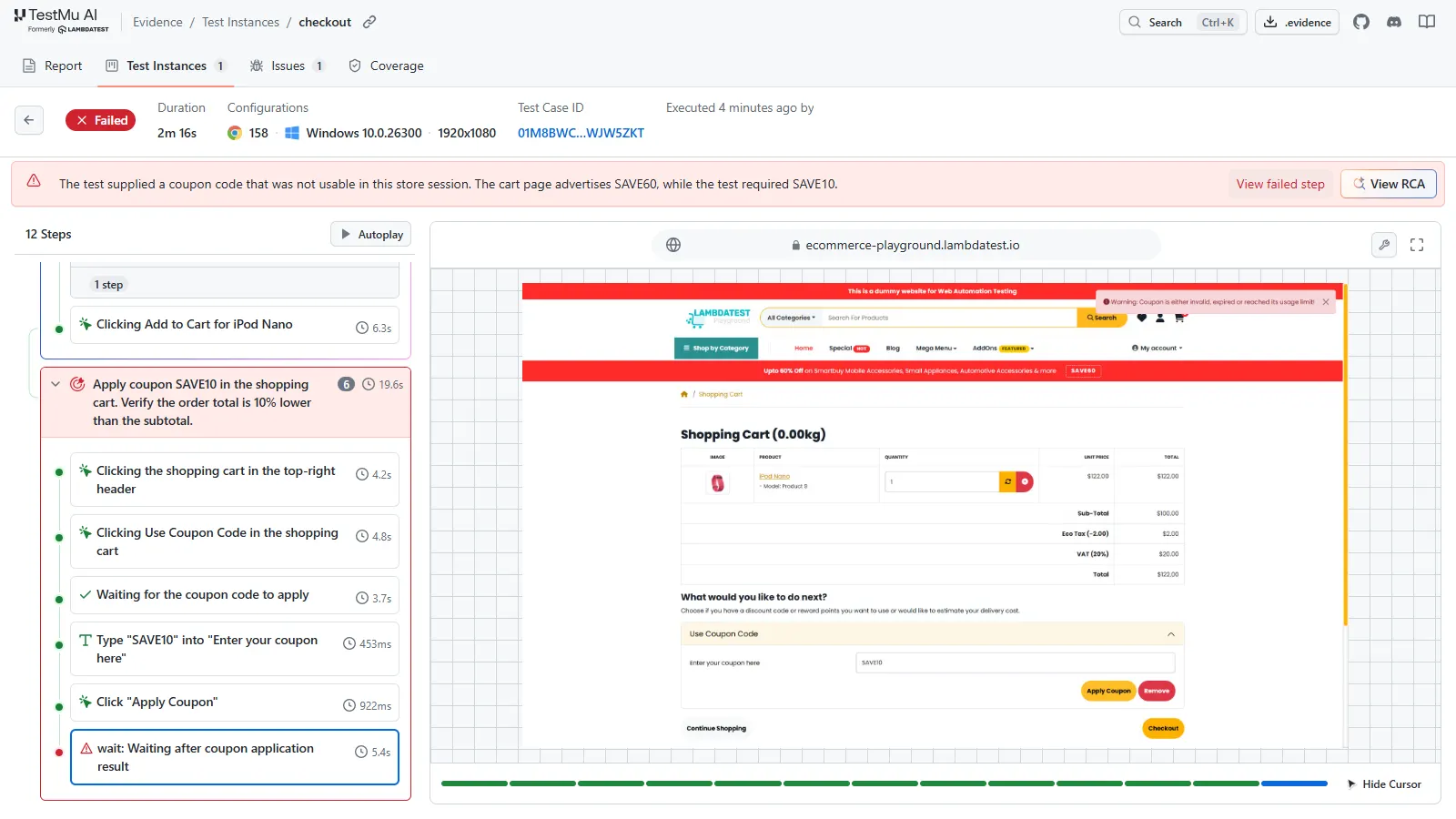
Step 5. Read the evidence. Open up any .evidence file at evidence.lambdatest.com to replay each step with the screenshots and network and console logs. Opening a file there uploads nothing. It will also upload to TestMu AI Test Manager by default (next to your test cases and Jira links).
What Doesn't an Independent Gate Replace?
An independent gate checks behavior against approved criteria. Four things stay outside it:
- Semantic drift. If a button keeps its label but now goes to a different place, then Kane CLI is designed to fail the step rather than just carry on. That's a harder case to catch than a moved element, and bug classification is quite openly partial when the app state isn't deterministic.
- Security. Veracode's October 2026 update saw the average AI code security pass rate at 62% across the 18 models. End-to-end tests are used to assess behavior, and they don't in any way replace SAST, dependency checks or security review.
- Code review and unit tests. These cover maintainability and the edge cases inside a function.
- Evals and observability. LLM features require evals on output quality, and production monitoring scores will be in place on live traffic after release.
What Does Running Auto Mode Without a Gate Cost?
Running auto mode without an independent gate adds change volume with nothing new checking the outcomes. The 2025 DORA report (from nearly 5000 tech professionals) found that AI adoption is still correlated with lower software delivery stability and names the control systems that teams need: "strong automated testing, mature version control practices, and fast feedback loops".
Within Team and Enterprise adopters, Anthropic reports that auto mode users ship around 25% more PRs, with no published method.
In the 2025 Stack Overflow survey, 45.2% of developers said debugging AI-generated code takes longer.
For the CIO and the Founder, the Auditor and the Customer Will All Be Asking, "Why Did That Change Get Shipped?"
A gate gives you a replayable record of that: the criteria that your team approved, the build, the verdict and the evidence. That record is in the systems that your team owns (Test Manager, your CI artifacts, etc.). Your team defines what "done" means via the criteria in your repo, and the coding agent works to that definition.
Gate Your Next Auto-Mode Session
TestMu AI has 3M+ users and 18k+ enterprises across 132 countries, running 1.5B+ tests per year. It's a Leader in the 2026 Gartner® Magic Quadrant™ for Agentic Software Quality Assurance Platforms and was recognized in The Forrester Wave™: Autonomous Testing Platforms, Q4 2025.
Auto mode determines which actions are safe. Your acceptance criteria will determine when the work is complete. Kane CLI is free to install, and new accounts are given 10,000 credits for 30 days.
npm install -g @testmuai/kane-cli && kane-cli loginConclusion
Claude Code auto mode, like Antigravity Auto, Codex Auto-review and Cursor's Run Everything, settles whether an action may run. Checking that the finished feature works is left to Claude itself, the same model that wrote the change, so a misread requirement can still pass.
To close that gap, keep acceptance criteria a person approves in acceptance/, run them with Kane CLI from a Stop hook before Claude can finish, and require the same suite as a CI check that saves an .evidence file for every verdict.
Testing from the terminal? Kane CLI by TestMu AI lets SDETs and developers plan, write, run and debug tests from the command line.
Sources
- Claude Code permission modes
- Claude Code Desktop
- Claude Code hooks
- Anthropic: auto mode default
- Antigravity permissions
- Antigravity changelog
- OpenAI Codex approvals and security
- Cursor run modes
- Cloud Agents release notes
- Cursor forum (YOLO nickname)
- Cognition: Introducing SWE-2.1
- TestMu AI Verification Bench
- arXiv 2606.18168
- CodeRabbit
- Kane CLI
- Kane CLI README
- CLI reference
- TestMu AI: Claude Code browser
- KaneAI
- DORA 2025
- Stack Overflow 2025 survey
- Veracode, Oct 2026
- TestMu AI
Author

Asad Khan
Blogs: 10


Asad Khan is the Co-Founder and CEO of TestMu AI, with over 15 years of experience in software testing, product strategy, and leadership. Under his leadership, TestMu AI has grown into an AI-native software testing platform trusted by 2.5M+ users across 132 countries, including startups, enterprises, and Fortune 500 companies. He is a member of the Forbes Technology Council and is followed by 39,000+ professionals on LinkedIn from the software testing and quality assurance community. Before TestMu AI, Asad co-founded 360logica, a software testing company that he grew into a multi-million-dollar business before its acquisition by Saksoft. Earlier, he began his career at GlobalLogic as a Lead Engineer serving top Wall Street banks. He holds a Bachelor of Technology from JSS Academy of Technical Education, Noida.
Reviewer

Maneesh Sharma
Reviewer
Maneesh Sharma is Chief Operating Officer at TestMu AI, where he leads the company's revenue functions across go-to-market, sales, RevOps, customer success, and the partner ecosystem, driving its global expansion. He brings over 28 years of experience across product, go-to-market, and business operations. Before TestMu AI he was Managing Director and General Manager for GitHub across India and APAC, Head of Partner Sales and Ecosystem at Adobe, Chief Revenue Officer at WizIQ, and Head of Products and Solutions at SAP India. Maneesh holds an MBA from IIM Bangalore and a B.E. in Electronics and Communications from NIT Surat.


Claude Code Auto Mode FAQs
Did you find this page helpful?
More Related Blogs

TestMu AI forEnterprise
Get access to solutions built on Enterprise
grade security, privacy, & compliance
- Advanced access controls
- Advanced data retention rules
- Advanced Local Testing
- Premium Support options
- Early access to beta features
- Private Slack Channel
- Unlimited Manual Accessibility DevTools Tests