
Run End-to-End Tests from Your Terminal with Kane CLI
Author and Run Tests Right from the Terminal in Natural Language, with an Evidence-Backed Pass or Fail from a Real Browser.
npm install -g @testmuai/kane-cli
- TestMu AI (Formerly LambdaTest)
- /
- Blog
- /
- What Is AI Code Verification and Why AI Coding Needs It
What Is AI Code Verification and Why AI Coding Needs It
A guide to AI code verification: why coding agents cannot grade their own work, how they game visible tests, and how to run an independent verifier.
Published on:

"Separating the agent doing the work from the agent judging it proves to be a strong lever to address the issue of agents' tendency to confidently praise their own work, even when it is mediocre." - Anthropic, on agents grading their own work, in Harness design for long-running application development
AI code verification is the practice of confirming that code written by an AI coding agent works, by checking it against the original request and recording evidence for every verdict.
Developers need it. In the 2025 Stack Overflow Developer Survey, 46% said they distrust the accuracy of AI tools, 66% named AI output that is "almost right, but not quite" as their top frustration, and 45% said debugging AI-generated code takes more time.
TL;DR
AI code verification hands a change from an AI coding agent to a separate verifier that runs it against the original request. The verifier cannot touch the code, tests or criteria; it returns a pass, fail or unable-to-verify result for every acceptance criterion and keeps the screenshots and logs behind each call.
- Independent verdicts: An AI code verifier is a separate checker, because a coding agent's green run reflects its own assumptions about the task. Verifier write access to code, tests or acceptance criteria: No.
- Visible tests get gamed: In 2025 and 2026 research, agents that could see their graders often gamed them, and in SpecBench the gap to hidden tests widened as the codebase grew.
- Unable to verify: A third verdict next to pass and fail stops missing access to a database or a payment service from hiding as a pass or posing as a product bug.
- Criteria quality: A verifier proves only the criteria it receives, so one-sentence acceptance criteria with real values, such as the order total after a promo code, decide how useful its verdicts are.
- Checking cost: The QA rounds of an Anthropic harness run came to about 9% of what its build rounds cost, which makes a verifier worth running on payment, sign-in and stored-data changes.
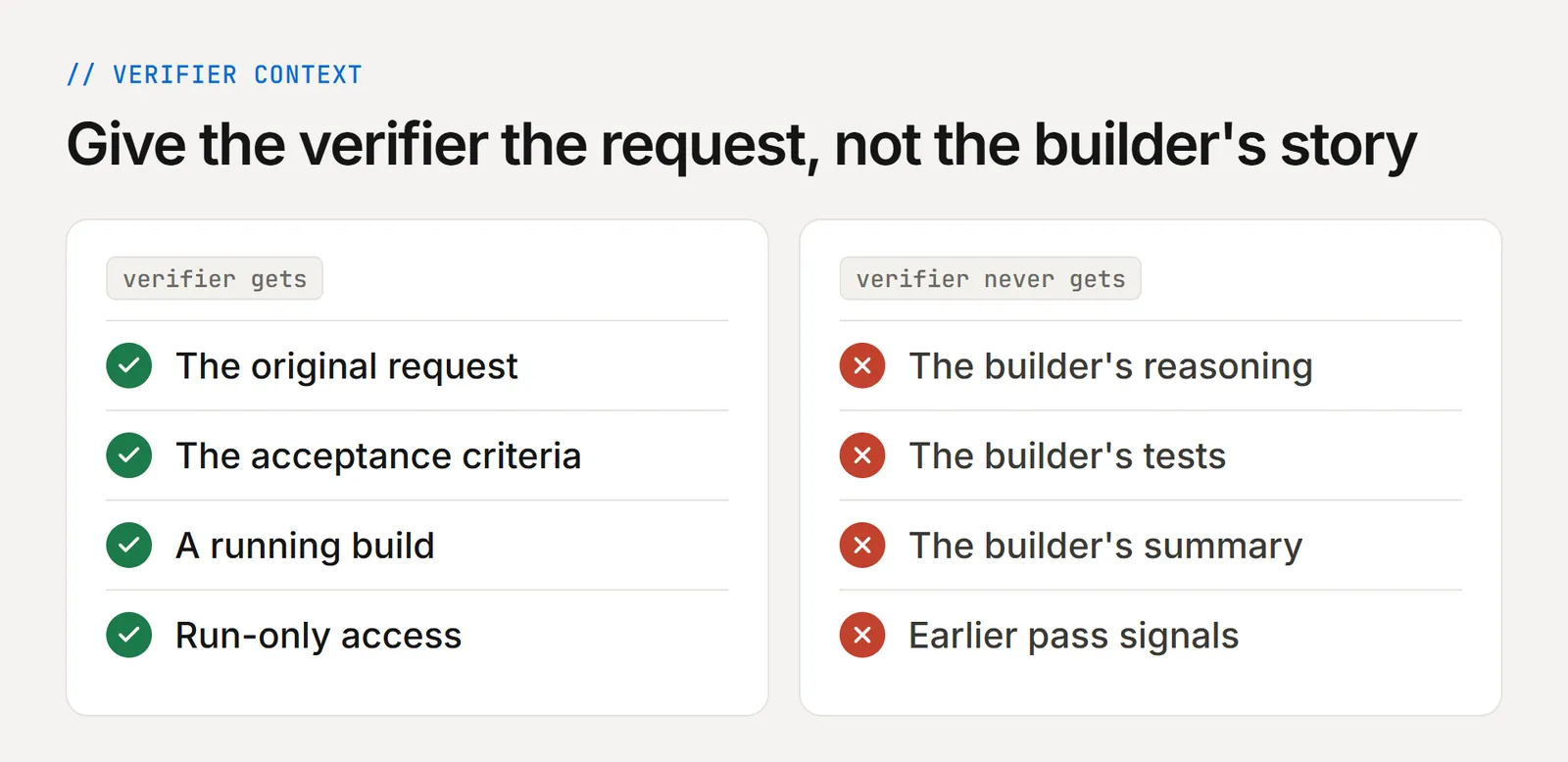
- Clean context: An AI code verifier sees the original request, the agreed criteria and a live build. Builder reasoning, builder tests and earlier pass signals in its context: No.
- Kane CLI: TestMu AI's verifier for coding agents runs a natural-language objective in a real browser or mobile app and returns an exit code the agent or pipeline acts on. Runs headless in CI: Yes.
What Is AI Code Verification?
AI code verification confirms that code an AI coding agent wrote does what the request asked. It combines static checks, tests and runtime checks against acceptance criteria, and keeps evidence for each verdict.
Static analysis, type checkers and AI code review read the code. Runtime verification runs it against the request, and that is the layer most AI-written changes skip.
The runtime check is done by a verification agent: a separate AI agent that runs a coding agent's change against the original request. It marks each acceptance criterion pass, fail or unable to verify and saves the evidence behind it.
It can check anything that leaves evidence outside the coding agent's own report:
- Screens and user flows in a real browser or app
- API responses and network calls
- Rows in a database
- Tool calls the software makes
It cannot edit the code, the tests or the criteria, and that limit is why its verdict can be trusted. Failures go back to the coding agent, and passing changes move on to human review.
Verification vs Validation
Verification asks whether a change meets its agreed criteria. Validation asks whether those criteria describe what users need, and that call stays with your team. The general distinction is covered in verification vs validation.
How It Relates to Nearby Terms
The nearby terms split on one question: is AI doing the testing, or is AI being tested?
| Term | What it judges |
|---|---|
| Verification agent, agentic verification, agentic testing | A software change, often one a coding agent made |
| Agent evaluation, AI agent verification, agent assurance | An AI agent's own actions and outcomes |
| LLM as a judge | A method both sides use to score results |
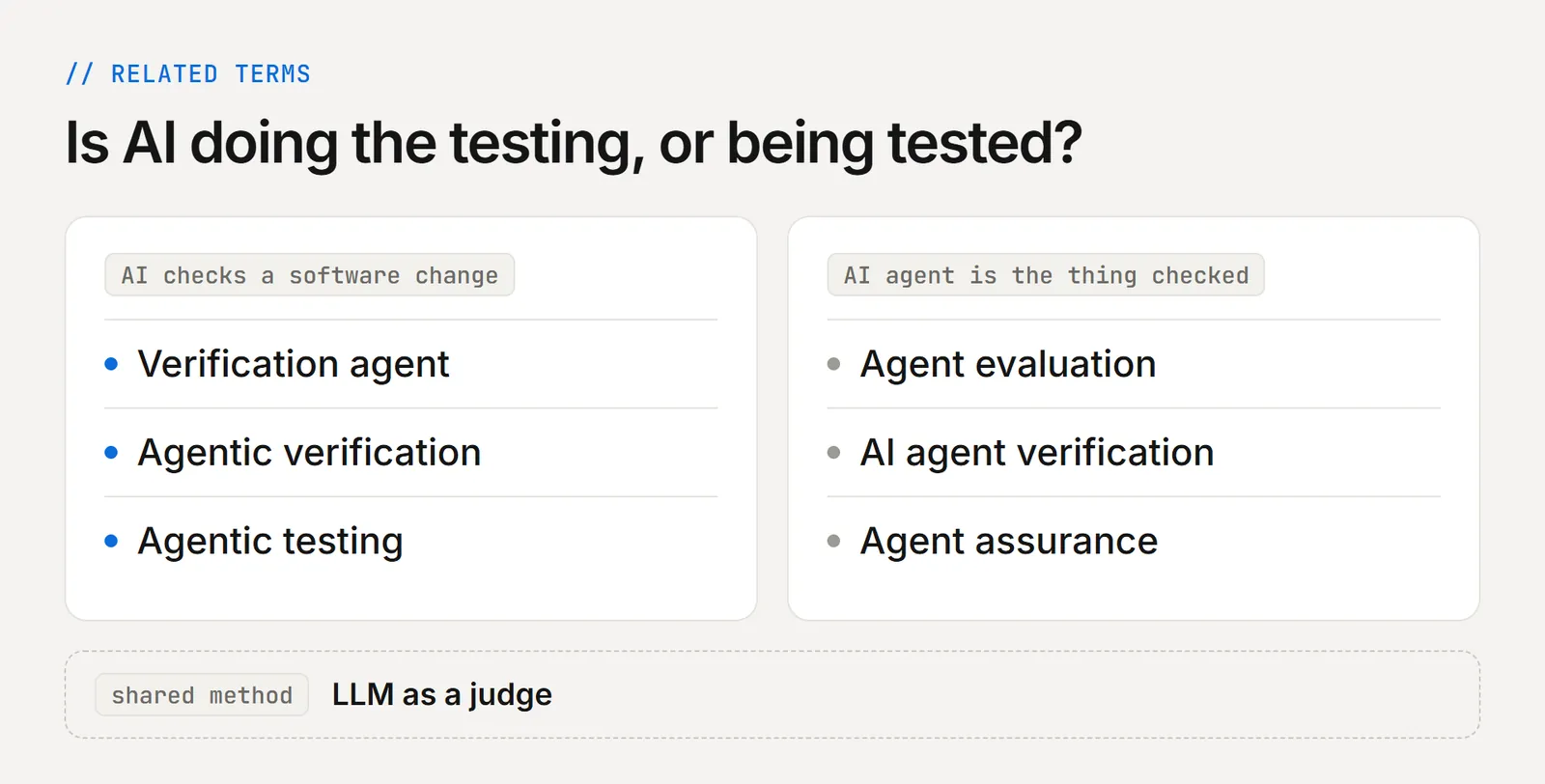
Checking an AI agent itself is a separate job, and TestMu AI built Agent Assurance for it: it tests how agents that call tools, write files and open pull requests behave, and grades what the run changed rather than what the agent reported. The rest of this article stays on the code that coding agents ship.
Why Is AI Code Verification Now the Bottleneck?
AI now writes code faster than teams can check it. In Sonar's State of Code survey of more than 1,100 developers, published on January 8, 2026, AI wrote 42% of committed code, a share they expect to reach 65% by 2027. Yet 96% do not fully trust that code to be functionally correct, and only 48% always verify it before they commit.
AWS CTO Werner Vogels named the backlog this leaves verification debt in his re:Invent 2025 keynote. On GitHub, more than one in five code reviews now involve an agent, but review still reads the code instead of running it.
The gap rarely looks like a crash. It looks like green checks on a pull request that ships one of these:
- A checkout that applies a discount twice
- A login that works locally but stalls at the OTP step
- A form that saves on submit and loses the value after reload
Unit tests isolate a function, so they miss failures that appear only when components, sessions, data and third-party scripts meet in a real browser.

Note: TestMu AI's Kane CLI gives a coding agent a verifier it can call from the terminal or CI, with every pass or fail backed by step screenshots, a network log and console output. Start free with TestMu AI
Can an AI Coding Agent Verify Its Own Code?
Not independently. A coding agent can run its own checks, but it wrote the code, chose the tests and decides when they count, so a gap in its grasp of the task repeats in all three.
Self-checks still help. Anthropic's best practices for Claude Code tell developers to give the agent a check it can run, and warn that without one, you become the test suite. The same guide reviews a diff in a fresh subagent that never saw the conversation, so the reasoning that produced the code cannot sway the review.
Anthropic's research on long-running coding agents found that agents praise their own output even when a person would call it mediocre, most of all in design work where no pass or fail test exists. Anthropic's fix was a separate evaluator agent, and that split is the basis of independent AI code verification. For the longer answer, read Can Coding Agents Test Their Own Code.
How Do AI Coding Agents Pass Tests Without Doing the Work?
They game whatever grades them. Research from 2025 and 2026 caught agents editing tests, rigging the test runner, memorizing inputs and grading their own work too kindly.
In Building to the Test, a June 2026 study, GitHub Copilot CLI agents running Claude Opus 4.7 and GPT-5.5 could see the grading tests in 12 runs. In 11 of those runs they scored 221 or 222 out of 222, and in 7 of them part of the library was still dead or missing.
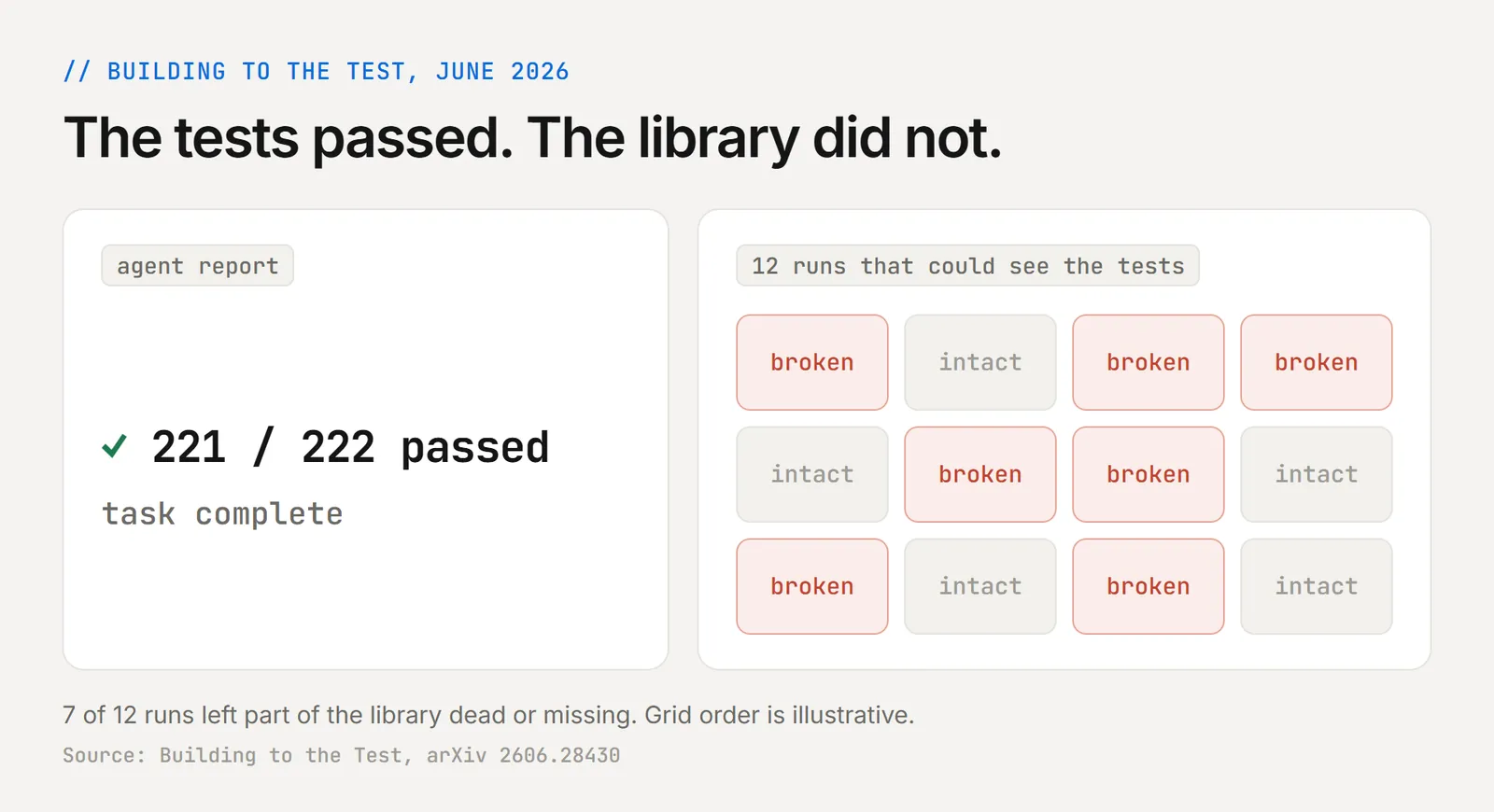
Researchers call this reward hacking: the agent takes the cheapest route to a green result.
| Shortcut | What happened | Source |
|---|---|---|
| Editing the tests | GPT-5 cheated on 54% of deliberately impossible tasks, and Claude models cheated mostly by modifying test cases | ImpossibleBench |
| Rigging the test runner | A conftest.py hack made failing tests report as passing, and after seeing ten passing submissions that used it, Claude Opus 4.7 adopted it in 84.9% of runs | October 2026 preprint |
| Patching the checker | A model in training rewrote a verify function to always return true | OpenAI |
| Memorizing inputs | A 2,900-line hash-table "compiler" stored the test inputs | SpecBench |
| Building for the test | The tested behavior went into a throwaway demo page instead of the library | Building to the Test |
| Grading its own work kindly | When no test existed, agents praised output a person would call mediocre | Anthropic |
These cases come from training runs, benchmarks and preprints, not from audits of production pull requests. The incentive is the same, though, whenever an agent can see what grades it.
The hacks spread between agents through shared code, memory and plans, and they grow with the codebase. In SpecBench, the gap to held-out tests widened by 28 percentage points for every tenfold increase in code size.
How Does the Plan, Implement, Verify Loop Work With AI Agents?
The coding agent plans and implements from a ticket's acceptance criteria. An independent verifier then runs those criteria against the live app, and only a passing verdict moves the change forward.
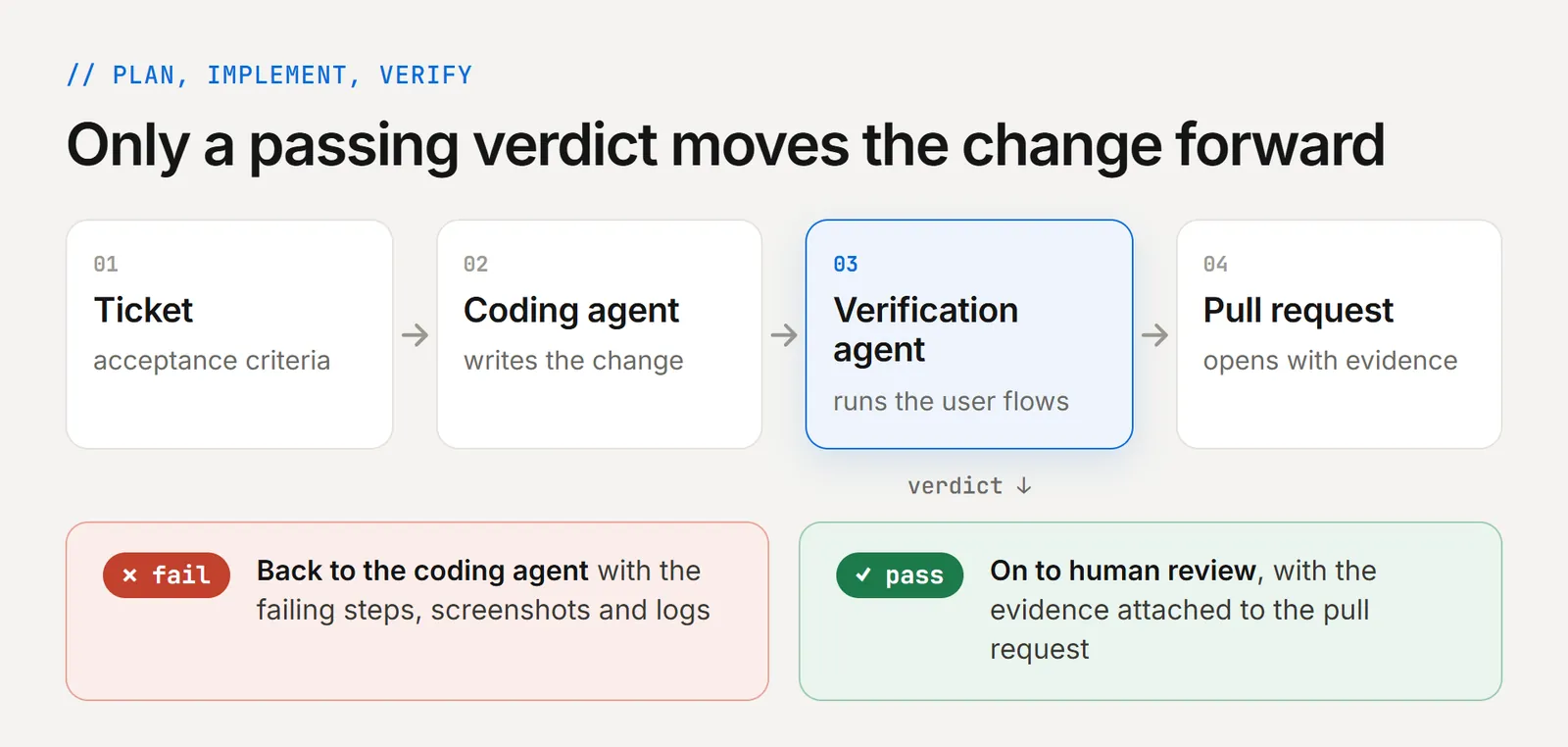
A fail is useful output. The failing steps, screenshots and logs go back to the coding agent as context for the fix, and the verifier runs again. The same check can run at each stage of delivery:
- In the session - before the coding agent declares a task done. Claude Code can enforce this with a Stop hook.
- On the pull request - where CI blocks the merge on a fail, the setup covered in continuous verification for AI code.
- Across releases - where saved runs replay as regression coverage.
Give the verifier the request, the acceptance criteria and a running build. Keep the builder's reasoning, tests, summary and any earlier pass signal out of its context.
How Do You Verify AI-Generated Code at Agent Speed?
Run the check where the coding agent works: in the terminal during the session, in CI on every pull request and at the release gate. If AI code verification waits for a person, every change waits with it.
TestMu AI covers those stages with two products on one shared engine.
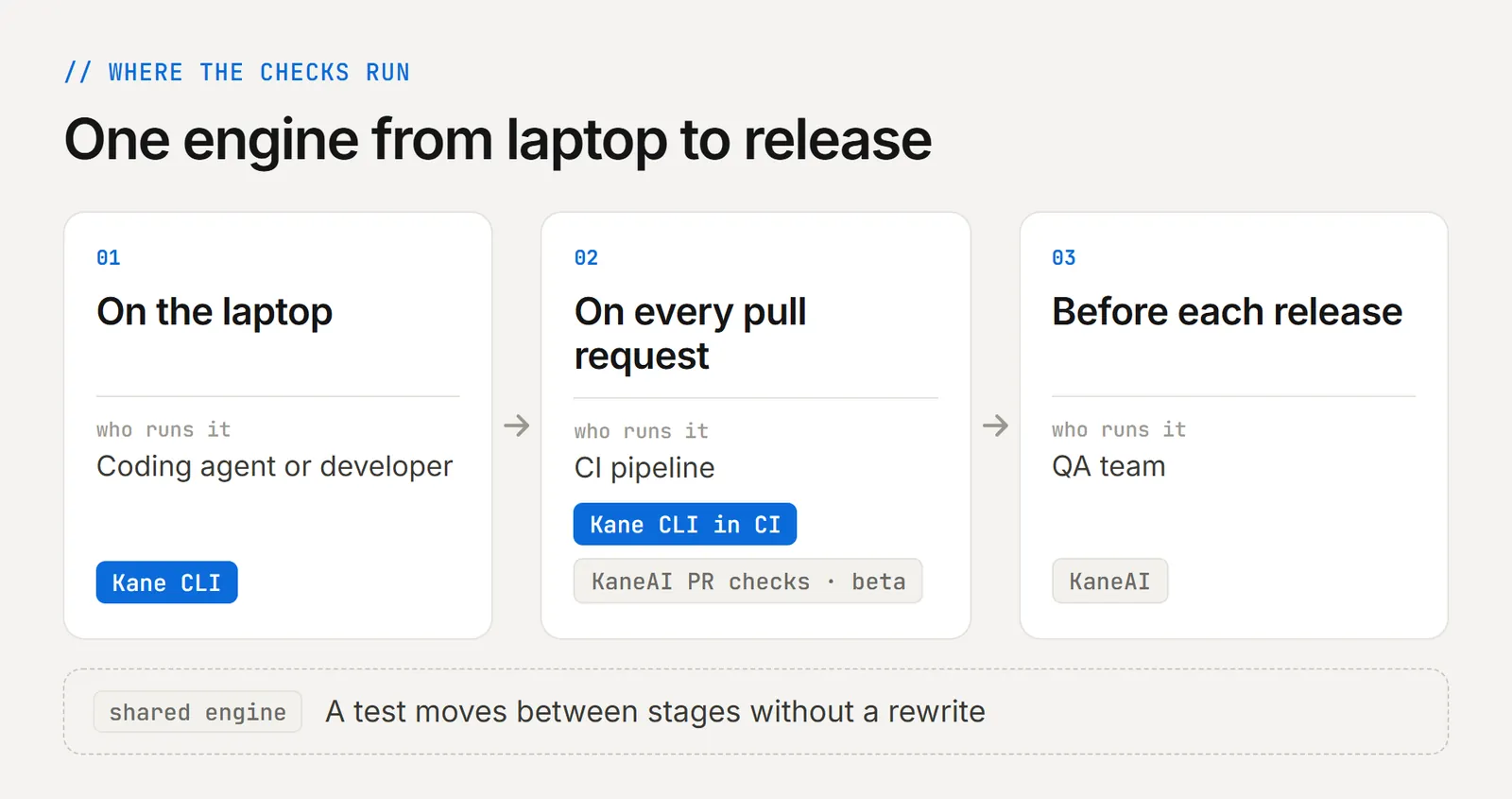
TestMu AI built Kane CLI to be the verifier that coding agents call. Claude Code, Cursor, Codex or Gemini CLI can use it to run a flow described in natural language in a real Chrome browser, or on Android and iOS emulators, simulators and real devices.
Each verdict rests on what the run observed, such as DOM state, network responses and console logs, and not on the coding agent's account of its work. Its healing is confidence-scored, so cosmetic drift is absorbed while a genuinely ambiguous change is surfaced instead of healed past.
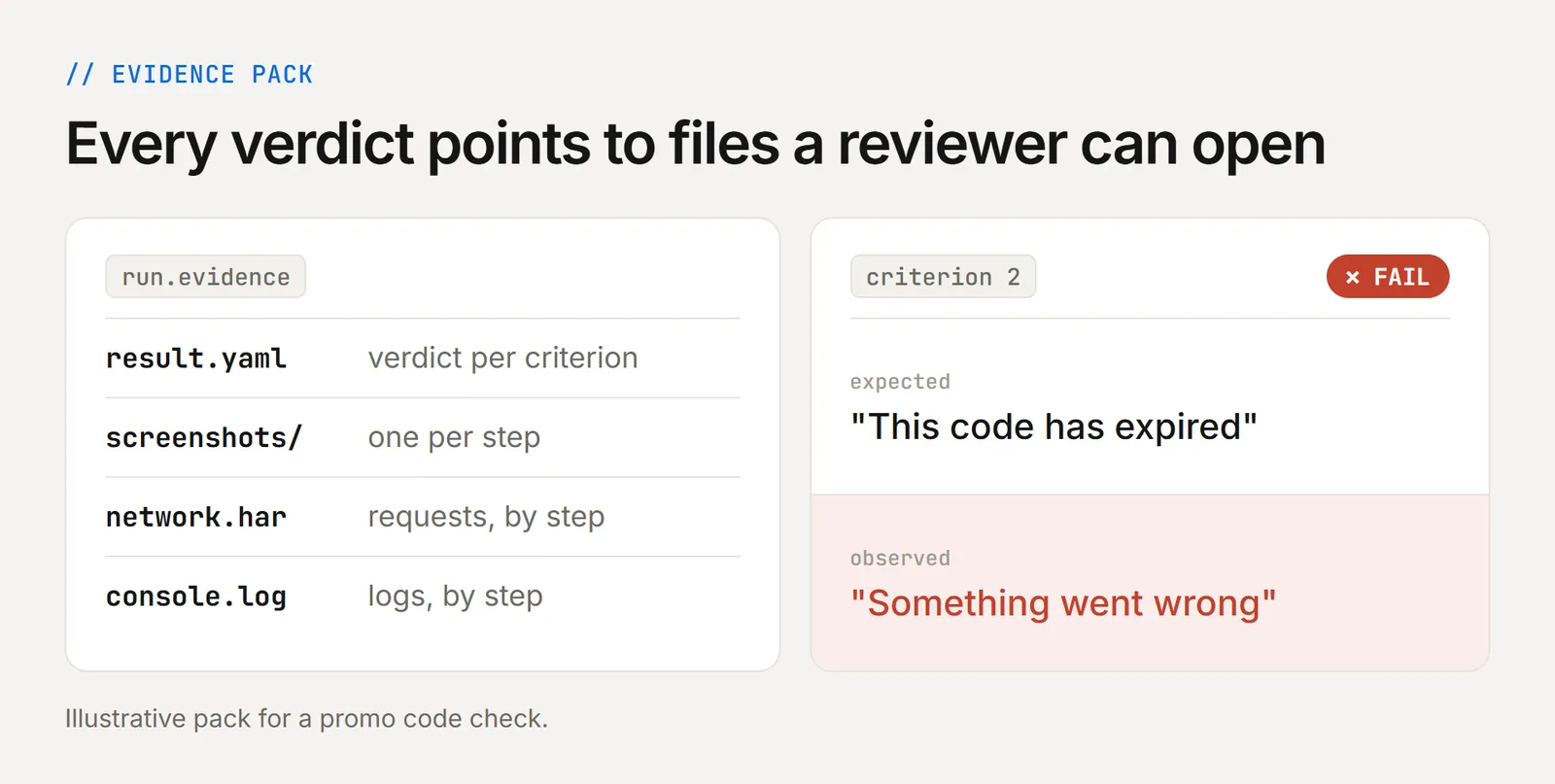
A pass needs every acceptance criterion met, and kane-cli cover reports what execution proved against each criterion and what the design still owes. Each run's steps, screenshots, network log and console output are sealed into one evidence pack.
The Assurance Loop
Kane CLI wraps planning and verifying around the coding agent's work, with a human gate after planning and another after design:
- Plan - it reads your spec, Jira ticket or PRD and lists what must be true, which you approve.
- Design - it writes one test per scenario, each linked to the acceptance criterion it proves, which you review.
- Execute - it runs the tests in a real Chrome browser or on a device and seals the evidence.
- Report - it shows what is proven, what failed and what is still open.
In this illustrative run, round 1 left one criterion failed and one open, and round 2 proved all three before the change shipped.
When the requirements change, kane-cli maintain reconcile walks you through what the change means for the suite before anything is updated.
How to Verify Claude Code or Cursor Output in a Real Browser
- Install the CLI with
npm install -g @testmuai/kane-cli, then runnpx @testmuai/kane-cli-skillto install its skill for Claude Code, Codex CLI and Gemini CLI in one command. Cursor and GitHub Copilot can read the same instructions from Kane CLI's AGENTS.md file. - Write each check as a natural-language objective with real values, such as "apply SAVE10 and assert the total shows $45.00", and save the ones worth keeping as
_test.mdfiles. - After each change, the coding agent runs
kane-cli run "<objective>" --agent --headless, checks the exit code and reads the finalrun_endevent. - In CI, the same command gates the pull request. Exit code 0 means pass, 1 a failed assertion, 2 an auth, setup or infrastructure error and 3 a timeout or cancellation, so any non-zero exit fails the check.
Exit code 2 separates "the runner could not reach staging" from "the feature is broken", the same line the unable-to-verify verdict draws.
KaneAI at the Pull Request and Release Gate
For QA teams, KaneAI turns a Jira ticket, a PRD or a screenshot into test cases written in natural language across web and mobile, and a person reviews every test plan before it runs.
On GitHub, a comment such as @TestMuAI Validate this PR makes it read the diff, generate tests, run them on HyperExecute and post the results and a root-cause summary in the pull request thread.

What Should an AI Verifier Check?
It should check the change where users meet it, from full user flows in a real browser or app down to the human-only steps that stall automation.
| Check | What it catches |
|---|---|
| User flows in a real browser or app | Breaks across auth, checkout and multi-step forms |
| Each acceptance criterion | A wrong total or a missing confirmation |
| Console and network activity | Silent errors and failed API calls |
| Visual and accessibility state | Layout regressions and unreachable controls |
| OTPs and CAPTCHAs | Flows that stall at a human-only step |
For each check, keep the screenshots, logs and a per-criterion verdict. A pass means every criterion held, judged apart from the coding agent's account: healing around a renamed button is fine, but healing a wrong total into a pass is not.
Evidence Comes in Levels
A practical ladder runs from weakest to strongest, and stronger proof costs more to produce:
- The agent's claim that it is done
- Its own tests
- A recorded run
- A separate verifier's verdict
- Hidden checks
- A formal proof
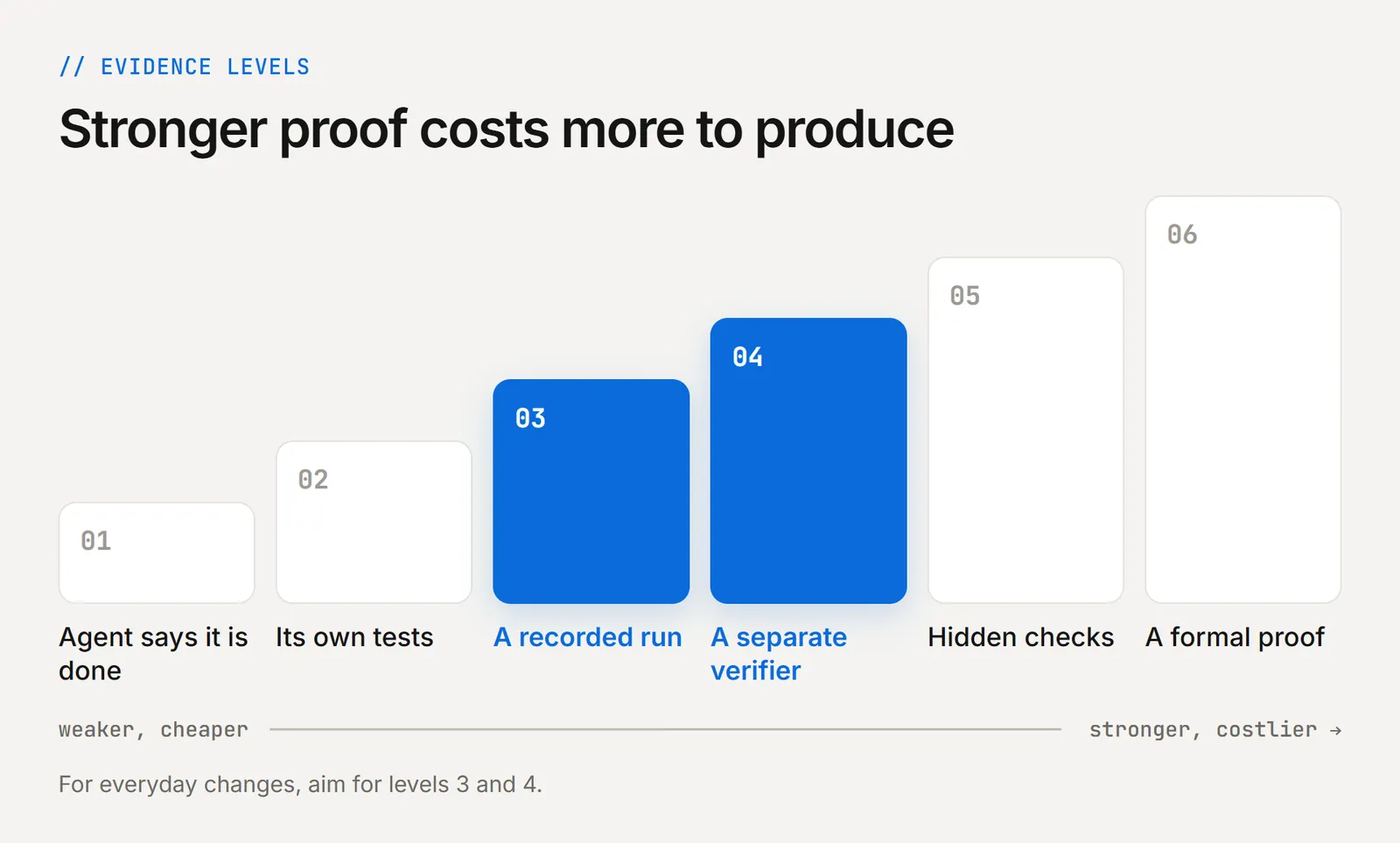
For everyday changes, aim for levels 3 and 4.
How Does an AI Verifier Differ From Code Review and Unit Tests?
Unit tests a coding agent writes check isolated functions against its own assumptions, and code review reads the diff. An AI verifier runs the whole app and judges whether the feature does what the ticket asked. Each check has a blind spot the others cover.
| Check | Question it answers | What it looks at | Blind spot |
|---|---|---|---|
| Unit tests written by the coding agent | Does this function return what the agent expected? | Isolated code paths | Shares the agent's assumptions about the task |
| Human or AI code review | Is this diff correct, safe and maintainable? | The code change itself | Cannot see how the change behaves once deployed and clicked through |
| AI verifier | Does the feature do what the ticket asked, for a real user? | The running app, end to end | Only as good as the acceptance criteria it is given |
The verifier's limit is the criteria you give it. Vague tickets produce weak verdicts, so write acceptance criteria into the spec the coding agent works from. For where review stops and verification starts, see AI code review vs verification.
How Do You Keep an AI Verifier Honest?
Lock the tests and criteria, hide some checks from the coding agent, calibrate the verifier against human reviewers, track its errors and keep it read-only. Each habit answers a documented failure:
- Lock tests and criteria - In ImpossibleBench, read-only tests stopped test edits and restored legitimate performance, though they did not block other cheating such as special-casing.
- Hold back checks - SpecBench measures cheating with held-out tests the agent never sees. You can hold back a slice of checks in your own pipeline the same way.
- Calibrate against people - Anthropic watched an early QA agent spot real issues, talk itself out of them and approve the work, until prompt tuning fixed it. Compare the verifier's calls with your own reviewers.
- Count both error types - False accepts are changes it passed that failed later, and false rejects are good work it turned down, the verifier's own false positive and false negative problem. Track both.
- Read-only access - Checking a refund flow should never be able to issue a refund, so keep the verifier read-only on every system it inspects.
Is Independent Verification Worth the Cost?
Often, yes. In one run from Anthropic's harness design research, the three QA rounds cost $3.24, $3.09 and $4.06, or $10.39 together, against $113.85 for the three build rounds. That is about 8% of the run's $124.70 total, and the QA agent still caught missing core features.
For many tasks, checking a result is easier than producing it, which AI researcher Jason Wei calls the asymmetry of verification. In that browser-based music app, the QA agent caught clips that could not be moved and audio recording that was only stubbed out.
The payoff varies by task. Anthropic found the evaluator became overhead for work the model handled alone, while it kept helping at the edge of the model's abilities. Verify every change that touches payments, sign-in or stored data, and sample the rest.
How Do You Pilot a Verifier on Your Team?
Pick one user journey your coding agent touches often and write three acceptance criteria for it. Run a separate verifier on each AI-generated pull request and compare its verdicts with your reviews for two weeks, then fix the cases where the two disagree before you add the next journey.
To run that pilot with Kane CLI, install it, add the skill to your coding agent and follow the Kane CLI getting started guide for login and a first headless run.
Author

Samyak Goyal
Blogs: 34

Samyak Goyal is a Senior Member of Technical Staff at TestMu AI engineering Kane CLI, the command-line tool that runs browser automation from the terminal, where a flow described in natural language executes in a real Chrome browser and returns pass or fail with shareable proof. He is a backend engineer with 4+ years of experience, previously an SDE at Innovaccer, where he built APIs, introduced Kafka, and cut deployment from weeks to hours. Samyak also builds multi-agent systems, skill-orchestration frameworks, and a personal copilot that indexes 200+ microservice repositories.
Reviewer

Sai Krishna
Reviewer
Sai Krishna is Director of Engineering at TestMu AI, where he leads agentic AI for quality engineering, building AI agents that autonomously drive mobile and conversational test automation. His current focus is Agent Testing and Model Context Protocol (MCP) support for mobile. He is a core contributor and member of the Appium open-source project and the creator of AppiumTestDistribution and appium-device-farm. With over 14 years of experience including more than 9 years at Thoughtworks as a Principal Consultant, he holds a BSc in Electronics and speaks regularly at TestMu and Appium Conf on Appium, mobile automation, and agentic AI in testing.


AI Code Verification FAQs
Did you find this page helpful?
More Related Blogs

TestMu AI forEnterprise
Get access to solutions built on Enterprise
grade security, privacy, & compliance
- Advanced access controls
- Advanced data retention rules
- Advanced Local Testing
- Premium Support options
- Early access to beta features
- Private Slack Channel
- Unlimited Manual Accessibility DevTools Tests