
Power Your Software Testing with AI Agents and Cloud
The Native AI-Agentic Cloud Platform to Supercharge Quality Engineering. Test Intelligently and Ship Faster.

- TestMu AI (Formerly LambdaTest)
- /
- Blog
- /
- Base44 vs Lovable: Features, Testing, and Security Compared
Base44 vs Lovable: Features, Testing, and Security Compared
Base44 vs Lovable compared on stack, Git sync, built-in testing, security scans, and credits, plus a TestMu AI probe of 47 live template apps from both tools.
Published on:
Base44 and Lovable both turn one prompt into a hosted app with sign-in and a database, yet neither builder's own tester runs against the URL your users open. The Base44 testing agent works in a separate environment and Lovable's browser testing runs on the project preview, so the published app, with its production data and custom domain, is the version neither one checks.
This Base44 vs Lovable comparison sets the two AI app builders side by side on stack, code export, built-in testing, security scans, and credits, using each vendor's current documentation. It also loads live template apps from both official galleries on TestMu AI's cloud browsers with the same checks, and runs a Kane CLI test against a published Lovable app.
TL;DR
Base44 vs Lovable is a choice between two AI app builders that turn a prompt into a hosted web app with a database and sign-in. Base44 keeps the code, backend, and hosting on its managed platform. Lovable writes React code you can sync to Git on any plan. Choose Base44 for managed internal tools and Lovable for code you own.
- Free plan: Yes on both Base44 and Lovable. Base44 Free includes 25 message credits a month, at most 5 a day, and up to 5 apps. Lovable Free grants 5 build credits a day, capped at 30 a month.
- Git sync on the free plan: Lovable: Yes, with two-way sync to GitHub, GitLab, or Bitbucket. Base44: No. Two-way GitHub sync and ZIP export start on the Builder plan, and exported Base44 code still relies on Base44 to run.
- Built-in login-form testing: No on both Base44 and Lovable. The Base44 testing agent signs in for you but cannot test a login form, OTP code, or email link. Lovable browser testing signs in only on its built-in backend and runs on the preview.
- Server-rendered pages: Lovable: Yes for TanStack Start projects, the default for new projects since May 13, 2026. Base44: No. Base44 serves browsers a hidden page summary first and crawlers a prerendered copy.
- Test IDs in generated apps: None of the 47 Base44 and Lovable template apps probed on TestMu AI cloud carried a data-testid or similar attribute, so tests on either builder locate elements by role and accessible name.
- Published-URL checks: Neither the Base44 nor the Lovable built-in tester runs against the published URL. TestMu AI's Kane CLI runs a plain-English check on the live app from either builder and exits with code 0 when the check passes.
What Is the Difference Between Base44 and Lovable?
Base44 and Lovable both turn a prompt into a hosted web app with a database, sign-in, and hosting. The difference is where the app lives afterward: Base44 keeps code, backend, and runtime on its own platform, while Lovable writes code you can sync to your own Git repository and, for new projects, renders pages on the server.
Base44 belongs to Wix, which announced the Base44 acquisition as a move further into vibe coding.
Lovable's built-in backend runs on Supabase's open-source foundation and covers the database, authentication, storage, and functions, with hosting handled by Lovable.
Lovable's TanStack Start upgrade guide says TanStack Start became the default for new projects on May 13, 2026, renders each page on the server, and that most upgrades of an older React + Vite project cost 10 to 35 credits.
| Dimension | Base44 | Lovable |
|---|---|---|
| Rendering | Client-rendered in the browser; crawlers get a prerendered copy | Server-rendered with TanStack Start for new projects; older React + Vite projects render in the browser |
| Backend | Data tables, users, backend functions, and integrations managed by Base44 | Built-in backend with database, authentication, storage, and edge functions, or your own Supabase project |
| Code editing | View on Free, edit on paid plans | Edit and download on Pro and above |
| Git | Two-way GitHub sync on Builder and above | Two-way sync to GitHub, GitLab, or Bitbucket on every plan |
| Built-in testing | Testing agent on every plan; separate test database on Builder and above | Rule tests written automatically; browser testing on the preview |
| Security scans | On demand on every plan; the publish panel warns but does not block | Quick scan on every publish; Deep scan of all app code on demand |
| Penetration testing | Tenzai integration | Aikido integration |
| Store apps | Native web view wrapper with App Store and Google Play files on Builder and above | Progressive Web App, or a wrapper such as Capacitor outside Lovable |
| Free plan | 25 message and 100 integration credits a month, up to 5 apps | 5 build credits a day, capped at 30 a month |
The TestMu AI short below compares the two builders on backend and development, then shows how to test whichever one you pick.

For each builder on its own, the Base44 review audits 58 live Base44 apps for accessibility and page weight, and the Lovable review covers Lovable's scans, compliance scope, and pre-launch checks.
How Do Base44 and Lovable Test the Apps They Build?
Base44 runs an agent that clicks through your key flows in a browser, while Lovable writes small automated tests for the rules you change and drives a browser on request. Neither one points at the URL your users open.
Base44's testing agent runs AI-generated or hand-written scenarios in a real browser on every plan, at around 1 to 4 credits a run. It signs in before each run, but flows that fill in a login form, enter an OTP code, or click an email verification link are not supported yet, and scheduled runs are still planned.
Lovable's testing documentation says it writes a test whenever you add or change a rule, such as a price, a limit, or a permission, and runs the covering tests before it reports the work as done. Frontend tests use Vitest, React Testing Library, and jsdom, and edge function tests are written only when you ask.
Lovable's browser testing always runs against the preview of the project you have open. Its documented limits include canvas tools, complex upload widgets, drag-and-drop, subtle visual details, and icon-only buttons, and signed-in pages are testable only on Lovable's built-in backend.
| Question | Base44 testing agent | Lovable tests and browser testing |
|---|---|---|
| Where does it run? | A separate environment, so production data is never touched | Rule tests in a simulated browser; browser testing on the project preview |
| Who writes the tests? | AI suggests tests from your app and chat history, or you describe a flow | Lovable adds a test for every rule it changes; edge tests on request |
| Can it sign in? | Yes, automatically, but it cannot test the login form itself | Yes on the built-in backend; external auth gets signed-out pages only |
| Does it run on a schedule? | No, scheduled runs are planned | No, it runs when you ask or when Lovable decides lighter checks are not enough |
| What does it skip? | Login forms, OTP codes, and email verification links | Copy and styling tests; canvas, drag-and-drop, and fine visual checks in the browser |
Base44 also offers test data on the Builder plan and higher: a separate, empty database you switch to in the dashboard and preview, while the published app always reads production data.
What both builders leave to you:
- The published URL - both testers run somewhere other than the address your users open, so a custom domain, a publish that lagged behind the editor, or a production-only setting goes unchecked.
- Account isolation - sign in as two different users and confirm one cannot read or change the other's records, since a passing flow for one user proves nothing about the second.
- The sign-in itself - test the login form, password reset, and email verification on Base44 yourself, and the signed-in pages on Lovable apps that use their own Supabase project or another auth provider.
- Regression runs - rerun the same flows after every prompt that touches them, because neither builder reruns your tests on a timer.
Step-by-step guides for each builder are in the Base44 testing guide and the guide to test Lovable apps without code.

Note: Kane CLI from TestMu AI runs a plain-English check against the published URL of a Base44 or Lovable app and returns pass or fail with step screenshots, a network log, and console output. Try TestMu AI free
How Do Base44 and Lovable Template Apps Compare Under One Probe?
Half of the Base44 templates sent a signed-out visitor straight to a login page, while every Lovable template that loaded opened to the public. Neither builder added test IDs to any interactive element, so a test on either one has to find buttons by their role and accessible name.
Template apps are what new builders clone first, so the probe opened the app templates from each official gallery at their live URLs and ran the same checks on each:
- Sample - the 24 apps on the first page of the Apps listing in Base44's Templates Marketplace, and the first 24 apps in Lovable's Apps template gallery, each opened at its *.base44.app or *.lovable.app address. One Lovable app timed out after 60 seconds and is excluded, leaving 47.
- Browser - Chrome 156 on Windows 11 on TestMu AI's cloud grid, driven through the Browser Cloud SDK with Puppeteer, with a fresh browser context per app and the cache disabled.
- Checks - the first HTML response before any JavaScript ran, Chrome's accessibility tree after the page settled, dedicated test attributes in the DOM, and console errors and HTTP 4xx responses during the load.
- Caveat - each app loaded once, signed out, and Base44's marketplace includes templates from community creators, so read the gaps as tendencies rather than guarantees.
| Check on a signed-out first load | Base44 (24 apps) | Lovable (23 apps) |
|---|---|---|
| Redirected to a login page | 12 of 24 | 0 of 23 |
| First HTML response | 23 carried a visually hidden summary with the app name, description, and page links; none carried the rendered page | 21 carried an empty root plus the "Edit with Lovable" badge; 2 carried the full page, both on TanStack Start |
| Apps on TanStack Start | Not applicable | 4 of 23 |
| Elements with data-testid, data-test, data-cy, or data-qa | 0 of 395 interactive elements | 0 of 318 interactive elements |
| Apps with an unnamed button, link, or control | 6 of the 12 public apps (31 controls); 0 of the 12 login pages | 2 of 23 apps (12 controls) |
| Apps logging a console error on load | 21 of 24; 15 had a 401 or 403 on the current-user request | 2 of 23 (a missing favicon and a blocked inline script) |
| Median first contentful paint | 1.27 seconds | 1.78 seconds |
| Served /.well-known/trust.json | Not a Base44 feature | 0 of 23 |
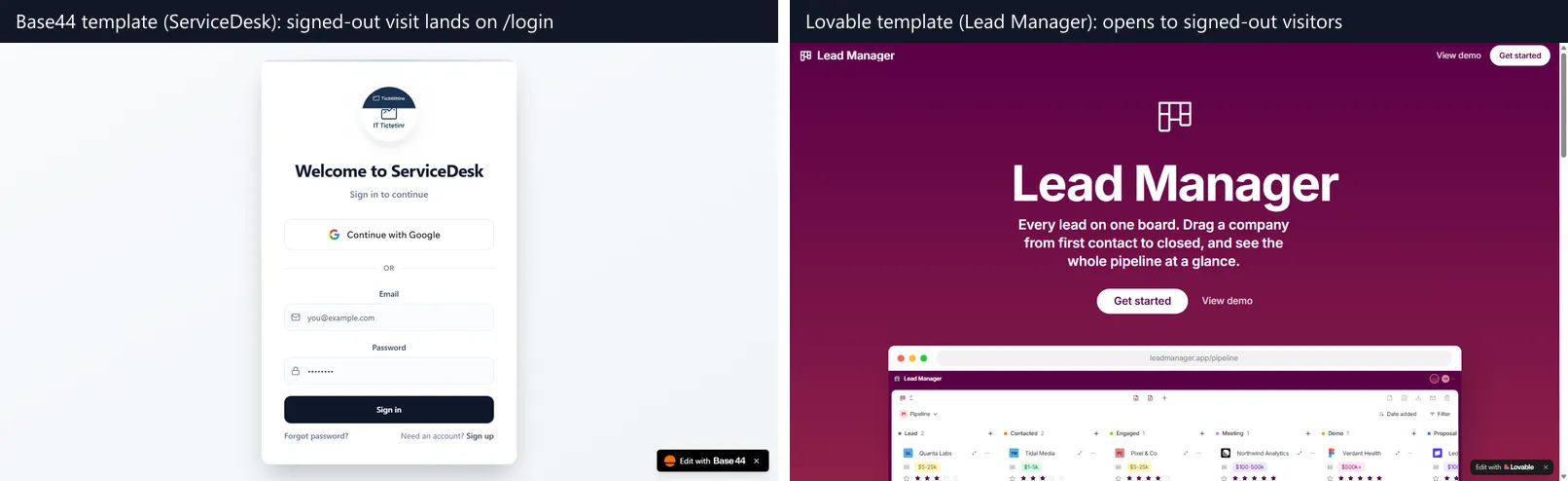
Base44's search visibility docs explain the hidden summary: crawlers receive a prerendered copy of each page, a page with no saved copy yet gets a short summary of its heading, description, and links, and a browser always loads the live app.
What the results mean for the tests you write:
- Plan for sign-in on Base44 - with half the templates behind /login, most Base44 tests start by signing in, so keep a dedicated test account and treat the login form as a test case in its own right.
- Locate by role and name - no template carried a test attribute, so Playwright tests should use getByRole and visible labels, or ask the builder to add data-testid attributes to the controls your tests depend on.
- Name your icon buttons - unnamed controls break role-based locators and are the icon-only buttons Lovable's browser testing struggles with; prompting the builder to add an accessible label fixes both.
- Allowlist expected console noise - Base44 apps request the current user on load, and a signed-out visitor gets a 401 or 403, so a console-error check needs to ignore that request instead of failing every run.
- Test in a real browser - an HTML-only smoke check sees an empty root on React + Vite Lovable apps and a hidden summary on Base44, so assert on the rendered page after it settles.
Can You Export Code From Base44 and Lovable?
Yes on both, with different limits. Lovable syncs your code to Git on every plan, while Base44 starts GitHub sync and ZIP export on its Builder plan and says the exported code still depends on Base44 to run.
Lovable's Git sync overview describes automatic two-way sync with GitHub, GitLab, or Bitbucket, so you can back up code, work in your own IDE, and deploy anywhere. Downloading the codebase as a file needs a paid plan.
Base44's developer tools page says a ZIP export on the Builder plan and higher is a copy of your code, not a way to move the app off Base44.
Base44's GitHub sync guide says two-way sync requires the Builder plan or higher and syncs your changes to the connected repository automatically.
- Tests in the repository - with Lovable's Git sync you can commit a Playwright suite next to the app and run it in your own CI on every push, on any plan.
- Checks before deploy - Base44 lets you connect GitHub workflows and checks to validate each change, then deploys from the reviewed code, which needs the Builder plan.
- Free-plan limits - Base44 Free lets you view the code but not edit it; Lovable Free syncs to Git but leaves editing and downloading to paid plans.
Base44's migration guide imports a Lovable project's public-schema tables with data, keys, and the row level security flag, plus the frontend source from its GitHub repository, starting with 100 items per entity so you can preview first.
Is Base44 or Lovable Safer?
Neither builder enforces your app's data rules for you. Base44 and Lovable each run security scans and integrate Wiz, each has had a public access-control flaw, and the documentation for each leaves data permissions to the person building the app.
Base44's security scan is available on every plan and checks data permissions, exposed secrets, and vulnerable code, with static code analysis on Builder and above. At publish, the panel shows a security status that warns you but does not stop the publish.
Lovable's security overview describes a Quick scan that runs on every publish and a Deep scan of all application code that you start yourself, with scheduled Deep scans only on Enterprise. Lovable states that these scans do not replace a thorough security review.
| Control | Base44 | Lovable |
|---|---|---|
| Automatic scan | Security status shown at publish; run the scan on demand | Quick scan on every publish |
| Deeper code review | Static code analysis on Builder and above | Deep scan on demand; scheduled on Enterprise |
| External scanners | Wiz, plus Tenzai AI penetration tests on the published app | Wiz, plus Aikido AI penetration tests |
| Blocks publishing on findings | No, it warns | Depends on a workspace setting |
| Public security page | None | Opt-in trust center at /.well-known/trust.html and trust.json |
Lovable's trust center publishes security checks Lovable verified for a published app, as a page for people and a JSON file for tools, once you enable it for the project. Lovable calls it informational, not a certification.
Base44's flaw was reported by Wiz Research: a non-secret app_id sent to undocumented registration and verification endpoints let an attacker create a verified account on private apps. The issue was fixed in less than 24 hours, with Wix confirming no evidence of past abuse.
Lovable's flaw is CVE-2025-48757: an insufficient database row-level security policy in Lovable through April 15, 2025, that let remote unauthenticated attackers read or write the database tables of generated sites.
The NVD record marks the CVE as disputed, because Lovable's position is that each customer accepts responsibility for protecting the data of their own application.
A scan cannot know which user should see which row, so the access test stays yours on both builders: sign in as two accounts, request each other's records, and repeat the same requests while signed out.
How Do Base44 and Lovable Pricing Compare?
Both builders meter AI usage in credits, but they count differently. Base44 splits building from app features into two credit pools, and Lovable grants daily build credits on top of a monthly subscription balance.
Base44's credits documentation says message credits are used when you build with Base44's AI, while integration credits are used when your app calls Base44's built-in services, such as sending an email or running an LLM call.
Base44's billing and plans page lists message and integration credits for each plan, from 25 and 100 a month on Free to 1,200 to 8,200 and 50,000 to 300,000 on Elite.
| Base44 plan | Message credits a month | Integration credits a month | Testing-relevant additions |
|---|---|---|---|
| Free | 25, at most 5 a day | 100 | Testing agent and security scan; up to 5 apps |
| Starter | 100 | 2,000 | In-app code edits |
| Builder | 250 | 10,000 | GitHub sync, test data, ZIP export, static code analysis |
| Pro | 500 | 20,000 | Everything in Builder |
| Elite | 1,200 to 8,200 | 50,000 to 300,000 | Everything in Pro |
Lovable's subscription plans page gives Free 5 daily build credits capped at 30 a month, and Pro and Business 5 daily build credits with no monthly cap plus subscription credits from 100 a month, while Enterprise credits are volume-based.
| Lovable plan | Credits | Testing-relevant additions |
|---|---|---|
| Free | 5 build credits a day, capped at 30 a month; 20 Cloud and 4 AI credits a month | Git sync; publish to up to 10 invited people per project |
| Pro | From 100 a month, plus 5 build credits a day | Code editing and download, custom domains, user roles |
| Business | From 100 a month, plus 5 build credits a day | SSO, security center, password-protected preview links |
| Enterprise | Volume-based by contract | Scheduled security scans, audit logs, SCIM |
Dollar prices sit on each vendor's pricing page. Budget for verification on top of building:
- Base44 testing agent - around 1 to 4 credits per run, and generating tests with AI costs roughly half that rate.
- Lovable fixes - every Build mode change after a failed check spends credits, and most TanStack Start upgrades cost 10 to 35.
- Kane CLI - runs draw KaneAI credits from your TestMu AI account, and the 10-step tip calculator check later in this comparison used about 19.
Which Is Better, Lovable or Base44?
Lovable is better when you want the code in your own repository and pages that render on the server. Base44 is better when you want a managed backend, a built-in testing agent, and store-ready mobile files without touching code.
For phones, Base44's app store guide runs the published app inside a native web view, and downloading the store submission files requires the Builder plan or higher.
The Lovable FAQ says Lovable builds mobile-friendly web apps and does not generate React Native projects, and suggests a Progressive Web App for home-screen installs or a wrapper such as Capacitor, outside Lovable, for store submission.
| If you need | Pick | Why |
|---|---|---|
| An internal tool for signed-in staff, with no code to maintain | Base44 | Managed backend, sign-in, and hosting, with a testing agent on every plan |
| The code in your own repository from the free plan | Lovable | Two-way Git sync to GitHub, GitLab, or Bitbucket on every plan |
| Pages that search engines, link previews, and HTML-only tools can read | Lovable | TanStack Start renders each page on the server for every visitor |
| An App Store and Google Play listing from the builder | Base44 | Store files for a native web view wrapper on Builder and above |
| A separate database for trying data changes | Base44 | Test data on Builder and above, switchable in the dashboard and preview |
| Tests for business rules written as you build | Lovable | A test for every price, limit, or permission rule you add or change |
| A public app that opens without sign-in | Either | Both publish public pages; half of Base44's app templates start behind a login |
If Replit is also on your shortlist, the Base44 vs Replit and Lovable vs Replit comparisons cover the other two pairings.
How Do You Test a Base44 or Lovable App Before Launch?
Run your key flows against the published URL from outside the builder, after every change that touches them. Kane CLI from TestMu AI drives a real Chrome browser from a plain-English objective, checks the result on the rendered page, and saves step screenshots, a network log, and console output for every run.
TestMu AI's pages on Lovable app testing and Base44 app testing cover setup for each builder. Here is the check against Lovable's Tip Calculator template, a three-step flow with an icon-only button and a total that animates in:
npm install -g @testmuai/kane-cli
kane-cli login

kane-cli run "Click Clear under the bill amount, then click Type and enter 120 as the bill amount. Select the 20% tip and click Continue. Increase the number of people to 3 and click See results. Verify that the total per person shows {{expected_per_person}}" \
  --url "https://tip-calculator-49d3356b.lovable.app/" \
  --variables '{"expected_per_person":{"value":"$48.00"}}' \
  --agent --headless
The run passes in 10 steps, and the last line of agent output is a run_end event (trimmed here):
{"type":"run_end","status":"passed","one_liner":"calculated a 20% tip split for three people on tip-calculator-49d3356b.lovable.app","final_state":{"url":"https://tip-calculator-49d3356b.lovable.app/?bill=12000&tip=20&people=3&roundUp=false","total_per_person":"$48.00"},"reason":"Objective completed","duration":67.5,"result_code":100,"reason_code":"success.complete"}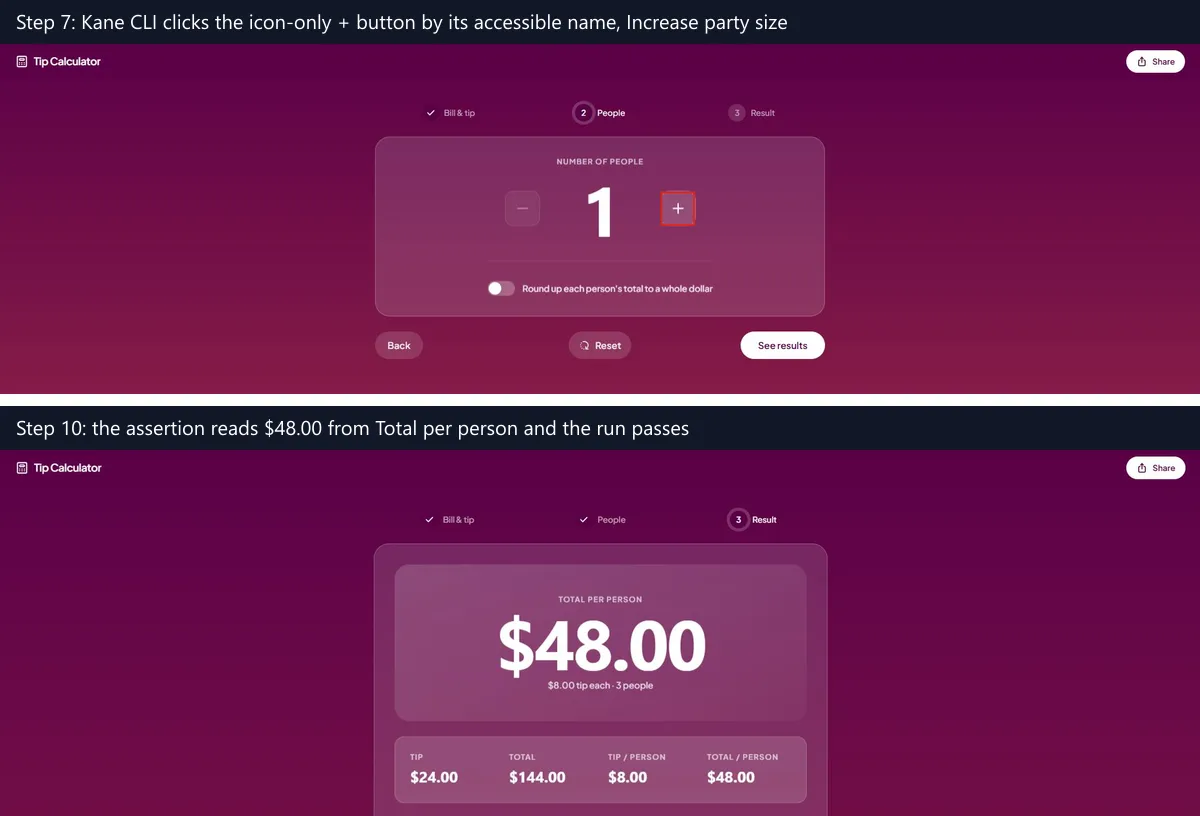
- Icon-only controls - step 7 clicks the "+" button through its accessible name, Increase party size, the kind of control Lovable's own browser testing finds harder than a labeled button.
- Animated values - the headline total counts up after See results, so a script that reads it at once can capture an in-between number; the assertion read $48.00 from the settled card.
- Shareable state - the app writes the bill, tip, and party size into the URL, so a follow-up test can open the result page directly with those query parameters.
- Exit codes - 0 for a pass, 1 for a failed assertion, 2 for a setup or authentication error, and 3 for a timeout, so the same command can gate a CI job after each publish.
For a Base44 app behind /login, put the test account's email and password in a variables file and mark the password with "secret": true, so Kane CLI keeps it out of logs and screenshots. The same objective style then covers the sign-in form that the Base44 testing agent skips.
Conclusion
Decide first where the code should live. Pick Base44 if a managed platform is fine and the app sits behind a sign-in, since its testing agent and security scan come with every plan. Pick Lovable if you want the code in your own repository from day one and pages that render on the server.
Then, before you share the published link, point one Kane CLI objective at the flow your users hit first and rerun it after every prompt that changes that flow. The Kane CLI introduction covers installation, sign-in, and the first run.
Testing from the terminal? Kane CLI by TestMu AI lets SDETs and developers plan, write, run and debug tests from the command line.
Author

Shravan Mahajan
Blogs: 11

Shravan Mahajan is a Software Engineer at TestMu AI building Kane CLI, the command-line tool that runs browser automation from the terminal, describing flows in natural language that execute in a real Chrome browser and return pass or fail with shareable proof. He has an experience of 6 years in the Technical industry. His top skills are JavaScript, React.js, and full-stack development. At Fractal he built automated data pipelines with T-SQL, SSIS, Python, and Azure. He is also a Microsoft Certified Azure Data Engineer Associate.
Reviewer

Mayank Bhola
Reviewer
Mayank Bhola is Co-Founder and Head of Products at TestMu AI, where he leads the entire product portfolio across KaneAI, Kane CLI, HyperExecute, SmartUI, the Real Device Cloud, Accessibility, and other software testing product lines. As an early Lead Architect he designed and built the company's flagship Tunnel technology from scratch, created the React-based automation platform, and architected the data-intensive pipelines and FAAS services that scale it. He brings more than 10 years of experience in software development and product engineering, with earlier roles as Head of Technology at Juggernaut Books and Senior Software Engineer at PressPlay TV and Zomato. Mayank holds a B.Tech in Computer Engineering from JIIT Noida.


Base44 vs Lovable FAQs
Did you find this page helpful?
More Related Blogs

TestMu AI forEnterprise
Get access to solutions built on Enterprise
grade security, privacy, & compliance
- Advanced access controls
- Advanced data retention rules
- Advanced Local Testing
- Premium Support options
- Early access to beta features
- Private Slack Channel
- Unlimited Manual Accessibility DevTools Tests