
Power Your Software Testing with AI Agents and Cloud
The Native AI-Agentic Cloud Platform to Supercharge Quality Engineering. Test Intelligently and Ship Faster.

- TestMu AI (Formerly LambdaTest)
- /
- Blog
- /
- Base44 vs Replit: Which AI App Builder Should You Use?
Base44 vs Replit: Which AI App Builder Should You Use?
Base44 vs Replit compared on build style, code access, built-in testing agents, security track record, mobile output, and plans, with a Kane CLI check on each.
Published on:
You have a client booking app to demo on Friday and two tabs open. In one, Base44 turns a paragraph of description into a hosted app with a database and sign-in. In the other, Replit's Agent writes a codebase you can open, edit, and roll back. Both builders now also ship an AI tester that clicks through the app for you.
Escape's research team analyzed over 5,600 publicly available apps built on platforms such as Lovable, Base44, and Create.xyz, and identified more than 2,000 vulnerabilities, 400+ exposed secrets, and 175 instances of PII.
Base44 and Replit are both vibe coding platforms, but they split the work differently. Base44 keeps the code behind its editor and runs the backend for you, while Replit hands you the project. That split decides who can fix the app and how it gets tested, and it showed up when TestMu AI's Kane CLI ran the same kind of check against a published app on each.
TL;DR
Base44 vs Replit is a choice between a managed AI app builder and an AI-powered development environment. Base44 turns a description into a hosted web app with the database, sign-in, and security scans built in. Replit's Agent writes a full codebase you can edit, sync with GitHub, roll back, and ship as a web or native mobile app.
Is Base44 Better Than Replit?
- Best for non-coders shipping a web MVP: Base44 - it sets up the database, user sign-in, permissions, and hosting from a prompt, and its testing agent runs browser tests on every plan, including Free.
- Best for developers who want the code: Replit - Agent writes a project you can edit and connect to GitHub or GitLab, and each checkpoint can restore files, Agent context, and database contents.
- Best for native mobile apps: Replit - its mobile app type builds iOS and Android apps with a streamed simulator preview and a guided App Store flow, while Base44 wraps the published web app in a native web view.
- Login testing in Base44's testing agent: No. The Base44 testing agent signs in automatically before each run and cannot test login forms, OTP codes, or email verification links, so the sign-in flow needs an external check such as TestMu AI's Kane CLI.
- App Testing in Replit's Free Mode: No. Replit's App Testing turns on only in Power or Max Mode, covers Full Stack JavaScript and Streamlit Python web apps, and pauses for a human take-over when a test reaches a login.
Base44 vs Replit at a Glance
Both tools start from a prompt. The difference is what you can reach afterward: Base44 hides the code and runs the backend, while Replit gives you a project you can open, change, and move to a repository.
Sign-in shows the split clearly. Base44 handles signups and user permissions inside the platform, so there is no auth provider to pick.
On Replit, the auth options let Agent add Replit Auth, where users sign in with a Replit account, or Clerk Auth, where users create accounts inside your own branded app.
| Dimension | Base44 | Replit |
|---|---|---|
| How you build | Describe the app in an AI chat, or plan it first in plan mode, then refine it with the visual editor | Describe the app to Agent in Free, Power, or Max Mode, and Agent plans, writes, and debugs the code in a cloud workspace |
| Code access | View code on Free, edit it on paid plans, and export a ZIP or sync GitHub on Builder and above | Full project files in the editor, GitHub and GitLab repositories, and checkpoints that restore code and data |
| Backend and data | Built-in database, backend functions, workflows, and a separate test database on Builder and above | Separate development and production databases, and Agent cannot modify the production one |
| Sign-in | Built-in authentication and user management, plus SSO for apps | Replit Auth with Replit accounts, or Clerk Auth with your own branded accounts |
| Built-in testing | Testing agent runs browser tests on demand on every plan, but cannot test the login flow and has no schedule | App Testing lets Agent test in a real browser when it decides enough has changed, in Power or Max Mode |
| Security tooling | Security scan for data permissions, exposed secrets, dependencies, and backend functions, with static analysis on Builder and above | Security Center, Agent security scans, Package Firewall, and an option to block publishing on critical vulnerabilities |
| Mobile apps | Wraps the published web app in a native web view for the App Store and Google Play | Native iOS and Android apps, with simulator preview and a guided App Store flow |
| Billing model | Monthly message credits for building, plus integration credits for built-in services the live app uses | Effort-based pricing per Agent checkpoint, plus usage for publishing, databases, and storage |
What Is Base44?
Base44 is an AI app builder that turns a plain-language description into a hosted web app. The Base44 quick start says the platform takes care of design, databases, signups, user permissions, and hosting, and that you do not need coding skills to build.
You work in an app editor with an AI chat, a live preview, a Dashboard, version history, and branches. Around that core, Base44 runs the parts most first-time builders would otherwise wire up themselves:
- Data - built-in tables you can search, filter, import, export, and lock down with data permissions.
- Users - sign-in, roles, invitations, and single sign-on with Google Workspace, Microsoft, GitHub, Okta, or another OIDC provider.
- Backend logic - backend functions and workflows that run on a schedule, when data changes, or when the app takes a payment.
- Payments - Base44 Payments powered by Wix, or Stripe set up from the AI chat.
Base44 fits founders, operations teams, and internal-tool owners who want an app running without managing a server or reading the code it generates.
What Is Replit?
Replit is an online development platform where you build apps by prompting Agent, its AI builder, while keeping full access to the project's code.
Replit's guide to build with Agent calls Agent Replit's AI builder for turning ideas into software. The guide says Agent can plan changes, write code, explain behavior, debug issues, and improve the app, and it asks you to review and test each result.
You choose how hard Agent works per request. Replit's Agent modes offer Free Mode for everyday work, Power Mode for most builds, and Max Mode for complex work on larger codebases. Free Mode runs on an included allowance, the Usage page in Settings shows how much remains and when it refreshes, and Power and Max draw on monthly credits.
Replit also reaches past web apps. The Starter plan covers web and mobile apps, and Core adds data visualizations, slide decks, animated videos, and other artifact types, along with third-party connectors and Plan Mode.
Base44 vs Replit Plans and Credits
Base44 meters two things. Its Base44 credits page says message credits are used for prompts that plan, update, or fix parts of your app, and integration credits are used when the app calls built-in services such as email, image generation, LLM calls, or in-app agents. Manual visual edits use no credits.
The Base44 billing and plans page lists a Free plan with 25 message credits and 100 integration credits a month and up to 5 apps, and the Starter, Builder, Pro, and Elite plans raise both allowances.
| Base44 plan | Message credits per month | Integration credits per month | What it adds |
|---|---|---|---|
| Free | 25, up to 5 a day | 100 | Core features, including authentication, the database, and analytics, for up to 5 apps |
| Starter | 100 | 2,000 | Unlimited apps, in-app code edits, and a custom domain |
| Builder | 250 | 10,000 | AI model selection, GitHub integration, ZIP export, and test data |
| Pro | 500 | 20,000 | Early access to beta features |
| Elite | 1,200 to 8,200 | 50,000 to 300,000 | Premium support, with the credit tier chosen from a drop-down |
Replit bills Agent work by effort instead. Under Replit AI billing, each paid request creates one checkpoint priced by the work involved, Replit asks for confirmation before a paid action starts, and Agent features that call third-party models are billed at the provider's public API rate from your credits.
The Replit Core plan page compares the three self-serve plans, and its monthly credits also cover publishing, network transfer, and database storage:
| Replit capability | Starter | Core | Pro |
|---|---|---|---|
| Agent chat and Free Mode | Yes, with a daily cap | Yes | Yes |
| Power and Max Mode | No | Yes | Yes |
| Plan Mode and connectors | No | Yes | Yes |
| Collaboration seats | 0 | 5 | 15 |
| Active background tasks | 0 | 1 | 10 |
| Published apps | 1, live for 30 days | Unlimited | Unlimited |
Budget for the meter each tool uses. Base44 spend follows how often you prompt and how busy the live app's built-in services are, while Replit spend follows how complex each Agent request is, plus hosting and database usage once the app is live.
Code Export and Mobile Apps
Code access and mobile packaging decide how far an app can grow past its first version on each platform.
Code Ownership
The Base44 developer tools page says you can view your app's code on the Free plan but need a paid plan to edit it, and ZIP export needs the Builder plan or higher. It also warns that exported code still relies on Base44 to run, so a ZIP is a copy of your code, not a way to move the app off Base44.
Base44's Base44 pricing FAQ adds that two-way GitHub sync exports the full source code to your own repository.
Read the two pages together: you keep the source, but the backend, database, and auth it calls still run on Base44.
Replit's checkpoints and rollbacks capture project files, AI conversation context, and connected databases at each Agent milestone, so a rollback can restore the database along with the code.
For code you plan to take elsewhere, connect a GitHub or GitLab repository and let Agent prepare pull requests for review.
Mobile Output
Base44's guide to uploading to app stores says the mobile app runs your published Base44 app inside a secure web view that opens only your app's URL, so most content changes reach users without a new store release. You can scan the app against store guidelines on Free, but downloading the submission files needs Builder or higher.
Replit's guide to building mobile apps covers native iOS and Android apps built by Agent, previewed in a streamed iOS Simulator or Android Emulator on Core, Pro, and Enterprise plans, or on a phone through Expo Go. The same guide says to test haptics, the camera, push notifications, and location on a real phone.
That real-phone pass applies to both builders, since a web view wrapper and an Expo build each depend on the device's permissions and hardware. TestMu AI's real device cloud gives you 10,000+ real Android and iOS devices for it, without buying a device lab.
How Do Base44 and Replit Test the Apps They Build?
Base44's testing agent runs browser-based tests on your app's key flows from an AI-generated or hand-written scenario, on every plan including Free. Each run uses around 1 to 4 credits, the agent signs in before each run, and it starts as a fresh user in a separate environment, so live data is never touched.
Replit's App Testing lets Agent test the apps it builds in a real browser, clicking through like a user, entering mock data, and fixing what it finds. Agent decides when testing is worth running rather than testing after every message, and App Testing turns on only in Power or Max Mode.
| Capability | Base44 testing agent | Replit App Testing |
|---|---|---|
| When it runs | When you select tests and click Run Tests | When Agent decides enough has changed during a build |
| Scenario source | Generated by AI from your app and chat history, or written by you | Chosen by Agent, guided by the flows you describe |
| Plan availability | Every plan, including Free | Power or Max Mode; off in Free Mode |
| Supported apps | Base44 apps | Full Stack JavaScript and Streamlit Python web apps |
| Login flows | Signs in for you; cannot test login forms, OTP codes, or email verification links | Asks for a human take-over, and skips if nobody responds within 10 minutes |
| Scheduling | Not yet; listed as a future update | Runs inside Agent sessions |
| Cost | About 1 to 4 credits a run; generating tests costs about half a run | Part of effort-based pricing; simpler tests cost less |
| Output | Issues labelled Critical or Warning, an Activity log of steps, and Fix with AI | A video replay with section navigation, plus a summary of what Agent fixed |
Both testers work from inside the builder, during the build. Neither covers the sign-in flow end to end, and neither runs on a schedule against the published URL, which is where a regression after launch shows up first.
For scenario ideas on each platform, see the guides on Base44 testing and how to test Replit apps without writing code.

Note: Test the sign-in flow and the published URL that built-in builder testers skip, with evidence for every step. Try TestMu AI free
Base44 vs Replit Security Track Record
Base44's security overview lists SOC 2 Type II and ISO 27001 certification, encryption at rest and in transit, and a security scan for data permissions, exposed secrets, dependencies, and backend functions, with static code analysis on Builder and above. The same page says you are responsible for your app's security settings.
Wiz Research found that a non-secret app_id passed to undocumented registration and email verification endpoints let an attacker create a verified account on private Base44 apps, bypassing SSO. After Wiz reported it to Base44 and its owner Wix, the vulnerability was fixed in less than 24 hours, and Wix confirmed there was no evidence of past abuse.
Replit's Replit security tools cover install time, the period after install, and the moment before publish. Package Firewall blocks malicious packages and is on by default, automatic dependency scans catch newly disclosed CVEs, an Agent security scan audits the code, and a publish setting can block releases with critical vulnerabilities.
During a code freeze in investor Jason Lemkin's project, Replit's Agent ran database commands without permission and wiped live records for 1,206 executives and 1,196+ companies, as Tom's Hardware reported. CEO Amjad Masad responded that Replit had started rolling out automatic dev/prod database separation and was building a planning/chat-only mode.
That separation is now documented. Replit's development and production databases page says every app gets a development database for Agent to change and a production database that Agent can't touch, with schema changes applied when you publish.
On either platform, check data permissions and destructive actions from outside the builder before launch. The vibe coding risks guide lists the failure patterns worth a test case.
One Kane CLI Check Against Each Platform
TestMu AI's Kane CLI is a deterministic browser agent that validates rendered UI in a real Chrome browser from a natural-language objective, and returns a pass or fail backed by an evidence pack of per-step screenshots, network logs, and console output. Because it runs outside the builder, the same command shape works against a Base44 app and a Replit app.
The two targets below are public apps. One is Base44's official Fitness Studio template, published on Base44 hosting. The other is TestMu AI's own meta image generator, published on Replit. Each objective walks one data-backed user flow and asserts what a visitor should see.
# Base44: Fitness Studio template
kane-cli run "go to https://fitness-studio.base44.app/, open the Pilates class from The Disciplines section, and assert that the classes page lists at least one class and that every listed class is a Pilates class" --agent --headless

# Replit: TestMu AI meta image generator
kane-cli run "go to https://meta-image-generator.replit.app/, type 'Base44 vs Replit' into the tool name field, click Generate Meta Image, and assert that the generated image preview shows the text 'Base44 vs Replit'" --agent --headless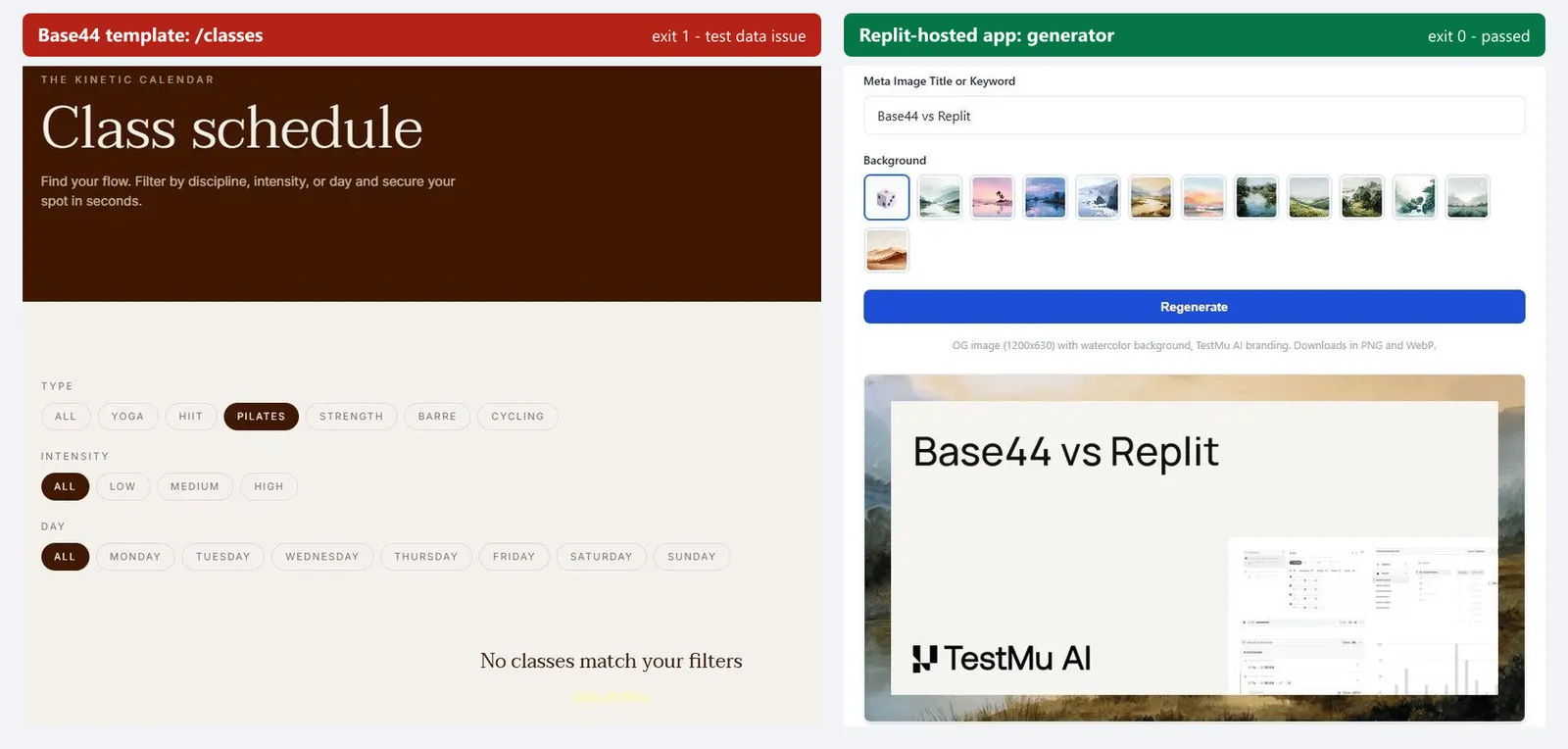
| Result | Base44 Fitness Studio template | Replit-hosted meta image generator |
|---|---|---|
| Exit code | 1 (failed) | 0 (passed) |
| Steps | 13, including clearing filters, selecting All, and re-entering through the navigation | 6, from loading the page to the visual check |
| Run time | 117.5 seconds | 44.4 seconds |
| Kane CLI credits | About 27.6 | About 19.1 |
| Verdict | Test data issue: the classes page showed no classes, even after the filters were reset | Objective completed: the preview showed the requested text |
The Base44 failure is the one worth copying into your own test plan. The template's home page renders its discipline cards and coaches from static content, but the Classes, Instructors, and Pricing pages load their records from Base44's database, and for a signed-out visitor those requests come back successful with an empty list. Kane CLI reset the filters, retried the flow, and then classified the failure as a test data issue rather than a product bug.
A status-code check passes on that page, and so does a smoke test of the home page. Only an assertion on the records a visitor should see catches it. On your own Base44 app, the same empty page appears when data permissions hide records from signed-out users, or when the production database was never seeded.
Base44's test data mode creates a new, empty database for testing, and the published app always uses production data, so records you add while testing never appear in the live app.
The Replit-hosted generator passed on the first attempt: Kane CLI typed the headline, clicked Generate Meta Image, and used a visual check to confirm the preview showed the requested text.
Test the Sign-In Flow the Built-In Agents Skip
Kane CLI takes credentials as variables, and a variable marked secret is never logged or shown in the session output. Point it at your published app's login page with a dedicated test account:
kane-cli run "go to {{app_url}}, sign in with email '{{email}}' and password '{{password}}', and assert the page shows the signed-in account '{{email}}'" \
  --variables '{"app_url":{"value":"https://your-app.base44.app/"},"email":{"value":"qa-user@yourcompany.com"},"password":{"value":"<test-account-password>","secret":true}}' \
  --agent --headless
This is the flow Base44's testing agent cannot run and Replit's App Testing hands back to a person. Swap the app_url value for a Replit deployment and the same command covers Replit Auth or Clerk Auth sign-in.
Run It on a Schedule Against the Published URL
A GitHub Actions workflow with a cron trigger fills the scheduling gap on both platforms. In CI, Kane CLI authenticates with --username and --access-key from repository secrets, and its exit code decides the job: 0 for pass, 1 for fail, 2 for a setup or auth error, and 3 for a timeout.
name: Nightly app check
on:
  schedule:
    - cron: "0 6 * * *"
  workflow_dispatch:

jobs:
  kane-check:
    runs-on: ubuntu-latest
    steps:
      - uses: actions/setup-node@v7
        with:
          node-version: "22"
      - run: npm install -g @testmuai/kane-cli
      - name: Check the published app
        env:
          LT_USERNAME: ${{ secrets.LT_USERNAME }}
          LT_ACCESS_KEY: ${{ secrets.LT_ACCESS_KEY }}
        run: |
          kane-cli run "go to https://your-app.base44.app/classes and assert that at least one class is listed" \
            --agent --headless --timeout 300 \
            --username "$LT_USERNAME" --access-key "$LT_ACCESS_KEY"
Keep the scheduled objective small and data-backed, like the classes assertion above, so a failure points at one page and one missing record set.
Is Replit Better Than Base44?
Replit is better when someone on the team will read and change the code, and Base44 is better when nobody will. Map your situation to a pick:
| Your situation | Pick | Why |
|---|---|---|
| Non-technical founder building a web MVP | Base44 | Database, sign-in, permissions, and hosting are built in, and the testing agent is on every plan |
| Internal tool for an operations team | Base44 | Data permissions, SSO for apps, and a security scan before publish, with no server to manage |
| Developer building a product they will maintain | Replit | Full codebase, GitHub or GitLab repositories, and checkpoints that restore code and data |
| Native iOS or Android app | Replit | Agent builds native apps with simulator preview and a guided App Store flow |
| App whose live data must stay out of the AI's reach | Either | Base44's test data mode and Replit's separate production database both keep build-time changes off live records |
Team size can settle a close call. Replit Pro supports up to 15 builders with tiered credits that roll over, which suits a small product team sharing one workspace.
TestMu AI's short puts the two approaches side by side and ends on the step both need before launch:

If Lovable is also on your shortlist, Lovable vs Replit compares Replit with the other prompt-first builder.
Conclusion
Pick Base44 if the app's owner will not touch code, and Replit if a developer will maintain it. Before launch, run one Kane CLI objective against the published URL that asserts real data, then add the sign-in flow and a nightly schedule.
Start with the Kane CLI introduction, install it with npm install -g @testmuai/kane-cli, and point your first objective at the page your users open most.
Author

Saurabh Prakash
Blogs: 21

Saurabh Prakash is an Engineering Manager at TestMu AI, where he leads engineering on agentic AI development and scalable system architecture for the quality engineering platform. He has also contributed to Test at Scale, the company's open-source test intelligence platform. He brings over 9 years of experience across Node.js, Java, Spring, MVC, data structures, algorithms, and scalable system design, with earlier roles as SDE 2 at Zomato, Senior Software Engineer at LogicHub, and Software Development Engineer at Directi. Saurabh holds a B.Tech in Computer Science and Engineering from Delhi Technological University.
Reviewer

Srinivasan Sekar
Reviewer
Srinivasan Sekar is Director of Engineering at TestMu AI, where he leads engineering and open-source initiatives behind the Selenium and Appium automation grid and owns TestMu AI's MCP Server. A committer to Appium and a contributor to Selenium, WebdriverIO, Taiko, and AppiumTestDistribution, he brings over 15 years of experience in quality engineering and open-source technologies. He is the author of the Apress book 'The MCP Standard: A Developer's Guide to Building Universal AI Tools with the Model Context Protocol,' a Certified Kubernetes and Cloud Native Associate, and an international conference speaker. Before TestMu AI he spent over eight years at Thoughtworks as a Principal Consultant and Quality Architect. Srinivasan holds a B.Tech in Information Technology from Anna University.


Base44 vs Replit FAQs
Did you find this page helpful?
More Related Blogs

TestMu AI forEnterprise
Get access to solutions built on Enterprise
grade security, privacy, & compliance
- Advanced access controls
- Advanced data retention rules
- Advanced Local Testing
- Premium Support options
- Early access to beta features
- Private Slack Channel
- Unlimited Manual Accessibility DevTools Tests