
Power Your Software Testing with AI Agents and Cloud
The Native AI-Agentic Cloud Platform to Supercharge Quality Engineering. Test Intelligently and Ship Faster.

- TestMu AI (Formerly LambdaTest)
- /
- Blog
- /
- Lovable Review: What It Builds Well and What to Test
Lovable Review: What It Builds Well and What to Test
Lovable review from the testing side: what it builds, the tests it runs on its own, its security scans and credits, and what to test before you ship an app.
Published on:
Ask Lovable to "Build me a booking app for my yoga studio", and one sentence returns an app with sign-ups, a database, and hosting. TestMu AI's short Lovable review starts from that prompt, and it is a fair test: a booking app holds sign-ups, other people's data, and payments.
In a March 2025 scan of 1,645 Lovable-built sites, Matt Palmer found 303 database endpoints across 170 projects, about 10.3% of the sample, with row-level security (RLS) settings too weak to stop a modified request from reading the data, according to his CVE-2025-48757 statement.
Lovable now runs a security scan every time you publish. This Lovable review rates the builder from the testing side: what it builds, what it tests on its own, where its scans and certifications stop, and what to check before real users sign in.
TL;DR
Lovable is an AI app builder that turns a plain-English prompt into a hosted web app with a database, authentication, and code you own. It is worth it for MVPs and internal tools. Lovable's built-in tests run on the preview and its certifications cover the platform, so test sign-in, roles, and checkout on the published app yourself.
- Free plan: Is Lovable free? Yes. Lovable's Free plan gives 5 build credits a day, capped at 30 a month, plus a daily chat allowance, and it publishes to a lovable.app URL.
- Built-in testing: Does Lovable test your app? Partly. Lovable writes and runs tests for the rules you change, and its browser testing runs on the project preview, not on your published URL.
- Security scans: Is Lovable safe? Yes as a platform, with conditions. A Quick scan runs on every publish, and Lovable says its scans do not replace a thorough security review of your app.
- Compliance scope: Does Lovable's SOC 2 cover my app? No. Lovable's SOC 2 Type II report, ISO 27001 certification, GDPR support, and AIUC-1 certification cover the platform, not the apps you build.
- Mobile apps: Can Lovable make mobile apps? Not native ones. Lovable builds mobile-friendly web apps and does not generate React Native projects.
- Code export: Can you export code from Lovable? Yes. Lovable supports Git sync on every plan, and paid plans can download the whole codebase as a ZIP file.
What Is Lovable?
Lovable is a full-stack AI development platform that builds web apps from natural-language prompts. It generates the frontend, backend, database, authentication, and integrations as editable code, then hosts the result.
Lovable sits among the AI app builders aimed at people who want a working product fast, and it is a common entry point to vibe coding, where you describe software instead of writing it. If you are still choosing a builder, the Lovable vs Replit comparison covers how the two differ.
The TestMu AI short below goes from the yoga studio prompt to what Lovable generates, who it suits, and the step to keep before you ship.

Lovable Review Scorecard
Each rating below weighs what Lovable gives you against the limit its own documentation states. "Strong" means you can rely on it, "Partial" means you add your own checks, and "Platform only" or "Web only" marks a hard boundary.
| Area | What Lovable gives you | Where it stops | Rating |
|---|---|---|---|
| Prompt to app | Interface, app logic, database, authentication, and hosting from one prompt | One fixed stack: TanStack Start for apps created from May 13, 2026, React and Vite for older apps, and PostgreSQL, with no framework choice | Strong |
| Built-in backend | Database, authentication, storage, edge functions, secrets, and logs, with hosting handled | Signed-in browser testing works only on this backend, not on your own Supabase project or another auth provider | Strong |
| Code ownership | You own the code, with Git sync on every plan and a codebase download on paid plans | The database export leaves out stored files, edge function code, and secrets | Strong |
| Built-in testing | Tests written and run for every rule you add or change, plus browser testing on request | Browser tests run on the preview, and canvas tools, complex uploads, drag-and-drop, and subtle visual details are unreliable | Partial |
| Security tooling | A Quick scan on every publish and a Deep scan of your application code on demand | The Deep scan does not run automatically as you work, scheduled scans are Enterprise only, and Lovable says scans do not replace a security review | Partial |
| Compliance | SOC 2 Type II, ISO 27001:2022, GDPR support, and AIUC-1 for the platform | None of it extends to the app you build | Platform only |
| Mobile | Mobile-friendly web apps that can become a Progressive Web App | No native or React Native output; store apps need a wrapper such as Capacitor outside Lovable | Web only |
| Pricing model | Daily build credits on Free, and paid tiers from 100 to 10,000 credits a month | Free caps build credits at 30 a month, and editing code in Lovable needs a paid plan | Partial |
Lovable's Chat, Plan, and Build Modes
Lovable's project chat has three modes, described in its Plan mode documentation: Chat mode discusses the app without changing code, Plan mode writes a plan you edit and approve, and Build mode makes the change and verifies it. A Plan mode message costs one credit plus any subagent research, while a Chat mode message typically costs a fraction of a credit and draws on the daily chat allowance first.
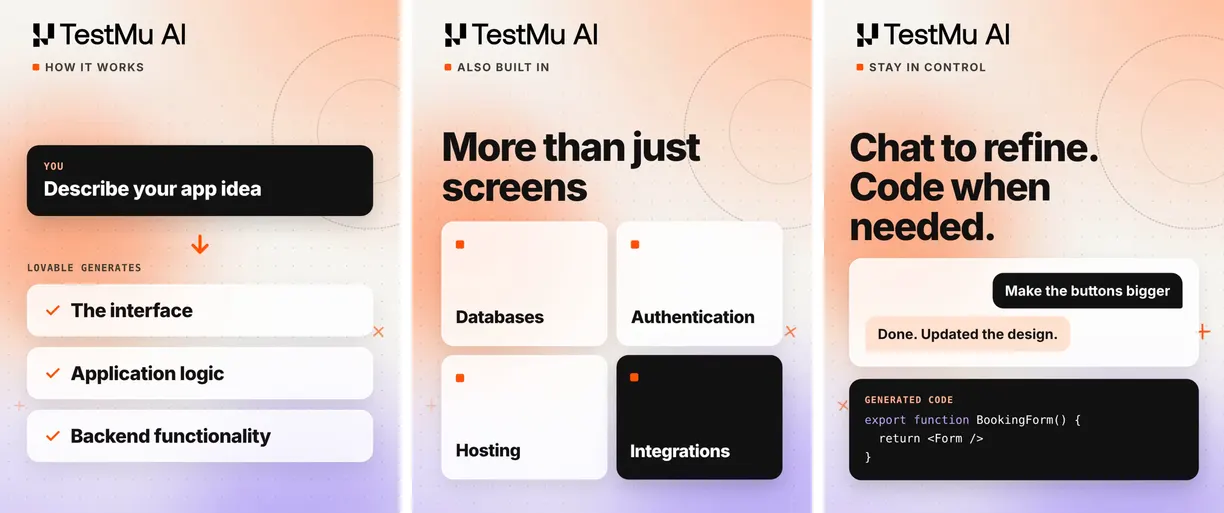
The frames above, from the short, trace the yoga studio build. Each step leaves a different thing for you to verify:
- Describe the idea - Lovable generates the interface, application logic, and backend from the prompt. Check that the booking rules it inferred, such as class capacity and cancellation windows, match the ones you meant.
- Built-in services - the database, authentication, hosting, and integrations come with the app. Check who can read which tables before anyone signs up.
- Refine in chat - a request like "Make the buttons bigger" is a Build mode change to real code. Re-run the flows it touches, because a styling prompt can still move a form field or a button handler.
- Edit the code - the generated code, such as the BookingForm component in the frame, is React code you can read, and edit directly on paid plans.
The built-in backend runs on Supabase's open-source foundation and covers the database, authentication, storage, edge functions, secrets, and logs. Lovable hosts the app and scales hosting with traffic automatically, with no infrastructure setup required.
Does Lovable Test Your App?
Partly. When you add or change a rule in your app, such as a price, a limit, a permission, a date, or who can do what, Lovable writes a small test for it and runs the tests covering your change before it reports the work as done, according to its testing documentation.
- Frontend tests - run in a simulated browser with Vitest, React Testing Library, and jsdom, and usually live in your project's src/test folder.
- What gets no automatic test - copy, styling, markup, and snapshots.
- Edge tests - tests for edge functions, your server-side code, are written and run only when you ask.
Lovable's browser testing drives a real browser in a remote virtual environment to click buttons, fill forms, read console logs and network requests, and check mobile, tablet, and desktop sizes. It always runs against the preview of the project you have open, and it starts when you ask or when Lovable decides lighter checks are not enough.
The documented limits mark where your own tests take over:
- Canvas and drawing tools - browser testing cannot interact with them.
- Upload widgets - standard file inputs work, but custom or complex upload widgets can be unreliable.
- Drag-and-drop and clipboard - drag-and-drop is less reliable than clicks, and clipboard actions and text selection are unreliable.
- Visual detail - it is not reliable for subtle design details or color differences.
- Icon-only buttons - harder for it to use than buttons with a text label.
- Signed-in pages - only on Lovable's built-in backend; apps on their own Supabase project or another auth provider get signed-out pages only.
A pass in the Details view shows that the preview worked for the user Lovable signed in as. It does not show that a second account is locked out of the first account's data, or that your published domain behaves the same way.

Note: Run your Lovable app's sign-up, login, and checkout journeys across real browsers and operating systems on TestMu AI before you share the link. Try TestMu AI free
Is Lovable Safe?
Yes as a platform, with conditions for your app. Lovable scans every publish and holds platform certifications, and its documentation puts the security of each app on the person who builds it.
Quick Scan and Deep Scan
Lovable's security overview describes two built-in scans. The Quick scan completes a fixed set of checks in seconds every time you publish, and the Deep scan reviews all of your application code but does not run automatically as you work.
- Quick scan: database review - tables without per-record access control, access rules that let everyone through, and leaked-password protection turned off.
- Quick scan: dependency audit - known vulnerabilities in npm dependencies, where only critical-rated ones become findings.
- Quick scan: MCP server check - an MCP server your app exposes without authentication.
- Deep scan - access control, endpoints anyone can trigger, unsafe input and injection, leaked secrets, payment and billing bypasses, sign-in weaknesses, and personal data exposed in errors and logs.
Lovable states that these tools do not replace a thorough security review. Whether critical findings block publishing depends on a workspace setting, which new Enterprise workspaces created by Lovable turn on by default, and scheduled Deep scans are available only on Enterprise.
The 2025 Row-Level Security CVE
The CVE-2025-48757 record describes an insufficient row-level security policy in Lovable through April 15, 2025 that let remote unauthenticated attackers read or write the database tables of generated sites, with a CVSS 3.1 base score of 9.3 (Critical). The entry is marked disputed: Lovable's position is that each customer accepts responsibility for protecting the data of their own application.
The generated apps called the database straight from the browser with a public key, so row-level security was the only thing keeping rows private. The Quick scan now flags tables with no per-record access control, but a scan cannot know your business rules, so only a test with real accounts confirms them.
Lovable's Compliance Scope
Lovable publicly documents SOC 2 Type II, ISO 27001:2022 certification, GDPR support, and AIUC-1 certification, and its October 21, 2026 post on compliance and your app states that users do not automatically receive the platform's certifications.
- SOC 2 Type II - you can use Lovable's report to assess it as a vendor, but it is not an audit of your business or app. A SOC 2 report for your own service needs a separate examination by an independent CPA firm.
- ISO 27001:2022 - evidence of how Lovable manages information security; your organization does not become certified by using it.
- GDPR - for personal data inside your app, you are typically the controller and Lovable is your processor, so deletion requests and retention rules are processes you build and run.
- AIUC-1 - Lovable's certification does not certify the apps or AI workflows its customers build.
The same post tells builders to test with separate accounts and different roles, and to check whether one customer can read another customer's records.
The Lovable FAQ adds a hard limit: the standard Terms of Service do not allow protected health information, payment card data, financial account numbers, government identifiers, or biometric data, including in the apps you build.
Lovable Pricing and Credits
Lovable bills in credits. Its subscription plans page lists a Free plan and three paid plans, with Pro and Business sold in monthly tiers from 100 to 10,000 credits, and annual billing gives two months free.
| Plan | Credits | What the plan adds |
|---|---|---|
| Free | 5 daily build credits, capped at 30 a month; a daily chat allowance; 20 Cloud and 4 AI credits a month | Git sync, workspace-private projects, and publishing to up to 10 invited people per project |
| Pro | Monthly tiers from 100 to 10,000 credits, plus 5 daily build credits with no monthly cap | Code editing and download, custom domains, user roles, credit rollovers, and top-ups |
| Business | The same monthly tiers as Pro | SSO, role-based access, the security center, a Data Processing Agreement, and workspace data excluded from model training by default |
| Enterprise | Volume-based credits set by contract, with no daily build credits or monthly grants | SCIM, audit logs, scheduled security scans, and EU inference |
Dollar prices for each tier are on Lovable's pricing page. Budget for testing too: every Build mode fix you make after a failed check spends credits, so catching a broken flow early is cheaper than untangling it several prompts later.
What Are the Pros and Cons of Lovable?
Pros
- Full stack from one prompt - interface, database, authentication, and hosting arrive together.
- Plan before you build - Chat and Plan modes let you settle a change before any code moves.
- Rule tests by default - prices, limits, and permissions get a test without being asked.
- A scan on every publish - plus a Deep scan of your app logic when you start one.
- Your code, on any plan - Git sync to GitHub, GitLab, or Bitbucket works on Free.
Cons
- Fixed stack - no choice of framework or database.
- Preview-only browser testing - with documented blind spots for canvas, uploads, drag-and-drop, and visual detail.
- Mostly manual Deep scans - they do not run as you work, and scheduling them requires Enterprise.
- A thin Free plan - 30 build credits a month and no code editing.
- No native mobile apps - and no health, payment card, or government ID data under the standard terms.
Pre-Launch Checks for a Lovable App
The short ends on three things a generated app has to survive before launch: invalid data, the wrong account, and a complex checkout. Lovable's own tools cover part of each, and the rest is yours.
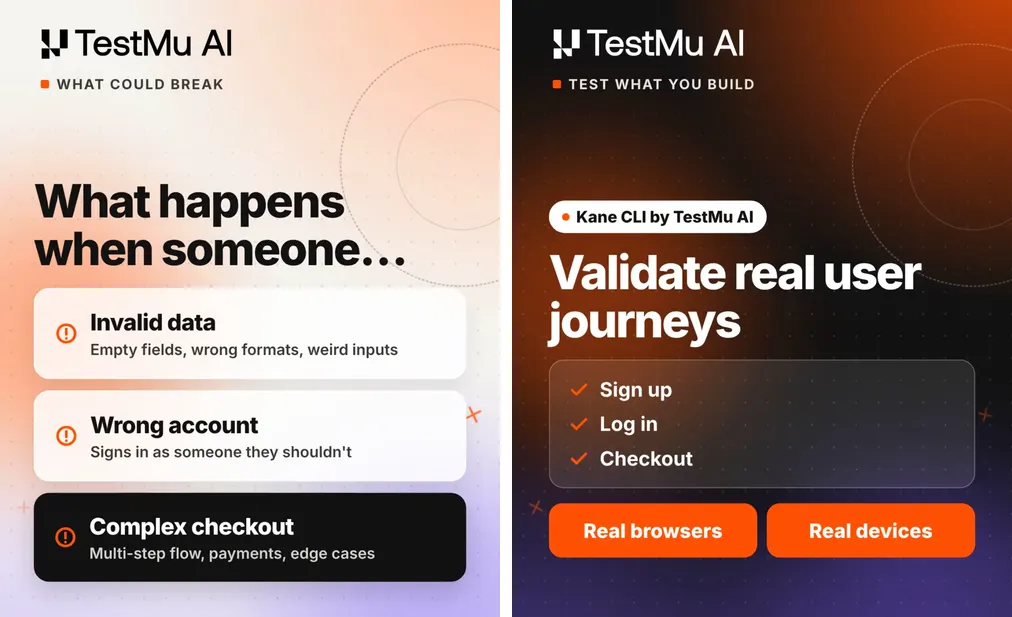
- Invalid data - submit empty fields, wrong formats, and odd input on every form, then ask Lovable to call the matching edge function directly with the same input, since a check that lives only in the form can be skipped.
- Wrong account - create two test members, sign in as one, and confirm it cannot see or change the other's bookings, then repeat while signed out.
- Complex checkout - run the full multi-step flow in your payment provider's test mode, including a declined payment, a step back mid-flow, and a double click on the pay button.
- The published URL - repeat all three on your lovable.app address or custom domain, because Lovable's browser testing ran on the preview.
Kane CLI from TestMu AI handles the published-URL side. It drives a real Chrome browser from a plain-English objective, exits with 0 for a pass, 1 for a failed assertion, 2 for a setup or auth error, and 3 for a timeout, and seals screenshots, a HAR network log, and console output into an evidence pack for every run. Install it and sign in with your TestMu AI credentials:
npm install -g @testmuai/kane-cli
kane-cli login --username "$LT_USERNAME" --access-key "$LT_ACCESS_KEY"
Keep the test member's credentials in a variables file, with the password marked secret so it stays out of logs and screenshots:
{
  "member_email": { "value": "member-a@yourstudio.com" },
  "member_password": { "value": "use-a-test-account-password", "secret": true },
  "other_member_name": { "value": "Member B" }
}
The wrong-account check for the yoga studio app then reads like the test you would describe to a colleague:
kane-cli run "log in with '{{member_email}}' and '{{member_password}}', open the My Bookings page, assert that no booking for '{{other_member_name}}' is listed, log out, then open the My Bookings page again and assert it asks the visitor to sign in" \
  --url https://your-studio.lovable.app \
  --variables-file ./member.json \
  --agent --headless --timeout 300
The same exit codes let this command gate a CI pipeline after every Lovable change. For a full run against a Lovable app, see the Lovable Kane CLI verification walkthrough, and the guide to test Lovable apps covers writing these journeys as plain-English steps that keep working after Lovable regenerates the UI.
Is Lovable Worth It?
Lovable is worth it for MVPs and internal tools, and a poor fit for regulated data or native mobile apps:
- Founders validating an MVP - yes. One prompt puts a hosted app with sign-up and a database in front of users, and the Free plan covers trying the idea.
- Teams building internal tools - yes, and the Business plan adds SSO and role-based access for company sign-in.
- Developers who want their own stack - partly. You cannot pick the framework or database, but Git sync keeps the code in your repository on any plan.
- Apps that hold health, payment card, or government ID data - no, not under Lovable's standard terms.
- Teams that need native mobile apps - no. Lovable builds web apps, and a store listing needs a PWA or a Capacitor wrapper built outside Lovable.
Lovable Review Verdict
Lovable earns its place for MVPs and internal tools: one prompt produces the full stack, the code is yours, and every rule you change gets a test. Its browser testing stops at the preview and its certifications stop at the platform, so sign-in, roles, and checkout on the published app are yours to verify.
Before you share a Lovable app, run the Deep scan, then point a Kane CLI wrong-account check at the published URL. The Kane CLI introduction covers setup, and the Lovable app testing page lists the journeys worth covering for a Lovable build.
Author

Shravan Mahajan
Blogs: 11

Shravan Mahajan is a Software Engineer at TestMu AI building Kane CLI, the command-line tool that runs browser automation from the terminal, describing flows in natural language that execute in a real Chrome browser and return pass or fail with shareable proof. He has an experience of 6 years in the Technical industry. His top skills are JavaScript, React.js, and full-stack development. At Fractal he built automated data pipelines with T-SQL, SSIS, Python, and Azure. He is also a Microsoft Certified Azure Data Engineer Associate.
Reviewer

Mayank Bhola
Reviewer
Mayank Bhola is Co-Founder and Head of Products at TestMu AI, where he leads the entire product portfolio across KaneAI, Kane CLI, HyperExecute, SmartUI, the Real Device Cloud, Accessibility, and other software testing product lines. As an early Lead Architect he designed and built the company's flagship Tunnel technology from scratch, created the React-based automation platform, and architected the data-intensive pipelines and FAAS services that scale it. He brings more than 10 years of experience in software development and product engineering, with earlier roles as Head of Technology at Juggernaut Books and Senior Software Engineer at PressPlay TV and Zomato. Mayank holds a B.Tech in Computer Engineering from JIIT Noida.


Lovable Review FAQs
Did you find this page helpful?
More Related Blogs

TestMu AI forEnterprise
Get access to solutions built on Enterprise
grade security, privacy, & compliance
- Advanced access controls
- Advanced data retention rules
- Advanced Local Testing
- Premium Support options
- Early access to beta features
- Private Slack Channel
- Unlimited Manual Accessibility DevTools Tests