
Power Your Software Testing with AI Agents and Cloud
The Native AI-Agentic Cloud Platform to Supercharge Quality Engineering. Test Intelligently and Ship Faster.


- TestMu AI (Formerly LambdaTest)
- /
- Blog
- /
- How to Test Lovable Apps Without Code
How to Test Lovable Apps Without Code (2026 Guide)
Test the full flow of any app you built with Lovable, from signup to core actions and forms, in plain English. No Selenium, no Playwright, no code.
Last Updated on:
An app built with Lovable can be tested without writing code by describing steps in plain English that KaneAI runs against the live UI, verifying a new signup actually redirects to the dashboard and a saved record survives a page reload against a connected backend like Supabase, even after the next prompt rewrites the screen.
Why apps built with Lovable are hard to test
A Lovable app is fast to build and fragile to pin down, because the very thing that makes it quick to change is what makes it hard to test:
- The markup regenerates on every prompt, so class names, element order, and component structure can all change the moment you refine a screen, and anything tied to a selector goes stale fast
- The output is Tailwind and shadcn/ui, which means a deep stack of utility classes and generated wrappers with very few stable ids or labels to grab onto
- The people building on Lovable are usually founders, PMs, and designers, not automation engineers, so there is nobody on the team to write or maintain a Selenium suite
- Most Lovable apps wire up a real backend, like Supabase auth, a database, and edge functions, so a screen that looks correct is not proof the data actually saved
- Iteration is constant, and you might reprompt the same page ten times before launch, with each version needing a fresh check that nothing that worked before is now broken
- The app publishes to a live lovable.app URL or a custom domain instantly, with no staging gate, so a bug reaches users the moment you hit publish
Multiply that by every browser and phone your users actually own, and the surface you need to cover grows far faster than the app you spent an afternoon prompting into existence.
The old way: brittle scripts against generated markup
Here is what verifying one core action, adding an item and checking it renders, looks like in a typical Selenium setup pointed at a Lovable app:
const { Builder, By, until } = require("selenium-webdriver");

(async () => {
  const driver = await new Builder().forBrowser("chrome").build();
  try {
    await driver.get("https://my-app.lovable.app");
    const field = await driver.wait(until.elementLocated(By.css("input[placeholder='Add a task']")), 10000);
    await field.sendKeys("Ship the release");
    await driver.findElement(By.css("button.inline-flex.items-center.add-task")).click();
    const item = await driver.wait(until.elementLocated(By.xpath("//li[contains(., 'Ship the release')]")), 10000);
    const text = await item.getText();
    if (!text.includes("Ship the release")) throw new Error(`Task never rendered, saw: ${text}`);
  } finally {
    await driver.quit();
  }
})();
It works right up until the next prompt. The moment you ask Lovable to restyle the button or rename the field, those Tailwind class names and that placeholder text change, and the script breaks on a selector that no longer exists. Maintenance like this is the dominant cost of any real automation suite, and a large share of every sprint gets spent re-pointing selectors at regenerated markup instead of adding new coverage. Worse, it assumes there is someone on the team who writes Python or JavaScript in the first place, which is exactly the person a Lovable builder usually does not have. It is the core tradeoff behind code-based vs. codeless test automation.
If you are a founder, a designer, or a PM who shipped with Lovable to avoid the code wall, hitting a code wall for testing defeats the point. So the app gets tested by hand, slowly, inconsistently, and never at 2 a.m. before you publish the next version.
The no-code way: write the test the way you would explain it
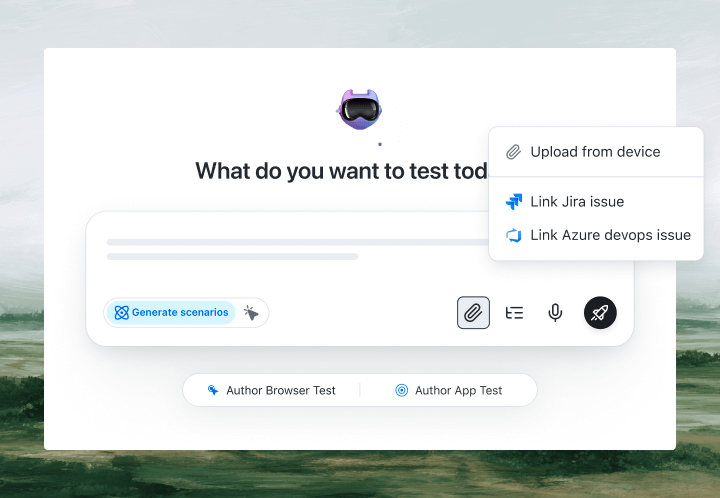
With KaneAI, you write the same test in plain English:
- Go to my-app.lovable.app
- In the new task field, type Ship the release
- Click Add
- Verify Ship the release appears in the task list
- Verify the task count goes up by one
That is the entire test. KaneAI reads each step, finds the right elements on your live Lovable app the way a human tester would, by understanding the page rather than matching a brittle Tailwind class, and runs the flow. This matters most for AI-generated apps whose markup regenerates on every edit: when Lovable rewrites the component on your next prompt, the step re-anchors itself instead of breaking, and that self-healing against churned selectors significantly reduces maintenance. Best of all, the test is plain English that a non-coder founder can read, own, and update, no engineer in the loop.

The apps built with Lovable scenarios that actually break
Once the happy path passes, real coverage is just more English. These are the Lovable-specific scenarios worth adding, and each takes about two minutes to write:
New user signup
- Open the signup screen and register a brand-new email and password
- Verify the app redirects to the logged-in home or dashboard
- Refresh the page and verify the session is still active, not bounced back to signup
A form that has to persist
- Fill in a create form and submit it
- Verify a success state or the new record appears in the list
- Reload the page and verify the record is still there, so a passing screen is not mistaken for saved data
The screen you just reprompted
- After a Lovable edit to a page, re-run the core action that page is responsible for
- Verify the primary button still triggers the right outcome, not a dead click
- Verify nothing that worked in the previous version silently regressed
Mobile and small screens
- Open the app on a phone-sized viewport
- Verify the menu, key inputs, and primary call to action are reachable and not clipped
- Complete the core flow end to end on the smaller layout
Run every one of them across Chrome, Safari, Firefox, and real iOS and Android devices from the same plain-English steps, with no per-browser rewrites.
Putting it on autopilot
Because Lovable ships changes constantly, these tests are most valuable when they run without you:
- Schedule the suite nightly, so a late-evening reprompt cannot quietly break signup before your morning users arrive
- Trigger on deploy, where Kane CLI runs the same tests from your pipeline when Lovable publishes or your connected GitHub repo updates, and pauses for an OTP or CAPTCHA instead of failing
- Alert on failure in Slack, with a full replay of exactly what the AI saw when the step failed: screenshots, video, and the reason in plain English
When a test fails, you do not get a stack trace at line 47. You get a plain-English reason for the exact step that failed. Anyone on the team can read it, and anyone can fix the test, because the test is just English.
Try it on your own Lovable app in 10 minutes
- Sign up for KaneAI free, with no credit card
- Paste your published lovable.app URL or custom domain
- Write your first test in plain English, or let KaneAI suggest one from your app
- Run it and watch your Lovable app get tested end to end
Your app was built in the language you already speak, so test it the same way. Once the core flows are covered, read how to add visual regression testing without code to catch the layout shifts a reprompt can introduce, and if you also build with another AI builder, see how to test apps built with Emergent or test apps built with Base44 the same way.
Going Past the Vibes: How to Build Real Apps, presented at Testμ 2026, works through the same problem.

Note: Test the app you built with Lovable without writing a line of code. Start with KaneAI free.
Author

Reshu Rathi
Blogs: 6


Reshu Rathi is a skilled content and marketing professional with expertise in content marketing for SaaS, tech, AI, and startup growth. She crafts strategies that drive engagement and growth, leveraging deep industry knowledge. Reshu excels in simplifying complex topics to create impactful, audience-focused content.
Reviewer

Salman Khan
Reviewer
Salman is a Test Automation Evangelist and Community Contributor at TestMu AI, with over 6 years of hands-on experience in software testing and automation. He has completed his Master of Technology in Computer Science and Engineering, demonstrating strong technical expertise in software development, testing, AI agents and LLMs. He is certified in KaneAI, Automation Testing, Selenium, Cypress, Playwright, and Appium, with deep experience in CI/CD pipelines, cross-browser testing, AI in testing, and mobile automation. Salman works closely with engineering teams to convert complex testing concepts into actionable, developer-first content. Salman has authored 120+ technical tutorials, guides, and documentation on test automation, web development, and related domains, making him a strong voice in the QA and testing community.


Lovable App Testing FAQs
Did you find this page helpful?
More Related Blogs

TestMu AI forEnterprise
Get access to solutions built on Enterprise
grade security, privacy, & compliance
- Advanced access controls
- Advanced data retention rules
- Advanced Local Testing
- Premium Support options
- Early access to beta features
- Private Slack Channel
- Unlimited Manual Accessibility DevTools Tests