
Power Your Software Testing with AI Agents and Cloud
The Native AI-Agentic Cloud Platform to Supercharge Quality Engineering. Test Intelligently and Ship Faster.

- TestMu AI (Formerly LambdaTest)
- /
- Blog
- /
- Base44 Review: What 58 Live Apps Reveal About Quality
Base44 Review: What 58 Live Apps Reveal About Quality
Base44 review: its features, credits, and security, plus an audit of 58 live Base44 apps for WCAG violations, mobile layout, page weight, and console errors.
Published on:
A Base44 prompt can return a styled app with a database, a sign-up flow, and hosting in one pass, and the preview makes it look finished. The preview does not tell you whether the text clears contrast checks, whether every button has a name a screen reader can announce, or how much a phone downloads before the first screen paints.
This Base44 review covers the builder itself, its features, credits, and security record, and then puts its output under test. I ran the live preview apps featured in Base44's Templates Marketplace through accessibility, mobile layout, page weight, and runtime error checks on TestMu AI's cloud, so the verdict rests on what Base44 apps actually ship.
TL;DR
Base44 is an AI app builder, owned by Wix, that turns a plain-English prompt into a hosted web app with a database, authentication, and integrations. It suits MVPs and internal tools. In an audit of 58 live template apps, most public pages shipped contrast or naming issues, so test before you publish.
- Free plan: Is Base44 free? Yes. The Free plan includes 25 message credits and 100 integration credits a month, up to 5 apps, and authentication, database, and analytics features.
- Code export: Can you export code from Base44? Yes. Two-way GitHub sync exports the full source code to your own repository, and the GitHub integration starts on the Builder plan.
- Built-in testing: Does Base44 test login flows for you? No. The Base44 testing agent runs browser tests on key flows, but flows with a login form, an OTP code, or an email verification link are not supported yet.
- WCAG results: Do Base44 apps pass WCAG checks out of the box? Not reliably. 37 of the 43 public template home pages had at least one WCAG 2.x A or AA violation, and low-contrast text was the most common.
- Mobile layout: Do Base44 layouts break at phone width? No. None of the 58 Base44 template apps scrolled sideways at a 375-pixel viewport, although 15 public apps still transferred more than 5 MB on a mobile load.
- Pre-publish verification: Kane CLI from TestMu AI drives the published Base44 URL in a real Chrome browser from plain-English steps, covering the sign-in, saved-record, and role checks that the Base44 testing agent skips.
What Is Base44?
Base44 is an AI app builder owned by Wix: you describe an app in plain English, and it generates the interface, backend logic, database, authentication, and hosting together.
The Base44 product line now covers the app builder, Superagents, Base44 Backend, and Base Code, a separate product that connects an existing GitHub repository to a shared cloud workspace and ships changes as pull requests, according to the Base Code launch announcement from Wix.
For phones, Base44 wraps the published web app in a native web view for the Apple App Store and Google Play, according to its app store submission guide.
The store version is therefore the same web app your visitors load in a browser, so every web-level finding below applies to the mobile app too.
Base44 sits among the AI app builders aimed at people who would rather describe software than write it. The short TestMu AI review below shows the prompt-to-app flow, the built-in integrations, and who the builder suits.

Base44 Features Worth Knowing Before You Publish
Base44 bundles the backend and some of its own quality tooling into every plan. The table pairs each feature with the check it leaves to you.
| Feature | What it does | What you still check |
|---|---|---|
| AI chat builder | Plans, builds, and fixes the app from prompts; Discuss mode answers questions without changing the app | Each Build prompt can touch working flows, so re-run your tests after every edit |
| Built-in backend | Database entities, authentication, file storage, email, and Stripe payments generated with the app | Data permissions per table, and which roles can read or change which records |
| Testing agent | The testing agent runs browser tests on key flows from AI-generated or hand-written scenarios, on every plan, for about 1 to 4 credits a run | Login forms, OTP codes, and email verification links are not supported, and scheduled runs are not available yet |
| Security scan | Checks data permissions, user-editable fields, private fields, and exposed secrets, with one-click fixes | The publish panel warns about risks but does not block publishing |
| Branches | Copies of the app for trying changes before merging them into main | Test the branch before the merge, since main is what visitors load |
| GitHub sync | Two-way sync with your own repository for local development in any IDE | Requires the Builder plan or higher |
| Accessibility guidance | A checklist in the docs plus AI-chat prompts such as asking it to check the homepage and fix color contrast | The docs index lists no dedicated accessibility scan, so contrast and accessible names are on you |
| Performance guidance | Docs explain LCP, CLS, and INP and suggest prompts such as lazy loading below-the-fold media | You measure the published app yourself in Chrome DevTools |
Base44 Pricing and Credits
Base44 bills in credits. Message credits are used when you build with Base44's AI chat, and integration credits are used when the app calls Base44's built-in services, such as sending an email or running an LLM call, according to Base44's credits documentation.
The Base44 pricing page lists a Free plan, four paid plans, and custom Enterprise pricing, and yearly billing saves 20% on every paid plan.
| Plan | Message credits a month | Integration credits a month | What the plan adds |
|---|---|---|---|
| Free | 25 | 100 | Up to 5 apps, with authentication, database, and analytics |
| Starter | 100 | 2,000 | Unlimited apps, in-app code edits, a custom domain, and a free domain for one year |
| Builder | 250 | 10,000 | AI model selection and the GitHub integration |
| Pro | 500 | 20,000 | Early access to beta features |
| Elite | 1,200 | 50,000 | Premium support |
Dollar prices for each tier sit on the same pricing page. Credits refresh on a set schedule, and anything you have not used expires at the reset instead of rolling over. Testing costs credits too, since every testing-agent run and every batch of AI-generated tests draws on your plan's credits.
How I Tested 58 Live Base44 Apps
Base44's Templates Marketplace mixes templates published by Base44's own Templates account with templates from community creators, and each card shows a clone count and a View template link.
The sample is every preview app linked from the Featured row and the first page of the main, Apps, and Websites listings, sorted by most popular, so it is the output new builders are most likely to clone.
- Sample - 58 live apps: 43 open to anonymous visitors and 15 that redirect to a login page.
- Browser - Chrome 156 on Windows 11 on TestMu AI's cloud grid, driven through the Browser Cloud SDK with Puppeteer and the browser cache disabled.
- Accessibility - axe-core 4.10.3 with the WCAG 2.0, 2.1, and 2.2 Level A and AA rule tags, run on each home page in its first-load state.
- Mobile layout - each page reloaded at a 375 by 812 pixel viewport, with the document scroll width compared against the viewport width.
- Weight and speed - bytes transferred per page load from the Chrome DevTools Protocol, plus Largest Contentful Paint from the browser's performance timeline.
- Errors - console errors, uncaught exceptions, failed requests, and HTTP 4xx responses during each load.
An automated scan covers only part of WCAG testing. A rule engine catches contrast failures and missing names, while keyboard order, screen reader announcements, and content that appears only after scrolling need manual checks, so treat every count below as a floor.
Base44 Review Results: Accessibility, Mobile Layout, and Page Weight
Base44 gets layout right at phone width, and its platform-hosted sign-in page passed every check. The generated pages carry the problems: low-contrast text, unnamed controls, and heavy media.
Accessibility Violations
The W3C's contrast minimum criterion asks for a contrast ratio of at least 4.5:1 for normal-size text and 3:1 for large text.
- 37 of 43 public home pages (86%) had at least one WCAG A or AA violation; 6 had none.
- 32 of 43 failed color contrast, with a median of 3 failing elements per page and 30 on the worst page.
- 15 of 43 had at least one critical-impact violation, most often an icon-only button with no accessible name (11 apps).
- 18 of 43 had a button, link, select, or input that a screen reader cannot name.
- Base44's own sign-in page passed: all 11 apps that redirect to it scored zero violations, while 3 of the 4 apps with a generated custom login page had at least one.
| axe rule | WCAG success criterion | Impact | Public apps affected (of 43) |
|---|---|---|---|
| color-contrast | 1.4.3 Contrast (Minimum), AA | Serious | 32 |
| button-name | 4.1.2 Name, Role, Value, A | Critical | 11 |
| link-name | 2.4.4 Link Purpose and 4.1.2, A | Serious | 8 |
| target-size | 2.5.8 Target Size (Minimum), AA | Serious | 3 |
| select-name, label | 4.1.2 Name, Role, Value, A | Critical | 2 each |
| scrollable-region-focusable | 2.1.1 Keyboard, A | Serious | 2 |
| meta-viewport | 1.4.4 Resize Text, AA | Critical | 1 |
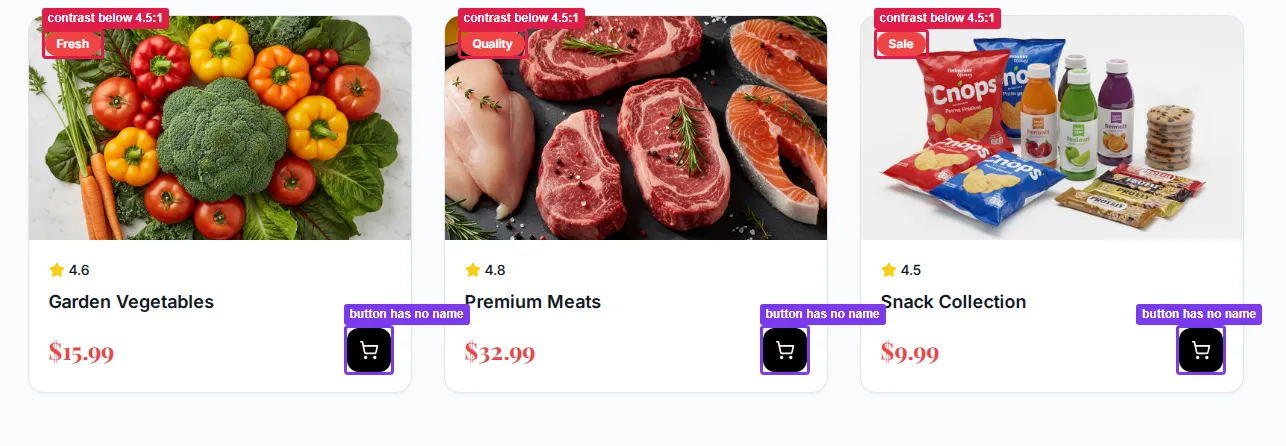
The capture above shows the two most common failures on one grocery template. The red badges fail contrast, and each cart button is an icon with no text or aria-label, so a screen reader announces it only as "button". Both are small fixes, a darker badge color and an aria-label on each icon button, and the color contrast accessibility guide covers how to pick colors that pass.
For a wider baseline, the WebAIM Million report found detected WCAG 2 failures on 95.9% of the top million home pages and low-contrast text on 83.9% of them, using the WAVE evaluation engine.
WAVE and axe apply different rule sets, so the two studies are not directly comparable, but low-contrast text tops the failure list in both.
Mobile Layout
- 0 of 58 apps scrolled sideways at a 375-pixel viewport. In 27 of them, elements extended past the right edge but were clipped instead of widening the page.
- 3 of 43 public apps failed the WCAG 2.2 target-size rule, which asks for touch targets of at least 24 by 24 CSS pixels or enough spacing around smaller ones.
- 1 app disabled pinch zoom in its viewport meta tag, which blocks users who enlarge text on a phone.
A single width is a smoke test, so run full responsive testing across the breakpoints your users have before calling the layout done.
Page Weight and Load Speed
Google's Largest Contentful Paint guidance treats 2.5 seconds or less as a good score, measured at the 75th percentile of real page loads.
- 4.0 MB was the median transfer for a public home page on desktop; 19 of 43 crossed 5 MB and 12 crossed 10 MB.
- 62.1 MB was the heaviest single page, Base44's own Fitness Studio template, which shows 8.7k clones on the marketplace.
- 7 of the 12 public pages over 10 MB, including the two heaviest, are templates published by Base44's own Templates account rather than by community creators.
- Images made up almost all of the transfer on the five heaviest pages, served from Base44's media host, while each app's own JavaScript stayed around 0.2 MB.
- 2.5 MB was the median on the 375-pixel mobile reload, and 15 of 43 public apps still transferred more than 5 MB.
- 2,264 ms was the median lab LCP; 19 of 43 public pages took longer than 2.5 seconds and 4 took longer than 4 seconds.
These are lab numbers from a fast cloud connection, so real phones on mobile networks will do worse. The generated code is light, so the fix is in the media: resize and compress uploaded images, and prompt Base44 to lazy-load anything below the fold.
Console Errors and Broken Images
- 34 of 43 public apps logged a 401 for the
/entities/User/merequest on load. The apps ask for the current user as they start, and an anonymous visitor gets a 401, so filter this message out before you fail a build on console errors. - 10 of 43 public apps had broken images, either 404 responses or image URLs the browser blocked, with 12 on the worst page.

Note: Check your Base44 app for low-contrast text, unnamed buttons, and missing form labels before you share it. TestMu AI runs axe-core scans against any live URL and maps every issue to its WCAG success criterion. Try TestMu AI free
Is Base44 Secure?
Wiz Research found that undocumented registration and email-verification endpoints accepted a non-secret app_id, which let an outsider create a verified account on a private Base44 app and bypass its SSO. Base44 and Wix fixed it in less than 24 hours, and Wix said it found no evidence of past abuse.
Every plan now includes a security scan that checks data permissions, user field access, private fields, and exposed secrets, and applies recommended fixes in one click. The publish panel shows the app's security status and warns about risks, but it does not stop you from publishing, and Base44's documentation states that you are responsible for your app's security.
The scan reads configuration, so it cannot confirm what a signed-in user actually sees, and permission leaks are among the vibe coding risks that only show up in a running app. Verify these on the published app with real test accounts:
- Record visibility - a user sees only the records their role and ownership allow, and a logged-out visitor sees none of them.
- Profile fields - a user cannot edit a field such as company or role on their own profile to gain another group's access.
- Public tables - testimonials, listings, and other public data do not expose emails, phone numbers, or tokens.
- Sign-up rules - if sign-up is meant to be closed, a new email address cannot register and reach the app.
Base44 Pros and Cons
| Pros | Cons |
|---|---|
| Interface, database, authentication, and hosting from one prompt | Unused credits expire at each reset, and testing draws on the same balance |
| A testing agent and a security scan on every plan, including Free | The testing agent skips login, OTP, and email verification flows and cannot run on a schedule |
| Layouts held at phone width in all 58 apps tested | 37 of 43 public template pages failed at least one WCAG A or AA rule |
| You own the code, with two-way GitHub sync for local development | GitHub sync and app store submission files need the Builder plan or higher |
| The platform-hosted sign-in page passed axe with zero violations | Pages run heavy, Base44's own templates included, with a 4.0 MB median transfer on desktop |
How to Test a Base44 App Before You Publish
Base44's own tools cover functional flows and configuration. Fill the gaps the audit exposed in this order, against the published URL rather than the builder preview.
- Run the testing agent on core flows - generate tests for checkout, form submission, and navigation, then re-run them after every Build prompt that touches those pages.
- Run the security scan and rescan after changes - once you change the app, the fix buttons stay off until you scan again, so a stale scan can hide a new permission gap.
- Scan every public page for WCAG issues - start with contrast and accessible names, since those caused most of the failures above.
- Verify login-gated journeys in a real browser - sign-in, saved records, and role rules are the flows the testing agent cannot run.
- Check phone widths and page weight - compress hero media and prompt Base44 to lazy-load anything below the fold.
For the accessibility pass, TestMu AI's accessibility testing suite runs on axe-core. The Accessibility DevTools Chrome extension adds a Full Page scan for single screens and a Workflow scan for modals, multi-step forms, and other states that only appear after interaction. Test Scheduling can then re-scan your published pages daily, weekly, or monthly from a URL list or sitemap, so a prompt that reintroduces low-contrast text gets flagged on the next run.
For login-gated journeys, Kane CLI drives your live base44.app URL in a real Chrome browser from plain-English objectives and returns a pass or fail with evidence. Install it and sign in with your TestMu AI credentials:
npm install -g @testmuai/kane-cli
kane-cli login --username "$LT_USERNAME" --access-key "$LT_ACCESS_KEY"
Keep test-account credentials in a variables file and mark the password as secret, so it never appears in logs or screenshots:
{
  "email": { "value": "qa-member@yourcompany.com" },
  "password": { "value": "use-a-test-account-password", "secret": true }
}
Then describe the journey and the permission rule you expect. Exit code 0 means it passed, 1 means an assertion failed, 2 means an environment or auth error, and 3 means a timeout, so the same command can gate a CI pipeline:
kane-cli run "log in with '{{email}}' and '{{password}}', open the Orders page, assert that only orders created by this user are listed, log out, then assert the Orders page asks the visitor to sign in" \
  --url https://your-app.base44.app \
  --variables-file ./test-user.json \
  --agent --headless --timeout 300
Use a pre-verified test account so the run does not stop at an email OTP. For a plain-English walkthrough of entity, role, and integration checks, see the guide to Base44 testing.
Who Should Use Base44?
- Founders validating an MVP - Base44 puts a hosted app with sign-up and a database in front of users without any infrastructure setup, and the Free plan covers up to 5 apps for testing the idea.
- Teams building internal tools - private apps with role-based access suit dashboards, trackers, and back-office forms, where speed matters more than page weight.
- Product teams with an existing codebase - Base Code fits better than the app builder, since it works on your repository and ships changes as pull requests.
- Builders with accessibility obligations - public-sector, education, and consumer apps that must meet WCAG need an accessibility pass on every page before launch, given how often the templates failed.
If you are weighing Base44 against Lovable, the pre-publish questions are the same, and the guide to test Lovable apps applies the same checks to that builder.
Base44 Review Verdict
Before you share a Base44 app, run its security scan, then point an accessibility scan and a Kane CLI sign-in check at the published URL. The Kane CLI introduction covers setup, and the Base44 app testing page lists the entity, role, and integration flows worth covering.
As a builder, Base44 earns its place for MVPs and internal tools: the full stack comes from one prompt, layouts hold at phone width, and testing and security tools ship on every plan. The weak spots in this Base44 review sit in accessibility and login-gated behavior, and both are cheap to catch before launch.
Author

Rahul Mishra
Blogs: 19

Rahul Mishra is a Lead Member of Technical Staff at TestMu AI, leading frontend engineering and accessibility testing across the quality engineering platform. He mentors frontend engineers, runs code reviews and sprint planning, optimizes React.js rendering performance, and makes product features accessible to users with disabilities through WCAG and ADA-compliant accessibility audits. He brings 10+ years of experience across React.js, VueJS, TypeScript, Swift, Objective-C, and AWS, with earlier work as a Technical Lead at VectoScalar Technologies. Rahul holds a B.E. in Information Technology.
Reviewer

Himanshu Sheth
Reviewer
Himanshu Sheth is the Director of Marketing (Technical Content) at TestMu AI, with over 8 years of hands-on experience in Selenium, Cypress, and other test automation frameworks. He has authored more than 130 technical blogs for TestMu AI, covering software testing, automation strategy, and CI/CD. At TestMu AI, he leads the technical content efforts across blogs, YouTube, and social media, while closely collaborating with contributors to enhance content quality and product feedback loops. He has done his graduation with a B.E. in Computer Engineering from Mumbai University. Before TestMu AI, Himanshu led engineering teams in embedded software domains at companies like Samsung Research, Motorola, and NXP Semiconductors. He is a core member of DZone and has been a speaker at several unconferences focused on technical writing and software quality.


Base44 Review FAQs
Did you find this page helpful?
More Related Blogs

TestMu AI forEnterprise
Get access to solutions built on Enterprise
grade security, privacy, & compliance
- Advanced access controls
- Advanced data retention rules
- Advanced Local Testing
- Premium Support options
- Early access to beta features
- Private Slack Channel
- Unlimited Manual Accessibility DevTools Tests