

Power Your Software Testing with AI Agents and Cloud
The Native AI-Agentic Cloud Platform to Supercharge Quality Engineering. Test Intelligently and Ship Faster.


- TestMu AI (Formerly LambdaTest)
- /
- Blog
- /
- Android Device Statistics for Mobile App Testing [2026]
Android Device Statistics for Mobile App Testing [2026]
In this article, we explore the various Android device statistics and popular Android devices for mobile app testing.
Last Updated on:
On This Page
- Why is Android OS so Popular?
- Android Devices Based on Global Market Share
- Android Devices Based on OS Versions
- Android Devices Based on Screen Resolutions
- Android Devices Based on Different Geographies
- Popular Android Devices for Mobile App Testing
- Factors to Consider for Android Device Testing
- Android Device Testing on the Cloud
- Conclusion
Android device testing should prioritize Android 16.0, the most common version in the United States at 40.49 percent, followed by Android 13.0 at 13.62 percent and Android 15.0 at 10.75 percent. The most common mobile screen resolution there, 414x896, covers only 21.28 percent of devices, showing how fragmented the ecosystem remains.
However, if we talk about numbers, it is clear that Android OS tops the charts, holding a strong lead at 67.45%. Being an open-source platform and adaptable to be easily ported to nearly any device, Android has become a popular choice for mobile app developers, offering uniform experiences across various Android devices and OS versions.
OEMs like Samsung, Xiaomi, Oppo, and more contribute significantly to this Android ecosystem. Considering the above whopping figures, it is clear that the Android device industry is booming, and so are Android applications. Therefore, thorough Android device testing becomes crucial to ensure the proper functioning of Android applications.
Optimizing user experience for Android devices is crucial for reducing uninstall rates and enhancing improving overall KPIs including app crash rates, performance metrics, user engagements, conversion rates, and more. Testing your web or native apps on popular Android devices ensures a uniform experience, ultimately contributing to the success of your app or website in the competitive Android ecosystem. Also, regular testing and continuous improvement are essential to maintain a better UX on Android.
So what are the top Android devices to test your mobile apps? In this article, we explore the various Android device statistics and popular Android devices for mobile app testing.
Key Takeaways
- StatCounter's August 2026 mobile operating system data shows Android holding 67.45% of the global market, which makes thorough Android device testing crucial for mobile app quality.
- StatCounter's August 2026 global vendor data puts Samsung at 19.77% and Xiaomi at 10.45% of all mobile devices, so Samsung and Xiaomi hardware should be priorities in an Android testing pool.
- In the United States, StatCounter's August 2026 data shows Android 16.0 as the most common Android version at 40.49%, followed by Android 13.0 at 13.62%, Android 15.0 at 10.75%, and Android 14.0 at 9.49%.
- StatCounter's August 2026 mobile screen resolution data for the United States ranks 414x896 first at only 21.28% and 390x844 second at 11.95%, which shows why Android app testing must cover many screen resolutions.
- StatCounter's August 2026 regional data shows Samsung as the leading Android vendor in the United States at 21.97%, while Xiaomi holds 13.11% in Europe and 12.25% in Asia, so the target geography changes which Android devices to test.
- Statista's worldwide statistics place the Samsung Galaxy A52s 5G, Samsung Galaxy S22 Ultra 5G, Samsung Galaxy S21 FE 5G, and Samsung Galaxy A32 5G among the popular Android devices for mobile app testing.
- When choosing Android devices for testing, check the target audience's devices, OS versions, screen sizes and viewports, device launch years, and popular OEMs, using analytics platforms such as Google Analytics.
- TestMu AI's real device cloud provides real Android devices across different Android versions for Android automation testing with Appium and Espresso, without the cost and scalability issues of an in-house device lab.
Why is Android OS so Popular?
Android stands as the widely used operating system for mobile devices. Being user-friendly, it is accessible to everyone irrespective of their technical skills or prior experience and offers a diverse range of features across various devices that comes at no cost. Android also provides access to Google Play Store, an official marketplace for Android applications.
When looking at the global market, iOS is behind Android in covering the wider market share, and this is mainly due to the expensive iPhones. In many countries, people opt for Android phones, which come in various price brackets, catering to different budgets. Another factor that sets Android apart from iOS is the vast number of apps available on the Google Play Store compared to the Apple App Store.
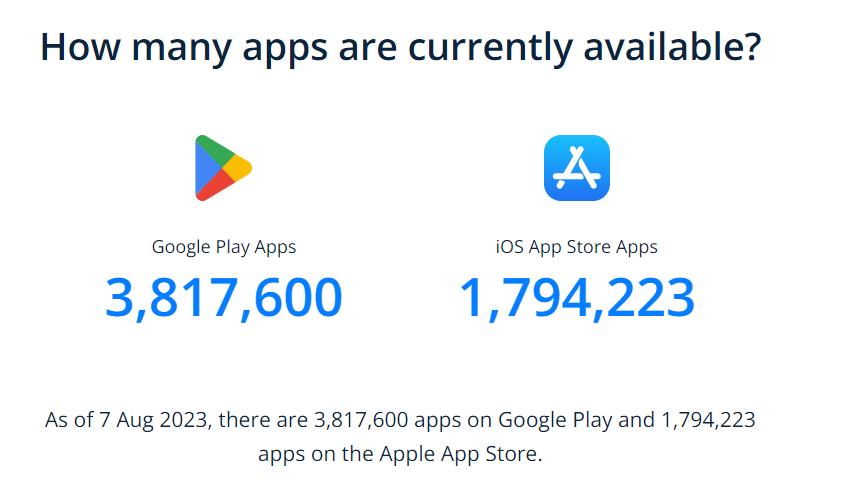
Furthermore, Android boasts better compatibility with other devices like wearables and peripheral devices when compared to iOS. This gives users more options to seamlessly integrate their devices.
In the further sections of this article on Android device statistics, we will break down the Android device statistics based on global market share, Android versions, screen resolutions, and different geographies. Understanding the distribution of these is crucial for app developers and testers to address the challenges of ensuring the functionality and compatibility of Android applications across a fragmented device ecosystem.
We will also list some popular Android devices to test on. This will further help you enhance app quality and user experience by taking into account the different characteristics of Android devices.

Android Devices Based on Global Market Share
Across all mobile vendors worldwide, Apple leads with 32.51% and Samsung follows as the largest Android vendor at 19.77%. Xiaomi, securing 10.45% of the market share, has positioned itself as a strong contender.
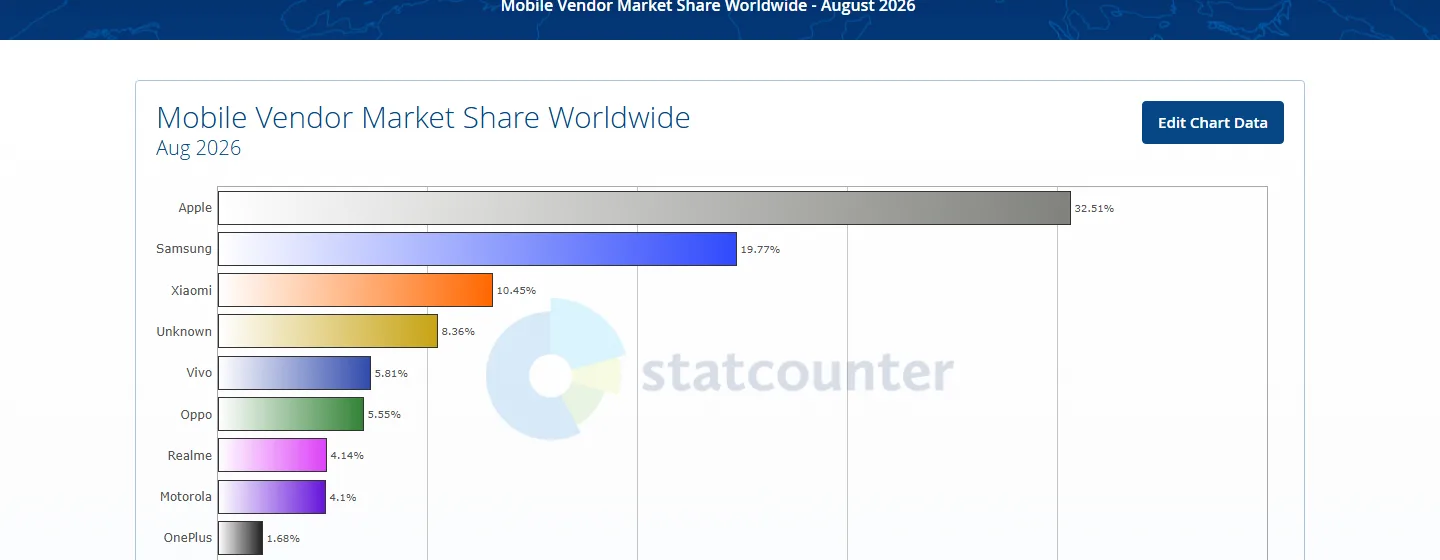
Devices whose vendor StatCounter cannot identify still account for 8.36%, reflecting the wide array of options available to end-users. Vivo, with a 5.81% market share, Oppo at 5.55%, Realme at 4.14%, and Motorola at 4.1% contribute to the dynamic nature of the mobile industry.
Since Samsung holds a significant market share, it’s important to prioritize testing on Samsung devices. Xiaomi also commands a notable share, so including Xiaomi devices in your testing pool is crucial.
Consider testing on OEMs like Oppo and Vivo, as well as lesser-known OEMs, which collectively hold a substantial market share.
Android Devices Based on OS Versions
When selecting an Android device, it’s important to consider the Android version to ensure app compatibility, security updates, and performance enhancements. Latest Android versions typically offer enhanced security through timely updates and performance improvements, making them a desirable choice.
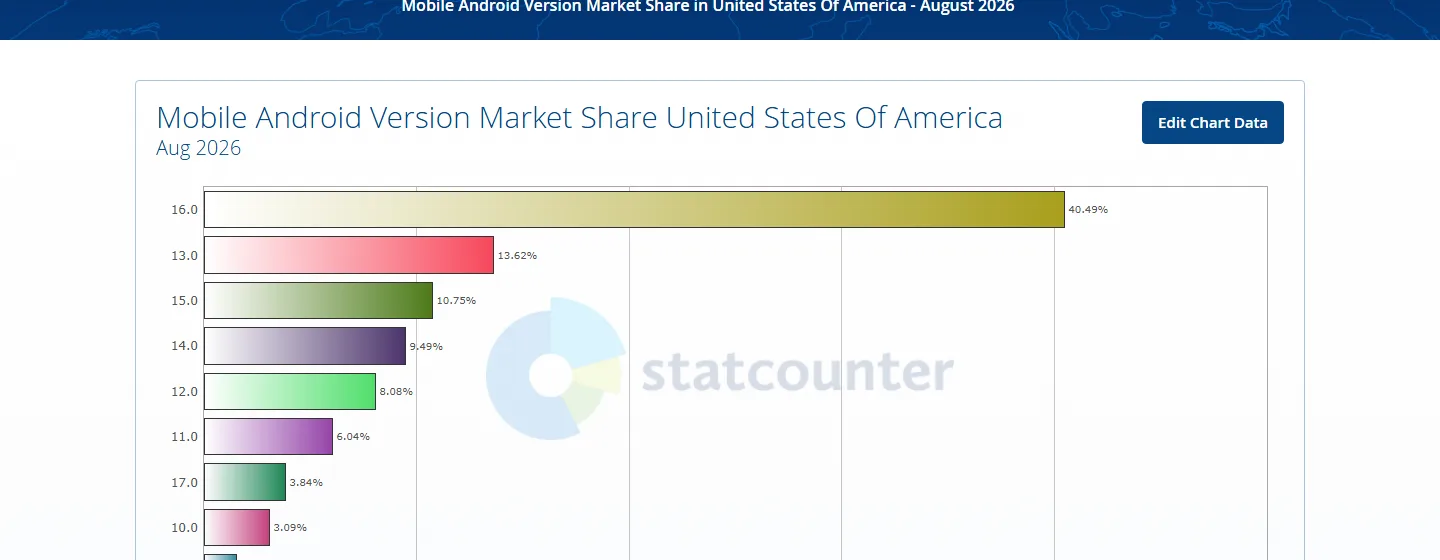
The above data represents the distribution of different Android versions’ market share in the United States, indicating the percentage of devices running each Android version.
As you can see, Android 16.0 enjoys the highest prevalence at 40.49%, followed by Android 13.0 at 13.62%, Android 15.0 at 10.75%, and Android 14.0 with a 9.49% market share. It’s important to prioritize mobile testing on these Android versions.
Older releases still carry real traffic, with Android 12.0 at 8.08%, Android 11.0 at 6.04%, and Android 10.0 at 3.09%, while the newest Android 17.0 has already reached 3.84%, so cover both ends of the range.
Android Devices Based on Screen Resolutions
While performing Android app testing, considering different screen sizes and resolutions should be a part of your mobile app test strategy. This will help ensure all the icons, fonts, images, etc., in your user interface, is consistent across various mobile device resolutions.
If there are UI discrepancies in your Android application between different screen sizes and resolutions, chances are people might lose interest in your application, providing negative feedback.
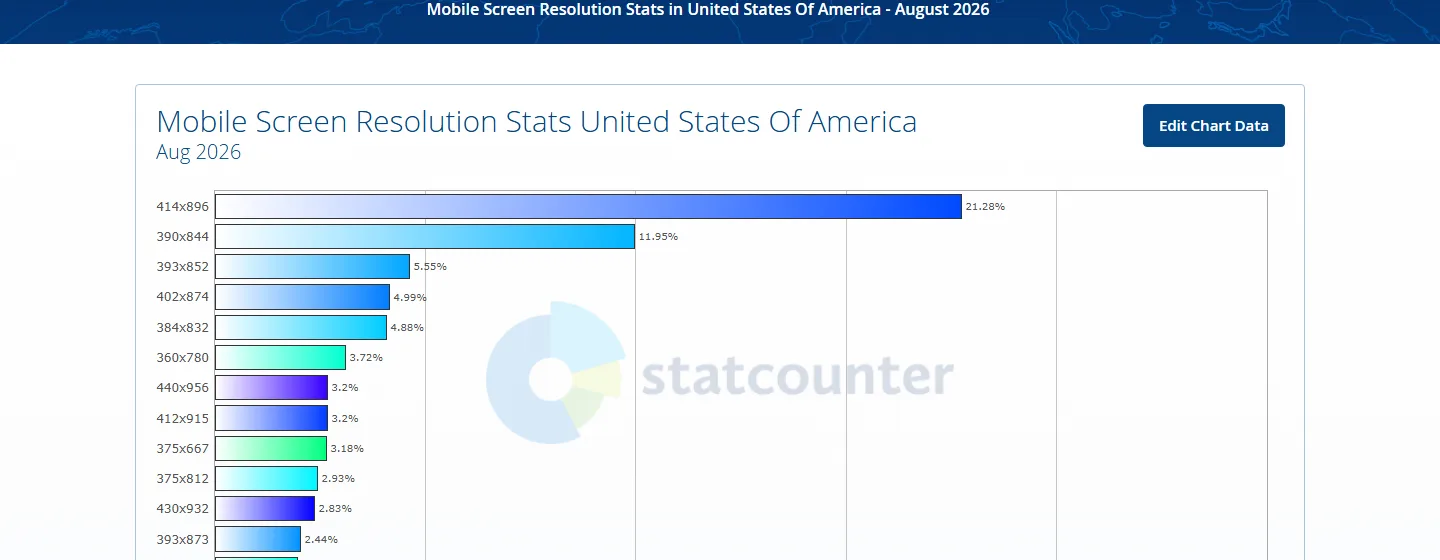
The above statistics show the most common mobile screen resolutions in the United States, counting every mobile device, which are:
- 414×896: 21.28%
- 390×844: 11.95%
- 393×852: 5.55%
- 402×874: 4.99%
- 384×832: 4.88%

Note: Test your websites on Android viewports. Try LT Browser 2.0 Today!
Android Devices Based on Different Geographies
Suppose you are targeting a global audience for your mobile app; then, the user behavior and preferences to select device or browsers changes depending on different continents or geographies. Therefore, it is crucial to understand your user base based on the target geolocations.
Let’s explore the key Android device statistics for testing your mobile application across various geolocations.
United States of America
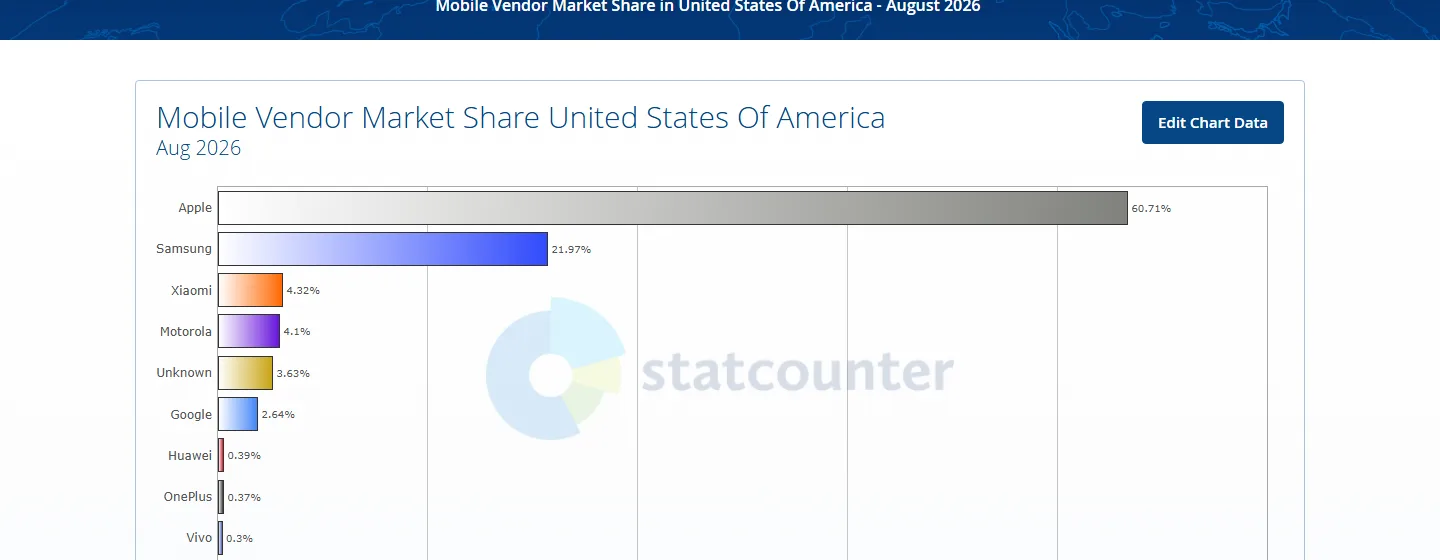
Here is the data for Android share in the United States of America, which shows that Samsung mobile devices are the most popular Android choice in the region, with a market share of 21.97%, followed by Xiaomi (4.32%), Motorola (4.1%) and Google (2.64%).
Europe
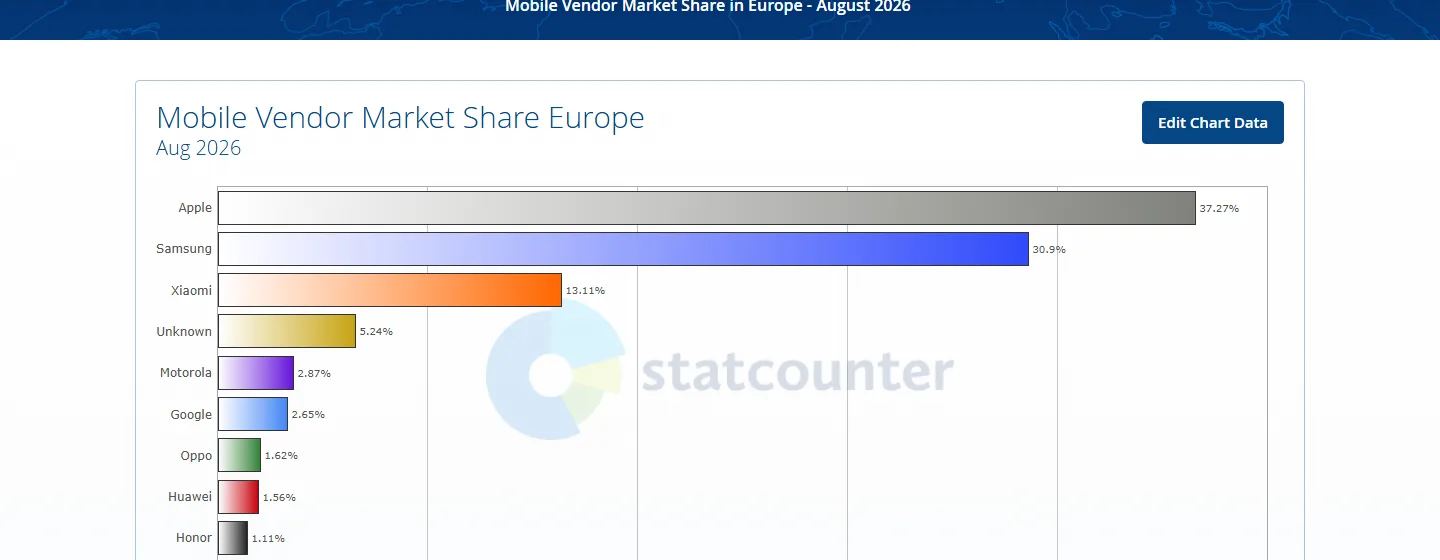
In Europe, Samsung remains the most widely used Android OEM at 30.9%, taking the second spot after Apple. Next comes Xiaomi holding a market share of 13.11%, followed by Motorola at 2.87% and Google at 2.65%.
Asia
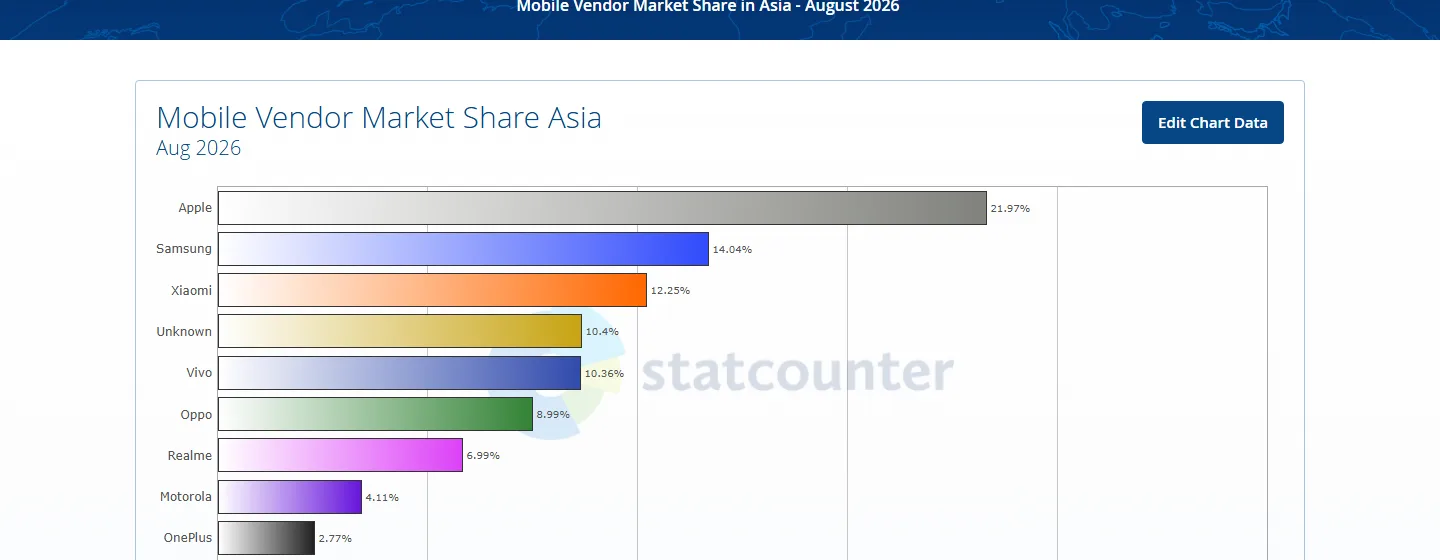
Looking at the Android device statistics for Asia, you can see that Samsung leads the Android vendors with a mobile market share of 14.04%. Then comes Xiaomi accounting for 12.25% of the market, followed by Vivo at 10.36% and other OEMs.

Popular Android Devices for Mobile App Testing
Device popularity shifts every quarter, so build the list from the shares above rather than from a fixed table. In August 2026 that means Samsung first among Android vendors in every region covered here, at 21.97% in the United States, 30.9% in Europe, and 14.04% in Asia, followed by Xiaomi at 13.11% in Europe and 12.25% in Asia.
Pair those vendors with the versions and viewports your users actually run: Android 16.0 for current behaviour, Android 13.0 and Android 12.0 for the long tail that still carries traffic, and the viewports that lead the resolution chart above, including 414x896, 390x844, 384x832, and 360x780.
In the next section of this article on Android device statistics, let’s look at the factors to consider when choosing mobile devices for Android testing.
Also Read: Mobile UI Testing Tutorial: A Comprehensive Guide With Best Practices
Factors to Consider for Android Device Testing
When performing Android device testing, you need to consider several important factors to ensure your mobile app delivers a uniform experience across a wide range of devices. Here are key factors to keep in mind:
- Device fragmentation: As the Android market is highly fragmented, it’s crucial to test your apps on different devices, resolutions, hardware specifications, and OS versions. Testers should keep updating their device list periodically to remain in sync with the new devices being launched in the market. For a repeatable way to decide which combinations belong on that list, see how to build an Android app testing device matrix. For this, they can leverage online device farm offered by cloud-based testing platforms like TestMu AI.
- Target audience: Select devices that your target audience uses. A detailed analysis of the app under test will decide if you need to test the entire mobile app or only its few elements. You should prioritize testing all crucial features across major devices and their OS combinations.
Find your website’s user metrics and insights by leveraging various analytics platforms such as Google Analytics. Post that, break those insights or analytics according to the devices, device versions, and geographical locations used by your intended audience.
- Popular OEMs: When users make decisions about their mobile devices, they consider the OEM’s reputation as well. Therefore, stay updated on current trends in popular devices and platforms by leveraging web analytics tools like StatCounter, Statista, and more.
Here is a quick summarization of the above pointers you must consider while selecting your Android devices for testing:
- Global traffic volume of the website or mobile application from devices.
- Market share and device popularity among your target audience.
- Check the device OS and OS version your users use to access the mobile app.
- Identify the range of screen sizes, resolutions, and viewports your users use across different devices.
- Keep track of the launch year of Android devices to gauge their technical capabilities and performance. Also, stay updated with the latest devices released in the market.
- Find out which OEMs ships devices your users commonly use.
Looking at the above Android device statistics, you may now understand why Android OS is an undisputable leader in the mobile market. Therefore, the business must ensure its mobile application functions seamlessly on different Android devices, which can only be achieved by performing comprehensive Android device testing.
However, to test Android applications, setting up in-house Android device labs can be challenging, expensive, and often has scalability issues. An ideal solution here is to move testing to a cloud-based platform like TestMu AI.
Note: Test your Android apps across 53+ geographies. Try TestMu AI Today
Android Device Testing on the Cloud
AI-powered test orchestration and execution platform like TestMu AI offers a comprehensive solution for Android device testing through its real device cloud. You can get access to a wide range of real Android devices running different Android versions, allowing developers and testers to ensure their mobile web and native applications function seamlessly across different devices and operating systems.
Unlike Android emulator online, which may lack accuracy and fail to replicate real-world scenarios, TestMu AI’s mobile device lab offer real-user environments for accurate and reliable testing. By using real devices, developers can identify device-specific issues, test real user interactions, and accurately assess functionality under varying network conditions, and geolocation, and much more.
In addition, you can also perform Android automation testing using frameworks like Appium and Espresso across different real devices and browsers.
Refer to our support documentation to run your first test with Appium.

Subscribe to our TestMu AI YouTube Channel for the latest updates on tutorials around Selenium testing, Playwright testing, Selenium mobile testing and more. Ensure your website’s mobile responsiveness with TestMu AI’s Mobile-Friendly Test, a handy tool to optimize your user experience.
Conclusion
Testing on the right set of devices relies on the target market. It is, therefore, imperative for organizations and enterprises to offer their users a quality mobile experience.
An effective mobile app testing strategy requires businesses to consider the target audience, its device matrix, and the appropriate selection of mobile app testing tools. At the same time, you need to consider the above Android device statistics and maintain a balance between choosing the right combination of device and operating system to reach the maximum number of potential customers. On a side note you can refer to our article on how to check screen resolution on Android if you wish to debug screen resolution issue.
Also, read our short guide on what is a mobile application?
Author

Shantanu Wali
Blogs: 9

Shantanu Wali is Vice President of Product Management at TestMu AI (formerly LambdaTest), where he owns several product lines across the testing platform, including the Real Device Cloud and the Digital Experience Testing Cloud. He has also contributed significantly to the development and scaling of KaneAI, TestMu AI's flagship GenAI-native testing agent that uses natural language to make software testing faster and more reliable in this AI era. He brings 7+ years of experience across software development and product management, starting as a backend developer at Infosys building solutions for Fortune 500 clients. Shantanu holds an MBA from IIM Calcutta and a B.Tech in Mechanical Engineering.
Reviewer

Chaitanya Sharma
Reviewer
Chaitanya Sharma is an AI Product Manager at TestMu AI (formerly LambdaTest), where he builds agentic AI capabilities focused on computer vision and multi-modality, moving testing beyond static script execution toward autonomous, agent-driven workflows. Before TestMu AI he shipped 135+ features at Sprinklr for a no-code community and website builder used by Fortune 500 enterprises including Dell, Samsung, and Polestar. At Policybazaar he led the zero-to-one launch of a digital lending and insurance marketplace embedded in Bahrain's dominant payments app, building a risk-intelligence engine that compressed loan-approval times by 80%. He explored machine learning and NLP through research at the University of Cambridge, and holds a B.Tech from Delhi Technological University.


Android Device Statistics FAQs
Did you find this page helpful?
More Related Blogs
TestMu AI forEnterprise
Get access to solutions built on Enterprise
grade security, privacy, & compliance
- Advanced access controls
- Advanced data retention rules
- Advanced Local Testing
- Premium Support options
- Early access to beta features
- Private Slack Channel
- Unlimited Manual Accessibility DevTools Tests