
Power Your Software Testing with AI Agents and Cloud
The Native AI-Agentic Cloud Platform to Supercharge Quality Engineering. Test Intelligently and Ship Faster.


- TestMu AI (Formerly LambdaTest)
- /
- Blog
- /
- ADA Title II Checklist: WCAG 2.1 AA Steps and New Deadlines
ADA Title II Checklist: WCAG 2.1 AA Steps and New Deadlines
ADA Title II requires WCAG 2.1 AA for state and local government websites and apps. See the extended 2027 and 2028 deadlines and a full step-by-step checklist.
Published on:
Plenty of ADA Title II guides still tell public entities their deadline is April 2026. That date no longer applies: a Department of Justice interim final rule moved it to April 2027 for large entities and April 2028 for smaller ones.
The extension changed the dates and nothing else. The standard is still WCAG 2.1 Level AA, and this checklist walks through the work in order, marking which checks an automated scan from a tool like TestMu AI can cover and which need a person with a keyboard and a screen reader.
Overview
ADA Title II requires state and local governments to make their web content and mobile apps conform to WCAG 2.1 Level AA. After the April 2026 extension, entities with 50,000 or more people must comply by April 26, 2027, and smaller entities and special districts by April 26, 2028.
When Is the ADA Title II Compliance Deadline?
- Population of 50,000 or more: April 26, 2027, moved from April 24, 2026 by the Department of Justice interim final rule effective April 20, 2026.
- Under 50,000 or special district: April 26, 2028, moved from April 26, 2027 by the same rule, with the WCAG 2.1 AA standard unchanged.
Can an Automated Scan Prove ADA Title II Compliance?
- Rule-backed criteria: 22 of the 50 WCAG 2.1 A and AA success criteria have at least one axe-core rule, so scans give partial evidence for them.
- Manual-only criteria: 27 criteria, including focus order, keyboard traps, and error identification, need keyboard, screen reader, and visual testing, which TestMu AI supports with keyboard scans and real-device screen reader sessions.
What Is ADA Title II?
Title II of the Americans with Disabilities Act prohibits disability discrimination in the services, programs, and activities of state and local governments. In April 2024 the Department of Justice published a final rule, 89 FR 31320, that set a specific technical standard for their websites and mobile apps.
According to the ADA.gov fact sheet on the web and mobile app rule, that standard is WCAG 2.1 Level AA. Conforming means meeting every Level A and Level AA success criterion in WCAG 2.1, which the web accessibility guide explains principle by principle.
ADA.gov also allows an equivalent alternative to WCAG 2.1 AA only where the government can show it gives the same or better accessibility and usability. For most teams, the practical target is WCAG 2.1 AA itself.
ADA Title II Deadlines After the 2026 Extension
The Department of Justice published an interim final rule extending the compliance dates (91 FR 20902), effective April 20, 2026. Each deadline moved by about one year:
| Public entity | Original date | Current date |
|---|---|---|
| Total population of 50,000 or more | April 24, 2026 | April 26, 2027 |
| Total population under 50,000, or any special district government | April 26, 2027 | April 26, 2028 |
The interim final rule itself says what did and did not change:
- Substance unchanged - the rule "does not alter the substantive requirements adopted in the 2024 final rule, including the scope of coverage."
- Possible future rulemaking - during the extension, the Department "will consider issuing an NPRM" on the substance of the 2024 rule. No such proposal has been published in the Federal Register as of this article's date.
- Obligations continue now - "Regardless of the compliance dates, covered entities have an ongoing obligation" to make services offered through web content and mobile apps accessible.
- Pending lawsuit - the National Federation of the Blind challenged the extension in National Federation of the Blind v. Department of Justice, No. 1:26-cv-02007 (D. Md.), filed May 21, 2026. The docket shows the case still open.
Plan against the dates in the table, and check the Federal Register and the court docket before any milestone, because either can change them.
ADA Title II Web Rule Coverage
ADA.gov lists all state and local governments, their departments and agencies, special purpose districts, and Amtrak and other commuter authorities. In practice that means:
- Public schools, community colleges, and public universities
- Courts, police, and elections offices
- Benefits offices, public hospitals, libraries, and parks
- Public transit authorities
Federal agencies are not covered by Title II. Their websites and software fall under Section 508 of the Rehabilitation Act, which uses WCAG 2.0 Level A and AA instead; the Section 508 compliance guide covers those requirements.
The rule also reaches past the entity's own staff. ADA.gov states that governments that contract with others to provide public services must ensure those contractors follow Title II, so a payment portal, permit system, or learning platform a vendor runs for an agency is part of that agency's compliance.
ADA Title II Exceptions and Their Conditions
The rule has five exceptions, and each comes with conditions. ADA.gov summarizes them as follows:
- Archived web content - exempt only when all four conditions hold: created before the compliance date (or a copy of pre-date physical media), kept only for reference, research, or recordkeeping, stored in a special archive area, and unchanged since it was archived.
- Preexisting conventional electronic documents - Word, PDF, spreadsheet, and presentation files available before the compliance date, unless they are still used to apply for or access a service.
- Third-party content - content posted by members of the public, such as a message board post. Content posted by the government, its contractors, or through tools it provides does not qualify.
- Individualized, password-protected documents - documents about a specific person, property, or account that are password-protected or otherwise secured.
- Preexisting social media posts - posts made before the compliance date.
An exception does not remove the entity's other ADA duties, such as effective communication and reasonable modifications for a person who asks.
ADA Title II Checklist in Seven Steps
Work through these in order. The early steps shrink the scope; the later ones produce the evidence.
- Inventory every domain, subdomain, app, and document set (Step 1).
- Tag each item that meets an exception and record why (Step 2).
- Scan every page against WCAG 2.1 AA (Step 3).
- Manually test the 27 criteria no automated rule covers (Step 4).
- Fix forms, documents, and mobile apps (Step 5).
- Collect a current ACR from every vendor (Step 6).
- Rescan after every release (Step 7).
Step 1: Inventory Every Web Property, App, and Document Set
- List every domain and subdomain, including department microsites and payment or permit portals.
- List every mobile app the entity offers, including apps built by vendors.
- List document libraries, especially forms used to apply for or access services.
- Record whether an internal team or a named vendor owns each item.
Step 2: Mark What Falls Under an Exception
Tag each inventory item against the exceptions above, and write down which condition it meets. An archive page that someone edited after archiving no longer qualifies, so record the last-modified date as well.
Step 3: Run Automated Scans Against WCAG 2.1 AA
Automated scans are the fastest way to find missing alt text, low contrast, and unlabeled controls across hundreds of pages. Set the rule set to WCAG 2.1 AA so results match the legal standard.
I ran one scan on the TestMu AI cloud grid against the Selenium Playground input form, with the accessibility capability set to WCAG 2.1 AA, and ran axe-core in the same session for the raw rule output:
Session ID: 0a218be2598812f3aca5d6663e46c5e8
axe-core 4.12.1 | rules passed: 26 | needs review: 2 | rules failed: 2
  SC 1.4.3      color-contrast               serious   1 element(s)
  SC 4.1.2      select-name                  critical  1 element(s)
The TestMu AI dashboard for build 108748957 summarized the run as 5 total issues across 3 issue types against WCAG 2.1 AA:
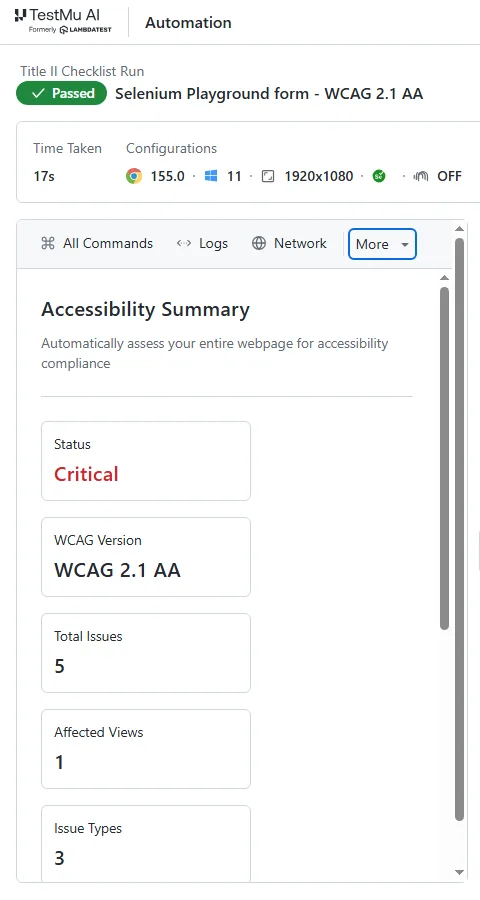
The page under test is a form, yet the scan reports nothing about 3.3.1 Error Identification or 3.3.3 Error Suggestion, because no axe-core rule covers either. Silence on those rows is not a pass.
Step 4: Test the Criteria Scans Cannot Reach
I mapped every rule in axe-core 4.14.0 to its WCAG tags and compared them with the 50 Level A and AA criteria in WCAG 2.1. 22 criteria have at least one rule and 27 have none. The last one, 4.1.1 Parsing, is obsolete. Cover the 27 with these passes:
- Keyboard only - unplug the mouse and complete every key task. Check that focus is visible, follows a logical order, and never gets stuck.
- Screen reader - complete the same tasks with NVDA or VoiceOver, listening for reading order, status messages, and error announcements. The screen reader accessibility testing guide covers the setup.
- Zoom and reflow - view each page at 400% zoom and at 320 CSS pixels wide, and check that nothing is cut off or requires two-way scrolling.
- Forms and errors - submit forms empty and with bad data, and check that each error names the field and suggests a fix. The accessible forms and error handling guide has test cases for this pass.
- Media - check live captions, audio description, and text alternatives for every video.
- Site-wide consistency - compare navigation, labels, and component names across pages.
Step 5: Fix Documents and Mobile Apps
- Documents - start with forms and any file used to apply for or access a service, since those never qualify for the preexisting-document exception.
- Mobile apps - test on real Android and iOS devices with TalkBack and VoiceOver turned on, so you hear what users of those screen readers hear. The mobile accessibility testing guide lists the checks.
Step 6: Get Conformance Evidence From Every Vendor
Because contractors must follow Title II, ask each vendor on your inventory for a current Accessibility Conformance Report for the version you run, written against WCAG 2.1 AA or later. The guide to what a VPAT is and how to fill one out explains how to read one and what a credible report contains.
If you are the vendor, expect this request from public-sector buyers and prepare the report before the deadline for your largest customers.
Step 7: Monitor After Every Release
A site that conforms on the deadline can fail a week later when a content editor uploads an image without alt text. TestMu AI accessibility scheduling runs recurring scans that address this:
- Sitemap-based coverage - enter a domain or XML sitemap, and the URL list is re-extracted on each run so new pages are scanned automatically.
- Signed-in pages - save login credentials or connect through a tunnel to scan portals and staging sites.
- Cadence and alerts - run daily, weekly, or monthly, and get Slack or email alerts when new violations appear.
- Audit exports - export reports as PDF or CSV for your compliance records.
The accessibility test scheduling docs walk through the setup.

Note: Scan your whole site against WCAG 2.1 AA on a schedule, and test the manual criteria with keyboard scans and real-device screen readers, all in TestMu AI. Start testing for free.
WCAG 2.1 AA Checklist: Automated vs Manual
Every WCAG 2.1 Level A and AA success criterion, grouped by area. The automated column lists criteria with at least one axe-core 4.14.0 rule. Those still need a manual check for quality, such as whether alt text is meaningful. The manual column lists criteria with no rule at all.
| Area | Automated rule exists (22) | Manual testing only (27) |
|---|---|---|
| Images and media | 1.1.1 Non-text Content, 1.2.1 Audio-only and Video-only, 1.2.2 Captions (Prerecorded), 1.4.2 Audio Control | 1.2.3 Audio Description or Media Alternative, 1.2.4 Captions (Live), 1.2.5 Audio Description, 1.4.5 Images of Text, 2.3.1 Three Flashes |
| Color, contrast, and text | 1.4.1 Use of Color, 1.4.3 Contrast (Minimum), 1.4.4 Resize Text, 1.4.12 Text Spacing | 1.3.3 Sensory Characteristics, 1.4.10 Reflow, 1.4.11 Non-text Contrast, 1.4.13 Content on Hover or Focus |
| Keyboard and focus | 2.1.1 Keyboard | 2.1.2 No Keyboard Trap, 2.1.4 Character Key Shortcuts, 2.4.3 Focus Order, 2.4.7 Focus Visible, 3.2.1 On Focus |
| Structure and navigation | 1.3.1 Info and Relationships, 1.3.4 Orientation, 2.4.1 Bypass Blocks, 2.4.2 Page Titled, 2.4.4 Link Purpose, 3.1.1 Language of Page, 3.1.2 Language of Parts | 1.3.2 Meaningful Sequence, 2.4.5 Multiple Ways, 2.4.6 Headings and Labels, 3.2.3 Consistent Navigation, 3.2.4 Consistent Identification |
| Forms and errors | 1.3.5 Identify Input Purpose, 3.3.2 Labels or Instructions | 3.2.2 On Input, 3.3.1 Error Identification, 3.3.3 Error Suggestion, 3.3.4 Error Prevention |
| Timing, pointer, and motion | 2.2.1 Timing Adjustable, 2.2.2 Pause, Stop, Hide, 2.5.3 Label in Name | 2.5.1 Pointer Gestures, 2.5.2 Pointer Cancellation, 2.5.4 Motion Actuation |
| Code and assistive technology | 4.1.2 Name, Role, Value | 4.1.3 Status Messages |
4.1.1 Parsing is the 50th criterion. W3C has since marked it obsolete, so it needs no testing.

Austin Siewert
Co-Founder, Steadfast Systems
Discovered @TestMu AI yesterday. Best browser testing tool I've found for my use case. Great pricing model for the limited testing I do 👏
2M+ Devs and QAs rely on TestMu AI
Deliver immersive digital experiences with Next-Generation Mobile Apps and Cross Browser Testing Cloud

Start This Week With an Inventory and a Baseline Scan
Build the inventory from step 1 this week, then run a sitemap-based WCAG 2.1 AA scan of your highest-traffic domain to get a baseline. The baseline shows where the 22 rule-backed criteria fail, and the 27 manual criteria become your test plan for the months before your deadline.
TestMu AI Accessibility Testing covers WCAG 2.0, 2.1, and 2.2 across web pages, automated test suites, and native apps on real devices, so one platform holds the evidence from every step above.
Author

Rahul Mishra
Blogs: 17

Rahul Mishra is a Lead Member of Technical Staff at TestMu AI, leading frontend engineering and accessibility testing across the quality engineering platform. He mentors frontend engineers, runs code reviews and sprint planning, optimizes React.js rendering performance, and makes product features accessible to users with disabilities through WCAG and ADA-compliant accessibility audits. He brings 10+ years of experience across React.js, VueJS, TypeScript, Swift, Objective-C, and AWS, with earlier work as a Technical Lead at VectoScalar Technologies. Rahul holds a B.E. in Information Technology.
Reviewer

Shahzeb Hoda
Reviewer
Shahzeb Hoda is the Associate Director of Marketing and a Community Contributor at TestMu AI, leading strategic initiatives in developer marketing, content, and community growth. With 10+ years of experience in quality engineering, software testing, automation testing, and e-learning, he has authored and reviewed 70+ technical articles on software testing and automation. Shahzeb holds an M.Tech in Computer Science from BIT, Mesra, and is certified in Selenium, Cypress, Playwright, Appium, and KaneAI. He brings deep expertise in CI/CD pipeline automation, cross-browser testing, AI-driven testing practices, and framework documentation. On LinkedIn, he is followed by 3,700+ engineers, developers, DevOps professionals, tech leaders, and enthusiasts.


ADA Title II FAQs
Did you find this page helpful?
More Related Blogs

TestMu AI forEnterprise
Get access to solutions built on Enterprise
grade security, privacy, & compliance
- Advanced access controls
- Advanced data retention rules
- Advanced Local Testing
- Premium Support options
- Early access to beta features
- Private Slack Channel
- Unlimited Manual Accessibility DevTools Tests