
Power Your Software Testing with AI Agents and Cloud
The Native AI-Agentic Cloud Platform to Supercharge Quality Engineering. Test Intelligently and Ship Faster.


- TestMu AI (Formerly LambdaTest)
- /
- Blog
- /
- What Is a VPAT? Template, Example & How to Fill One Out
What Is a VPAT? Template, Example & How to Fill One Out
A VPAT is the free ITI template vendors use to report WCAG and Section 508 conformance. See the 2.5 editions, a filled example, and the evidence each row needs.
Published on:
A procurement team is ready to sign, and one line stands between your product and the purchase order: "Attach a current VPAT for the version you are quoting." Sales forwards it to engineering, and engineering finds a blank template with a row for every WCAG success criterion.
Filling the rows takes an afternoon. Backing them up takes testing. This guide covers what a VPAT is, which edition to use, what each conformance level commits you to, and how I gather the evidence for each row using automated scans and manual checks in TestMu AI.
Overview
A VPAT (Voluntary Product Accessibility Template) is a free template from the Information Technology Industry Council that vendors fill in to report how a product meets WCAG, Section 508, or EN 301 549. The completed document is an Accessibility Conformance Report (ACR), and each row needs testing behind it to be credible.
What Is the Difference Between a VPAT and an ACR?
- VPAT: The blank VPAT 2.5Rev form that ITI publishes in four editions, offered free of charge with no ITI membership required.
- ACR: The finished report for one product and version, listing a conformance level and a remark for every criterion in the chosen edition.
What Evidence Does Each VPAT Row Need?
- Automated scan results: axe-core 4.14 has rules for 23 of the 55 WCAG 2.2 Level A and AA criteria, so scans provide evidence for fewer than half of the rows.
- Manual and assistive technology testing: The other 32 criteria, including focus order, keyboard traps, and error identification, need keyboard, screen reader, and visual review before you can claim Supports.
- Conformance remarks: ITI requires remarks that name the affected features whenever a row is Partially Supports or Does Not Support.
TestMu AI does not write the ACR for you; its Accessibility Testing suite produces the scan results and test sessions you cite as evidence.
What Is a VPAT?
A VPAT® (Voluntary Product Accessibility Template) is a standard document format for reporting how a software or hardware product conforms to accessibility standards. The Information Technology Industry Council (ITI) publishes it, and the current release is VPAT 2.5Rev, dated April 2025.
Three facts from ITI's VPAT page shape how you should treat the document:
- Free to use - ITI offers the template free of charge, and you do not need ITI membership to use it.
- No certification - ITI does not review or approve completed VPATs, and there is no VPAT certification. The report is the vendor's own claim.
- Registered service mark - the VPAT name and form are ITI registered service marks and should not be altered without ITI's written permission, so reports reference it as "VPAT®".
The word "voluntary" refers to the template, not to the buyer's request. A federal agency, a public university, or an enterprise procurement team can make a current ACR a condition of purchase, which is why the request usually arrives late in a deal.
VPAT vs ACR: Template vs Accessibility Conformance Report
The Section508.gov ACR and VPAT FAQ describes vendors creating "an Accessibility Conformance Report (ACR) using the Voluntary Product Accessibility Template (VPAT®)". The two terms describe different stages of the same document:
| Attribute | VPAT | ACR |
|---|---|---|
| What it is | The blank template, with instructions and one row per criterion | The completed report with a conformance level and remark in every row |
| Who produces it | ITI | The vendor of the product being reported |
| Scope | Any ICT product, split into four editions by standard | One named product and version, on a stated report date |
| Who reads it | The person writing the report | Procurement, accessibility, and legal reviewers on the buyer's side |
When a buyer asks for "your VPAT", they want the ACR. Send the completed report for the exact version they are buying, not the blank form and not a report for an older release.
Which VPAT 2.5 Edition Do You Need?
ITI publishes four editions of VPAT 2.5Rev. Each covers a different set of standards and a different WCAG version, so pick the edition from the buyer's requirement, not from habit.
| Edition | Standards covered | WCAG version inside | Use it when |
|---|---|---|---|
| 508 | Revised Section 508 Standards | WCAG 2.0 | You sell to US federal agencies |
| EU | EN 301 549 | WCAG 2.1 | You sell to public sector buyers in the EU |
| WCAG | WCAG only | WCAG 2.0, 2.1, and 2.2 | The buyer names a WCAG level, such as 2.1 AA, and no regulation |
| INT | Section 508, EN 301 549, and WCAG | All of the above | You sell in several markets and want one report |
- Federal buyers - Section508.gov tells vendors to use a VPAT that includes the Revised Section 508 Standards, meaning the Rev508 or RevINT edition at version 2.x or later. A report built on the original 2001 standards must be updated. The Section 508 compliance guide covers what those standards require.
- EU buyers - the EU edition maps to EN 301 549, the standard behind the European Accessibility Act compliance requirements.
- Everyone else - the WCAG and INT editions are the only ones that include WCAG 2.2 criteria, so use one of them when the buyer asks for 2.2.
Required Sections in a VPAT Report
The VPAT 2.5Rev WCAG edition lists Essential Requirements for Authors, and ITI states that deviating from them "precludes vendors from referencing the template by name". A compliant ACR has these sections at a minimum:
- Report title - in the format "[Company Name] Accessibility Conformance Report".
- VPAT heading information - the template version, such as VPAT® 2.5Rev.
- Product name and version - including the version identifier, so the buyer knows which release was tested.
- Report date - at least the month and year of publication.
- Product description and contact information - an email address is enough for follow-up questions.
- Notes - optional; ITI recommends using it to explain revisions and what the report does not cover.
- Evaluation methods used - how the product was tested: assistive technologies, manual and automated tools, and any published test method.
- Applicable standards and guidelines - only the WCAG versions you actually evaluated against.
- Terms - definitions of every conformance level you use.
- Tables - one row per success criterion, each with a conformance level and a remark.
Two of these sections depend entirely on testing: Evaluation Methods Used and the remarks in each table row. Those are the sections a buyer's accessibility reviewer reads first.
VPAT Conformance Levels and the Evidence Each One Needs
The definitions below are ITI's recommended terms from the VPAT 2.5Rev template. The evidence column is what I keep on file before I enter each level, so I can answer a reviewer who asks how I know.
| Level | ITI definition | Evidence to keep |
|---|---|---|
| Supports | At least one method meets the criterion without known defects, or meets it with equivalent facilitation | A clean scan for the rule-backed part plus a dated manual check for the rest |
| Partially Supports | Some functionality does not meet the criterion | The failing screens or components, with issue IDs from your tracker |
| Does Not Support | The majority of functionality does not meet the criterion | Scan or test results showing the failure is widespread |
| Not Applicable | The criterion is not relevant to the product | A one-line reason, such as "the product contains no prerecorded video" |
| Not Evaluated | The product has not been evaluated against the criterion | Allowed only for WCAG Level AAA criteria, never for A or AA |
- Remarks for partial support - for Partially Supports or Does Not Support, ITI says the remark should identify the functions or features with issues and how they fall short.
- Supports instead of Not Applicable - ITI notes that a WCAG row may use Supports when no content exists for the criterion to apply to, in line with W3C's Understanding Conformance guidance.
- 4.1.1 Parsing - the template marks it "always answer Supports" for WCAG 2.0 and 2.1 after the September 2023 errata, and "does not apply" for WCAG 2.2, where it was removed.
Levels A and AA are what buyers usually ask for, and the differences between WCAG conformance levels decide which rows your report must answer.
Automated vs Manual Evidence for Each VPAT Row
To see how much of an ACR a scanner can back up, I mapped every rule in the open-source axe-core engine (version 4.14.0, 105 rules) to its WCAG tags. I then compared the tags against the 55 Level A and AA success criteria in the WCAG 2.2 Recommendation.
- 23 of 55 criteria have at least one axe-core rule. These include 1.1.1 Non-text Content, 1.4.3 Contrast (Minimum), 2.4.2 Page Titled, 2.5.8 Target Size (Minimum), and 4.1.2 Name, Role, Value.
- 32 of 55 criteria have no axe-core rule at all. For these rows, a scan report is not evidence in either direction.
- A rule is not a verdict - a passing contrast rule does not confirm that alt text is meaningful. W3C's guidance on selecting evaluation tools states that tools "can not determine accessibility, they can only assist in doing so."
These are the 32 rows with no automated rule, grouped by the test that produces their evidence:
| Test to run | WCAG 2.2 criteria with no axe-core rule |
|---|---|
| Keyboard-only pass | 2.1.2 No Keyboard Trap, 2.1.4 Character Key Shortcuts, 2.4.3 Focus Order, 2.4.7 Focus Visible, 2.4.11 Focus Not Obscured (Minimum), 3.2.1 On Focus |
| Screen reader pass | 1.3.2 Meaningful Sequence, 3.3.1 Error Identification, 4.1.3 Status Messages |
| Visual and zoom review | 1.3.3 Sensory Characteristics, 1.4.5 Images of Text, 1.4.10 Reflow, 1.4.11 Non-text Contrast, 1.4.13 Content on Hover or Focus, 2.3.1 Three Flashes or Below Threshold |
| Pointer and touch review | 2.5.1 Pointer Gestures, 2.5.2 Pointer Cancellation, 2.5.4 Motion Actuation, 2.5.7 Dragging Movements |
| Media review | 1.2.3 Audio Description or Media Alternative (Prerecorded), 1.2.4 Captions (Live), 1.2.5 Audio Description (Prerecorded) |
| Form and flow walkthrough | 3.2.2 On Input, 3.3.3 Error Suggestion, 3.3.4 Error Prevention (Legal, Financial, Data), 3.3.7 Redundant Entry, 3.3.8 Accessible Authentication (Minimum) |
| Site-wide consistency review | 2.4.5 Multiple Ways, 2.4.6 Headings and Labels, 3.2.3 Consistent Navigation, 3.2.4 Consistent Identification, 3.2.6 Consistent Help |
Five of the six Level A and AA criteria added in WCAG 2.2 are in this list; only 2.5.8 Target Size (Minimum) has an axe-core rule. A report that adds the 2.2 rows without new manual testing has no evidence behind them. The screen reader accessibility testing guide and the keyboard scan in Accessibility DevTools walk through the two manual passes that cover the most rows.
How to Fill Out a VPAT, Step by Step
This is the sequence I follow, from the procurement request to a published report. It matches the phases in the TestMu AI VPAT and ACR evidence documentation.
- Lock the scope - record the product name, version, platforms, and the buyer's required standard. Download the matching edition from ITI.
- Run automated scans - scan every key page and user flow, not just the home page. Workflow scans reach modals and multi-step forms that a URL scan never sees.
- Run the manual passes - keyboard-only, screen reader, zoom and reflow, and touch, covering the 32 rows in the table above.
- Fix, then re-scan - every defect you fix before publishing is one less "Partially Supports" remark.
- Map results to rows - assign a conformance level per criterion and write remarks that name the affected features and link to issue IDs.
- Write Evaluation Methods Used - list the tools, browsers, and assistive technologies, with versions.
- Review, date, and publish - get a second reviewer, set the report date, and save it as an accessible PDF or HTML page.
For step 2, I ran a real scan to show what the evidence looks like. The test below runs on the TestMu AI cloud grid against the Ecommerce Playground with the accessibility capability set to WCAG 2.1 AA, then triggers a scan with the lambda-accessibility-scan hook:
const { Builder } = require("selenium-webdriver");

const capabilities = {
  browserName: "Chrome",
  browserVersion: "latest",
  "LT:Options": {
    username: process.env.LT_USERNAME,
    accessKey: process.env.LT_ACCESS_KEY,
    platformName: "Windows 11",
    build: "VPAT Evidence Run",
    name: "Ecommerce Playground - WCAG 2.1 AA evidence",
    accessibility: true,
    "accessibility.wcagVersion": "wcag21aa",
    "accessibility.bestPractice": false,
    "accessibility.needsReview": true,
  },
};

(async () => {
  const driver = await new Builder()
    .usingServer("https://hub.lambdatest.com/wd/hub")
    .withCapabilities(capabilities)
    .build();
  try {
    await driver.get("https://ecommerce-playground.lambdatest.io/");
    await driver.sleep(4000);
    // Results appear under the Accessibility tab of this test in the dashboard
    await driver.executeScript("lambda-accessibility-scan");
  } finally {
    await driver.quit();
  }
})();
In the same session, I also ran axe-core 4.12.1 directly to print the failing rules with their WCAG tags. That gives a per-criterion view to paste next to the matching VPAT rows:
Session ID: 407cf9a9438b03d8114918b974e87c12
axe-core 4.12.1 | rules passed: 31 | needs review: 1 | rules failed: 3
  SC 1.4.3      color-contrast               serious   13 element(s)
  SC 1.1.1      image-alt                    critical  1 element(s)
  SC 2.4.4, 4.1.2 link-name                    serious   1 element(s)
The TestMu AI dashboard for build 108738931 summarized the same run as 18 total issues across 3 issue types against WCAG 2.1 AA:
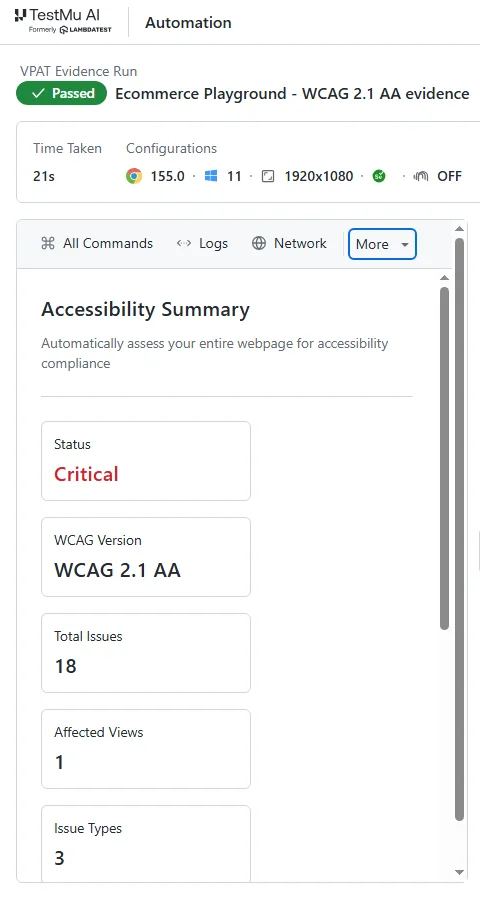
Read against the VPAT, this one page gives evidence for four rows: 1.4.3 and 1.1.1 cannot be marked Supports until the flagged elements are fixed, and 2.4.4 and 4.1.2 need a remark about the unnamed link. It says nothing about the 32 manual rows, which is the gap a buyer's reviewer will ask about.

Note: TestMu AI Accessibility Testing runs WCAG checks inside your Selenium, Playwright, and Cypress suites, plus keyboard scans and NVDA, JAWS, VoiceOver, and TalkBack testing for the manual rows. Start testing for free.
Common VPAT Mistakes That Weaken an ACR
Each mistake below breaks a rule in ITI's template instructions or the Section508.gov FAQ, which are the documents a careful reviewer checks against.
- Supports on every row - a report with no partial support and no remarks implies no testing. ITI requires remarks explaining each Partially Supports or Does Not Support entry, and honest partial ratings make the rest of the report believable.
- No version or date - ITI requires the product version identifier where available and at least the month and year of the report.
- Not Evaluated on A or AA rows - the template allows Not Evaluated only for Level AAA criteria.
- A stale report - Section508.gov says an updated ACR may be required every time the product is changed or updated, including version changes and bug fixes.
- The wrong edition - a WCAG edition sent to a federal buyer lacks the Revised Section 508 chapters for hardware, software, and support documentation that the 508 edition includes.
- A scan score as the evidence - an overall accessibility score is context, not a criterion-by-criterion statement, and it covers none of the manual rows.

VPAT Template, Filled Example, and Evidence Workbook
Download the blank VPAT template free from the ITI page linked at the top of this guide, in the edition your buyer needs. Use it unaltered for the report itself, because ITI asks that the form not be changed, and keep your testing in a separate evidence workbook.
Here is what filled rows look like when written from the Ecommerce Playground scan above. A real ACR rates the whole product, not one page, so treat these as an example of the wording, not a finished report:
| Criteria | Conformance Level | Remarks and Explanations |
|---|---|---|
| 1.1.1 Non-text Content (Level A) | Partially Supports | One image on the home page has no text alternative. The remaining images pass the automated check; a manual review confirms whether their text describes them. |
| 1.4.3 Contrast (Minimum) (Level AA) | Partially Supports | 13 text elements on the home page fall below the 4.5:1 contrast ratio. |
| 2.4.4 Link Purpose (In Context) (Level A) | Partially Supports | One link on the home page has no accessible name, so its purpose cannot be determined from the link or its context. |
| 4.1.2 Name, Role, Value (Level A) | Partially Supports | The same link exposes no name to assistive technologies. |
Each remark names the affected feature, as ITI requires for Partially Supports. A row such as 2.1.2 No Keyboard Trap cannot be filled from this scan at all; it needs the keyboard-only pass first.
My workbook has one row for each of the 55 WCAG 2.2 A and AA criteria and these columns:
- Criterion and level - the number, name, and A or AA, copied from W3C.
- Automated rule exists - yes or no, from the axe-core mapping above, so nobody treats a clean scan as proof for a manual row.
- Test method - automated, keyboard, screen reader, visual, pointer, media, or flow walkthrough.
- Evidence link - the scan report, session recording, or issue ID that supports the answer.
- Draft conformance level and remark - written in ITI's terms, ready to paste into the ACR.
- Tested on and tested by - the date and person, which you need when the next release triggers an update.
When the next version ships, re-run the automated scans, re-test only the rows touched by the release, and update the dates. The WCAG testing guide covers how to plan each manual pass in detail.
Start Your First ACR With a Scan of Your Top User Flows
Run an automated scan of the five user flows a buyer will care about most (sign-in, search, checkout or core task, settings, and help) before you open the VPAT template. The results give you evidence for the 23 rule-backed rows and show which screens to start the manual passes on.
TestMu AI Accessibility Testing covers WCAG 2.0, 2.1, and 2.2 and exports reports as PDF or CSV for your evidence file. To add scans to an existing suite, follow the accessibility automation setup docs.
Note: AI assistance was used in researching and drafting this article. Rahul Mishra (Lead Member of Technical Staff at TestMu AI, expertise in Accessibility Testing and WCAG Compliance) verified every statistic, link, and product claim against primary sources, including ITI, Section508.gov, and W3C, before publication, following our editorial process and AI use policy. This article is not legal advice.
Author

Rahul Mishra
Blogs: 17

Rahul Mishra is a Lead Member of Technical Staff at TestMu AI, leading frontend engineering and accessibility testing across the quality engineering platform. He mentors frontend engineers, runs code reviews and sprint planning, optimizes React.js rendering performance, and makes product features accessible to users with disabilities through WCAG and ADA-compliant accessibility audits. He brings 10+ years of experience across React.js, VueJS, TypeScript, Swift, Objective-C, and AWS, with earlier work as a Technical Lead at VectoScalar Technologies. Rahul holds a B.E. in Information Technology.
Reviewer

Shahzeb Hoda
Reviewer
Shahzeb Hoda is the Associate Director of Marketing and a Community Contributor at TestMu AI, leading strategic initiatives in developer marketing, content, and community growth. With 10+ years of experience in quality engineering, software testing, automation testing, and e-learning, he has authored and reviewed 70+ technical articles on software testing and automation. Shahzeb holds an M.Tech in Computer Science from BIT, Mesra, and is certified in Selenium, Cypress, Playwright, Appium, and KaneAI. He brings deep expertise in CI/CD pipeline automation, cross-browser testing, AI-driven testing practices, and framework documentation. On LinkedIn, he is followed by 3,700+ engineers, developers, DevOps professionals, tech leaders, and enthusiasts.


VPAT FAQs
Did you find this page helpful?
More Related Blogs

TestMu AI forEnterprise
Get access to solutions built on Enterprise
grade security, privacy, & compliance
- Advanced access controls
- Advanced data retention rules
- Advanced Local Testing
- Premium Support options
- Early access to beta features
- Private Slack Channel
- Unlimited Manual Accessibility DevTools Tests