

Power Your Software Testing with AI Agents and Cloud
The Native AI-Agentic Cloud Platform to Supercharge Quality Engineering. Test Intelligently and Ship Faster.


- TestMu AI (Formerly LambdaTest)
- /
- Learning Hub
- /
- Web Development: A Beginner's Guide
Web Development: A Beginner's Guide
Learn about web development, including front-end, back-end, full-stack, best practices, and the process for creating user-friendly websites.
Last Updated on:
Web development is the work of building and maintaining websites and web applications that run over the Internet. Front-end code runs in the browser with HTML, CSS, and JavaScript, while back-end code runs on the server with languages such as Python, Ruby, Java, and PHP. This guide covers what web development is, its main types, the development process, web development versus web design, best practices, and how AI changes web development in 2026.
TL;DR
- Web development is the work of building and maintaining websites and web applications that run over the Internet.
- Front-end development builds what a user sees in the browser with HTML, CSS and JavaScript.
- Back-end development runs the servers, databases and application logic behind the interface.
- A full-stack developer works across front-end and back-end, so one person can build an application end to end.
- Web design decides how a site looks, while web development writes the code that makes it work.
- Best practices span responsive design, HTTPS, version control, cross-browser checks and clean modular code.
What Is Web Development?
Web development is the process of creating and maintaining websites and web applications that run over the Internet. It combines technical knowledge and tools, alongside essential web development skills, to develop user-friendly interface designs and implement functionality aligned with these goals.
Tasks involved in building dynamic and interactive websites or applications include coding, scripting, and server configuration. It helps businesses, organizations, and individuals establish an online presence while meeting user needs.
Web application development is divided into two categories: front-end and back-end development. The front-end focuses on visual elements and user interaction, while the back-end manages server logic and databases. Key technologies include client-side tools like HTML, CSS, and JavaScript, and server-side tools like Python, PHP, and Node.js, ensuring functionality, scalability, and security.
Key Takeaway: Web development builds and maintains websites and web applications, splitting into front-end work on the user interface and back-end work on server logic and databases.
Types of Web Development
Web development is categorized into front-end, back-end, and full-stack development. Each plays a distinct role in creating functional and engaging websites and applications.
- Front-end Development: This focuses on the user-facing part of a website, including everything visible on a browser, such as text, images, buttons, and forms. Developers use HTML, CSS, and JavaScript to create responsive and visually appealing designs that work seamlessly on all devices. They often collaborate with designers to ensure an intuitive user experience and apply frameworks and libraries like React, Angular, or Vue.js to simplify development.
- Back-end Development: This refers to the server side of a website, which involves managing databases, servers, and applications that store and process data. Developers use languages like Python, Ruby, Java, and PHP and frameworks like Node.js and Django. They focus on performance, scalability, and security, ensuring a strong foundation to support the front end.
- Full-Stack Development: This involves both front-end and back-end work, enabling developers to handle all phases of web development. They use various programming languages and frameworks to build complete applications from scratch, combining user-friendly interfaces with robust backend functionality. Full-stack developers often act as a bridge between front-end and back-end teams to ensure smooth development processes.
Key Takeaway: Web development has three types: front-end development for the user-facing interface, back-end development for servers and databases, and full-stack development that covers both front-end and back-end.

Note: Create and test user-friendly websites across 3,000+ browser and OS combinations. Try TestMu AI Now!
Process of Web Development
Creating a website involves several key stages, each crucial for building a functional, engaging, and high-performing site. From initial research to post-launch maintenance, every step ensures the website meets client requirements and delivers an excellent user experience.
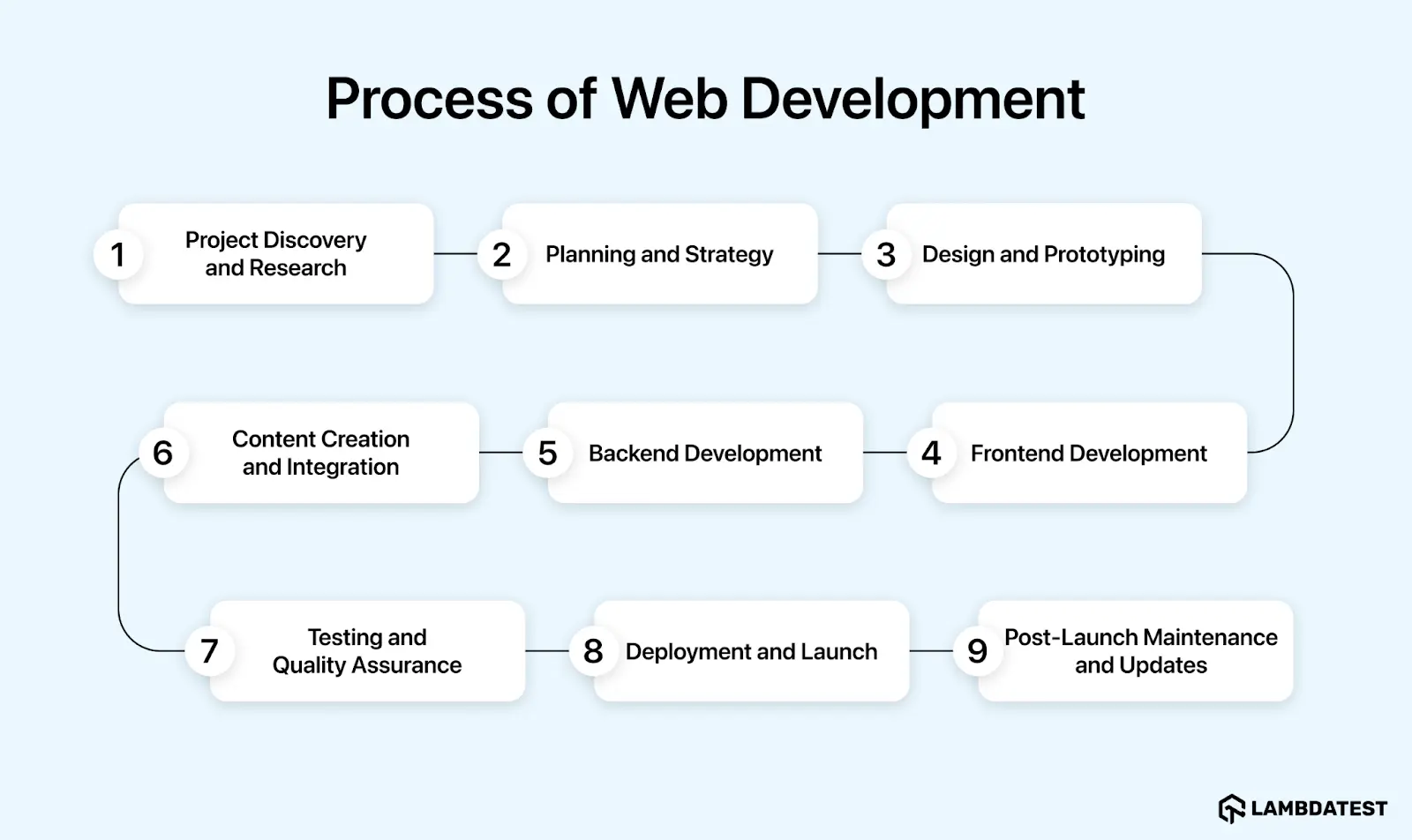
- Project Discovery and Research: The process begins with understanding the project's objectives, scope, and target audience. Information is gathered through stakeholder discussions, market analysis, and competitor research. This phase helps define the target audience, their preferences, and trends, ensuring the website aligns with these needs. Feedback from potential users is also considered to create a user-centric design.
- Planning and Strategy: Based on the discovery phase, a detailed plan is created. This includes defining the website's structure, creating a sitemap, specifying the technology stack, and setting timelines and milestones. Clear objectives and KPIs, such as user engagement and load times, are established to measure the website's success.
- Design and Prototyping: Designers create wireframes and mockups to visualize the website's layout, color schemes, typography, and interactions. They use tools like Figma and Sketch to develop prototypes. This iterative process ensures the design meets user expectations and aligns with the brand identity while improving navigation, readability, and accessibility.
- Frontend Development: This involves converting designs into functional user interfaces using HTML, CSS, and JavaScript. Developers ensure the website is responsive and works across devices and browsers. To enhance functionality, frameworks and libraries like React, Angular, and Vue.js are used.
- Backend Development: This focuses on the server side, managing databases, servers, and applications. Developers use languages like Python, Ruby, Java, and PHP and frameworks like Node.js and Django. They handle performance, scalability, and security to provide a robust foundation for the front end.
- Content Creation and Integration: Content, including text, images, and videos, is created or curated to align with the design and enhance the user experience. Content is also optimized for SEO to improve visibility and ranking. Tools like WordPress, Joomla, and Drupal are commonly used for content management.
- Testing and Quality Assurance: Thorough web testing ensures the website is bug-free and functions smoothly. Testing includes functionality, performance, security, and usability checks. Bugs are identified and fixed to maintain a reliable and seamless user experience.
To ensure your website functions consistently across different browsers and devices, you can leverage cloud-based platforms like TestMu AI, an AI-native test execution platform that enables you to run both manual and automated tests across 3,000+ browser and OS combinations using online browsers.

- Deployment and Launch: Once testing is complete, the website is deployed to a live server. This involves configuring hosting, setting up domains, and ensuring everything functions correctly. During the launch, developers monitor the website for any issues and address them promptly.
- Post-Launch Maintenance and Updates: Post-launch maintenance includes regular updates, bug fixes, performance optimization, and security checks. Continuous monitoring and user feedback guide improvements, ensuring the website remains relevant and effective. Staying updated with the latest web technologies ensures long-term success.
The above process plays a critical role in web development, ensuring the final product is not only functional but also optimized for a seamless user experience. By creating secure, scalable, and user-friendly websites or web applications, developers ensure the end result aligns with both business goals and user needs.
Key Takeaway: Building a website runs through nine ordered stages that begin with project discovery and research and end with post-launch maintenance, with testing and quality assurance completed before deployment.
Web Development vs Web Design
Web development and web design are two distinct yet complementary aspects of website creation. Web development focuses on building and maintaining a website's functional elements, while web design concerns conceptualizing and planning its visual aspects.
Web designers must stay aligned with the latest web design trends, focusing on how a website looks and feels to the user. This includes paying attention to usability, layout, color schemes, typography, and branding. By keeping these elements in mind, designers ensure that the website not only reflects modern design aesthetics but also provides a seamless, intuitive, and engaging user experience.
Understanding the differences between web development and web design helps businesses and professionals collaborate more effectively to create successful websites.
Key differences between web development and web design are as follows:
| Aspect | Web Development | Web Design |
|---|---|---|
| Objective | Build a functional, performant, and interactive website | Create a visually appealing and easy-to-use website |
| Primary Focus | Logic, functionality, and technical implementation | Layout, aesthetics, and user experience |
| Core Skills | Coding, APIs, databases, performance optimization | Visual design, UX/UI principles, branding |
| Tools & Technologies | HTML, CSS, JavaScript, React, Django | Figma, Sketch |
| Collaboration | Works with designers to implement designs accurately | Works with developers to ensure designs are feasible |
| End Result | A fully functional and scalable website | An engaging and intuitive visual experience |
Key Takeaway: Web development builds a website's functionality with code, APIs, and databases, while web design plans a website's layout, color schemes, typography, and branding.
Best Practices for Web Development
Web development involves creating efficient, safe, and user-friendly websites. Developers follow proven best practices to ensure that their projects meet high-quality standards and are future-proof.
- Implement Responsive Design: Responsive design ensures that your website functions properly on multiple devices and screen sizes. This technique increases accessibility and user satisfaction, making the site responsive to smartphone, tablet, and desktop users. To achieve responsiveness, you can use flexible grid layouts, CSS media queries, or leverage web development frameworks designed for building responsive layouts.
- Enhance Website Performance: Performance is critical for retaining users and improving search engine results. Developers should optimize images, reduce HTTP requests, and enable lazy loading for photos and videos. Tools like TinyPNG can minimize image size without sacrificing quality. Additionally, caching and using Content Delivery Networks (CDNs) like Cloudflare can reduce server stress and speed up content delivery.
- Focus on Secure Coding Practices: Security is a key aspect of web development, as it protects user information and maintains a safe browsing environment. Ensure encryption of communication using HTTPS protocol. Protect against SQL injection and cross-site scripting (XSS) attacks. Regularly update libraries and frameworks and encrypt sensitive information to enhance security.
- Adopt Version Control Systems: Version control systems, like Git, are essential for effective collaboration and code management. These systems allow developers to log changes, collaborate in real-time, and roll back to prior versions if needed. Version control simplifies teamwork and ensures smooth project development, especially for large teams.
- Ensure Cross-Browser Compatibility: Websites should provide a consistent user experience across all major browsers, such as Chrome, Firefox, Safari, and Edge. Inconsistencies in rendering and functionality can be identified and fixed using testing tools. Developers should address compatibility concerns to ensure the site appears and functions consistently for all users.
- Write Clean and Modular Code: Writing clean, modular code makes debugging and maintenance easier. Developers should follow consistent naming conventions and keep separate files for CSS, JavaScript, and HTML. Frameworks like React and Angular encourage reusable components, which improve scalability. Adding clear comments to code helps improve collaboration and understanding among team members.
- Conduct Comprehensive Testing: Testing ensures that the deployed site is functional, reliable, and user-friendly. Automated testing tools like Selenium, Playwright, and Cypress can simplify functional testing. Additional tests, such as unit tests, integration tests, and performance tests, help address identified issues. Testing on multiple devices and browsers ensures a flawless user experience.
- Optimize for Search Engines (SEO): SEO enhances a website's online presence and drives organic traffic. Key practices include structuring content with relevant headings, writing descriptive meta tags, and providing alt text for images. Clean, semantic HTML code helps search engines understand the website structure, while sitemaps and internal linking improve crawlability.
- Stay Updated on Industry Trends: Web development evolves rapidly, so staying updated on web development trends is crucial for providing modern solutions. Following industry blogs, attending webinars, and participating in forums are great strategies to keep current with new tools and frameworks. Embracing evolving technologies keeps your initiatives innovative and relevant.
Performance work now has a published target to aim at. Interaction to Next Paint (INP) is a stable Core Web Vital that measures how quickly a page responds to user input. A page counts as responsive when its INP is 200 milliseconds or less at the 75th percentile of real user page loads, measured separately for mobile and desktop. Read that number from field data collected on real visits rather than from a single lab run, because the threshold is defined against real traffic.
Cross-browser decisions have a shared reference point as well. Baseline, governed by the WebDX Community Group, labels each web platform feature by how safely you can ship it. A feature is newly available once it works in all four core browsers, which are Chrome, Edge, Firefox, and Safari. It becomes widely available 30 months after that point, which is when most sites can adopt it without keeping a fallback.
Following best practices in web development safeguards against security vulnerabilities, ensures high performance, and allows applications to adapt to users' needs.
Key Takeaway: Best practices for web development cover responsive design, page performance, secure coding, version control, cross-browser compatibility, clean modular code, testing, and SEO, with an Interaction to Next Paint of 200 milliseconds or less marking a responsive page.
How Does AI Change Web Development in 2026?
AI tools now draft markup, styles, and boilerplate, but developers still own review, testing, and accessibility. Adoption is high and trust is not. In the 2025 Stack Overflow Developer Survey, which collected answers from more than 49,000 developers in 177 countries, 84% said they use or plan to use AI tools in their development process, and 51% of professional developers said they use them daily. In the same survey, 46% said they distrust the accuracy of AI output, against 33% who said they trust it.
The assistance has also moved into the browser toolchain. Chrome DevTools includes an AI assistance feature powered by Gemini. Google documents it for four jobs a web developer does every day: explaining an element's styles and helping fix layout and styling bugs, reading request and response headers that are not obvious at a glance, explaining what an unfamiliar script is used for, and investigating the root cause of a sluggish page.
What does not change is the review step. The two AI frustrations developers reported most in that survey were solutions that are almost right but not quite, at 66%, and debugging AI-generated code taking more time, at 45.2%. So treat generated markup, CSS, and JavaScript as a first draft, not as finished work. Check any feature it introduces against Baseline before you ship it, measure the page against the 200 millisecond INP threshold using field data, and run the same cross-browser, security, and accessibility checks you would run on code you wrote yourself.
Key Takeaway: AI tools now draft markup, styles, and boilerplate for web developers, but 46% of respondents in the 2025 Stack Overflow Developer Survey distrust the accuracy of AI output, so generated code still needs human review and testing.
Conclusion
Web development is typically iterative. It includes planning, designing, coding, testing, and maintenance to create functional, user-friendly websites. Knowing the roles of front-end and back-end development, as well as full-stack development, helps create visually appealing, responsive, and secure websites. Generally, an established process ensures that users' needs and related business goals are satisfactorily met.
Web developers should focus on best practices, such as responsive design, fast loading times, and regular website updates, to ensure that their websites remain reliable and relevant over time. Listening to user feedback and adapting to changes also keeps websites effective over time. A thoughtful approach will build lasting solutions that deliver value to businesses and users.
Citations
New Technologies for Web Development:
https://www.researchgate.net/publication/228742449_New_technologies_for_web_developmentWeb Development Framework: Future Trends:
https://ieeexplore.ieee.org/document/10074105Website Development Technologies: A Review:
https://www.ijraset.com/research-paper/website-development-technologiesInteraction to Next Paint (INP):
https://web.dev/articles/inpBaseline for Web Platform Features:
https://web.dev/baselineAuthor

Vishal kumar Sahu
Blogs: 8


Vishal Kumar Sahu is a Marketing Executive with over two years of experience in the software testing and QA domain. He holds a TestMu AI Certification in Automation Testing and has hands-on expertise in Selenium, Cypress, and Appium, with a focus on both web and mobile automation. Vishal has authored several technical blogs and specializes in writing about testing tools, best practices, and automation strategies. He blends technical knowledge with content strategy to support product education and engage the QA community through SEO-driven resources.
Reviewer

Himanshu Sheth
Reviewer
Himanshu Sheth is the Director of Marketing (Technical Content) at TestMu AI, with over 8 years of hands-on experience in Selenium, Cypress, and other test automation frameworks. He has authored more than 130 technical blogs for TestMu AI, covering software testing, automation strategy, and CI/CD. At TestMu AI, he leads the technical content efforts across blogs, YouTube, and social media, while closely collaborating with contributors to enhance content quality and product feedback loops. He has done his graduation with a B.E. in Computer Engineering from Mumbai University. Before TestMu AI, Himanshu led engineering teams in embedded software domains at companies like Samsung Research, Motorola, and NXP Semiconductors. He is a core member of DZone and has been a speaker at several unconferences focused on technical writing and software quality.


Web Development FAQs
Did you find this page helpful?
More Related Learning Hubs
TestMu AI forEnterprise
Get access to solutions built on Enterprise
grade security, privacy, & compliance
- Advanced access controls
- Advanced data retention rules
- Advanced Local Testing
- Premium Support options
- Early access to beta features
- Private Slack Channel
- Unlimited Manual Accessibility DevTools Tests