

Power Your Software Testing with AI Agents and Cloud
The Native AI-Agentic Cloud Platform to Supercharge Quality Engineering. Test Intelligently and Ship Faster.


- TestMu AI (Formerly LambdaTest)
- /
- Blog
- /
- Find Elements With Link Text & Partial Link Text In Selenium
Find Elements With Link Text & Partial Link Text In Selenium
We will check two primary CSS locators in Selenium called link text & partial link text, as we perform automation testing with Selenium to find a web element.
Last Updated on:
Selenium locates a hyperlink by its exact displayed text with link text, or by any substring of that text with partial link text, letting testers click a link on a page like Airbnb without hunting for an ID or CSS selector. When several links repeat the same text, Selenium automatically clicks the first match it finds in the DOM.

This article will represent the practical implementation of link text & partial link text, as we perform automation testing with Selenium. The links on any web application can help in locating an element with either exact match of the text or through a partial match. Using link text & partial link text in Selenium, we will be able to locate both of these matches. This is the last article of my tutorial series on CSS Locator in Selenium.
You can also watch this video to learn how to find elements by Text in Selenium WebDriver using Java.
You can check out other articles around different CSS locator in Selenium that helps in locating elements through various ways:
If you are an advanced or medium Selenium practitioner, then you can chuck on dedicated articles mentioned above. And go for our complete guide to help you illustrate the practical demonstration of CSS locator in Selenium.
Check Out My Complete Guide For Every CSS Locator In Selenium WebDriver With Examples
With that said, let’s find out how to leverage link text & partial link text in Selenium to locate elements on a web page.

Austin Siewert
Co-Founder, Steadfast Systems
Discovered @TestMu AI yesterday. Best browser testing tool I've found for my use case. Great pricing model for the limited testing I do 👏
2M+ Devs and QAs rely on TestMu AI
Deliver immersive digital experiences with Next-Generation Mobile Apps and Cross Browser Testing Cloud

This certification is for anyone who wants to stay ahead among professionals who are growing their career in Selenium automation testing.
Here’s a short glimpse of the Selenium 101 certification from TestMu AI:

Using Link Text In Selenium To Locate An Element
In order to access link using link text in Selenium, the below-referenced code is used:driver.findElement(By.linkText("this is a link text"));
Note: In a scenario where, multiple links having similar text exists, it will automatically select the first one.
Let’s refer the code snippet below to understand the use case. In this case, we are taking Airbnb example, where we are clicking on any one stay of Goa through the link match.
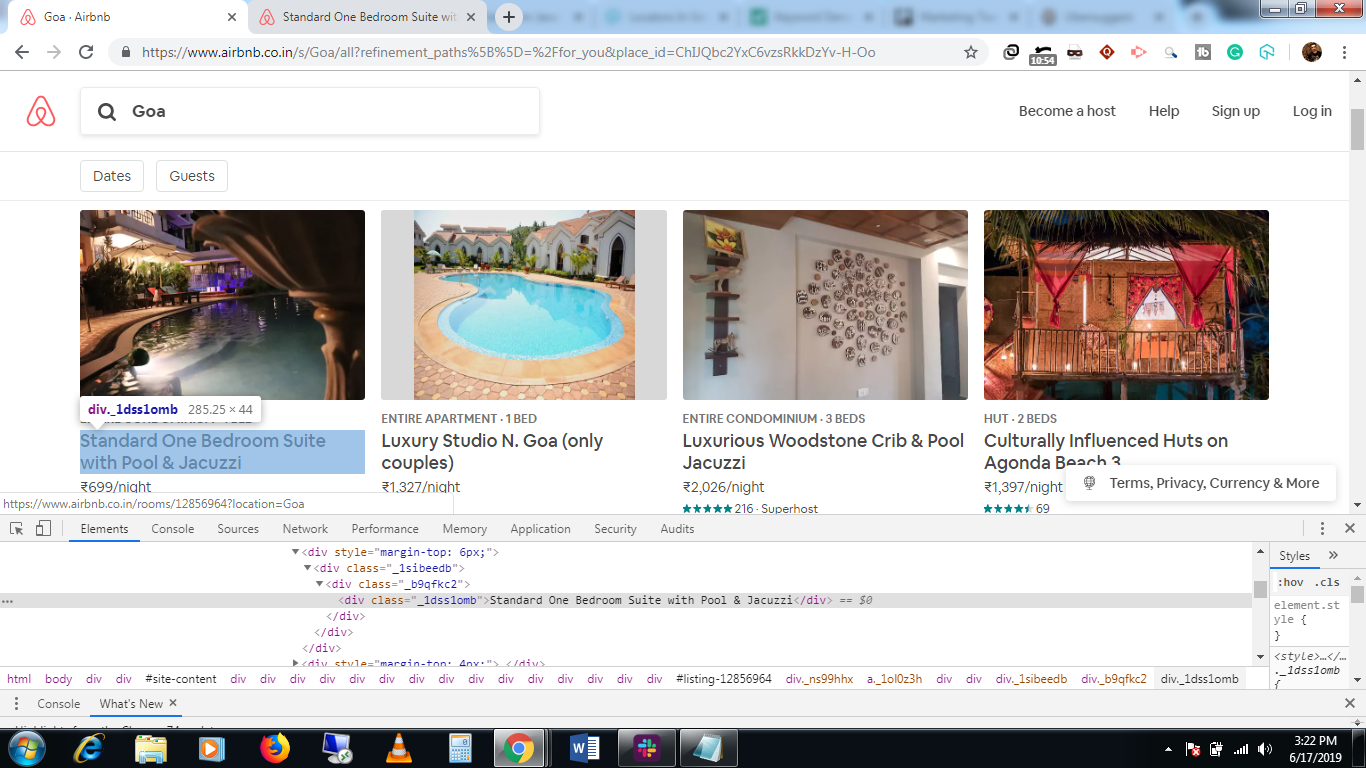
Referenced screenshot of the div element with the link text:

import java.util.concurrent.TimeUnit;

import org.openqa.selenium.By;
import org.openqa.selenium.WebDriver;
import org.openqa.selenium.chrome.ChromeDriver;
import org.testng.Assert;

public class LinkText {

  public static void main(String[] args) {
    // TODO Auto-generated method stub

    System.setProperty("webdriver.chrome.driver", ".\ChromeDriver\chromedriver.exe");
    WebDriver driver=new ChromeDriver();
    driver.manage().timeouts().implicitlyWait(20, TimeUnit.SECONDS);

    driver.manage().window().maximize();

    //Opening the air bnb Goa homestays page
    driver.get("https://www.airbnb.co.in/s/Goa/all");

    //locating an element via link text in Selenium now, and clicking on that stay
    driver.findElement(By.linkText("Standard One Bedroom Suite with Pool & Jacuzzi")).click();

            driver.quit();
  }

}
We can locate the same element using partial link text in Selenium as well. Let’s check how!
Using Partial Link Text In Selenium To Locate An Element
Partial link text in Selenium is another way of locating an element via a link. The only difference from the link text in Selenium to partial link text is that it does not look into the exact match of the string value but work on a partial match. So, in case you are looking for a link with a bigger text length, you can get away from using only the partial link text rather than the whole link text in Selenium.
Syntax of locating element by partial link text.
driver.findElement(By.partialLinkText ("link text"));
Referencing the above scenario, below is the code snippet for partial link text of the same stay of Airbnb:
import java.util.concurrent.TimeUnit;

import org.openqa.selenium.By;
import org.openqa.selenium.WebDriver;
import org.openqa.selenium.chrome.ChromeDriver;
import org.testng.Assert;

public class PartialLinkText {

  public static void main(String[] args) {
    // TODO Auto-generated method stub

    System.setProperty("webdriver.chrome.driver", ".\ChromeDriver\chromedriver.exe");
    WebDriver driver=new ChromeDriver();
    driver.manage().timeouts().implicitlyWait(20, TimeUnit.SECONDS);

    driver.manage().window().maximize();

    //Opening the air bnb Goa homestays page
    driver.get("https://www.airbnb.co.in/s/Goa/all");

    //locating an element via link text now and clicking on that stay
    driver.findElement(By.partialLinkText("Pool & Jacuzzi")).click();

             driver.quit();
  }

}

How To Select The Right Link Text When You Have Multiple Match Results?
The only thing to remember and to be cautious of while using partial link text in Selenium is when partial link text ends up matching with multiple link text on the page. In this case, make sure, you are clicking on the desired one.
Let’s consider another scenario as we perform automation testing with Selenium, where you end up matching multiple link text and wish to target only the designated one. For the same homestays of Goa, I am trying to locate the element with partial text as ‘pool’ in it. So, the strategy would be to find out home many stays have a pool in them and click on the required stay, post that. The reference code snippet below represents how we can pick the right target out of multiple match results using the partial link text in Selenium.
import java.util.List;
import java.util.concurrent.TimeUnit;

import org.openqa.selenium.By;
import org.openqa.selenium.WebDriver;
import org.openqa.selenium.WebElement;
import org.openqa.selenium.chrome.ChromeDriver;
import org.testng.Assert;

public class LinkText {

  public static void main(String[] args) {
    // TODO Auto-generated method stub

    System.setProperty("webdriver.chrome.driver", ".\ChromeDriver\chromedriver.exe");
    WebDriver driver=new ChromeDriver();
    driver.manage().timeouts().implicitlyWait(20, TimeUnit.SECONDS);

    driver.manage().window().maximize();

    //Opening the air bnb Goa homestays page
    driver.get("https://www.airbnb.co.in/s/Goa/all");

    //locating an element via link text now and clicking on that stay
    List<WebElement> poolNumber=driver.findElements(By.partialLinkText("Pool"));

    //find the number of links with the text as pool
    int numberOfStaysWithPool= poolNumber.size();

    System.out.println(numberOfStaysWithPool);

    for(int k=0; k<numberOfStaysWithPool; k++)
    {
      //printing all those links
      System.out.println(poolNumber.get(k).getText());

    }

    //select the luxury three bedroom apartment link
    poolNumber.get(2).click();

             driver.quit();
  }

}
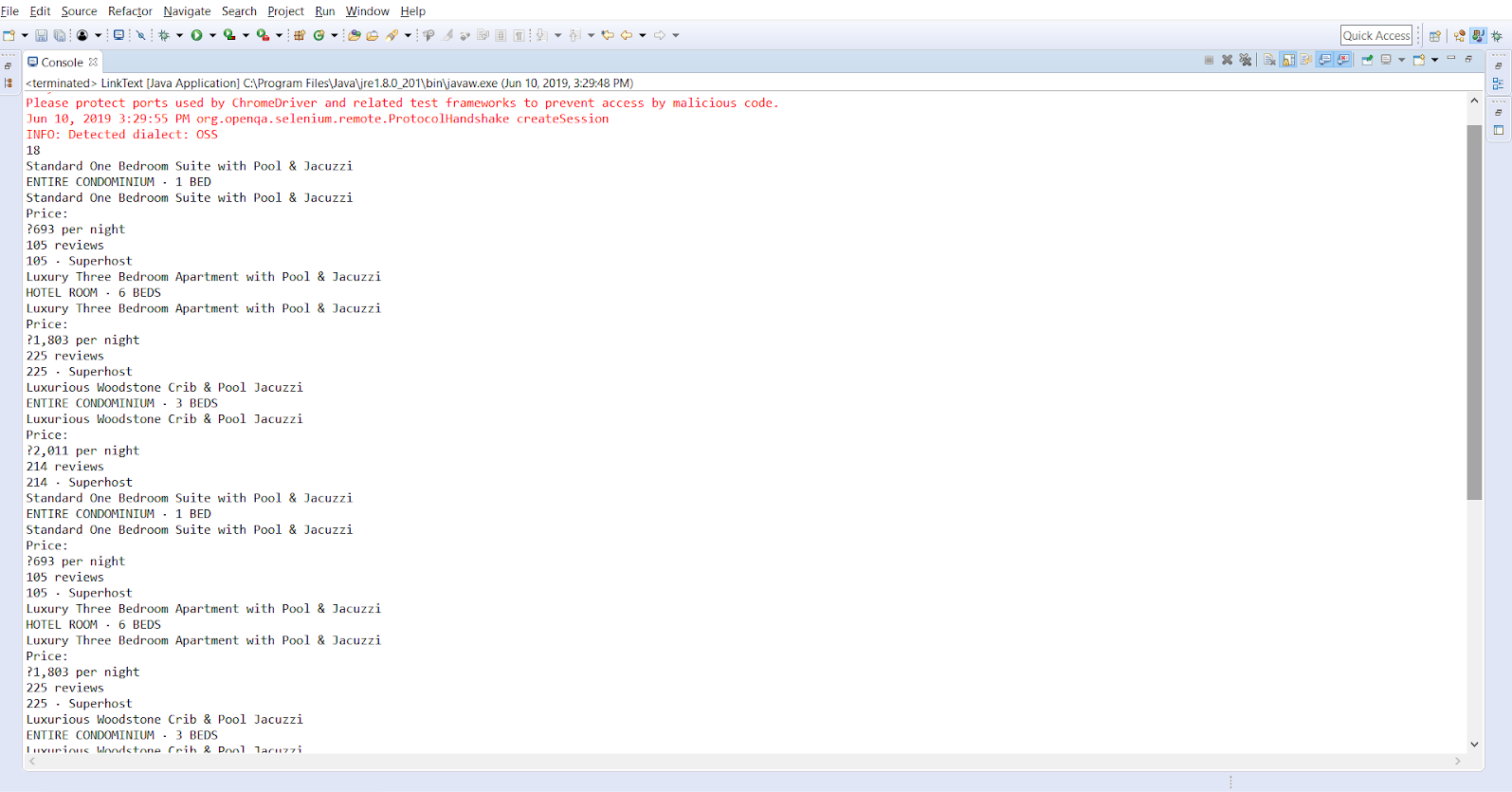
In the above code snippet, I have used findElements since I am supposed to receive multiple web elements with partial text as ‘pool’. Now, using an index, I have navigated to one of the links, which I wish to click. Simple, isn’t it?
Note: Both, link text & partial link text are cases sensitive as CSS locator in Selenium.
For example, Assume that a link ‘Register’ is present on a home page and a similar link ‘REGISTER’ is present on the footer of the homepage. In this case, if you are locating with link text ‘REGISTER’, it will automatically select the link in the footer and not the other one.
Link text and partial link text locator in Selenium works only on links of a given web application. If you intend to locate elements other than links you cannot use link text or partial link text locator in Selenium. If you are dealing with links in your application, then this is perhaps the best locator to go with. Happy testing! 🙂

How Do AI Browser Agents Find Links Without Locator Code?
Microsoft's official Playwright MCP server lets an AI agent find a link by its accessibility role and name instead of writing a By.linkText locator by hand.
The server exposes a snapshot tool that returns the page's accessibility tree: every element's role, such as link, and its accessible name, which for a plain anchor is usually the same visible text a Selenium By.linkText or By.partialLinkText locator would match. The agent reads that tree, matches the name it needs, and clicks the corresponding reference, all without pixel coordinates or a screenshot.
The mechanism is structured accessibility data, not vision. Playwright's own documentation contrasts this approach with an optional pixel-based vision mode used only as a fallback, and states plainly that the tool operates on structured data rather than screenshots.
The real limitation for this locator strategy specifically: an accessible name is not always the visible text. A link whose aria-label overrides its text gives the agent a different name to match than the string a By.linkText locator would use, so the two approaches can pick different elements on the same page. Playwright MCP also needs a running browser instance for every session, so it complements a Selenium regression suite instead of replacing one.
Author

Sadhvi Singh
Blogs: 8


Sadhvi Singh is a software testing and quality engineering leader with 14+ years of experience driving automation, performance, and AI-augmented QA initiatives. Currently Director of Quality Engineering at Brevo, she specializes in API and UI automation, performance testing, CI/CD integration, and vulnerability management systems (SCA, SAST, DAST). Sadhvi is ISTQB Foundation and Advanced Test Analyst certified and has led large QA teams across enterprise environments.
Reviewer

Srinivasan Sekar
Reviewer
Srinivasan Sekar is Director of Engineering at TestMu AI (formerly LambdaTest), where he leads engineering and open-source initiatives behind the Selenium and Appium automation grid and owns TestMu AI's MCP Server. A committer to Appium and a contributor to Selenium, WebdriverIO, Taiko, and AppiumTestDistribution, he brings over 15 years of experience in quality engineering and open-source technologies. He is the author of the Apress book 'The MCP Standard: A Developer's Guide to Building Universal AI Tools with the Model Context Protocol,' a Certified Kubernetes and Cloud Native Associate, and an international conference speaker. Before TestMu AI he spent over eight years at Thoughtworks as a Principal Consultant and Quality Architect. Srinivasan holds a B.Tech in Information Technology from Anna University.


Did you find this page helpful?
More Related Blogs
TestMu AI forEnterprise
Get access to solutions built on Enterprise
grade security, privacy, & compliance
- Advanced access controls
- Advanced data retention rules
- Advanced Local Testing
- Premium Support options
- Early access to beta features
- Private Slack Channel
- Unlimited Manual Accessibility DevTools Tests