

Power Your Software Testing with AI Agents and Cloud
The Native AI-Agentic Cloud Platform to Supercharge Quality Engineering. Test Intelligently and Ship Faster.


- TestMu AI (Formerly LambdaTest)
- /
- Learning Hub
- /
- What Is Pilot Testing? Guide for Software Pilot Testing
What Is Pilot Testing? Guide for Software Pilot Testing
Learn how to run pilot testing with real users to catch bugs, improve usability, and validate ideas. Includes tools, steps, templates, and expert tips.
Last Updated on:
On This Page
- What Is Pilot Testing?
- Why Pilot Testing Matters
- The 4 Types of Pilot Testing
- Step-by-Step: How to Run a Pilot Test
- Pilot Testing Report (with Template)
- Pilot Surveys to Validate User Experience Before Full Release
- Real-World Pilot Testing Example
- Pretesting vs. Pilot Testing vs. Beta Testing
- Pilot vs. PoC vs. Beta Testing
- Pilot Testing AI and LLM Applications
- Common Mistakes (and How to Avoid Them)
- Best Practices for Pilot Testing
Pilot testing is a preliminary stage designed to evaluate a product, process, or methodology on a smaller scale before full-scale implementation. It’s a small, low-risk test that helps identify problems, confirm feasibility, and make improvements before a full rollout.
Pilot testing allows you to refine designs based on real-world feedback. In software, it helps spot bugs and UX issues that may not appear in a lab, ultimately reducing uncertainty and boosting success.
TL;DR
- Pilot testing is a trial run of your product with a small group of real users before you release to everyone.
- Most pilots recruit 5 to 15 representative users and run for 1 to 2 weeks, long enough for meaningful feedback.
- Software engineering uses four pilot types, which separately de-risk technology compatibility, operational workflow, user acceptance, and scalability under growing load.
- A fintech pilot hit 96% payment success but missed its 2-second latency target, so the team chose a conditional No-Go.
- AI and LLM features need pilots most, because non-deterministic behavior demands checks on regression, latency, hallucination rates, and safety.
- Teams that run pilots on TestMu AI's real device cloud surface browser-specific bugs staging environments often miss.
What Is Pilot Testing?
In simple words, pilot testing is a trial run of your product with a small group of real users before you release it to everyone.
Pilot testing is a controlled, small-scale version of a larger rollout. It’s used to uncover flaws, measure effectiveness, and prepare for full deployment. The pilot is intentionally limited, either in time, scope, audience, or geography, so you can manage risk while learning from real interactions.
The term borrows from aviation: before a full flight, a pilot takes the aircraft on a controlled test run to confirm everything works. In software, a pilot test is that same trial run, a small, low-risk launch that proves the product is ready before the real one. That is why it is called a pilot test.
Pilot testing also builds confidence. When you share results with stakeholders, completion rates, issue logs, and user feedback. You give them data, not guesses. That trust leads to faster approvals and fewer surprises.
Key Applications of Pilot Testing
- Software Development: Ensuring app functionality by identifying bugs and UX issues early, this process helps optimize launches and saves time and resources.
- Research & Surveys: Refining survey questions for clarity and neutrality, pilot testing guarantees reliable responses before broader distribution.
- Product Development: Assessing prototypes and designs, this process collects valuable feedback to refine products before moving to mass production.
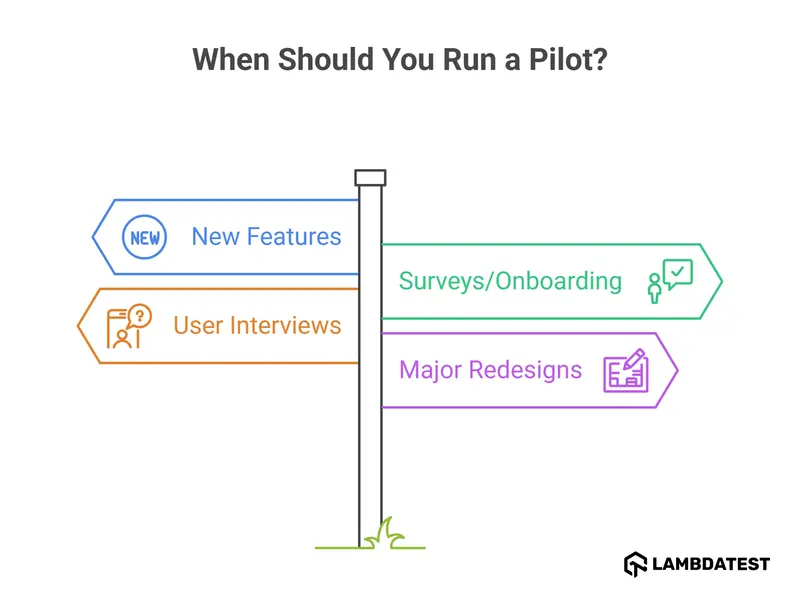
When Should You Run a Pilot?
You run a pilot when the stakes are high and certainty is low. This includes:
- Before launching new features
- Before releasing surveys or onboarding flows
- Before user interviews, if the script is new
- After major redesigns
Why Pilot Testing Matters
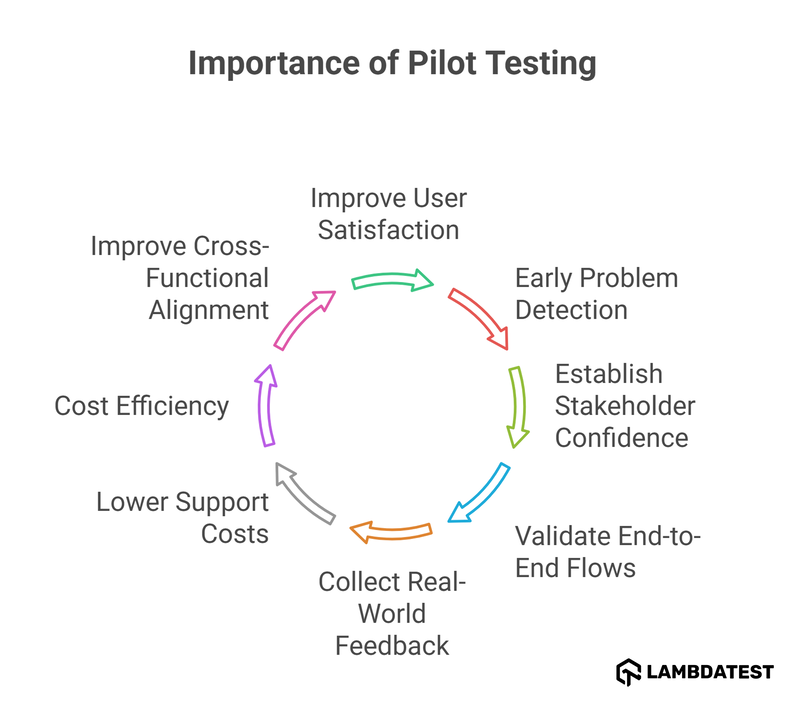
User testing can uncover up to 85% of usability issues with just five participants. When done correctly, pilot testing not only strengthens your product but also minimizes rollout risks. Here’s what you gain:
- Improved User Satisfaction: Pilot testing gathers valuable user feedback, helping you shape a product that meets real-world needs.
- Early Detection of Problems: Identify issues that staging environments often miss, like integration failures, edge-case conditions, or browser-specific errors.
- Cost Efficiency: Fixing problems at the pilot stage is far cheaper than addressing them after launch.
- Validate end-to-end flows: Make sure users can complete tasks without confusion, roadblocks, or unexpected detours.
- Collect real-world feedback: Learn how actual users behave and where they struggle, giving you qualitative input alongside metrics.
- Lower support costs post-release: Pilot testing often uncovers usability problems that generate future tickets. Fixing them early prevents downstream churn.
- Establish confidence with stakeholders: When you present metrics from a successful pilot, you reduce decision friction.
- Improve cross-functional alignment: Sharing pilot results across QA, product, design, and engineering teams keeps everyone grounded in real usage, not assumptions.
The 4 Types of Pilot Testing in Software Engineering
Not every pilot answers the same question. Depending on what you most need to de-risk, a software pilot usually falls into one of four types:
- Tech Pilot: validates technology compatibility, for example whether the new system integrates cleanly with existing infrastructure, browsers, devices, and third-party services before you commit to it.
- Pilot-in-Operation: tests the real operational workflow with a small group actually doing their jobs on the product, surfacing process gaps that a lab test never would.
- Pilot of User Acceptance: a small-scale user acceptance test that checks whether real users find the product useful, usable, and ready to adopt.
- Pilot of Scalability: gradually increases load or user count to confirm the system holds up as usage grows, catching performance ceilings before full rollout.
Many rollouts combine these: a Tech Pilot to prove integration, then a Pilot of User Acceptance to prove value, and a Pilot of Scalability to prove it will not buckle under real traffic.
Step-by-Step: How to Run a Pilot Test
1. Define What Success Looks Like
Success starts with clarity. What does “ready for release” mean to your team? Set measurable targets before you test. For example:
- 90% of users complete a task in under 3 minutes
- <5% error rate
- Positive qualitative feedback on feature flow
These goals turn your pilot into a decision tool, not a vague exercise.
2. Choose the Right Participants
Sample selection matters. Internal testers are fine for early validation, but for usability or market feedback, recruit real users who match your audience. Keep the group small, 5 to 10 users often reveal 80% of usability issues.
3. Set Up Tools and Scenarios
The pilot environment must mirror production. Your setup must simulate real conditions. Otherwise, the feedback won’t match what users will face.
Tools to consider:
- Surveys: LimeSurvey, Typeform, SurveyMonkey
- UX testing: Maze, UXtweak
- Automation + CI: TestMu AI
- Session replay & logging: FullStory, Hotjar, LogRocket
Build out realistic scenarios like:
- Common flows: account creation, form submission, checkout, etc.
- Edge cases: slow network, mobile interactions, error paths
Create task instructions or scripts. Brief moderators if it’s a guided session. Provide fallback support.
4. Run the Pilot
Treat it like a live test. Provide the same instructions and support you would in a full rollout. Observe how users interact, where they hesitate, and what breaks. If possible, record sessions for later analysis. Tools like Lookback or Loom make this easy. Be transparent, always ask for consent when recording.
5. Collect and Analyze Data
Instead of focusing solely on success or failure, dive deeper into the overall experience. Track key metrics like time on task, task success rate, drop-off points, and rage clicks.
When tagging issues, categorize them by severity (Critical, High, Medium, Low), type (UI glitch, logic error, confusion, crash), and cause (design flaw, outdated content, API failure). Organize these findings into a shareable dashboard or spreadsheet, and prioritize fixes based on risk and frequency.
6. Iterate and Improve
Review your pilot data and fix the most critical issues first. Focus on what impacts the user experience and core workflows. Keep a simple changelog to track updates.
If needed, rerun the pilot with a fresh group to validate improvements. Then, check your success metrics:
- If goals are met, move forward.
- If key issues remain, refine and retest.
- If results fall short entirely, pause and reassess.

Note: Run your pilot test on real browsers and devices with TestMu AI. Catch issues early and launch with confidence. Try TestMu AI Now!
Wrap it up with a short report, highlight what was tested, what changed, or you're ready to launch.
Pilot Testing Report (with Template)
A pilot testing report is a concise summary of what was tested, what was learned, and what actions were taken. It helps stakeholders make data-informed decisions before full-scale rollout.
The report generally captures:
- Objectives
- User feedback and metrics
- Issues found and their severity
- Fixes implemented
- Final recommendation (Go / No-Go / Iterate)
Here’s a quick: Pilot Testing Report Template , ready-to-use format to align teams and document findings clearly. |
Pilot Surveys to Validate User Experience Before Full Release
A pilot survey is a small-scale test of a questionnaire or form before large-scale deployment. In software, this might mean testing in-app feedback forms or onboarding surveys with a small user group.
Why pilot surveys matter:
- Ensure questions are clear and unbiased
- Spot drop-off points or confusion in the survey interface
- Validate that the response data is meaningful and actionable
Here’s a quick: Pilot Testing Questionnaire Template , use this to collect structured feedback during your pilot. Covers usability, performance, satisfaction, and more. |
Real-World Pilot Testing Example: A Step-by-Step Scenario
Imagine a fintech company rolling out a new instant-payment feature in its mobile app. Instead of shipping to all 2 million users, the team runs a pilot with 10% of users in a single city. Here is how the pilot plays out step by step:
- Setup: the feature is enabled behind a flag for roughly 200,000 users in one city. The team defines success up front: at least 95% payment success rate, under 2 seconds median transaction time, and zero critical security incidents.
- Metrics tracked: transaction success and failure rates, latency, support tickets per 1,000 users, drop-off in the payment flow, and qualitative feedback from an in-app survey.
- Run and observe: over two weeks the team watches dashboards daily, reproduces reported failures on real devices, and logs each issue with severity and priority.
- Findings: the success rate hits 96%, but median latency is 3.1 seconds on older Android devices, above the 2-second target, and one edge-case bug double-counts a specific retry.
- Go/No-Go decision: because the core metric passed but latency and the retry bug did not, the team makes a conditional No-Go: fix the two issues, re-run a shorter pilot, then proceed to full rollout once the targets are met.
The value is in the decision at the end. The pilot converted a risky all-at-once launch into a measured, evidence-based Go/No-Go call that protected 1.8 million users from a latency and billing defect.
Pretesting vs. Pilot Testing vs. Beta Testing
Here is a detailed comparison table for pretesting vs. pilot testing vs. beta testing, covering their key differences across multiple attributes:
| Aspect | Pretesting | Pilot Testing | Beta Testing |
|---|---|---|---|
| Primary Goal | Validate individual elements (e.g., questions, UI components, instructions) | Test the full product flow or feature in a real-world, small-scale setting | Collect broad user feedback at scale under near-final or production conditions |
| Focus Area | Clarity, logic, and usability of specific parts | End-to-end experience, functionality, stability, and user satisfaction | Market readiness, performance under load, long-tail issues, and adoption patterns |
| Audience | Internal team, usability experts, or limited stakeholders | Real users from target segments, recruited intentionally | General public, early adopters, or opt-in customers |
| Sample Size | Very small (1 to 3 people) | Small but representative (5 to 15 users usually) | Large and diverse (hundreds to thousands) |
| Environment | Lab-like, highly controlled | Simulated or near-production | Real-world, production, or near-production |
| Test Scope | Isolated elements or modules | Entire workflows, cross-functional dependencies, and real use conditions | Full product, across environments, devices, and user scenarios |
| Duration | Short, often hours or a few days | Short to medium, typically 1 to 2 weeks | Medium to long, can last several weeks to months |
| Feedback Type | Immediate expert feedback, usability observations | Structured and unstructured feedback, metrics, and behavioral observations | Real-world feedback, bug reports, support queries, usage analytics |
| Tools Involved | Wireframes, clickable prototypes, survey drafts, static mockups | Feature-complete test builds, session replay tools, and test management dashboards | Final builds, bug tracking tools, telemetry/analytics platforms |
| Risk Exposure | Very low | Low to medium | Medium to high |
| Output/Deliverable | Refined content, UI components, survey questions | Pilot report with success metrics, issue log, and go/no-go decision | Public release notes, changelogs, backlog of feedback |
| Best Used When | Designing surveys, new UI elements, or instructions | Validating newly developed features, workflows, or platforms before rollout | Gearing up for the final launch or stress testing a release with mass adoption |
| Objective | Reduce friction in design or content before development starts | Ensure stability, usability, and performance before wide rollout | Detect scalability or edge-case issues in real-world conditions |
| Common Mistakes | Overreliance on internal bias, skipping expert reviews | Using internal testers only, skipping success metrics, treating it like a demo | Launching without moderation, under-supporting feedback channels, and ignoring data from early adopters |
Pilot Testing vs. Proof of Concept (PoC) vs. Beta Testing
A Proof of Concept, a pilot, and a beta answer different questions and happen at different stages. Confusing them leads teams to test the wrong thing at the wrong time.
| Aspect | Proof of Concept (PoC) | Pilot Testing | Beta Testing | Full Rollout |
|---|---|---|---|---|
| Question it answers | Is this technically feasible at all? | Does the end-to-end flow work for real users at small scale? | Does it hold up broadly under near-production conditions? | Can everyone use it reliably? |
| Stage | Earliest, before real build | After a working build exists | Late, near final | General availability |
| Audience | Internal team or a few experts | A small, representative real-user group | Large opt-in group or early adopters | All users |
| Scale | Minimal, throwaway prototype | Small and controlled (for example 10% in one region) | Hundreds to thousands | Entire user base |
| Outcome | Feasibility verdict | Go/No-Go decision with metrics | Edge-case and scale feedback | Live product |
In short: a PoC proves it can be built, a pilot proves it works for real users on a small scale, beta proves it survives broad use, and full rollout ships it to everyone.
Pilot Testing AI and LLM-Powered Software Applications
Pilot testing is even more important for AI and LLM-powered features, because their behavior is non-deterministic and can drift as models or prompts change. Before pushing an LLM update, such as a new messaging or summarization model, to all users, run it as a pilot with a small group and measure the dimensions that generic software tests miss:
- Regression: confirm the update did not degrade answers that previously worked. AI regression testing compares new outputs against a known-good baseline across a fixed scenario set.
- Latency: measure response times under real conditions; a smarter model that is noticeably slower can hurt the experience more than it helps.
- Hallucination rates: track how often the model produces confident but unsupported or incorrect answers, and gate the rollout on staying under a defined threshold.
- Safety and bias: check that responses stay on-policy and do not introduce biased or harmful content for edge-case prompts.
Treat each of these as a pilot success metric with a Go/No-Go threshold. TestMu AI's Agent Testing automates this by generating and scoring scenarios for hallucination, bias, toxicity, and completeness, so an AI pilot can be evaluated at scale instead of by hand before it reaches every user.
Common Mistakes (and How to Avoid Them)
- Using internal testers only- Biases results. Always test with real users.
- Skipping success criteria- Without targets, you can't measure effectiveness.
- Treating it as a formality- Pilots are experiments, not demos. Expect things to break.
- Not iterating- A pilot isn’t useful unless it leads to change.
Best Practices for Pilot Testing
1. Define Clear Goals: Set measurable, achievable objectives for what you want to learn or validate.
2. Choose a Representative Sample: Ensure your sample group reflects your target audience for relevant feedback.
3. Collect Quantitative & Qualitative Feedback: Combine data with user comments for a complete picture of performance.
4. Act on Feedback: Use insights to make meaningful improvements and adjust your product or process accordingly.
Additional Resources
- Download Examples of Software Pilot Testing: Real-world example of Healthcare Appointment App pilot testing in a clinical setting
- Download UX Testing Checklist: Step-by-step guide to ensure usability coverage during pilot tests
Final Thoughts
Pilot testing is a practical insurance policy against avoidable failure. Before launching software, a survey, or a service workflow, test it with a small group first. Observe. Learn. Adjust. Then scale.
The most polished products aren’t built in a vacuum. They’re rehearsed. And pilot testing is how you do that well.
2M+ Devs and QAs Rely on TestMu AI for Web & App Testing Across 3000 Real Devices
 Sign up with google
Author

Bhavya Hada
Blogs: 29


Bhavya Hada is a Community Contributor at TestMu AI with over three years of experience in software testing and quality assurance. She has authored 20+ articles on software testing, test automation, QA, and other tech topics. She holds certifications in Automation Testing, KaneAI, Selenium, Appium, Playwright, and Cypress. At TestMu AI, Bhavya leads marketing initiatives around AI-driven test automation and develops technical content across blogs, social media, newsletters, and community forums. On LinkedIn, she is followed by 4,000+ QA engineers, testers, and tech professionals.
Reviewer

Harish Rajora
Reviewer
Harish Rajora is a software developer at TestMu AI with over 6 years of hands-on experience in Python and cross-platform application development across Windows, macOS, and Linux. He has authored 800+ technical articles and worked on large-scale projects, including GenAI applications and core engineering features used by millions. Harish has led DevOps initiatives building CI/CD pipelines with Jenkins, AWS, GitLab, and GitHub, and holds an M.Tech in Software Engineering from IIIT Allahabad.


Pilot Testing FAQs
Did you find this page helpful?
More Related Learning Hubs
TestMu AI forEnterprise
Get access to solutions built on Enterprise
grade security, privacy, & compliance
- Advanced access controls
- Advanced data retention rules
- Advanced Local Testing
- Premium Support options
- Early access to beta features
- Private Slack Channel
- Unlimited Manual Accessibility DevTools Tests