

Next-Gen App & Browser Testing Cloud
Trusted by 2 Mn+ QAs & Devs to accelerate their release cycles


Why Cross Browser Testing Is Important To Your Business?
This blog is where you will gain in-depth insights on cross browser testing, why cross browser testing is important to your business and much more.

Swastika Yadav
December 28, 2025
The last two decades have seen massive growth in the IT industry. Numerous things went online with this growth, and to this day, almost every single thing we know of is online, either in the form of websites, web apps, and mobile applications.Today, more than 60% of the world’s population, i.e., Approximately 4.66 billion people, has daily access to the internet.
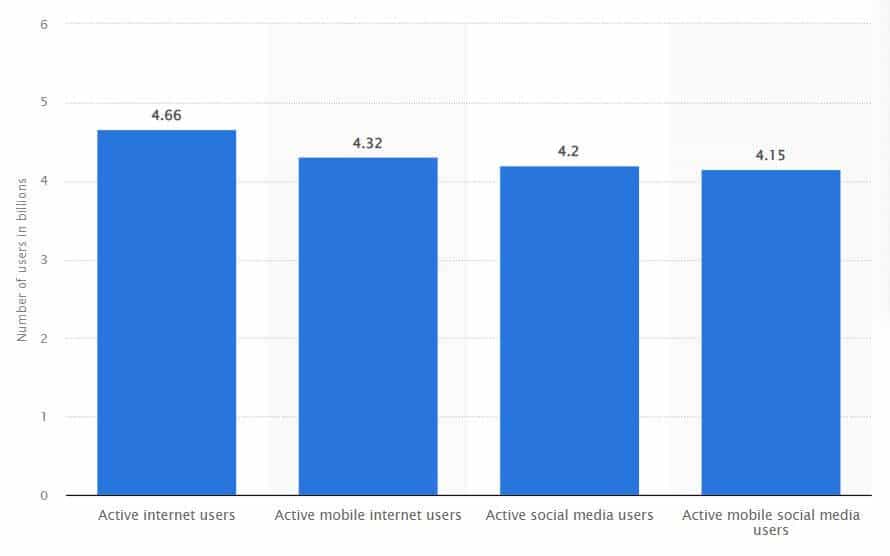
Now, when it comes to accessing a particular thing on the internet, people have multiple options. The competition to grab the customer is higher than ever and increases every day. You may create a top-class product that can easily compete and beat the rest, but a small overlooked aspect can cause you huge damage.
Suppose you hired a great team of developers who create a top-notch web app for you. But how do you classify it as top-notch? They show you a demo, and you get it right on your browser (say Chrome), but that’s not it. You don’t know who is going to access your web app and from which browser. What if it doesn’t work on Internet Explorer or Safari? You won’t know; the customer will switch to another product. How can you prevent that from happening? How will you retain the customer? The answer is
In this cross browser testing tutorial, we will deep dive into various aspects of cross browser testing, including why cross browser testing is important to your business.
So, let’s get started!
What is Cross Browser Testing?
A website or web app contains multiple components, from texts to images and videos to infographics. Cross browser testing is a testing method that verifies if a website or web app performs across various browsers and environments gracefully.
This testing strategy ensures that all the components, i.e., text, images, videos, etc., of a website or web app are working as expected. Customer experience is the most important aspect of a product or company. Hence, you need to be sure if your product passes cross browser compatibility.
You need to ensure this compatibility majorly complies with these two aspects:
- Browser and Operating System: People around the globe use different devices with different operating systems and browsers. Hence, you must ensure that your product works the same in every environment, such as Safari for Mac, Chrome ; Firefox for Windows, Linux, etc.
- Different devices and Screen resolutions: Devices such as Mobile, Desktops, Tablets, etc., come in a lot of shapes and sizes. What works for your 5-inch screen might not work for a 10-inch screen.
In short, cross browser testing is non-functional testing where the product (website or web app) is tested across a number of environments and devices.

Why Cross Browser Testing is important?
Within the last ten years, we all have seen a surge in online services and products. Every day starts and ends with a business going online. Customers today have almost everything within their palms, and the competition is higher than ever. There is also a difference between each customer – Perspective and Taste. The same is the case with browsers. Different browsers may have different perspectives. The components rendered may not be viewed the same across all environments. Hence, this is why cross browser testing is important to your business.
See it from a customer’s perspective – Say you have been trying to access an application on your Chrome browser, and it hasn’t been working the way you want it to. What do you do? You will seek the help of another browser, or even worse, you’ll switch to another service or product.
Imagine this case again from the product owner’s perspective. How would you feel about it? Isn’t this a bad customer experience? Won’t you lose a potential customer? However, to avoid such ‘avoidable’ circumstances, you need to incorporate the following –
- What all browsers and environments do you support
Being the service/product provider, it is your duty to practice transparency with the customers. You must have seen many companies and products deliberately mentioning the platforms they are available on.
- Perform Cross Browser Testing
Now that you’ve explicitly stated the platforms you are available on, you need to ensure that everything works perfectly fine. If it doesn’t, it can cost you and your company the name and credibility.
There are multiple products and platforms you can look over for cross browser testing. Cloud-based cross browser testing platforms like TestMu AI provides an online browser farm of 3000+ browsers and OS combinations to users already installed and ready to be used on their infrastructure. If you are stuck anywhere, you have 24×7 support too!
But why cross browser testing is important to perform? Because the customer is the owner. Every aspect of your business is entirely dependent on the customers. Today, they have innumerable options for everything out there. With so many options available at their fingertips, people have become impatient. Even a slight delay or inconvenience can make them switch to another provider.
Before you go out and launch your product, it becomes super-necessary to ensure cross browser compatibility. This compatibility check verifies if all the proposed components of the web app or website are rendered exactly the way they are bound to. This verification picks out any irregularities and also ensures that the end-user experience is not compromised.
TestMu AI’s LT Browser is a next-gen browser to build, test & debug mobile websites. Try it now, for free!
Want to deepen your knowledge? Check our cross browser testing With cypress tutorial.
Why do Cross Browser issues occur?
Now that we know why cross browser testing is important, it’s time to understand why cross browser issues occur in the first place. The answer is – Browser Engine. The engine is the most integral part of a browser. Every website, web app, or web page is rendered through the browser engine only. Whenever the URL is called, the browser engineer identifies the programming languages and frameworks used in the URL and renders the components.
But before rendering the component, the browser engineer interprets the components in its own way. Every browser interprets the components in its own way, and this difference in interpretation causes cross browser issues across different browsers. While some browsers catch the style sheets and JavaScript versions, others may fail to interpret those. Hence, it results in cross browser compatibility issues for the latter browsers.
Some common Cross Browser Compatibility issues
There are a bunch of options that can cause cross browser issues. These can be easily popped out with the help of cross browser testing. Following are some of the most common issues that arise during cross browsing environment –
- HTML/CSS Validation
Different browsers and operating systems have different ways of handling code. The smallest errors, like forgetting a semicolon or not closing a tag, may behave differently in different environments. Some browsers may render the component easily, while others may throw errors or not show anything at all.
This can be pointed out with the help of cross browser testing. However, it is more efficient to use an HTML/CSS validator in the beginning. For example – W3C validator for HTML and Jigsaw Validator for CSS.
- The DOCTYPE Error
This error may arise in old and outdated browsers. The DOCTYPE, in general, isn’t checked by most browsers, but the old ones like Internet Explorer (version 7.0 ; below) may throw errors for missing it out. This is because browsers have two modes of operation – Strict and Quirk mode.
Upon not finding the Doctype, browsers move from strict mode to quirk mode and continue the operation. But the browsers with older versions that do not support HTML5 will likely get confused and mark the page as unresponsive.
- JavaScript Issues
We all know that JavaScript is ever-changing, but the browsers are not. Hence, cross browser compatibility issues with javascript arise when an outdated browser fails to acknowledge any newer JavaScript features.
If we are to recall one such feature of JavaScript, it is ‘Promise’ which isn’t supported in older versions of Internet Explorer.
- CSS Resets
Each browser has its own default design layout. This layout is applied to each website that appears on the browser. But for a website to use its own CSS design, it needs to override the default layout of the browser. In case you don’t or fail to do that, the browser won’t render what you expect. This can cause cross browser compatibility issues.
This issue can be solved easily by incorporating CSS resets. It is a style sheet that resets the layout of a website or web app and applies the basic style to be overridden as expected. A few of the most popular CSS reset style sheets are HTML5 Reset and Normalize.css.
- Need for separate Stylesheets
Most of the cross browser issues arise either from Stylesheets or JavaScript, and both of these occur because of older browsers. You don’t have control over people as to which browser they use.
The fastest way to tackle this issue is to use different stylesheets for different browsers accordingly. The use of conditional statements can ensure whether the correct stylesheet is used for each browser.
- Not performing Cross Browser Testing
You can take care of each known issue beforehand, but you can never be too sure. Hence, no matter how much you are prepared or how many precautions you’ve dealt with, you mustn’t roll out the product without performing cross browser testing.
You must perform real-time cross browser testing on real devices. If you want to work smart and save time ; money, you can use TestMu AI cross browser testing platform. Cross browser testing tools like TestMu AI offer an online device farm consisting of 3000+ real devices running on real operating systems to perform automation testing and real-time cross browser testing of your product effortlessly. Moreover, you can test your public as well as locally hosted website.
Also read: 11 Lifesaving HTML/CSS Tricks Every Developer Should Know
Also read – Does Browser Testing On Internet Explorer Still Make Sense?
Also read – Fixing Javascript Cross Browser Compatibility Issues
Also read: How To Create Browser Specific CSS Code?
Also read: JavaScript Cross Browser Compatible Issues And How To Solve Them
Here’s a short glimpse of the TestMu AI real device cloud offering real device testing:
You can also Subscribe to the TestMu AI YouTube Channel and stay updated with the latest tutorials around automated browser testing, Selenium testing, CI/CD, and more.

Also read: Top 7 Challenges Of Cross Browser Testing With Solutions
Features to test while performing Cross Browser Testing
If your application or website is working fine on one online browser, say Chrome, it doesn’t guarantee a proper execution on other browsers. It might not even guarantee smooth execution over different versions of Chrome itself. Thus, cross browser testing becomes important. But what all do you need to test? What features do you exactly need to check while performing this test? Let us find out:
- Basic Functionality – Whenever you open a website or a web app, what are the first things you see? The key elements of the page – Heading, Images, Videos, Menu, Link, etc. These are the key elements that collectively form the initial look and feel of a website.
- Form Validations are working as expected.
- Inputs based on touch are working smoothly.
- Menu and Alerts are working as designed.
- Performance and Design – It is very important to check if your website is performing as expected. For example – Analyze the load time over multiple browsers, i.e., if your website loads within the desired time frame and if there is any delay.The design metrics include the testing of the graphical user interface (GUI) to ensure that the look and vibe of the application as a whole are positive. Testing for design also includes layout, font sizes, media queries, etc. to match with expectations.
- Response – The ultimate revenue, feedback, success, and even failure, everything depends on your customers and their experience. Hence, it is super-important to test whether the proposed actions run smoothly on the user’s actions. For example – A specific filter or query by the user should load the expected results with an excellent GUI. Even a small glitch or compromise may cost you the customer.Seamless responsiveness testing of a website also depends on compliance with WCAG, i.e., Web Content Accessibility Guidelines. That is if your website is designed to serve differently-abled people as well.
While performing cross browser testing, you need to test all these as to whether these components appear and work as expected, and if there is any malfunction over some of the browsers, etc. Moreover, under basic functionality, you also need to check whether:
Also read – Understanding The Difference Between Cross Browser Testing ; Responsive Testing
How do you select Browsers for Testing?
With the availability of countless browsers, devices, and operating systems, how to select what browsers you need to check for? Don’t even get started on permutation and a combination of browsers and operating systems, that’ll only double your pain.
However, you can narrow down your focus and build a more streamlined plan of selecting top browsers for cross browser testing.
You can niche down your options by using the following two criteria:
- Based on Popularity: Everything across the world follows the 80/20 principle, and so do the browsers. More than 80% of the world’s internet traffic belongs to the top 20% of browsers. The same goes for operating systems, platforms, devices, and everything. This is one of the key metrics to look for when putting out a B2C product.
- Based on Statistics: You need to know about your target audience. You can’t sell clothes at a restaurant where people come to eat. Hence, analyze the stats and find out what all browsers and operating systems are being used by most of your potential customers. If you already have a product or website out in the market, make use of those analytics tools like Google Analytics to figure it out.
Hence, choose your browsers and operating systems based on the criteria of popularity.
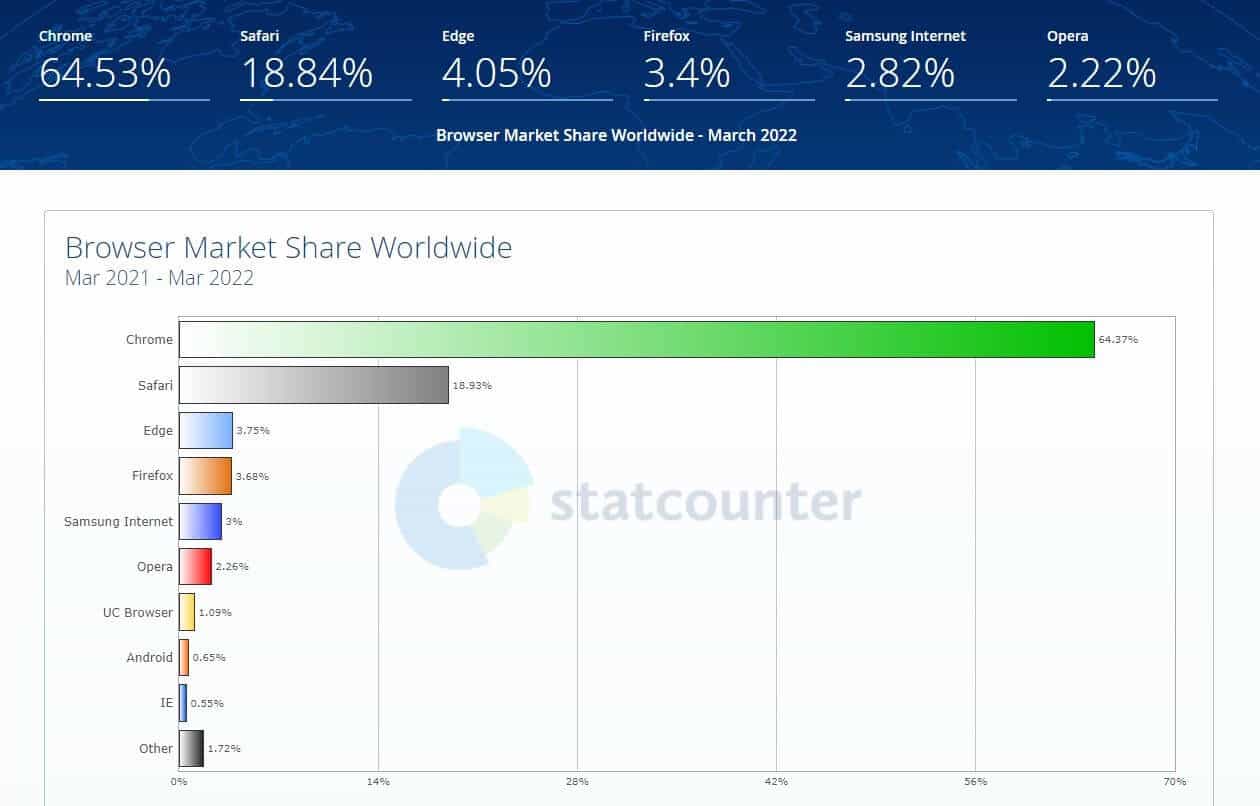
Draft a Browser Support Matrix
One of the most important aspects of developing a website or web app is considering what all browsers and systems you are willing to support. Ideally, before development, you decide on a list of browsers that you are going to launch your website on. This list of compatible browsers with your website is called Browser Support Matrix or Browser Compatibility Matrix.
This list includes all the supported browsers by your website, mobile, and desktop versions, and operating systems. In most cases, this browser matrix includes a combination of browsers, operating systems, and devices.
But why do you need a browser support matrix? As I’ve mentioned above, you can choose browsers and operating systems based on popularity and statistics. This helps you narrow down your development and test cases to specific and desired sets of browsers and platforms. This is where the browser matrix comes into the picture. It helps you clearly plan and devise a roadmap for the development, testing, and launch of your website to the end.
Also read – Which Browsers Are Important For Your Cross Browser Testing?
How to perform Cross Browser Testing?
There are two ways to perform cross browser testing: The manual method and the automation method. There is a strong need for you to know when and how to choose a specific testing method and in which case you will benefit from Manual or Automation cross browser testing. Let me make it easy for you!
Manual cross browser testing
When starting out with cross browser testing, it is important to decide if or how much manual testing is required. To brief what manual testing is –
It is a software testing practice performed manually, of course, by testers or a team of testers by going to each browser and executing the test cases manually, noting down the results, following the bugs, etc. It really is tedious and tiring. Based on your project requirements, manual testing efforts may vary from hours to weeks!
What are the key steps of Manual cross browser testing?
- Develop a strategy
You need to devise a manual cross browser testing strategy that aligns with your product goals. Determine what you need to test and where to test. After this, you need to make a list of environments, optimization steps of live tests, coverage, etc. It is better if you come up with a shared testing platform where you and your team can collectively work towards the coverage goals. The most important part of this strategic planning is coming up with the infrastructure you want to use and move forward with.
- Testing Infrastructure: Simulator, Emulator, and Real DeviceThe most important aspect is the selection of infrastructure where you want to conduct these tests. Do you plan to use real devices, emulators, or simulators? Emulators and Simulators are virtual mobile devices. To be more precise, these are programs that let you create a desired mobile environment to perform your tests. Whereas, real devices are the devices that we see and use in our daily life.
However, while performing software tests, real devices are always resorted to at last.Simulators and Emulators allow you to run your tests inside virtual-software environments that are flexible and defined according to your needs. Although they both are used for testing, this doesn’t mean they are exactly the same.
Simulators basically create software environments and are implemented using some high-level languages. These do not form a part of or do not emulate the actual hardware required to run the foretold software.
Emulators, on the other hand, try to replicate all the hardware requirements along with the software requirements. An emulator is written using an assembly language. It won’t be wrong if I state that emulators form a middle base between simulators and real-time devices.
No doubt, manual testing can save you some money if you are not scaling too many browsers in the first place. However, the situation reverses when you are a large company and want to roll out your product on numerous browsers and platforms. This is where the second option, automation testing, helps you better.Also read: Emulator vs Simulator vs Real Device Testing: Key Differences
Automated cross browser testing
Unlike manual testing, automation testing takes much less time and effort. Automation testing requires minimum manual labor and can be performed efficiently with the help of automation testing platforms like TestMu AI. You get automated cross browser testing for thousands of browsers, operating systems, and their combinations.
Moreover, in cross browser testing where you need to test functionality over a combination of browsers, operating systems, and devices, it is more beneficial to automate it. Automation browser testing provides precise and faster results, no matter how much the case and how complex the environment.
Also read: How To Move From Manual Testing To Automation?
Now, this is where the world’s most powerful automated testing tool, TestMu AI, comes to your rescue. It gives you a cloud Selenium Grid to conduct your automated cross browser testing on more than 3000 browsers, operating systems, and their combinations.
Let me guide you through the TestMu AI Dashboard, where you can perform all sorts of automated cross browser tests for your website.
- Register on TestMu AI. Don’t worry; you won’t need to add your card or pay any fees upfront. TestMu AI gives a free trial to get a gist of what all it offers.
- When on the TestMu AI homepage, click on the Start Free Testing button and sign up. You can sign up using Google, GitHub or manually give your details.
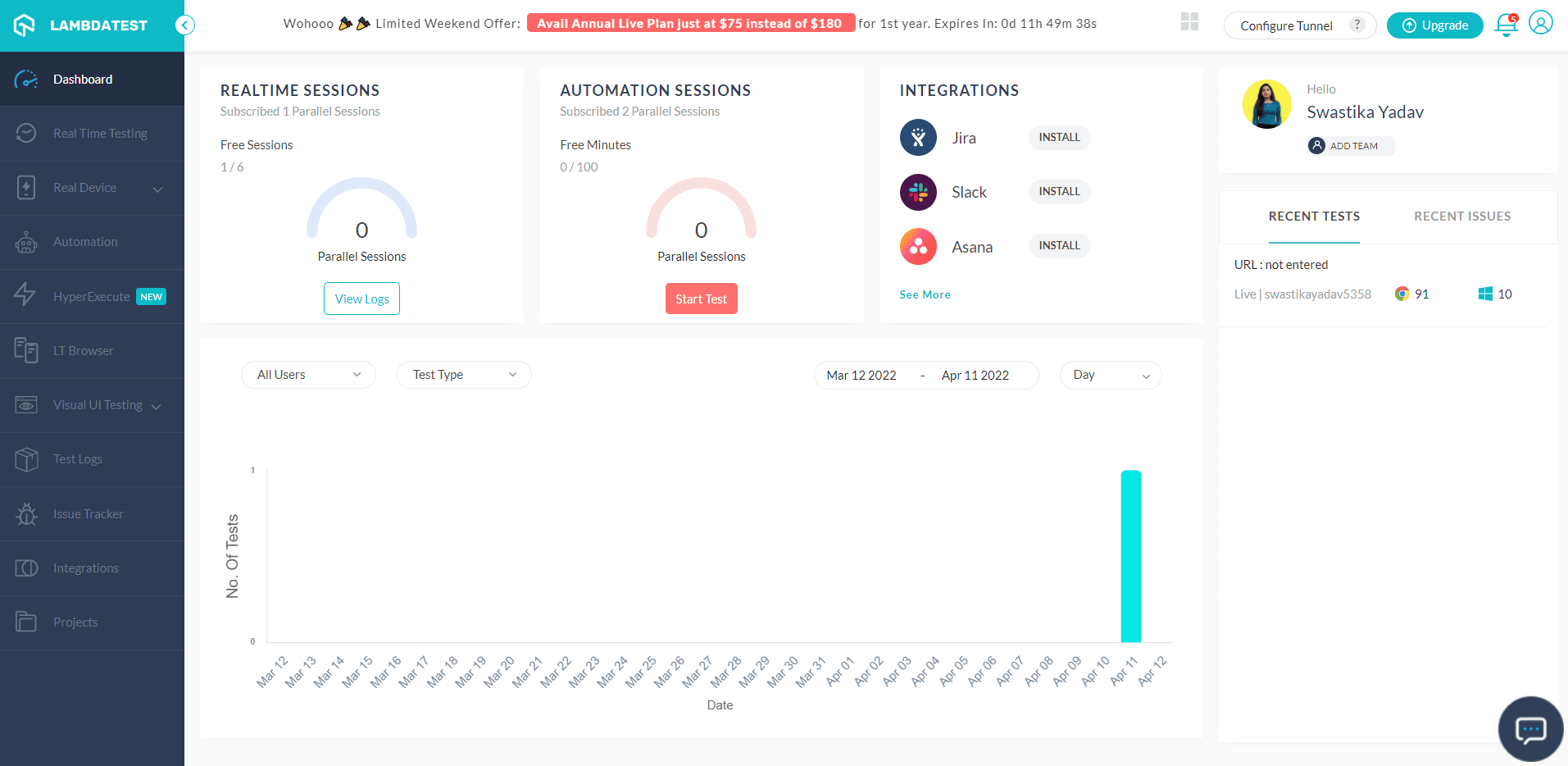
- Once you log in, you’ll see the TestMu AI Dashboard on your screen like this.
- Click on the Real Time Testing button available on the top left of your screen, below Dashboard. You’ll see an interface like this.
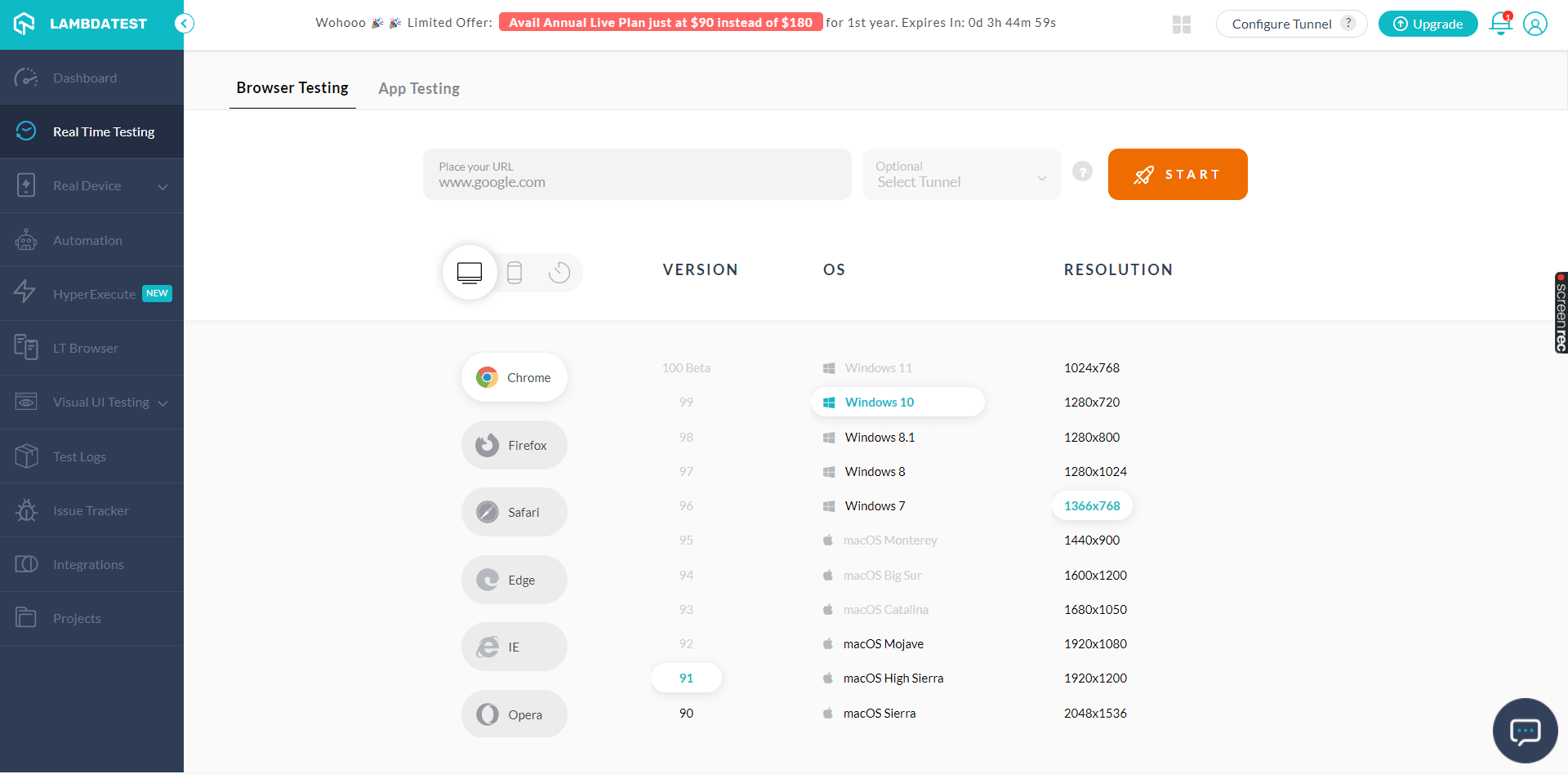
- Here, you can select whether you want to test on the browser interface or application interface. Now, place the URL for which you want to perform a cross browser test. Select device type, browser, version, resolution, and OS. You can play around with all sorts of combinations.
- After giving all your desired combinations, click on the START button. After a wait time of not more than just a few seconds, you’ll see how your website looks and works under given configurations.
- On the left-hand side, you see a bunch of options. You can take a screenshot, record video, change configurations and play around with that virtual real-time interface of your website.
Here, you’ll find a bunch of options to carry out different forms of testing. Since we are talking about cross browser testing in this article, I’ll guide you through one example of Live Real-Time Testing offered by TestMu AI.
For example, let us give the following URL and combinations.
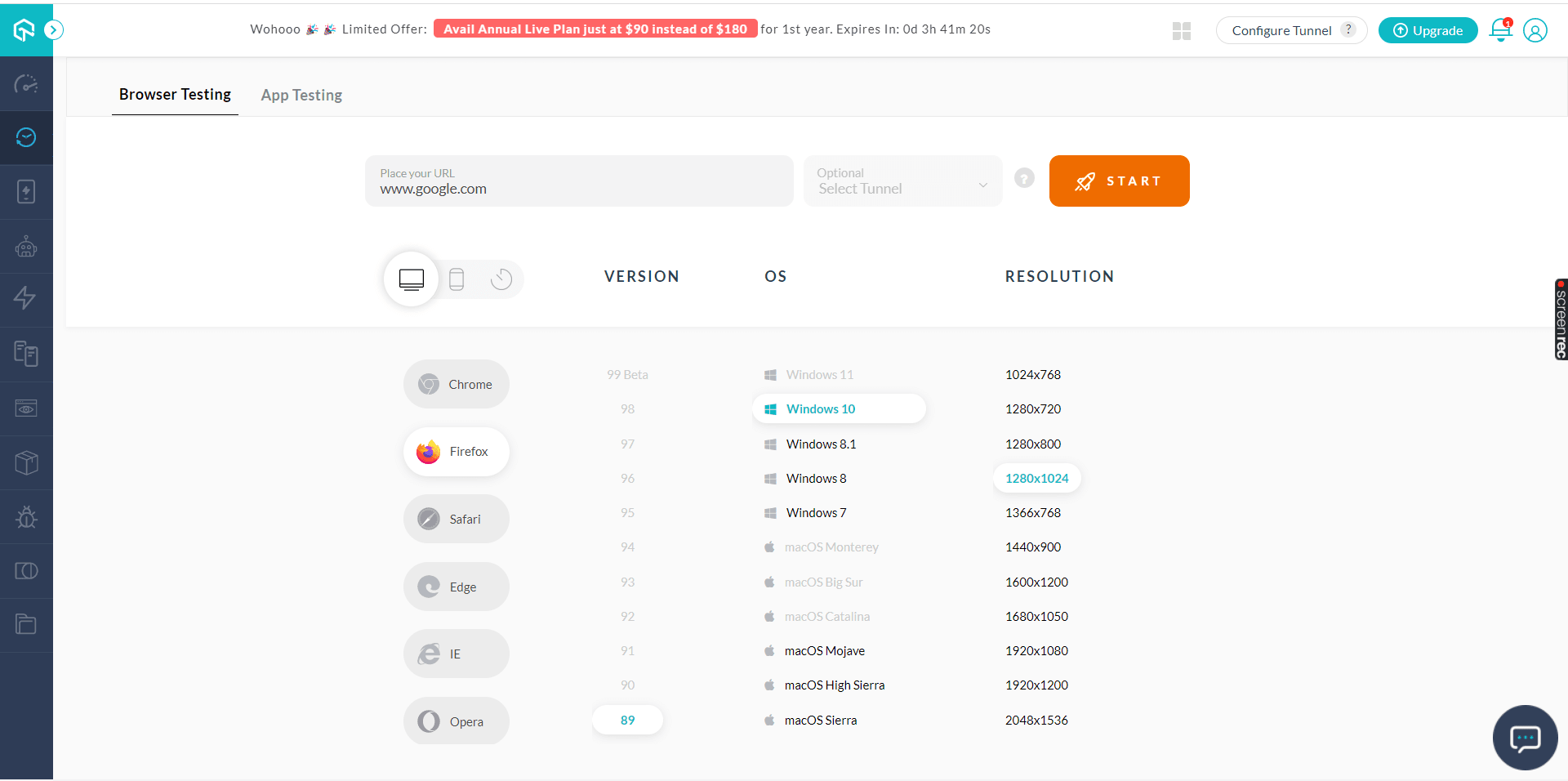
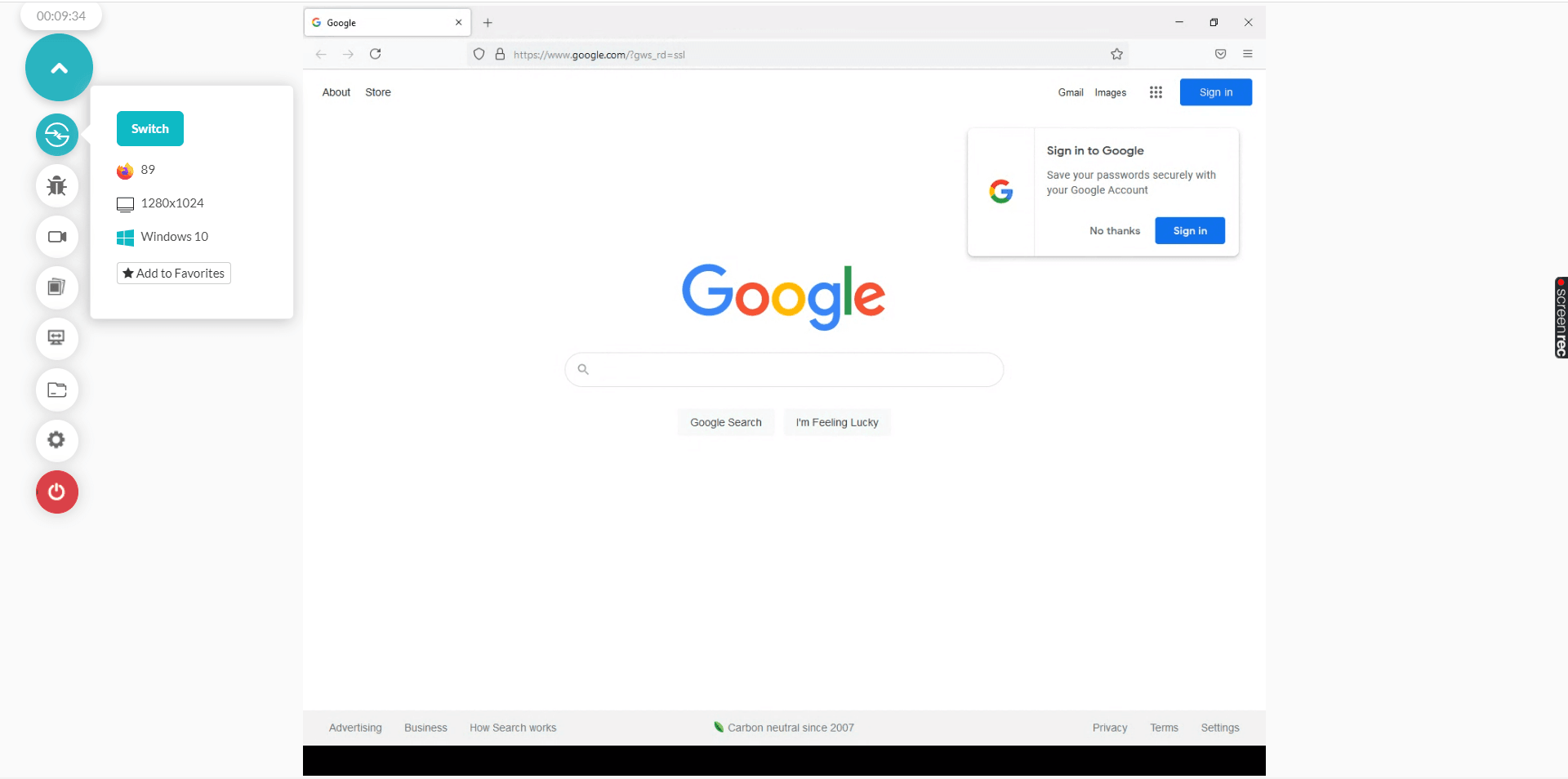
Won’t you call this perfectly balanced and easy to handle? TestMu AI is the best cross browser testing tool you can invest in.
Moreover, not only cross browser testing, but you also get a complete package of software testing from unit testing to integration testing and from cross browser testing to regression suite. TestMu AI is a one-stop solution for your automation testing needs.
With this Screenshot Testing Tutorial, you will learn how to perform Automated Screenshot Testing on the TestMu AI platform.
Conclusion
If we have to sum up this article on why cross browser testing is important, we established that any online business is entirely dependent on the customers and their experience using your product. One of the most common user experience issues occurs because of cross browser incompatibilities. These cross browser compatibility issues must be resolved beforehand, i.e., before putting forth the product in front of your customer.
Hence, this is why cross browser testing is important to be taken care of. You can’t bear the risk of rolling out your website or web app with a chance of a bad user experience. This may very well cost you lifetime customers or even your whole business. Therefore, get yourself a dedicated process for cross browser testing and launch your product with utmost confidence. And what tool is better than TestMu AI? On a side note you can understand what is browser in detail through our article and get an idea about its components in detail.
Note: If you want Learn about how to test your website on older browser versions for smooth performance. Check out this blog.


Frequently asked questions
Did you find this page helpful?
More Related Hubs
TestMu AI forEnterprise
Get access to solutions built on Enterprise
grade security, privacy, & compliance
- Advanced access controls
- Advanced data retention rules
- Advanced Local Testing
- Premium Support options
- Early access to beta features
- Private Slack Channel
- Unlimited Manual Accessibility DevTools Tests