

Power Your Software Testing with AI Agents and Cloud
The Native AI-Agentic Cloud Platform to Supercharge Quality Engineering. Test Intelligently and Ship Faster.


- TestMu AI (Formerly LambdaTest)
- /
- Blog
- /
- Travis CI vs Jenkins | Which CI/CD Tool Is Right for You?
Jenkins vs Travis | Which CI/CD Tool Is Best for You?
Travis CI vs Jenkins - who wins the race? Check this ultimate comparison to decide which CI/CD tool is best for you. Learn more.
Last Updated on:
This article is a part of our Content Hub. For more in-depth resources, check out our content hub on Top CI/CD Tools Comparison.
Travis CI and Jenkins are both popular CI/CD tools and were launched in the same year i.e. 2011. Jenkins remains open source and self-hosted, which is the root of most of the differences below: you own the server, the plugins, and the security patching. Travis CI is a hosted service, so you own none of that and pay for build capacity instead. That trade, control against maintenance, decides this choice more often than any feature comparison.
As a DevOps professional, you need to evaluate these tools based on your budget, project requirements, and other data points. This is why we take a deep dive into Travis CI vs Jenkins comparison to help you decide the right CI/CD tool for your project requirements.
If you are new to DevOps and are just learning the basics then we recommend you read our detailed article on “What Is Continuous Integration And Continuous Delivery?”. Without further ado, let’s get started.
Overview
Choose Jenkins if you require a free, self-hosted automation server with complete on-premise control and have a dedicated team to maintain it, or select Travis CI if you prefer a zero-maintenance, cloud-hosted pipeline where you pay for build capacity.
Which should you pick in 2026?
- Best for on-premise control: Jenkins is a free, open-source, self-hosted automation server written in Java that offers a massive ecosystem of over 1,500 plugins, making it ideal for teams that want complete control over their infrastructure and can handle the maintenance.
- Best for zero-maintenance pipelines: Travis CI is a hosted, credit-based cloud service that requires no installation and integrates directly with GitHub and Bitbucket, making it best for teams wanting to avoid infrastructure management and willing to pay for build capacity.
Is Travis CI still free for open source?
- Best alternative for open-source projects: GitHub Actions is a strong alternative to consider, especially since Travis CI retired its free tier for open-source projects and transitioned to a paid, credit-based allocation model.
How do you run either at scale?
- Best for scaling test execution: TestMu AI's HyperExecute integrates with both Jenkins and Travis CI to run test suites across just-in-time infrastructure, eliminating build agent bottlenecks by offloading slow test execution.
What is Jenkins?
Jenkins is a popular open-source CI/CD tool that is in usage for a long time. The tool is written entirely in Java. Jenkins has a powerful set of features that can be used to build, test, and integrate changes in a project.
It is the go-to choice for startups as it is free to use, supports a wide range of plugins, and is backed by a vibrant community. Developers get the chance to set up a CI/CD environment in Jenkins. Jenkins is available for a wide range of platforms - Windows, macOS, and various flavors of Unix (i.e. Ubuntu, OpenSUSE, and more).
Another major strength of Jenkins is its extensibility with plugins. Like other open-source projects, Jenkins maintains two release lines - a weekly release and an LTS (Long Term Support) line, so teams can choose between the newest features and a slower, more stable cadence.
Salient features of Jenkins
- Open source and free for use.
- Extensive plugin ecosystem.
- Vibrant community.
- Supports parallel execution.
- Ease to set up.
- Offers REST API.
- Can be configured using Jenkinsfile.
Read - Learn how to do continuous integration with one of the most popular CI/CD tool, Jenkins.
This Jenkins Tutorial for beginners and professionals will help you learn how to use Jenkins, one of the most popular CI/CD tools used in DevOps. If you are preparing for an interview you can learn more through Jenkins Interview Questions.

What is Travis CI?
Amongst all the CI/CD tools, Travis CI is undoubtedly one of the most popular choices. Initially, it was created for open source projects but with time, the tool has also migrated to close source projects. Like Jenkins, Travis CI is also one of the early players in the CI/CD tools market.
The tool is written in Ruby and is developed & maintained by the Travis CI community. Travis CI was earlier available only for GitHub hosted projects but now it also supports Bitbucket hosted projects.

It is available for Linux, macOS, and Windows (early stage) operating systems. Travis CI is no longer unconditionally free for open-source work: it now runs on paid, credit-based plans, and open-source projects request an allocation rather than receiving unlimited free builds. Check the Travis CI pricing page for current plans before you assume a project qualifies, because this change is the single biggest reason teams reconsidered the tool. For using Travis CI, you should have an account on GitHub or Bitbucket. There is no installation required and you can get started by simply signing up and adding a project.
Salient features of Travis CI
- Free for testing open-source applications.
- Available for Continuous Delivery (CD) and Continuous Integration (CI).
- Available for macOS, Linux, Windows (early stages).
- Supports around 30 different programming languages like Ruby, Perl, Python, Scala, etc.
- Can be configured after adding .travis.yml file (i.e. YAML format text file).
- Supports integration with external tools.
- Supports build matrix feature to accelerate the project execution.
Let’s start with a detailed Travis CI vs Jenkins face-off by evaluating it from perspectives of usability, support, and more.
Travis CI vs Jenkins - Detailed Showdown
Here are some of the features used for Travis CI vs Jenkins comparison:
Setup and Installation
Jenkins is a self-contained Java program that runs seamlessly out of the box. In total, three major steps are involved if Java and Tomcat server is pre-installed. Jenkins is available for Windows, Unix, and macOS platforms.
Jenkins can be combined with Docker to bring more speed and consistency to the automation tasks. Jenkins can run as a servlet in Java containers like GlassFish and Apache Tomcat.
Using the Travis CI tool with a cloud-hosted code repository does not require any installation. However, the following prerequisites have to be met:
- An account on GitHub or Bitbucket
- Owner permissions for the project hosted on the preferred platform (i.e. GitHub or Bitbucket)
For getting started with Travis CI with GitHub, the developer needs to sign up with GitHub on Travis. Enable the repository for testing from Travis Settings Page and add .travis.yml (YAML text file) to the root directory. Further details about the installation of Travis CI using GitHub and Bitbucket are available in the official Travis CI tutorial documentation.
The setup and installation process of Jenkins is simple, as few steps are required in the installation. Travis CI is one of the preferred tools if you are using GitHub or Bitbucket, as it integrates with the respective platforms. It automatically runs the test suites when any change is pushed to the repository.
Ease of Use
The focus for Jenkins has always been on functionality rather than usability. It does not mean that it is not user friendly, as the documentation is exhaustive enough to get started with Jenkins. The upgrade process of Jenkins is also simple and straight-forward. All the configurations are stored in a simple XML file that the admin can directly edit from the file system. Hence, changes can be spread quickly across multiple Jenkins projects, instead of doing the same from the UI.
Due to tight integration with GitHub, Travis CI is preferred CI/CD tool for many open source projects. Travis CI allows you to independently test pull requests & branches. For easy monitoring, the test results are displayed on the GitHub UI.
The documentation is exhaustive which makes onboarding very easy. Owing to the simple user interface, Travis CI is more friendly to use when compared to Jenkins. However, the opinion might differ for a developer (or admin) who is well-versed with Jenkins.
Parallel Execution
Travis CI supports parallel testing. It can also be integrated with tools like Slack, HipChat, Email, etc. and get notifications if the build is unsuccessful. Developers can speed up their test suites by executing multiple builds in parallel, across different virtual machines. The ‘build matrix’ feature offered by Travis CI allows developers to break down a build into assorted parts and thus speed up the suites.
For parallel testing, you need to make changes in the .travis.yml file for fully utilizing the available capacity of your account. You can execute parallel builds on a single VM(Virtual Machine) or on multiple VMs for RSpec, Cucumber, or Minitest.
Build stages in Travis CI can also be used for achieving parallel execution. Build stages are used to group jobs and run the relevant jobs (in a stage) in parallel. However, the stages are run in a sequential manner. The Parallel Test Executor Plugin is used for parallel execution using Jenkins. As the same environment is shared by different builds, you may face issues with parallel builds in Jenkins, especially when accessing shared resources like filesystem.
Parallel builds are an integral part of CI/CD tools and there is no clear winner in the Travis CI vs Jenkins face-off.
Apps and Plugin Ecosystem
Travis CI has support for 21 programming languages such as C, C++, Java, Perl, PHP, Python, R, JavaScript (with Node.js), and more. Depending on your preference of language, you can download community-developed apps for Travis CI.
The apps & tools ecosystem comprises tools for mobile applications, plugins, command-line tools, libraries, and more. You can find more information about the apps, clients, and tools for Travis CI here.
As Jenkins is an open-source project with an overflowing plugin ecosystem, it thrives on community development. Presently, there are 1500+ plugins offered by Jenkins. Each of them supports to build, deployment, automation, and has a huge community contribution as well. Jenkins is extensible due to the availability of a wide range of plugins.
As far as the apps and plugins ecosystem is concerned, Jenkins is the clear winner. Its large open-source contributor base keeps the plugin catalog far ahead of Travis CI's, which is the practical payoff of Jenkins being community-driven rather than a single-vendor hosted service.
Third-party (and cloud) Integrations
Travis CI is a cloud-based CI server where you can add repositories hosted on other servers (apart from GitHub and BitBucket) as sub-modules. Travis CI can be used for free if the source code is public.
Travis CI has built-in plugins for popular cloud providers such as AWS, Azure, Google Cloud, etc. When it comes to integrating new GitHub projects with old ones, these plugins come in handy. They are also useful in running builds on various GitHub events and configuring build parameters. Further information about Azure with Travis CI is below:
Like Travis CI, Jenkins also supports integration with popular cloud platforms. The integration can be done using plugins. You can integrate Jenkins on the following cloud platforms:
- Google Cloud
- Amazon EC2
- Digital Ocean
- Microsoft Azure
Features and Capabilities
The out-of-the-box integration with GitHub is one of the major advantages of Travis CI, considering that it is extensively used for open-source projects. On the other hand, it gets a bit more complicated when you try to integrate Travis CI with any control platform apart from GitHub. The tool features modern UI and a good experience whether it is used with the browser (or command-line client).
Though Jenkins and Travis CI have support for open-source and proprietary repositories, the offerings differ a bit for proprietary repositories. An upgrade to Travis CI Enterprise (or paid version) is required if you intend to build and test your private repositories available on GitHub. Travis CI has a user-friendly GUI which makes it very easy to use. Travis CI uses a clean room approach for builds, instead of using the build-agent approach. Hence, every build is run in a new and clean consistent environment.
Jenkins is easy to use and can be customized using plugins. Community is the backbone of Jenkins and you should choose Jenkins if you want to use a CI/CD tool that thrives on community support. There is a learning curve involved in setting up and customizing Jenkins.
Jenkins pipeline is a set of plugins tasked with providing support for continuous implementation and integration to various delivery pipelines into Jenkins. It is used for realizing continuous delivery with Jenkins and comes packed with an automation server that can be extended or used to create delivery pipelines as ‘code’ with the help of pipeline Domain-Specific Language (DSL).
Community Support
Being open-source in nature, Jenkins has excellent support from the online community. Jenkins community can be used for troubleshooting, knowledge sharing, reviews, documentation, and more. The Jenkins Community Blog is also updated on a regular basis.
The Travis CI community has a mix of sections - deployment, enterprise, discussion & feedback, languages, environments, and more. However, the vibrancy of an online community lacks in the case of Travis CI. Plugins (or apps) and community support are not the strong points for Travis CI.
If you are looking for CI/CD tools specifically for open-source projects, you should give both the tools a try and choose the one that suits your requirements.

Austin Siewert
Co-Founder, Steadfast Systems
Discovered @TestMu AI yesterday. Best browser testing tool I've found for my use case. Great pricing model for the limited testing I do 👏
2M+ Devs and QAs rely on TestMu AI
Deliver immersive digital experiences with Next-Generation Mobile Apps and Cross Browser Testing Cloud

Extended Customization
RESTful APIs are offered by Travis as well as Jenkins CI for custom-made extensibility. The latest release of Travis CI APIs is API V3 which was released way back in 2017. The API version V2 is not deprecated, as it seems to be in use for Travis CI’s web front-end applications. The Ruby Library for Travis CI is also based on API V2.
In Jenkins, the remote access APIs are available for XML, Python, and JSON. These APIs can be used for triggering builds, creating jobs, and more. The documentation on Jenkins APIs can be of extensive help when using APIs with your project.
Hosting (On-Premise or Cloud)
The free and open-source version of Travis CI is based entirely on the cloud, but the enterprise can also be hosted on-premise. Hence, you can run CI builds using the Enterprise version on-premises with in-house servers or your private cloud. The cloud or on-premises environment supported are AWS, Google Compute Engine, VMware, OpenStack, and Azure. The Travis CI Enterprise also gives your team visibility and control over their build processes.
When it comes to hosting in the cloud or on-premise, Jenkins is available in both the variants. The only charge associated with using Jenkins (in on-premise mode) is the investment in setting up the on-premise infrastructure, as the tool is free to use. Architecting for scale using Jenkins can be of help when using Jenkins for DevOps testing in the on-premise environment.
If you are looking for a free (and open-source) CI/CD tool for either cloud or on-premise environment, go for Jenkins. Usability wise, Travis CI is also good for open-source repositories. Switching to Travis CI Enterprise is purely based on your budget and project requirements.

Release Cycle
Jenkins follows a dual-track release approach: a fast-moving Weekly line and a slower LTS (Long-Term Support) line for teams that value stability over the newest features. Changelogs for the LTS and weekly releases are published on the Jenkins site.
For using Travis CI, you only have to install dependencies. There is no release perse as far as Travis CI is concerned. In order to do that, all you will need to do is adding a simple YAML file (.travis.yml) to the root directory of the repository.
Open Source vs Commercial
Apart from features, pricing is another major factor that you have to consider when choosing the ideal CI/CD tool for DevOps testing. While Jenkins is completely free to use, only Travis CI for open-source projects is free.
Travis CI Enterprise has Monthly and Annual plans. The pricing is divided into four different categories:
- Bootstrap
- Startup
- Small Business
- Premium (for large teams)
Further details about the pricing of Travis CI are available on the official Travis CI website. Jenkins is widely preferred by early-stage (as well as growth-stage) startups as only infrastructure cost is involved for using Jenkins.
Travis CI vs Jenkins Comparison Snapshot
Here is the snapshot of Travis CI vs Jenkins comparison:
| Feature | Jenkins | Travis CI |
|---|---|---|
| Open source or Commercial | Free (open-source) | Free for open-source projects Travis CI Enterprise for on-premise variant |
| Product Type | Self-hosted/On-Premise | Self-hosted/On-Premise |
| Setup and Installation | Easy | No installation required |
| Ease of use | Customizable via the available plugins | Focus on usability and functionality. Quite easy to use due to a Good GUI. |
| Official Support | IRC, Blogs, community available for support (no official support as Jenkins is an open-source project). | Official support on the Travis CI Community Forum |
| Apps & Plugin ecosystem | 1500+ plugins | Fewer apps and plugins available for Travis CI |
| Parallel Execution | Yes (partial) | Yes |
| Reporting | Yes | Yes |
| Build Pipelines | Custom pipelines through Jenkins Pipeline DSL | Yes |
| Cloud Integrations | Amazon EC2, VMWare vSphere, Google Cloud, Slack, etc. through Jenkins Plugins | Built-in support for AWS, Azure, Google Cloud, etc |
| REST APIs | Yes | Yes |
| Integration with GitHub | Supported through plugins | Built-in integration with GitHub and BitBucket |
| Online Documentation | Yes, Blogs, Support Forum, IRC, events, and more. | Yes, Blogs, official community |
| Customization Options | More | Less |
| Configuration | Completely customizable | Customization through .travis.yml (YAML) file |
Pros and Cons: Travis CI vs Jenkins
The feature tables above show what each tool does. The trade-offs below are what you actually live with day to day.
Jenkins
- Pro - Infinite flexibility: A plugin ecosystem in the thousands means Jenkins can integrate with almost anything, and being self-hosted means no per-build cost and full control over the environment and data.
- Pro - Free and open source: No license fee and no vendor lock-in. You can run it on hardware you already own.
- Pro - Pipeline as code: Jenkins pipelines are defined in a version-controlled Jenkinsfile, in either a declarative pipeline (a structured, easier-to-read syntax) or a scripted pipeline (full Groovy for maximum flexibility), so the build definition lives beside the code it builds.
- Con - Maintenance is yours: You own the server, the upgrades, the plugin compatibility, and, critically, the security patching. A neglected Jenkins instance is a well-known attack surface.
- Con - Setup overhead: Standing up and tuning Jenkins takes real effort before the first pipeline runs, and that cost never fully goes away.
Travis CI
- Pro - Zero-maintenance cloud setup: Add a .travis.yml file to your repo and builds run on Travis CI's infrastructure. No server to patch, no agents to manage.
- Pro - Clean builds by default: Every build runs in a fresh, isolated environment, so builds do not contaminate each other (more on this below).
- Con - Cost: The credit-based pricing can get expensive at scale, and the once-generous free open-source tier is gone.
- Con - Less flexible: You work within Travis CI's hosted model. You cannot reach into the underlying infrastructure the way you can with a self-hosted Jenkins box.
The 2026 Reality: Is Travis CI Still Free, and Do People Still Use It?
Much of the older advice about these tools is out of date, because the ground shifted. Here is where things actually stand.
Travis CI is no longer free for open source. The original service lived at travis-ci.org and offered a genuinely generous free tier for open-source projects. That domain was retired and everything moved to travis-ci.com on a paid, credit-based model. Open-source projects can still request an allocation, but the era of unlimited free builds ended, and you should check the current Travis CI pricing before assuming a project qualifies.
That change is why GitHub Actions rose. When the free tier tightened, a large share of open-source and small-team projects migrated to GitHub Actions, which is built into GitHub, requires no separate service, and ships a free tier for public repositories. For many teams the modern CI/CD question is no longer "Travis or Jenkins" but "GitHub Actions, or one of these two for a reason."
Do people still use Travis CI? Yes, but less than at its peak. It remains a solid hosted option for teams that want a simple YAML-driven pipeline and are fine paying for it, particularly those not fully on GitHub.
Is Jenkins still relevant? Very. Its age is a feature here: the plugin ecosystem, on-premise control, and data residency keep it the default in enterprises and regulated industries where a hosted cloud service is a non-starter. Jenkins is not going anywhere; it is simply no longer the automatic choice for a small team starting fresh.
Build Environments: Ephemeral Clean Rooms vs. Shared Build Agents
One architectural difference explains a whole class of "it works on my machine, and in CI, but not in yours" bugs: how each tool provisions the environment a build runs in.
- Travis CI: ephemeral clean rooms. Every single build spins up a fresh, isolated VM or container, runs, and is destroyed. Nothing carries over between builds. This clean-room model means a build cannot be contaminated by leftover state from a previous run, so a green build is trustworthy, and it is the same discipline that makes ephemeral environments resistant to drift.
- Jenkins: shared build agents (by default). The traditional Jenkins setup runs builds on long-lived agents that persist between jobs. That is fast and flexible, but leftover files, cached dependencies, and environment tweaks accumulate over time, and this configuration drift is exactly how a build passes on the agent but fails elsewhere. Jenkins can be configured for ephemeral agents (using Docker or Kubernetes plugins), but it is opt-in work, not the default.
The practical takeaway: Travis CI gives you clean, reproducible builds for free but on its infrastructure and its bill; Jenkins gives you speed and control but leaves environment hygiene as your responsibility. If you run shared Jenkins agents, invest early in containerized, disposable build environments to avoid the drift trap.
Travis CI vs Jenkins: Which CI/CD Tool Should You Choose?
One thing that is clear from the Travis CI vs Jenkins comparison is that both the products have very good features. Travis CI has an upper edge over Jenkins if you are using GitHub for version control due to its tight integration with GitHub. On the other hand, Jenkins is in development and use for many years and is also used by startups (and large enterprises). Apart from the features, you should also look at the pricing and in-house competency when short-listing the CI/CD tool, the same also applies in the case of Travis CI vs Jenkins.
Fun Fact: You can integrate both Jenkins & Travis CI pipelines with TestMu AI cloud Selenium Grid of 2000+ real browsers for desktop and mobile to ensure faster & robust release cycles. Check out all TestMu AI CI/CD Integrations.
Travis CI vs Jenkins has been a debated discussion among DevOps professionals across multiple online forums.
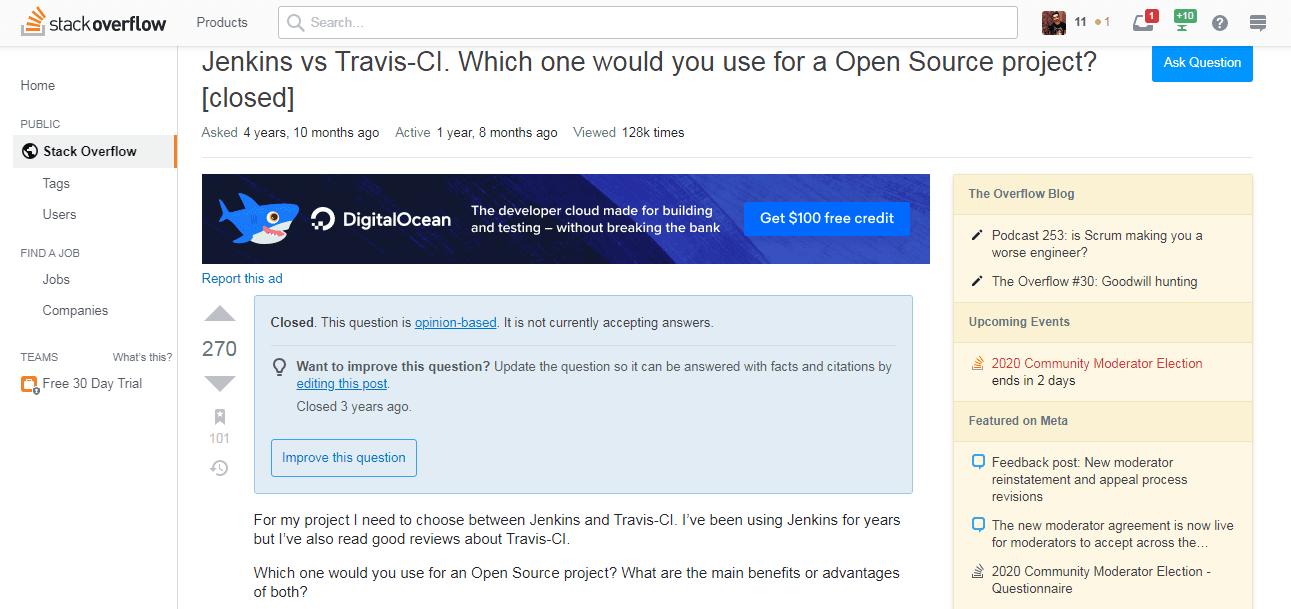
Src: Stackoverflow
I hope I was able to help you come to a conclusion between Travis CI vs Jenkins. In case you still have any questions, feel free to share them with me in the comments. Happy testing! 🙂
Austin Siewert
Co-Founder, Steadfast Systems
Discovered @TestMu AI yesterday. Best browser testing tool I've found for my use case. Great pricing model for the limited testing I do 👏
2M+ Devs and QAs rely on TestMu AI
Deliver immersive digital experiences with Next-Generation Mobile Apps and Cross Browser Testing Cloud
Author

Himanshu Sheth
Blogs: 142


Himanshu Sheth is the Director of Marketing (Technical Content) at TestMu AI, with over 8 years of hands-on experience in Selenium, Cypress, and other test automation frameworks. He has authored more than 130 technical blogs for TestMu AI, covering software testing, automation strategy, and CI/CD. At TestMu AI, he leads the technical content efforts across blogs, YouTube, and social media, while closely collaborating with contributors to enhance content quality and product feedback loops. He has done his graduation with a B.E. in Computer Engineering from Mumbai University. Before TestMu AI, Himanshu led engineering teams in embedded software domains at companies like Samsung Research, Motorola, and NXP Semiconductors. He is a core member of DZone and has been a speaker at several unconferences focused on technical writing and software quality.
Reviewer

Harish Rajora
Reviewer
Harish Rajora is a software developer at TestMu AI with over 6 years of hands-on experience in Python and cross-platform application development across Windows, macOS, and Linux. He has authored 800+ technical articles and worked on large-scale projects, including GenAI applications and core engineering features used by millions. Harish has led DevOps initiatives building CI/CD pipelines with Jenkins, AWS, GitLab, and GitHub, and holds an M.Tech in Software Engineering from IIIT Allahabad.


Travis CI vs Jenkins FAQs
Did you find this page helpful?
More Related Blogs
TestMu AI forEnterprise
Get access to solutions built on Enterprise
grade security, privacy, & compliance
- Advanced access controls
- Advanced data retention rules
- Advanced Local Testing
- Premium Support options
- Early access to beta features
- Private Slack Channel
- Unlimited Manual Accessibility DevTools Tests