
Author End-to-End Tests in Natural Language with KaneAI
Plan, Author, and Evolve E2E Tests for Web and Mobile Apps in Natural Language.

- TestMu AI (Formerly LambdaTest)
- /
- Blog
- /
- Self-Healing Test Automation: How It Works & Why It Fails
Self-Healing Test Automation: How It Works & Why It Fails
See how self-healing test automation repairs broken locators automatically, where it still fails, and the tools that do it, in a practical guide for QA teams.
Last Updated on:
Automated UI tests break when the application changes, even when the feature still works. A renamed class or a moved button fails the locator, and someone has to fix the script by hand.
Unreliable tests are expensive: Atlassian reports that flaky tests in its Jira backend repo force reruns that waste over 150,000 hours of developer time each year. Self-healing test automation repairs a broken locator during the run, so the test keeps going instead of failing on a cosmetic change.
TL;DR
Self-healing test automation repairs a broken element locator during the run, so a renamed class or a moved button does not fail an otherwise working test. It cuts locator maintenance, but a heal can also bind to the wrong element, so every heal needs a log and a review.
- How healing works - When the stored locator fails, a self-healing engine tries fallback attributes such as ID, text, and position, or the step's original intent, and continues only when the match clears a confidence threshold.
- Where healing fails - Self-healing repairs how a test finds an element, not changed behavior. It can heal to a look-alike element and pass a test that should fail, so pair it with assertions on outcomes.
- Open-source options - Healenium adds locator healing to Selenium web tests under an Apache-2.0 license, and Playwright's healer agent re-runs a failing test, proposes a fix, and skips the test when the feature looks broken.
- KaneAI Auto-Heal - TestMu AI's KaneAI rebuilds a broken locator from the step's natural-language instruction at runtime, and its optional Self-maintenance setting holds re-authored steps as draft versions until someone approves them.
How Do You Keep Heals Trustworthy?
Review heals like code changes: log each one, fail low-confidence matches, and replace any locator that heals on every run with a stable attribute such as a dedicated data-testid.
What Is Self-Healing Test Automation?
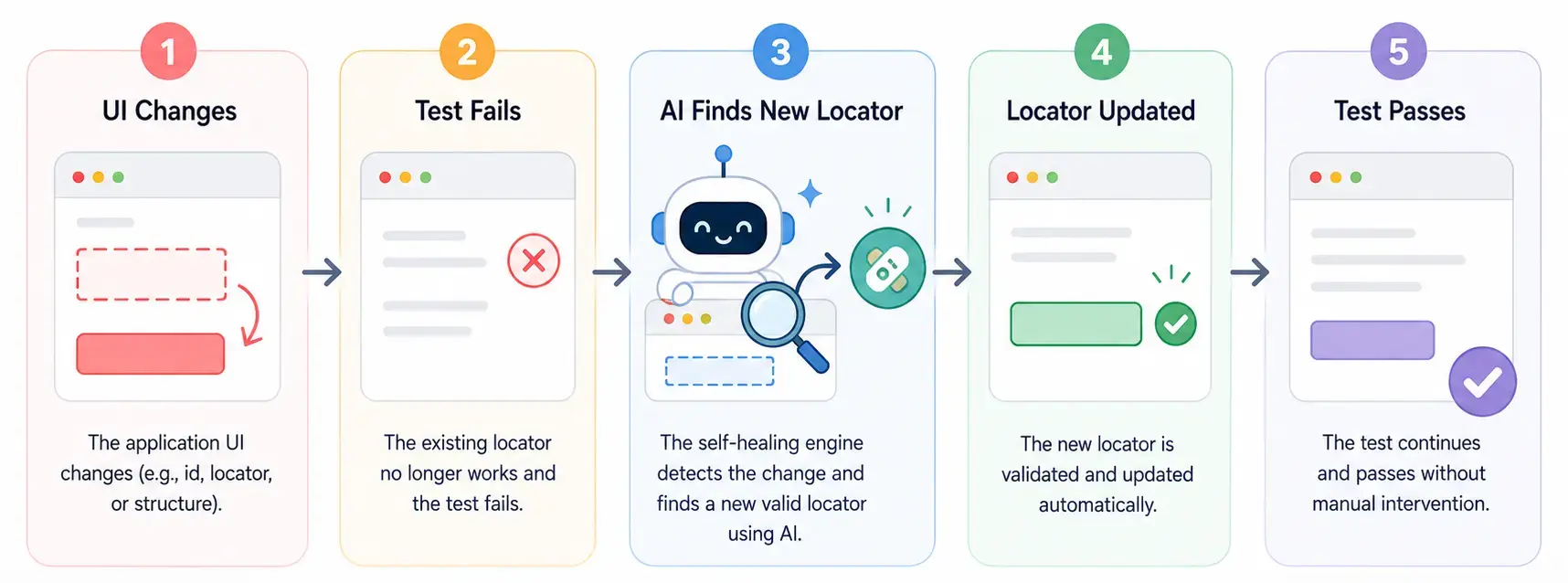
Self-healing test automation detects a broken element locator during a test run and repairs it without a human editing the script. The test finds the element another way, continues, and records the new locator for the next run.
It targets one failure type: a test that broke because the UI changed shape, not because the feature broke. A renamed CSS class, a regenerated ID, or a button moved inside a new wrapper all qualify.
Healing repairs a locator after it breaks. Intent-based testing attacks the same problem earlier, by binding the test to the outcome so a renamed element never breaks the locator in the first place.
What Is Self-Healing Test Automation Used For?
Self-healing test automation keeps large, frequently changing UI suites stable, most often in regression, end-to-end, cross-browser, and CI testing, where UI churn breaks element locators.
- Regression testing - Large regression suites break as the UI evolves; healing keeps them running without a selector fix after every release.
- End-to-end testing - Long user journeys touch many elements, so one locator change can fail the whole flow.
- Cross-browser and cross-device testing - Rendering differences shift attributes between browsers and devices, and healing lets one script run on all of them.
- CI/CD pipelines - A broken locator blocks the build for a cosmetic change; healing keeps the pipeline moving and logs the fix for review.
Why Use Self-Healing Test Automation?
Teams adopt self-healing test automation to stop spending sprint time on selector fixes. The main benefits:
- Fewer locator failures - A missing element normally throws NoSuchElementException and fails the run; healing relocates the element and continues.
- Lower maintenance - Engineers review a heal instead of rewriting a selector, so suite upkeep stops growing with every UI change.
- Cleaner failure signal - With cosmetic breaks absorbed, a red build is more likely to mean a real defect.
- Faster feedback - Fewer reruns and manual fixes mean results reach developers while the change is still fresh.
To put a figure on the maintenance hours self-healing gives back, you can model the savings with this test automation ROI calculator. For a side-by-side cost model, see self-healing vs manual test maintenance.

Note: Run healed Selenium, Playwright, and Cypress suites across 3,000+ browser/OS combinations on TestMu AI. Try TestMu AI free!
Example of Self-Healing Test Automation
Take a login flow automated with Selenium. The login button starts with the class btn-login:
<button class="btn-login">Login</button>The test locates and clicks it by that class:
# Locate the login button by its class
driver.find_element(By.CSS_SELECTOR, "button.btn-login").click()
A developer later renames the class to login-btn. On the next run, plain Selenium cannot find the old selector and fails:
NoSuchElementException: Unable to locate element: {"method":"css selector","selector":"button.btn-login"}With self-healing enabled, the runner relocates the button by its text and role, updates the locator, and records the fix before continuing. The log line below is illustrative; each tool formats its heal records differently:
[heal] button.btn-login not found; matched button.login-btn (text "Login", confidence 0.94); locator updatedThe test passes and the script now points at login-btn. The heal record is what a reviewer checks to confirm the engine picked the right button. For the Selenium-specific setup, see auto-healing in Selenium automation testing.
How Does Self-Healing Test Automation Work?
Self-healing test automation stores more than one way to find each element, tries the fallbacks when the primary locator fails, and saves the winning match for the next run.
- Capture the element - On a passing run, the tool records several attributes (ID, name, CSS selector, XPath, visible text) instead of one selector.
- Detect the break - When the primary locator returns nothing, the run pauses on that step instead of failing.
- Score candidates - The engine compares page elements against the stored attributes, or against the step's natural-language intent, and ranks them.
- Heal or fail - If the best candidate clears the confidence threshold, the step runs on it and the new locator is saved; if not, the step fails as normal.
The threshold is the setting that matters. Healenium exposes it as a score cap that sets the match probability required before it heals, and a low cap is how wrong-element heals get in.
Intent-based engines go a step further. KaneAI, for example, rebuilds a failed locator from the original instruction ("click the Login button"), so a renamed class heals while a removed feature still fails, as it should.
How Does KaneAI Help With Self-Healing Test Automation?
KaneAI handles self-healing in two layers: Auto-Heal repairs a broken locator at runtime so the run continues, and Self-maintenance re-authors steps Auto-Heal cannot recover into a new test version that waits for your approval.
Built by TestMu AI, KaneAI is a GenAI-native testing agent. Per the KaneAI Auto-Heal docs, Auto-Heal applies to any step that needs an element locator, such as Click, Type, or Hover. When the primary locator and its fallbacks all fail, KaneAI rebuilds the locator from the step's original natural-language instruction.

Self-maintenance decides what happens when a step still cannot run. The healing and dynamic test guide lists its strategies, of which only one is active at a time:
- Adaptive Heal - Re-authors the failing objective and the ones after it, then saves the result as a draft version.
- Dynamic Test - Authors each objective from its goal on every run, so a changed workflow is picked up without a recorded step to replay.
- Retry on Failure - Runs the whole test again from the start after it fails, without creating a new version.
Self-maintenance is off by default and can be set per organization, project, or test run. Drafts from Adaptive Heal and Dynamic Test stay in Version History until someone approves them, because Auto-approve changes is also off by default.
Because KaneAI exports tests to Selenium, Playwright, Cypress, and Appium, the healed suite stays ordinary code your team owns. Each run executes on TestMu AI's cloud, which covers 3,000+ browser/OS combinations and 10,000+ real devices.

Traditional vs. Self-Healing vs. Agentic Test Automation
The table below compares how traditional, self-healing, and agentic approaches each handle the changes that break automated tests.
| Scenario | Traditional Automation | Self-Healing Automation | Agentic Self-Healing |
|---|---|---|---|
| Locator renamed or changed | Test fails; engineer fixes it manually | Relocates via backup attributes and updates the script | Auto-Heal re-derives the element from the step's intent at runtime |
| UI redesigned | Tests rewritten from scratch | Often still fails; layout moved too far | Adaptive Heal re-authors the failing objective and every one after it, then continues |
| Logic or workflow change | Manual test update | Not handled; only fixes locators | Dynamic Test authors each objective from the goal on every run, so the new behavior is picked up without a recorded step to replay |
| Maintenance effort | High | Low | Lowest, moved from rewriting to reviewing each draft version |
| When humans step in | After every broken run | To review automatic heals | To approve or decline each re-authored version, because Auto-approve changes ships off |
| What the fix leaves behind | A hand-edited script in version control | A runtime substitution, often with no lasting record | A new test version in Version History, marked so the record shows whether a person reviewed it |
How Is Agentic AI Changing Self-Healing Test Automation?
Classic self-healing is reactive: a locator breaks and the tool patches it. Agentic AI keeps the intent of each step, so it can re-derive the right action when a label changes or a page is redesigned.
The tester's job shifts from rewriting locators to reviewing what the agent re-derived. That only works when the agent leaves a reviewable record, which is why KaneAI holds re-authored tests as drafts. The Adaptive Heal and Dynamic Test walkthrough shows that review flow step by step.
Self-Healing Test Automation Tools
Self-healing ships as open-source libraries, framework features, and commercial platforms. The table lists tools alphabetically, with each one's healing method as its own documentation describes it.
| Tool | Type | How it heals | Good to know |
|---|---|---|---|
| Cypress cy.prompt | Cypress command (beta) | Turns natural-language steps into Cypress commands and self-heals a step when its element changed since the last run | Needs a Cypress Cloud account or record key; Chromium-based browsers only |
| Healenium | Open-source library (Apache-2.0) | Proposes replacement locators for Selenium web tests and heals only above a configurable match score | Runs with a separate backend service |
| KaneAI (TestMu AI) | GenAI-native testing agent | Rebuilds a broken locator from the step's natural-language instruction; optional Self-maintenance re-authors failing objectives | Re-authored tests stay as drafts until approved |
| mabl | Commercial test platform | Uses multiple AI models and visual context to update element locators and test steps | Asks the user for the intent behind an action when unsure |
| Playwright healer agent | Built-in Playwright test agent | Re-runs failed actions, inspects the page for a matching element, proposes a fix, and re-runs the test | Skips the test when it judges the feature itself broken |
Pick by where your suite lives. A Selenium suite can add Healenium, a Playwright suite can start with auto-heal in Playwright, and a Cypress suite can try Cypress AI. Teams that want authoring, healing, and review in one place across web and mobile can use KaneAI. For a wider shortlist, see these AI testing tools.
What Are the Challenges of Self-Healing Test Automation?
The biggest risk of self-healing test automation is a wrong heal that passes: the test turns green on the wrong element and ships the bug it should have caught.
- Masking real bugs - An over-eager heal can re-point a test and pass it, hiding a defect that should have failed the build.
- Wrong-element matches - When elements look alike, the engine can heal to the wrong one, so the test runs but checks the wrong thing.
- Logic changes - Healing repairs how a test finds elements, not changed behavior; a new required field still needs a human update.
- Setup and trust - Thresholds take tuning, and every automatic fix still needs a review before it becomes part of the suite.
Treat every heal as an unreviewed code change: log it, diff it, and fail the build when confidence is low.
Best Practices for Self-Healing Test Automation
Treat self-healing as an assist to good test design, not a replacement for it.
- Start with stable locators - Give tests durable identifiers such as dedicated data-testid attributes so healing stays the exception.
- Review every heal - Check automatic heals before merging, so a wrong match is caught before it ships.
- Watch the heal logs - A locator that heals on every run needs a real fix; per the Cypress docs, frequent heals also add AI calls and slow the run.
- Tune confidence thresholds - Set the bar high enough that low-confidence matches fail loudly instead of healing to the wrong element.
- Assert outcomes - Pair healing with assertions on behavior and content, so a passing test still means the feature works.
Conclusion
Start by finding the locators in your suite that break most often and give them stable attributes, then turn on healing for the rest with review enabled. To try it on your own app, follow the getting started with KaneAI guide and author one flow in plain English.
For how healing fits into a wider QA practice, see how teams use AI in QA.
Author

Tahneet Kanwal
Blogs: 27


Tahneet Kanwal is a freelance technical content writer with over 2 years of hands-on experience in frontend development and technical writing. She holds a B.Tech in Information Technology from University College of Engineering and Technology (UCET). Tahneet creates clear, SEO-optimized content on web technologies, software testing, and automation tools, leveraging her skills in HTML, CSS, JavaScript, React, Tailwind CSS, and various tools like VS Code, GitHub, Figma, and Canva. She is the author of 30+ technical blogs and an open-source contributor through Hacktoberfest. She has also participated in the Google Cloud Arcade Facilitator Program and holds certifications as a Meta Android Developer (Coursera) and in Web Development (Internshala). Over time, she has evolved her writing to prioritize structure, readability, and SEO while maintaining technical depth.
Reviewer

Harish Rajora
Reviewer
Harish Rajora is a software developer at TestMu AI with over 6 years of hands-on experience in Python and cross-platform application development across Windows, macOS, and Linux. He has authored 800+ technical articles and worked on large-scale projects, including GenAI applications and core engineering features used by millions. Harish has led DevOps initiatives building CI/CD pipelines with Jenkins, AWS, GitLab, and GitHub, and holds an M.Tech in Software Engineering from IIIT Allahabad.


Self-Healing Test Automation FAQs
Did you find this page helpful?
More Related Blogs

TestMu AI forEnterprise
Get access to solutions built on Enterprise
grade security, privacy, & compliance
- Advanced access controls
- Advanced data retention rules
- Advanced Local Testing
- Premium Support options
- Early access to beta features
- Private Slack Channel
- Unlimited Manual Accessibility DevTools Tests