

Power Your Software Testing with AI Agents and Cloud
The Native AI-Agentic Cloud Platform to Supercharge Quality Engineering. Test Intelligently and Ship Faster.


- TestMu AI (Formerly LambdaTest)
- /
- Blog
- /
- Optimize your Testing Pipeline: Reduce Upload Times and Debug Faster
Optimize your Testing Pipeline: Reduce Upload Times and Debug Faster
Optimize your testing pipeline: incremental uploads send only changed code, and fail-fast limits stop a run early instead of forcing a full suite rerun.
Last Updated on:
You optimize your testing pipeline by uploading only the changed code on each run and stopping a job once failures repeat. A differentialUpload setting sends only the changed portion of a codebase while tests still run against all of it, and a FailFast limit aborts a job after a set number of consecutive failures. This guide covers the features that accelerate testing productivity, incremental upload and FailFast, and how AI assistants shorten the debug cycle.
Key Takeaways
- The differentialUpload setting in HyperExecute uploads only the changed portion of a codebase on each run, while the tests still execute against the complete codebase.
- A codebase left untouched for longer than the differentialUpload ttlHours window uploads in full on its next HyperExecute run, so slow-moving branches need a higher TTL than the 60-hour default.
- HyperExecute FailFast aborts a test job after a set number of consecutive failures, so a QA team debugs the root cause instead of waiting for a full suite to finish.
- The FailFast counter resets as soon as one test passes, which stops scattered flaky failures from halting an otherwise healthy run.
- The HyperExecute MCP Server lets an MCP client inside an IDE generate runner commands and YAML, look up documentation, and read job and session details through natural language.
- HyperExecute Auto Healing builds a replacement locator when the DOM changes mid-run, but it cannot recover from WebDriver initialization failures and can mask a genuine application bug.
HyperExecute: A Solution to Accelerate Your Testing Productivity
HyperExecute enhances testing efficiency with features like Incremental Upload and FailFast, minimizing waiting times and accelerating feedback loops. Let's see how:
Incremental Upload: No More Uploading the Entire Codebase Every Time
Our customer, a fast-growing startup, relied on the Jenkins CI pipeline for their automated testing. Every time they encountered a failed test or made even a tiny code tweak, such as fixing a minor bug, it triggered their complete testing cycle.
This meant the entire codebase, a massive collection of files, had to be fetched onto Jenkins and then get triggered. This resulted in long waiting times for their QA team, eventually hindering and slowing down the entire process of diagnosing and fixing issues.

This drastic reduction in the test payload has several key benefits:
- Reduced Waiting Time: Developers no longer have to wait for lengthy uploads, allowing them to push code changes and iterate faster.
- Faster Feedback Loop: The QA team receives test results quicker, enabling them to identify and address issues promptly.
- Improved Efficiency: It frees up valuable time for both developers and testers, allowing them to focus on higher-level tasks.
differentialUpload ensures complete codebase testing while focusing upload efforts on the updated code portion. This created a win-win situation for the development and QA teams, leading to a more productive and efficient testing process.
You switch incremental upload on in the HyperExecute YAML file. The differentialUpload block takes enabled: true plus an optional ttlHours value that sets how long the cached codebase stays reusable, accepting 1 to 360 hours and defaulting to 60. A repository left untouched for longer than that TTL uploads in full on its next run, so teams on slow-moving branches should raise the value rather than assume the cache is still warm.

Faster Feedback, Faster Fixes: Eliminate the Waiting Time with Failfast
With the Jenkins-based CI pipeline, the QA team encountered another hurdle. Whenever a test failed, they had to rerun the entire test suite. This could take several hours, depending on the suite's complexity.
This meant that even if a critical bug was causing early failures, the QA team had to wait for the entire test suite to finish before they could debug the root cause of the problem. This was causing significant delays in the testing process, leading to frustration and decreased productivity among team members. HyperExecute's FailFast feature automatically aborted their test execution after a predefined number of consecutive failures. This helped their developers, or QA's, focus issues first and debug tests quickly.
With more immediate identification of failing tests, developers were able to receive feedback and begin fixing issues sooner. This led to a faster feedback loop between the development and QA cycles, accelerating their overall delivery process.
FailFast is set in the same YAML file. The failFast block takes maxNumberOfTests, the number of consecutive failures that aborts the job, and the counter resets as soon as one test passes, so scattered flaky failures do not halt a healthy run. Adding level: scenario counts failures per scenario instead of per test, and the documentation advises picking one level rather than applying both at once.
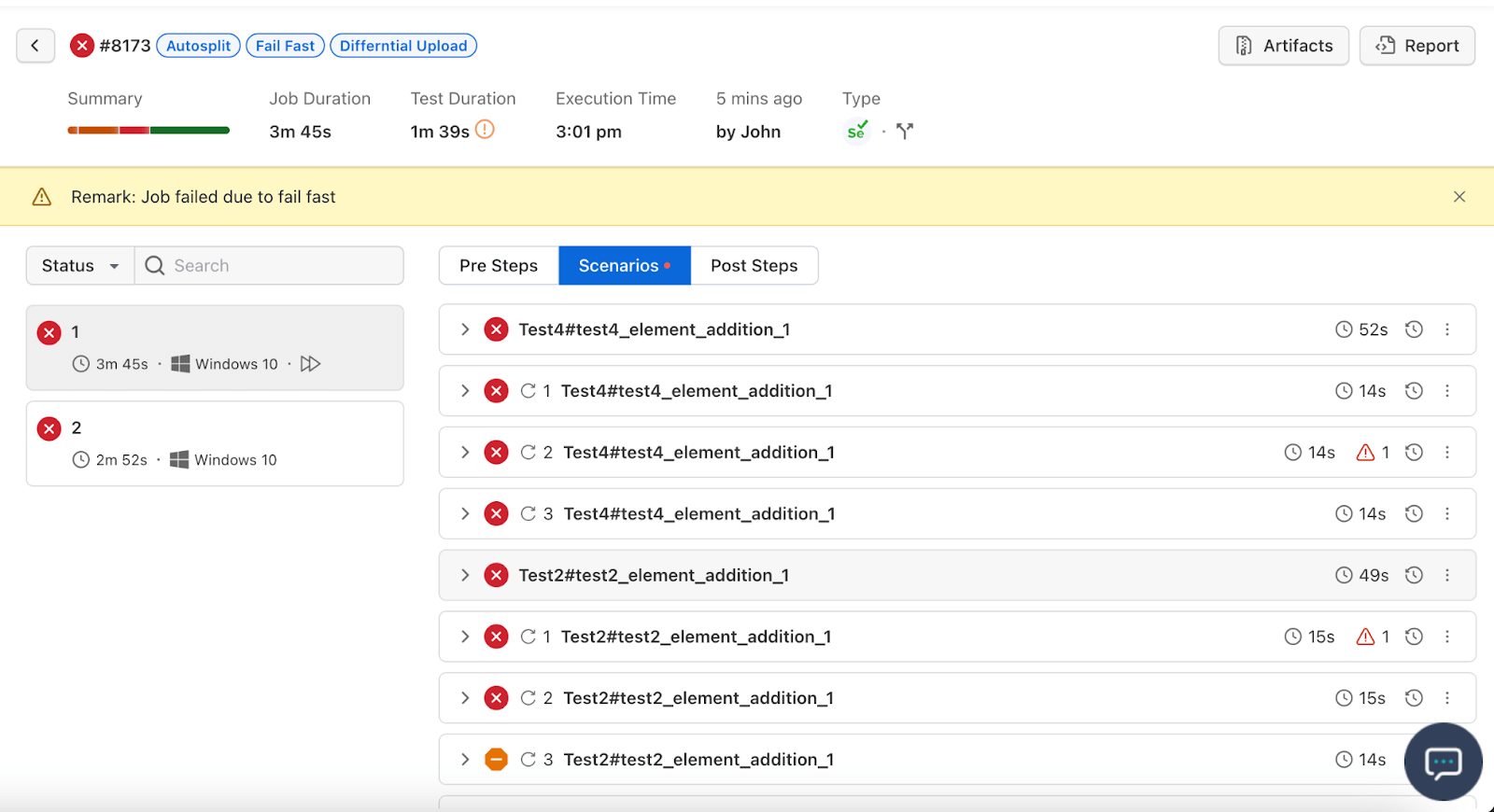
Key Takeaway: HyperExecute pairs differentialUpload, which sends only changed code to a test run, with FailFast, which stops a job after a set number of consecutive failures, cutting both the upload wait and the rerun wait in a CI pipeline.
How Do AI Assistants Shorten the Debug Cycle on HyperExecute?
AI assistants now handle the HyperExecute configuration work that used to happen by hand after a failed run. The HyperExecute MCP Server, part of the TestMu AI MCP Server, lets a connected MCP client inside your IDE drive the platform through natural language, and it documents five capabilities: Test Runner Command Generation, HyperExecute YAML Generation, HyperExecute Documentation Lookup, HyperExecute Job Info and HyperExecute Sessions. Both features above live in the same YAML file, so generating the testDiscovery and testRunnerCommand entries from a prompt, then reading job status in the same window, removes a round trip through the dashboard.
Locator drift causes the other class of repeat runs. Auto Healing applies a dynamic locator strategy that adapts to DOM changes in real time. It records element paths, detects the failure, analyzes the current DOM and generates a new locator so execution continues. You switch it on with the autoHeal capability set to true inside LT:Options, not in the YAML file. The documentation states the limits plainly: it cannot recover from WebDriver initialization or system-level failures, it can mask a real application or script bug, and it adds a slight performance cost. Keep FailFast enabled alongside it so a genuine regression still stops the job.
Test order matters once both are running. The auto-split strategy spreads discovered tests across parallel VMs through autosplit and concurrency, and it re-orders previously failed tests ahead of the rest in later runs. Failures then surface earlier in the job, which is the condition FailFast needs in order to abort while there is still machine time left to save.
Key Takeaway: AI features on HyperExecute shorten the debug cycle by generating YAML and runner commands from natural language, replacing drifted locators during a run, and re-ordering previously failed tests to the front of later runs.
Conclusion
HyperExecute's features weren't isolated solutions; they worked together to revolutionize our customer's testing processes. differentialUpload eliminated redundant uploads, slashed test turnaround times, and freed up valuable developer time. Additionally, FailFast empowered QA teams to identify failing tests quicker, allowing them to focus on the most critical issues. Faster execution and targeted debugging together produced a large gain in efficiency.
Our customer's QA team got results quickly. They were able to pinpoint and fix bugs significantly faster, ensuring a smoother development experience, which ultimately delivered high-quality software at an accelerated pace. HyperExecute transformed testing from a bottleneck into a powerful driver of development efficiency, allowing them to bring their product to market faster and with greater confidence.

Author

Aman Chopra
Blogs: 15


Aman Chopra is a DevOps Engineer and Community Contributor with over 7 years of experience in cloud technologies, software development, and software testing. Currently working at TestMu AI, Aman specializes in optimizing Azure cloud infrastructure, enhancing API accessibility, and integrating cloud platforms like AWS and GCP. With expertise in Git, Docker, Kubernetes, and CI/CD practices, Aman has contributed to various open-source projects and authored guides on cloud computing, containers, and CI/CD. He holds a B.Tech in Computer Science.


HyperExecute Pipeline FAQs
Did you find this page helpful?
More Related Blogs
TestMu AI forEnterprise
Get access to solutions built on Enterprise
grade security, privacy, & compliance
- Advanced access controls
- Advanced data retention rules
- Advanced Local Testing
- Premium Support options
- Early access to beta features
- Private Slack Channel
- Unlimited Manual Accessibility DevTools Tests