

Power Your Software Testing with AI Agents and Cloud
The Native AI-Agentic Cloud Platform to Supercharge Quality Engineering. Test Intelligently and Ship Faster.


- TestMu AI (Formerly LambdaTest)
- /
- Blog
- /
- Automate Dynamic UI Tests with Sikuli and TestMu AI
Automate Dynamic UI Tests With Sikuli and TestMu AI
Learn how Sikuli automates dynamic UI tests with image recognition, how to tune match thresholds, and how to keep image based tests off fragile locators.
Last Updated on:
Sikuli automates dynamic UI testing by matching screenshots of on-screen elements instead of element locators such as IDs, XPaths, and CSS paths. Sikuli scores each screen region against your reference image and treats anything above 0.7 similarity as a match, and Pattern(image).similar(0.9) tightens that threshold.
TL;DR
- Sikuli automates UI tests through image recognition, matching screenshots of on-screen elements instead of depending on element locators such as IDs, XPaths, and CSS paths.
- UI tests built on element locators break whenever the interface changes slightly, which forces repeated test maintenance and debugging on a large dynamic UI suite.
- The Sikuli name now covers three codebases: the original MIT research project stopped releasing, SikuliX1 has moved to the oculix-org organization on GitHub, and active development continues as OculiX, which needs Java 11 or later.
- Sikuli accepts any screen region scoring above 0.7 against the reference screenshot as a match, and Pattern(image).similar(0.9) raises that threshold when a screen holds several near identical controls.
- Reference screenshots must be captured on the same operating system, display scaling, and theme the tests run on, because a baseline taken on a light theme machine will miss the same button on a dark theme machine.
- AI screen agents read a live screenshot and return click coordinates instead of storing reference images, which removes the image library but gives up the repeatable pass or fail verdict of a template match.
The Challenge: A Labyrinth of UI Tests
Testing a large and dynamic user interface (UI) can be daunting. Traditional testing methods often rely on element locators (IDs, XPaths, CSS paths, etc.). But these locators are fragile.
Me and my team were working on one of our flagship websites, and even a minor UI tweak could break them, causing tests to fail unexpectedly. This throws us into a vicious cycle of test maintenance and debugging, wasting valuable development time. We needed a solution that could handle these dynamic elements effectively, automate repetitive tasks, and significantly accelerate test execution.
Key Takeaway: UI tests built on element locators such as IDs, XPaths, and CSS paths break whenever the interface changes slightly, which turns a large dynamic UI suite into constant test maintenance and debugging.
Sikuli: Automate your UI Tests
Our initial solution came in the form of Sikuli, an open-source gem that uses image recognition for UI automation. Sikuli interacts with UI elements based on what you see on the screen! It simply captures screenshots of the elements you want to interact with, and Sikuli uses them to perform actions like clicks, typing, and drag-and-drops.
Check which Sikuli you are installing before you write any code, because the name now covers three codebases. The original MIT research project stopped releasing years ago. According to the README of RaiMan's SikuliX1 repository, further development of SikuliX was taken over by Julien Mer and renamed OculiX, which keeps the org.sikuli.* package names for compatibility, requires Java 11 or later, and was at version 3.0.3 in September 2026. Pin the exact build in your dependency file.
Image matching is not exact matching, and that gap decides how stable your suite is. Sikuli scores each candidate region against your reference screenshot and, according to the SikuliX Pattern documentation, uses a default minimum similarity of 0.7, which you can raise with Pattern(image).similar(0.9) when a screen holds several near identical controls. Capture every reference image on the same operating system, display scaling, and theme your tests run on, because a baseline from a light theme laptop will miss the same button on a dark theme virtual machine.
This removed our reliance on locators that broke with every UI change. However, while Sikuli addressed the automation challenges, running hundreds of Sikuli tests locally remained a time bottleneck. Precious development hours were ticking away during each test execution cycle. We needed a way to hit the gas pedal on test execution
Key Takeaway: Sikuli drives UI tests from screenshots of on-screen elements instead of locators, and Sikuli stays stable only when the default 0.7 similarity threshold is tuned and reference images are captured on the same operating system, display scaling, and theme the tests run on.
HyperExecute: Orchestrating Speed with Isolated Virtual Machines
This is where HyperExecute, the Next Gen testing platform, entered the scene as the perfect complement to Sikuli. HyperExecute provides pre-configured isolated virtual machines (VMs) equipped with all the tools and libraries your tests need.
Here's where HyperExecute truly shines. It avoids the pitfalls of remote driver connection issues that plague some platforms. Traditional platforms often require establishing remote connections to individual VMs for test execution. This can be cumbersome and time-consuming, especially when managing a large test suite
HyperExecute takes a different approach, focusing on test orchestration. It manages VMs behind the scenes and distributes our Sikuli tests for parallel execution. This eliminates the need for individual remote connections, as Sikuli only requires the browser to interact with the tests; thus, it simplifies the process and ensures consistent test execution across different environments.
This newfound confidence allowed us to focus on creating robust Sikuli tests, knowing they'd run flawlessly regardless of the environment.

Austin Siewert
Co-Founder, Steadfast Systems
Discovered @TestMu AI yesterday. Best browser testing tool I've found for my use case. Great pricing model for the limited testing I do 👏
2M+ Devs and QAs rely on TestMu AI
Deliver immersive digital experiences with Next-Generation Mobile Apps and Cross Browser Testing Cloud

Key Takeaway: HyperExecute runs Sikuli tests on pre-configured isolated virtual machines and distributes them for parallel execution, which removes the per-machine remote driver connections that slow down a large UI test suite.
SmartUI: Visual Validation Made Easy
With Sikuli conquering dynamic UI elements and HyperExecute orchestrating speedy test execution, we had a powerful foundation for automated UI testing. But there was still room for improvement. Here's where SmartUI, the final piece of our winning trio, entered the scene.
Manually validating the results of hundreds of UI tests can be a tedious and error-prone process. SmartUI, a visual testing tool, brings the power of visual validation to the table. It automatically compares screenshots captured during test execution with baseline screenshots, highlighting any visual discrepancies. This allowed us to quickly identify UI regressions and pinpoint the issue's exact location.
Key Takeaway: SmartUI compares screenshots captured during a test run against baseline screenshots and highlights the visual differences, so UI regressions are located without manually reviewing hundreds of test results.
The Ultimate Trio: Sikuli, HyperExecute, and SmartUI
Here's how Sikuli, HyperExecute, and SmartUI work together to create a powerful and efficient UI testing process:
- Sikuli Automation - We leverage Sikuli to create automated tests that interact with UI elements based on screenshots.
- HyperExecute Orchestration - HyperExecute manages pre-configured VMs and distributes the Sikuli tests for parallel execution across these VMs, drastically reducing execution times.
- SmartUI Validation and Reporting - SmartUI automatically captures screenshots during test execution, compares them with baselines, and generates reports highlighting any visual discrepancies and test failures.
This combination empowered us to:
- Automate complex UI interactions - Sikuli handles dynamic UI elements effectively.
- Run tests faster - HyperExecute orchestrates parallel execution across VMs, significantly reducing execution times.
- Validate UI visually - SmartUI simplifies visual validation and pinpoints regressions with ease.
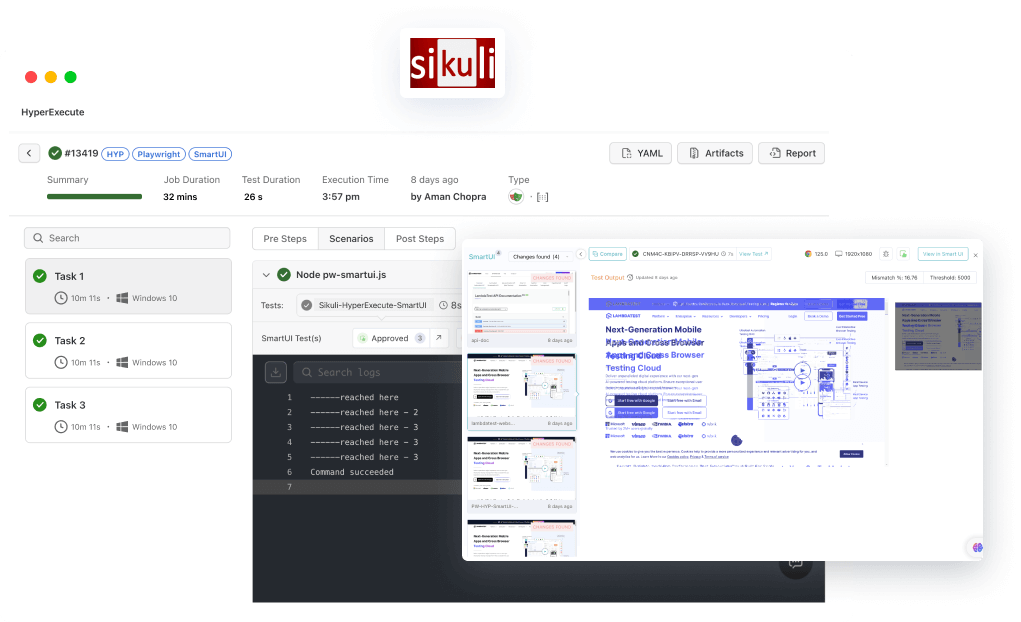
Key Takeaway: Sikuli, HyperExecute, and SmartUI split image based UI testing by role: Sikuli automates the screen interactions, HyperExecute distributes the tests across virtual machines, and SmartUI compares the captured screenshots against baselines and reports the differences.
How Do AI Screen Agents Change Image Based UI Testing?
AI screen agents drop the stored reference image. The model reads a live screenshot and returns the coordinates to click, so there is no image library to keep in sync. Anthropic's computer use tool works this way. It gives the model screenshot, click, type, key, scroll and drag actions, and every coordinate the model returns sits in the pixel space of the screenshot you sent back. OpenAI's computer use tool runs the same loop and returns structured mouse and keyboard actions that your application translates into browser or desktop input.
The trade is determinism. A Sikuli template match repeats: the same pixels at the same similarity threshold give the same verdict on every run. An agent decides again each time. Anthropic's documentation reports that click precision differs between models, that offset clicks usually come from coordinate scaling mismatches, and that small targets get missed when a screenshot is downscaled. It recommends 1024x768 or 1280x720 for desktop tasks and advises against going above 1920x1080. It also puts each screenshot at roughly 1,000 to 1,800 input tokens, so a long agent loop carries a token cost on every execution that a pixel comparison does not.
Give the two different jobs. Keep Sikuli on regression testing, where a fixed pass or fail verdict is the point and the reference images are the record of what the screen should look like. Put an agent on the work around it: walking a screen nobody has scripted yet, or recapturing reference images after a redesign so a human only reviews the diff. One caution if you do point an agent at a test environment. Treat the screen as untrusted input. Anthropic documents that the model will sometimes follow instructions it finds in on-screen content even when they conflict with yours, and runs classifiers over returned screenshots to flag prompt injection.
Key Takeaway: AI screen agents read a live screenshot and return click coordinates instead of storing reference images, but an agent gives up the repeatable verdict of a template match, so Sikuli fits the regression path while an agent fits unscripted exploration and baseline recapture.
Conclusion
Use image-based automation with Sikuli or OculiX for screens that locators cannot reach reliably, tune the similarity threshold per pattern, and capture reference images on the same operating system, scaling, and theme your tests run on. To run a large image-based suite in parallel, TestMu AI HyperExecute places each test script and its dependencies in a single isolated environment on fresh virtual machines, and the HyperExecute getting started guide covers a first run.

Author

Aman Chopra
Blogs: 15


Aman Chopra is a DevOps Engineer and Community Contributor with over 7 years of experience in cloud technologies, software development, and software testing. Currently working at TestMu AI, Aman specializes in optimizing Azure cloud infrastructure, enhancing API accessibility, and integrating cloud platforms like AWS and GCP. With expertise in Git, Docker, Kubernetes, and CI/CD practices, Aman has contributed to various open-source projects and authored guides on cloud computing, containers, and CI/CD. He holds a B.Tech in Computer Science.
Reviewer

Srinivasan Sekar
Reviewer
Srinivasan Sekar is Director of Engineering at TestMu AI (formerly LambdaTest), where he leads engineering and open-source initiatives behind the Selenium and Appium automation grid and owns TestMu AI's MCP Server. A committer to Appium and a contributor to Selenium, WebdriverIO, Taiko, and AppiumTestDistribution, he brings over 15 years of experience in quality engineering and open-source technologies. He is the author of the Apress book 'The MCP Standard: A Developer's Guide to Building Universal AI Tools with the Model Context Protocol,' a Certified Kubernetes and Cloud Native Associate, and an international conference speaker. Before TestMu AI he spent over eight years at Thoughtworks as a Principal Consultant and Quality Architect. Srinivasan holds a B.Tech in Information Technology from Anna University.


Sikuli UI Automation FAQs
Did you find this page helpful?
More Related Blogs
TestMu AI forEnterprise
Get access to solutions built on Enterprise
grade security, privacy, & compliance
- Advanced access controls
- Advanced data retention rules
- Advanced Local Testing
- Premium Support options
- Early access to beta features
- Private Slack Channel
- Unlimited Manual Accessibility DevTools Tests