

Power Your Software Testing with AI Agents and Cloud
The Native AI-Agentic Cloud Platform to Supercharge Quality Engineering. Test Intelligently and Ship Faster.


- TestMu AI (Formerly LambdaTest)
- /
- Blog
- /
- Mainframe Testing with HyperExecute
Mainframe Testing with HyperExecute
Run IBM Z green-screen 3270 mainframe tests in parallel on HyperExecute with Robot Framework, s3270/x3270 emulators, auto-split, and scenario video recordings.
Published on:
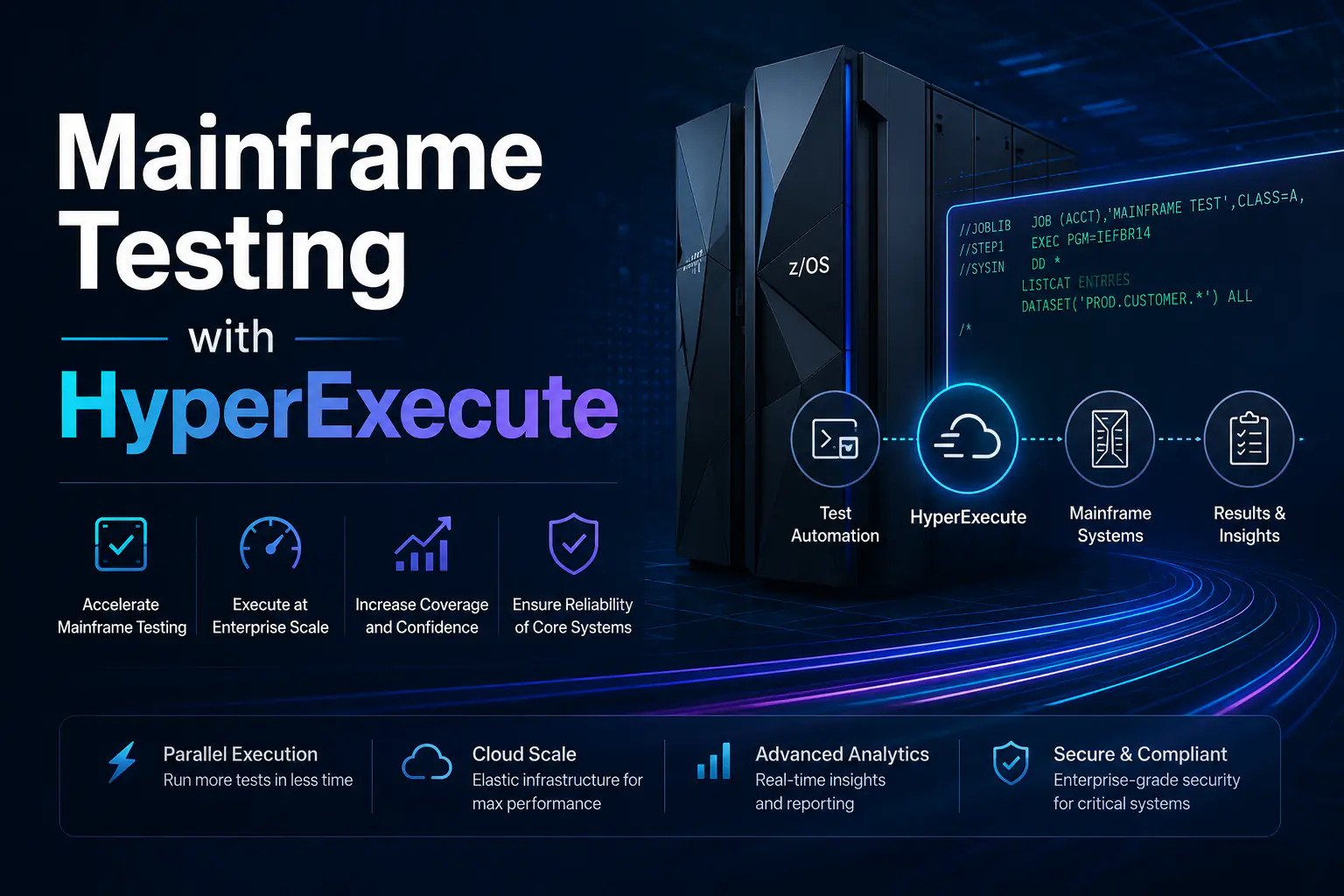
Mainframe computers have been around from the 1940s and evolved during the 1950s. The IBM System/360 is generally regarded as the first modern mainframe architecture. Fast-forward now, the real question is Are mainframes still relevant?
Well, mainframe computers have also evolved with time and enterprises across banking, payments, healthcare, utilities, and government prefer mainframes for the privacy, security, and reliability to handle these workloads demands.
IBM Z[1], in particular, has evolved far beyond its legacy image, capable of running hybrid cloud workloads, Linux, and containerized applications. As per IBM, the IBM Z[2] minimizes downtime, offers uninterrupted operations, and provides 99.99 percent availability for mission-critical workloads.
Testing IBM Z applications, however, presents significant challenges due to legacy green screen (3270) interfaces, manual regression cycles, and outdated tooling that struggles to integrate with modern CI/CD pipelines. Typically, testing relies either on TN3270-based emulation using tools like s3270 to simulate an actual terminal connection, or on mocked responses without a real z/OS host.
In this blog, we'll explore how HyperExecute simplifies and accelerates mainframe testing, thereby enabling teams to test IBM Z applications, including green screen systems, faster and with greater confidence.
Why Enterprises Still Rely on Mainframes
Though we are living in an Agentic era where autonomous agents are reshaping how software gets built and tested, mainframes still hold their relevance. Businesses including banks, airlines, healthcare, utilities, insurance firms, and government systems still run on mainframes.
Mainframes are still the preferred choice, as mainframes have the capacity of processing huge volumes of transactions every day. Enterprises depend heavily on these systems because they offer non-negotiable ACID compliance, which ensures absolute reliability for managing transactions, records, and core business functions.
Mainframe computers can routinely process close to a billion transactions[3] a day in real-time. Beyond their exceptional processing speeds, mainframes deliver the hardened security architectures, advanced encryption, and robust audit capabilities accumulated over decades, satisfying the demands of government and financial regulators.
To meet strong security objectives, mainframe customers normally add a sophisticated security manager product[4] to transform the company's security policy into a usable plan. The Z family of mainframes provides a highly secure system for processing large volumes of heterogeneous applications that access critical data[4].
Mainframes exhibit scalability both on software and hardware fronts, with many enterprises able to lower their Total Cost of Ownership (TCO)[5] which includes machine and execution costs.
Batch processing and Online Transaction Processing (OLTP) are the two main categories (including web applications) of enterprise workload demands. As the name suggests, batch workloads efficiently process large volumes of data and help generate critical business outputs such as financial statements and sales reports. OLTP workloads support high-volume, mission-critical transactions with exceptional scalability, reliability, and sub-second response times.
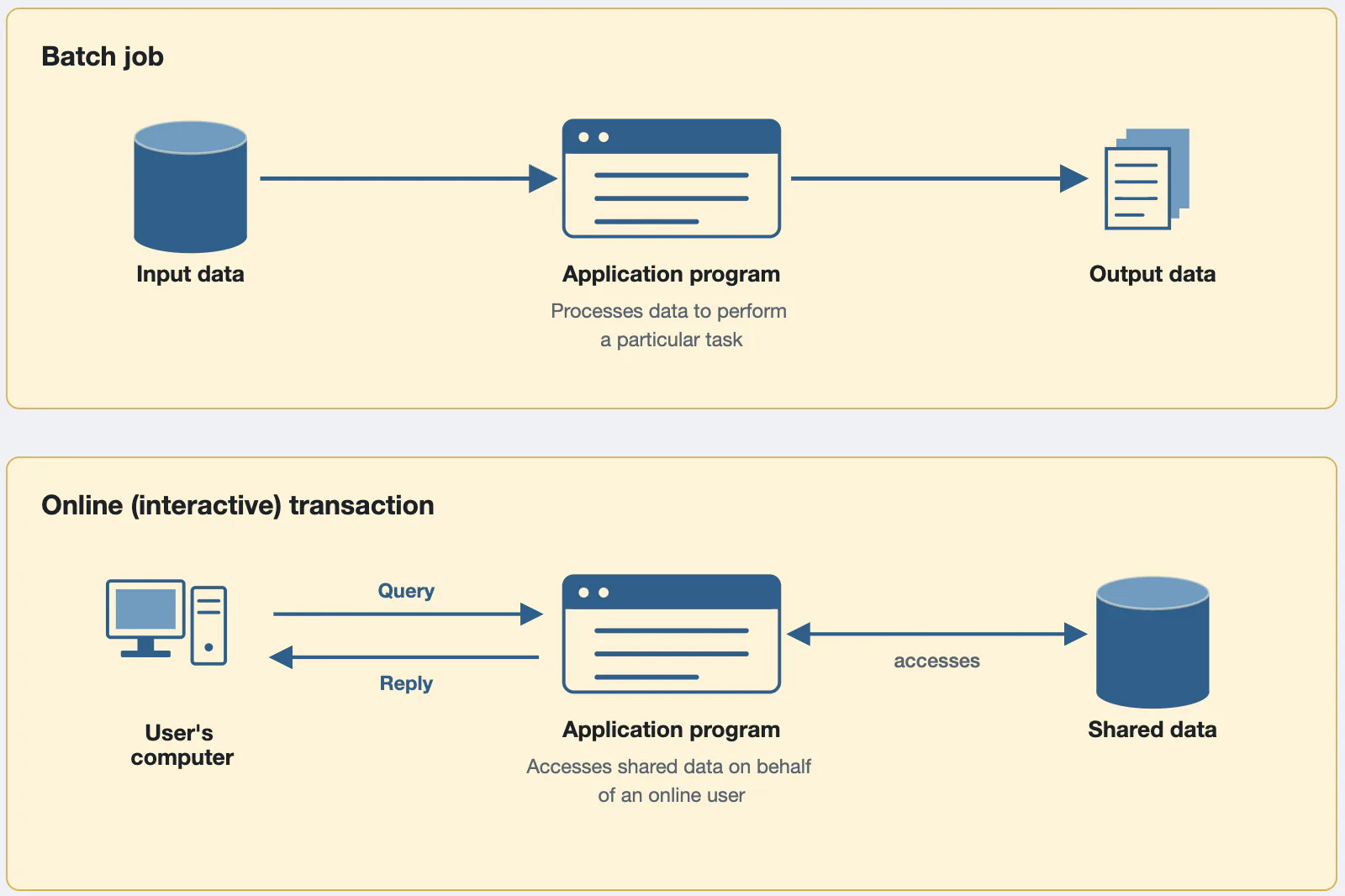
Figure 1: Typical mainframe workloads [Image Source]
An ATM transaction is a classic example of high-volume and low-latency workload that can be efficiently handled by mainframes. As per IBM, IBM zSystems (or IBM Z)[6] is used by 44 of the top 50 banks and all top 10 insurers worldwide. This is over and above its usage in government, healthcare, airline, and retail sectors.
Challenges With Mainframe Testing
Apart from challenges around modernization of mainframe applications, testing also remains one of the critical challenges for enterprises that leverage IBM Z for business-critical applications. As per a report, close to 60 percent[7] mainframe specialists are over the age of 50 and many of them are nearing retirement. Most IBM Z applications still run on green screen interfaces, which in some cases are considered as technical debt[8].
These 3270 terminal sessions are built around fixed-position text fields and function keys, with no accessible UI elements for automation! Hence, the challenge is two-fold, as there is a dearth of mainframe specialists who understand these systems and the underlying technology to test them.
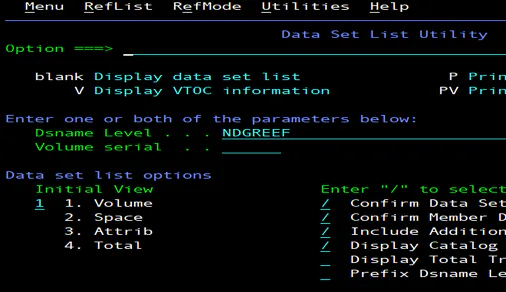
Figure 2: Sample 3270 terminal session [Image Source]
Here are some of the major technical challenges associated with testing legacy mainframe applications:
Limited access to IBM Z/OS environments
The cost of IBM mainframes, including the popular IBM Z, spans hardware, software, licensing, storage and labor, and is typically measured in MIPS (Million Instructions Per Second) or MSUs (Million Service Units)[9]. Though the modern pricing models are more nuanced, measurement in MIPS still remains the preferred pricing option.
Unlike cloud environments that can be provisioned on demand, IBM Z resources are shared across multiple applications and BUs. While some enterprises are able to provision a dedicated mainframe sandbox for testing based on their budget and existing setup, the high premium makes it difficult for most teams to justify solely for QA purposes.
With limited test capacity, QA teams responsible for executing UAT, regression, and integration tests compete for limited slots (or resources). Also, provisioning additional MIPS or LPAR (Logical Partition) adds directly to TCO.
Legacy, text-based UIs (green screens)
Mainframe applications typically present themselves through 3270 terminal interfaces, often via TN3270 emulators. Commonly termed as green screens, a term that was initially coined from the green monochrome displays used by early IBM 3270 terminals.
With the advancements in tools and technologies, many mainframe enterprise customers are now undertaking mainframe modernization projects[7]. This is primarily to address concerns associated with skyrocketing mainframe costs and shrinking pool of mainframe talent.
Modernizing 3270/green-screen terminals comes with a caveat, the overall effort can be humongous since modernization includes deciphering the existing legacy system architecture and code. Over and above, most approaches (like screen-scraping into a web UI) only replace the presentation layer, leaving the underlying COBOL/CICS logic untouched.
Slow regression cycles
Akin to any automation test suite, mainframe regression cycles also depend on variable factors like application complexity, test suite size, and test execution infrastructure. However, testing mainframe applications can hit a speed roadblock since mainframe CPU capacity that is measured in MIPS or MSUs is a shared and metered resource.
To avoid the scenarios related to resource contention and protect performance of high-priority workloads, enterprise teams also limit the number of concurrent sessions. On the whole, factors such as shared resources in limited capacity and sequential execution can significantly extend regression execution times, especially for large test suites.
Session-based, stateful terminal sessions
As stated in the official IBM documentation, many traditional green screen programs (or applications) are accessed through 3270 terminal sessions. These applications run on CICS (Customer Information Control System), IMS (Information Management System), or TSO (Time Sharing Option).
Conversational and stateful in nature, the host maintains the user's interaction state throughout the terminal session. The context of the transaction, user inputs, and prior navigation collectively dictate the layout and state of each subsequent screen.
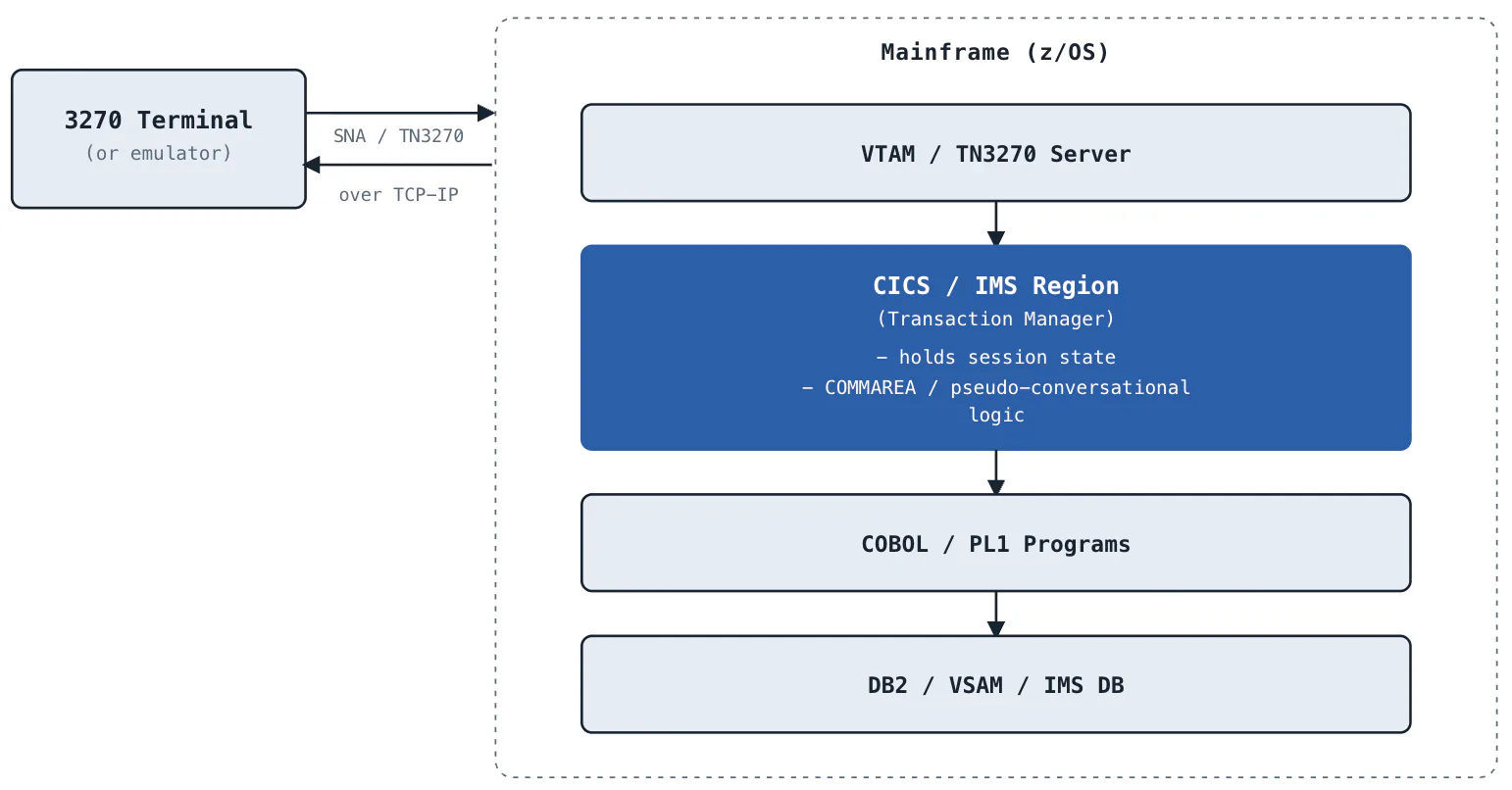
Figure 3: Where state actually lives in a 3270 / CICS application [Image generated using AI]
As the tests are dependent on the previous step, any deviation in the application flow or synchronization causes test flakiness, eventually resulting in test failure. Owing to this, state management is one of the prime challenges in mainframe test automation.
Fragmented, hard-to-scale infrastructure
Running mainframe tests at scale requires setting up, deploying, and starting up emulators, X displays for GUI sessions, and mock servers across every machine in the suite. Since many mainframe terminal tests are stateful, they require consistently configured execution environments.
Inconsistent infrastructure (i.e., differences in terms of mainframe emulators, sessions, etc.) can introduce flakiness in the test pipeline. This not only jeopardizes the release cycles but also results in increased mainframe resource consumption, thereby leading to higher operational costs.
As cloud computing, AI, and other digital transformation technologies advance, mainframe operators are increasingly forced to modernize to avoid technical obsolescence. As stated earlier, mainframe modernization projects come with its own set of challenges since the backend still runs on the same shared IBM Z capacity.
What HyperExecute Brings to Mainframe QA
Be it a modernized service built on the identical z/OS backend, or a slow legacy green-screen application that continues to execute COBOL transactions from decades ago, changing the interface does not eliminate the infrastructural overhead required to deploy, distribute, and validate tests.
HyperExecute from TestMu AI closes the mainframe QA infrastructure gap, regardless of whether you have a green-screen application or a modernized one that communicates over REST or SOAP. Akin to a cloud grid that can be leveraged for manual and automated testing, HyperExecute for mainframe testing brings on-demand test orchestration via which you can provision fresh VMs and install s3270/x3270 emulators on demand!
HyperExecute automatically provisions a clean VM for each run, dynamically installing all required suite components, including mock servers, emulator binaries, and Python dependencies. Enterprises running mainframe tests at scale can shed that infrastructure burden, since HyperExecute takes it on for them. Check out the official HyperExecute documentation to learn about its key benefits.
Green-screen mainframe test suites are inherently slow to run, as each test opens its own terminal session and navigates a multi-screen flow. The smart auto-split strategy from HyperExecute is instrumental in distributing tests across multiple VMs efficiently for parallel testing. This ensures optimal utilization of concurrency by allowing you to split tests based on various levels, such as files, modules, and scenarios.
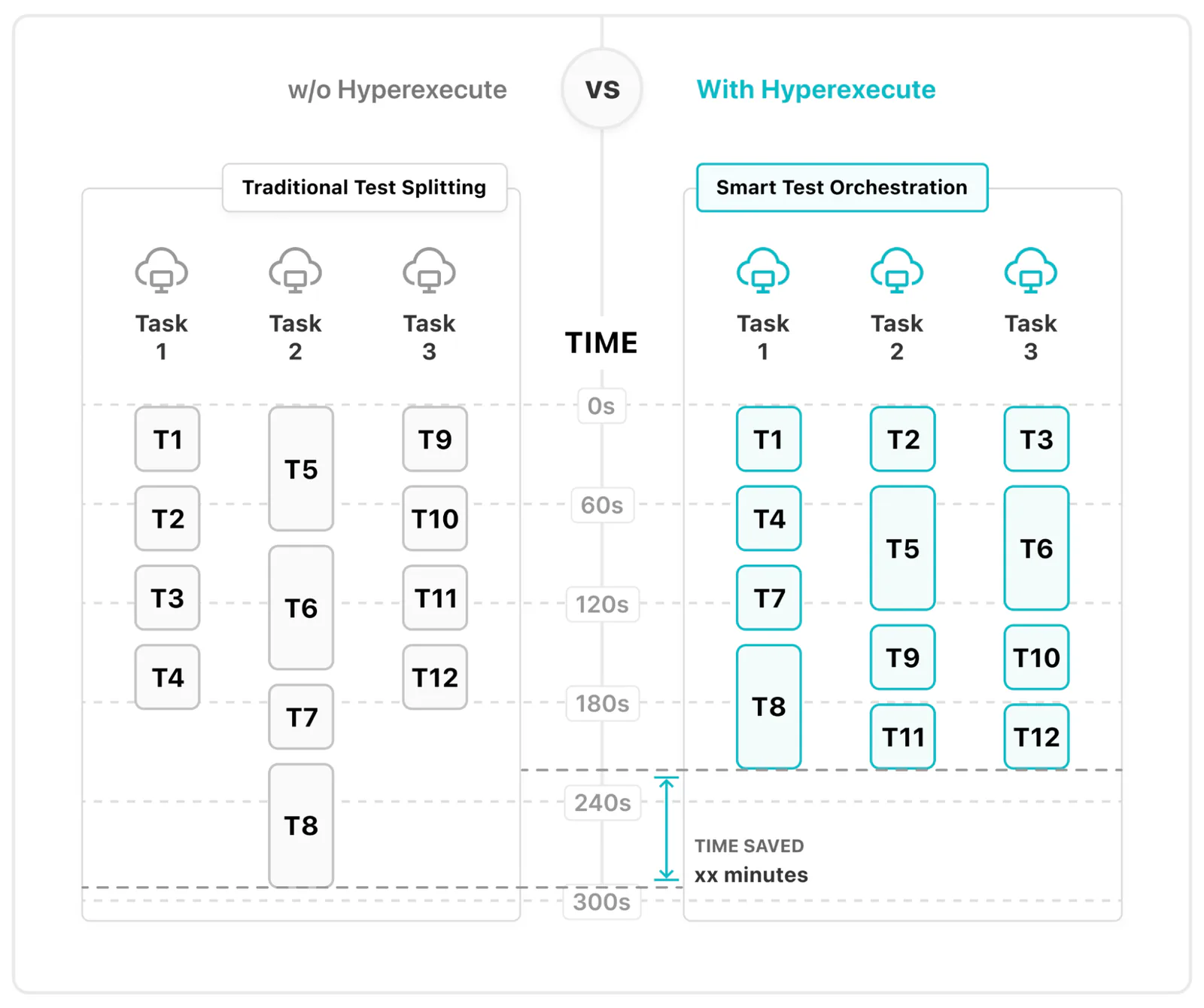
Figure 4: Key benefits of auto-split strategy in HyperExecute [Image Source]
Parallel execution at scale with JIT (Just-in-time) testing infrastructure provisioned by HyperExecute helps reduce the regression execution cycles by a huge margin. With HyperExecute, you can define the operating system (i.e., via the runson configuration attribute) on which the QA team intends to run the tests.
All the configuration parameters required to execute mainframe emulator tests on HyperExecute are defined in a YAML file. You can find the complete list of supported configuration options in the HyperExecute YAML documentation. A sample stripped-down HyperExecute YAML is shown below:
---
version: 0.1

# Run all tests on Ubuntu Linux VMs (required for s3270 install)
runson: linux

# Automatically split discovered test files across parallel machines
autosplit: true

# Number of parallel VMs to spin up
concurrency: 5

# Retry each failed test suite once before marking it as failed
retryOnFailure: true
maxRetries: 1

# Record a video for each test scenario on HyperExecute
captureScreenRecordingForScenarios: true

# Timeout values in minutes
globalTimeout: 30
testSuiteTimeout: 30
testSuiteStep: 10
HyperExecute records a native video of every test scenario when captureScreenRecordingForScenarios configuration attribute is set to true. This visual evidence is useful for QA & dev teams, compliance teams, and business stakeholders since they provide macro and micro-level insights into the test execution.
Regardless of the testing framework you choose to complete the task, HyperExecute executes it seamlessly. This applies whether you are using the Robot Framework equipped with robotframework-mainframe3270 to handle legacy green-screen workflows, or employing standard API/UI testing frameworks for a modernized layer that operates on the identical backend.
Simply put, the players (test scripts, pipeline, etc.) largely stay the same. What moves is where they run: HyperExecute becomes the new goal post.

Demo: Running Mainframe Test Suites on HyperExecute
In order to demonstrate automation of Mainframe applications, particularly green-screen applications, we would be using the Mainframe3270 Robot framework library.
The library is based on the py3270 project, a Python interface to x3270, an IBM 3270 terminal emulator. It provides an API to a x3270 or s3270 subprocess. You can find more details about it in robotframework-mainframe3270 on PyPi. To execute tests on the TestMu AI cloud, you need access to HyperExecute on TestMu AI.
Project Description
This Robot Framework test suite is built to execute locally or scale across parallel VMs using HyperExecute. It targets a simulated First National Bank (FNB) mainframe green screen environment.
The architecture is divided into three distinct execution tracks:
Base Track (tests/01-05) - Functions entirely standalone, requiring neither an active z/OS host nor a local 3270 emulator binary.
Headless TN3270 Track (tests/06-09) - Employs a separate simulation that communicates via the actual TN3270 protocol. It utilizes the s3270 emulator binary, which is provisioned during the pre phase of hyperexecute-mainframe-testing.yaml.
Graphical x3270 Track (tests/10) - Exercises the identical TN3270 protocol but presents a visible x3270 GUI window rather than working headlessly.
To accommodate the necessary X display, it hooks directly into the VM display pre-configured by HyperExecute's captureScreenRecordingForScenarios directive, eliminating the need for an independent Virtual Framebuffer (Xvfb) configuration.
Project Deep Dive: Mainframe Simulator Testing
As stated earlier, the sample provides three execution tracks, each representing a different approach to mainframe testing.
Socket-based CICS-style simulation
A lightweight TCP simulation of a CICS-style 3270 environment is delivered by mock_server/fnb_mock_server.py.
Instead of relying on the deprecated telnetlib, Robot Framework tests leverage raw sockets to interact via libs/fnb_client.py. This setup ensures that test data remains isolated for every connection, with execution synchronized through the @@SCREEN-END@@ sentinel.
Headless TN3270 simulation
A more realistic TN3270 setup featuring EBCDIC encoding, 3270 data-stream directives, and Telnet negotiation is provided by mock_server/fnb_mock_tn3270.py.
The headless test cases located in tests/06_tn3270_*.robot depends on robotframework-mainframe3270 and mandates having the x3270/s3270 terminal emulator available on the PATH.
GUI x3270 simulation
The mock_server/fnb_mock_tnX3270.py script leverages the TN3270 protocol via port 3272, serving as the foundation for the test cases in tests/10_x3270_gui_banking.robot.
By setting the parameter visible=${True}, it triggers the x3270 interface graphically to capture screenshots and facilitate visual inspections. Furthermore, because this GUI binds directly to the active Xvfb instance within HyperExecute, all terminal window movements and automated steps are fully recorded in the final test executions.
HyperExecute is especially valuable for mainframe testing when running with a visible 3270 GUI emulators, since it automatically provisions the X display the emulator needs to render, without a separate virtual framebuffer.
For more information about the project and its internal working, please refer to the How it works section in ReadMe.
Execution
Before the local execution, start the mock FNB mainframe TCP server (port 3271) in the background by running the command python mock_server/fnb_mock_server.py & on the terminal.
The mock server is needed so that the Robot framework test suites have something deterministic to test against in CI/HyperExecute, without needing a real z/OS mainframe or an x3270/ws3270 terminal emulator. Once the server is started, it starts listening to the incoming requests at port 3271 (i.e., FNB mock 0.0.0.0:3271).
Run the command robot --outputdir results tests to trigger the tests locally. As seen below, the test execution is successful.
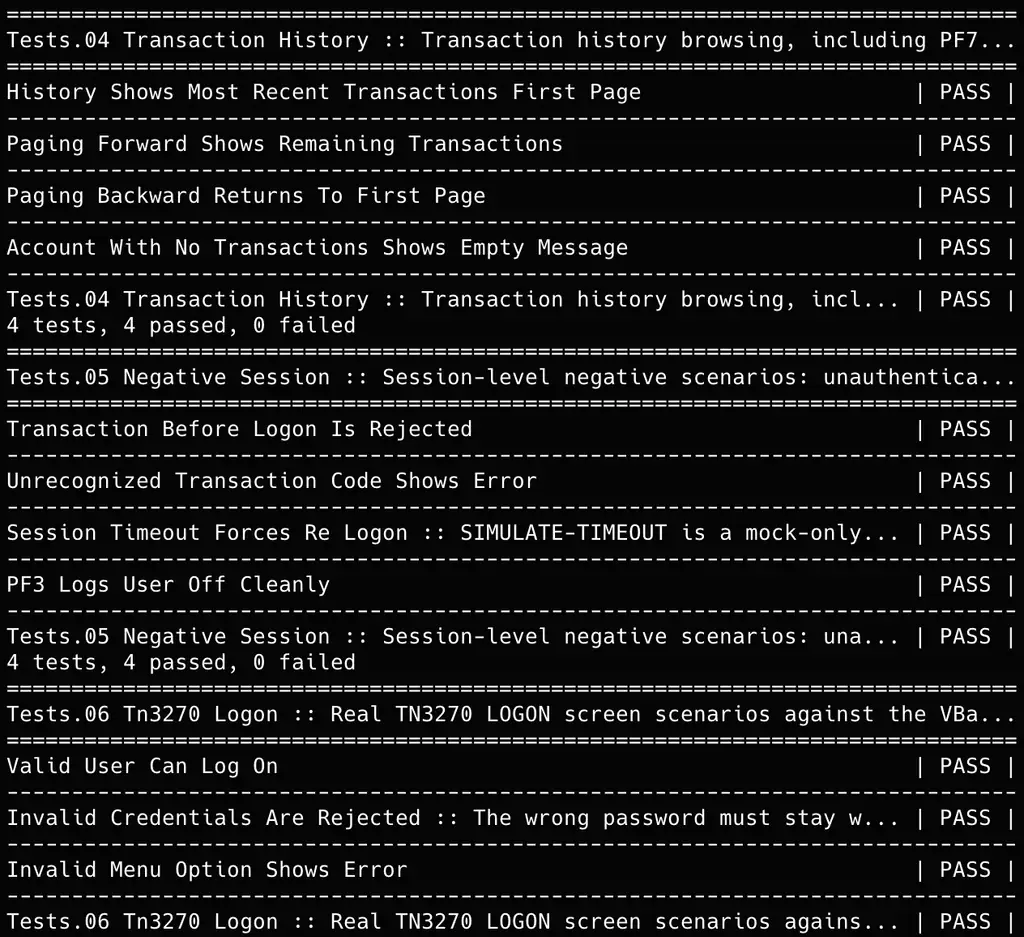
For more details on local execution, we recommend checking out the steps mentioned in the run locally in ReadMe.
For cloud execution on HyperExecute, first download the HyperExecute CLI that aligns with the host OS. Now run the following command on the terminal for triggering the tests on HyperExecute:
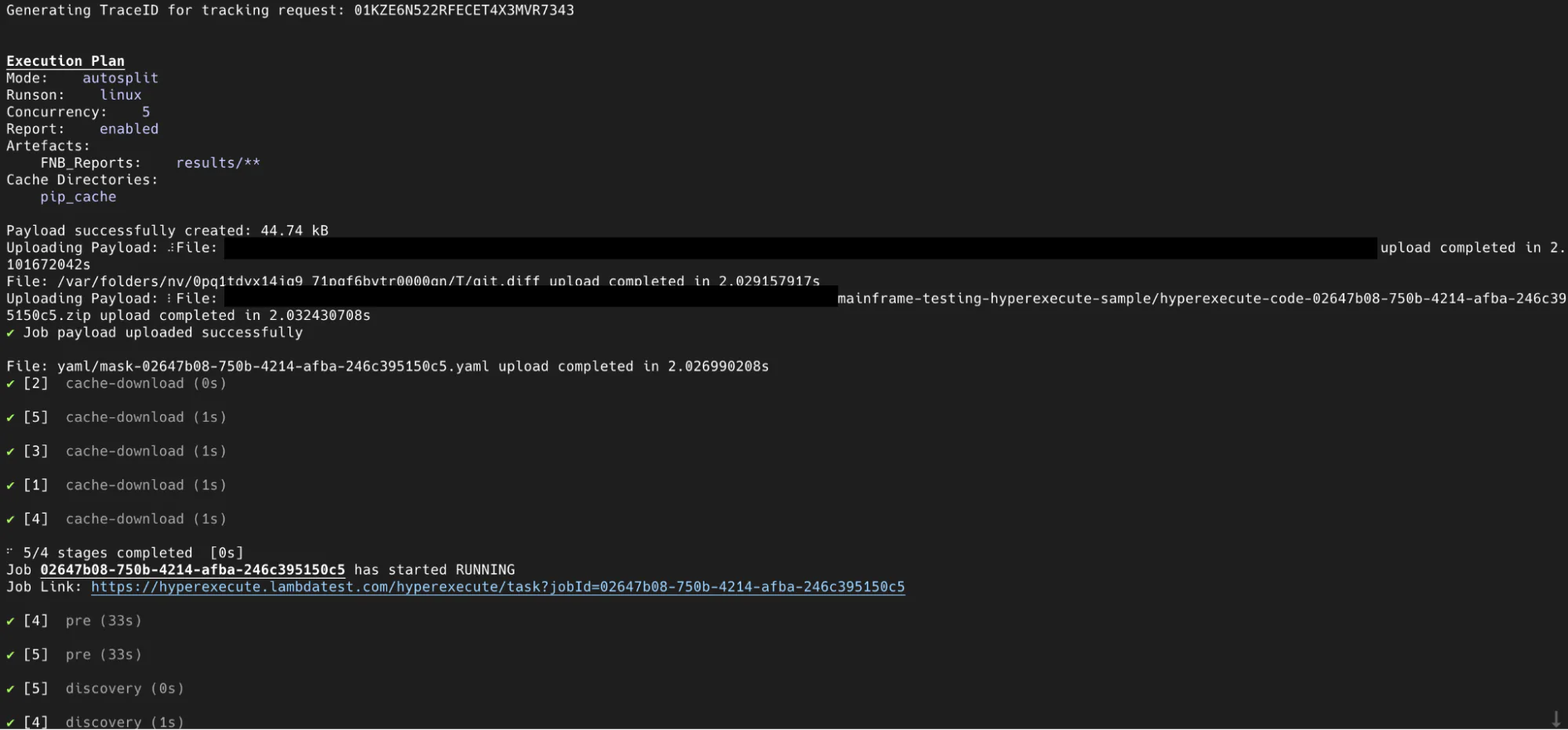
./hyperexecute --config yaml/hyperexecute-mainframe-testing.yaml --download-report --download-logsAs seen below, the job was submitted in autosplit mode on Linux runners with a concurrency of 5, uploading the payload, and test code archive successfully. This is inline with the steps mentioned in the HyperExecute YAML.
Core banking transactions are successfully processed end-to-end on the HyperExecute cloud grid, confirming that the mainframe banking GUI functions correctly when driven via the x3270 terminal emulator.
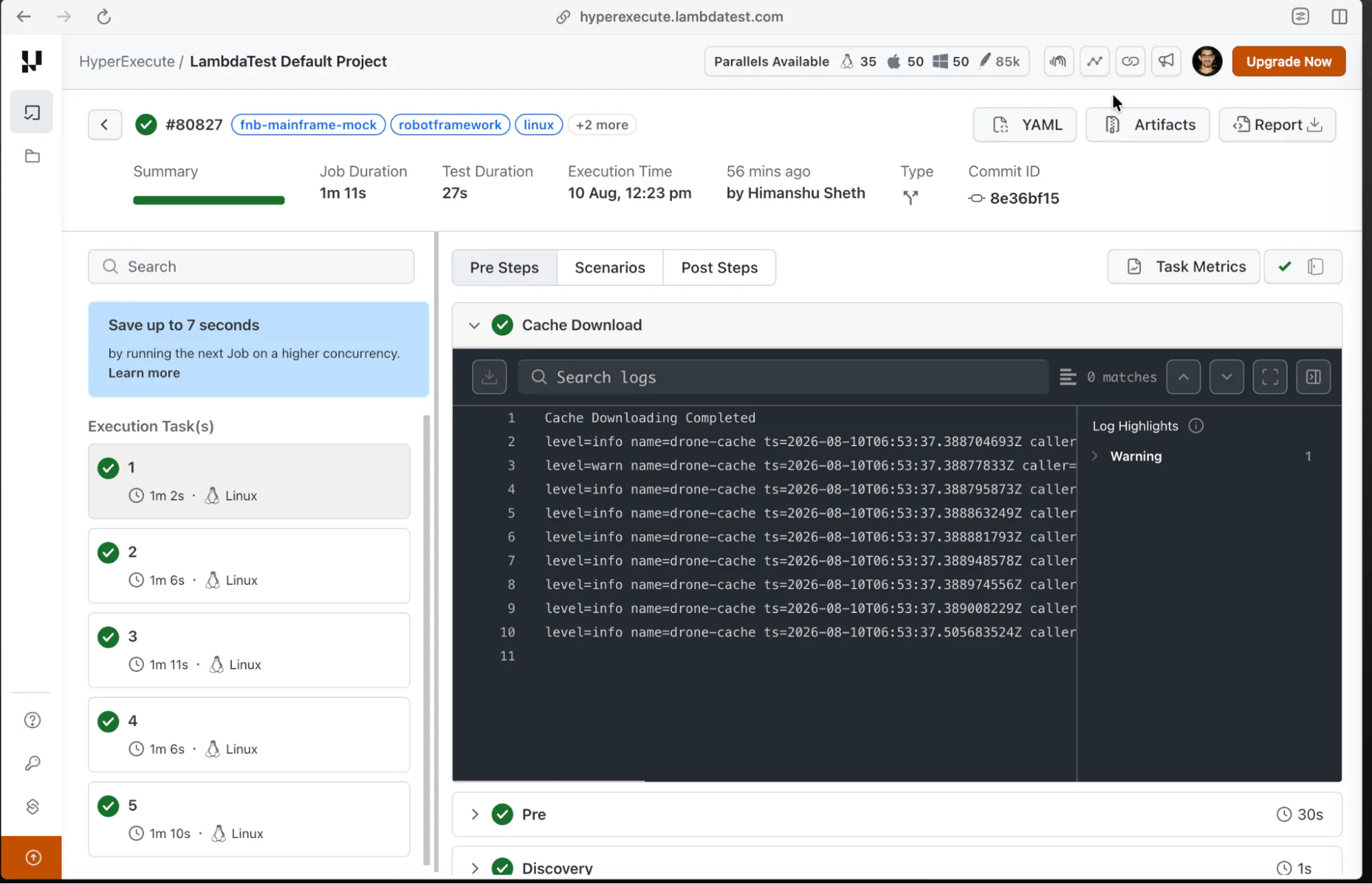
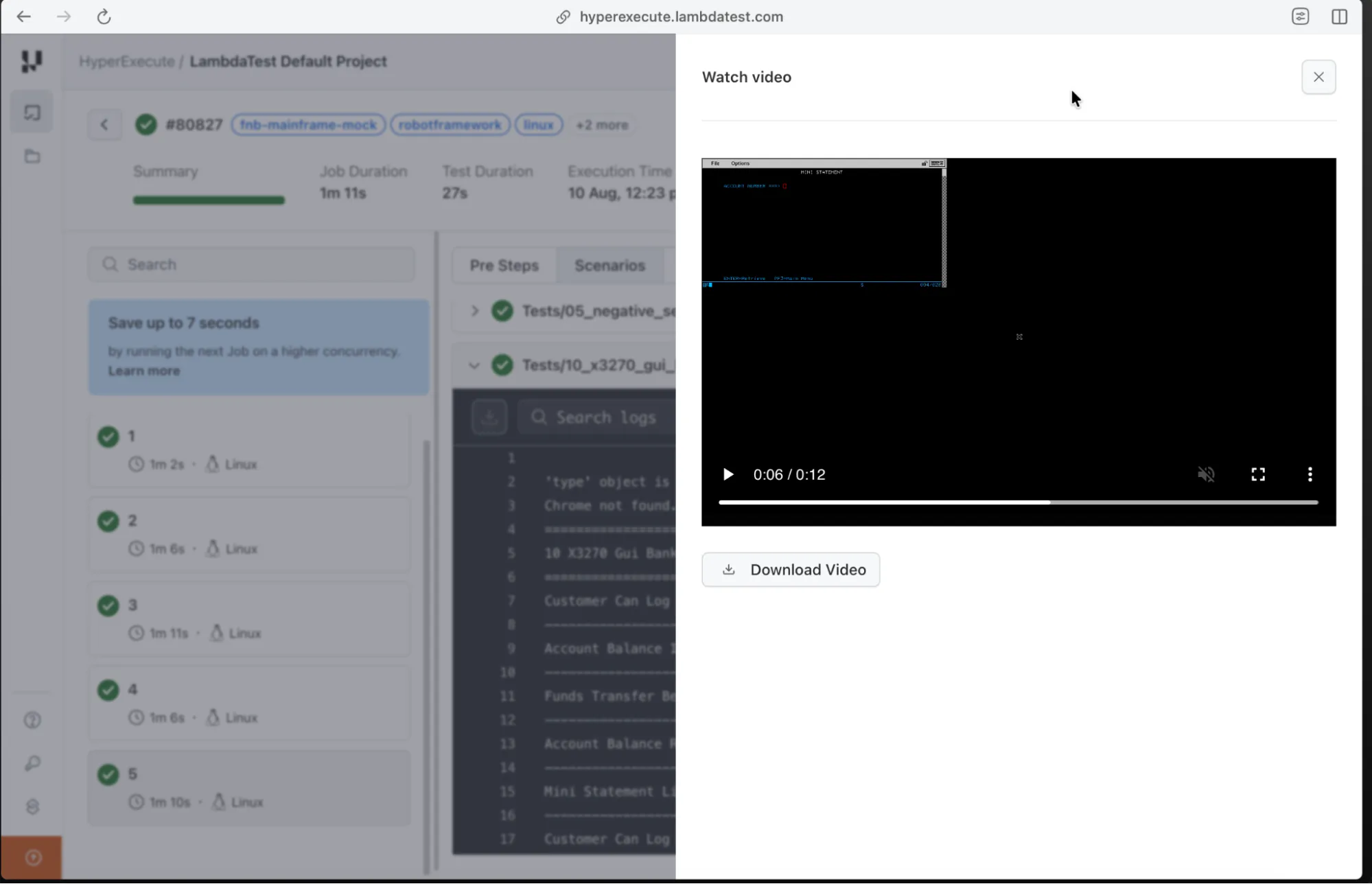
For more details on cloud execution, we recommend checking out the steps mentioned in the Run on HyperExecute in ReadMe.
It's A Wrap
Mainframes still remain the foundational backbone of today's banking, healthcare, and government systems. As the IBM Z platform continuously modernizes by embracing hybrid cloud environments and containerization, the testing methodologies must evolve in tandem. Bringing green-screen 3270 testing into a faster, cloud-based workflow proves that even decades-old interfaces can keep up with modern engineering speed.
With HyperExecute from TestMu AI, teams can run multiple 3270 terminal sessions in parallel, cut down lengthy regression cycles by a huge margin, and get consistent, reliable results across every green screen transaction. All of these benefits without doing any changes in the implementation of mainframe test suites!
Sources and References Used
- [1] Maximizing the value of Z with IBM Apptio Mainframe Total Cost of Ownership (TCO) - IBM (October 2025)
- [2] Server and cyber resiliency with IBM Z - IBM
- [3] What is a mainframe? - IBM Think
- [4] Mainframe strengths: Security - z/OS Basic Skills, IBM Documentation
- [5] Mainframe strengths: Scalability - z/OS Basic Skills, IBM Documentation
- [6] IBM zSystems fundamentals: An introductory Q&A - IBM Developer
- [7] Top 5 challenges of mainframe modernization projects - Amdocs (November 2023)
- [8] The interface to z/OS and the green screen myth - EXECPGM (May 2021)
- [9] Maximizing the value of Z with IBM Apptio Mainframe Total Cost of Ownership (TCO) - IBM Newsroom (October 2025)
Author

Himanshu Sheth
Blogs: 141


Himanshu Sheth is the Director of Marketing (Technical Content) at TestMu AI, with over 8 years of hands-on experience in Selenium, Cypress, and other test automation frameworks. He has authored more than 130 technical blogs for TestMu AI, covering software testing, automation strategy, and CI/CD. At TestMu AI, he leads the technical content efforts across blogs, YouTube, and social media, while closely collaborating with contributors to enhance content quality and product feedback loops. He has done his graduation with a B.E. in Computer Engineering from Mumbai University. Before TestMu AI, Himanshu led engineering teams in embedded software domains at companies like Samsung Research, Motorola, and NXP Semiconductors. He is a core member of DZone and has been a speaker at several unconferences focused on technical writing and software quality.


Mainframe Testing FAQs
Did you find this page helpful?
More Related Blogs
TestMu AI forEnterprise
Get access to solutions built on Enterprise
grade security, privacy, & compliance
- Advanced access controls
- Advanced data retention rules
- Advanced Local Testing
- Premium Support options
- Early access to beta features
- Private Slack Channel
- Unlimited Manual Accessibility DevTools Tests