
Run End-to-End Tests from Your Terminal with Kane CLI
Author and Run Tests Right from the Terminal in Natural Language, with an Evidence-Backed Pass or Fail from a Real Browser.
npm install -g @testmuai/kane-cli
Maestro MCP: How It Works and Where Kane CLI Fits
Maestro MCP gives Claude Code, Cursor and Codex a live mobile device. See setup commands, all 10 tools, its limits, and how Kane CLI verifies the result.
Maestro MCP is the MCP server that's built into the Maestro CLI. It enables Claude Code, Cursor, Codex and any other coding agent that supports MCP to list devices, read the screen, run Maestro YAML flows and send them off to Maestro Cloud. Kane CLI sits alongside it if you need the written acceptance criteria, the sealed run evidence and actual iOS devices.
This guide comes from TestMu AI, the maker of Kane CLI, the end-to-end testing agent for developers, SDETs and their coding agents. Every Maestro fact below is taken from maestro.dev or docs.maestro.dev as of November 2026.
TL;DR
Maestro MCP is the MCP server built into the Maestro CLI that lets coding agents drive a mobile device and write Maestro YAML flows. It is free and open source, needs Java 17 or higher, and gives the agent tools to list devices, read the screen, run flows and send them to Maestro Cloud.
Maestro MCP Setup and Tools
- Maestro Claude Code setup: Install the Maestro CLI with Java 17 or higher, run claude mcp add maestro -- maestro mcp, then restart Claude Code so the agent can drive a live emulator or simulator.
- Codex CLI: Codex CLI registers the Maestro MCP server with codex mcp add maestro -- maestro mcp, and the Codex Desktop App reads the same ~/.codex/config.toml entry.
- Cursor: Cursor IDE and Cursor CLI load Maestro MCP from a JSON entry in ~/.cursor/mcp.json or a project .cursor/mcp.json, with command maestro and argument mcp.
- Maestro MCP server tools: The Maestro MCP server gives the agent list_devices, inspect_screen, take_screenshot and run for local devices, plus Maestro Cloud tools that need maestro login or MAESTRO_CLOUD_API_KEY.
Maestro MCP at a Glance
- Free and open source: Yes. Maestro MCP, the Maestro CLI and Maestro Studio are free on your own devices; Maestro Cloud is the paid tier for hosted devices and parallel runs.
- Local physical iPhones: Not covered. The Maestro MCP docs list Android emulators, iOS simulators, Chromium and physical Android devices over USB as local targets.
Maestro MCP and Kane CLI by Job
- Exploring an app while you build: Maestro MCP lets the agent inspect the screen, try steps as inline YAML and save the working journey under .maestro/, which maestro test replays in CI with no model calls.
- Gating a merge on acceptance criteria: Kane CLI by TestMu AI runs plain-English Verify lines from a _test.md file, replays cached steps with no LLM cost, and exits 0 to 3 so CI can block the merge.
- Testing on a real iPhone: Kane CLI runs plain-English Verify checks with --target ios on real iOS devices in the TestMu AI cloud from macOS, Linux or Windows. Mac or Xcode required: No.
What Is Maestro MCP?
Maestro MCP is a Model Context Protocol server that is included with the Maestro CLI (the open-source mobile UI testing framework from mobile.dev). It communicates with your agent over stdio via JSON-RPC 2.0 (as per the Maestro MCP docs).
The agent reads the view hierarchy, writes out a Maestro-based flow in YAML, runs it on an Android emulator, an iOS simulator or Chromium and then reads the result. Maestro lists the server as free and open source.
Other products bear the same name; there's an MCP server for video production. This article is only about the mobile.dev testing framework.
How Do You Set Up Maestro MCP in Claude Code, Codex or Cursor?
Maestro MCP requires the Maestro CLI and Java 17 or higher (JAVA_HOME must point to it).
Install the Maestro CLI, which includes the MCP server:
curl -fsSL "https://get.maestro.mobile.dev" | bash
maestro --help
Register the server with your agent:
# Claude Code
claude mcp add maestro -- maestro mcp

# Codex CLI
codex mcp add maestro -- maestro mcp

# Gemini CLI
gemini mcp add maestro maestro mcp
Cursor IDE and Cursor CLI read the server from ~/.cursor/mcp.json or a project .cursor/mcp.json:
{
  "mcpServers": {
    "maestro": {
      "command": "maestro",
      "args": ["mcp"]
    }
  }
}
Claude Desktop launches from a minimal shell, so the entry in claude_desktop_config.json needs the full path to the maestro binary and an env block setting JAVA_HOME. For Windsurf, the JetBrains IDEs and VS Code, the Maestro docs all point you to the respective client's MCP setup page. Reload or restart the agent once you've added the server.
Which Tools Does the Maestro MCP Server Expose?
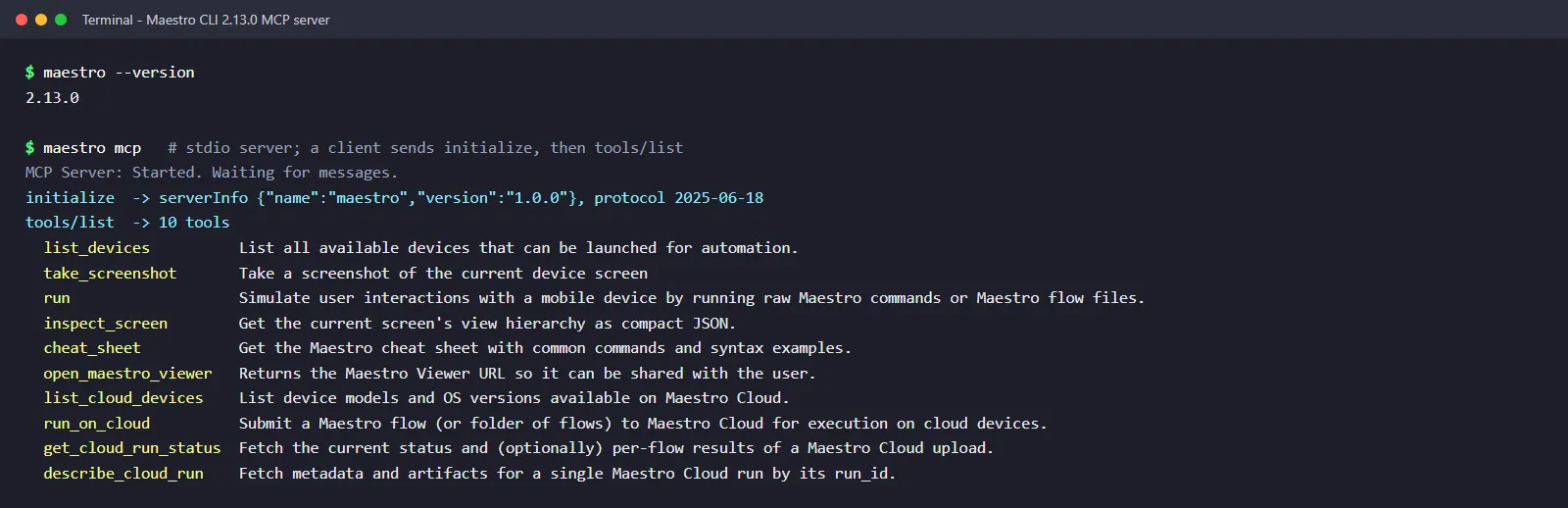
The Maestro MCP server has ten tools exposed in Maestro CLI 2.13.0, nine of them listed in the Maestro docs as of November 2026.
| Tool | What it does |
|---|---|
list_devices | Lists Android emulators, iOS simulators and Chromium for web |
inspect_screen | Returns the current view hierarchy as compact JSON |
take_screenshot | Captures the current device screen |
run | Runs flows from inline yaml, from files, or from a dir with tag filters |
cheat_sheet | Returns Maestro command syntax and best practices |
open_maestro_viewer | Returns the URL of Maestro Viewer, a live device mirror |
list_cloud_devices | Lists valid device and OS pairs on Maestro Cloud |
run_on_cloud | Submits flows to Maestro Cloud, with optional priority |
get_cloud_run_status | Polls a Cloud run and returns per-flow results |
describe_cloud_run | Fetches metadata and artifacts for a single Cloud run by its run_id |
The four Cloud tools require maestro login or MAESTRO_CLOUD_API_KEY in non-interactive environments. Maestro Cloud is a paid tier (the Maestro pricing page lists $250 per device per month, priced by max concurrent executions, with web/Chromium device pricing on request). For plan-by-plan cost maths, see our Maestro Cloud pricing comparison with the TestMu AI plans.
What Does a Coding Agent Do With Maestro MCP?
A coding agent using Maestro MCP will explore the app via inline YAML, then save the working journey as a flow file. Maestro's guide to mobile UI testing with coding agents is the loop: inspect_screen, run with YAML (to try the steps), and then save the result under .maestro/ in the repo.
A saved flow looks like this:
appId: com.example.shop
---
- launchApp
- tapOn: "Search"
- inputText: "running shoes"
- pressKey: Enter
- assertVisible: "Results"
The saved flow will run again through the agent with files (or with maestro test in CI) at no model cost. The expensive exploration happens just once, and the YAML is yours to version.
If you're new to the YAML format, then our walkthrough of the Maestro YAML flow syntax and commands covers selectors, conditions and device runs.

Note: Try the Kane CLI next to Maestro MCP. Install via npm install -g @testmuai/kane-cli, run kane-cli login --oauth, and new accounts get 10k free credits for 30 days.
Where Does Maestro MCP Stop?
Maestro MCP is a very good driver. Four points count for teams that want a release gate.
1. A repair can rewrite the check. Maestro's MCP page says the agent runs a flow on a live device "and self-corrects until it passes". The fix lands in the YAML, and the YAML holds both the steps and the assertVisible lines.
A reviewer has to read the diff to tell a moved button from a loosened check. Very Good Ventures, testing the same setup, warned that generated flows can be "syntactically valid but miss business logic".
2. Flows follow the UI text. The Maestro guide states that if the labels or the layout change, then the re-run will fail and you'll have to ask the agent to go and update the flow. Maestro's pricing page also has self-healing with local agents in the free tier, so healing does exist; it just happens via an agent session.
3. Local devices are the ones you've actually plugged in. The Maestro MCP guides talk about Android emulators, iOS simulators, Chromium and physical Android devices over USB.
They don't cover local physical iPhones. Hosted devices are those from the Maestro Cloud.
4. Run records are a folder tree. Inside the chat, take_screenshot and Maestro Viewer let a person watch.
Outside it, maestro test --format junit or html-detailed writes reports, and each flow gets a folder with commands.json, logs, crash reports and a screenshot of the failing step. In a normal run, "a passing Flow has no screenshots/ folder at all."
Maestro MCP vs Kane CLI: How Do They Compare?
Maestro MCP and Kane CLI both have the ability to put a mobile device into a coding agent's loop and have an agent write tests for either one. The difference between them is what a repair can change and what a run leaves behind. Facts as of November 2026 from the live docs of each vendor.
| Question | Maestro MCP | Kane CLI |
|---|---|---|
| What the agent writes | Maestro YAML flows | Plain-English *_test.md files with a check in each step |
| Can a repair change the check? | Yes: fixes edit the YAML, which holds the assertions | No: heal re-authors steps at run time; the Verify lines decide the verdict. "A pass means every acceptance criterion for that scenario is satisfied" |
| Replay cost | Saved flows run with maestro test, no model calls | Recordings replay "with no agent involved and no LLM cost" |
| When the UI moves | Run fails; the agent updates the flow | Emulator and simulator: retries up to three smaller replay windows, then re-authors the authorable steps |
| Run record | JUnit or HTML reports, commands.json, logs, failing-step screenshot; Cloud reporting | One sealed .evidence file: a screenshot of every step, console, network and device logs, failure record |
| Local devices | Android emulator, iOS simulator, USB Android, Chromium | Android emulator and iOS simulator on an Apple Silicon Mac |
| Hosted devices | Maestro Cloud, $250 per device per month; web pricing on request | Real Android and iOS devices in the TestMu AI cloud, run from macOS, Linux or Windows |
| Web | Yes, Chromium | Mobile target is native apps only; browser tests use the desktop target |
| CI output | maestro test exit status and JUnit | --agent NDJSON events and exit codes 0-3 |
| Price to start | Free, open source | CLI free; runs use credits (10,000 free for 30 days) |
How Does the Kane CLI Verify the Flow That Your Agent Just Built?
Kane CLI verifies a mobile flow by taking a test file (which you or your agent writes) and running plain English checks against it, recording the run in a sealed evidence file. Here's the same search workflow as a Kane CLI test, using the mobile frontmatter from the Kane CLI test.md docs.
Save this as tests/app/saved_search_test.md:
---
target: emulator
app: ./builds/app-debug.apk
device_name: Pixel 7
os_version: "14"
---

# Saved search

## Search for running shoes

Tap the search box, type "running shoes" and submit.
Verify at least one product result is visible.

## Save the search

Tap "Save search".
Verify "running shoes" appears under Saved searches.
Prepare the emulator and run it:
kane-cli login --oauth
kane-cli doctor --target emulator --install
kane-cli testmd run tests/app/saved_search_test.md --agent
On the first run, Kane CLI authors each step and saves a recording next to the test. Subsequent runs will just replay those recordings with no agent and no LLM cost as long as the step text stays the same. If the button moves and the replay fails, then adaptive heal will re-author the steps.
The two "Verify" sentences in the file are left completely untouched, so a missing saved search will still cause the run to fail.
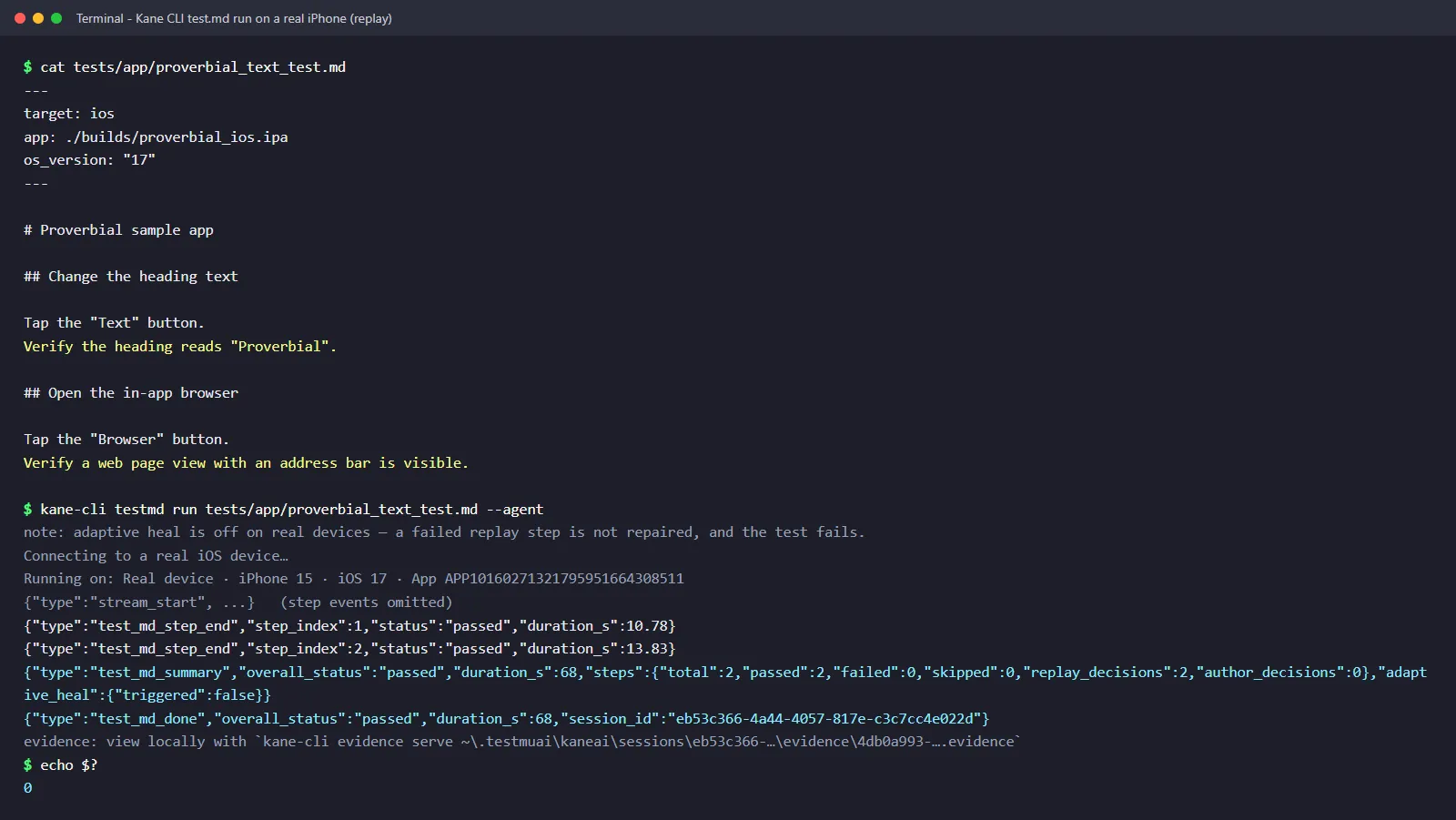
The exit code tells you what happened: 0 = passed, 1 = a step failed, 2 = setup/auth error, 3 = canceled or timed out. With --agent you get the file-level result in the test_md_done event (overall_status, duration_s, session_id). Each run also produces a sealed .evidence pack which you can open with kane-cli evidence serve <path-to-pack>.
The Kane CLI evidence docs detail what's in the pack: per-step screenshots, device logs, device model and OS version and a failure record on any failed runs.
To run the same check on a real iPhone, no Mac or Xcode is needed:
kane-cli run "Search for running shoes and verify at least one product result is visible" --target ios --os-version 17 --app ./builds/MyApp.ipaThe Kane CLI real device docs explain how you pick a device by name, by regex or by OS version on TestMu AI's 50k+ real iOS and Android devices. One caveat from the Kane CLI mobile docs: adaptive heal on replay is only available for emulator and simulator, not real devices.
The Four-Gate Check for Agent-Written Mobile Tests
Run any agent-written mobile test through the four gates before it blocks a merge.
- Check gate: can a repair change what is being checked? If one edit can move a step and weaken an assertion, then a person has to go through every change to the checks.
- Replay gate: what runs on the second run? A saved flow or cached recording should just replay with no model calls. Both Maestro and the Kane CLI pass this one.
- Drift gate: does a moved button require a person? Step repairs should be able to happen without a human. A wrong cart total must remain a failure.
- Proof gate: what's left when the chat closes? The reviewer should be able to see every step, every screenshot and every log without having to re-run the test.
When Is Maestro MCP the Better Choice?
Maestro MCP is the better fit in these cases:
- You want free and open source. Maestro CLI, Studio and MCP are all free on your own devices. Kane CLI requires a TestMu AI account and credits.
- You already have Maestro flows. Any team with a
.maestro/folder gets an agent on top of their existing YAML. - You test web and mobile via a single flow format. Maestro runs that identical flow on Chromium.
- You develop on Linux or Windows using local emulators. Kane CLI's local emulator and simulator will require an Apple Silicon Mac.
Can You Use the Maestro MCP and the Kane CLI Together?
Yes. A practical split is Maestro MCP for exploratory work as you're building, and Kane CLI as the gate before merge. On a Linux CI runner, you'd run the Kane CLI suite on cloud emulators using --remote (the plan requires HyperExecute macOS runners), with the credentials coming from the runner's secrets:
kane-cli login --username "$LT_USERNAME" --access-key "$LT_ACCESS_KEY"
kane-cli plugin install remote-execution
kane-cli testrun run --match '^tests/app/' --remote --device-name "Pixel 7" --os-version 14
A non-zero exit code will fail the build, and the PR reviewer can open the evidence pack. The existing .maestro/ flows can also be run on real Android and iOS devices via Maestro tests on HyperExecute (with a separate script for running on real iOS devices).
For a wider view of agent-based mobile tooling, see our guide to the various AI mobile app testing CLIs compared, and the Kane CLI 0.9 real device release notes.
Conclusion
Start with one journey your team checks by hand before each release. Let your coding agent explore it through Maestro MCP, then write its expected results as Verify lines in a _test.md file and run that file with kane-cli testmd run on every pull request.
Keep Maestro MCP for exploring your app. If a journey has to go through before merging, then write the acceptance criteria once and let Kane CLI make the call. Install via npm install -g @testmuai/kane-cli, and you'll get 10,000 free credits on the Kane CLI page.
Testing from the terminal? Kane CLI by TestMu AI lets SDETs and developers plan, write, run and debug tests from the command line.
Was this helpful?
Authors

Srinivasan Sekar
Author · 37 posts
Srinivasan Sekar is Director of Engineering at TestMu AI, where he leads engineering and open-source initiatives behind the Selenium and Appium automation grid and owns TestMu AI's MCP Server. A committer to Appium and a contributor to Selenium, WebdriverIO, Taiko, and AppiumTestDistribution, he brings over 15 years of experience in quality engineering and open-source technologies. He is the author of the Apress book 'The MCP Standard: A Developer's Guide to Building Universal AI Tools with the Model Context Protocol,' a Certified Kubernetes and Cloud Native Associate, and an international conference speaker. Before TestMu AI he spent over eight years at Thoughtworks as a Principal Consultant and Quality Architect. Srinivasan holds a B.Tech in Information Technology from Anna University.


Mayank Bhola
Reviewer
Mayank Bhola is Co-Founder and Head of Products at TestMu AI, where he leads the entire product portfolio across KaneAI, Kane CLI, HyperExecute, SmartUI, the Real Device Cloud, Accessibility, and other software testing product lines. As an early Lead Architect he designed and built the company's flagship Tunnel technology from scratch, created the React-based automation platform, and architected the data-intensive pipelines and FAAS services that scale it. He brings more than 10 years of experience in software development and product engineering, with earlier roles as Head of Technology at Juggernaut Books and Senior Software Engineer at PressPlay TV and Zomato. Mayank holds a B.Tech in Computer Engineering from JIIT Noida.
Maestro MCP FAQs

TestMu AI forEnterprise
Get access to solutions built on Enterprise
grade security, privacy, & compliance
- Advanced access controls
- Advanced data retention rules
- Advanced Local Testing
- Premium Support options
- Early access to beta features
- Private Slack Channel
- Unlimited Manual Accessibility DevTools Tests