
Run End-to-End Tests from Your Terminal with Kane CLI
Author and Run Tests Right from the Terminal in Natural Language, with an Evidence-Backed Pass or Fail from a Real Browser.
npm install -g @testmuai/kane-cli
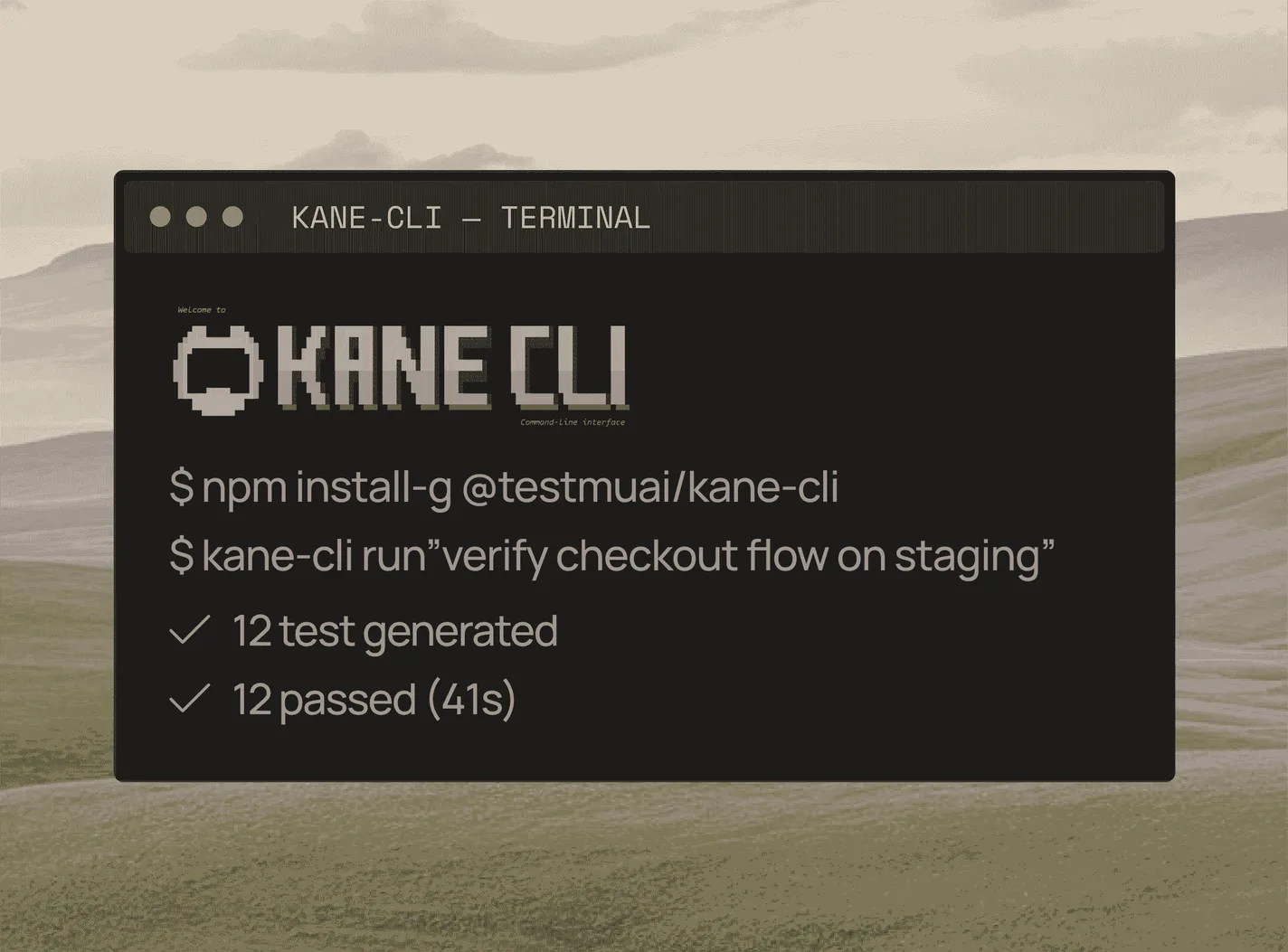
CodeRabbit has four paid plans: Essentials at $24, Team at $48 and Advanced at $72 per user per month on annual billing (with Enterprise on request). New organizations start with a free 14-day trial of the Advanced plan.
The CodeRabbit pricing FAQ also lists a Free plan, and CodeRabbit is always free for open source projects. CodeRabbit Verify test runs are free whilst Verify is in public beta.
Prices from CodeRabbit's pricing page (checked 26 Nov 2026). Prices on CodeRabbit are subject to change at any time, so you should always check the pricing page before you purchase.
TL;DR
CodeRabbit pricing in 2026 has three paid plans billed per user a month: Essentials at $24, Team at $48 and Advanced at $72 on annual billing. Enterprise is priced on request, and a Free plan covers pull request summaries. New organizations get a free 14-day Advanced trial, and CodeRabbit Verify runs cost nothing during its public beta.
CodeRabbit Pricing Plans and Cost
- CodeRabbit Essentials: CodeRabbit Essentials is $24 per user a month billed annually or $30 month-to-month. Essentials is the plan CodeRabbit previously called Pro, with AI code review in pull requests, the CLI and the IDE, and 5 reviews per developer per hour.
- CodeRabbit Team: CodeRabbit Team is $48 per user a month billed annually and adds unit test generation, finishing touches, post-merge actions and the Triage pull request queue. CodeRabbit Team raises the limits to 8 reviews per developer per hour and 5 linked repositories.
- CodeRabbit Advanced: CodeRabbit Advanced is $72 per user a month billed annually and adds continuous security review plus blast radius and architecture impact analysis, at 10 reviews per developer per hour. CodeRabbit Agent and Deep Scan are billed on demand on top of any plan.
CodeRabbit Free Tier and Verify Pricing
- CodeRabbit free tier: Free plan: Yes. CodeRabbit's plans documentation lists unlimited public and private repositories, pull request summaries only, and code reviews through the VS Code extension and CLI. Open source projects get Team features free on public repositories, and organizations that don't subscribe after the trial revert to Free.
- CodeRabbit Verify pricing: CodeRabbit Verify pull request runs and user journey runs are free during the public beta that CodeRabbit announced on 18 November 2026, and the first Agent turn in each fix task is free. CodeRabbit has not published post-beta Verify pricing.
- Merge-blocking pull request checks: CodeRabbit Verify posts a comment with no check run, so a failing Verify run never blocks a merge. A Kane CLI check from TestMu AI fails the GitHub check on a non-zero exit code, and Kane CLI sessions upload to TestMu AI Test Manager for regression history. The trade-offs are covered in AI code review vs verification.
CodeRabbit Plans and Prices at a Glance
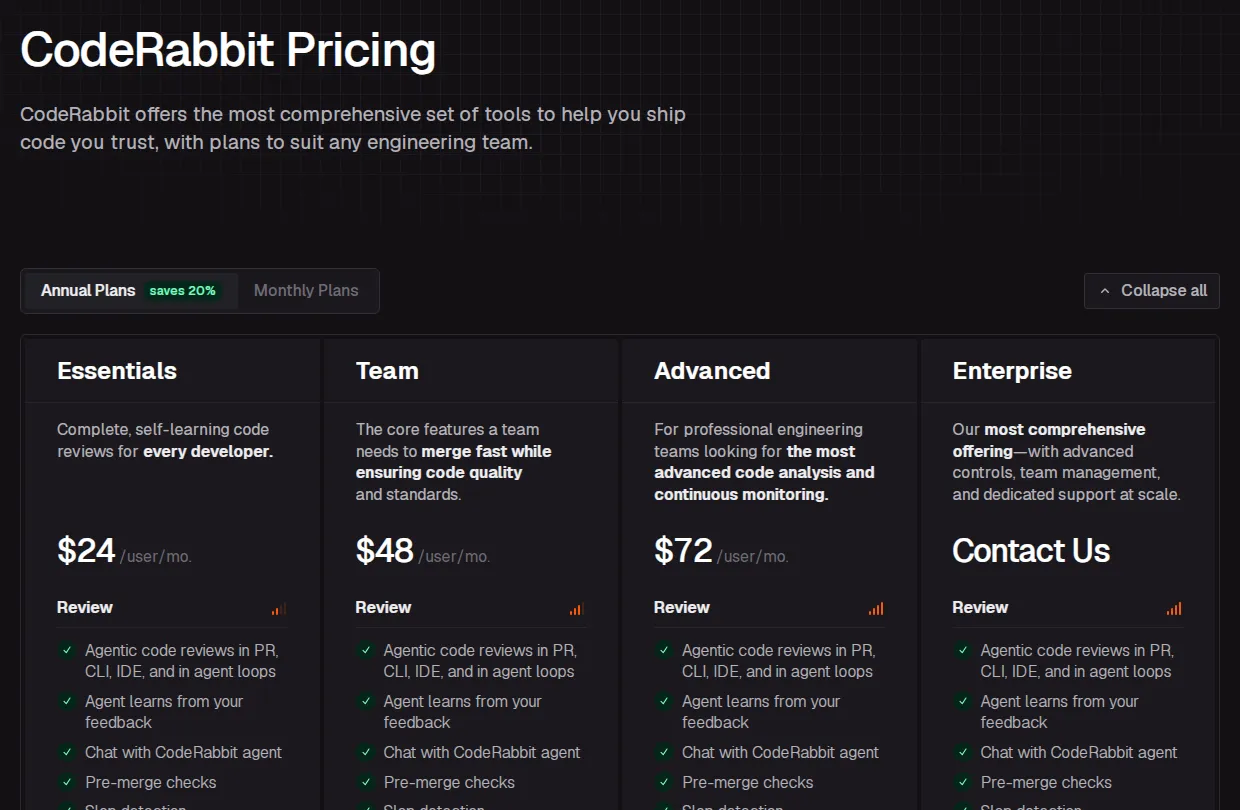
CodeRabbit is a pay per user per month model with review limits and features as part of the plan. The pricing page has the Monthly and Annual plans toggled, with the Annual plan clearly marked as "saves 20%".
The $24, $48 and $72 are the per-user prices on annual billing, the pricing page's default view. Month-to-month billing is $30, $60 and $90 per user, according to CodeRabbit's plans documentation.
| Plan | Price per user per month | Reviews per developer per hour | Linked repositories | MCP connections | What the plan includes |
|---|---|---|---|---|---|
| Essentials | $24 | 5 | 1 | 5 | AI review in PRs, the CLI, the IDE and agent loops; pre-merge checks; slop detection; 1-click fixes; security code review |
| Team | $48 | 8 | 5 | 10 | Unit test generation, finishing touches, post-merge actions, a prioritized PR queue, Slack triage, 10 custom pre-merge checks |
| Advanced | $72 | 10 | 10 | 15 | Security risk, blast radius and architecture impact analysis, continuous security review, PR security review, security merge blocking |
| Enterprise | Contact sales | 12 | 20 | 20 | Multi-org admin, SSO, custom roles, audit logs, admin APIs, a support SLA, custom deployment and purchasing options |
All plans include Jira and Linear integration, usage analytics, monthly spend caps and access to the CodeRabbit API and MCP server. The hourly review limits are governed by a fair usage policy, and additional reviews are available on consumption with a budget cap.
Is CodeRabbit Free?
CodeRabbit has a Free plan, but CodeRabbit's plans documentation limits it to pull request summaries, with code reviews only through the VS Code extension and the CLI. Pull request reviews start with Essentials at $24/user/month on annual billing, after the free 14-day Advanced trial.
The pricing page FAQ also asks "How do I sign up for the free open-source plan?" Its answer: install CodeRabbit on a public repository and the reviews stay free, with no extra setup. Neither the Free plan nor the open source plan appears in the plan table, so check the plans documentation for the current terms before you rely on either.
Lots of the directory and review sites still have the old plan names on their pages (Lite, Pro, Pro+). Those pages are now out of date. CodeRabbit's own FAQ has the answer to "Will the plan renaming change my price?" and their current table of plans is Essentials, Team, Advanced and Enterprise.
What CodeRabbit Costs for a Team
CodeRabbit's cost scales with the number of users on a plan. At the listed per-user prices, a team pays:
| Team size | Essentials ($24) | Team ($48) | Advanced ($72) |
|---|---|---|---|
| 10 developers | $240 a month | $480 a month | $720 a month |
| 25 developers | $600 a month | $1,200 a month | $1,800 a month |
| 50 developers | $1,200 a month | $2,400 a month | $3,600 a month |
These figures use the annual-billing price per user and don't take on-demand usage into account, so the same team pays more on month-to-month billing. The pricing FAQ also has answers to "Will I be charged for all the developers in my organization?" and to seat reassignment, so you should read those before you go and budget for a large organization.
Usage-Based Costs on Top of Seats
CodeRabbit adds on-demand charges for some products, separate from the per-user plan price:
- CodeRabbit Agent: billed on demand on every plan (separate from seats). The pricing FAQ's answer to 'How are on-demand products priced?' puts it at $0.40 per agent minute for cloud coding tasks, Slack and automations, and an admin can set a monthly spending cap.
- Deep Scan (CodeRabbit Security): marked as on-demand on every plan, no fixed price.
- Extra reviews: available on consumption past the hourly limit (with the ability to cap the budget).
How Much Does CodeRabbit Verify Cost?
CodeRabbit Verify (CodeRabbit's new app testing product) is free to run during the public beta, which was announced on 18 November 2026. This covers both pull request runs and repository journey runs. If a bug is found by Verify, then the first CodeRabbit Agent turn in each fix task is free; subsequent turns are billed as normal Agent usage.
Verify runs don't require the CodeRabbit Agent add-on and no Agent minutes are billed for them during the beta. To set up Verify, an Admin will need either a CodeRabbit Review seat or an active trial and Coding Agent must be on for the organization with data retention enabled. CodeRabbit had not yet published post-beta pricing for Verify as of 26 November 2026.
Verify's beta limits also have an impact on cost planning. If you need native mobile coverage, a pull request check that can prevent the merge or support for self-hosted CodeRabbit, GitHub Enterprise Server or Azure DevOps, then you'll need to budget for a separate testing layer even though Verify runs are free.
CodeRabbit Verify: What Launched in November 2026
CodeRabbit Verify is CodeRabbit's agentic app testing product. It tests your app as it runs on pull requests and on saved user journeys.
CodeRabbit announced Verify in public beta on 18 November 2026. It takes CodeRabbit from being a diff reviewer to being an app behavior tester.
How Verify Works on a Pull Request
- An Admin sets up the coding environment with a startup script, and Verify launches the app inside an isolated CodeRabbit sandbox.
- A dev comments
@coderabbitai verifyon the PR. Teams can also turn on Auto Verify (and also verify new commits) so that new PRs and pushes get verified automatically. - Verify reads the changes in the pull request and writes out test scenarios for the behavior that they impact. You can add instructions after the
@coderabbitai verifycommand to influence which scenarios it focuses on. CodeRabbit's view is that the expected result is derived from the intended behavior, the documentation and the existing test expectations, so the new code doesn't get to define its own correctness. - Verify runs the scenarios against the app and leaves one comment on the PR. The links in that comment take you to the evidence (screenshots, browser recordings and logs) in CodeRabbit Explain.
User Journeys and Fixes
Apart from individual pull requests, an agent can propose user journeys for you to approve (up to 50 per repository). The Verify runs are scheduled, can open a Jira or Linear issue for a new finding if Auto create issues is on, and a subsequent run that verifies a fix can close the finding. Journey findings can trigger a CodeRabbit Coding Agent task, and PR findings can be copied out as Markdown or opened in Codex.
What Verify Doesn't Cover Yet
Verify is in public beta with very clear boundaries. It's for web apps and services only (native mobile apps are not supported). It posts a comment with no check run or commit status, so a failing Verify run will never block a merge.
Scheduled journeys don't send an alert if a run fails or is skipped. It only runs on CodeRabbit Cloud with GitHub Cloud, GitLab.com and Bitbucket Cloud. Self-hosted CodeRabbit, GitHub Enterprise Server and Azure DevOps are not supported.
Do You Still Need a Testing Platform With CodeRabbit Verify?
CodeRabbit Verify is the easier entry point for web teams who are already on the CodeRabbit Cloud. The runs are free during the beta, and you get your app running in its own sandbox so you don't need a preview deploy. TestMu AI is the more appropriate choice when you need a PR check to block the merge, when you need to test native mobile or a wide range of browsers or when you're running on a Git host and CI that Verify doesn't support.
CodeRabbit's seat price covers the cost of reviewing the diff. Proving that the built app still works is a different job entirely, and Verify and TestMu AI take a different approach to it. The gaps below are taken from CodeRabbit's own Verify docs, checked on 26 November 2026.
A Test That Can't Block a Merge Is Advisory
CodeRabbit Verify posts a single comment on the PR with no check run or commit status, so a failing Verify run doesn't in any way block a merge. Someone has to read that comment and take action. The Kane CLI GitHub Action will fail the check on any non-zero exit code, so you can make it a required status check in your branch protection, and a broken user journey will itself prevent the merge.
Good for One-Off PR Checks, Thin for Regression and Replays
CodeRabbit Verify reuses the scenarios from a PR on subsequent runs of that PR. Automatic runs will skip merged PRs, and the docs don't state that the scenarios are carried over after merge. Its regression layer is saved user journeys (up to 50 per repository), one active run per branch and environment, overlapping scheduled runs are skipped rather than queued, and there's no documented way to export them to code.
The Kane CLI tests are the .test.md files in your repo, selected by tag and run in parallel. When the recordings of those tests are committed, the CI will replay the steps with zero LLM cost.
Regression Suites as a QE Harness: Test Manager and Jira
Kane CLI can run a full regression suite as well as a single PR check. Tests live as _test.md files in your repo and are selected by tag. They run in parallel with workers on the CI runner or on HyperExecute with --remote (which requires a HyperExecute subscription).
Every run ends with a typed exit code, and --agent streams NDJSON events that your pipeline can consume. By default, each session is uploaded to TestMu AI Test Manager as a test case (with a 7-day share link and Playwright code export); a local session folder with the evidence is retained.
The TestMu AI Cloud app for Jira Cloud will link test runs to Jira issues and show the execution history of every test case linked to an issue, so a regression result on a test case linked to an issue will trace back to its ticket.
CodeRabbit Verify manages the journeys, schedules and findings within CodeRabbit and will auto-create Jira or Linear tickets for any new journey findings. Failed and skipped scheduled runs will not generate issues. The documentation doesn't contain any test cases, test plans or execution history that would be visible on the Jira issues.
Evidence You Keep vs Evidence in CodeRabbit
Verify and Kane CLI both capture evidence, just in different places. Verify stores the screenshots, browser recordings and logs in CodeRabbit Explain (with a sign-in and repository access required), and the documentation is pretty clear that you can only download the large text logs.
The Kane CLI evidence pack contains the screenshots and the console and network logs for the step that failed. The Kane CLI GitHub Action will upload that and link to it from the pull request comment and the job summary. On other CI systems, you'll just archive it as a build artifact in your own pipeline.
Coverage, CI and Where Tests Live
Verify tests on web apps and services only, on CodeRabbit Cloud via GitHub Cloud, GitLab.com and Bitbucket Cloud. Kane CLI runs on Android Emulator, iOS Simulator and real devices and can run in any CI. TestMu AI has 3,000+ browsers and 50,000+ real devices, and HyperExecute can run in your own cloud account or behind your firewall.
| What you need | CodeRabbit Verify (public beta) | TestMu AI |
|---|---|---|
| A PR check that blocks the merge | Posts a comment only, no check run or commit status | Kane CLI GitHub Action fails the check on any non-zero exit code |
| Native iOS or Android testing | Not supported | Android Emulator, iOS Simulator and 50,000+ real devices |
| More than one browser | Browser not documented | 3,000+ browsers for Selenium, Playwright and Cypress; Kane CLI in real Chrome |
| GitHub Enterprise Server, self-managed GitLab or Azure DevOps | Not supported | Kane CLI runs in any CI; HyperExecute lists Jenkins, GitLab, Azure DevOps and Bitbucket |
| Self-hosted or private deployment | CodeRabbit Cloud only | HyperExecute in your own cloud account or behind your firewall |
| A regression suite in your repo | Up to 50 saved journeys per repository, stored in CodeRabbit | _test.md files committed to your repo, selected by tag, run in parallel; KaneAI exports Selenium, Playwright and Appium code |
| Replaying a recorded test | New runs regenerate in a fresh sandbox; replaying recorded steps isn't documented | Committed recordings replay in CI with no LLM cost |
| Test management and Jira traceability | Auto-create Jira or Linear issues for new journey findings; no test cases, test plans or Jira-side run history documented | Kane CLI sessions upload to TestMu AI Test Manager by default; its Jira Cloud app links test runs and shows execution history on Jira issues |
| Evidence you keep | Kept in CodeRabbit Explain; download documented only for large text logs | Screenshots plus console and network logs for the failing step; GitHub Actions uploads the pack, other CI archives it as a build artifact |
| Alerts on failed scheduled runs | No alert for failed, blocked or skipped runs | Runs as a CI job, so your CI's existing failure notifications apply |
| Cost while you evaluate | Free during the public beta | Kane CLI free to install; 10,000 free credits for 30 days |
Where CodeRabbit Verify Is the Better Choice
- Free whilst it's in beta: The Verify pull request and journey run costs nothing during the public beta.
- No preview deploy required: Verify just pulls your startup script into its own sandbox and runs it. The Kane CLI will test the URL you supply it with, so in order to test the changes in each PR you'll need either a preview deploy or an app that you build and then start on the CI runner.
- One vendor if you're already using CodeRabbit: Your review and app testing is all in the same tool and in the same pull request.
- Fixes in the same product: Journey findings can open up a CodeRabbit Coding Agent task with the finding, repository and branch all pre-populated.
Using Both on One Pull Request
Lots of teams can run both. CodeRabbit will review the diff, and a Kane CLI check will run the app and fail the PR if a user flow is broken.
TestMu AI prices the testing layer at per agent on the KaneAI plans and per parallel test on HyperExecute rather than per reviewer seat. KaneAI Starter is $17/month for 1 agent (billed annually) with 2,000 credits/month for local runs via the Kane CLI. KaneAI Pro is $89/month for 1 agent (billed annually) with 12,000 credits and 100 HyperExecute minutes.
If you're testing a chatbot or voice agent rather than a web app, then TestMu AI Agent Testing scores the chat and voice conversations on 9 quality metrics and phone calls on 30+ metrics.
For the full review vs runtime test comparison, see TestMu AI vs CodeRabbit. To see how CodeRabbit stacks up against the other reviewers, have a look at AI code review tools compared.

Try it on your next pull request
Note: Install the Kane CLI with npm install -g @testmuai/kane-cli (Node.js 18 or later and Chrome) and get started free with the Kane CLI.
Conclusion
Start by comparing the hourly review limits per developer across Essentials, Team and Advanced, then add the CodeRabbit Agent and Deep Scan usage, which bill on top of the seat price. If your pull requests also need a test that can stop a merge, budget for that layer separately, since a Verify run posts a comment rather than a check.
Testing from the terminal? Kane CLI by TestMu AI lets SDETs and developers plan, write, run and debug tests from the command line.
Author

Sandeep Yadav
Blogs: 12

Sandeep Yadav is a Senior Software Engineer at TestMu AI, where he builds the platform's test intelligence and AI-native engineering systems. He has architected autonomous GitHub Apps, vector-search code intelligence, and self-diagnosing QA workflows, and designed distributed platforms that process 2M+ daily test executions and 1B+ events, turning high-volume test, log, and code data into intelligent, self-optimizing systems. He works on embedding reasoning models into production infrastructure to power autonomous review, root-cause analysis, and analytics workflows. He brings over four years of engineering experience with deep expertise in the Elastic Stack, Apache Kafka, and Redis. Earlier he engineered a GDPR-compliant, end-to-end-encrypted secure web-chat application at Mithi. A Facebook Hackercup 2021 Round 2 qualifier and merit-scholarship recipient, Sandeep holds a B.Tech in Electrical Engineering from Delhi Technological University.
Reviewer

Siddhant Sinha
Reviewer
Siddhant Sinha is a Lead Member of Technical Staff at TestMu AI architecting Kane CLI, the command-line tool for browser automation from the terminal, where natural-language flows run in a real Chrome browser and return pass or fail with shareable proof. He has spent over three years at TestMu AI building scalable platforms that run tests at scale on real Android and iOS devices. His expertise covers platform architecture, large-scale distributed systems, and CLI design, shaped by earlier cloud-native engineering at Semut.io, including building Elasticsearch as a service.


CodeRabbit Pricing FAQs
Did you find this page helpful?
More Related Blogs




TestMu AI forEnterprise
Get access to solutions built on Enterprise
grade security, privacy, & compliance
- Advanced access controls
- Advanced data retention rules
- Advanced Local Testing
- Premium Support options
- Early access to beta features
- Private Slack Channel
- Unlimited Manual Accessibility DevTools Tests