

Power Your Software Testing with AI Agents and Cloud
The Native AI-Agentic Cloud Platform to Supercharge Quality Engineering. Test Intelligently and Ship Faster.


- TestMu AI (Formerly LambdaTest)
- /
- Blog
- /
- Browser Market Share in 2026
Browser Market Share in 2026: Global Stats and Trends
Browser market share in 2026: Chrome leads at 68%, Safari 16%, and Edge 5% globally. See the latest StatCounter stats by desktop, mobile, engine, and region.
Last Updated on:
Browser market share is the percentage of web traffic each browser accounts for. It shifts by platform and region, which makes it the starting point for choosing which browsers to test.
All figures reflect July 2026. They come from StatCounter Global Stats methodology: over 3 billion page views a month across more than 1 million websites, counted by page views rather than unique users.
TL;DR
- Google Chrome held 68.28% of global browser market share in July 2026, followed by Safari at 16.47% and Edge at 5.36%.
- Blink-based browsers, including Chrome, Edge, Samsung Internet, and Opera, accounted for about 77.6% of global page views.
- Edge is the second most used desktop browser at 11.14%, while Safari is second on mobile at 25.43%.
- Chrome's share is highest in Asia at 76.97%, and Safari's share is highest in North America at 29.21%.
- Testing Safari on a real iPhone adds more new coverage than testing a second Blink-based browser.
Global Browser Market Share in 2026
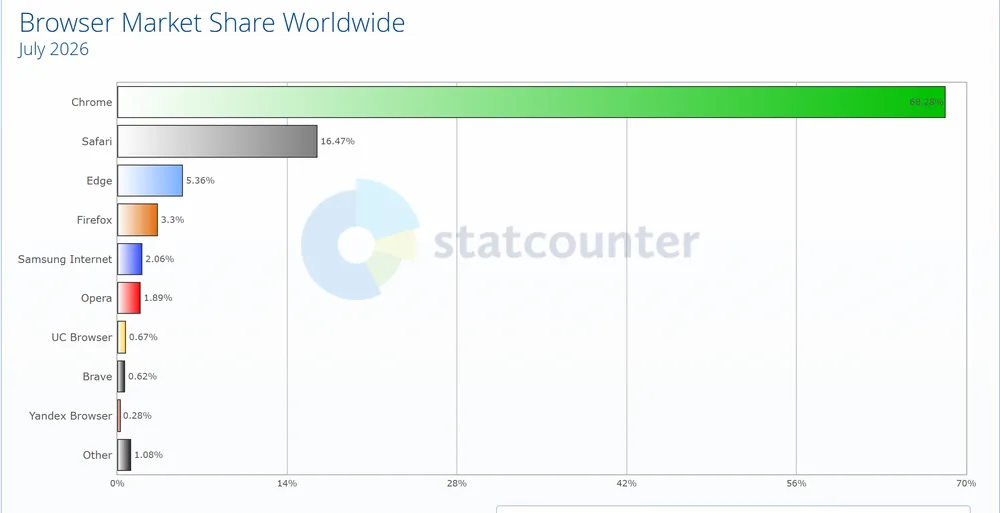
Chrome belongs at the center of your test strategy, but its lead does not make the rest optional. Safari alone accounts for roughly one page view in six.
Versions matter as much as browsers, so test website on different browsers in both current and legacy releases. Users stay on older versions for three common reasons:
- Managed machines - Enterprise IT often holds desktop browsers back from the current release.
- Older phones - Devices that no longer get OS updates stay on older browser builds.
- Safari tied to iOS - Safari on iPhone updates with iOS, so users who skip iOS updates keep older Safari.
This guide to cross browser testing on older browser versions covers how to pick which releases to keep.
Browser Market Share by Rendering Engine
Browsers that share an engine render pages almost the same way. The table below adds up the July 2026 shares by engine.
| Engine | Browsers counted | Share | Testing implication |
|---|---|---|---|
| Blink | Chrome, Edge, Samsung Internet, Opera | 77.59% | One Blink browser covers most rendering behavior |
| WebKit | Safari | 16.47% or more | Needs its own coverage, ideally on a real iPhone |
| Gecko | Firefox | 3.3% | The only independent third engine, so keep one Firefox check |
The WebKit figure is a floor. Outside the EU, every iPhone browser runs on WebKit, so part of Chrome's mobile share renders in WebKit too, as covered in these cross browser testing trends.
Browser Engines: The Crux of Cross Browser Compatibility explains why engines diverge.
Key Takeaway: Rendering risk comes from three engines, not six browsers: one Blink browser, Safari on a real iPhone, and Firefox together cover about 97% of global page views.

Note: Check your site on Blink, WebKit, and Gecko in one session, including Safari on real iPhones. Run your browser matrix free
Desktop vs Mobile vs Tablet Browser Market Share
The table below compares the main browsers across platforms, to help you prioritize web testing by device type.
| Browser | Desktop | Mobile | Tablet |
|---|---|---|---|
| Chrome | 70.67% | 66.8% | 48.39% |
| Safari | 5.66% | 25.43% | 33.33% |
| Edge | 11.14% | Not in top list | Not in top list |
| Firefox | 6.43% | 0.67% | Not in top list |
| Android browser | Not in top list | Not in top list | 14.08% |
| Samsung Internet | Not in top list | 2.48% | 1.39% |
| Opera | 2% | 1.81% | 1.01% |
The pattern to act on: desktop plans need Edge, while mobile and tablet plans need Safari.
Desktop Browser Market Share
On desktop worldwide, Chrome leads with 70.67%, so test on Chrome first. Edge is a clear second at 11.14%, ahead of Firefox (6.43%), Safari (5.66%), and Opera (2%).
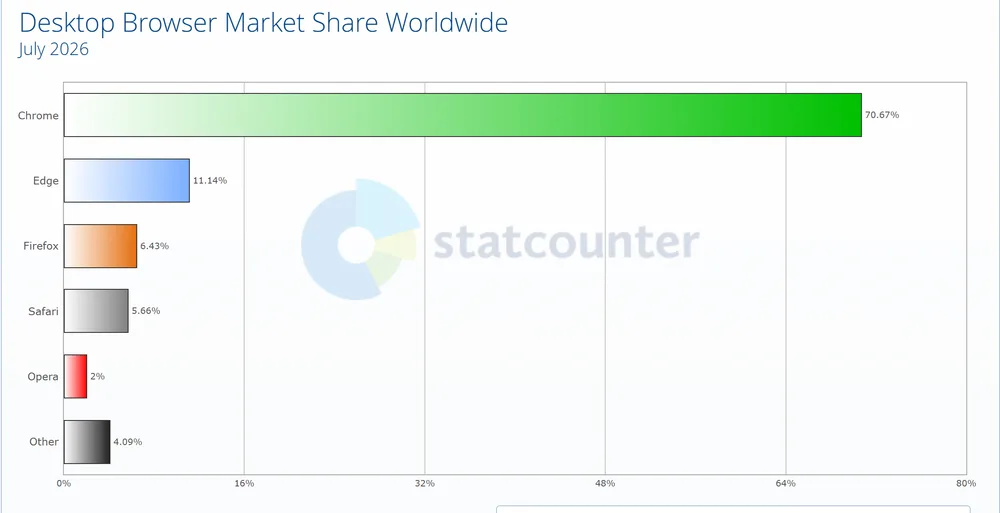
Edge sits well ahead of Firefox for second place. If your audience skews desktop, cover Chrome and Edge first, then Firefox and Safari.
Mobile Browser Market Share
On mobile worldwide, Chrome leads with 66.8% and Safari is second at 25.43%. Samsung Internet (2.48%), Opera (1.81%), UC Browser (1.26%), and Firefox (0.67%) make up most of the rest.
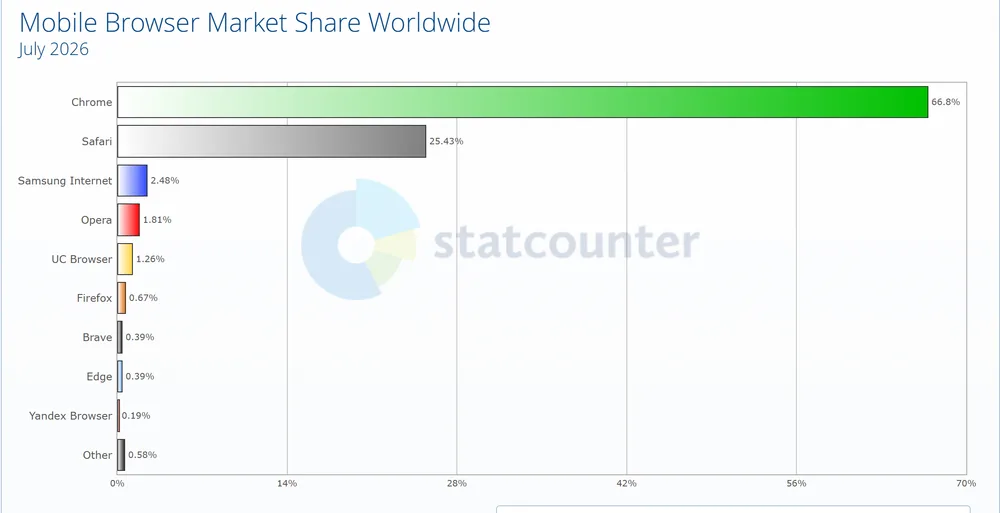
Chrome and Safari together hold 92.23% of mobile browsing as the defaults on Android and iOS. Chrome is essential for Android, and you should test on Safari for iPhone coverage.
Plan mobile web checks for layout and touch, and follow this ultimate guide to building a mobile-friendly website when a page fails them.
Tablet Browser Market Share
Here is how browser market share looks on tablets worldwide.
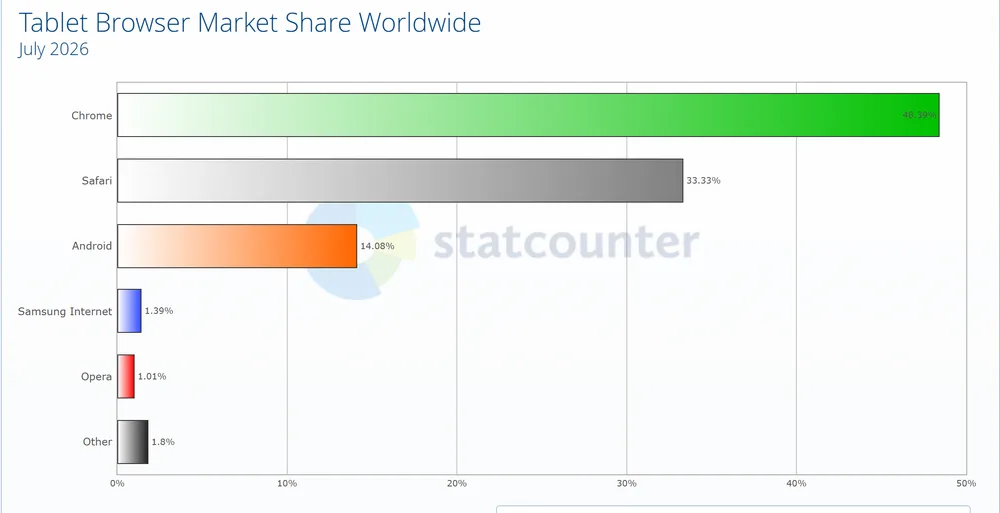
Chrome leads tablets at 48.39%, with Safari a strong second at 33.33% on the back of the iPad. The legacy Android browser (14.08%), Samsung Internet (1.39%), and Opera (1.01%) follow.
Browser Market Share by Region
The table below compares the top three browsers in each region.
| Region | Chrome | Safari | Edge |
|---|---|---|---|
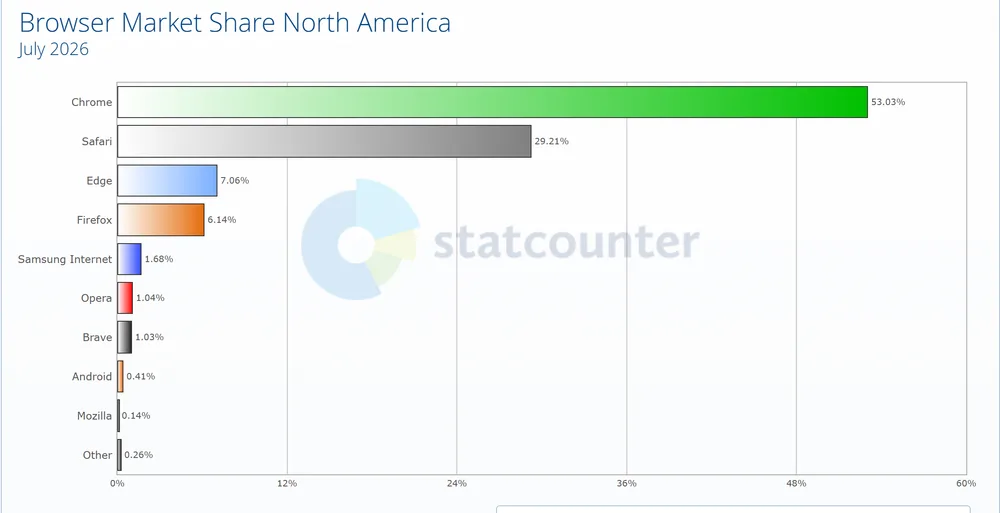
| North America | 53.03% | 29.21% | 7.06% |
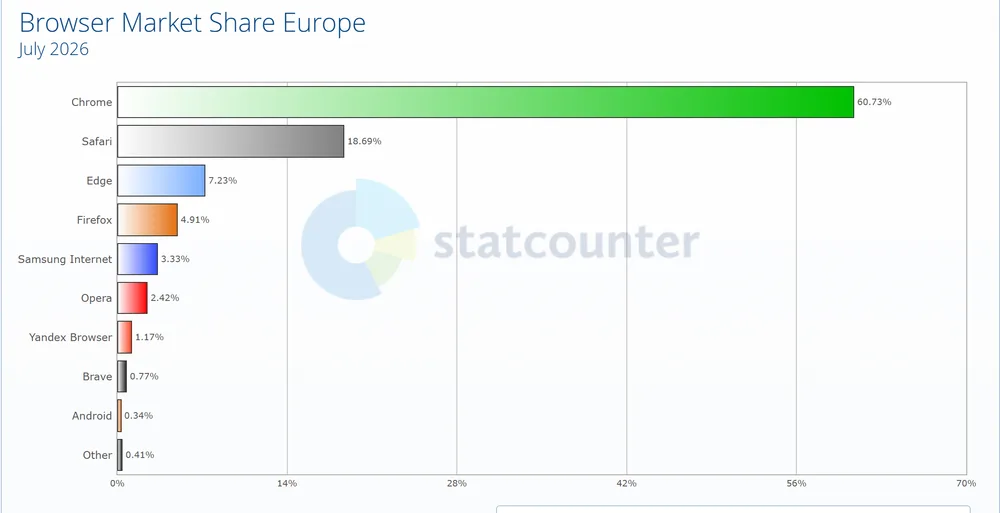
| Europe | 60.73% | 18.69% | 7.23% |
| Asia | 76.97% | 10.94% | 3.87% |
A product aimed at North America needs nearly three times the Safari attention of one aimed at Asia.
North America
In North America, Chrome leads at 53.03% and Safari is a strong second at 29.21%. Edge (7.06%) and Firefox (6.14%) compete for third, so test on Edge for Windows users.
Europe
In Europe, Chrome holds 60.73% and Safari follows at 18.69%. Edge (7.23%) and Firefox (4.91%) round out the leaders, and Firefox retains enough share here that you should test on Firefox for European users.
Asia
Asia is the most Chrome-dominated major region, with Chrome at 76.97%. Safari trails at 10.94%, followed by Edge (3.87%) and Opera (1.93%).
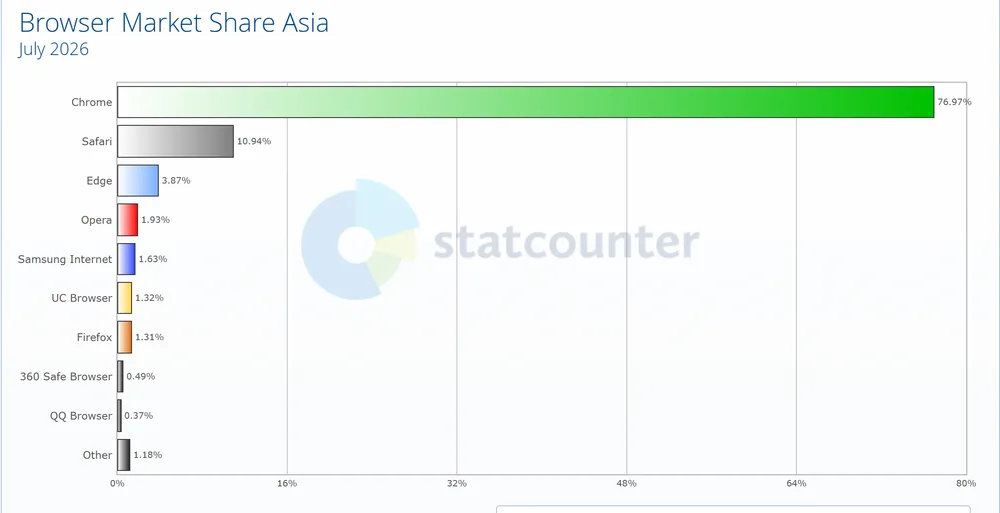
Key Takeaway: Global averages hide regional gaps: Safari holds 29.21% of North American page views but 10.94% in Asia, so the audience region should decide how much Safari coverage a test plan gets.
Choosing Test Browsers From Market Share Data
Select browsers by combining global market share, which shows what is popular, with your own analytics, which shows what your users actually run, then rank the combinations by traffic.
Covering every version is impractical, so use these two inputs:
- Popularity - Track the leading browsers per platform with market share data to spot current shifts.
- Web analytics - Break down your traffic in Google Analytics by browser, version, region, and OS.
List the highest-traffic browser and OS combinations first. This cross browser testing strategy explained in three easy steps turns that list into a plan.
Default Browser Test Order
Without analytics of your own, the July 2026 shares suggest this order for web application testing:
| Priority | Browser | Why it earns the slot |
|---|---|---|
| 1 | Google Chrome | Leads desktop, mobile, and tablet; test current and recent versions |
| 2 | Safari | Second worldwide and the main WebKit browser, required for iPhone, iPad, and Mac |
| 3 | Microsoft Edge | Second on desktop, important for Windows and enterprise users |
| 4 | Firefox | The only Gecko browser, still meaningful on desktop in Europe |
| 5 | Samsung Internet and Opera | Smaller shares that reach the Android and regional long tail |
Layer in the versions your analytics show, including a few legacy releases, to catch issues real users still hit.

Running Your Browser Matrix on Real Browsers
Testing across multiple browsers means running the same checks on each browser and version in your matrix, which is far faster on a cloud grid than on machines you build and maintain yourself.
Cross browser testing on TestMu AI covers 3,000+ browser and OS combinations and 10,000+ real devices, for both manual and automated browser testing. For the matrix in this guide, it gives you:
- Latest and legacy coverage - Test current and older Chrome, Safari, Edge, and Firefox versions on real Windows and macOS.
- Parallel runs - Execute Selenium, Cypress, and Playwright suites across many browsers at once to cut execution time.
- Quick rendering checks - Open a browser emulator online during development.
- Geolocation testing - Verify how pages render and behave for users in different regions.
- Local page testing - Test locally or privately hosted pages across browsers through a secure tunnel.
To run your first suite across real browsers in parallel, follow the getting started with TestMu AI automation guide.
Note: Build your browser matrix from the tables above and run it on real browsers today. Run your browser matrix free
Turning 2026 Browser Stats Into a Test Plan
The 2026 numbers point to a small, deliberate test matrix rather than every browser on the market. Build the matrix in three layers:
- Engines first - Cover one Blink browser, Safari on a real iPhone, and Firefox, which together reach about 97% of page views.
- Platforms next - Add Edge if your traffic skews desktop, and Safari on iPad if tablet users matter.
- Regions and versions last - Weight Safari by where your users are, then add the older versions your analytics still show.
Browser share shifts month to month, and StatCounter publishes fresh figures every month. Recheck your own analytics each quarter, and drop or add a browser when its share crosses your coverage threshold.
A matrix only protects users when it runs on every release, so choose automation testing tools that can run the whole matrix without manual effort.
Author

Salman Khan
Blogs: 138


Salman is a Test Automation Evangelist and Community Contributor at TestMu AI, with over 6 years of hands-on experience in software testing and automation. He has completed his Master of Technology in Computer Science and Engineering, demonstrating strong technical expertise in software development, testing, AI agents and LLMs. He is certified in KaneAI, Automation Testing, Selenium, Cypress, Playwright, and Appium, with deep experience in CI/CD pipelines, cross-browser testing, AI in testing, and mobile automation. Salman works closely with engineering teams to convert complex testing concepts into actionable, developer-first content. Salman has authored 120+ technical tutorials, guides, and documentation on test automation, web development, and related domains, making him a strong voice in the QA and testing community.
Reviewer

Himanshu Sheth
Reviewer
Himanshu Sheth is the Director of Marketing (Technical Content) at TestMu AI, with over 8 years of hands-on experience in Selenium, Cypress, and other test automation frameworks. He has authored more than 130 technical blogs for TestMu AI, covering software testing, automation strategy, and CI/CD. At TestMu AI, he leads the technical content efforts across blogs, YouTube, and social media, while closely collaborating with contributors to enhance content quality and product feedback loops. He has done his graduation with a B.E. in Computer Engineering from Mumbai University. Before TestMu AI, Himanshu led engineering teams in embedded software domains at companies like Samsung Research, Motorola, and NXP Semiconductors. He is a core member of DZone and has been a speaker at several unconferences focused on technical writing and software quality.


Browser Market Share FAQs
Did you find this page helpful?
More Related Blogs
TestMu AI forEnterprise
Get access to solutions built on Enterprise
grade security, privacy, & compliance
- Advanced access controls
- Advanced data retention rules
- Advanced Local Testing
- Premium Support options
- Early access to beta features
- Private Slack Channel
- Unlimited Manual Accessibility DevTools Tests