
Power Your Software Testing with AI Agents and Cloud
The Native AI-Agentic Cloud Platform to Supercharge Quality Engineering. Test Intelligently and Ship Faster.


- TestMu AI (Formerly LambdaTest)
- /
- Blog
- /
- Galaxy Z Fold8 and Z Fold8 Ultra Are Now Live on TestMu AI Real Device Cloud
Galaxy Z Fold8 and Z Fold8 Ultra Are Now Live on TestMu AI Real Device Cloud
Galaxy Z Fold8 and Z Fold8 Ultra are now live on TestMu AI Real Device Cloud on Android 17, before retail. Test your site and app before users hold the device.
Last Updated on:
Samsung announced the Galaxy Z Fold8 and the Galaxy Z Fold8 Ultra at Galaxy Unpacked on July 22, 2026. Both are already live on TestMu AI Real Device Cloud, running Android 17, and no customer is holding one yet.
General availability starts August 7, 2026, per Samsung's US launch announcement. That gap is the opportunity. You can test your website and your app on the real hardware now, and fix what breaks before your users hold the device in their hands.
What Is New in the Galaxy Z Fold8 Lineup
Picture your launch morning: someone unfolds a new Galaxy Z Fold8 Ultra into that 8-inch screen and opens your app first thing. That unfold is exactly where foldables break. A split view collapses, a layout jumps, and suddenly there's more screen than your app knows what to do with.
The catch was always timing. You can't test a device you don't have yet, and by the time you do, so does everyone else. So we changed the order.
The Galaxy Z Fold8 and Z Fold8 Ultra are live on real devices in TestMu AI's cloud right now, before they've reached a single store, so you can open one, unfold it, and see exactly what your users will see on launch day, on real Android 17 hardware.
So when your user opens your app on launch morning, the version they meet is one you already made sure of. Specifications below come from Samsung's Galaxy Z Fold8 announcement.
Galaxy Z Fold8
- A 7.6-inch main display at 1,848 x 2,448 that opens into a wide, landscape canvas.
- A 5.5-inch cover display at 1,248 x 1,972 on a short, passport-shaped body.
- Folds to 81.9 x 123.9 x 9.7 mm and opens to 161.4 x 123.9 x 4.5 mm, at 201 g.
- Snapdragon 8 Elite Gen 5 for Galaxy, running Android 17 with One UI 9.
Galaxy Z Fold8 Ultra
- An 8.0-inch main display at 2,504 x 2,256, keeping the taller book-fold shape.
- A 6.5-inch cover display at 1,080 x 2,520, noticeably narrower than the Fold8 cover.
- Folds to 72.8 x 158.4 x 8.9 mm and opens to 143.2 x 158.4 x 4.1 mm, at 215 g.
- The same Snapdragon 8 Elite Gen 5 for Galaxy, also on Android 17 with One UI 9.
Divide width by height and the two devices separate. The Fold8 main display resolves to 0.755, taller than it is wide. The Fold8 Ultra resolves to 1.110, wider than it is tall.
| Screen | Galaxy Z Fold8 | Galaxy Z Fold8 Ultra |
|---|---|---|
| Main resolution | 1,848 x 2,448 | 2,504 x 2,256 |
| Main aspect ratio | 0.755, portrait | 1.110, landscape |
| Cover resolution | 1,248 x 1,972 | 1,080 x 2,520 |
| Cover aspect ratio | 0.633 | 0.429 |
That is roughly a 1.47 times difference in aspect ratio between two devices that share a name, a chipset, and an operating system. A layout tuned on one of them will not automatically hold on the other, and neither device is in a single customer's hands yet to tell you about it.
Test Web Apps Before the Devices Ship
A foldable gives your site two viewports on one device, and the Fold8 pair gives you four across the two models. Every one of them can be opened in a browser session today.
- Width-based media queries written for the Fold7 generation, which stayed portrait when unfolded, now meet a landscape viewport on the Fold8.
- Grid column counts derived from viewport width alone produce very different results at 1,848 and 2,504 device pixels.
- Fixed-height headers and sticky bars eat a much larger share of a short landscape canvas than of a tall portrait one.
- Modal and dialog widths capped at a phone-sized maximum look stranded in the middle of an eight-inch display.
- Aspect-ratio media queries handle this range more reliably than width alone, and both devices are available to prove it either way.
If you want a refresher on structuring breakpoints for a range this wide, our guide to responsive testing covers the approach.

Note: Test your site and app on a real Galaxy Z Fold8 and Fold8 Ultra before the devices reach customers. Both new foldables are live on Android 17 with no hardware to buy. Try for free
Test Mobile Apps on Real Fold8 Devices
App behavior on a foldable depends on a physical hinge, which is exactly what an emulator cannot give you. These are the checks worth running first on the real device cloud.
- Multi-window and split-screen workflows, where your app shares the unfolded panel with another app and receives a fraction of the width it expects. Check that minimum-width handling degrades cleanly instead of clipping controls off the edge.
- Screen transitions between folded and unfolded states, which fire an Android configuration change and recreate the activity. Anything held only in memory, such as form input, scroll position, or an in-flight upload, is at risk here.
- Cover-screen entry points, since a user can start a flow folded and finish it unfolded, and the app has to carry state across that boundary.
- Drag and drop between panes, which only becomes reachable once there is room for two panes side by side.
- Camera, biometrics, and sensors on the unfolded panel, where the preview surface and the orientation both change underneath your code.
The configuration-change case produces the most bug reports, because it is invisible on a conventional handset. Our comparison of emulators, simulators, and real devices covers where each option stops being useful.

Start Testing on the Galaxy Z Fold8 in 3 Steps
- Log in to TestMu AI and open Real Devices, then filter the Android catalog to Samsung.
- Pick Galaxy Z Fold8 or Galaxy Z Fold8 Ultra, both listed on Android 17.
- Upload your .apk or .aab, or enter a URL for web testing, and start the session.
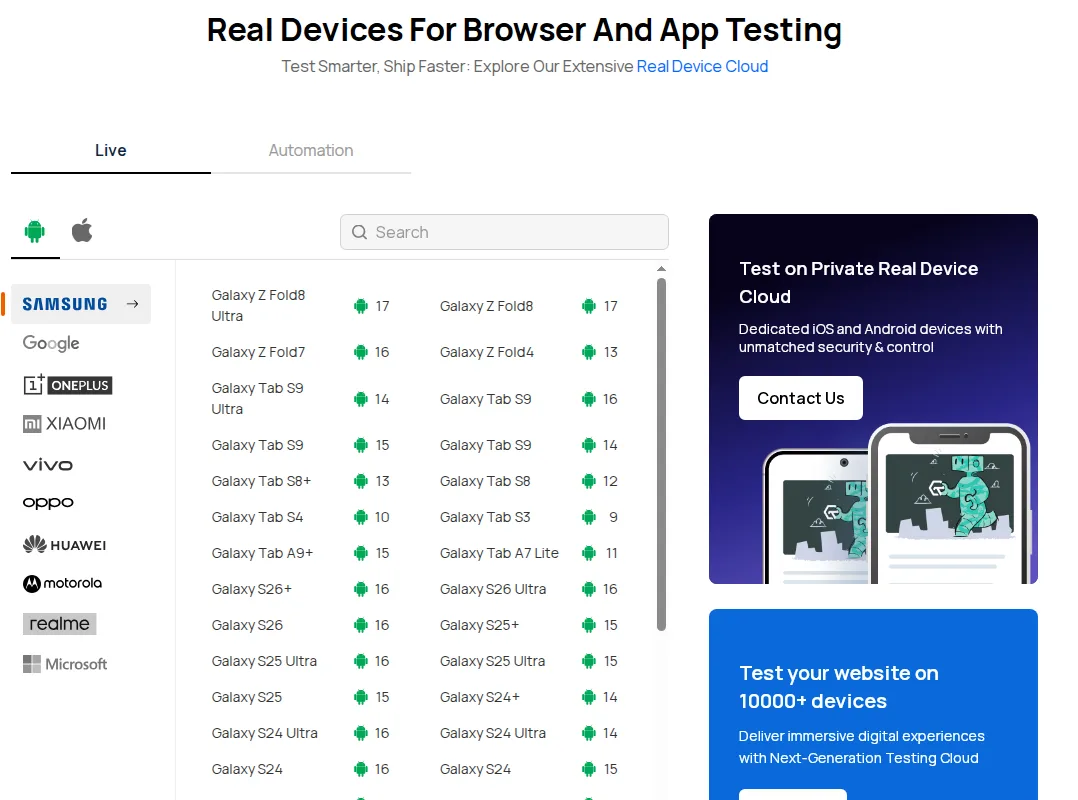
Both models sit at the top of the Samsung section on Android 17, next to the Galaxy Z Fold7 on Android 16. The current list of real devices shows everything that is bookable, including which models are manual only.
For automation, the Fold8 models are addressable through standard Appium capabilities. Real device execution is opt-in, so isRealMobile has to be set explicitly or the session runs against a virtual device instead:
const capabilities = {
  "lt:options": {
    "username": "YOUR_USERNAME",
    "accessKey": "YOUR_ACCESS_KEY",
    "platformName": "Android",
    "deviceName": "Galaxy Z Fold8",
    "platformVersion": "17",
    "isRealMobile": true,
    "app": "lt://APP_ID",
    "build": "Fold8 Layout Regression",
    "name": "Unfolded layout on the main display"
  }
};

// Mobile hub endpoint for real device sessions
const hubUrl = "https://mobile-hub.lambdatest.com/wd/hub";
Swap deviceName to Galaxy Z Fold8 Ultra to run the same suite against the second form factor, which is the comparison that exposes the aspect-ratio failures. The Appium testing documentation covers app upload and the full capability set, and app automation handles parallel execution once you are running both devices.
Summing Up
Samsung put two foldables with opposite unfolded orientations into the same generation, and both are on TestMu AI Real Device Cloud on Android 17 while the shelves are still empty. Retail units arrive on August 7.
Run your layout suite against the Galaxy Z Fold8, repeat it on the Galaxy Z Fold8 Ultra, and diff the two result sets. Whatever passes on one and fails on the other is a defect your users would have found for you. For background, see our write-ups on testing foldable phones, the earlier Galaxy Z Fold4 launch, and Android 17 on real devices. Apple's first foldable is covered in the guide to testing on iPhone Duo. The Pixel 11 Pro and Pixel 11 Pro XL landed on the same Android 17 build in August.

Author

Vaishali Vatsayan
Blogs: 7

Vaishali Vatsayan is a Community Contributor at TestMu AI with 5+ years of experience in copywriting, content strategy, and UX writing for SaaS and AI products. She is skilled in test automation and mobile automation testing across Android and iOS, and specializes in product copy, onboarding flows, microcopy, UI strings, and brand voice. She worked as a Senior Copywriter at Leena AI.
Reviewer

Srinivasan Sekar
Reviewer
Srinivasan Sekar is Director of Engineering at TestMu AI, where he leads engineering and open-source initiatives behind the Selenium and Appium automation grid and owns TestMu AI's MCP Server. A committer to Appium and a contributor to Selenium, WebdriverIO, Taiko, and AppiumTestDistribution, he brings over 15 years of experience in quality engineering and open-source technologies. He is the author of the Apress book 'The MCP Standard: A Developer's Guide to Building Universal AI Tools with the Model Context Protocol,' a Certified Kubernetes and Cloud Native Associate, and an international conference speaker. Before TestMu AI he spent over eight years at Thoughtworks as a Principal Consultant and Quality Architect. Srinivasan holds a B.Tech in Information Technology from Anna University.


Galaxy Z Fold8 Testing FAQs
Did you find this page helpful?
More Related Blogs

TestMu AI forEnterprise
Get access to solutions built on Enterprise
grade security, privacy, & compliance
- Advanced access controls
- Advanced data retention rules
- Advanced Local Testing
- Premium Support options
- Early access to beta features
- Private Slack Channel
- Unlimited Manual Accessibility DevTools Tests