
Power Your Software Testing with AI Agents and Cloud
The Native AI-Agentic Cloud Platform to Supercharge Quality Engineering. Test Intelligently and Ship Faster.


- TestMu AI (Formerly LambdaTest)
- /
- Blog
- /
- Android 17 Features: What's New and What Breaks for Your App
Android 17 Features: What's New and What Breaks for Your App
Android 17 (API 37) is stable. See the new features, the behavior changes that hit every app, what breaks at targetSdk 37, and where to test Android 17 devices.
Published on:
Google counts over 580 million large screen devices in users' hands, and Android 17 removes the developer opt-out that let apps lock orientation and size on those screens for every app that targets API level 37, according to the Android 17 release post.
Android 17 became stable on June 16, 2026, and the Android 17 QPR1 update reached Pixel phones in September. This guide covers the new Android 17 features, the behavior changes that reach your app before you change a line of code, what breaks when you raise targetSdkVersion to 37, and where to run Android 17 on real hardware.
TestMu AI opened the Android 17 on real devices beta in February, and the stable build now runs on Pixel and Galaxy Z Fold8 devices. If the platform is new to you, start with the Android testing tutorial.
TL;DR
Android 17 is Google's 2026 Android release, API level 37, stable since June 16, 2026. It enforces RAM-based memory limits on every app, and for apps that target API 37 it removes the large-screen resizability opt-out, makes MessageQueue lock-free, and puts local network access behind a new permission.
- Release status: Android 17 reached stable on June 16, 2026 as API level 37, and Android 17 QPR1 rolled out to Pixel devices in September 2026 without app-impacting API changes, so API 37 is still the level to test against.
- Changes for every app: Android 17 applies RAM-based app memory limits, a three-hour delay on WebOTP texts for apps that are not the verified recipient, and stricter background audio rules to all apps, whatever their targetSdkVersion.
- Can apps still lock orientation on large screens? No. Apps that target API 37 lose the opt-out, so Android 17 ignores screenOrientation, resizeableActivity=false and aspect ratio limits on large screens with a smallest width of 600dp or more. Games are exempt from this rule.
- Does Google Play require API 37 yet? No. Since August 31, 2026, new apps and app updates on Google Play must target API 36, and Google has not announced a date for requiring API 37.
- Android 17 on TestMu AI: TestMu AI lists Android 17 on eight Pixel models plus the Galaxy Z Fold8 and Z Fold8 Ultra for live and automated testing, while its Android emulators stop at Android 16.
What Are the New Android 17 Features?
Google's Android 17 features page lists Handoff, the contact picker, Encrypted Client Hello, new ProfilingManager triggers and hybrid APK signing among the new APIs.
| Feature | What it does | What to test |
|---|---|---|
| AppFunctions | Exposes app capabilities as tools for Android MCP, so on-device agents such as Gemini can discover and run them; the Jetpack library is in alpha | Each function's inputs and the app state it changes, using Google's ADB commands and test agent app |
| Handoff | Continues an activity on another Android device through setHandoffEnabled() and HandoffActivityData, with a web fallback | State restored on the receiving device, and the web fallback when the app is not installed there |
| Contact picker | ACTION_PICK_CONTACTS returns only the fields the user selects, without the READ_CONTACTS permission | Flows that requested READ_CONTACTS, including search and multi-select |
| Encrypted Client Hello | Encrypts the server name during the TLS 1.3 handshake, configured with the domainEncryption element in the network security config | Connections to your API hosts and CDNs, and to any TLS-inspecting proxy in your test network |
| ProfilingManager triggers | New cold start, out-of-memory, excessive CPU and anomaly triggers return traces and heap dumps | TRIGGER_TYPE_ANOMALY wiring, which fires before the system enforces a memory limit |
| Hybrid APK signing | The v3.2 APK Signature Scheme pairs a classical signature with a post-quantum ML-DSA signature | Install and update paths after you rotate to a new signing key, on old and new Android versions |
| App Bubbles | Any app can float as a bubble from a launcher long-press; tablets and foldables get a Bubble Bar | Layouts in small floating windows and while the window resizes |
AppFunctions and App Bubbles come from the release post, which also makes Android development Compose-first. View components in android.widget and View-based Jetpack libraries such as Fragments, RecyclerView and ViewPager are now in maintenance mode, and all new APIs, libraries and guidance target Jetpack Compose.
Which Android 17 Changes Affect Every App?
These changes apply as soon as your app runs on Android 17, whatever its targetSdkVersion, per Google's behavior changes for all apps page.
Run this pass first. Users on Android 17 already hit these changes with the build you have in the store.
| Change | What breaks | How to test it |
|---|---|---|
| App memory limits | The system kills processes that exceed a limit based on total device RAM; the exit reason is REASON_OTHER with MemoryLimiter:AnonSwap in the description | Long sessions on lower-RAM devices, with the exit reason logged at the next launch |
| SMS OTP protection | WebOTP-format codes are withheld for three hours from apps that read SMS but are not the verified recipient | Sign-in flows that read OTPs from the inbox; move them to SMS Retriever or SMS User Consent |
| Background audio | Playback and volume calls the user did not start fail silently, and audio focus requests return AUDIOFOCUS_REQUEST_FAILED | Audio started from the background, from notifications and after boot |
| Keyboard after rotation | The soft keyboard is no longer restored after a configuration change the app does not handle | Forms that should keep the keyboard open through rotation; fix with stateAlwaysVisible or a programmatic request |
| Cross-profile loopback | Loopback traffic between profiles, such as work and personal, is blocked by default | Apps that reach a local server running in another profile |
| Bluetooth re-pairing | The system re-pairs lost bonds in the background after user confirmation, and ACTION_KEY_MISSING fires only if that fails | Unpair a peripheral in Settings and check the app's reconnect path |
| Keystore limits | Apps that target API 37 can own 50,000 keys and other apps 200,000; key creation past the limit throws KeyStoreException | Apps that create a key per account, per session or per message |
The memory limit is the change most likely to pass for a random crash in your reports. Log the exit reason on the next launch so a limiter kill is labeled as one:
val activityManager = getSystemService(ActivityManager::class.java)
activityManager.getHistoricalProcessExitReasons(packageName, 0, 5)
    .filter { info ->
        info.reason == ApplicationExitInfo.REASON_OTHER &&
            info.description?.contains("MemoryLimiter:AnonSwap") == true
    }
    .forEach { info ->
        Log.w("MemoryLimiter", "Killed at " + info.timestamp + ", PSS " + info.pss + " KB")
    }
Add these to the same regression pass:
- CameraX version - the release post says to update CameraX to 1.5.2 or 1.6.0+ to avoid a crash tied to a new dynamic range mode on Android 17 devices.
- Activity recreation - Google's guide to handle configuration changes says that starting with Android 17, activities no longer restart by default for keyboard, navigation, touchscreen, color mode and desk-mode UI changes and receive onConfigurationChanged() instead. An app that needs a full restart must opt in with android:recreateOnConfigChanges. Neither behavior changes page lists it, so check it in both passes.
What Breaks When You Target Android 17 (API 37)?
Raising targetSdkVersion to 37 switches on the changes for apps targeting Android 17 or higher, listed on Google's Android 17 behavior changes page.
Several of them surface as exceptions or process crashes rather than visible UI bugs, so read device logs alongside screenshots.
| Change | What breaks at API 37 | How to test it |
|---|---|---|
| Large-screen resizability | No opt-out: on large screens with a smallest width of 600dp or more, Android ignores screenOrientation, resizeableActivity=false and aspect ratio limits; games are exempt | Unfold a book-style foldable, rotate it, and resize the app in a floating window; check camera previews and stretched layouts |
| Lock-free MessageQueue | Code that reflects on MessageQueue private fields or methods breaks | Search your code and SDKs for that reflection, then run startup and UI tests |
| static final fields | Reflection writes throw IllegalAccessException, and JNI writes crash the app | Test setups and libraries that patch constants at runtime |
| Local network access | LAN discovery and connections need ACCESS_LOCAL_NETWORK, part of the NEARBY_DEVICES group, or a system device picker | Casting and smart-home setup on a fresh install with no nearby-devices grant |
| Certificate Transparency | CT is on by default; on Android 16 it was opt-in | Builds that call staging or internal servers signed by a private CA |
| Native library loading | Files loaded with System.load() must be read-only, or the system throws UnsatisfiedLinkError | Apps that download or unpack .so files at runtime |
| Background activity launches | IntentSender launches fall under the background launch rules; replace MODE_BACKGROUND_ACTIVITY_START_ALLOWED with MODE_BACKGROUND_ACTIVITY_START_ALLOW_IF_VISIBLE | Notification, widget and PendingIntent actions that open an activity |
| Widget bitmaps | RemoteViews bitmaps and icons above 1.5 x screen width x screen height x 4 bytes throw IllegalArgumentException and crash the process | Widgets with large images on high-resolution screens |
| SMS OTP delay | Standard OTP texts reach most apps only three hours after receipt | Any sign-in path that still reads the SMS inbox |
| Bluetooth RFCOMM reads | InputStream.read() returns -1 on disconnect instead of throwing IOException | Read loops in apps that talk to classic Bluetooth devices |
| Content capture | setContentCaptureEnabled(false) no longer disables Content Capture | Screens with payment or health data; protect them with FLAG_SECURE |
| NPU access | Per the release post, apps that use the NPU directly must declare FEATURE_NEURAL_PROCESSING_UNIT in the manifest or lose NPU access | On-device ML through the LiteRT NPU delegate, vendor SDKs or NNAPI |
| Custom notification views | Per the release post, size limits on custom notification views get stricter, closing a loophole that bypassed them through URIs | Notifications built with custom RemoteViews layouts and images loaded by URI |
The resizability row takes the most manual time: unfold the device, rotate it, and drag the app into a floating window on each screen. The guide to testing foldable phones covers the posture and app continuity cases that go with it.

Note: Raising targetSdkVersion to 37? Run the debug build on Android 17 Pixels and the Galaxy Z Fold8 on TestMu AI and catch resizability and permission failures before the store release. Try TestMu AI free!
How to Test API 37 Changes Before Raising targetSdkVersion
Google's Android 17 migration guide splits the work into two phases: make the app compatible with Android 17 without changing targetSdkVersion, then update targetSdkVersion to target Android 17. For a debuggable app, its compatibility toggles let you test targeted changes without changing targetSdkVersion and manage them with adb commands.
# List every compatibility change on the device and how it is gated
adb shell dumpsys platform_compat

# Turn on the API 37 large-screen resizability rule for your debug build
adb shell am compat enable UNIVERSAL_RESIZABLE_BY_DEFAULT com.example.app

# Return the change to its default state
adb shell am compat reset UNIVERSAL_RESIZABLE_BY_DEFAULT com.example.app- Debuggable builds - Google's compatibility framework tools page requires a debuggable build variant, and on a public release build of Android only changes gated by targetSdkVersion can be toggled. The same page explains the dumpsys output: enableAfterTargetSdk is one below the target level that switches a change on, and toggling a change kills the app so the override applies at once.
- The resizability flag - Google's resizability guidance says you can test the large-screen rule by enabling the UNIVERSAL_RESIZABLE_BY_DEFAULT compat flag.
- Logcat confirmation - the CompatibilityChangeReporter tag logs each reported change ID once per process, so force-stop and relaunch the app to see every change it hits.
- Non-SDK access - the migration guide asks you to watch logcat for non-SDK API warnings and to call StrictMode detectNonSdkApiUsage(), which catches the MessageQueue reflection that breaks at API 37.
- On TestMu AI - live app sessions on real devices include an ADB shell that accepts am compat enable, dumpsys, getprop and pm clear on public devices, per the real device ADB shell docs. am compat reset and Google's am memory-limiter commands need a private device, where the full am command set is available.
Which Android 17 Devices Can You Test on TestMu AI?
At the time of writing, the public list of real devices on TestMu AI shows these Android 17 entries, and each one is offered for both live and automated testing:
| Brand | Android 17 devices | What they cover |
|---|---|---|
| Pixel 11 Pro XL, Pixel 11 Pro, Pixel 11, Pixel 10 Pro, Pixel 9 Pro XL, Pixel 9, Pixel 7 Pro, Pixel 7 | Eight phones across four Pixel generations, from the Pixel 7 to the Pixel 11 Pro XL | |
| Samsung | Galaxy Z Fold8 Ultra, Galaxy Z Fold8 | Two book-style foldables for the API 37 large-screen rules |
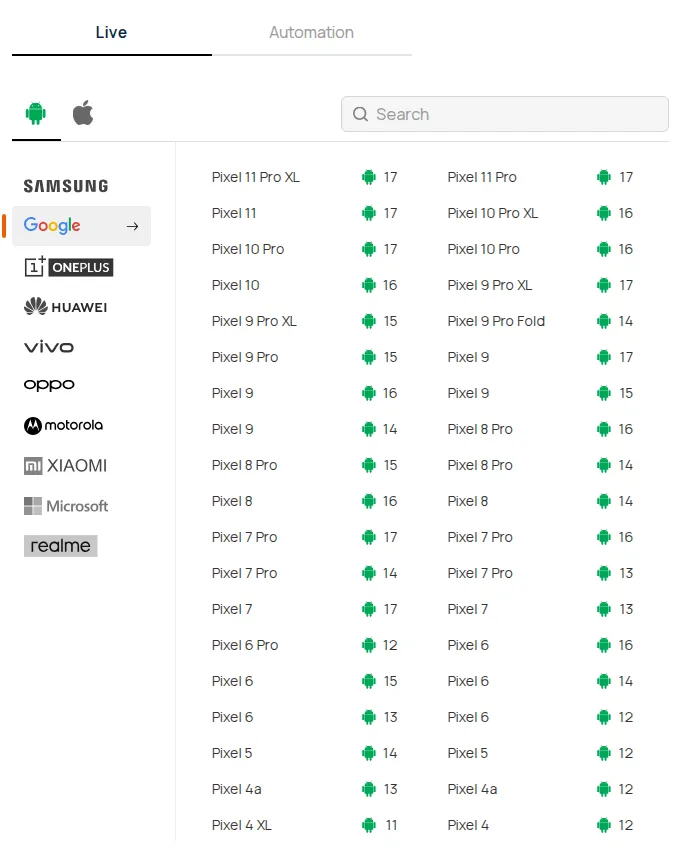
Older Pixel models are listed on several OS builds. The Pixel 9, for example, is listed on both Android 16 and Android 17, so one device model gives you an Android 16 baseline and an Android 17 run on the same hardware.
- Real devices only - the Android emulator online covers Android 4.1 through 16, so Android 17 runs happen on physical Pixels and foldables.
- Session artifacts - every real device cloud session records video, device logs, network logs, and CPU and memory data, which is where a memory-limiter kill or a silently failed audio call shows up.
- Automated runs - App Automation runs Appium, Espresso, XCUITest, Maestro and Mobilewright suites in parallel on 10,000+ real Android and iOS devices. If you are upgrading Appium in the same cycle, read what's new in Appium 4 first.
- Device planning - an Android app testing device matrix weights Android 17 against the versions your users still run, so the new OS gets a share of runs rather than the whole budget.

Android 17 QPR1 and the Changes Coming Next
Android 17 QPR1 reached Pixel devices with the September 2026 Feature Drop, per 9to5Google.
Google's QPR1 release notes say the QPR updates do not include app-impacting API changes, and that QPR1 reached Platform Stability with new capabilities you can adopt from its API diff report.
Your API 37 test plan carries over to QPR1 unchanged. These items set the next round of work:
- Android 18 URI grants - starting in Android 18, the system stops granting URI permissions automatically for ACTION_SEND, ACTION_SEND_MULTIPLE and ACTION_IMAGE_CAPTURE intents, so add FLAG_GRANT_READ_URI_PERMISSION now, plus the write flag for image capture.
- Cleartext traffic - Google plans to deprecate usesCleartextTraffic, so move cleartext exceptions into a network security configuration file.
- Google Play deadline - since August 31, 2026, new apps and app updates must target API 36, with extensions available to November 1, 2026, per Google Play's target API level requirements, which list no API 37 requirement yet.
StrictMode already flags the Android 18 URI grant change in debug builds:
val policy = StrictMode.VmPolicy.Builder()
    .detectImplicitUriPermissionGrant()
    .penaltyLog()
    .build()
StrictMode.setVmPolicy(policy)
Getting Started With Android 17 Testing
Run your current store build, unchanged, on an Android 17 Pixel and a Galaxy Z Fold8 first; that run covers every row in the all-apps table. Then build a debuggable variant, switch on API 37 changes one at a time with am compat enable, and raise targetSdkVersion to 37 once that pass is clean.
To automate the same checks, follow getting started with Espresso testing and select the Android 17 devices on TestMu AI for your next build.
Author

Sai Krishna
Blogs: 23

Sai Krishna is Director of Engineering at TestMu AI, where he leads agentic AI for quality engineering, building AI agents that autonomously drive mobile and conversational test automation. His current focus is Agent Testing and Model Context Protocol (MCP) support for mobile. He is a core contributor and member of the Appium open-source project and the creator of AppiumTestDistribution and appium-device-farm. With over 14 years of experience including more than 9 years at Thoughtworks as a Principal Consultant, he holds a BSc in Electronics and speaks regularly at TestMu and Appium Conf on Appium, mobile automation, and agentic AI in testing.
Reviewer


Android 17 FAQs
Did you find this page helpful?
More Related Blogs

TestMu AI forEnterprise
Get access to solutions built on Enterprise
grade security, privacy, & compliance
- Advanced access controls
- Advanced data retention rules
- Advanced Local Testing
- Premium Support options
- Early access to beta features
- Private Slack Channel
- Unlimited Manual Accessibility DevTools Tests