
Power Your Software Testing with AI Agents and Cloud
The Native AI-Agentic Cloud Platform to Supercharge Quality Engineering. Test Intelligently and Ship Faster.

- TestMu AI (Formerly LambdaTest)
- /
- Blog
- /
- Gemini CLI vs Claude Code: Access, CI, and a Same-Task Test
Gemini CLI vs Claude Code: Access, CI, and a Same-Task Test
Gemini CLI vs Claude Code in 2026: who can still use Gemini CLI, how each runs headless in CI, and how both agents did on one task checked in a real browser.
Published on:
TL;DR
Gemini CLI vs Claude Code comes down to your account. Gemini CLI is Google's open-source terminal agent for Gemini Code Assist Standard and Enterprise organizations. Claude Code is Anthropic's terminal agent for paid Claude plans, and it was the faster of the two on a same-task test. Free and Google AI Pro users now get Antigravity CLI instead.
Is Gemini CLI still free?
- Free Gemini CLI access: No. Free personal accounts and Google AI Pro or Ultra subscriptions now run Antigravity CLI. Gemini CLI still serves Code Assist Standard and Enterprise licenses, Code Assist for GitHub on Google Cloud, and paid Gemini API or Vertex AI keys.
- Claude Code on the Claude Free plan: No. Claude Code needs a Claude Pro, Max, Ultra, Team or Enterprise plan, or an Anthropic API key billed by usage.
Should I pick Gemini CLI or Claude Code?
- Best for Code Assist Enterprise teams: Gemini CLI - an Apache 2.0 licensed agent that signs in through Google Cloud or Vertex AI, and the terminal agent Google keeps supporting for Code Assist Standard and Enterprise licenses.
- Best for Claude subscribers and CI scripts: Claude Code - included in paid Claude plans, and on the same feature task it finished each run in about a minute and a half, against seven to fourteen minutes for Gemini CLI.
- Best for free or Google AI Pro users: Antigravity CLI - Google's replacement for individual accounts reads the same GEMINI.md and AGENTS.md files, so moving off Gemini CLI mostly means relocating workspace skills and MCP config.
Did both agents build a working feature in the same-task test?
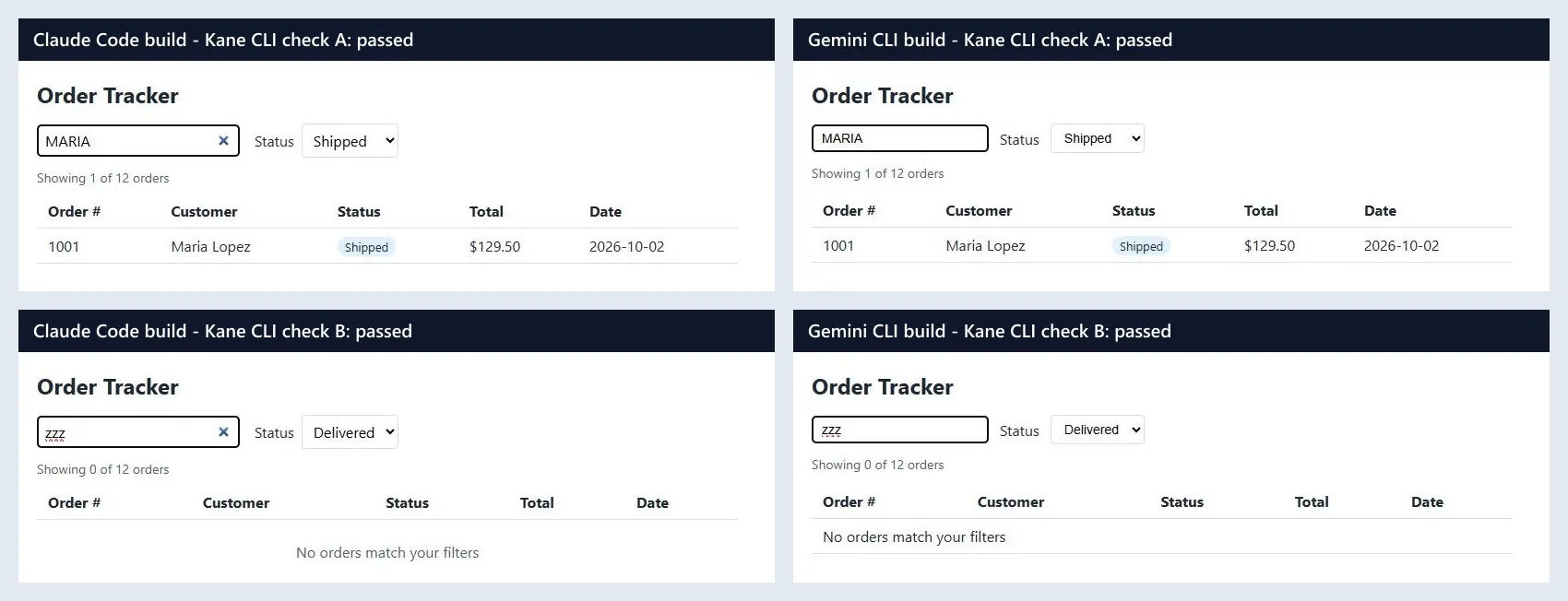
Yes. Each agent built the same search-and-filter feature twice, and all four builds passed both browser checks that TestMu AI's Kane CLI ran in real Chrome. The agents only edited files, so the browser check is what showed the feature worked.
Run gemini with the personal Google account that worked last spring and the request no longer goes through, while a teammate on a company license keeps working as before. That split is where a Gemini CLI vs Claude Code decision starts.
Google's Gemini CLI transition post says Gemini CLI stopped serving requests for Google AI Pro and Ultra subscribers and for free users on June 18, 2026, and points them to Antigravity CLI. Access for organizations on Gemini Code Assist Standard and Enterprise licenses stays unchanged.
In the Stack Overflow 2026 coding agent survey, 1,789 of 12,255 respondents (14.6%) had used Gemini Code Assist in the past year.
That license now decides who runs Gemini CLI, yet many Gemini CLI vs Claude Code write-ups still describe a free Gemini CLI tier that no longer serves requests.
Given the same small feature task, both agents produced builds that passed two browser checks run in real Chrome by TestMu AI's Kane CLI. Claude Code finished each run in about a minute and a half. Gemini CLI took between seven and fourteen minutes, and its first run spent its opening turns searching the web for the task's own wording.
Is Gemini CLI Still Available?
Yes, for organizations. The Gemini CLI README says the tool is designed for Gemini Code Assist Standard and Enterprise licenses and Code Assist for GitHub on Google Cloud, plus legacy paid API and Vertex keys. Free individual access and Google AI Pro and Ultra plans moved to Antigravity CLI.
| Your account | Google CLI to use | Status since June 18, 2026 |
|---|---|---|
| Gemini Code Assist Standard or Enterprise | Gemini CLI (gemini) | Unchanged. Google says it keeps supporting Gemini CLI for these licenses. |
| Code Assist for GitHub through Google Cloud | Gemini CLI | Unchanged. |
| Paid Gemini API or Vertex AI key | Gemini CLI | Still accepted, billed by usage. |
| Free personal Google account | Antigravity CLI (agy) | Gemini CLI stopped serving these requests. |
| Google AI Pro or Ultra | Antigravity CLI (agy) | Moved from Gemini CLI. |
The README adds two caveats for anyone comparing models. Gemini CLI is not tuned for the Gemini 4 series, such as Gemini 4 Argon, and Google says not to use it to benchmark Gemini models because its harness produces unrepresentative scores.
If you already have code from either Google CLI to check, the Gemini CLI testing guide covers verification for both.
Gemini CLI vs Claude Code at a Glance
On the Claude pricing page, Claude Code is included in the Pro, Max and Ultra plans but not in Free. Max gives 5x Pro usage every 5 hours and every week, and Ultra drops the 5-hour limit for verified accounts with 10x Pro usage every week.
| Feature | Gemini CLI | Claude Code |
|---|---|---|
| Maker and license | Google, open source under Apache 2.0 | Anthropic, proprietary |
| Who can sign in | Code Assist Standard and Enterprise users, Code Assist for GitHub on Google Cloud, paid Gemini API or Vertex AI keys | Claude Pro, Max, Ultra, Team and Enterprise users, or an Anthropic API key |
| Models used with no model flag (same-task test) | gemini-3.8-flash, routed through gemini-3.5-flash-lite | claude-opus-5-5, with claude-haiku-5-5 for a small side call |
| Context file | GEMINI.md (global, workspace and just-in-time); context.fileName can add AGENTS.md | CLAUDE.md; reads AGENTS.md only when no CLAUDE.md exists |
| Skills folders | .gemini/skills or .agents/skills, plus the same two under your home folder | .claude/skills and ~/.claude/skills |
| MCP config | mcpServers in ~/.gemini/settings.json | .mcp.json in the project, or ~/.claude.json |
| Headless mode | -p with text, json or stream-json output | -p with text, json or stream-json output |
| Untrusted folder in a headless run | Refuses to start unless you pass --skip-trust or set GEMINI_CLI_TRUST_WORKSPACE=true | No trust dialog under -p; project hooks and .mcp.json servers still run |
| Sandboxing | -s flag with macOS Seatbelt, Docker or Podman, among others | Bash sandbox on macOS, Linux and WSL2; native Windows runs commands unsandboxed |
| Undo | Checkpointing is off by default; enable it in settings.json, then use /restore | Checkpoints are automatic; use /rewind |
| GitHub Actions | run-gemini-cli action from google-github-actions | claude-code-action, set up with /install-github-app |
For the files and extension points on the Anthropic side, the Claude Code guide walks through CLAUDE.md, skills, hooks and subagents. For the wider field of terminal agents, see the roundup of agentic coding CLI tools. For Codex's skill folders and triggers, see Codex skills.
How the Same-Task Test Worked
Both agents got an identical repo: a static Order Tracker page that loads 12 orders from orders.json into a table, plus a TASK.md asking for these changes:
- Search - a text input with the placeholder "Search by customer" that filters rows by customer name, case-insensitive, as the user types.
- Status filter - a dropdown labelled "Status" with All, Pending, Shipped and Delivered that combines with the search.
- Count line - "Showing X of Y orders" above the table, updated whenever either filter changes.
- Empty state - the text "No orders match your filters" instead of any rows when nothing matches.
- A small trap - statuses are lowercase in orders.json but capitalized in the dropdown, so a filter that compares raw strings breaks.
Each agent ran headless with the same prompt, file-edit permission only and no shell, in its own git repo.
Claude Code's bare mode skips hooks, skills, plugins, MCP servers and CLAUDE.md, but it never reads OAuth credentials, so it needs ANTHROPIC_API_KEY, an apiKeyHelper or your cloud provider's credentials.
On a subscription login, turn off user skills and MCP servers with flags instead, and move Gemini CLI's user-level skills aside for the run so neither agent loads extra instructions.
# Gemini CLI: trust the folder for this run, auto-approve file edits only
GEMINI_CLI_TRUST_WORKSPACE=true gemini \
  -p "Implement the task described in TASK.md in this folder. Only edit files in this folder." \
  --approval-mode auto_edit --output-format json > gemini-run.json

# Claude Code: accept edits only, no skills or slash commands, no MCP servers
claude -p "Implement the task described in TASK.md in this folder. Only edit files in this folder." \
  --permission-mode acceptEdits --disable-slash-commands --strict-mcp-config \
  --no-session-persistence --output-format json > claude-run.json
Each finished build was served on its own local port and graded in Chrome by Kane CLI with two objectives. Both objectives were written before either agent ran and kept outside both repos, so neither agent could read them:
# Check A: case-insensitive search, then search plus status filter
kane-cli run "go to http://127.0.0.1:8732/, type 'MARIA' in the 'Search by customer' box, verify the page shows 'Showing 3 of 12 orders', select 'Shipped' in the Status dropdown, verify the page shows 'Showing 1 of 12 orders' and the only order row is order 1001 for Maria Lopez" \
  --agent --headless --timeout 300 --max-steps 20

# Check B: status filter alone, then the empty state
kane-cli run "go to http://127.0.0.1:8732/, select 'Delivered' in the Status dropdown, verify the page shows 'Showing 5 of 12 orders', type 'zzz' in the 'Search by customer' box, verify the text 'No orders match your filters' is visible and no order rows are shown" \
--agent --headless --timeout 300 --max-steps 20- Rounds - each agent ran twice, from a clean checkout each time.
- Versions - Gemini CLI 0.66.0, Claude Code 2.1.314 and Kane CLI 0.10.0.
- Models - no model flag on either agent, so each used its defaults for the account it signed in with.
Same-Task Results: Time, Turns, and Browser Checks
All four builds passed both Kane CLI checks, so correctness did not separate the agents on this task. Time to a finished build did, and so did the way each agent described its own work.
| Metric | Claude Code round 1 | Claude Code round 2 | Gemini CLI round 1 | Gemini CLI round 2 |
|---|---|---|---|---|
| Wall-clock time | 89 s | 94 s | 863 s | 436 s |
| Turns or main-model requests | 14 turns | 21 turns | 21 requests | 15 requests |
| Output tokens, thinking included | 6,038 | 8,847 | 58,935 | 48,366 |
| Lines added / removed | 42 / 1 | 42 / 1 | 61 / 2 | 81 / 20 |
| Tried to test its own build | Yes, 3 shell calls blocked | Yes, 6 shell calls blocked | No; ran 5 web searches for the spec's wording | Tried git log; no shell tool available |
| Said it had not run the code | Yes | Yes | No | No |
| Kane CLI check A / check B | Passed / Passed | Passed / Passed | Passed / Passed | Passed / Passed |
- Speed - Claude Code finished in 89 and 94 seconds. Gemini CLI spent most of its time in model reasoning: its round-two log shows two gaps of roughly two and a half minutes between tool calls before the first edit.
- Web searches for the spec - In round one, Gemini CLI's reasoning called TASK.md an evaluation task, and it ran 5 Google searches for exact sentences from the spec before it edited a file. 14 of the 16 requests to the search model returned HTTP 500 errors. Round two made no searches.
- Self-testing - Claude Code wrote Node scripts to exercise its filters against a stubbed DOM. The edit-only permission blocked them, and its final message said it had not run the code. Gemini CLI's headless auto_edit mode does not register a shell tool at all, and its final message said the task was implemented.
- Diff size - Claude Code produced the same size of change both times. Gemini CLI's second diff rewrote app.js and grew to 81 added lines.
- The case trap - Both agents mapped the capitalized dropdown labels to the lowercase status values, and every Shipped and Delivered check passed.
Two runs per tool on one small task is a spot check, and token counts come from different tokenizers, so compare them loosely. The speed gap describes Gemini CLI's harness with the model it picked, which is why the Gemini CLI README asks you not to use the CLI to benchmark Gemini models.
Running Gemini CLI and Claude Code Headless in CI
The Gemini CLI headless reference lists four exit codes: 0 for success, 1 for a general error or API failure, 42 for an input error and 53 when the turn limit is exceeded. Its JSON output carries the response plus token usage and API latency stats.
The Gemini CLI trusted folders page says that in a headless environment such as a CI pipeline, an untrusted folder makes the CLI throw FatalUntrustedWorkspaceError and exit, unless you pass --skip-trust or set GEMINI_CLI_TRUST_WORKSPACE=true.
In practice that refusal exits with code 55, which is missing from the headless exit-code list. Branch on any non-zero code in CI rather than matching specific values.
Claude Code takes the opposite default. Its headless docs say a -p session runs the hooks in a project's .claude/settings.json and connects the servers in its .mcp.json even in a folder you never trusted, with no trust dialog. Add --bare in CI so only what you pass on the command line runs.
- Gemini CLI auth in CI - set GEMINI_API_KEY for a paid key, or GOOGLE_GENAI_USE_VERTEXAI with a Google Cloud key. Personal Google sign-in for free accounts no longer serves Gemini CLI.
- Claude Code auth in CI - bare mode reads ANTHROPIC_API_KEY, an apiKeyHelper or your cloud provider's credentials, never your subscription login. The GitHub Action also accepts a CLAUDE_CODE_OAUTH_TOKEN secret.
- No shell in auto-edit modes - Gemini CLI's auto_edit mode left the agent with no shell tool, and Claude Code's acceptEdits mode blocked its shell calls. If you want the agent to run tests, allow the specific commands rather than everything.
- Spend tracking - Claude Code's JSON output includes a client-side cost estimate field, and Gemini CLI's stats break tokens down by model, including the router and search models.
# Gemini CLI: trust this checkout for the run and keep tools to file edits
GEMINI_CLI_TRUST_WORKSPACE=true gemini -p "$TASK" --approval-mode auto_edit --output-format json > gemini.json || exit 1

# Claude Code: skip host hooks, skills, plugins, MCP servers and CLAUDE.md
claude --bare -p "$TASK" --permission-mode acceptEdits --output-format json > claude.json || exit 1

# Gate the merge on the browser, not on the agent's own report
kane-cli run "$OBJECTIVE" --agent --headless --timeout 300 \
  --username "$LT_USERNAME" --access-key "$LT_ACCESS_KEY" || exit 1
Note: Kane CLI by TestMu AI runs the browser check your coding agent skips, in real Chrome, and exits 0, 1, 2 or 3 so CI can stop a merge on a broken feature. Start free and run your first browser check.
Context Files, Skills, and MCP Across Both Tools
Gemini CLI reads GEMINI.md context files in layers: a global file at ~/.gemini/GEMINI.md, files in the workspace and its parent folders, and just-in-time files it finds when a tool touches a directory. It concatenates all of them and sends them with every prompt.
Claude Code's memory docs say it reads AGENTS.md only when no CLAUDE.md, .claude/CLAUDE.md or CLAUDE.local.md exists in the working directory or above it, and it never reads anything under a .agents/ folder. When both files exist, it reads CLAUDE.md only, unless CLAUDE.md imports AGENTS.md.
To keep one set of rules for both agents, put them in AGENTS.md. Then point Gemini CLI at it through the context.fileName setting in .gemini/settings.json, which accepts a list:
{
  "context": {
    "fileName": ["AGENTS.md", "GEMINI.md"]
  }
}
On the Claude Code side, either leave CLAUDE.md out so AGENTS.md loads on its own, or keep a CLAUDE.md whose first line imports the shared file:
@AGENTS.md

# Claude-only notes below this line- Gemini CLI skills - the Gemini CLI skills page loads SKILL.md folders from .gemini/skills or .agents/skills, with .agents/skills winning a name clash.
- Claude Code skills - Claude Code loads project skills from .claude/skills, so a skill shared by both agents needs a copy in each place.
- MCP servers - Gemini CLI keeps them under mcpServers in its settings.json, while Claude Code uses .mcp.json or ~/.claude.json. The two files cannot be shared, so keep each server definition in one script that writes both.
- Custom commands - Gemini CLI has custom slash commands and extensions. Claude Code merged custom commands into skills, so a .claude/commands file and a skill both create the same slash command.
Moving From Gemini CLI to Antigravity CLI
The Antigravity CLI migration guide says agy detects Gemini CLI configs on first launch and offers to convert them. Context files carry over unchanged, but some paths do not:
- Context files - GEMINI.md and AGENTS.md in the workspace, and ~/.gemini/GEMINI.md globally, work the same way in both CLIs.
- Extensions - agy plugin import gemini converts Gemini CLI extensions into Antigravity plugins, and legacy commands become skills.
- Workspace skills - move .gemini/skills to .agents/skills by hand, or agy will not see them.
- MCP servers - they move out of settings.json into ~/.gemini/config/mcp_config.json or .agents/mcp_config.json, and the url or httpUrl key becomes serverUrl.
- Partial parity - some custom terminal themes and experimental visual overlays from Gemini CLI are not supported.
Antigravity CLI is one surface of a larger product, with a desktop app, an IDE and editor extensions alongside the agy binary. The Google Antigravity review covers how those parts fit and whether their agents ship working apps.
If the goal is Gemini models inside Claude Code rather than a second coding agent, the Gemini API CLI is Google's stateless gemini-api command. It gives Claude Code, Codex and other agents with shell access direct calls for Gemini models, file analysis, media generation and managed agents.
Checking Either Agent's Output in a Browser
Neither agent opened the page it built, and only one of them said so. Kane CLI by TestMu AI is an agentic quality verifier: it runs a plain-English objective in a real browser and returns a pass or fail with screenshots and logs.
- One install for both agents - npx @testmuai/kane-cli-skill writes the skill for Claude Code, Codex CLI and Gemini CLI, as the Kane CLI with AI coding agents docs describe.
- Agent mode - --agent --headless prints NDJSON events ending in a run_end event, which the coding agent reads to decide whether to fix something or stop.
- Exit codes for CI - 0 on pass, 1 on fail, 2 on a setup or auth error and 3 on timeout.
- Evidence - every run saves an .evidence pack with per-step screenshots, logs and a network trace. The screenshots in the results above come from those packs.
- Credits - the CLI is free to install, and runs use KaneAI credits from your TestMu AI account. Each check in this test used about 21 credits.
npm install -g @testmuai/kane-cli
npx @testmuai/kane-cli-skill

# From Claude Code or Gemini CLI, or from your own terminal
kane-cli run "go to http://localhost:3000/, type 'MARIA' in the search box, verify the page shows 'Showing 3 of 12 orders'" \
  --agent --headless --timeout 300
The same loop works for apps a Google agent builds; the Gemini CLI app testing page shows the setup for Gemini CLI projects.
Gemini CLI or Claude Code: Which Fits Your Team?
Start from the account you already pay for, then weigh speed and how much you want to control the harness.
| Your situation | Pick | Why |
|---|---|---|
| Organization on Code Assist Standard or Enterprise | Gemini CLI | Your license covers it, it signs in through Google Cloud, and Google keeps updating it for these licenses. |
| Individual on a free or Google AI Pro or Ultra account | Antigravity CLI | Gemini CLI no longer serves these accounts. |
| Claude Pro, Max, Ultra, Team or Enterprise subscriber | Claude Code | It is already in your plan. |
| Short headless tasks in CI | Claude Code | It finished the same task in about a minute and a half per run, and --bare keeps runs reproducible. |
| You need to read, patch or fork the harness | Gemini CLI | It is open source under Apache 2.0. |
| A repo already shared by several agents | Either | Both can read AGENTS.md, Gemini CLI through context.fileName. |
If you are weighing Claude Code against an editor-first agent instead, Claude Code vs Cursor compares the two on plans, models and config.
Conclusion
Before you compare Gemini CLI vs Claude Code on features, check which account you have. A Code Assist Standard or Enterprise license keeps you on Gemini CLI, a paid Claude plan includes Claude Code, and a free or Google AI Pro account now means Antigravity CLI.
Whichever agent you keep, gate its output on a browser check rather than on its own summary. The Kane CLI getting started guide sets up that check in a few commands.
Testing from the terminal? Kane CLI by TestMu AI lets SDETs and developers plan, write, run and debug tests from the command line.
Author

Samyak Goyal
Blogs: 34

Samyak Goyal is a Senior Member of Technical Staff at TestMu AI engineering Kane CLI, the command-line tool that runs browser automation from the terminal, where a flow described in natural language executes in a real Chrome browser and returns pass or fail with shareable proof. He is a backend engineer with 4+ years of experience, previously an SDE at Innovaccer, where he built APIs, introduced Kafka, and cut deployment from weeks to hours. Samyak also builds multi-agent systems, skill-orchestration frameworks, and a personal copilot that indexes 200+ microservice repositories.
Reviewer

Srinivasan Sekar
Reviewer
Srinivasan Sekar is Director of Engineering at TestMu AI, where he leads engineering and open-source initiatives behind the Selenium and Appium automation grid and owns TestMu AI's MCP Server. A committer to Appium and a contributor to Selenium, WebdriverIO, Taiko, and AppiumTestDistribution, he brings over 15 years of experience in quality engineering and open-source technologies. He is the author of the Apress book 'The MCP Standard: A Developer's Guide to Building Universal AI Tools with the Model Context Protocol,' a Certified Kubernetes and Cloud Native Associate, and an international conference speaker. Before TestMu AI he spent over eight years at Thoughtworks as a Principal Consultant and Quality Architect. Srinivasan holds a B.Tech in Information Technology from Anna University.


Gemini CLI vs Claude Code FAQs
Did you find this page helpful?
More Related Blogs

TestMu AI forEnterprise
Get access to solutions built on Enterprise
grade security, privacy, & compliance
- Advanced access controls
- Advanced data retention rules
- Advanced Local Testing
- Premium Support options
- Early access to beta features
- Private Slack Channel
- Unlimited Manual Accessibility DevTools Tests