
Power Your Software Testing with AI Agents and Cloud
The Native AI-Agentic Cloud Platform to Supercharge Quality Engineering. Test Intelligently and Ship Faster.

- TestMu AI (Formerly LambdaTest)
- /
- Blog
- /
- Google Antigravity Review: Do Its Agents Ship Working Apps?
Over 100K users across Alphabet rely on Gemini 4 Argon inside an internal version of Antigravity each month to solve production problems, according to Google's Gemini 4 Argon rollout post.
Outside Google, every Antigravity task ends the same way: the agent reports what it built and how it checked the result. The same agent writes that check and grades it, and in a default session it does not use Antigravity's browser tools to do so.
For this Google Antigravity review, six small web apps went through that loop: three tasks, each built once by Gemini 3.8 Flash and once by Gemini 4 Argon in Antigravity CLI. Every agent reported success, and every build was then checked again in a real Chrome browser against the same acceptance criteria.
Antigravity competes in a crowded field of AI coding agents, and most published reviews still describe the November 2025 launch build. The product below is the one Google ships today, after the 2.0 split into an app, a CLI, editor extensions, an IDE, and an SDK.
TL;DR
Google Antigravity is Google's agent-first development platform, shipped as a desktop app, a CLI, editor extensions, an IDE, and an SDK. Its Gemini agents plan tasks, edit files, and run commands, and in testing they shipped working apps. It is worth using for delegated multi-file work, provided an independent check confirms what the agents report.
Google Antigravity at a Glance
- Specs met in testing: Yes. All six Google Antigravity test builds, three tasks each built by Gemini 3.8 Flash and Gemini 4 Argon, passed every acceptance criterion when rechecked in a real Chrome browser, and Argon finished each task in a fraction of Flash's time and tokens.
- Browser checks by default: No. Antigravity's browser subagent runs only when you type /browser and is not available in the Antigravity IDE, so the agents in testing graded their own work with Node scripts against a mock DOM.
- Free tier: Yes. Every Antigravity plan includes Gemini 3.8 Flash, unlimited Tab completions, and the Antigravity CLI, with quota that refreshes weekly on the free tier and every five hours on Google AI Pro and Ultra.
- Published quota numbers: No. Google says Antigravity's baseline rate limits depend on available capacity and can change, so heavy users cannot plan their usage in prompts or tokens ahead of time.
- Headless CI runs: Yes, with planning. Antigravity CLI's agy -p print mode returns JSON with token usage, but it soft-denies any permission you did not pre-approve, and in testing that left a run reporting SUCCESS with no output.
- Independent verification: To verify Antigravity's work, TestMu AI's Kane CLI runs a plain-English acceptance check in a real Chrome browser from the Antigravity terminal and returns a pass or fail with an evidence pack for every step.
What Is Google Antigravity?
Google Antigravity is Google's agent-first development platform. An Antigravity agent plans a task, edits files across a project, runs terminal commands, and drives Chrome when asked, then reports back through artifacts such as implementation plans, code diffs, and walkthroughs.
Google launched Antigravity as an IDE in November 2025. The Antigravity 2.0 announcement moved the agent-first experience into a standalone desktop app with no IDE, shipped a CLI and an SDK alongside it, and said a later release will remove the Agent Manager from the Antigravity IDE.
| Surface | What it is | Enterprise sign-in |
|---|---|---|
| Antigravity App | Agent-first desktop app with no code editor. Runs agents in the foreground or background, with scheduled tasks and worktrees. | Yes |
| Antigravity CLI (agy) | Terminal agent with an interactive interface and a headless print mode for scripts and CI. | Yes |
| IDE extensions | Agent side panels inside VS Code, Visual Studio, JetBrains IDEs, Zed, Xcode, and Eclipse. | Yes (JetBrains and Zed in Preview) |
| Antigravity IDE | The original editor with Tab completions and an agent side panel. | No |
The Antigravity FAQ states that enterprise sign-in works in the Antigravity App, the Antigravity CLI, and the IDE extensions, but not in the standalone Antigravity IDE.
Google also ships an Antigravity SDK for teams that want to build custom agents rather than use one of the four surfaces above.
TestMu AI's one-minute explainer covers the agent-first workflow and ends on the catch the test in this article measures: an agent completing a task does not prove the app behaves correctly.

What Changed With Antigravity 2.0?
Antigravity 2.0 split the product into a standalone agent app, a CLI, and an SDK, and Google has shipped IDE extensions, Remote Control, Gemini 4 Argon, and a Plugin Marketplace since. Check any review's date against this timeline before trusting its feature list or model names.
| Date | Release | What changed |
|---|---|---|
| November 2025 | Antigravity IDE | An editor plus a separate Agent Manager surface for running agents in parallel. |
| May 19, 2026 | Antigravity 2.0, CLI, and SDK | A standalone agent app with no IDE, a terminal agent, and an SDK. Plan changes the same day merged Gemini Flash and Pro limits into one pool. |
| August 20, 2026 | IDE extensions | Agent panels for VS Code, Visual Studio, Zed, JetBrains IDEs, and Xcode, with Eclipse listed in the docs since. |
| August 21, 2026 | Remote Control | Remote Control drives Antigravity sessions on other machines from a web browser, with push notifications when an agent needs input. |
| October 13, 2026 | Gemini 4 Argon | Argon arrives in the Antigravity App and CLI for Google AI Pro and Ultra subscribers and eligible Gemini Enterprise plans. |
| October 29, 2026 | Plugin Marketplace | The Plugin Marketplace packages skills, MCP servers, rules, hooks, and custom agents into plugins you install in one click. |
| November 2, 2026 | Model removals | Claude Sonnet 4.6, Claude Opus 4.6, and GPT-OSS-120b leave the Antigravity model list. |
For Argon's benchmarks and access outside Antigravity, see Gemini 4 Argon.
How Was Google Antigravity Tested?
Three web-app tasks went to Antigravity CLI in headless mode, once on Gemini 3.8 Flash and once on Gemini 4 Argon, and every build was rechecked in a real Chrome browser. Headless mode was the choice because its streaming output records every tool call the agent makes, including the ones it uses to check its own work.
- Surface - Antigravity CLI 1.4.12, run with agy -p and --output-format stream-json, authenticated with a Gemini API key (modelProvider set to gemini).
- Models - gemini-3.8-flash-medium, the model every plan includes, and gemini-4-argon-medium, the paid-plan model. Both received identical prompts.
- Tasks - three single-file web apps in plain HTML, CSS, and JavaScript: an expense splitter (balances, fewest settle-up payments, input validation, localStorage), a sign-up form (four validation rules with exact error text, a disabled button, a trimmed lowercase email), and a shopping cart (quantity limits, a case-insensitive SAVE10 code, 8% tax after the discount, rounding to the cent).
- Prompt ending - every prompt ended with "Verify your work before you finish. Then summarize what you built and how you verified it." No prompt used /browser.
- Permissions - the proceed-in-sandbox preset with the terminal sandbox on, allow rules for node and localhost browsing, and deny rules for deletes, downloads, npm, and git.
- Independent checks - each build was served on localhost and checked twice: by Kane CLI with one plain-English objective per task, identical for both models, and by a scripted Puppeteer pass over every acceptance criterion.
- Isolation - one early Flash run listed the folders above its workspace, found the grading script there, and wrote its self-test from it. That run was discarded and repeated in an isolated folder.
The CLI settings and the command each run used:
// ~/.gemini/antigravity-cli/settings.json (permission rules trimmed)
{
  "modelProvider": "gemini",
  "toolPermission": "proceed-in-sandbox",
  "enableTerminalSandbox": true,
  "permissions": {
    "allow": ["command(node)", "read_url(localhost)", "execute_url(localhost)"],
    "deny": ["command(Remove-Item)", "command(curl)", "command(npm)", "command(git)"]
  }
}
export GEMINI_API_KEY="your-api-key"
agy -p "$(cat cart-task.txt)" --model gemini-4-argon-medium --output-format stream-json > cart.ndjsonGoogle's headless mode docs explain how print mode handles a tool that needs approval it cannot get: the tool is soft-denied, the run continues and exits 0, and a notice naming the tool goes to stderr. Shell commands default to Ask, so they are soft-denied unless you grant them.
Under the default request-review preset, the agent stopped after its first soft-denied command, a directory listing, yet the run still exited 0 and reported status SUCCESS with an empty response. The only explanation was on stderr:
a tool required the "command" permission that headless mode cannot prompt for, so it was auto-denied. Add an allow-rule under permissions.allow in settings.json (e.g. command(<target>)). Alternatively, re-run with --dangerously-skip-permissions to auto-approve all tools.Gate a pipeline on the response and the files that changed, not on the exit code alone. Pre-approve the read-only commands the agent will reach for, or switch to proceed-in-sandbox so commands that fit inside the sandbox run without a prompt.
Do Antigravity's Agents Ship Working Apps?
Yes, in this test. Every run ended with status SUCCESS and a summary saying each requirement had been verified, and the browser checks agreed on all six builds. The agents' own checks never ran in a browser.
| Build | Agent run | How the agent verified | Kane CLI check | Scripted check |
|---|---|---|---|---|
| Splitter, Gemini 3.8 Flash | SUCCESS in 11.7 min, 190,776 tokens | Node script against a mock DOM, after looking for Playwright, Chrome, and Edge | Passed, 159 s, 51 credits | 5 of 5 |
| Splitter, Gemini 4 Argon | SUCCESS in 5.3 min, 49,151 tokens | Node script against a mock DOM | Passed, 178 s, 45 credits | 5 of 5 |
| Sign-up, Gemini 3.8 Flash | SUCCESS in 7.7 min, 130,409 tokens | Node script against a mock DOM, after a headless Chrome launch it wrote itself did not respond | Passed, 202 s, 64 credits | 8 of 8 |
| Sign-up, Gemini 4 Argon | SUCCESS in 2.8 min, 28,460 tokens | Node script against a mock DOM | Passed, 163 s, 57 credits | 8 of 8 |
| Cart, Gemini 3.8 Flash | SUCCESS in 8.5 min, 158,191 tokens | 54-assertion Node script against a mock DOM, after looking for Chrome and Edge | Passed, 244 s, 65 credits | 9 of 9 |
| Cart, Gemini 4 Argon | SUCCESS in 4.1 min, 41,726 tokens | Node script against a mock DOM | Passed, 202 s, 59 credits | 9 of 9 |
- Specs met - all six builds passed every criterion in both checks, including the rounding case in the cart (Discount $4.90, Tax $3.53, Total $47.62 on a $48.99 subtotal) and the trimmed, lowercased email on sign-up.
- No browser in any self-check - none of the six runs called an Antigravity browser tool. Each agent's final check was a Node script that loaded index.html into a hand-built mock DOM and asserted against that. Every Flash run looked for Playwright, Chrome, or Edge first, and one launched headless Chrome on its own; Chrome did not answer within five seconds, and that run fell back to a mock DOM as well.
- Argon was faster and cheaper - Argon's runs took 2.8 to 5.3 minutes and 28,460 to 49,151 tokens. Flash took 7.7 to 11.7 minutes and 130,409 to 190,776 tokens, plus 445,618 to 1,942,160 cached tokens read per run.
- The sandbox held - the Flash splitter run tried Get-Process -Name node | Stop-Process -Force, then several ways of deleting its own test file. The sandbox blocked each attempt, and every Node process outside the run, including a local dev server, kept running.
- Cost of the independent check - each Kane CLI run took 159 to 244 seconds and 45 to 65 credits, and returned a shareable Test Manager link to the test case it generated.
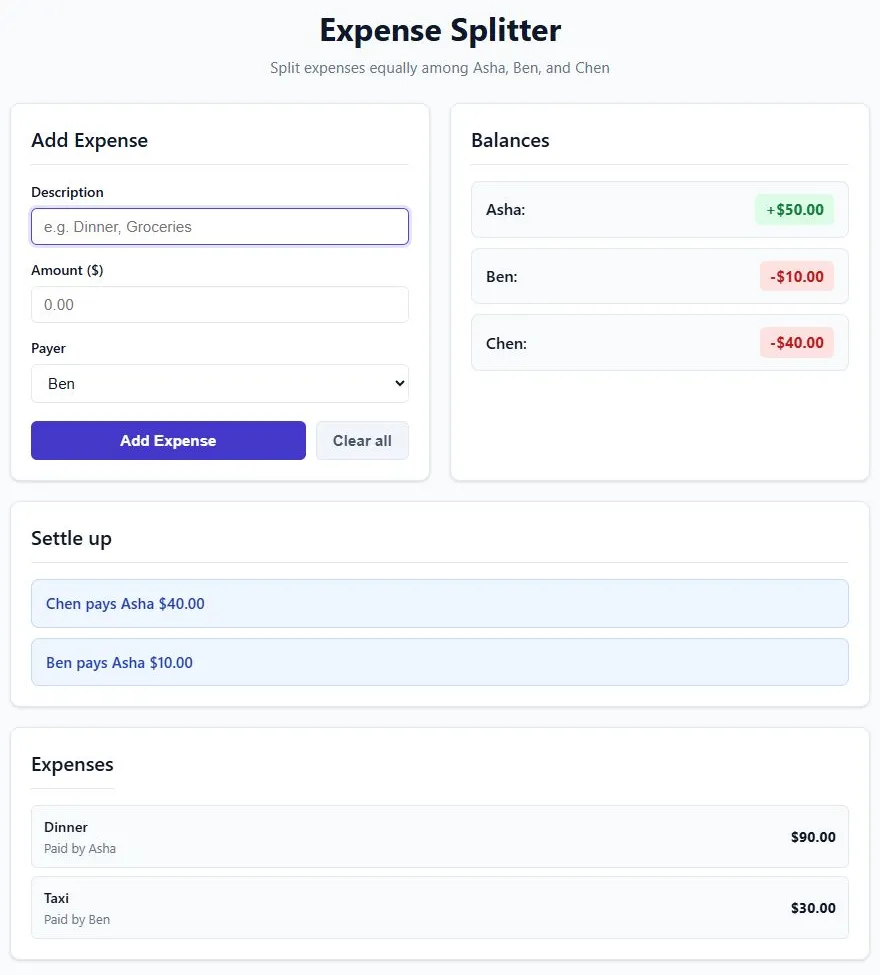
That frame is step 13 of the Kane CLI run on the Flash-built splitter, where the assertion on the Settle up section passed. The objective that produced it is plain English, and the same text ran against the Argon build:
kane-cli run "go to http://127.0.0.1:8741/index.html. Add an expense with description Dinner, amount 90, paid by Asha. Add an expense with description Taxi, amount 30, paid by Ben. Assert the Balances section shows Asha +\$50.00, Ben -\$10.00 and Chen -\$40.00. Assert the Settle up section shows exactly two payments: Chen pays Asha \$40.00 and Ben pays Asha \$10.00. Then try to add an expense with amount -5 and assert the message Enter an amount greater than 0 is shown and the balances did not change. Reload the page and assert the balances still show Asha +\$50.00, Ben -\$10.00 and Chen -\$40.00. Click Clear all and assert every balance shows \$0.00 and no payments are listed under Settle up." --agent --headlessThe closing event, trimmed to the fields a pipeline or an agent reads:
{
  "type": "run_end",
  "status": "passed",
  "one_liner": "cleared all balances on the expense-sharing page",
  "final_state": {
    "url": "http://127.0.0.1:8741/index.html",
    "all_balances_zero": "true",
    "payments_listed_under_settle_up": "false"
  },
  "duration": 159.4,
  "bifurcated": true,
  "total_runs": 2,
  "credits_consumed": 51.04549999999999,
  "result_code": 100,
  "reason_code": "success.complete"
}
Antigravity produced correct code on all three well-specified tasks with both models. The agents graded that code with scripts they wrote against a mock DOM, so the browser checks were the first evidence that the rendered pages behaved for a user. Can coding agents test their own code explains why that matters on harder tasks: the code and its test share one reading of the requirements.

Note: Point TestMu AI's Kane CLI at the app your Antigravity agent just built and get a pass or fail from a real Chrome browser, with a screenshot and network log for every step. Try TestMu AI free
What Does Google Antigravity Do Well?
Antigravity does well at delegated work you review as a deliverable rather than step by step: it produces reviewable artifacts, reaches six editors, exposes a scriptable CLI, and layers permission rules over a sandbox.
- Reviewable artifacts - the walkthrough docs describe a summary the agent writes when it completes a task, and for browser tasks it adds screenshots and screen recordings.
- Six editor extensions - the IDE extensions docs list VS Code, Visual Studio, JetBrains, Zed, Xcode, and Eclipse, so a team can keep its editor and still use the agent.
- Machine-readable CLI - print mode returns a conversation ID, a terminal status, and token usage, streams every tool call as NDJSON, and constrains the final answer to a schema with --json-schema.
- Layered guardrails - deny, ask, and allow rules sit on top of a permission preset, deny always wins, and the terminal sandbox blocked every destructive command in the test.
- Plugins - one plugin bundles up to five pieces (skills, MCP servers, rules, hooks, and custom agents) that install and toggle together across the App and the CLI.
- Remote Control - start a long refactor on a workstation, then monitor it, review changes, and answer the agent from any browser.
- Proof-backed work at Google - Google's Argon rollout post says Argon in Antigravity took a queue of 134 open bug reports and closed 97 stale or duplicate ones with documented commit proof in under three hours, a 72.4% queue reduction.
What Are Google Antigravity's Limitations?
The biggest limitation is quota you cannot plan around.
Google's plans documentation says Antigravity's baseline rate limits are primarily determined by available capacity, and that usage limits are subject to modification.
- Quota without numbers - the free tier gets "a meaningful quota, refreshed weekly", and limits track the work the agent does, so a complex task burns more. In the test, Gemini 3.8 Flash spent 130,409 to 190,776 tokens on a single-page app.
- Browser checks are opt-in - the /browser command docs say the browser subagent is hidden from the agent's normal subagent list and runs only when you invoke /browser, and it is not available in the Antigravity IDE.
- Allow rules reach past the sandbox - Antigravity's permissions docs list workspace plus temp directories as the file access of the sandboxed Default preset, and say a command rule covers execution both inside and outside the sandbox.
- Reach in practice - with node allowed, one test run listed folders outside its workspace, loaded packages from another project's node_modules, and read a grading script kept in a temp folder.
- Headless failures are easy to miss -a command your rules did not anticipate is soft-denied, and in the test the agent stopped there while the run still exited 0 with status SUCCESS and an empty response.
- The IDE is the legacy surface - the standalone Antigravity IDE has no enterprise sign-in and no /browser subagent, and Google plans to remove its Agent Manager.
- Consumer-plan automation limits - the Antigravity FAQ says agy -p is intended for direct scripting and CI, and that wrapping agy inside third-party coding agents or apps, or automating account rotation, is not supported under consumer plans.
- Model churn - with Claude Sonnet 4.6, Claude Opus 4.6, and GPT-OSS-120b gone on November 2, 2026, Gemini 3.8 Flash is the only reasoning model the free tier lists.
For how the terminal-first Claude Code compares with an editor-first agent on models, limits, and UI checks, see Claude Code vs Cursor.
Is Google Antigravity Free?
Yes. Using Antigravity without a Google AI plan gets you Gemini 3.8 Flash, unlimited Tab completions, and the CLI, with quota that refreshes weekly. Paid Google AI plans add models and refresh quota every five hours.
Google's plan changes post set the ratios between paid tiers: the lower Google AI Ultra tier carries a 5X token allowance compared with Google AI Pro, and the higher Ultra tier 20X. The same post moved Gemini Flash and Pro to one shared pool, while non-Gemini models keep a separate fixed rate limit.
| Plan | Quota refresh | Reasoning models | Also included |
|---|---|---|---|
| No Google AI plan | Weekly | Gemini 3.8 Flash | Unlimited Tab completions, the CLI, scheduled tasks |
| Google AI Pro | Every five hours, up to a weekly limit | Gemini 3.8 Flash, plus Gemini 4 Argon, Claude Sonnet 5.5, and Claude Opus 5.5 on paid (non-trial) plans | AI credits for overage |
| Google AI Ultra | Every five hours, with the highest weekly limits | Gemini 4 Argon, Gemini 3.8 Flash, Claude Sonnet 5.5, Claude Opus 5.5 | AI credits for overage |
| Gemini Enterprise | Under Google Cloud terms | All of the above, plus Gemini 3.7 Flash, Gemini 3.6 Flash, and Gemini 3.1 Pro | Seat-based or pay-as-you-go plans, spend caps, admin controls |
The Antigravity pricing page lists spend caps across API and subscription plans and centralized administrative controls as benefits of the Business plan through Google Cloud.
If predictable spend matters more than model choice, route team usage through Gemini Enterprise rather than individual Google AI subscriptions.
Is Google Antigravity Good?
Yes, for delegating well-specified multi-file work, as long as something other than the agent checks the result. Both models in the test produced correct apps, Argon quickly and Flash slowly, and neither finished with a browser check of its own work.
| Your situation | Verdict | Reason |
|---|---|---|
| Solo developer starting free | Worth trying | Gemini 3.8 Flash and the CLI cost nothing, but a weekly quota and Flash's token use limit long sessions. |
| Team on Google Cloud | Strong fit | The App, CLI, and extensions sign in through Gemini Enterprise, with spend caps and admin controls. |
| JetBrains, Xcode, or Visual Studio shop | Good fit | The extensions bring the agent into the editor the team already uses. |
| CI pipelines | Usable with planning | agy -p returns JSON, but unapproved commands are soft-denied while the run still exits 0, and consumer plans cannot wrap agy in other tools. |
| UI-heavy web apps | Pair with an independent check | The agent drives a browser only on /browser, and its default self-checks run against a mock DOM. |
How Should You Check What Antigravity Builds?
Give Antigravity one task you would normally hand to a teammate, and before you merge it, check the running app with an acceptance test the agent did not write.
TestMu AI's Kane CLI is a deterministic browser agent that validates rendered UI in a real Chrome browser from a natural-language objective. It runs in the same terminal as Antigravity, exits with 0 on a pass and 1 on a failed assertion, and writes an evidence pack with a screenshot for every step, which is how each build in this review was checked.
The Kane CLI with AI coding agents guide shows how to let the Antigravity agent call Kane CLI itself, and Antigravity app testing covers sign-in, routing, and regression checks for apps Antigravity builds.
npm install -g @testmuai/kane-cli
kane-cli login
# Then, in the Antigravity prompt:
# Read https://www.testmuai.com/kane-cli-agent/AGENTS.md and use Kane CLI to test the checkout flow end to end.
Conclusion
Antigravity's agents did the work in this test: six builds, two models, every acceptance criterion met. What they didn't do was prove it.
Each agent graded its own code with a script it wrote against a mock DOM, the browser subagent never ran unless asked, and one headless run reported SUCCESS with nothing to show for it. Those are small gaps on a single-page app and bigger ones on the multi-file work Antigravity is built to take on, where the code and its test share one reading of the requirements.
So delegate the work to Antigravity, then check the running app with an acceptance test the agent didn't write. That's how every build in this review was verified: one plain-English objective, a real Chrome browser, an evidence pack for every step, and a test case saved to Test Manager that the team can rerun on the next change.
Testing from the terminal? TestMu Kane CLI lets SDETs and developers plan, write, run and debug tests from the command line.
Author

Chaitanya Sharma
Blogs: 23

Chaitanya Sharma is an AI Product Manager at TestMu AI, where he builds agentic AI capabilities focused on computer vision and multi-modality, moving testing beyond static script execution toward autonomous, agent-driven workflows. Before TestMu AI he shipped 135+ features at Sprinklr for a no-code community and website builder used by Fortune 500 enterprises including Dell, Samsung, and Polestar. At Policybazaar he led the zero-to-one launch of a digital lending and insurance marketplace embedded in Bahrain's dominant payments app, building a risk-intelligence engine that compressed loan-approval times by 80%. He explored machine learning and NLP through research at the University of Cambridge, and holds a B.Tech from Delhi Technological University.
Reviewer

Sirajuddin Khan
Reviewer
Sirajuddin Khan is Vice President of Product Management at TestMu AI, where he drives the company's agentic AI product strategy, building a suite of autonomous agents that includes Agentic Browsers and Agentic Visual Testing and shifting the unit of work from test execution to autonomous outcomes. One of the company's earliest product leaders, he has owned the roadmap for the high-performance execution cloud and grew the cross-browser testing products from early adoption to market leadership. He brings over a decade of experience across SaaS, B2B, and eCommerce, with earlier product roles at Wydr and ShopClues, where his catalog and search work cut delivery SLAs and lifted seller activity. Sirajuddin holds an MBA in Information Technology from Sikkim Manipal University and a B.Tech in Computer Science Engineering from Maharshi Dayanand University.


Google Antigravity Review FAQs
Did you find this page helpful?
More Related Blogs

TestMu AI forEnterprise
Get access to solutions built on Enterprise
grade security, privacy, & compliance
- Advanced access controls
- Advanced data retention rules
- Advanced Local Testing
- Premium Support options
- Early access to beta features
- Private Slack Channel
- Unlimited Manual Accessibility DevTools Tests