
Power Your Software Testing with AI Agents and Cloud
The Native AI-Agentic Cloud Platform to Supercharge Quality Engineering. Test Intelligently and Ship Faster.

- TestMu AI (Formerly LambdaTest)
- /
- Blog
- /
- Cursor Review: Agents, Bugbot, Plans, and Limits
Most Cursor reviews in search results still describe the old Cursor: a Pro plan that new customers can no longer buy, Claude and GPT usage bundled into that plan, and none of the features Cursor shipped in September and October 2026.
This review covers Cursor as it stands in November 2026: the agent and its CLI, Cloud Agents, Bugbot, the plans sold through The X Subscription, and privacy. It also answers the question a QA engineer asks first: what confirms that an app Cursor builds works for a user?
Cursor's Bugbot page reports that 70%+ of Bugbot's flags get resolved before merge.
That figure comes from Cursor measuring its own reviewer, so the testing section below uses a TestMu AI demo in which Cursor builds an OTP login flow and TestMu AI's Kane CLI tests it in Chrome.
TL;DR
Cursor is worth it for developers who want a coding agent inside a VS Code-based editor, and for teams that will use Cloud Agents and Bugbot code review on Premium or above. Its weak spots are that Claude, GPT, and Gemini models now cost extra prepaid credit, and that none of its built-in checks is independent of Cursor.
Cursor at a Glance
- Free plan: Yes. Cursor's Free plan includes Agent and Chat with limited usage, and Plus adds Agent with Cursor's own Grok and Composer models, without Cloud Agents or Bugbot.
- Third-party models: Cursor offers Claude, GPT, and Gemini models on Premium and above only, billed at the provider's API list price from prepaid credit, outside the weekly usage pool.
- Bugbot code review: Cursor's Bugbot comes with Premium and above, and commenting cursor review or bugbot run on a pull request starts a manual review on GitHub, GitLab, Bitbucket, Azure DevOps, or Origin.
- Built-in browser tool: Yes. Cursor's agent navigates, clicks, types, and takes screenshots with access to console logs and network traffic, then judges the result itself.
- Native Windows CLI: Yes. A PowerShell installer sets up Cursor's agent command on Windows, and unattended runs need agent login or a CURSOR_API_KEY.
- Independent UI check: Not built in. TestMu AI's Kane CLI runs a natural-language objective in a real Chrome browser and returns a pass or fail exit code that Cursor's agent or a CI job can read.
What Is Cursor?
Cursor is an AI code editor built on the VS Code codebase, with a coding agent that plans, edits files, runs terminal commands, and drives a browser. The same agent runs in the desktop editor, in a terminal through Cursor CLI, and in Cloud Agents that work inside cloud virtual machines.
Cursor's VS Code migration guide says Cursor is based upon the VS Code codebase, and its one-click import brings over your extensions, themes, settings, and keybindings.
Cursor's SpaceX announcement says Cursor has officially been acquired by SpaceX, completing a process that started in April with a SpaceXAI partnership on model training.
You can work with Cursor's agent from several places:
- Desktop editor - Agent, Plan Mode, and a browser pane, alongside the VS Code editing features you import.
- Cursor CLI - the agent command for terminals and CI, with a print mode for scripts.
- Cloud Agents - agents in isolated cloud VMs, started from the desktop app, the web, Slack, a GitHub or Bitbucket comment, Linear, the iOS app, or the API.
- Cursor for iOS - starts Cloud Agents, and through Remote Control shows and replies to local agents running on your computer.
Cursor Changes Since August 2026
Check any Cursor review's date before trusting its plan or model list. Cursor's changelog shows how much has shipped since the acquisition:
- September 23 - Rollouts and Security Review launch on Teams and Enterprise plans. Rollouts watches each change as it deploys and reports its health per environment, and Security Review reports exploitable bugs on every pull request.
- October 6 - Remote control for local agents lets the Cursor iOS app see and reply to agents running on your computer. It is on by default for everyone except Enterprise organizations.
- October 13 - with the Origin App Marketplace, Origin integrates with over 20 apps for deployments, CI, code review, security, monitoring, and project management, and the marketplace opens to public submissions.
- October 16 - Cloud agent canvases arrive, and cloud environments now support up to 300 repositories, with large environments loading 5x faster.
- October 20 - the Agent SDK defines an agent as a folder of code that you test with evals and deploy to Cursor or to your own infrastructure.
- October 29 - Cursor reports that a malicious build of a Claude Code extension was briefly available in its extension marketplace, covered under privacy and security below.
The plan change matters most for existing users. New customers now start on The X Subscription, and the older Pro, Pro+, and Ultra plans continue only for people already on them.
Cursor Features Reviewed
The table rates each part of Cursor on what it does, which plan includes it, and how it holds up for a team that ships to production.
| Feature | What it does | Plan | Verdict |
|---|---|---|---|
| Agent and Plan Mode | Plans a task, edits files across the repo, and runs terminal commands; Plan Mode writes an editable plan first | Free (limited) and up | The core of the product and the reason to choose Cursor |
| Browser tool | Navigates, clicks, types, and takes screenshots, with console logs and network traffic | Part of Agent | Useful for quick looks; the same agent decides whether it passed |
| Cloud Agents | Run in isolated cloud VMs with your repos, dependencies, and secrets, many in parallel | Premium and up | Strong for parallel tasks and multi-repo changes |
| Automations | Start Cloud Agents on a cron schedule, a pull request, a push, or a Slack message | Premium and up | Good for recurring chores; review what each run changes |
| Bugbot | Reviews pull request diffs for bugs, security issues, and code quality, with optional Autofix | Premium and up | Worth enabling, once findings are set to fail the check |
| Security Review and Rollouts | Exploitable-bug review on each pull request, and change health after each deploy | Teams and Enterprise | New in September; Rollouts needs telemetry wired in |
| Origin | Cursor's git forge for repositories, pull requests, and mirrors of GitHub repos | Premium and up | Early beta; keep GitHub or GitLab as the source of truth |
| Rules, skills, and hooks | AGENTS.md, .cursor/rules, skills folders, and hooks.json scripts on agent events | All plans | Strong; Cursor also loads Claude Code and Codex skill folders |
Cursor's Cloud Agents docs describe agents that run in isolated VMs with cloned repos, installed dependencies, secrets, startup commands, and network access, so they can build, test, and interact with the software they change.
Commit project conventions to AGENTS.md or .cursor/rules so every agent, local or cloud, reads the same instructions. The rule types and their frontmatter are covered in Cursor rules.
Bugbot and the Cursor Review Command
Bugbot is Cursor's pull request reviewer. It runs on every PR update for repositories where it is turned on, and commenting cursor review or bugbot run on a pull request starts a review by hand.
Cursor's Bugbot docs list GitHub, GitLab, Bitbucket, Azure DevOps, and Origin as supported, and say Bugbot reads existing PR comments so it does not repeat earlier suggestions. Those docs also explain the settings that decide whether Bugbot changes what gets merged:
- Findings do not block merges by default - the Cursor Bugbot check reports neutral when it finds issues, so requiring the check in branch protection only proves it ran. Turn on fail-on-unresolved issues, where your organization has it, to make findings fail the check.
- Project rules do not reach Bugbot - .cursor/rules files are ignored in Bugbot runs. Review guidance goes in .cursor/BUGBOT.md files, which Bugbot loads from the repository root and from folders above each changed file.
- Rule size caps - each rule is truncated at 30,000 characters, and all rules for one review are capped at 100,000 characters.
- Learned rules - Bugbot learns from merged or closed pull requests, and a PR comment of @cursor remember followed by a fact saves a rule for future reviews.
- Autofix - Autofix starts a Cloud Agent to fix what Bugbot found and bills Cloud Agent usage, so it needs prepaid credit on The X Subscription.
Bugbot reviews the diff, so the useful rules point it at gaps a diff can show, such as a changed form handler with no end-to-end test. A root .cursor/BUGBOT.md for a web app might read:
# Review rules for this repository

## Tests
- Flag any change to a form handler, auth flow, or checkout step that has no matching end-to-end check under e2e/.
- Flag tests that only assert a function was called, with no assertion on what the user sees.

## Security
- Flag API routes that read the request body without schema validation.
- Flag secrets, tokens, or connection strings committed in source or .env files.
Bugbot never opens the running app, so a rule can ask for a test but cannot confirm the feature works. For how Bugbot compares with other AI reviewers, see code review tools.

How Cursor Checks Its Own Work
Cursor checks its work in three places: the agent's browser tool during a task, Bugbot and Security Review on the pull request, and Rollouts after deploy. In each one, Cursor is grading code that a Cursor agent may have written.
Cursor's browser tool docs say the agent can navigate, click, type, and take screenshots, with full access to console logs and network traffic, and that it reads screenshots as images rather than text descriptions.
The Rollouts docs say Rollouts writes a rollout plan when a pull request opens, checks the change against your telemetry after it deploys, and reports its health in every environment, on Teams and Enterprise plans.
The browser tool reports back to the agent that wrote the code. A separate check that drives the app like a user and exits non-zero on failure gives you a verdict the coding agent did not write.
TestMu AI's demo shows that split in practice. Cursor's agent builds a Next.js app with Supabase email OTP sign-in from one prompt, on Cursor's Free plan, while Kane CLI is installed in the terminal pane beside it:
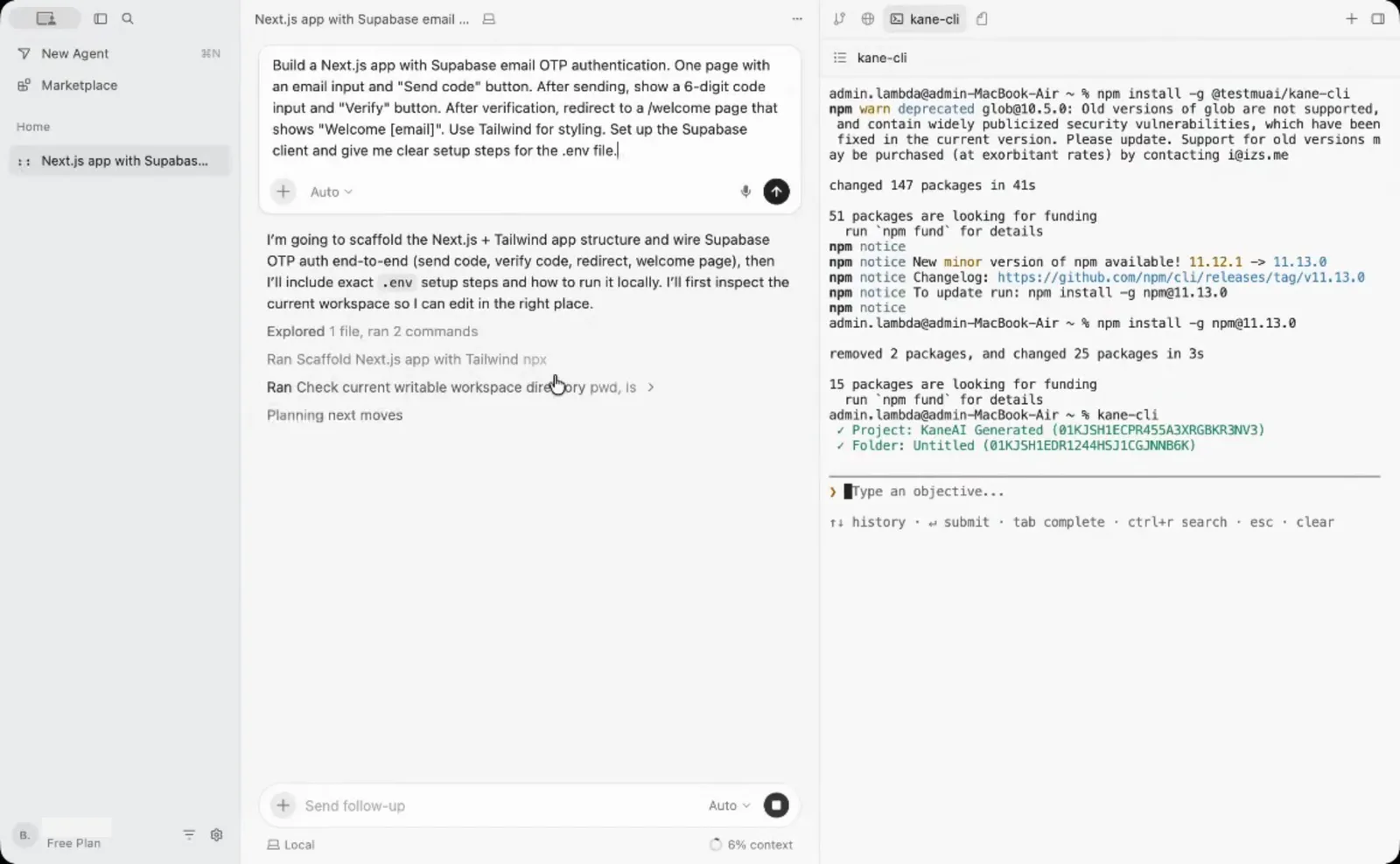
Kane CLI then runs the sign-in journey from Cursor's integrated terminal as one natural-language objective: open localhost, enter the email, request the code, verify it, and assert that the page contains Welcome. It breaks the objective into checkpoints and works through them in Chrome:
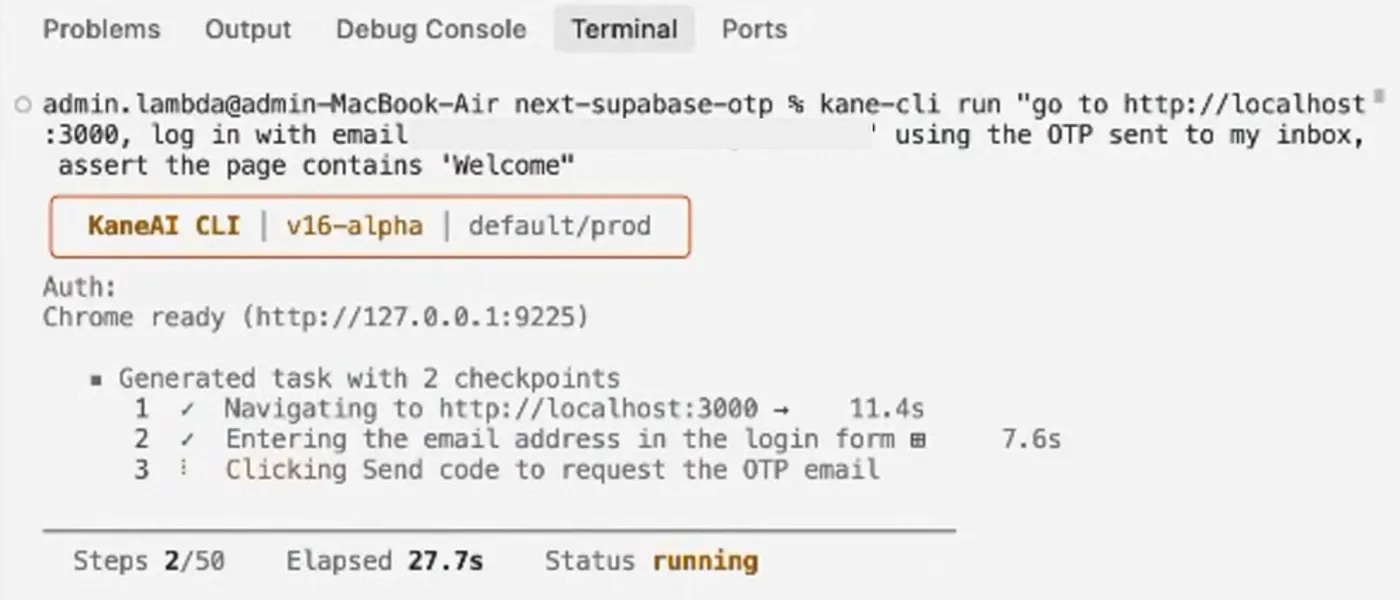
When the OTP screen appears, Kane CLI pauses and asks for the one-time code instead of scraping an inbox, then finishes the journey. The run passes and saves to KaneAI as a test case with a shareable link. The full demo:
TestMu AI's Kane CLI is an agentic quality verifier: a browser agent that validates rendered UI in a real Chrome browser from a natural-language objective. It takes only actions a real user could take, so it will not inject JavaScript to skip a broken modal or force-click a hidden button to manufacture a pass.
- Agent mode - kane-cli run with --agent --headless streams NDJSON events and ends with a run_end event that Cursor's agent can parse.
- Exit codes - 0 for a pass, 1 for a fail, 2 for setup or authentication errors, and 3 for a timeout, so a script can tell a broken app from a broken setup.
- Credits - the CLI is free to install, and runs use KaneAI credits whether they run on your machine or on the TestMu AI cloud grid.
To teach Cursor's agent the commands, append TestMu AI's instruction file to AGENTS.md, as the Kane CLI with AI coding agents guide describes:
npm install -g @testmuai/kane-cli
kane-cli login

# Cursor reads AGENTS.md at the repository root
curl -fsSL https://www.testmuai.com/kane-cli-agent/AGENTS.md >> AGENTS.md
To make the check a gate rather than an instruction the agent may skip, call it from a Cursor stop hook that sends a failed check back to the agent as a follow-up message. The hook script and hooks.json are in Kiro vs Cursor.
Cursor CLI on Windows and in CI
Cursor CLI installs natively on Windows with a PowerShell one-liner, and on macOS, Linux, and WSL with a curl script, according to Cursor's CLI installation docs. Either way, the command is agent.
# Windows (PowerShell)
irm 'https://cursor.com/install?win32=true' | iex

# macOS, Linux, and WSL
curl https://cursor.com/install -fsS | bash
Before you log in, the CLI reports its state like this, so a pipeline should read the output as well as the exit code:
PS> agent --version
2026.10.22-27dcf5f

PS> agent status
Not logged in
PS> $LASTEXITCODE
0

PS> agent -p "Say hello"
Error: Authentication required. Please run 'agent login' first, or set CURSOR_API_KEY environment variable.
PS> $LASTEXITCODE
1- agent status succeeds when logged out - it prints Not logged in and still exits 0, so a pre-flight step that checks only the exit code passes with no credentials.
- agent -p exits 1 without credentials - check that CURSOR_API_KEY is set, or look for the Authentication required message, before treating a non-zero exit as a problem in the code.
Cursor's CLI authentication docs recommend browser-based agent login, and for automation, scripts, or CI environments, a user API key from the Cursor dashboard set as CURSOR_API_KEY.
Running agent --help lists the flags that matter for automation:
- -p, --print - non-interactive mode for scripts, with --output-format set to text, json, or stream-json.
- -f, --force - allows commands unless explicitly denied, with --yolo as an alias.
- --auto-review - a server-side classifier runs safe tool calls automatically and prompts for the rest.
- --sandbox and --mode - turn the sandbox on or off for a run, or start in read-only plan or ask mode.
- -w, --worktree - starts the agent in an isolated git worktree, so a run does not touch your checkout.
- agent worker - runs a self-hosted Cloud Agent worker. Without --pool it is a personal My Machines worker that needs no Enterprise plan; with --pool it joins a team pool.
Cursor's headless CLI docs say that in print mode, changes are only proposed, not applied, unless you add --force.
Cursor's My Machines docs say the agent loop runs in Cursor's cloud while terminal commands, file edits, and browser actions execute on your machine, over an outbound connection that needs no inbound ports.
A full GitHub Actions workflow and the remaining flags are in Cursor CLI.

Note: Run the sign-up, checkout, and settings journeys your Cursor agents change through TestMu AI's Cursor app testing before they merge. Start free!
Cursor Plans and Pricing Structure
Cursor is sold through The X Subscription, one subscription for Grok, Cursor, and X. Each paid plan includes a weekly usage pool for Cursor's own models, and third-party models bill separately.
Cursor's models and pricing docs say the pool covers Grok 4.7, Grok 4.6, Grok 4.5, and Composer 2.5, is shared across the editor, the CLI, Cloud Agents, Grok Bot, and the Grok apps, and refreshes weekly.
| Plan | Cursor model usage | What it adds | Claude, GPT, and Gemini |
|---|---|---|---|
| Free | Limited | Agent and Chat | Not included |
| Plus | Base | Agent with Cursor models at fixed settings; no Auto, Cloud Agents, Automations, Bugbot, or Origin | Not included |
| Premium | 4x Plus | Cloud Agents, Automations, Origin, Bugbot, and Grok Bot | API list price from prepaid credit |
| Super | 15x Plus | Priority model access at peak times | API list price from prepaid credit |
| Ultra | 50x Plus | Earliest access to new products and models | API list price from prepaid credit |
| Teams | Per seat, matching Premium, Super, or Ultra | Rollouts, Security Review, and Cursor Router | API list price plus the Cursor Token Rate on eligible models |
| Enterprise | Pooled | Privacy Mode on by default, plus admin controls | API list price plus the Cursor Token Rate on eligible models |
Plus is the lowest-priced paid plan, but it locks you to Cursor's models at medium effort with Fast mode off. Check Cursor's pricing page for current prices before you budget.
Is Cursor Pro Worth It?
Pro is now a legacy plan. Cursor's legacy plans page says Pro, Pro+, Ultra, and the older Teams seats keep working as they are, while new customers start on The X Subscription, where Premium is Pro's closest tier.
The same page says each X Subscription plan includes at least twice the Cursor-model usage of the legacy plan it replaces, drops the included third-party model allowance, and that switching is permanent. That shapes the choice:
- Stay on Pro - if most of your usage is Claude, GPT, or Gemini, since Pro still includes a third-party allowance and a switch cannot be undone.
- Move to Premium - if Composer and Grok models cover most of your work, since the X Subscription plan raises Cursor-model usage and adds Grok and X benefits.
Privacy and Security
Cursor's privacy and data governance docs say that with Privacy Mode on, your code is never used for training by Cursor or other AI model providers, and that Privacy Mode is on by default for Enterprise teams.
Most models run under zero data retention agreements. Claude Fable models are an exception: Anthropic stores their inputs and outputs for harm-prevention reviews, so with Privacy Mode on, requests to them fail until an admin approves that retention policy.
Cursor's AIUC-1 certification post says Schellman audited Cursor's controls, and that two rounds of adversarial testing across several thousand scenarios exercised its rules, hooks, and Auto-review safeguards before Cursor passed the AIUC-1 requirements.
Cursor's October 29 security notice reports that malicious versions 2.1.312 and 2.1.313 of the Anthropic.claude-code extension were available in the Cursor VS Code Extension Marketplace between 2:27am and 1:35pm PT, and tried to install a persistent SSH backdoor.
Cursor removed the versions, shut down and rebuilt the marketplace, and published a script to check affected machines. On shared team machines, review extension updates before they roll out, and turn on Privacy Mode before an agent reads a private repository.

Cursor Pros and Cons
Cursor's strengths sit in the editor and the agent surfaces around it. Its weaknesses are mostly plan limits and checks that stay inside Cursor.
Cursor's Origin docs say Origin is in early beta and that its code storage is not available on Free or Plus.
| Pros | Cons |
|---|---|
| Built on VS Code, with a one-click import of extensions, themes, settings, and keybindings | Claude, GPT, and Gemini moved out of included usage onto prepaid credit, on Premium and above only |
| One weekly usage pool shared by the editor, the CLI, Cloud Agents, and Grok Bot | Plus excludes Auto, Cloud Agents, Automations, Bugbot, and Origin |
| Cloud Agents run in isolated VMs, in parallel, across multi-repo environments | Bugbot findings report neutral and do not block merges until you enable fail-on-unresolved |
| Bugbot rules per folder through .cursor/BUGBOT.md, plus rules learned from merged pull requests | No built-in check gives an independent pass or fail on the running app |
| Reads AGENTS.md and loads skills from Claude Code and Codex folders, so shared configs carry over | agent status exits 0 when logged out, so CI pre-checks need to read its output |
Is Cursor Worth Paying For?
Yes for developers who already work in VS Code and want an agent in the editor, and for teams that will use Cloud Agents and Bugbot on Premium or above. Plus suits developers who are happy with Cursor's own models, while heavy Claude or GPT users pay API list price on top of the plan.
Stack Overflow's AI coding agents survey data gives a read on developer intent: 1,436 of 12,255 respondents, or 11.7%, said they want to use Cursor in the next six months.
- Solo developer trying AI coding - start on Free, and move to Plus if Composer and Grok models cover your work.
- Developer who relies on Claude or GPT - Premium with prepaid credit, or compare a terminal-first agent in Claude Code vs Cursor.
- Team that reviews every pull request - Premium seats for Bugbot, with fail-on-unresolved issues turned on and BUGBOT.md rules committed.
- Enterprise - Teams or Enterprise for Rollouts, Security Review, Cursor Router, and Privacy Mode on by default.
- Team weighing Google's IDE - compare agents, plans, and browser control in Antigravity vs Cursor.
Conclusion
Install Cursor on the Free plan, import your VS Code profile, and give the agent one real task from your backlog. Before you trust the result, append the Kane CLI instruction file to AGENTS.md and have the agent run the journey it changed. The Kane CLI introduction covers sign-in and the first run.
Testing from the terminal? Kane CLI by TestMu AI lets SDETs and developers plan, write, run and debug tests from the command line.
Author

Shravan Mahajan
Blogs: 11

Shravan Mahajan is a Software Engineer at TestMu AI building Kane CLI, the command-line tool that runs browser automation from the terminal, describing flows in natural language that execute in a real Chrome browser and return pass or fail with shareable proof. He has an experience of 6 years in the Technical industry. His top skills are JavaScript, React.js, and full-stack development. At Fractal he built automated data pipelines with T-SQL, SSIS, Python, and Azure. He is also a Microsoft Certified Azure Data Engineer Associate.
Reviewer

Sri Harsha
Reviewer
Sri Harsha is Engineering Manager of the Open Source Program Office at TestMu AI, where he leads open-source engineering behind the Selenium and Appium automation grid and builds agentic AI systems for quality engineering. He is a member of the Selenium Technical Leadership Committee and a committer to WebdriverIO and Appium, and was recognized with the LambdaTest Delta Award 2023 for Best Contributor in open-source testing. He brings over 10 years of experience in software testing and automation, with earlier roles at EPAM Systems and ZenQ. Sri Harsha holds a B.Tech in Computer Science from Jawaharlal Nehru Technological University.


Cursor Review FAQs
Did you find this page helpful?
More Related Blogs

TestMu AI forEnterprise
Get access to solutions built on Enterprise
grade security, privacy, & compliance
- Advanced access controls
- Advanced data retention rules
- Advanced Local Testing
- Premium Support options
- Early access to beta features
- Private Slack Channel
- Unlimited Manual Accessibility DevTools Tests