
Power Your Software Testing with AI Agents and Cloud
The Native AI-Agentic Cloud Platform to Supercharge Quality Engineering. Test Intelligently and Ship Faster.

- TestMu AI (Formerly LambdaTest)
- /
- Blog
- /
- Antigravity vs Cursor: Which AI IDE Should You Use?
Your team standardized on Cursor in January. By October, a few engineers have installed Antigravity for its free Gemini quota, and the repository now holds a .cursor/rules folder, an AGENTS.md file, and two MCP configs that list the same servers in different formats.
Both tools have a real install base. In the Stack Overflow coding agent survey, 25.5% of respondents had used Cursor as a coding agent in the past year, and 16.0% had used Google Antigravity.
Most comparisons of the two still describe the launch-era products. Google has since split Antigravity into an app, a CLI, editor extensions, and a standalone IDE, and Cursor now sells through The X Subscription after its acquisition by SpaceX.
TL;DR
Antigravity vs Cursor is a choice between Google's multi-surface agent platform and Cursor's VS Code-based editor. Pick Cursor for one mature editor with PR review, cloud agents, and a CI-ready CLI. Pick Antigravity for a free Gemini quota, artifact-based review, and agent extensions for JetBrains, Xcode, and Visual Studio.
Antigravity vs Cursor at a Glance
- Best for one shared editor: Cursor - its Agents Window runs parallel agents in isolated Git worktrees, Bugbot reviews pull requests, and Cloud Agents run tasks on dedicated virtual machines on Premium plans and above.
- Best for a zero-cost start: Antigravity - every plan, including the free tier, gets Gemini 3.8 Flash, unlimited Tab completions, and the Antigravity CLI, with quota that refreshes weekly.
- Best for JetBrains or Xcode shops: Antigravity - Google ships Antigravity extensions for VS Code, Visual Studio, JetBrains IDEs, Zed, Xcode, and Eclipse, so the agent works inside the editor a team already uses.
- AGENTS.md support: Shared by both: Yes. Cursor and Antigravity both read an AGENTS.md file at the repository root, and both load Agent Skills from the .agents/skills folder, so one set of instructions serves both agents.
- Bring your own API key: Supported by Antigravity: No. Antigravity's plans exclude bring-your-own-key capacity, while Cursor bills third-party models at API list price from prepaid credit on Premium and above.
- Browser checks beyond Chrome: Built into either IDE: No. Antigravity checks UI work in Chrome and Cursor in a built-in web view, each driven by the agent that wrote the code, so cross-browser and independent checks need a separate tool such as TestMu AI's Kane CLI.
What Is the Difference Between Antigravity and Cursor?
Antigravity is Google's agentic development platform, delivered as a desktop app, a CLI, extensions for six editors, and a standalone IDE. Cursor is an AI code editor built on the VS Code codebase, with an Agents Window for parallel agents, Cloud Agents, and a CLI. Antigravity puts one agent into many surfaces, and Cursor puts many agents into one editor.
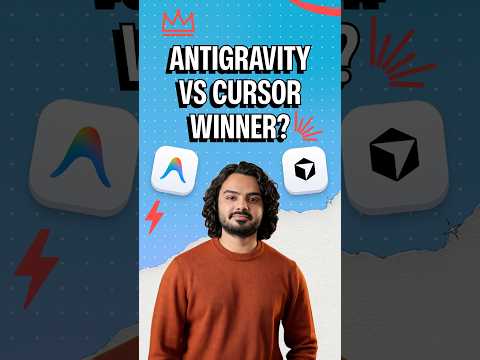
TestMu AI's one-minute short sets Cursor's AI-inside-your-editor approach against Antigravity's agent-first setup, and ends on the step both need: testing the changes the AI makes.
Google's Antigravity launch post introduced it as an agentic development platform with two surfaces: an Editor view with Tab completions and an agent side panel, and an agent-first Manager surface for running several agents in parallel.
The Antigravity 2.0 announcement then moved that Manager experience into a standalone desktop app with no IDE, and said a later release will remove the Agent Manager from the Antigravity IDE.
Cursor's VS Code migration guide states that Cursor is based upon the VS Code codebase, and it imports extensions, themes, settings, and keybindings in one click.
Cursor's SpaceX announcement confirms that Cursor has officially been acquired by SpaceX.
Alphabet's second-quarter earnings remarks put Antigravity at more than 2.4 million weekly active users.
Cursor's AIUC-1 certification post states that 70% of the Fortune 500 use Cursor.
| Dimension | Antigravity | Cursor |
|---|---|---|
| Owner | SpaceX, which completed its acquisition of Cursor in August 2026 | |
| Surfaces | Antigravity App, Antigravity CLI (agy), standalone Antigravity IDE, and extensions for VS Code, Visual Studio, JetBrains, Zed, Xcode, and Eclipse | Cursor desktop editor with the Agents Window, Cursor CLI (agent), Cloud Agents, and JetBrains IDEs through the Agent Client Protocol |
| Latest releases | Antigravity IDE v2.6.0 (October 26, 2026) and Antigravity CLI v1.4.10 (October 29, 2026) | Cursor IDE 3.27 (October 22, 2026) and Cursor CLI v2026.10.22 |
| House models | Gemini 3.8 Flash on every plan, Gemini 4 Argon on paid plans | Grok 4.7 and Composer, covered by plan usage |
| Review style | Artifacts: implementation plans, task lists, walkthroughs, screenshots, and browser recordings you can comment on | Plan Mode with an editable plan, inline diffs, and Bugbot reviews on pull requests |
| Project rules | AGENTS.md, GEMINI.md, and .agents/rules/*.md | AGENTS.md and .cursor/rules/*.mdc |
| Headless mode | agy -p with text, json, or stream-json output | agent -p with text, json, or stream-json output |
If a terminal-first agent is also on your shortlist, Claude Code vs Codex vs Cursor compares Cursor with the two leading CLI agents.
Which Models Can You Use in Antigravity and Cursor?
Antigravity is Gemini-first with a short list of Claude and open models, and Cursor is Grok- and Composer-first with frontier models from OpenAI, Anthropic, and Google billed separately. In both, your plan decides which models you can actually select.
Antigravity's model availability table lists Gemini 4 Argon, Gemini 3.8 Flash, Claude Sonnet 5.5, and Claude Opus 5.5, plus Claude 4.6 models and GPT-OSS 120B that the page marks for removal on November 2, 2026.
- Gemini 3.8 Flash - available on every plan, from the free tier to Enterprise.
- Gemini 4 Argon - needs a paid Google AI Pro plan, Google AI Ultra, or Enterprise.
- Claude Sonnet 5.5 and Claude Opus 5.5 - not on the free tier, and on Google AI Pro only for non-trial subscriptions.
- Claude 4.6 and GPT-OSS 120B - scheduled for removal, so move saved agent settings off them before that date.
Cursor's available models page names Grok 4.7 as Cursor's flagship model and Composer as its fast, cost-efficient model, both covered by plan usage, alongside frontier models from OpenAI, Anthropic, and Google.
Third-party models sit outside that pool. Cursor's models and pricing docs say they run at API list price from prepaid credit on Premium and above, and that the Plus plan excludes them.
Composer 2.5 scores 69.3% on Terminal-Bench 2.0 in Cursor's Composer benchmarks.
Gemini 3.8 Flash scores 89.4% on Terminal-bench 2.1 in Google DeepMind's Gemini 3.8 Flash model card.
Those are different benchmark versions, and each vendor ran its own evaluation, so neither figure is a head-to-head result. Give both agents the hardest open issue in your own repository before you judge model quality.
Is Antigravity Free, and How Do Its Limits Compare With Cursor?
Yes, Antigravity has a free tier with a quota that refreshes weekly, and Cursor has a Free plan with limited usage. Both cap agent work with weekly limits, and Antigravity's paid plans add a five-hour refresh window on top.
Antigravity's plans page gives users without Google AI Pro or Ultra a meaningful quota refreshed weekly, gives Pro a generous quota refreshed every five hours until the weekly limit is reached, and gives Ultra the highest limits. Every plan gets unlimited Tab completions, and the page lists bring-your-own-key capacity as unsupported.
Cursor's pricing help page says Cursor is part of The X Subscription, one subscription for Grok, Cursor, and X. Its Free plan covers Agent, Chat, and Tab completions with Cursor models, and the older Hobby, Pro, Pro+, and Ultra plans are now legacy plans that new customers cannot buy.
| Plan shape | Antigravity | Cursor |
|---|---|---|
| No-cost option | Individual use with a weekly quota, Gemini 3.8 Flash, and the CLI | Free plan with limited usage of Grok and Composer |
| Paid individual tiers | Google AI Pro and Google AI Ultra | Plus, Premium, Super, and Ultra |
| Refresh rhythm | Five-hour refresh up to a weekly limit on Pro and Ultra | Weekly usage pool shared across Grok and Cursor |
| Third-party models | Separate fixed rate limit for Claude and GPT models | API list price from prepaid credit, Premium and above |
| Your own API key | Not supported for extra capacity | Excluded on Plus |
| Teams | Business plan via Google Cloud and Gemini Enterprise seats | Teams and Enterprise plans |
- Solo developer without a budget - Antigravity's free tier includes the CLI and Gemini 3.8 Flash as the core agent model, while Cursor's Free plan limits usage of Grok and Composer.
- Heavy Claude user - Antigravity keeps Claude and GPT models on their own fixed rate limit inside the subscription, while Cursor meters them at API list price, so a usage spike hits a rate limit in one and spends prepaid credit in the other.
- Team that needs PR review - Cursor's Bugbot and Cloud Agents start at Premium, and the Plus plan excludes both.
Can You Move Rules, Skills, and MCP Servers Between Them?
Partly. AGENTS.md and Agent Skills folders work in both IDEs unchanged. Cursor's .mdc rules and both tools' MCP config files need a conversion step, and remote MCP servers that use SSE do not work in Antigravity.
Adoption between these tools is still shifting. In the JetBrains AI coding agent adoption research, Cursor's work adoption fell from 18% in January to 12% in May-July, while awareness of Google Antigravity rose from 29% in January to 47%.
Cursor's rules docs keep project rules in .cursor/rules as .mdc files, ignore plain .md files in that folder, and also read AGENTS.md in the project root and subdirectories.
Antigravity's rules docs load AGENTS.md or GEMINI.md from any project directory, plus .agents/rules/*.md files whose YAML frontmatter sets a trigger such as always_on, model_decision, glob, or manual.
| Config | Antigravity | Cursor | Carries over? |
|---|---|---|---|
| Repo-wide instructions | AGENTS.md or GEMINI.md in any directory | AGENTS.md in the project root and subdirectories | Yes, one AGENTS.md serves both |
| Scoped rules | .agents/rules/*.md with a trigger in frontmatter | .cursor/rules/*.mdc with description, globs, and alwaysApply | No, rewrite the frontmatter |
| Skills | .agents/skills/ by default | .agents/skills/ or .cursor/skills/, plus Claude and Codex skill folders | Yes, through .agents/skills/ |
| MCP config file | .agents/mcp_config.json or ~/.gemini/config/mcp_config.json | .cursor/mcp.json or ~/.cursor/mcp.json | Copy each server entry |
| Remote MCP transport | Streamable HTTP only | stdio, SSE, and Streamable HTTP | SSE servers do not |
| Reusable procedures | IDE workflows retired; /migrate-workflows turns them into skills | /migrate-to-skills turns slash commands into skills | Yes, once both are skills |
Skills port with no edits, because both tools read the same folder.
Cursor's skills docs load .agents/skills/ at project level, alongside .cursor/skills/ and the Claude and Codex skill folders.
Antigravity's skills docs name .agents/skills as the default folder and keep backward compatibility for .agent/skills.
MCP needs a copy step, and remote servers may need a new transport.
Cursor's MCP docs support stdio, SSE, and Streamable HTTP servers, configured in .cursor/mcp.json per project or ~/.cursor/mcp.json globally.
Antigravity's MCP docs require remote MCP servers to use the Streamable HTTP transport and do not support the legacy HTTP+SSE transport.
Antigravity is also moving reusable procedures into skills. Its IDE workflows page set October 19, 2026 as the date current workflows stop working and points to the /migrate-workflows command.
To make one repository work in both IDEs:
- Move always-on guidance from .cursor/rules into AGENTS.md at the repository root, since both agents read it.
- Keep repeatable procedures as .agents/skills/<name>/SKILL.md so both agents discover them.
- Mirror each remaining .mdc rule as an .agents/rules/<name>.md file, mapping globs to trigger: glob and alwaysApply: true to trigger: always_on.
- Copy each server from .cursor/mcp.json into .agents/mcp_config.json, and swap any SSE endpoint for a Streamable HTTP one.
- Commit both config sets so teammates and CI runners load identical context.
The same component rule looks like this in each format. Cursor first, then Antigravity:
---
globs: src/components/**/*.tsx
alwaysApply: false
---
- Use named exports, not default exports
- Keep components under 200 lines
---
trigger: glob
globs: "src/components/**/*.tsx"
description: "React component conventions"
---
- Use named exports, not default exports
- Keep components under 200 linesFor writing .mdc files that the agent follows reliably, see the guide to Cursor rules.
Which One Runs Better Headless in CI?
Cursor, on documented surface area. Cursor CLI has a GitHub Actions guide, authenticates with a CURSOR_API_KEY secret, and applies edits in print mode when you pass --force. Antigravity CLI also runs headless with agy -p, but an unattended runner takes more setup.
# Cursor CLI: authenticate with an API key, apply edits, return one JSON result
export CURSOR_API_KEY="your_api_key_here"
agent -p "Fix the failing test in src/date-parser.test.ts" --force --output-format json

# Antigravity CLI: set "modelProvider": "gemini" in ~/.gemini/antigravity-cli/settings.json first
export GEMINI_API_KEY="your-api-key"
agy -p "Fix the failing test in src/date-parser.test.ts" --output-format json- Edits in Cursor CLI - Cursor's headless CLI docs say that without --force, changes are only proposed, not applied.
- Edits in Antigravity CLI - Antigravity's headless mode docs start runs in the request-review permission mode, and --dangerously-skip-permissions approves all tool calls, including file writes and command execution.
- Safer write access - use scoped permissions.allow rules instead of skipping permissions, which is what the Antigravity docs recommend unless you fully trust the prompt and environment.
- Cursor authentication - the CLI reads a CURSOR_API_KEY environment variable, which a CI runner can hold as a secret.
- Antigravity authentication - Antigravity's install docs say that setting a GEMINI_API_KEY on its own has no effect until modelProvider is set to gemini in the CLI settings.
- Output - both CLIs accept --output-format text, json, or stream-json, so either can feed a later pipeline step.
- Plan terms - Antigravity's FAQ calls agy -p intended for direct scripting and CI workflows, and says wrapping agy inside third-party coding agents or applications is not supported under consumer plans.
- CI templates - Cursor publishes a GitHub Actions example that passes CURSOR_API_KEY from repository secrets.
- Antigravity in CI - the headless mode docs cover running agy non-interactively in CI pipelines and capturing machine-readable output.
For modes, flags, and CI recipes in depth, see the guide to running Cursor CLI.
Google's DORA report announcement says 90% of survey respondents use AI at work, and that AI adoption continues to have a negative relationship with software delivery stability.
Whichever agent edits code in the pipeline, gate the merge on a check that the agent did not write. The next section sets one up.
How Does Each Agent Check the UI It Builds?
Both agents can open a browser and look at their own work. Antigravity drives a local Chrome browser through its Browser Subagent, and Cursor's agent controls a built-in browser. In both cases the agent that wrote the code also judges the result, and it checks in one browser only.
Antigravity's IDE browser docs say it can open, read, and actuate a local Chrome browser, capturing screenshots and saving action videos as artifacts, inside a separate Chrome profile.
In the Antigravity App and CLI, the /browser command drives Google Chrome through the Chrome DevTools MCP server and records every browser session as a WebM video.
Cursor's browser tool docs describe a browser the agent uses to test applications and audit accessibility, which runs as a secure web view controlled through an MCP server running as an extension.
Developers want a check they can see. The Stack Overflow AI trust data shows 48% of developers trust AI output when they can easily verify it, and only 7% trust it with important decisions.
A browser recording shows what the agent clicked. Whether the outcome is right still rests on the same agent's judgment. Claude Code vs Cursor covers the same self-verification gap from the Claude Code side.
Run the Same Kane CLI Check From Either IDE
TestMu AI's Kane CLI is a deterministic browser agent that validates rendered UI in a real Chrome browser from a natural-language objective. It runs from Cursor's or Antigravity's integrated terminal, or from either agent, and returns a pass or fail backed by an evidence pack the agent can read.
Setup differs only in how each agent learns the commands. The Kane CLI with AI coding agents guide appends one instruction file to AGENTS.md for Cursor, and points Antigravity at the hosted copy of the same file. Because Antigravity also loads AGENTS.md from the repository root, one appended file can serve both agents.
npm install -g @testmuai/kane-cli
kane-cli login

# Append the Kane CLI agent instructions once, at the repository root
curl -fsSL https://www.testmuai.com/kane-cli-agent/AGENTS.md >> AGENTS.md
In Antigravity you can also skip the file and paste the hosted instructions into the prompt:
Read https://www.testmuai.com/kane-cli-agent/AGENTS.md and use Kane CLI to test the contact form end to end.The objective below checks a form on the TestMu AI Selenium Playground the way an agent-built change needs checking: fill every required field, submit, and assert the exact confirmation text.
kane-cli run "go to https://www.testmuai.com/selenium-playground/input-form-demo/, fill in every required field with valid sample data, choose United States as the country, submit the form, and assert the page shows 'Thanks for contacting us, we will get back to you shortly.'" --agent --headless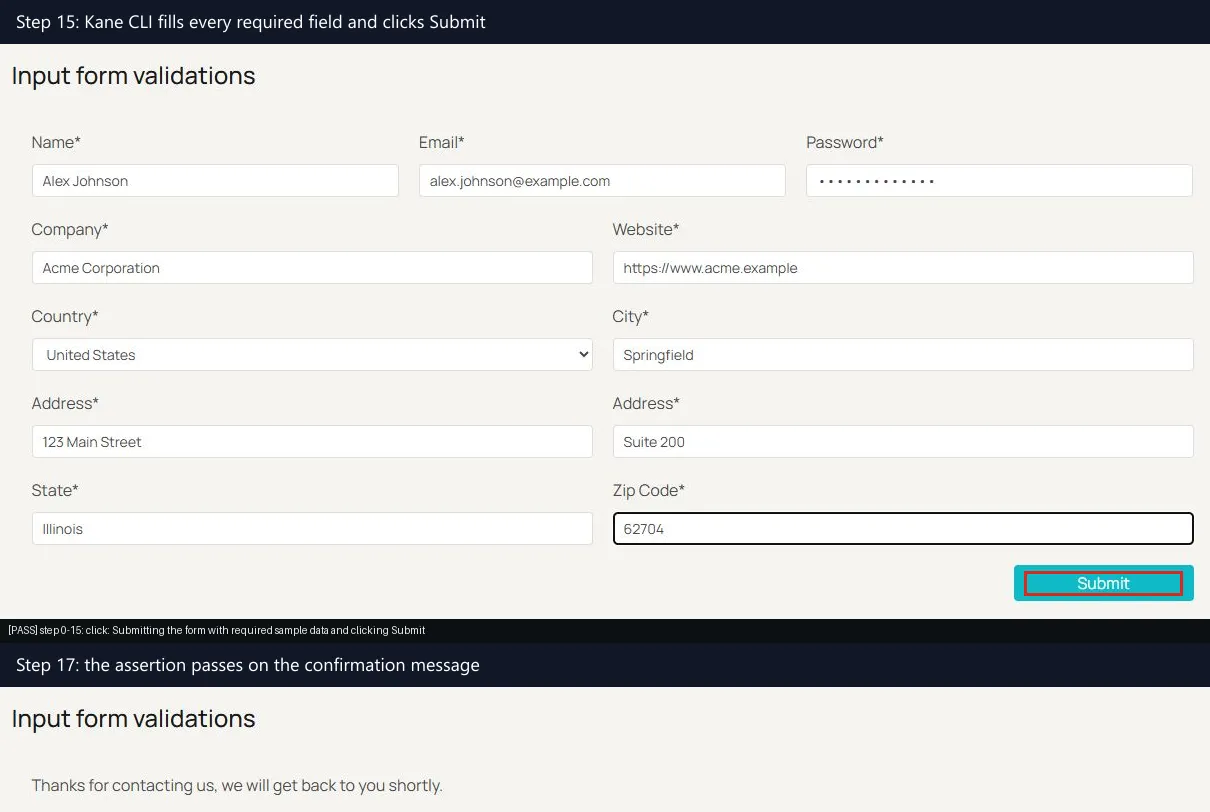
- Verdict - the closing run_end event reports status passed, result code 100, and reason success.complete.
- Steps and time - 18 steps in 73.9 seconds, with a screenshot and an annotated action for each step in the evidence pack.
- Cost - about 21 KaneAI credits for the run.
- Shareable proof - a Test Manager link to the generated test case, so a reviewer can replay the flow without either IDE.
The fields an agent reads from that final event, trimmed from the full run_end line:
{
  "type": "run_end",
  "status": "passed",
  "one_liner": "submitted the contact form on testmuai.com",
  "final_state": {
    "url": "https://www.testmuai.com/selenium-playground/input-form-demo/",
    "contact_confirmation_message": "Thanks for contacting us, we will get back to you shortly."
  },
  "duration": 73.9,
  "credits_consumed": 21.06782,
  "result_code": 100,
  "reason_code": "success.complete"
}
The exit code is what a pipeline gates on. The Kane CLI page lists 0 for pass, 1 for fail, 2 for setup or auth errors, and 3 for timeout, so the same command that runs in your editor can block a merge in CI.
For tool-specific walkthroughs, see Antigravity app testing and Cursor app testing.
Which One Handles Proprietary Code More Safely?
Cursor, once Privacy Mode is on, and Antigravity, once you sign in through an enterprise plan. Privacy Mode is on by default for Cursor Enterprise teams. Antigravity's no-training guarantee comes with enterprise sign-in through Google Cloud, and consumer users can opt out of data collection in Settings.
Cursor's data use page states that with Privacy Mode enabled, customer data will not be used for training by Cursor, and that Cursor maintains zero data retention agreements with all providers.
Cursor's privacy help page says Privacy Mode is on by default for Enterprise teams, and that Teams and Enterprise admins can enforce it organization-wide.
Cursor's data governance docs name two exceptions: a few models require data retention with the provider, and Cloud Agents are the only feature that requires Cursor to store code.
Cursor's security page lists AIUC-1, ISO/IEC 27001, and ISO/IEC 42001 certifications along with a SOC 2 Type II attestation.
Antigravity's terms of service say Google uses interactions to evaluate, develop, and improve its products and machine learning technologies, and that Google employees and contractors may review them.
The Antigravity FAQ says you can opt out of data collection at any point from the Settings panel.
Enterprise sign-in changes those terms. Antigravity's IDE extensions docs state that under enterprise sign-in, code, prompts, and agent transcripts are never used to train Google foundation models, and that the agents respect your organization's IAM policies and VPC Service Controls.
Cursor warned users that a maliciously modified version of Anthropic's Claude Code extension was made available in the Cursor VS Code Extension Marketplace.
Editor extensions are a supply-chain risk in any IDE, so pin extension versions and check publishers before installing.
The generated code needs the same scrutiny as the tooling. Veracode's GenAI code security report puts the average security pass rate of AI-generated code at 56 percent.
Run static analysis on every agent pull request regardless of which IDE produced it, and keep secrets out of the files either agent can read.
Is Antigravity Better Than Cursor?
Neither wins for every team. Cursor fits teams that want one mature editor with PR review, cloud agents, and Privacy Mode controls. Antigravity fits Gemini-first teams, developers on a zero budget, and shops that need the agent inside JetBrains, Xcode, or Visual Studio.
| Your situation | Pick | Deciding fact |
|---|---|---|
| Solo developer with no paid plan | Antigravity | Weekly free quota with Gemini 3.8 Flash, the CLI, and unlimited Tab completions |
| Team that wants PR review and cloud runs | Cursor, Premium or above | Bugbot and Cloud Agents, both excluded from Plus |
| JetBrains, Xcode, or Visual Studio shop | Antigravity | Native extensions for each editor; Cursor reaches JetBrains only through the Agent Client Protocol |
| Unattended agent runs in CI | Cursor | GitHub Actions guide and API-key authentication |
| Code that must stay out of training | Cursor Enterprise, or Antigravity with enterprise sign-in | Privacy Mode on by default for Enterprise teams, or Google's enterprise no-training guarantee |
| Heavy Claude usage | Measure both | Antigravity keeps Claude on a separate fixed rate limit; Cursor bills it at API list price from prepaid credit |
| One repo used from both IDEs | Both | AGENTS.md and .agents/skills load in each |
Whichever you pick, measure it on your own work. METR's randomized trial found that experienced open-source developers took 19% longer to complete issues when allowed to use AI tools, primarily Cursor Pro with Claude 3.5/3.7 Sonnet.
METR's uplift update reports some evidence for speedup in its later study, with an estimate of -18% for returning developers and a confidence interval between -38% and +9%, but calls its data only very weak evidence because of selection effects.
Run a two-week trial on real tickets with the same AGENTS.md, skills, and Kane CLI checks in both IDEs, then compare merged pull requests and failed checks rather than impressions.

Note: Whichever IDE you choose, its agent checks the UI in one browser. TestMu AI Automation Cloud runs your Selenium, Cypress, Playwright, and Puppeteer suites across 3,000+ real browser and OS combinations in parallel. Start testing for free
Conclusion
Pick the IDE that matches where your team already works, then keep the choice reversible: commit one AGENTS.md, keep procedures in .agents/skills, and maintain an MCP config for each tool.
Before you trust either agent's "done", add a check it did not write. Start with the Kane CLI introduction, append the agent instructions to AGENTS.md, and run your highest-traffic user flow as the first Kane CLI check from Cursor or Antigravity.
Author

Saurabh Prakash
Blogs: 21

Saurabh Prakash is an Engineering Manager at TestMu AI, where he leads engineering on agentic AI development and scalable system architecture for the quality engineering platform. He has also contributed to Test at Scale, the company's open-source test intelligence platform. He brings over 9 years of experience across Node.js, Java, Spring, MVC, data structures, algorithms, and scalable system design, with earlier roles as SDE 2 at Zomato, Senior Software Engineer at LogicHub, and Software Development Engineer at Directi. Saurabh holds a B.Tech in Computer Science and Engineering from Delhi Technological University.
Reviewer

Srinivasan Sekar
Reviewer
Srinivasan Sekar is Director of Engineering at TestMu AI, where he leads engineering and open-source initiatives behind the Selenium and Appium automation grid and owns TestMu AI's MCP Server. A committer to Appium and a contributor to Selenium, WebdriverIO, Taiko, and AppiumTestDistribution, he brings over 15 years of experience in quality engineering and open-source technologies. He is the author of the Apress book 'The MCP Standard: A Developer's Guide to Building Universal AI Tools with the Model Context Protocol,' a Certified Kubernetes and Cloud Native Associate, and an international conference speaker. Before TestMu AI he spent over eight years at Thoughtworks as a Principal Consultant and Quality Architect. Srinivasan holds a B.Tech in Information Technology from Anna University.


Antigravity vs Cursor FAQs
Did you find this page helpful?
More Related Blogs

TestMu AI forEnterprise
Get access to solutions built on Enterprise
grade security, privacy, & compliance
- Advanced access controls
- Advanced data retention rules
- Advanced Local Testing
- Premium Support options
- Early access to beta features
- Private Slack Channel
- Unlimited Manual Accessibility DevTools Tests