
Power Your Software Testing with AI Agents and Cloud
The Native AI-Agentic Cloud Platform to Supercharge Quality Engineering. Test Intelligently and Ship Faster.

- TestMu AI (Formerly LambdaTest)
- /
- Blog
- /
- Kiro vs Cursor: Specs, Agents, and How Each Verifies Code
Kiro's one-year post says more than 100,000 developers tried Kiro IDE within the first 5 days, and that the Kiro community has created more than 15,000 unique powers.
Kiro and Cursor both plan before they write code, and in both tools the agent that built a feature also decides when it is done. That is how a spec with every task ticked can still ship a search box that shows the wrong empty-state message.
This walkthrough follows one feature, a search filter on a staff table, through both IDEs: planning it, sharing project rules, checking the result in a real browser with TestMu AI's Kane CLI, gating each agent turn on that check, and running the agent headless.
TL;DR
Kiro vs Cursor is a choice between a spec-first agentic IDE and an editor-first AI code editor. Kiro, an AWS application, turns a request into requirements, a design, and tasks before it writes code. Cursor, owned by SpaceX, plans in one editable file and drives a built-in browser. Pick Kiro for requirement-led work and Cursor for fast editing.
Kiro vs Cursor Verdicts
- Best for requirement-led work: Kiro - a spec writes requirements.md in EARS notation, design.md, and tasks.md under .kiro/specs/, and runs independent tasks in parallel waves.
- Best for fast iteration in the editor: Cursor - Plan Mode writes an editable plan, and the agent drives a built-in browser with screenshots, console logs, and network traffic.
- Free plan: Yes for both. Kiro Free includes 50 credits and a subset of models, and Cursor's Free plan includes limited Agent and Chat usage.
- Built-in browser tool: Cursor: Yes. Kiro: No. Kiro's built-in web tools fetch pages as text, so a UI check needs an outside tool such as TestMu AI's Kane CLI, which ships an official Kiro power.
- Shared AGENTS.md: Yes. Kiro loads AGENTS.md as always-included steering and Cursor reads it as project instructions, so one root file can instruct both agents.
- Stop hook that re-prompts the agent: Yes in both. A Kiro Stop hook returns a block decision with a reason, and a Cursor stop hook returns a followup_message, capped at 5 loops by default.
Kiro vs Cursor: Key Differences
Kiro is an agentic IDE from AWS that plans through specs, and Cursor is an AI code editor that plans through an editable markdown plan. Kiro runs one agent harness behind its IDE, CLI, web, and mobile apps, while Cursor starts from the editor and adds agents around it.
Kiro's privacy and security docs describe Kiro as an AWS application that works as a standalone agentic IDE, with a security framework built around AWS's security infrastructure.
How Kiro works explains that the IDE, CLI, Web, and Mobile apps all talk to one unified agent harness over the Agent Client Protocol, so a steering file, hook, or MCP server you configure applies on every surface.
Cursor's SpaceX announcement confirms that Cursor has officially been acquired by SpaceX.
| Dimension | Kiro | Cursor |
|---|---|---|
| Maker | AWS | SpaceX, which acquired Cursor |
| Surfaces | IDE, CLI, Web, and Mobile apps on one shared agent harness | Desktop editor, Cursor CLI (agent), and Cloud Agents |
| Planning | Specs: requirements.md in EARS notation, design.md, and tasks.md | Plan Mode: clarifying questions, then one editable markdown plan |
| Project instructions | Steering files in .kiro/steering/, plus AGENTS.md | Rules in .cursor/rules/*.mdc, plus AGENTS.md |
| Hooks | JSON files in .kiro/hooks/ | A hooks.json file in .cursor/ |
| Extensions | Powers loaded on demand, skills, and MCP servers | Skills, subagents, and MCP servers |
| Browser control | None built in; web_fetch returns page text | Built-in browser tool with screenshots, console logs, and network traffic |
| Headless mode | kiro-cli chat --no-interactive | agent -p, which applies edits only with --force |
TestMu AI's short puts the split in one line each: Cursor for direct control over implementation, Kiro for documented requirements, structured planning, and traceability.

If Google's IDE is also on your list, Antigravity vs Cursor runs the same comparison for it.
Step 1: Plan the Feature as a Spec or a Plan
Kiro turns a feature request into three files before any code exists. Cursor's Plan Mode produces one plan you edit before the agent builds. The practical difference shows up at test time: Kiro's acceptance criteria are written to be testable, while a Cursor plan describes the work.
Kiro's specs docs say every spec generates requirements.md (or bugfix.md), design.md, and tasks.md, and that running all tasks groups independent ones into waves that run concurrently.
The feature specs page writes each requirement in EARS notation, WHEN a condition or event, THE SYSTEM SHALL an expected behavior, so that each requirement can be translated directly into test cases.
Cursor's Plan Mode docs describe an agent that asks clarifying questions, researches the codebase, and creates a plan you review and edit before building. Plans save to your home directory unless you click Save to workspace.
- Kiro workflows - Requirements-First, Design-First, Quick Spec for well-understood features, and Bugfix specs that record current, expected, and unchanged behavior.
- Cursor workflow - press Shift+Tab to rotate into Plan Mode, answer the agent's questions, edit the plan, then click to build it.
- Where the plan lives - Kiro writes specs into .kiro/specs/ inside the workspace, while a Cursor plan stays in your home directory until you move it into the workspace.
Save Cursor plans to the workspace when a plan should outlive the chat, so reviewers can read it the way they read a Kiro spec. The method behind both is covered in spec-driven development.
In Kiro, the staff search feature starts as .kiro/specs/staff-search/requirements.md, with two acceptance criteria for the search box on the TestMu AI Selenium Playground table demo:
# Requirements Document

## Requirement 1: Filter the staff table

**User Story:** As an office manager, I want to filter the staff table by office, so that I can see who works in one location.

### Acceptance Criteria

1. WHEN the user types "New York" in the Search box THE SYSTEM SHALL show only rows whose Office is New York
2. WHEN the search text matches no row THE SYSTEM SHALL display the message "No results found"
In Cursor, keep the same two criteria in the plan and save it to the workspace, so the browser checks in step 4 have a written source either way.

Note: Test the features Cursor edits across your web app with TestMu AI's Cursor app testing. Try free!
Step 3: Check What the Agent Built
Cursor's agent can drive a browser, and Kiro's built-in tools cannot. In both tools the agent that wrote the feature also judges it, which is the gap an outside check closes.
Kiro's built-in tools catalog lists file, shell, web search, web fetch, sub-agent, and context tools.
None of those tools opens or controls a browser, so a Kiro agent sees a web page only as fetched text.
Kiro's web tools page says web_fetch extracts text from a URL, and in its default selective mode returns up to 8,000 characters around search term matches.
Kiro's property-based testing turns EARS requirements into properties checked against generated inputs, but the docs note that requirements depending heavily on external services or non-deterministic behavior may need mocking or example-based tests. It is available in the IDE only.
Cursor's browser tool docs describe an agent that navigates, clicks, types, scrolls, and takes screenshots, with full access to console logs and network traffic, to test applications and audit accessibility.
Cursor's own self-driving codebases experiment found that requiring 100% correctness before every single commit caused major serialization and slowdowns, and suggested that an efficient system accepts some error rate but still needs a final green branch.
Put the browser check at the end of a turn or a spec, not on every file save. That is where the agent claims a criterion is met, and where an independent pass or fail is worth its runtime.
TestMu AI's Kane CLI is a deterministic browser agent for developers, AI coding agents, and CI/CD pipelines. It validates rendered UI in a real Chrome browser from a natural-language objective and returns a binary pass or fail with NDJSON events, where a browser tool hands back screenshots and a summary for the same agent to interpret.
- Exit codes for hooks and CI - 0 for a pass, 1 for a fail, 2 for setup or authentication errors, and 3 for a timeout.
- Evidence pack - each run seals screenshots, annotated steps, the console log, and a network HAR into a .evidence file a reviewer can open without either IDE.
- Failure triage - on a failure, Kane CLI investigates whether the product or the test is at fault and records a structured verdict in the pack's failure.yaml.
Kane CLI also ships as an official Kiro power. This short adds it from Kiro's marketplace, then has Kiro's agent build a login form and hand it to Kane CLI, which runs valid and invalid logins in Chrome:
Setup steps for the power and its steering files are in Kiro powers Kane CLI verification.
Step 4: Run Each Acceptance Criterion in a Real Browser
An EARS criterion already names the trigger and the expected result, which is most of a Kane CLI objective. Each criterion from step 1 becomes one objective file in a checks/ folder: the WHEN clause becomes the action, and the SHALL clause becomes the verification.
checks/1.1-new-york.txt
Go to https://www.testmuai.com/selenium-playground/table-sort-search-demo/ and type New York in the table's Search box. Verify that every visible row has New York in the Office column and that the text below the table reads Showing 1 to 5 of 5 entries.

checks/1.2-no-match.txt
Go to https://www.testmuai.com/selenium-playground/table-sort-search-demo/ and type zzz in the table's Search box. Verify that the table shows the exact message No results found.
Running one criterion headless, with NDJSON output for an agent or a script to read, is one command:
kane-cli run "$(cat checks/1.1-new-york.txt)" --agent --headless --timeout 240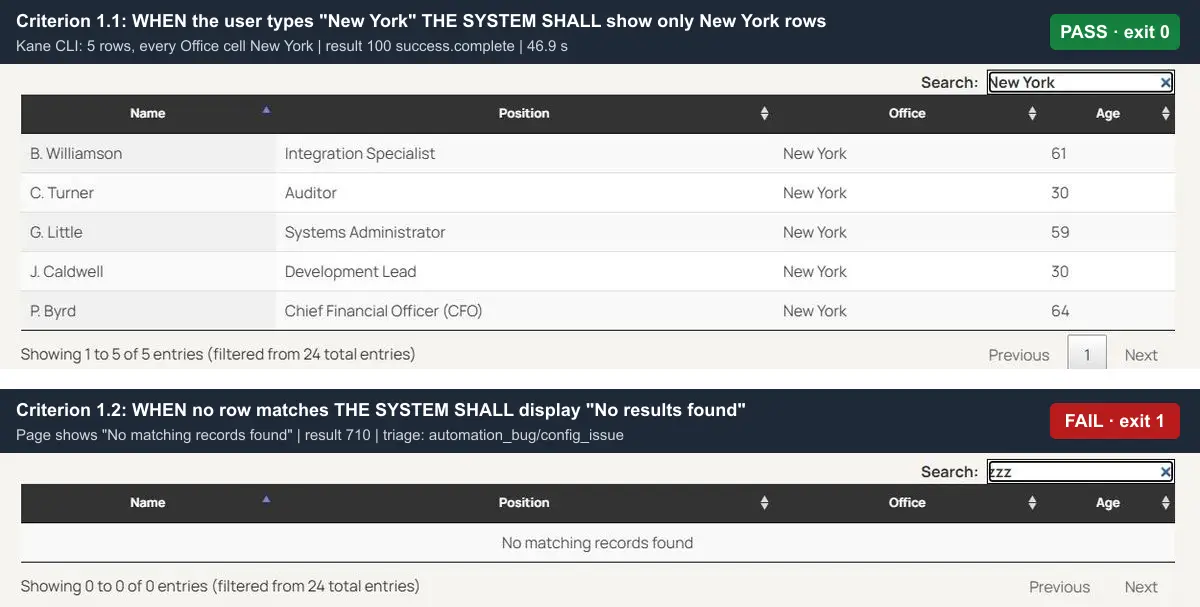
Criterion 1.1 passed in four steps: navigate, type New York, read the Office column, and assert. The run_end event carried result code 100 and reason success.complete, after 46.9 seconds of browser work and about 10.5 KaneAI credits.
Criterion 1.2 failed with exit code 1 and result code 710, assertion_error.final_verification. The page shows No matching records found, and the spec asked for No results found.
Kane CLI's triage then classified the failure as automation_bug/config_issue with 0.98 confidence: the search works, and the expected text is what disagrees. Its suggested fix was to update the expected text, or to assert the zero-results state instead of a hard-coded message.
In a spec-first workflow that disagreement is the useful result. Either requirements.md is wrong or the implementation is, and a person should decide which before an agent rewrites code to match the spec.
Step 5: Gate Each Turn With a Stop Hook
Both IDEs run shell commands on agent events, and both can send the agent back to work when a check fails. Kiro adds hook points around spec tasks, and Cursor splits tool hooks into separate shell and MCP events.
Kiro's hooks docs store hooks in JSON files in .kiro/hooks/, where each hook has a PascalCase trigger, an optional matcher, and a command or agent action. Command actions receive session context as JSON on stdin and time out after 60 seconds by default.
Kiro's hook types page notes that Kiro Web can store hook configuration but does not run hook triggers.
For the Stop trigger, which fires when the agent finishes its turn, the same page documents three outcomes:
- Exit 0 with a block decision - a JSON object with decision set to block and a reason on stdout starts another agent turn using that reason.
- Exit 1 - another agent turn starts, with a default continue instruction when the hook supplies no reason.
- Any other exit code - the response stays finished, and the hook output is not forwarded.
Kiro's hook actions page notes that Agent Prompt actions consume credits because they trigger a new agent loop, while Shell Command actions do not.
Cursor's hooks docs define hooks in a hooks.json file at the project or user level. A stop hook can return a followup_message that Cursor submits as the next user message, and loop_limit caps those follow-ups at 5 per script by default.
The two hook systems line up like this:
- Before a tool runs - Kiro's PreToolUse, where exit code 2 blocks the call, and Cursor's preToolUse, beforeShellExecution, and beforeMCPExecution.
- After the agent edits a file - Kiro's PostFileSave with a regex matcher on the path, and Cursor's afterFileEdit.
- Prompt submitted - Kiro's UserPromptSubmit and Cursor's beforeSubmitPrompt.
- Spec task boundaries - Kiro's PreTaskExec and PostTaskExec, with no Cursor equivalent, since Cursor has no spec tasks.
- Agent finishes a turn - Kiro's Stop, where a block decision re-prompts the agent, and Cursor's stop, where a followup_message does.
- Global hooks - ~/.kiro/hooks/ in Kiro CLI V3, and ~/.cursor/hooks.json in Cursor.
Use PostTaskExec for checks that should report on each spec task, and Stop for checks that must pass before the agent hands the turn back to you.
Wire Kane CLI Into Both Stop Hooks
The Kane CLI with AI coding agents guide appends a Kane CLI instruction file to AGENTS.md for Cursor. Kiro reads the same root AGENTS.md as steering, so one file teaches both agents the kane-cli commands.
npm install -g @testmuai/kane-cli
kane-cli login

# Both IDEs read AGENTS.md at the repository root
curl -fsSL https://www.testmuai.com/kane-cli-agent/AGENTS.md >> AGENTS.md
To make the check a gate rather than a suggestion, call it from each IDE's stop hook. One script serves both and maps Kane CLI's exit codes onto each hook's way of re-prompting the agent:
#!/usr/bin/env bash
# scripts/kane-verify.sh
# Usage: kane-verify.sh <kiro|cursor> <objective-file>
# Runs one acceptance criterion in Chrome; a failed check becomes another agent turn.
cat > /dev/null    # the stop event arrives as JSON on stdin; this check does not need it
kane-cli run "$(cat "$2")" --agent --headless --timeout 240 > .kane-last.ndjson
code=$?
if [ "$code" -eq 1 ]; then
  # Kane CLI requires Node.js, so node can read the run_end event
  node -e '
    const [mode, check] = process.argv.slice(1);
    const end = require("fs").readFileSync(".kane-last.ndjson", "utf8").trim().split("\n")
      .map(JSON.parse).find(e => e.type === "run_end");
    const reason = `Kane CLI failed ${check}. ${end.summary} If the spec is wrong, update requirements.md instead of the code.`;
    console.log(JSON.stringify(mode === "cursor" ? { followup_message: reason } : { decision: "block", reason }));
  ' "$1" "$2"
else
  [ "$code" -ne 0 ] && echo "kane-cli exited $code (setup or timeout), not an app failure" >&2
  echo '{}'
fi
exit 0
Exit code 1, a failed check, becomes another agent turn that carries Kane CLI's own failure summary. Exit codes 2 and 3 end the turn and print a note to stderr, since a login problem or a timeout says nothing about the code. For criterion 1.2, the reason the agent receives includes Kane CLI's summary of the triage above, so it is told the expected text is the likely culprit.
In Kiro, save the hook as .kiro/hooks/kane-verify.json:
{
  "version": "v1",
  "hooks": [{
    "name": "Kane CLI acceptance check 1.2",
    "trigger": "Stop",
    "action": { "type": "command", "command": "bash scripts/kane-verify.sh kiro checks/1.2-no-match.txt" },
    "timeout": 300
  }]
}
In Cursor, add the same script to .cursor/hooks.json, with loop_limit capping how many times a failed check can send the agent back:
{
  "version": 1,
  "hooks": {
    "stop": [{ "command": "bash scripts/kane-verify.sh cursor checks/1.2-no-match.txt", "timeout": 300, "loop_limit": 3 }]
  }
}
Raise the timeouts above the defaults. The passing check above took about two and a half minutes end to end, including Chrome startup, planning, and sealing the evidence pack, while Kiro's command hooks stop at 60 seconds unless you set a timeout.
The Kane CLI power file ships a sample hook at hooks/kane-verify.kiro.hook that fires when frontend or deploy-relevant files change and asks the agent to run a Kane CLI smoke test.
Kiro's IDE 1.0 hooks page says standalone .kiro/hooks/*.json files replace the previous .kiro.hook format, maps the old fileEdited trigger to PostFileSave, and has the IDE migrate a legacy hook when you click its upgrade badge in the Agent Hooks panel.
Keep the edit-time smoke test and the Stop gate as separate hooks, since one reports while you work and the other decides when a turn is done.
For a whole requirements.md rather than one criterion, the power also drives Kane CLI's assurance commands, which ingest the document, design requirement-linked tests, and report coverage per acceptance criterion with kane-cli cover.
Step 6: Run the Agent Headless in CI
Both CLIs run unattended with an API key. Kiro limits API keys to paid plans and documents its exit codes, and Cursor's print mode only proposes edits until you pass --force.
Kiro's headless mode docs run kiro-cli chat --no-interactive with a KIRO_API_KEY, available on Pro, Pro+, Pro Max, and Power. With no user to approve tool calls, --trust-all-tools approves everything and --trust-tools approves named tool IDs.
Kiro's exit codes reference lists 0 for success, 1 for a general failure, 3 when a server required by --require-mcp-startup does not start, and 4 when the requested agent is not found.
Cursor's headless CLI docs use print mode for non-interactive scripting and automation, and changes are only proposed, not applied, unless you add --force.
# Kiro CLI: non-interactive, scoped tool approval (needs KIRO_API_KEY)
kiro-cli chat --v3 --no-interactive --trust-tools=read_file,grep_search "List the acceptance criteria in .kiro/specs/staff-search/requirements.md that have no test"

# Cursor CLI: print mode applies edits only with --force (needs CURSOR_API_KEY)
agent -p --force "Implement the empty-state message from the staff search spec"
Data handling differs by plan. Kiro's data protection docs say Free Tier and individual subscriber content may be used for service improvement unless you opt out, while enterprise user content is not used for service improvement.
Cursor's privacy and data governance docs say that with Privacy Mode enabled, your code is never used for training by Cursor or other AI model providers, and that Privacy Mode is on by default for Enterprise teams.
Opt out on Kiro's individual plans, or turn on Privacy Mode in Cursor, before either agent reads a private repository. More Cursor CLI flags and a full workflow file are in Cursor CLI.
Plans, Credits, and Models
Both tools have a free plan. Kiro meters work in credits, scaled by a per-model multiplier, and Cursor meters a weekly usage pool for its own models while billing third-party models at API list price on Premium and above.
Kiro's billing docs list five tiers, Kiro Free, Pro, Pro+, Pro Max, and Power, with credits consumed fractionally per request. From November 1, 2026, a first upgrade from Free makes the rest of that month on Pro free and adds 500 trial credits on any paid plan.
Kiro's models page prices each model relative to Auto at 1.0x, with Claude Opus 5.5 at 2.0x and Claude Sonnet 5.5 at 1.3x. Its table marks Auto and a few models, such as Claude Sonnet 4.5, DeepSeek 3.2, GLM-5, and Qwen3 Coder Next, as available on the Free tier.
Cursor's models and pricing docs say each paid plan includes one weekly pool for Grok 4.7, Grok 4.6, Grok 4.5, and Composer 2.5, shared across Grok and Cursor. The Plus plan excludes Auto, Cloud Agents, Automations, Bugbot, and third-party models.
The table compares the structure of each plan line. Check both vendors' pricing pages for current prices before you budget.
| Access question | Kiro | Cursor |
|---|---|---|
| Free entry point | Kiro Free with 50 credits and a subset of models | Free plan with limited Agent and Chat usage |
| Paid tiers | Pro, Pro+, Pro Max, and Power, with 1,000, 2,000, 5,000, and 10,000 credits | Plus, Premium, Super, Ultra, Teams, and Enterprise |
| What is metered | Credits per request, scaled by the model's multiplier | A weekly pool for Cursor models, with Premium, Super, and Ultra at 4x, 15x, and 50x Plus usage |
| Claude and GPT models | Included from Pro up, at each model's credit multiplier | Premium and above, at API list price from prepaid credit |
| Past the limit | Add-on credits on paid tiers | Prepaid credit at per-model rates, or wait for the weekly reset |
| Automatic model routing | Auto on every tier, including Free | Auto on Premium and above, not on Plus |
Budget for the checks as well as the agent. Kane CLI runs use KaneAI credits from your TestMu AI account, whether they run on your machine or on the TestMu AI cloud grid, so scope stop-hook checks to the criteria that matter for the task.
Kiro or Cursor: Which One Fits Your Team?
Choose Kiro if your team writes requirements before code, wants specs committed next to the code, and needs a hook at each spec task. Choose Cursor if your team iterates inside the editor, wants a built-in browser for quick looks, and is already on The X Subscription.
- Product managers write the requirements - Kiro, because EARS acceptance criteria in requirements.md are readable by both PMs and the agent.
- Fast UI iteration on an existing app - Cursor, because Plan Mode, inline edits, and the built-in browser keep the loop inside the editor.
- Audit trail from requirement to task - Kiro, because specs live in .kiro/specs/ in the repository and PostTaskExec hooks run after each task.
- Team already pays for Grok or X - Cursor, because one X Subscription covers Grok and Cursor from the same weekly pool.
- Agents in the browser or on a phone - Kiro, because Kiro Web and Mobile run the same harness in a cloud sandbox and deliver pull requests.
- Mixed team on both tools - both, with a shared AGENTS.md and one check script called from both stop hooks as the common definition of done.
If Claude Code is the third option on your list, Claude Code vs Cursor compares it with Cursor on the same terms. Criteria that a browser check can verify are easier to write from acceptance criteria examples.
Conclusion
Pick Kiro when the requirements should exist before the code, and Cursor when the fastest path is editing with the agent beside you. Both read AGENTS.md, both have a stop hook that can send the agent back to work, and neither proves a criterion in a browser on its own.
Take one EARS criterion from your next spec, save it as a Kane CLI objective, and call it from the stop hook of whichever IDE you use. The Kane CLI introduction covers sign-in and the first run.
Testing from the terminal? Kane CLI by TestMu AI lets SDETs and developers plan, write, run and debug tests from the command line.
Author

Saurabh Prakash
Blogs: 21

Saurabh Prakash is an Engineering Manager at TestMu AI, where he leads engineering on agentic AI development and scalable system architecture for the quality engineering platform. He has also contributed to Test at Scale, the company's open-source test intelligence platform. He brings over 9 years of experience across Node.js, Java, Spring, MVC, data structures, algorithms, and scalable system design, with earlier roles as SDE 2 at Zomato, Senior Software Engineer at LogicHub, and Software Development Engineer at Directi. Saurabh holds a B.Tech in Computer Science and Engineering from Delhi Technological University.
Reviewer

Srinivasan Sekar
Reviewer
Srinivasan Sekar is Director of Engineering at TestMu AI, where he leads engineering and open-source initiatives behind the Selenium and Appium automation grid and owns TestMu AI's MCP Server. A committer to Appium and a contributor to Selenium, WebdriverIO, Taiko, and AppiumTestDistribution, he brings over 15 years of experience in quality engineering and open-source technologies. He is the author of the Apress book 'The MCP Standard: A Developer's Guide to Building Universal AI Tools with the Model Context Protocol,' a Certified Kubernetes and Cloud Native Associate, and an international conference speaker. Before TestMu AI he spent over eight years at Thoughtworks as a Principal Consultant and Quality Architect. Srinivasan holds a B.Tech in Information Technology from Anna University.


Kiro vs Cursor FAQs
Did you find this page helpful?
More Related Blogs

TestMu AI forEnterprise
Get access to solutions built on Enterprise
grade security, privacy, & compliance
- Advanced access controls
- Advanced data retention rules
- Advanced Local Testing
- Premium Support options
- Early access to beta features
- Private Slack Channel
- Unlimited Manual Accessibility DevTools Tests