

Power Your Software Testing with AI Agents and Cloud
The Native AI-Agentic Cloud Platform to Supercharge Quality Engineering. Test Intelligently and Ship Faster.


- TestMu AI (Formerly LambdaTest)
- /
- Learning Hub
- /
- How to Use Appium Skill With Claude Code [2026]
How to Use Appium Skill With Claude Code [2026]
Learn how to use the Appium Skill with Claude Code to generate, run, and debug Appium tests for Android and iOS using TestMu AI's agent skills.
Last Updated on:
An Appium Skill is a curated set of markdown guides that help AI coding agents write production-ready Appium tests by capturing real-world patterns, capability configs, and locator strategies from actual mobile codebases.
Without a skill file, your AI agent falls back on defaults. That means Thread.sleep(5000) on every async wait, XPath selectors that break on the next UI refactor, and capability blocks copy-pasted across every test class without a shared base.
An Appium Skill fixes this by telling the agent your wait strategy, preferred locator hierarchy, and capability setup. The agent stops guessing and starts writing mobile tests that fit your existing project structure.
Overview
To write production-ready mobile tests, install the Appium Skill by TestMu AI in Claude Code or Cursor AI to provide your AI coding agent with mobile-specific locator strategies, capability configurations, and gesture patterns that prevent fragile test generation across Android and iOS.
How to Install and Use Appium Skills Across AI Agents
- Best for Claude Code integration: Claude Code - Read the SKILL.md file from the cloned repository to automatically generate structured Appium test files, capability configurations, and pom.xml files using project-specific context.
- Best for Cursor AI integration: Cursor AI - Copy the appium-skill folder into your local skills path to apply mobile-specific locator strategies and gesture patterns using Cursor's custom rules format.
- Best for GitHub Copilot integration: GitHub Copilot - Use the appium-skill folder to feed custom instructions to the agent, ensuring it generates robust Appium tests that avoid fragile XPath selectors.
- Best for Gemini CLI integration: Gemini CLI - Load the Appium Skill into the CLI's context mechanism to prevent the agent from guessing capability blocks and locator preferences during test generation.
- Best for cloud scaling: TestMu AI - Run your generated Appium tests across real Android and iOS devices at scale by setting your credentials and uploading your APK or IPA files.
- Best for natural language test authoring: KaneAI - Use this generative AI agent to author mobile tests in plain language, execute them on real devices, and export them to Appium Java, Python, or JavaScript.
What Is an Appium Skill
An Appium Skill is a structured markdown guide that gives an AI coding agent the project-specific context it needs to write mobile tests that hold up in production across Android and iOS.
The SKILL.md format is specific to Claude Code - it is Anthropic's mechanism for giving Claude Code persistent, project-level context before it generates code. Other tools use their own formats: Cursor uses .cursor/rules, GitHub Copilot uses custom instructions, and Gemini CLI uses its own context mechanism.
The agent loads the skill, then applies its patterns automatically without you having to repeat capability configs or locator preferences on every prompt.
An Appium Skill is not documentation. The official Appium documentation covers what the API does. A skill covers when to use it, which locator strategy to pick first, and which patterns survive a real mobile codebase.
Without a skill, an agent guesses. Below is a tap interaction generated by Claude Code without the skill:
driver.findElement(By.xpath("//android.widget.Button[@bounds='[540,1200][700,1300]']")).click();
And below is the same interaction with the Appium Skill loaded:
driver.findElement(AppiumBy.accessibilityId("colorButton")).click();
The second locator works across screen sizes, OS versions, and layout changes. The first one breaks the moment a developer moves a button 10 pixels.
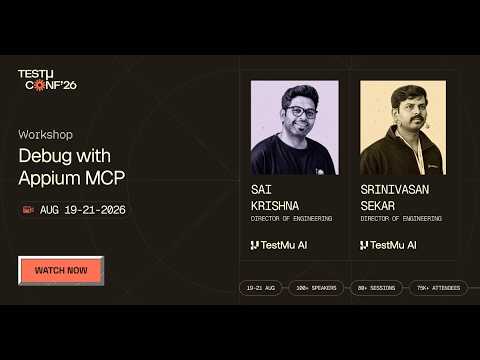
A skill file is one way to give an agent Appium context. The Model Context Protocol is another. In this TestMu Conf 2026 session, Debug with Appium MCP, Srinivasan Sekar and Sai Krishna show how MCP turns Appium from a traditional automation framework into an AI-native testing platform that understands natural language commands and interacts intelligently with mobile apps.
The Appium Skills Repository by TestMu AI (Formerly LambdaTest)
The Appium Skill is a repository maintained by TestMu AI.
LambdaTest Now Called TestMu AI — the same trusted platform with a new name and powerful AI capabilities.
The TestMu AI agent-skills repository covers 46 test automation frameworks across 15+ languages. Appium is one skill in a collection that also includes Playwright, Cypress, Selenium, Espresso, XCUITest, and more.
If your project uses Appium for mobile and Playwright for web, you install two skills. Each AI agent on your team draws from the right context for the right task. Here is how the Appium Skill folder is structured.
Repository Structure
appium-skill/
├── reference/       # Production patterns and playbooks
├── SKILL.md         # Agent entry point
There are two components. Each has a specific job.
- SKILL.md is what Claude Code reads first. It is a compact metadata file that tells the agent what the skill covers, when to load it, and which reference file to use for Android, iOS, or hybrid app testing. It stays small so it does not bloat the agent's context window on every prompt.
- reference/ is where the production patterns live. It includes capability configs for UiAutomator2 and XCUITest, locator strategy hierarchy, gesture implementations using the W3C Actions API, cloud integration with TestMu AI real device cloud, and language-specific patterns for Python and JavaScript.

Note: Run your Appium tests on real Android and iOS devices using Agent Skills. Try TestMu AI Today
How to Install the TestMu AI Appium Skill
With the repository structure covered, let's install the skill. Clone the TestMu AI agent-skills repo from GitHub, then copy the appium-skill folder into your tool's local skills directory.
Option 1: Clone the Full Repository
If your stack uses multiple frameworks, clone the whole collection:
# Cursor AI
git clone https://github.com/LambdaTest/agent-skills.git .cursor/skills/agent-skills

# Claude Code
git clone https://github.com/LambdaTest/agent-skills.git .claude/skills/agent-skills

# GitHub Copilot
git clone https://github.com/LambdaTest/agent-skills.git .github/skills/agent-skills

# Gemini CLI
git clone https://github.com/LambdaTest/agent-skills.git .gemini/skills/agent-skills
Option 2: Install Only the Appium Skill
Mobile-only projects can copy just the one directory:
git clone https://github.com/LambdaTest/agent-skills.git
cp -r agent-skills/appium-skill .claude/skills/
How to Run Tests Using Appium Skill
I will use Claude Code agent mode for demonstration. The same workflow applies to Cursor AI, GitHub Copilot, and Gemini CLI.
Open your IDE with agent support and switch to agent mode. Prompt it to write Appium tests, let the agent generate test files and config, then run the generated Maven command to execute and verify tests locally on an emulator.
Step 1: Open Claude Code (or any IDE with AI agent support like Cursor AI or VS Code with GitHub Copilot).
Step 2: Open the agent chat and type this prompt:
Write Appium tests using Java that open the TestMu AI Proverbial Android app and tap on the COLOR button.
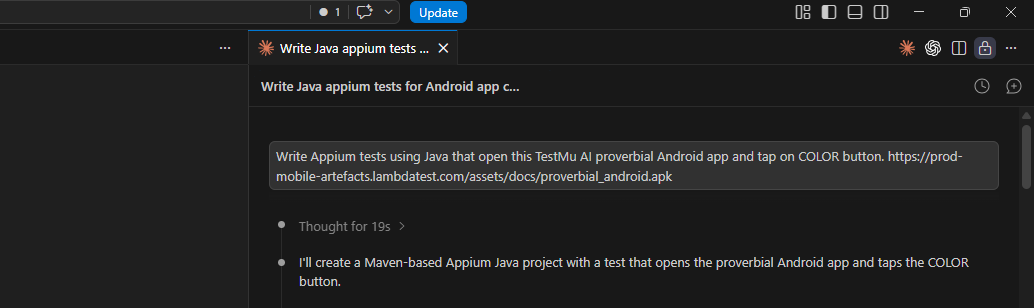
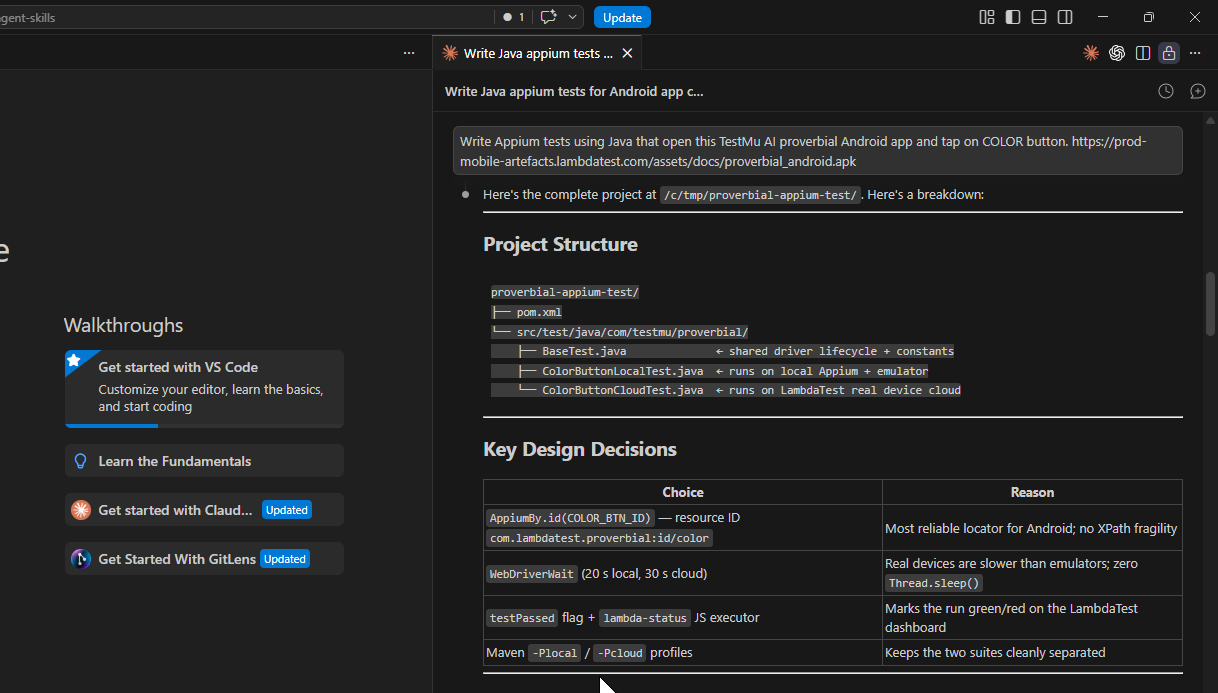
Step 3: The agent reads the installed Appium Skill and generates the tests. It creates a Maven project that opens the Proverbial Android app, locates the COLOR button using AppiumBy.accessibilityId, taps it once, and asserts that it remains visible after the tap.
Files added:
- pom.xml
- src/test/java/com/testmu/proverbial/BaseTest.java
- src/test/java/com/testmu/proverbial/ColorButtonLocalTest.java
- src/test/java/com/testmu/proverbial/ColorButtonCloudTest.java
Step 4: Now enter the prompt to run tests.
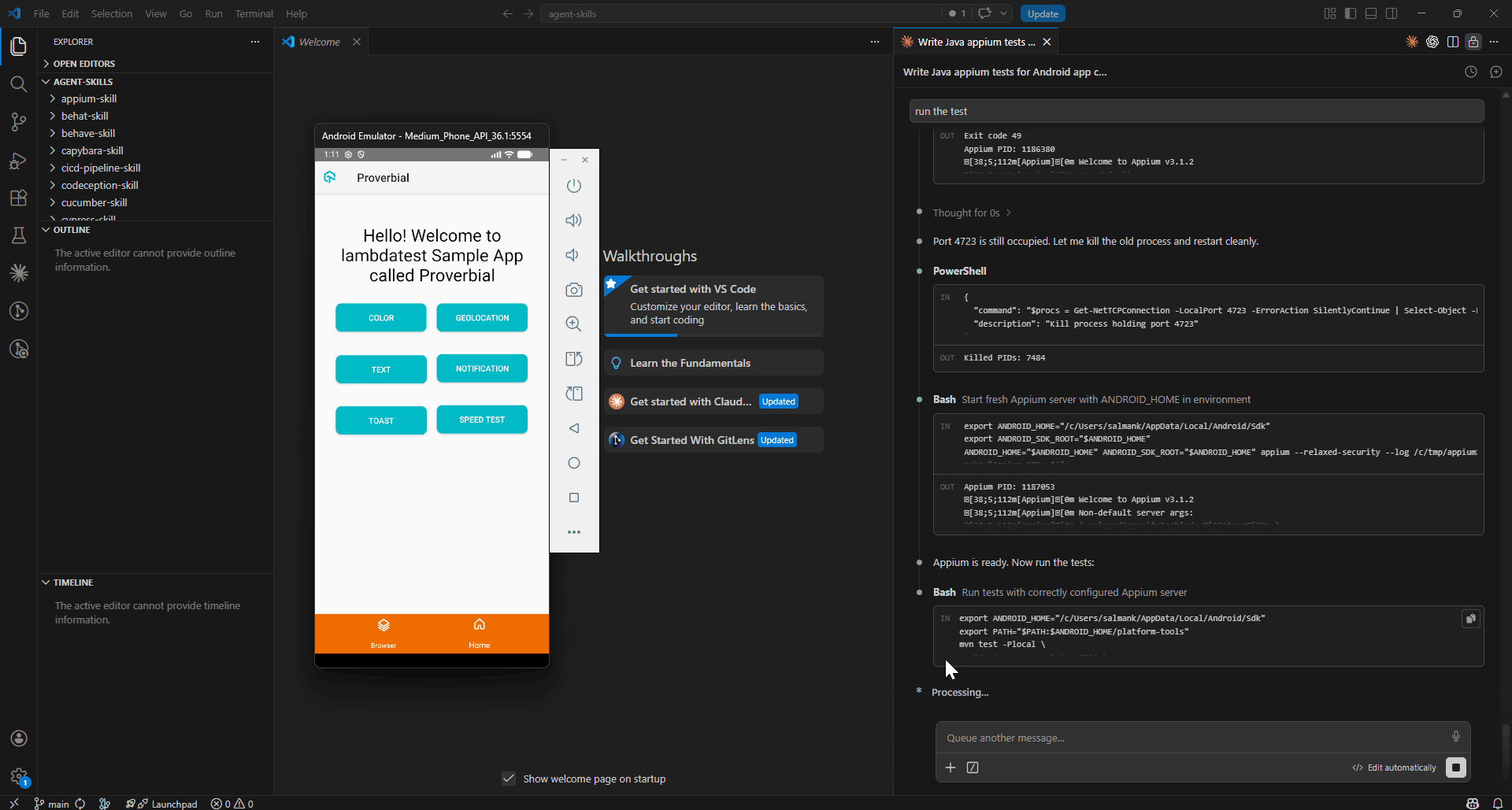
As you can see, both tests passed locally. The next step is to run the same tests on real devices using the TestMu AI cloud for cross-device and cross-OS coverage.
How to Run Appium Tests on Cloud With TestMu AI Skills
Once tests pass locally, you can scale them using the TestMu AI real device cloud. The Appium Skill makes this transition seamless by including cloud capability templates.
Step 1: Set your TestMu AI credentials as environment variables. Get them from the TestMu AI dashboard under Credentials.
# macOS/Linux
export LT_USERNAME="YOUR_TESTMUAI_USERNAME"
export LT_ACCESS_KEY="YOUR_TESTMUAI_ACCESS_KEY"

# Windows (PowerShell)
$env:LT_USERNAME="YOUR_TESTMUAI_USERNAME"
$env:LT_ACCESS_KEY="YOUR_TESTMUAI_ACCESS_KEY"
Step 2: Prompt the agent to run the same tests on the TestMu AI real device cloud:
Now run the test on TestMu AI real device cloud
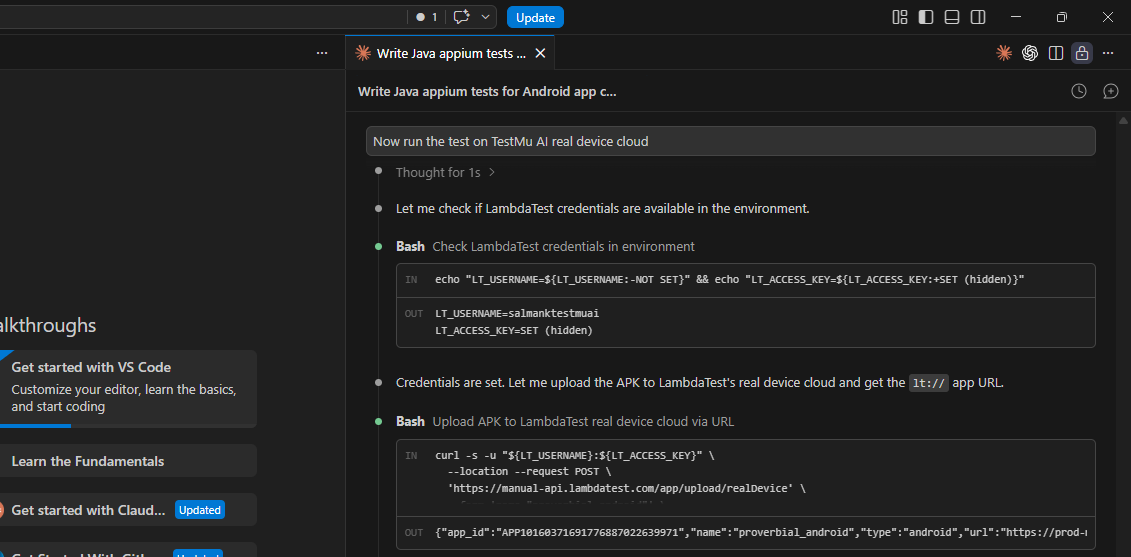
The agent reads the cloud integration reference from the Appium Skill and generates the correct capability block:
UiAutomator2Options options = new UiAutomator2Options();
options.setPlatformName("android");
options.setDeviceName("Pixel 7");
options.setPlatformVersion("13");
options.setApp("lt://APP1234567890");
options.setAutomationName("UiAutomator2");

HashMap<String, Object> ltOptions = new HashMap<>();
ltOptions.put("w3c", true);
ltOptions.put("build", "Appium Skill Build");
ltOptions.put("name", "Color Button Test");
ltOptions.put("isRealMobile", true);
ltOptions.put("video", true);
ltOptions.put("network", true);
options.setCapability("LT:Options", ltOptions);

String hub = "https://" + System.getenv("LT_USERNAME") + ":"
           + System.getenv("LT_ACCESS_KEY") + "@mobile-hub.lambdatest.com/wd/hub";
AndroidDriver driver = new AndroidDriver(new URL(hub), options);
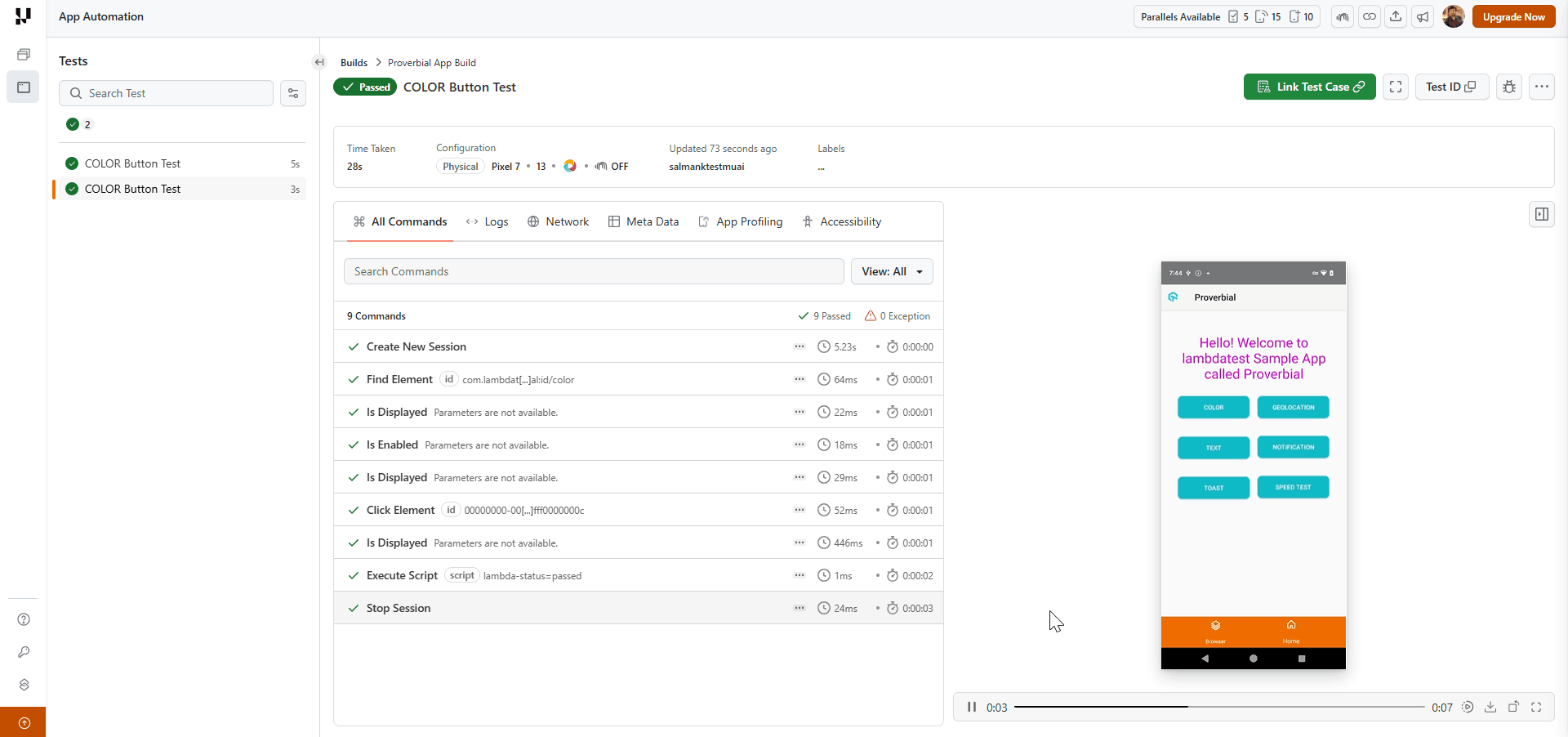
The TestMu AI App Automation dashboard shows a video replay of the test running on a real Pixel 7 device, with command-level logs, network activity, and device metrics captured automatically.
Are Agent Skills Enough for Appium Test Authoring Needs
Agent skills improve the quality of tests your engineers write. For test authoring at scale, that is only part of the problem.
When sprint velocity outpaces your team's capacity to write new mobile tests, coverage gaps accumulate. Your Appium expert is maintaining existing tests, not authoring new ones. New app flows go untested until someone has time.
Generative AI testing agents like TestMu AI's KaneAI solve the authoring bottleneck directly. Describe the user flow in natural language. KaneAI writes the test and can export it to Appium Java or Python.
Features:
- Natural Language Test Authoring: Describe the mobile user flow in plain language. KaneAI converts it into executable test steps. No scripting knowledge required.
- Real Device Execution: Run tests across real Android and iOS devices, OS versions, and screen sizes without extra setup.
- Multi-Framework Code Export: Export generated tests to Appium Java, Python, or JavaScript. Engineers retain full control over the generated output.
- 2-Way Test Editing: Switch between a natural language view and a code view while keeping them synchronized.
- Self-Healing Tests: KaneAI understands what the test verifies and finds the right elements each time, rather than patching broken locators after the fact.
- Assisted Debugging: KaneAI automatically analyzes failing test steps in real time, providing root cause analysis and actionable suggestions.
- Multi-Input Support: Feed KaneAI a Jira ticket, PRD, screenshot, or video. It extracts testable mobile scenarios and generates tests from any of these formats.

Conclusion
An Appium Skill does not change what Claude Code knows about Appium. It changes what the agent works from. The difference between a mobile test that survives three releases and one that breaks on the next UI update is almost always a locator choice, a hardcoded sleep, or a capability block that was never validated against a real device.
The local-to-cloud progression matters here. Get the patterns right on an emulator first. AccessibilityId locators, explicit waits, W3C gesture actions - these pay off locally before you touch a real device. Real devices add network latency and hardware variation.
The TestMu AI real device cloud adds 10000+ device coverage, video replay, and automatic test status reporting. Each layer builds on the one before it.
The TestMu AI agent-skills repository provides the Appium Skill alongside 45 others, so the same approach extends across your full test stack.
Author

Salman Khan
Blogs: 138


Salman is a Test Automation Evangelist and Community Contributor at TestMu AI, with over 6 years of hands-on experience in software testing and automation. He has completed his Master of Technology in Computer Science and Engineering, demonstrating strong technical expertise in software development, testing, AI agents and LLMs. He is certified in KaneAI, Automation Testing, Selenium, Cypress, Playwright, and Appium, with deep experience in CI/CD pipelines, cross-browser testing, AI in testing, and mobile automation. Salman works closely with engineering teams to convert complex testing concepts into actionable, developer-first content. Salman has authored 120+ technical tutorials, guides, and documentation on test automation, web development, and related domains, making him a strong voice in the QA and testing community.
Appium Skill Frequently Asked Questions
Did you find this page helpful?
More Related Learning Hubs
TestMu AI forEnterprise
Get access to solutions built on Enterprise
grade security, privacy, & compliance
- Advanced access controls
- Advanced data retention rules
- Advanced Local Testing
- Premium Support options
- Early access to beta features
- Private Slack Channel
- Unlimited Manual Accessibility DevTools Tests