

Power Your Software Testing with AI Agents and Cloud
The Native AI-Agentic Cloud Platform to Supercharge Quality Engineering. Test Intelligently and Ship Faster.


- TestMu AI (Formerly LambdaTest)
- /
- Blog
- /
- Claude Code Agent Teams: Setup, Commands, and Use Cases
Claude Code Agent Teams: Setup, Commands, and Use Cases
Claude Code Agent Teams explained: how to enable them, spawn and control teammates, teams vs subagents, real use cases, token costs, and troubleshooting tips.
Last Updated on:
Claude Code Agent Teams are an experimental feature that puts several Claude Code sessions on one task at the same time, coordinated by a lead session. Every teammate holds a separate context window and messages the others directly instead of routing findings through the coordinator.
Anthropic's own Claude Code cost documentation prices that parallelism plainly: agent teams use approximately 7x more tokens than standard sessions when teammates run in plan mode, roughly double the three-to-four-times figure circulating in community write-ups.
This guide covers how to switch them on, the commands that control a team, when subagents win instead, and the cases where a single session still beats a team.
If you are still mapping the fundamentals, our explainer on what Claude Code is and how its extension model works covers the session model and the six layers a team configuration builds on.
TL;DR
Claude Code Agent Teams let one Claude Code session act as a team lead that spawns other full Claude Code sessions as teammates. Each teammate keeps its own context window, claims work from a shared task list, and messages other teammates directly rather than reporting everything back through the lead.
How Do You Enable Agent Teams in Claude Code?
- CLAUDE_CODE_EXPERIMENTAL_AGENT_TEAMS: the single switch. Set it to 1 in your shell or in the env block of settings.json. Until you do, Claude Code writes no team directories and will not spawn teammates.
- Interactive sessions only: teammates never spawn under the -p headless flag or in Agent SDK sessions, so a CI pipeline cannot form a team no matter how the prompt is written.
- In-process display mode: the default. Every teammate runs inside one terminal and you switch between them with the arrow keys, which is what makes agent teams usable on Windows.
- Split-pane display mode: gives each teammate its own pane but needs tmux or iTerm2 with the it2 CLI, and is unsupported in VS Code's integrated terminal, Windows Terminal, and Ghostty.
- Subagent definitions as teammate roles: a role written once in .claude/agents/ can be spawned as a teammate, so team composition does not have to be retyped as prose every session.
What Is the Difference Between Claude Code Agent Teams and Subagents?
Subagents run inside one session and hand a summarized result back to the caller, which keeps cost low and the main agent in charge. Teammates are independent sessions that talk to each other, which buys genuine debate and cross-checking at roughly seven times the token spend. Whichever you pick, the code still needs verifying in a real browser, which is where TestMu AI's Kane CLI fits.
What Are Claude Code Agent Teams?
Claude Code Agent Teams run several Claude Code sessions against one problem at once. One session leads, assigns work, and synthesizes results. The rest are teammates: independent sessions that message each other.
The feature is experimental and off by default, per the Claude Code agent teams documentation (current as of v2.1.178). Two things separate it from earlier parallelism options:
- Teammates message each other by name - a discovery reaches another teammate without the lead relaying it.
- You can talk to any teammate yourself - open its transcript, redirect it, or ask a follow-up without going through the lead.
The practical effect: a team can argue. Five teammates trying to disprove each other's theories beat the first plausible answer a single session settles on. That argument is what the extra tokens buy.
How Do Claude Code Agent Teams Work?
Four moving parts, all plain files on your disk - not a hosted service:
- Team lead - the session you are typing in. It spawns teammates and creates tasks; leadership cannot be transferred.
- Teammates - separate Claude Code instances. Each loads your CLAUDE.md, MCP servers, and skills at spawn, plus the spawn prompt.
- Shared task list - pending, in progress, or completed. A task with unresolved dependencies cannot be claimed.
- Mailbox - one JSON file per agent at ~/.claude/teams/{team-name}/inboxes/{agent-name}.json. A message counts as sent only when the write succeeds.
The team name is derived from your session, not chosen by you: it is the word session- followed by the first eight characters of the session ID. The team config lives at ~/.claude/teams/{team-name}/config.json and the task list at ~/.claude/tasks/{team-name}/.
On session end the config directory is removed; the task list persists locally (retention follows cleanupPeriodDays), so a resumed session keeps its tasks.
Do not hand-edit or pre-author the config - it holds live runtime state and Claude Code overwrites your changes on the next update. There is no project-level equivalent either: a .claude/teams/teams.json in your repo is just a file.
The pattern generalizes beyond one vendor's CLI - our guide to multi-agent AI systems covers the architectures and failure modes in any implementation.
What Is the Difference Between Agent Teams and Claude Code Subagents?
Who talks to whom. Subagents report back to one caller; teammates talk to each other. Picking wrong can multiply your token bill sevenfold for no benefit.
| Dimension | Subagents | Agent teams |
|---|---|---|
| Context | Own context window, with results returned to the caller | Own context window, fully independent of the lead |
| Communication | Return a result to the caller; named subagents can message each other | Teammates message each other directly by name |
| Coordination | The main agent manages all work | Self-coordination through messages plus a shared task list |
| Your access | You interact through the main agent | You can open and message any teammate directly |
| Background work | Run in the background by default in interactive sessions | In-process teammates cannot run background subagents of their own |
| Token cost | Lower, because results are summarized back into one context | Roughly 7x a standard session when teammates plan, per Anthropic |
| Best for | Focused tasks where only the result matters | Work that needs discussion, challenge, and collaboration |
The decision rule is short. If you can describe the work as "go find out X and tell me," use a subagent. If the value depends on two workers disagreeing with each other, use a team.
The docs are explicit: sequential work, same-file edits, and dependent tasks do better with a single session or subagents.
For the full frontmatter reference, where definitions live, and how to verify what a subagent actually shipped, see our dedicated guide to Claude Code subagents.
How Do You Enable and Set Up Agent Teams in Claude Code?
Agent teams are off by default. Set CLAUDE_CODE_EXPERIMENTAL_AGENT_TEAMS to 1 to switch them on, either as a shell variable or, more durably, in the env block of your settings.json file.
{
  "env": {
    "CLAUDE_CODE_EXPERIMENTAL_AGENT_TEAMS": "1"
  }
}
You do not need to restart. Claude Code reapplies settings-file env values to the running session when you save, and rereads the variable each time it spawns an agent.
The default state is easy to verify - with the flag never set, neither team directory exists:
$ echo $CLAUDE_CODE_EXPERIMENTAL_AGENT_TEAMS
                                  # empty, the flag was never set

$ ls ~/.claude/
commands  debug  ide  plugins  projects  sessions  settings.json  skills

$ ls ~/.claude/teams/
ls: cannot access '/c/Users/<user>/.claude/teams/': No such file or directory

$ ls ~/.claude/tasks/
ls: cannot access '/c/Users/<user>/.claude/tasks/': No such file or directory
Keep that as a diagnostic: if ~/.claude/teams/ is still missing after a session starts, the variable is not reaching Claude Code - no prompt rewording will produce a teammate.
Two constraints catch people out immediately:
- Interactive sessions only. Under the -p flag, including Agent SDK sessions, no teammates spawn - a named subagent runs as an ordinary subagent even with teams on.
- Delegation changes globally. While teams are on, any subagent Claude names launches as a teammate - including ones Claude names on its own, during work you never framed as team work.
The fix for the second is in the troubleshooting section below.
How Do You Create and Control Your First Agent Team?
There is no create-team command - describe the team in plain language and Claude spawns it. This shape works because the three roles never wait on each other:
Spawn three teammates to review PR #142:
- One focused on security implications
- One checking performance impact
- One validating test coverage
Have them each review and report findings.
Name the teammates in your prompt. Names are assigned at spawn and route every message - naming them yourself is the only way to get predictable ones.
A Worked Example: My Three-Reviewer PR Team
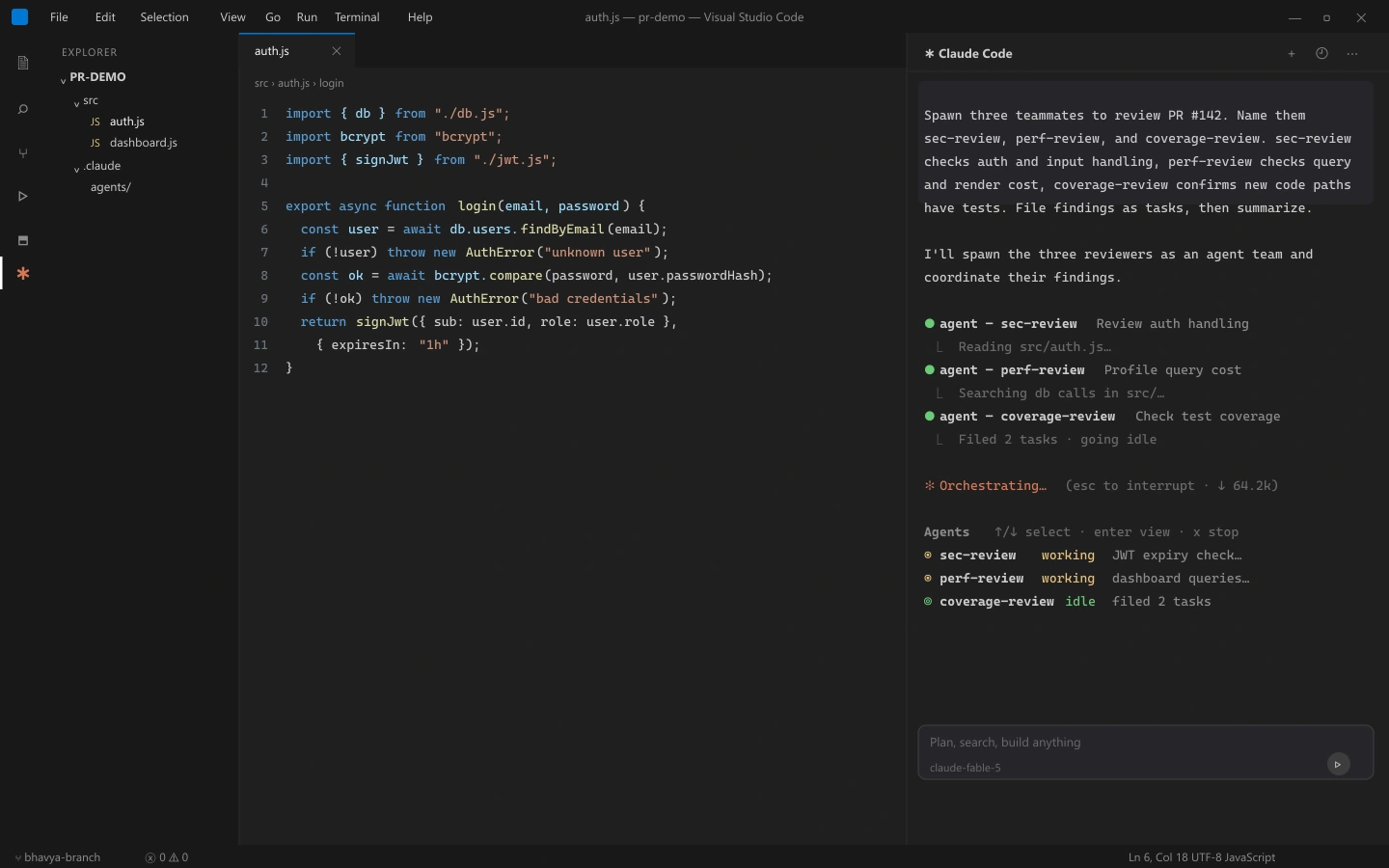
Here is the exact prompt I ran against a real pull request, naming the teammates so I could address them later:
Spawn three teammates to review PR #142.
Name them sec-review, perf-review, and coverage-review.
sec-review checks auth and input handling, perf-review checks query and
render cost, coverage-review confirms new code paths have tests.
Have each file findings as tasks, then summarize all three reports.
The lead spawned all three, and within a minute my session looked like this - the lead confirming the spawns, sec-review and perf-review working in the Agents panel, coverage-review already idle after filing two tasks:
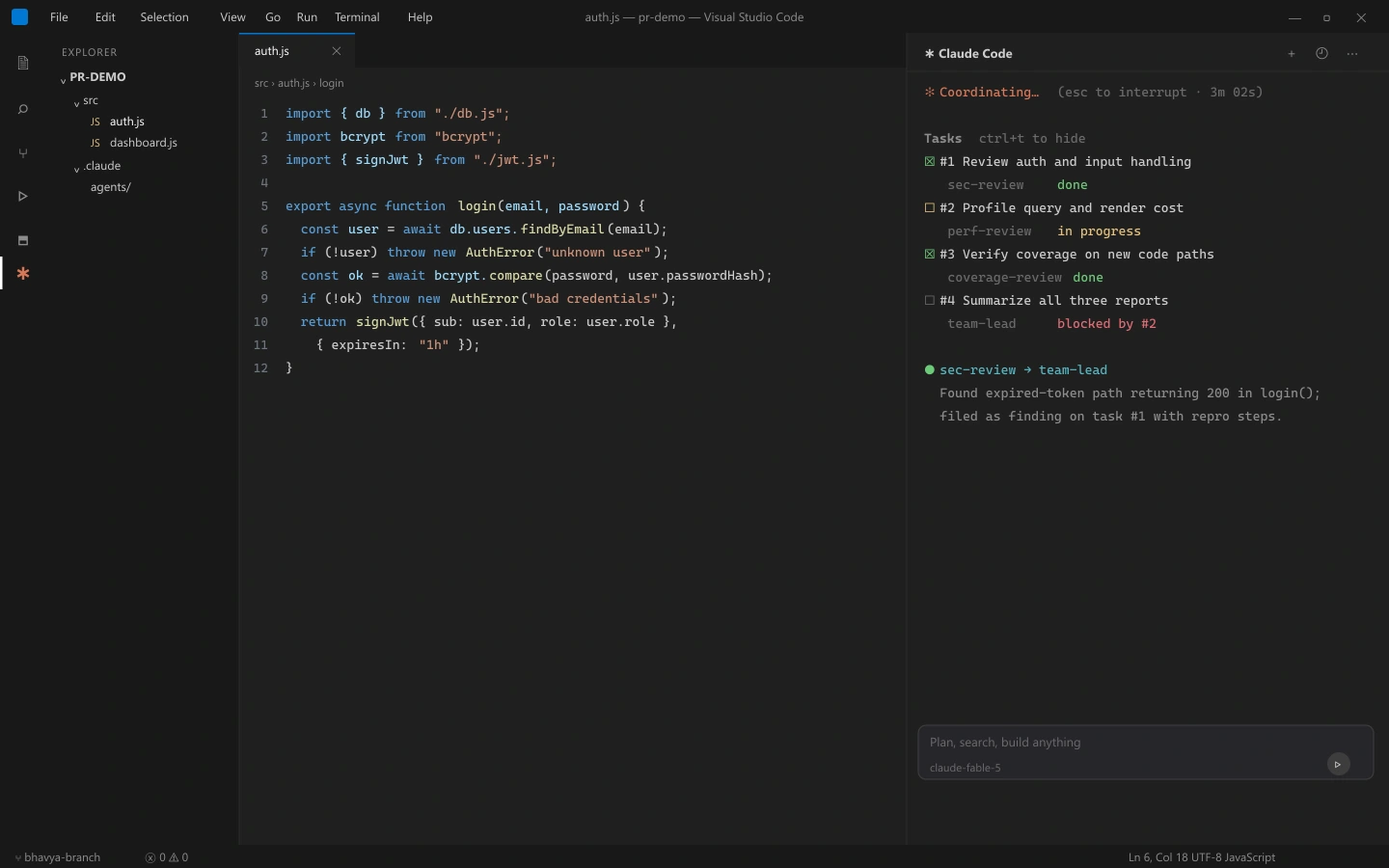
Ctrl+T flips to the shared task list, where each finding lands as a claimable task and the lead's summary sits blocked until the reviews close:
When perf-review flagged the dashboard query I knew was cached, I selected its row with the arrow keys, pressed Enter to open its transcript, and typed the correction - plain text goes to that teammate alone:
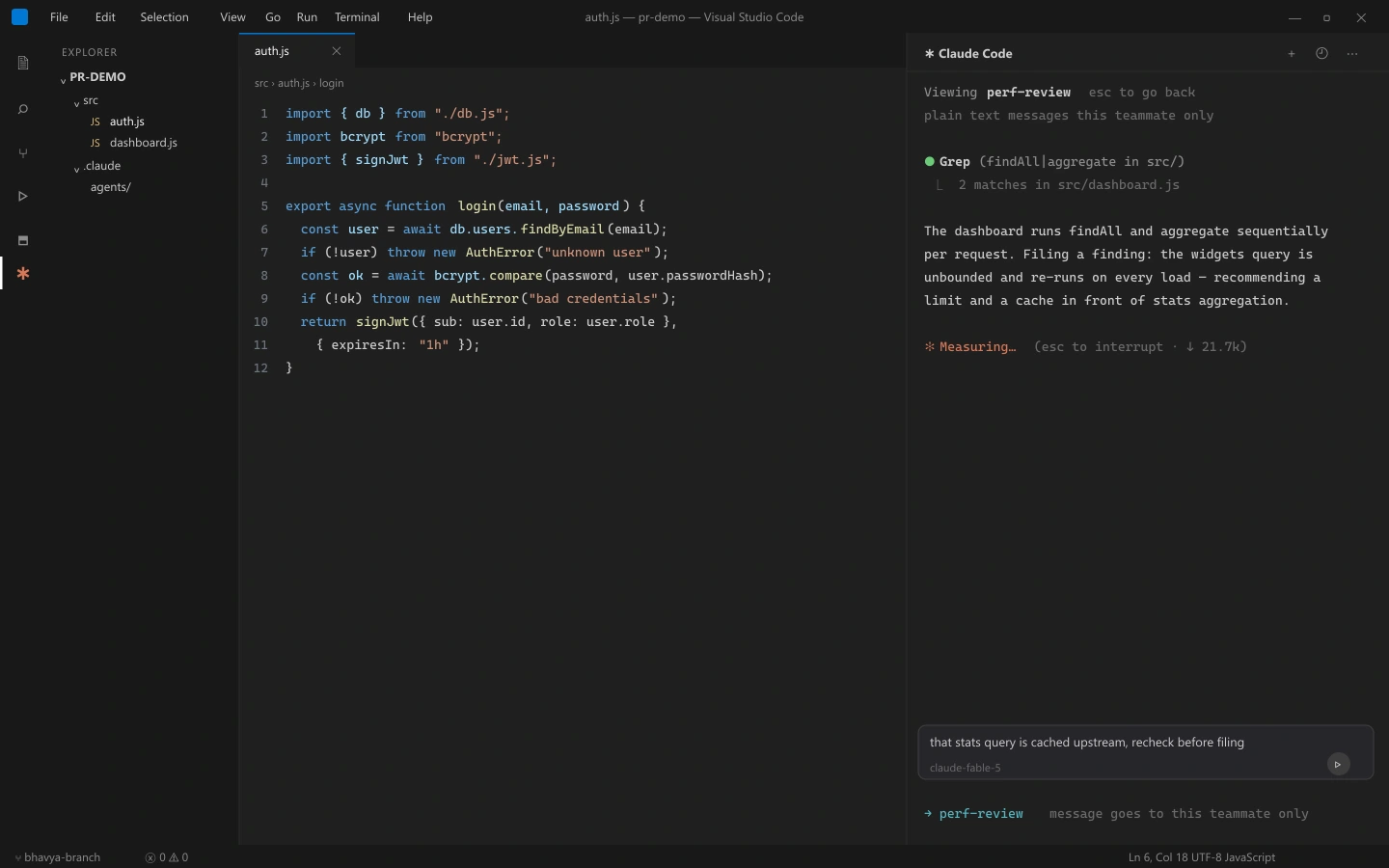
perf-review re-profiled with the cache warm, withdrew the finding, and the lead's summary arrived with the correction already folded in.
Controlling the Team From the Agent Panel
In the default in-process mode, teammates appear in a panel below your prompt input. Five keys are the entire interface:
- Up and down arrows - move the selection between teammates in the panel.
- Enter - open the selected teammate's transcript and type to message it directly.
- Escape - interrupt the selected teammate's current turn without stopping it.
- x - stop the selected teammate entirely.
- Ctrl+T - toggle the shared task list so you can see what is claimed and what is blocked.
While viewing a teammate, plain text and skills go to it; built-in slash commands still run in the lead. A teammate's model and fast mode are fixed at spawn, so /model and /fast only ever change the lead (v2.1.199+ shows a notice saying so).
Assigning Models, Plans, and Tasks
Set team size and model in the spawn sentence - Anthropic recommends Sonnet for teammates:
Spawn 4 teammates to refactor these modules in parallel. Use Sonnet for
each teammate.
With no model named, teammates run on the lead's model unless CLAUDE_CODE_SUBAGENT_MODEL is set. They inherit the lead's effort level too - /effort is the one setting that does apply to a viewed teammate.
For risky work, require a plan: the teammate stays read-only until the lead approves. The lead decides autonomously, so give it criteria:
Spawn an architect teammate to refactor the authentication module.
Require plan approval before they make any changes.
Only approve plans that include test coverage.
Tasks are lead-assigned or self-claimed, and claiming uses file locking, so two teammates cannot grab the same one. To end a teammate cleanly, ask the lead to shut it down by name - the teammate can approve or reject the request.

How Do You Verify What an Agent Team Actually Shipped?
Outside the agent, in a real browser. Agents verify with tests, type checkers, and linters - all code-surface tools. Nothing clicks the button and confirms the page loads, so a teammate's "passed" covers code only, and five teammates multiply that gap by five.
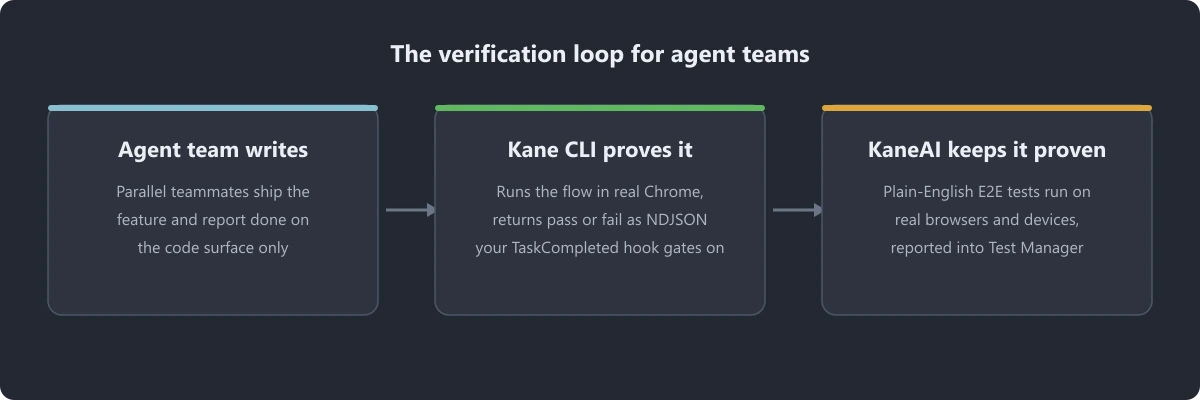
TestMu AI's Kane CLI closes the gap: give it a natural-language objective and it validates the rendered UI in real Chrome. With --agent --headless it emits NDJSON a teammate can parse, so a TaskCompleted hook can gate "done" on the browser agreeing:
npm install -g @testmuai/kane-cli
kane-cli login --username "$LT_USERNAME" --access-key "$LT_ACCESS_KEY"

kane-cli run "Sign in and confirm the dashboard loads" --agent --headless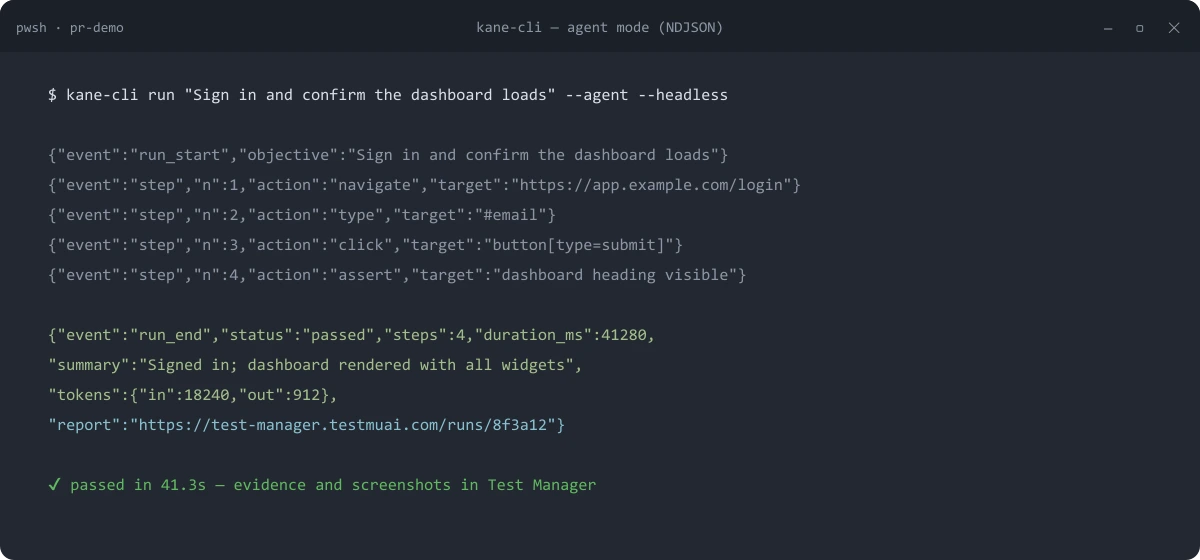
Use basic auth, not OAuth - OAuth needs a consent page a headless agent cannot click. Install the Kane CLI skill at .claude/skills/kane-cli/SKILL.md. Claude Code skills load at spawn, so every teammate verifies in the browser unprompted. The Kane CLI quick start documentation covers both auth methods.
Spot checks gate the merge; regression needs a suite. KaneAI, TestMu AI's GenAI-native testing agent, turns plain-English flows into end-to-end tests on real browsers and devices, reported into Test Manager. The team writes, Kane CLI proves the change, KaneAI keeps it proven.
A worked example of the write-then-verify loop is in our walkthrough of verifying Claude Code output with Kane CLI. For framework-level test code, the open-source TestMu AI agent skills repository ships 40+ MIT-licensed skills across Selenium, Playwright, Cypress, Appium, and more.

Note: Five parallel teammates can write more code in an hour than you can review in a day. Kane CLI runs each change in a real Chrome browser and returns an evidence-backed pass or fail your pipeline can gate on. Try TestMu AI free!
Which Settings and Commands Control Claude Agent Teams?
Six settings beyond the enable flag: display mode (a setting and a CLI flag), teammate model, cache lifetime, task retention, and one option removed in v2.1.234. File locations and precedence are in the Claude Code settings documentation.
| Setting | Where it lives | What it does |
|---|---|---|
| CLAUDE_CODE_EXPERIMENTAL_AGENT_TEAMS | env or settings.json env block | Turns agent teams on with 1 and off with 0. Off by default. |
| teammateMode | ~/.claude/settings.json | Display mode: in-process (default), auto, tmux, or iterm2 from v2.1.186. |
| --teammate-mode | CLI flag | Sets the display mode for one session. Experimental, and absent from claude --help. |
| CLAUDE_CODE_SUBAGENT_MODEL | environment variable | Model for teammates when the prompt names none. Otherwise the lead's model is used. |
| subagentPromptCacheTtl | settings.json | Set to 1h to extend an in-process teammate's cache beyond the five-minute default. |
| cleanupPeriodDays | settings.json | Governs retention of the persisted task list directory, as it does session transcripts. |
| teammateDefaultModel | removed in v2.1.234 | Ignored if left behind. Name the model in the prompt or use the subagent model variable. |
The cache setting is the one that costs money quietly. A teammate's cache holds five minutes by default, so a long-running team pays repeated cache misses, each reprocessing that teammate's full context. Setting subagentPromptCacheTtl to 1h keeps it warm, at the higher one-hour cache-write rate on the API.
If an availableModels allowlist blocks a requested model, the spawn does not fail. A blocked family alias like opus resolves to the newest permitted version of that family; any other blocked value falls back to the lead's model.
Can You Reuse Teammate Roles Across Projects?
Yes. A teammate can spawn from a subagent type in any scope - project (.claude/agents/, checked into git), user (~/.claude/agents/), plugin, or CLI-defined. Define a role once; it runs as both a subagent and a teammate.
Definitions are YAML-frontmatter Markdown files, and only name and description are required, per the Claude Code subagents documentation:
---
name: security-reviewer
description: Reviews auth and input handling for security defects.
tools: Read, Grep, Glob, Bash
model: sonnet
---

You are a senior security reviewer. Focus on token handling, session
management, and input validation. Report issues with severity ratings.
Save it as .claude/agents/security-reviewer.md and spawn it by name - team composition becomes a reviewable artifact:
Spawn a teammate using the security-reviewer agent type to audit the auth module.Two non-obvious behaviors: the body is appended to the teammate's system prompt rather than replacing it, and SendMessage (plus Task tools) is added to the allowlist so it can coordinate. One gap: the skills and mcpServers frontmatter fields are ignored for teammates, which load skills and MCP servers from project and user settings instead.
How Do Hooks and Permissions Keep an Agent Team in Check?
Three hook events fire on team activity: TeammateIdle, TaskCreated, and TaskCompleted. Each uses exit code 2 to reject the action and send feedback, so you enforce rules without reading every transcript.
- TeammateIdle - fires when a teammate is about to go idle. Exit 2 to send feedback and keep it working, which is how you stop a teammate declaring victory early.
- TaskCreated - fires as a task is being created. Exit 2 to prevent creation and explain why, useful for rejecting tasks that are too large to be checked.
- TaskCompleted - fires as a task is marked complete. Exit 2 to block completion, which is where you attach a real verification command.
A TaskCompleted hook wired to your test suite turns "the teammate says it is done" into "the suite agrees it is done." The Claude Code hooks documentation covers each event's payload.
Permissions: teammates start with the lead's permission settings - including --dangerously-skip-permissions if the lead launched with it - and every teammate's permission prompt surfaces in the lead session for you to approve. Per-teammate permission modes cannot be set at spawn, only changed afterwards.
Inter-agent messages are labeled as coming from another Claude session, not from you, so a teammate cannot approve a permission prompt on your behalf or relay a denied action through a peer. In auto mode a classifier also reviews every message before delivery - treating relayed approval claims as untrusted, including protocol messages like shutdown requests - and a blocked message never arrives. The same failure surface drives agent handoff testing: the handoff is the thing most likely to fail.
What Are the Best Agent Teams Use Cases Across Industries?
Work that splits cleanly by domain expertise, where the domains must reconcile before anything ships. Keep the team at three to five:
- Fintech and payments - one teammate owns ledger logic, one the provider integration, one idempotency and retries. The duplicate-webhook debate surfaces before the code hardens.
- Healthcare and regulated SaaS - data-handling, audit-logging, and access-control teammates review the same change; no single pass holds every rule.
- Ecommerce - cart, pricing, and inventory each get an owner during a checkout rewrite - the file-ownership split the docs recommend.
- Media and publishing - rendering, accessibility, and performance teammates on one template, since accessibility and performance findings usually contradict.
- Enterprise platform teams - one teammate per repository, each tracking a single working directory, negotiating the shared API contract.
- Developer tooling and QA - competing-hypothesis debugging: each teammate pursues a different theory about a flaky failure and tries to disprove the others.
That last case has the clearest mechanism: sequential investigation anchors on its first theory, and independent investigators refuting each other break the anchor. The surviving explanation is the trustworthy one.
Our guide to multi agent testing covers verifying what a group of agents collectively did, not each one in isolation.
When Are Agent Teams Not Worth the Token Cost?
Skip a team when the work is sequential, touches the same files, or only needs an answer rather than a debate.
The r/ClaudeCode criticism that teams are "expensive subagents" is right for a large share of tasks, and Anthropic's docs agree: teams add coordination overhead, use significantly more tokens, and lose to a single session or subagents on sequential or same-file work. Skip a team when:
- The work is sequential - if task B needs task A's output, teammates queue behind each other and you pay for parallel context windows that are mostly waiting.
- Teammates would edit the same files - two teammates in one file leads to overwrites, and the only real defense is splitting file ownership, which small changes rarely allow.
- Only the answer matters - if you want a result rather than a discussion, a subagent returns it at a fraction of the token cost.
- The task is small - coordination overhead is close to fixed, so on a short task it is pure loss.
- You need it in CI - teams simply do not form in headless or Agent SDK sessions, so this is a constraint rather than a preference.
A second cost appears on no bill: five unsupervised teammates can produce an hour of work in the wrong direction, five times over. Check in, redirect what is not working, and synthesize findings as they arrive.
A reasonable default: reach for a team when the value depends on disagreement, and reach for subagents when it does not. If you are choosing between orchestration patterns more broadly, our breakdown of agentic AI orchestration patterns maps the trade-offs beyond a single tool.
Why Are Agent Teams Not Working in Claude Code?
Most reported problems are one of six things: the feature is off, an idle row is hidden rather than stopped, Claude chose subagents, the delegation trap fired, a task status lagged, or permission prompts are queuing.
Teammates Are Not Appearing
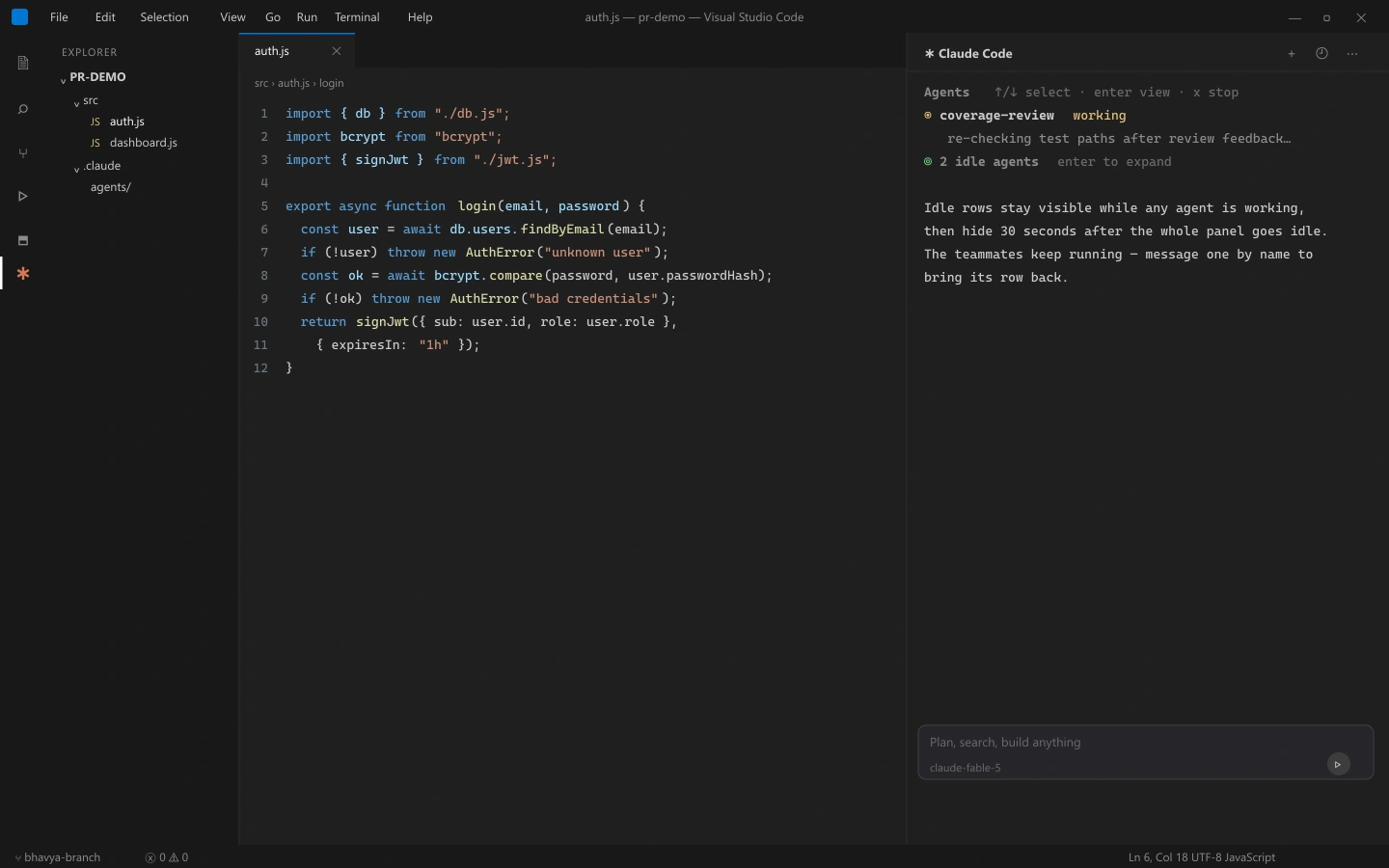
Check the enable flag first, then check whether the row is hidden, not stopped: idle rows stay visible while any agent works, and hide 30 seconds after the whole panel goes idle (v2.1.199+).
A hidden teammate keeps running - message it by name and the row returns. When more than three teammates are idle, the surplus rows collapse into a counter row like 2 idle agents, which Enter expands:
Claude may also have chosen subagents - both share the panel, so the panel alone does not confirm a team formed. Ask again and explicitly request an agent team.
Claude Spawns Teammates When You Wanted Subagents
The trap that breaks automation: with teams on, a subagent Claude names launches as a teammate - and a teammate never returns its output, only an idle notification. Flows waiting on subagent results stall with no error. Turn teams off to restore the old behavior:
{
  "env": {
    "CLAUDE_CODE_EXPERIMENTAL_AGENT_TEAMS": "0"
  }
}
No restart needed. Precedence: user settings.json beats a shell export, but project, local, and --settings values apply after it, and managed settings apply last - a 1 anywhere later wins, and only an admin can change a managed value.
Tasks Stuck and Agents Stopping Early
Task status can lag: teammates sometimes fail to mark a task complete, which blocks every task depending on it. Check whether the work is genuinely done, then update the status manually or tell the lead to nudge the teammate.
Teammates also stop after errors instead of recovering, so open the transcript, give direct instructions, or spawn a replacement. The lead can stop early too, deciding the team is finished before it is, in which case tell it to keep going.
Too Many Permission Prompts
Every teammate's permission request bubbles up to the lead, so a five-teammate team produces five streams of interruptions in one place. Pre-approve common operations in your permission settings before spawning, rather than approving them one at a time mid-run.
Known Limitations to Plan Around
- No session resumption - /resume and /rewind do not restore in-process teammates, and the lead may try to message teammates that no longer exist. Tell it to spawn new ones.
- One team per session - a session has exactly one team scoped to it. You cannot create additional named teams or share a team across sessions.
- No nested teams - teammates cannot spawn their own teammates. Only the lead manages the team.
- The lead is fixed - the main session leads for its lifetime, and leadership cannot be transferred or promoted to a teammate.
- Shutdown can be slow - teammates finish the current request or tool call before exiting, so a graceful shutdown is not immediate.
- Orphaned tmux sessions - in split-pane mode a tmux session can outlive Claude Code. Run tmux ls and kill the leftover session by name.
What Should You Try First With Agent Teams?
Start with a review, not an implementation. Enable the flag, then ask for three teammates to read your last pull request through a security lens, a performance lens, and a test-coverage lens.
Watch the panel while they work. Read-only tasks with clear boundaries show you the value of parallel exploration without the file-conflict risk of parallel implementation.
Then decide honestly whether the disagreement between those three reviewers was worth roughly seven times the tokens of one session. On research, review, and genuinely independent feature work it usually is. On sequential work it never is, and no prompt fixes that.
Whichever way that lands, the verification gap stays open: parallel agents produce more code than any human can review at the same rate. Install the Kane CLI skill so teammates verify their own work in a real browser, or read how TestMu AI's Agent Testing platform evaluates the agents themselves once they reach production.
Author

Samyak Goyal
Blogs: 31

Samyak Goyal is a Senior Member of Technical Staff at TestMu AI engineering Kane CLI, the command-line tool that runs browser automation from the terminal, where a flow described in natural language executes in a real Chrome browser and returns pass or fail with shareable proof. He is a backend engineer with 4+ years of experience, previously an SDE at Innovaccer, where he built APIs, introduced Kafka, and cut deployment from weeks to hours. Samyak also builds multi-agent systems, skill-orchestration frameworks, and a personal copilot that indexes 200+ microservice repositories.
Reviewer

Anubhav Singhmaar
Reviewer
Anubhav Singhmaar is an AI Product Manager at TestMu AI driving Kane CLI, the command-line tool that brings browser automation to the terminal, turning natural-language flows into runs in a real Chrome browser that return pass or fail with shareable proof. He owns the roadmap and prioritization and works with engineering to ship developer-facing features. Before TestMu AI, he spent over four years at Sprinklr owning enterprise voice AI across APAC and EMEA. A mechanical engineer turned product manager, he grounds guidance in real QA workflows.


Claude Code Agent Teams FAQs
Did you find this page helpful?
More Related Blogs
TestMu AI forEnterprise
Get access to solutions built on Enterprise
grade security, privacy, & compliance
- Advanced access controls
- Advanced data retention rules
- Advanced Local Testing
- Premium Support options
- Early access to beta features
- Private Slack Channel
- Unlimited Manual Accessibility DevTools Tests