
Power Your Software Testing with AI Agents and Cloud
The Native AI-Agentic Cloud Platform to Supercharge Quality Engineering. Test Intelligently and Ship Faster.


- TestMu AI (Formerly LambdaTest)
- /
- Learning Hub
- /
- How to Use Selenium Skill With Claude Code [2026]
A Selenium Skill is a SKILL.md file you install into a coding agent like Claude Code, Cursor, or GitHub Copilot. It tells the agent exactly which locator strategy to use, how to handle waits, how to structure Page Objects, and how to manage credentials.
But why do you need Selenium AI Skills? AI coding agents can write Selenium tests, but without explicit rules they fall back on generic patterns. They pick brittle CSS selectors, hardcode Thread.sleep() calls, and dump everything into a single file. The test passes once and breaks the next sprint. This is where Selenium AI Skills can help.
Overview
To write stable tests, use Claude Code to generate Page Objects with the Selenium Skill, and run them on TestMu AI for cloud execution. Clone the skill repository into your local skills directory, prompt the agent with your test target, and execute the tests.
What Is a Selenium Agent Skill
A Selenium Agent Skill is a SKILL.md file that gives AI coding agents Selenium-specific rules for locator strategy, wait handling, Page Object structure, and cloud grid configuration to generate maintainable Selenium tests.
How to Use the Selenium Skill
- Best for local test generation: Claude Code - This AI agent reads the Selenium Skill to automatically generate structured Page Objects, test files, and configurations based on your natural language prompts.
- Best for cloud test execution: TestMu AI - This platform provides an online Selenium Grid with 3,000+ browser/OS combinations to execute your generated tests automatically without local setup.
- Best for natural language authoring: KaneAI - This generative AI tool converts plain English flows into executable Selenium code, supports two-way editing, and automatically heals broken locators.
- Best for alternative IDE workflows: Cursor - This AI editor can load the SKILL.md file in its local skills directory to enforce stable locators and explicit waits.
- Best for Copilot users: GitHub Copilot - This agent uses the same SKILL.md configuration to generate maintainable Selenium tests that avoid brittle CSS selectors.
What Is a Selenium Skill
A Selenium Skill is a SKILL.md file that loads Selenium-specific rules into AI coding agents like Claude Code, Cursor, and GitHub Copilot to enforce stable locators, explicit waits, and Page Object structure in every generated test.
The skill defines when to use each API, which patterns to avoid, and what keeps a test suite maintainable. The format follows the open Agent Skills Standard. One file works in Claude Code, Cursor, GitHub Copilot, Gemini CLI, and 16+ other tools.
How Does a Selenium Skill Fix Brittle Test Code
The Selenium Skill replaces brittle CSS selectors with @FindBy locators inside Page Objects and swaps Thread.sleep() for WebDriverWait with ExpectedConditions, so generated tests survive UI changes across sprints.
The Selenium Skill is one piece of the broader Selenium AI ecosystem, which covers self-healing locators, AI-driven script generation, visual regression, and MCP-based agent workflows that work alongside agent skills to modernize existing Selenium suites end to end.
Teams that want a standalone code-generation flow outside the IDE can follow this guide to building an AI agent to generate Selenium Java tests, which uses a Python agent backed by OpenAI or Ollama to emit Page Object classes, a TestNG test class, and testng.xml from plain English scenarios.
Without the skill, Claude Code generates this:
driver.findElement(By.cssSelector(".btn-primary-blue")).click();
Thread.sleep(3000);
The CSS selector .btn-primary-blue breaks when a designer renames the class. Thread.sleep(3000) wastes three seconds whether the element is ready or not.
With the skill, the same prompt produces a Page Object with stable locators:
// LoginPage.java
@FindBy(id = "submit")
private WebElement submitButton;

public void clickSubmit() {
    new WebDriverWait(driver, Duration.ofSeconds(10))
        .until(ExpectedConditions.elementToBeClickable(submitButton))
        .click();
}
The skill applies these rules to the generated code:
| Rule | Without Skill | With Skill |
|---|---|---|
| Locators | CSS selectors inline in test | @FindBy inside Page Object |
| Synchronization | Thread.sleep() | WebDriverWait + ExpectedConditions |
| Credentials | Hardcoded strings | Environment variables |
| Structure | Single test file | POM + test class + config |
The @FindBy(id = "submit") locator stays stable when CSS classes change. Across a full suite, this keeps tests passing through UI updates.
For a deeper look at synchronization strategies, see this guide on Selenium waits.
What Is Inside the Selenium Skill Repository
The Selenium Skill repository contains a SKILL.md entry point that defines locator and wait rules, and a reference folder with a full implementation playbook, advanced patterns for Shadow DOM and AJAX, and cloud integration config.
The selenium-skill is one of 46 skills in the TestMu AI agent-skills repository. It sits alongside Playwright, Cypress, Appium, and WebdriverIO.
Here is the folder layout:
selenium-skill/
├── SKILL.md                    # Entry point - locator logic, wait rules, framework selection
└── reference/
    ├── playbook.md             # Java/Python/JS setup, POM templates, CI configs, debug table
    ├── advanced-patterns.md    # Shadow DOM, AJAX handling, custom waits, parallel execution
    └── cloud-integration.md    # TestMu AI capabilities, credentials, tunnel, dashboard
Claude Code reads SKILL.md first. It stays under 500 lines to avoid bloating the context window.
When the agent needs deeper guidance, it pulls from the reference files on demand.

Note: Run your Selenium tests effortlessly using Agent Skills. Try TestMu AI Today
How to Install the Selenium Skill in Claude Code
Clone the TestMu AI agent-skills repository into your project's .claude/skills/ directory using git clone. Claude Code detects the skill automatically on the next session start with no extra configuration.
TestMu AI, the new LambdaTest, is built for the AI era of software testing.
git clone https://github.com/LambdaTest/agent-skills.git .claude/skills/agent-skills
That gives Claude Code every skill in the repository. If you only want Selenium:
git clone https://github.com/LambdaTest/agent-skills.git
cp -r agent-skills/selenium-skill .claude/skills/
The same approach works for other tools. Replace .claude/skills/ with the target path:
- Cursor: .cursor/skills/agent-skills
- GitHub Copilot: .github/skills/agent-skills
- Gemini CLI: .gemini/skills/agent-skills
Once the folder is in place, every new session picks up the skill automatically.
How to Run Tests Using Selenium Skills in Claude Code
Open Claude Code and give it a test target with the language and framework you want. The agent reads the Selenium Skill and generates the full project for you.
I entered the following prompt:
Write a test in Selenium Java that visits https://ecommerce-playground.lambdatest.io/ and clicks on the Blog link in the header.
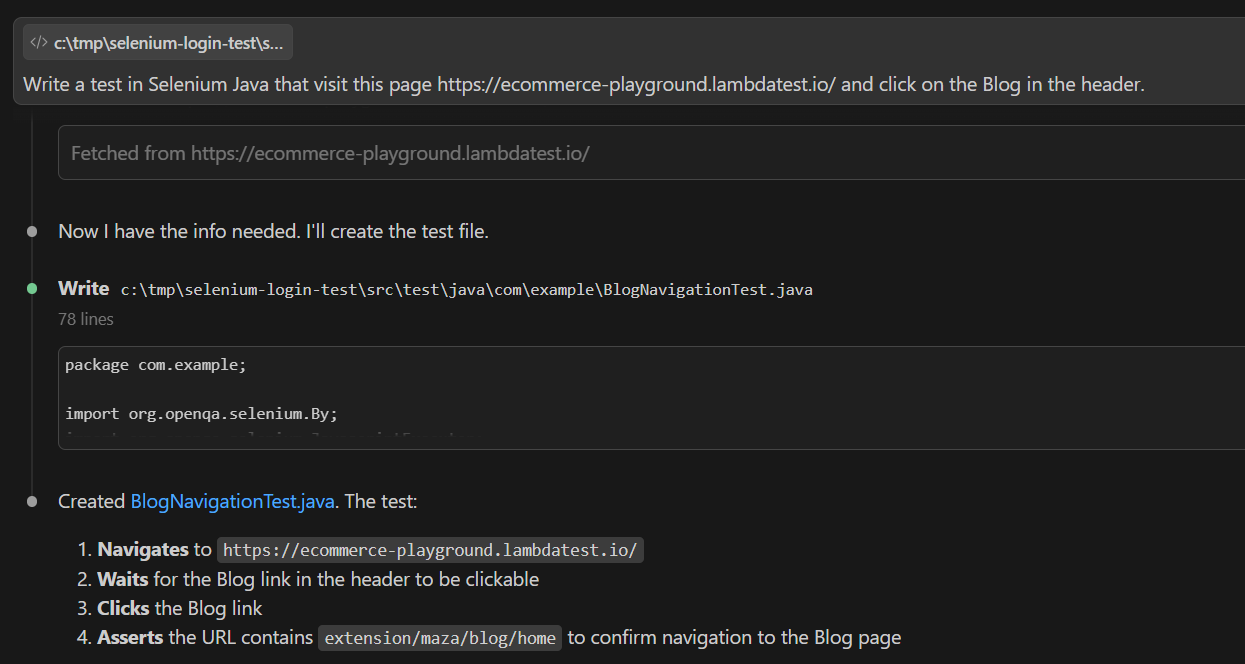
Claude Code picked up the Selenium Skill and generated four files:
- pom.xml: Selenium 4, TestNG, WebDriverManager dependencies
- pages/HomePage.java: Page Object with @FindBy and PageFactory
- tests/BlogNavigationTest.java: Test class with @Test and @BeforeMethod annotations
- testng.xml: Suite configuration for execution
Next, I passed another prompt to run the test:
Run the test
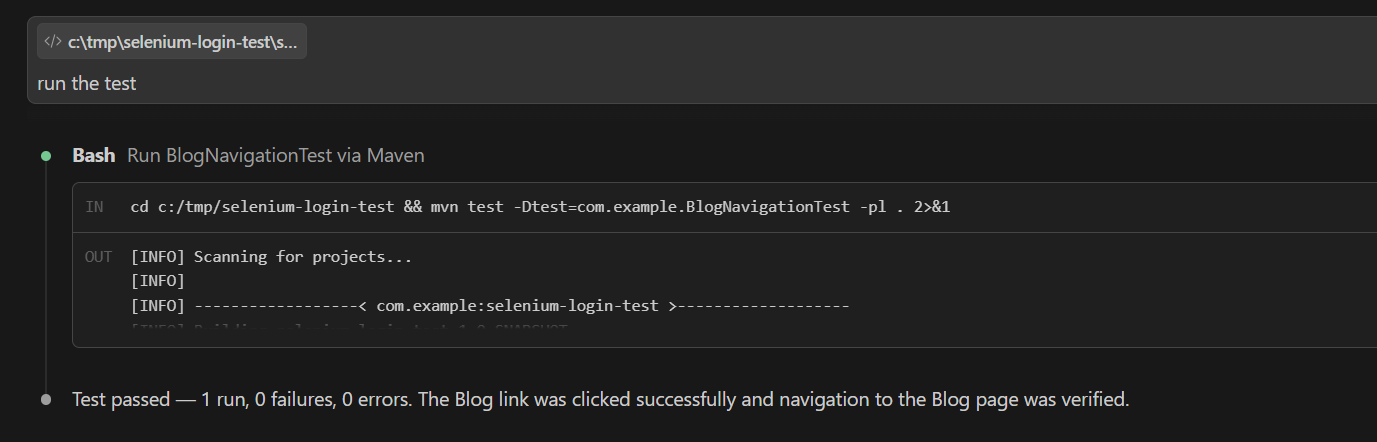
I did not specify where to run it. By default, the Selenium Skill executes tests on TestMu AI, a cloud testing platform that provides an online Selenium Grid with 3000+ browser and OS combinations. So the test ran on the cloud without any extra setup on my end.
Note: For cloud execution, you need a TestMu AI account to set your credentials in the environment variables. You can find them at the bottom of the TestMu AI Home dashboard under Credentials.
# macOS/Linux
export LT_USERNAME="YOUR_TESTMUAI_USERNAME"
export LT_ACCESS_KEY="YOUR_TESTMUAI_ACCESS_KEY"

# Windows (PowerShell)
$env:LT_USERNAME="YOUR_TESTMUAI_USERNAME"
$env:LT_ACCESS_KEY="YOUR_TESTMUAI_ACCESS_KEY"

# Windows (Command Prompt)
set LT_USERNAME="YOUR_TESTMUAI_USERNAME"
set LT_ACCESS_KEY="YOUR_TESTMUAI_ACCESS_KEY"
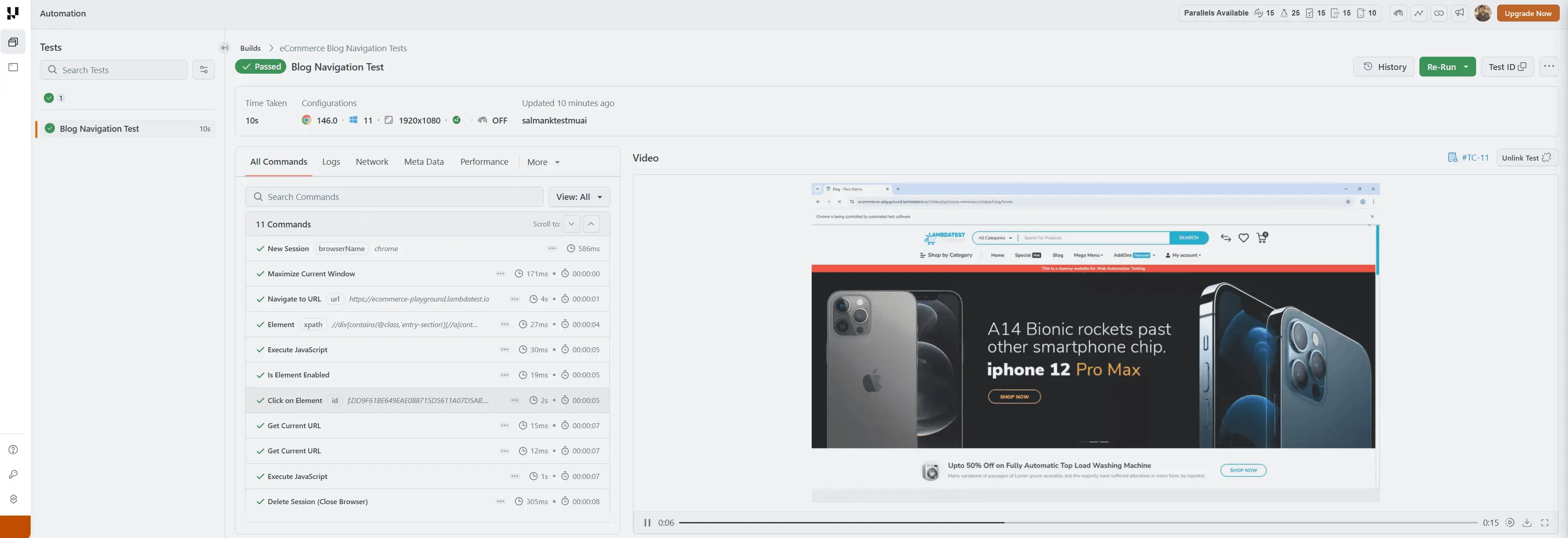
The TestMu AI Web Automation dashboard showed the test passed. The report included execution time, command steps, and a video replay confirming the Blog link click worked as expected.
If a test fails, you paste the stack trace back into Claude Code.
For more details, check out this guide to run Selenium tests using Agent Skills.
How to Author Selenium Tests at Scale
A Selenium Skill improves test quality, but when your team cannot author tests fast enough, coverage gaps grow every sprint.
Generative AI testing tools like TestMu AI's KaneAI solve this from the other side. Instead of an engineer prompting Claude Code test by test, KaneAI takes natural language prompts describing the user flow and generates the full Selenium test, ready to export.
Here is what it brings to Selenium teams specifically:
- Natural Language to Selenium Code: Describe a flow in plain English and KaneAI converts it into executable Selenium test steps.
- Direct Selenium Export: Export tests as Selenium Java, Python, or C# that plug into your existing Maven or Gradle project.
- 2-Way Editing: Switch between the plain-language view and the Selenium code view while keeping both in sync.
- Self-Healing Locators: KaneAI resolves broken @FindBy selectors automatically when UI elements change.
- Cross-Browser Execution: Run tests across Chrome, Firefox, Safari, and Edge on the TestMu AI grid.
- Assisted Debugging: Analyzes failing Selenium commands in real time and surfaces root cause with a fix.
- Multi-Input Test Generation: Feed a Jira ticket, PRD, screenshot, or spreadsheet to generate Selenium tests automatically.

Conclusion
The Selenium Skill gives Claude Code the rules your team already follows. Stable locators in Page Objects, explicit waits, and credentials in environment variables.
Install the skill, point Claude Code at a page, and the output is a structured test project ready to run.
The TestMu AI agent-skills ships the Selenium Skill alongside 45 others covering Playwright, Cypress, Appium, and more.
Author

Salman Khan
Blogs: 138


Salman is a Test Automation Evangelist and Community Contributor at TestMu AI, with over 6 years of hands-on experience in software testing and automation. He has completed his Master of Technology in Computer Science and Engineering, demonstrating strong technical expertise in software development, testing, AI agents and LLMs. He is certified in KaneAI, Automation Testing, Selenium, Cypress, Playwright, and Appium, with deep experience in CI/CD pipelines, cross-browser testing, AI in testing, and mobile automation. Salman works closely with engineering teams to convert complex testing concepts into actionable, developer-first content. Salman has authored 120+ technical tutorials, guides, and documentation on test automation, web development, and related domains, making him a strong voice in the QA and testing community.
Selenium Skill FAQs
Did you find this page helpful?
More Related Learning Hubs
TestMu AI forEnterprise
Get access to solutions built on Enterprise
grade security, privacy, & compliance
- Advanced access controls
- Advanced data retention rules
- Advanced Local Testing
- Premium Support options
- Early access to beta features
- Private Slack Channel
- Unlimited Manual Accessibility DevTools Tests