

Power Your Software Testing with AI Agents and Cloud
The Native AI-Agentic Cloud Platform to Supercharge Quality Engineering. Test Intelligently and Ship Faster.


- TestMu AI (Formerly LambdaTest)
- /
- Blog
- /
- AVIF Image Format - The Next-Gen Compression Codec
AVIF Image Format - The Next-Gen Compression Codec
AVIF Image Format is a next-generation image compression format that uses the AV1 compression algorithm. Explore compression codecs with AVIF Image Format.
Last Updated on:
On This Page
- What is AV Image Format (AVIF)
- How to Create AVIF Files?
- Why is AVIF better than other compression codecs?
- AVIF Current Browser Support
- AVIF Comparative Analysis
- AVIF Applications
- AI Agents and Image Format Automation
- Video Codecs and Their Importance
- Compression Affects and Parameters
- AVIF Browser Compatibility: Chrome, Firefox, Safari, and Edge
Page speed is a big thing. From a search engine optimization perspective, and user perspective. And it’s not me who’s saying this, it’s Google, and Moz, and SEMrush and every major SEO site out there. Now when we talk about page speed, the biggest challenge for developers is always images. They are the bane of their existence and are usually primary blame point when we talk about slow page load. That is one of the reasons why every developer is always looking for an image format that can improve their image compression. And AVIF has arrived to do just that.
AVIF Image Format can address images compressed with AV1 (AOMedia Video 1) algorithm. As compared to other compression codecs like JPEG, PNG, WebP, etc., it produces high quality compressed images without compromising much on quality. Developed by the Alliance for Open Media, it is a successor to WebP and promises to be a game-changer in image compression. With major companies supporting this format, the AVIF image format’s future is looking very bright.
Note: WebP2, once floated as a successor to WebP, never reached a finished release. Development on it has stalled, and Google has put its weight behind AVIF instead.
Jake Archibald, developer advocate for Google Chrome wrote a great post on why AVIF is great and you can check out a live demo on his site on why AVIF is so awesome.
What is AV Image Format (AVIF)
AVIF or AV Image Format is an open and royalty-free image format based on the AV1 codec, and like AV1, AVIF provides a very high compression rate. Being royalty-free makes it one of the best among its peers. Leveraging the powerful genes of AV1 proves beneficial in both processing time and handling hardware issues. AVIF has moved past its early days: it is now a mainstream, widely supported file format with a mature encoding and decoding ecosystem, so it is a safe default for most use cases today.
Developers have been working on developing a better image compression algorithm for some time now. For example, before AVIF, HEIF was invented which was arguably a better technique in its time. You would be knowing about the HEIF images if you are an iPhone user. HEIF uses HEVC codec, and as you may notice in the image below (Model: Samsung Galaxy S10), it will save storage space but it was not popular with some sharing sites.
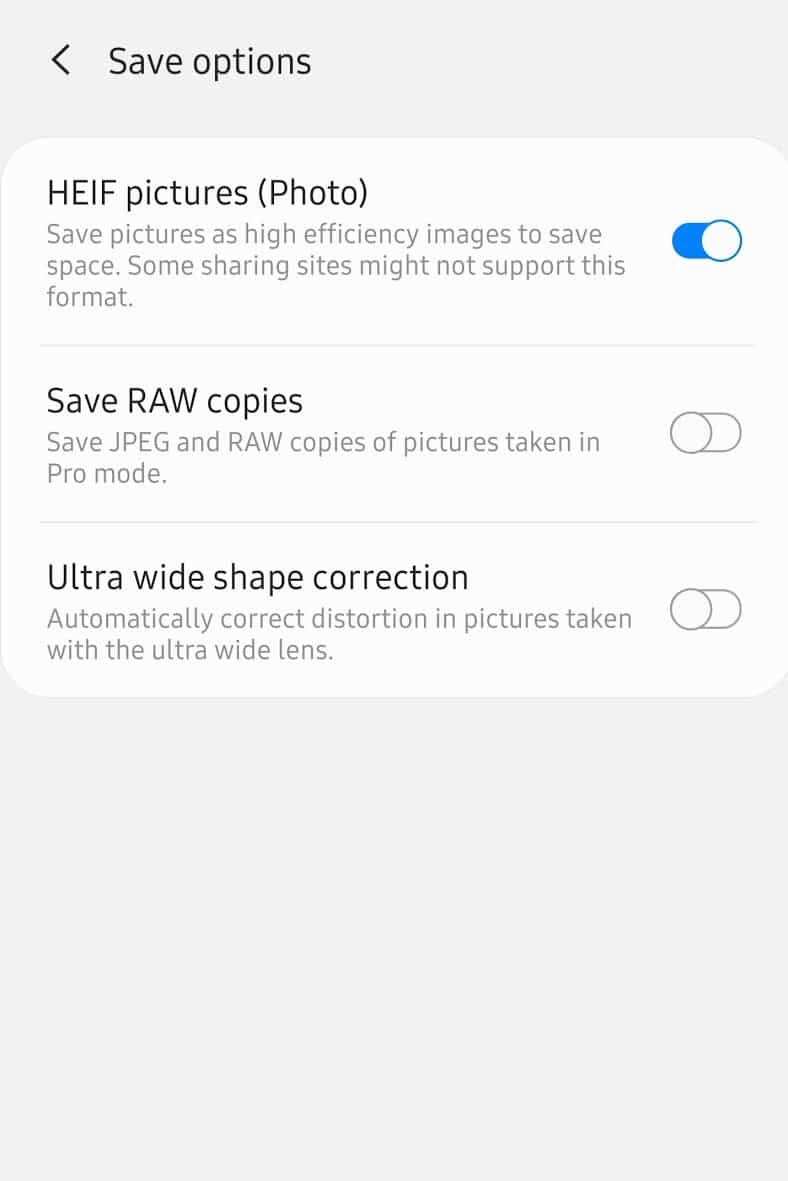
Arguably, HEIF is said to save 50% of the storage, which is excellent in today’s data-driven world. HEIF and AV1 are both based on the same standard, i.e., ISO-23000-12, which was driven by the Moving Pictures Experts Group (MPEG). Both formats’ pedigree alone marks their reliability and makes them trustworthy with a promising future. Apart from bringing the file size to a minimum, the codecs using this standard can also also be used for animated images or GIFs as popularly known.
Now If you are wondering that if HEIF was more or less the same, then why are we moving towards AV1 – it is mainly because of the royalty-fees and slightly better performance of AV1 compared to HEIF.
Before we dig deep into the AVIF image format and compare it with other compression codecs, it’s of utmost importance that your images are responsive to different resolutions. In this case use LT Browser a dev-friendly browser for mobile view debugging on which you can see the mobile view of your website on Android and iOS resolutions.

Austin Siewert
Co-Founder, Steadfast Systems
Discovered @TestMu AI yesterday. Best browser testing tool I've found for my use case. Great pricing model for the limited testing I do 👏
2M+ Devs and QAs rely on TestMu AI
Deliver immersive digital experiences with Next-Generation Mobile Apps and Cross Browser Testing Cloud

Now let’s understand more about the AV1 codec.
Introduction to AV1 Codec
AV1 is the most recent video codec developed by Alliance for Open Media and hence the name AOMedia Video 1 codec (AV1 codec). The development of the AV1 video codec resulted from the collaboration between Google, Xiph, and Cisco, who decided to combine their in-house video codecs into one single open, royalty-free video codec to benefit everyone. Being royalty-free has been the highlighted feature for AV1 since every other codec had a portion of royalties (except WebP). Therefore, unlike JPEG, which was neither open nor royalty-free, AV1 has seen much faster progress and a wider adoption among the top tech companies, including Google.
The idea behind designing AV1 was to transmit the video over the internet. With a greater compression reach for the video and reducing the number of overall bits, AV1 codec provides multiple coding techniques that enable the encoders to use various inputs for their missions. If you wonder why we brought this concept of video compression technique into an image compression post, video, and image codec share similarities between them because of the same nature of the data. AV1 codec has proved very advantageous for the internet by saving the bandwidth, which MPEG could not do, although JPEG XR was still in the race but not as effective as AV1.
When tech companies such as Facebook and other video streaming websites started using AV1, the company decided to bring an image format with the same efficiency and based on the same codec. AV1 codec is the foundation of the AVIF image format that is taking the internet by storm.
How to Create AVIF Files?
There are various image compression tools and encoders to create AVIF files. However, the option is not yet available on popular image editing software like Photoshop. Given below are two ways through which you can create AVIF files:
Squoosh
Squoosh is one of the most popular image compression applications by Google. This allows you to create AVIF files from some of the most popular image formats like JPEG, PNG, etc., on a single click. However, if you want to convert a large set of files, encoders are better at it.
AVIF Encoding and Decoding Mechanism
AVIF is often known to produce high-quality images in a compressed format while compromising little on quality. However, when we talk about encoding, there are three encoders available to create the exact image from the data, i.e., rav1e, SVT-AV1, libaom. Here, the only libaom fulfills all the requirements, where it uses the C API as the encoder library to get back the result.
Once you have encoded, the browser decodes the image for you. Every major browser now decodes AVIF natively, so you only need a JavaScript decoder for older browser versions that predate native support.
You can also use the AOMedia library libavif, an established open-source library to encode and decode images in AVIF image format. This can be done using the command line, and on Mac, you can install it with Homebrew.
Why is AVIF better than other compression codecs?
Some of the features that make AVIF potentially better than the competitors are as follows:
- AVIF supports High Dynamic Range (HDR), which provides better and brighter images.
- AVIF supports both lossless as well as lossy decomposition.
- AVIF includes an alpha channel (refer to chroma subsampling), providing a richer touch to the images.
- AVIF provides 8, 10, and 12-bit color depth.
- AVIF supports 4:2:0, 4:2:2 and 4:4:4 chroma subsampling, and many more
- AVIF provides the highest compression in royalty-free format.
AVIF started out with an availability gap, but that gap has closed. All major browsers, Chrome, Firefox, Safari, and Edge, now decode AVIF natively. Browsers are a primary medium for most images that we see in everyday life, and that broad support is why AVIF is safe to use in production today.
AVIF Current Browser Support
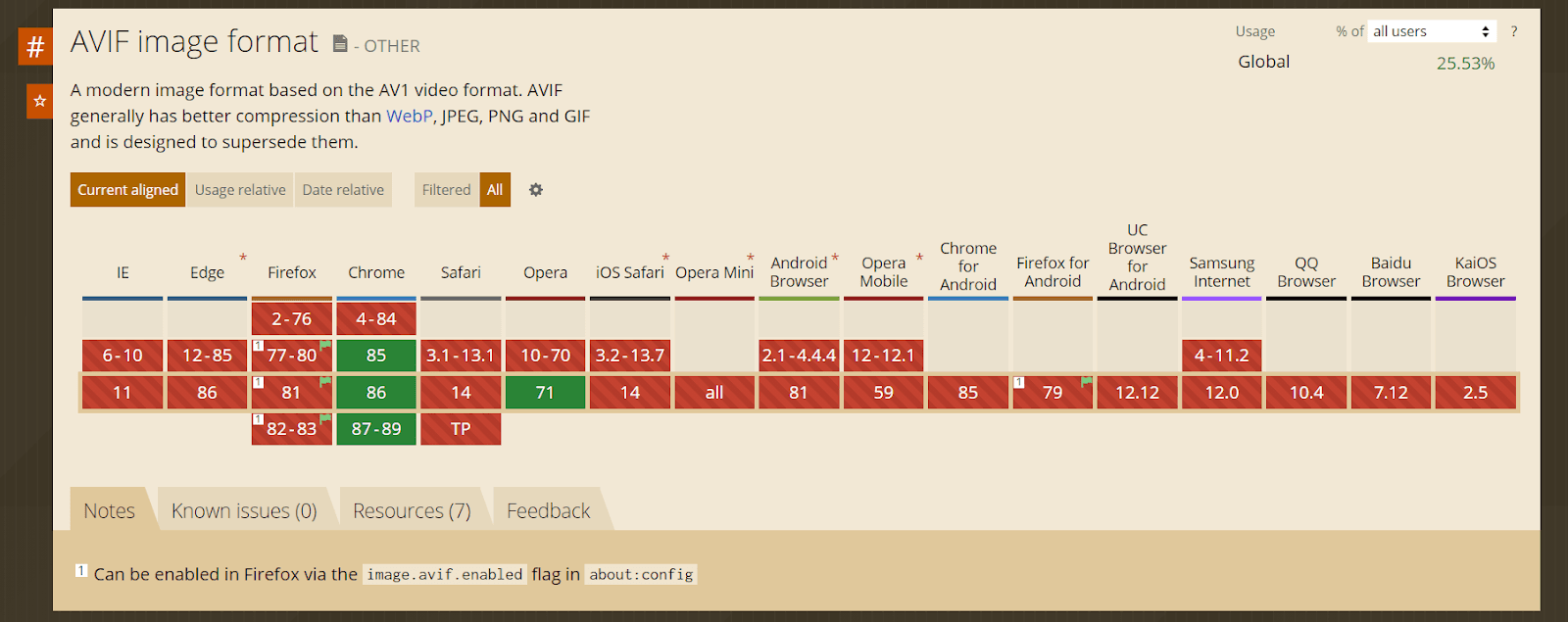
AVIF is now natively supported in every major browser: Chrome since version 85, Firefox since version 93, Safari since version 16.1, and Edge since version 121. Content providers no longer need a JavaScript decoder for mainstream traffic, though a fallback image still helps for users on older browser versions.
The chart below is an early snapshot of AVIF adoption from when the format first rolled out. Browser coverage has broadened significantly since.
AVIF Comparative Analysis
AVIF is a major upgrade over its other competitive image format like WebP, JPEG, PNG, and more. The following section is for demonstration purposes to show the image differences in different codecs.
Note: Since AVIF and WebP formats are not supported on some browsers, we have taken the screenshot and embedded them in the PNG format. However, you can try viewing the actual image by clicking on the link.
Comparing AVIF and JPEG
JPEG or Joint Photographic Experts Group has been ruling the media industry for quite some time. With advancements in digital technology, JPEG has provided better color resolution and 24-bit pixel quality. It can further bring down the RGB picture in a single luminance. However, the challenge with JPEG is that it blurs the sharpness of artifacts during compression.
The need to consider the AVIF Image format above JPEG was because of its high quality compressed image without losing much data and its acceptance by tech giants like Google, Youtube, Amazon, etc.
The following points will make it clear why you should pick AVIF over JPEG:
- JPEG does not have support for animation and transparency
- JPEG support only 8-bit whereas AVIF supports 8, 10, and 12-bit
- AVIF has superior image quality
- AVIF encoding is better with less blocked artifacts

JPEG Image Format

AVIF Image Format
Comparing AVIF and WebP
WebP is one of the most popular image compression formats that is used widely in browsers today. WebP compression was developed by Google taking VP8 video format as the container support. WebP is considered one of the most successful image formats being transferred today (only for the compatible browsers). When the PNG format dominated the image market, WebP provided a 45% reduction in the file size when compressed from PNG. This was a huge success and instantly adopted by Firefox, Opera, GNOME, and many other browsers started incorporating the technique, with Apple adding support for WebP in Safari starting with iOS 14.
Now you must be thinking if WebP is so widely accepted and provides both lossless and lossy compression, what’s the need for AVIF to be made native to these browsers? Well, the following differences would clear that out:
- AVIF provides a smaller sized image compared to WebP.
- WebP works on only 8-bit depth, whereas AVIF supports 8, 10, and 12-bit, which will accept a broader range of images to be compressed.
- WebP supports only 4:2:0 channel, whereas AVIF supports 4:2:0, 4:2:2, and 4:4:4 channels.
- The image quality produced by WebP is lower than AVIF and even JPEG.
- AVIF supports HDR, which produces high luminosity images.

WebP Image Format

Keep yourself updated with: Top 9 Best Practices To Avoid Browser Compatibility Issues.
AVIF Applications
AVIF offers technically advanced features like high dynamic range and wide color gamut, and being royalty-free, it is preferred for generating high quality compressed images. Browser compatibility is no longer the blocker it once was. Every major browser decodes AVIF natively, and most modern build tools and content management systems can output it without extra configuration.
AVIF has shipped by default since Chrome 85, Firefox 93 for still images and Firefox 113 for animated AVIF, Safari 16.1, and Edge 121. No flag or manual setting is needed on any of these versions or later. If an AVIF image fails to load, the first thing to check is the browser version, not a hidden preference.
All major browsers support the
<picture>
	<source srcset="img/Pic.avif" type="image/avif" />
	<source srcset="img/Pic.webp" type="image/webp" />
	<img loading="lazy" src="img/Pic.jpg" alt="Pic Description" />
</picture>
While deploying websites with Netlify, there is a common issue with Firefox not displaying the image. In such a scenario, you can try defining custom headers with the configuration file of Netlify. Furthermore, set the Content-Disposition to inline vs attachment to ensure that the browser renders the file internally rather than externally.
Before we discuss the future of AVIF, let’s quickly walk you through the importance of video codecs in compression algorithms and discuss parameters like chroma subsampling in compression.
How Do AI Coding Agents Handle Image Formats Like AVIF in 2026?
AI coding agents now pick the image format for you instead of leaving it to a developer. Tools such as GitHub Copilot, Cursor, and Claude Code can scaffold a build pipeline that converts an upload to AVIF and writes the fallback markup, instead of a person hand-coding each picture tag for every asset in a project.
- Automatic fallback markup: the agent generates the picture element with AVIF, WebP, and JPEG sources in the right order, so it does not have to be written by hand for every image on a page.
- Cross-browser render checks: an agent driving a real browser through the Playwright MCP server or browser-use can load the page and confirm the AVIF asset actually decoded, not just that the markup is valid, across Chromium, Firefox, and WebKit.
- Batch conversion: the agent can call an image pipeline to re-encode an entire folder of legacy JPEG or PNG assets to AVIF in one pass, instead of converting each file by hand.
The limitation is quality control. An agent can produce a technically correct AVIF file that is over-compressed or set to the wrong color depth for a detail-heavy image, and it has no way to judge whether the result still looks right. A person still has to review the visual output before it ships.
Video Codecs and Their Importance
A video codec is a software or a tool that executes specific compression algorithms on the data (such as a video) and produces similar content but smaller in size (similar content does not mean similar quality). A similar situation can be correlated while analyzing time and space in computer science. Like a time-space tradeoff, a simple quality-data tradeoff is a popular villain in deducing and inventing the compression algorithm.
If you are raising your bar for quality, the content will have to sacrifice the data limit. But as for computer scientists and most people, compression is applied only to decrease the size. So definitely, we cannot compromise on that parameter. The only way to achieve it is to compromise on the quality. We call it a lossy compression, while the one in which we are producing no loss during compression and decompression is called lossless compression. All the previous compression algorithms did the same when the word “compression” was relatively new, and all that the scientist wanted to do was adjust a video into a compact disk more than its size.
The journey of video codecs begins with H.261, a technique which most of you might not have heard because of its low efficiency and a laying stone in the compression world. You might know all the algorithms that followed the footsteps of H.261. In 1992, Joint Photographic Experts Group (JPEG) became a standard for compressing the images and sending them over to the wires just like any other thing in those days. Scientists could squeeze a video size using the same algorithm, considering them as “moving pictures,” giving rise to a newer algorithm for compressing the videos called Moving Pictures Expert Group or MPEG. These algorithms are well known as extensions of their files, and JPEG was such a hit that it is still a part of most images.
Although we will not cover every codec in this article, the gist of what we tried to convey here is that firstly, codecs have been with us for a long time and are improving every day. Secondly, codecs play an essential part in our daily life, from surfing to capturing a photo on our mobiles. The image you see at the top of this page is compressed and then shown by the transmission channels with the browser support.
Browser compatibility is another thing we need to look on, as different browsers can display a particular image differently. Thirdly, video codecs, and image codecs rely on almost similar algorithms with slight variations. Since the base procedure remains the same, they are often named identical to each other. With this, we will explore more codecs in this article. However, to understand the algorithm’s significant parameters, you can go through a good research paper for reference.
Compression Affects and Parameters
In the last section, it was evident that compromising the quality was a sure way to manage the size and bandwidth consumption while transferring the data. But talking more in-depth into the compression effects, it is quite important and exciting to know what kind of changes an image shows when processed by the algorithm and ready for the transfer. Ultimately, we cannot dramatically change the data.
Chroma Subsampling
Chroma subsampling, often popularly referred to as color subsampling, is the heart of the invention of compression. All the compression algorithms for the video codes and images still today focus majorly on chroma subsampling.
Chroma subsampling derives from the fact that the human eye is more sensitive to image luminosity than color differences. The slighter differences in the color are not differentiable to humans. If we lower the resolution of an image that would ultimately reduce the color shade a bit and the color quality, the difference will go unnoticed. This is a prevalent phenomenon used in both video compression and image compression codecs. Therefore, whenever we design or talk about a compression codec, the first question is, what are the subsampling ratios it supports?
The most popular file type you must have heard, JPEG uses chroma subsampling to transfer the images by optimizing bandwidth to carefully save the luminosity information rather than the exact color information. Diving into more details of its preservation will deviate us from the topic. Still, it won’t hurt to lay down basic facts to understand chroma subsampling as we will be differentiating these in the next section.
Chroma subsampling is represented in digits in the form X:Y:Z (excluding the alpha channel).
X: horizontal sampling reference (width of the conceptual region). Usually, 4.Y: number of chrominance samples (Cr, Cb) in the first row of X pixels. Z: number of changes of chrominance samples (Cr, Cb) between the first and second row of X pixels.
Note: Z has to be either zero or equal to Y (except in rare irregular cases like 4:4:1 and 4:2:1, which do not follow this convention).
We found the following image on Pinterest, which denotes the chroma subsampling of the images in the same form as we discussed above:
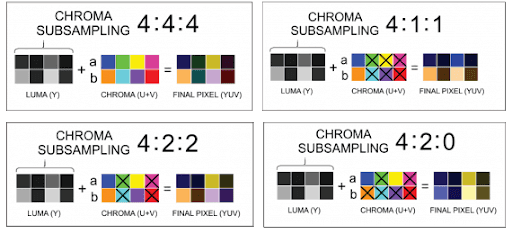
To leverage this information, it is reasonably evident that if we transfer a 4:4:4 sampled image as a 4:2:0 sampled image, we can dodge the human observational powers and, at the same time, save a lot of bandwidth considering millions of pixels get transferred in a single image.
Can you spot the difference between the 4:4:4 image and the 4:2:0 (yes, you can refer to them without the colon) images in the following collage?
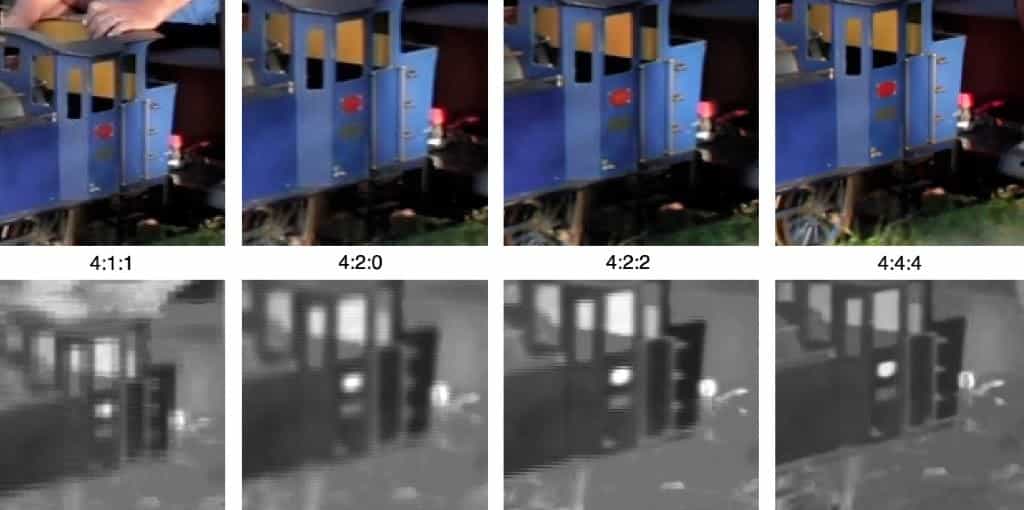
We are confident you must have spotted the real differences in the images, but it is just because we have shown you the original image and the compressed one to point out the differences. Although if someone sends you this image over WhatsApp and asks you the color of the image, you both will settle on the same answer and most probably on the same shade as well. And yes, WhatsApp uses the same JPEG compression technique we have been using for so long.
Now that we are familiar with the compression technique let’s spot the difference in images of 4:4:4 and 4:2:0 that we usually prefer while compressing.
- The color transition is not as smooth as it is on the original image.
- The color is not so “smooth,” and the grainy texture is visible on the 4:2:0 images.
- 4:2:0 is a lower down version of the resolution, and the jaggedness is screaming this out of the image.
But as we mentioned, human eyes cannot detect the differences; we do not have a problem. With time, the network waves have transformed into compression algorithms as the colors used in a device has increased, so has its size. With millions of colors used in a single image, even if we compress the image through JPEG, it is still considerably large these days until we provide repeated compression and bring out an image with blurred pixels visible. This brings us to the latest codec available today, which is like a super-infant and growing day by day, showing off its power of compression to more and more companies.

AVIF Browser Compatibility: Chrome, Firefox, Safari, and Edge
This post has covered the benefits of the AVIF image compression format. AVIF has the backing of major tech companies, and Netflix, Google, and Microsoft have all implemented it in production. AVIF is one of the most effective royalty-free, open-source image compression formats available today for photographic content, and it is no longer in a deployment phase. It is a default choice for new image pipelines.
Apart from providing a smaller sized image, AVIF proves to be one of the best among its peers for producing original-like quality images. This is possible because of the color depth and chroma subsampling support AVIF has. Adoption has followed: most major sites and content delivery networks now support serving AVIF automatically.
That revolution in image compression has already happened. Firefox shipped AVIF support for still images starting with version 93, and Chrome has supported it by default since version 85.
Chromium-based browsers such as Edge and Opera followed, and Safari added support from version 16.1. AVIF now has the broad user base that was once a future goal, and it is a practical default for new images rather than an experiment.
Thank you for reading, and now we would like to hear from you: how are you using AVIF in your projects? Or maybe you have a question. Either way, go ahead and leave a comment below.

Author

Harish Rajora
Blogs: 100


Harish Rajora is a software developer at TestMu AI with over 6 years of hands-on experience in Python and cross-platform application development across Windows, macOS, and Linux. He has authored 800+ technical articles and worked on large-scale projects, including GenAI applications and core engineering features used by millions. Harish has led DevOps initiatives building CI/CD pipelines with Jenkins, AWS, GitLab, and GitHub, and holds an M.Tech in Software Engineering from IIIT Allahabad.


Did you find this page helpful?
More Related Blogs
TestMu AI forEnterprise
Get access to solutions built on Enterprise
grade security, privacy, & compliance
- Advanced access controls
- Advanced data retention rules
- Advanced Local Testing
- Premium Support options
- Early access to beta features
- Private Slack Channel
- Unlimited Manual Accessibility DevTools Tests