

Power Your Software Testing with AI Agents and Cloud
The Native AI-Agentic Cloud Platform to Supercharge Quality Engineering. Test Intelligently and Ship Faster.


- TestMu AI (Formerly LambdaTest)
- /
- Blog
- /
- From a Sentence to a Suite: AI Test-Case Generation in Kane CLI
From a Sentence to a Suite: AI Test-Case Generation in Kane CLI
Kane CLI now writes your test cases. Describe a feature in plain English and kane-cli generate authors structured, typed, prioritized scenarios as real, runnable _test.md files.
Last Updated on:
The bottleneck in testing was never running the tests. It was writing them.
Before a single test runs, someone has to sit with a feature and enumerate it. What is the happy path. What breaks it. What the edge cases are. It is slow, it is unglamorous, and it is the first thing that gets cut when a deadline shows up. So coverage quietly erodes, and the gaps are exactly where the bugs were waiting.
That gap is what the test-case generator closes. It ships as kane-cli generate, new in 0.4.0. You describe a feature in plain English, and Kane authors the test scenarios and cases for you, structured, typed, and prioritized. It does not touch a browser; this part is pure authoring. You refine the result in plain English, save the runnable cases to disk, and run them later with the rest of Kane. And what it writes is a full suite of real _test.md files, not a list of ideas to go and implement.
It turns the most tedious part of testing into something you do in a sentence.
What It Looks Like
You run one command:
kane-cli generate "checkout flow on a shopping site"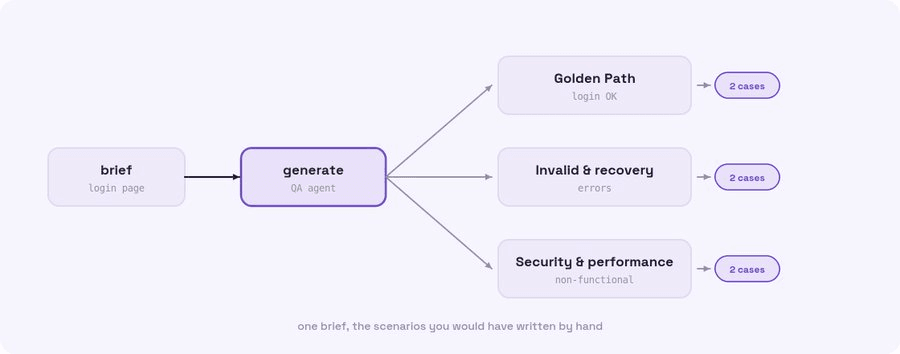
Kane CLI comes back with Test Scenarios, logical groupings of behaviour, each holding Test Cases. Every case is typed Positive, Negative, or Edge, and carries a category (Functional, Security, Performance, and so on) and a priority. No browser is launched. This is authoring, and it is fast.
For a login feature you might get a Login scenario with "Valid credentials" as a Positive case, "Wrong password" as a Negative one, and "Empty fields" as an Edge case, alongside a Checkout scenario and a non-functional one for security and performance. The result is presented adaptively: a small set shows as a nested tree, a large one as a summary with a scenario list you can expand on request.
What Is In a Case
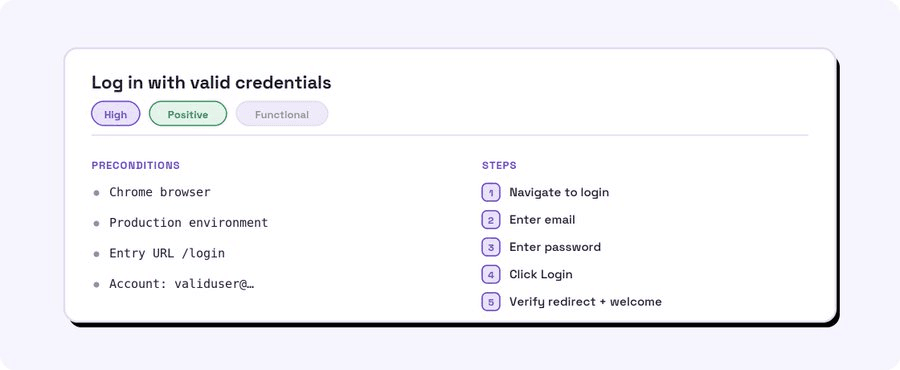
The cases are not vague suggestions. Each one is a concrete spec.
A case carries a title, a type (Positive, Negative, or Edge), a category, a priority, and steps written to be executed once saved. They read like specs, but they are built to run.
Built for Agents
Who is not running their work through an agent now? Claude, Codex, Gemini. A lot of testing goes through them, and the test-case generator is built for that. The catch is that agents are bad at babysitting a long-running shell process. Even when you stream the output, a command that sits open for a minute turns into a black box: the agent loses the thread, and the person watching it gets feedback late, out of order, or not at all.
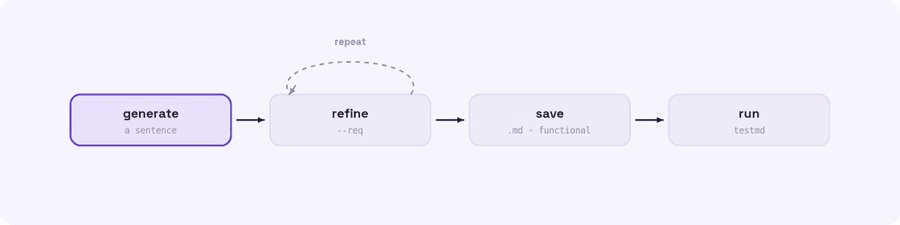
So it does not hold a process open. Each turn does one thing and exits, and what carries across is a request id, not a running process. The agent fires a turn (new, refine, or save), gets the result, the process ends, and the next turn re-attaches with --req. Kill and re-attach instead of babysit.
# New: start a fresh request
kane-cli generate "checkout flow on a shopping site"

# Refine: re-attach and adjust, in plain English (repeat as needed)
kane-cli generate "also cover an expired card and an out-of-stock item" --refine --req 23271

# Save: re-attach and write the runnable cases to disk
kane-cli generate --save --req 23271
And when you are the one driving, run it bare and you get a TUI instead, a live session for review. You skim the scenarios as they land, open the ones worth a look, delete the cases that do not apply (the generator always overshoots by a few), and save the keepers. Whether an agent is firing one turn at a time or you are clicking through it live, the author underneath is the same.
Either way, refining is how you shape the set. You do not edit a grid of checkboxes; you tell the generator what to change in plain English and it adjusts. Sometimes a turn ends with a clarifying question instead of a result. That is not an error, it is the generator asking before it guesses. Answer with another refine and it continues.
In this TestMu Conference 2026 session, Siddhant Sinha picks up where authoring ends and runs the rest of the loop with kane-cli in the workshop The Full Agentic QA Loop for Web Applications, covering evidence, assurance and maintenance.

Run Them
Saved files are ordinary runnable _test.md tests. You run or replay them with the surface Kane already had:
kane-cli testmd run .testmuai/tests/checkout-23271/<scenario>/<case>_test.mdThis is where the browser finally shows up. Generation authored the spec; testmd executes it in a real Chrome. Generate authors, testmd runs. That handoff is the whole point.

Note: Author your first suite in the time it takes to describe a feature, then run it in a real browser with TestMu AI. Start for free
Knobs Worth Knowing
A few flags earn their keep. --memory reuses relevant existing cases and cuts duplicates, which matters once a suite is mature. --scenario-limit and --per-scenario-limit cap how much it produces. The whole thing runs as typed NDJSON under --agent, which is on automatically when a coding agent or a pipe is driving it.
Where I Reach for It
A feature with no tests yet. The most common one. A new flow ships with zero coverage; author the first suite in the time it takes to describe it.
The cases you would forget. The model reliably proposes the Negative and Edge cases that get skipped at 6pm on a Friday.
Onboarding. Hand a new QA hire a generated suite as a starting point instead of a blank document.
Regression scaffolding. Generate, save the Functional cases, run them with testmd on every deploy.
Agent workflows. A coding agent, Claude or Gemini or Codex, generates cases for the feature it just built, refines them, and runs them to check its own work. There is a skill for this: npx @testmuai/kane-cli-skill teaches the agent to reach for the generator instead of hand-writing tests.
Migrating a manual plan. Turn an existing checklist into authored cases instead of retyping it into a framework.
Note: Shipped this in 0.4.0. Want the full release notes? Read them here
When Not to Lean on It
It drafts; you own the result. Refine before you trust. The model can miss a domain rule it had no way to know. If you need the non-functional cases as runnable tests, this is not that. And do not generate hundreds of cases you will never run; author for the flows that matter and refine hard.
Get It
Writing the cases was always the expensive part, the work that stood between an idea and any coverage at all. Now the first draft writes itself, in plain English, as real runnable tests, and your time goes to judgment instead of typing.
Describe the feature. Refine. Save. Run.
npm install -g @testmuai/kane-cli
kane-cli generate "checkout flow on a shopping site"
Already installed? Update in one line.
npm update -g @testmuai/kane-cliNote: Want the full command reference for generate, refine, and save? Read the Kane CLI documentation. View the docs
The Kane CLI Certification is free and takes you through generating, refining, and running test cases end to end.

Author

Bhawana
Blogs: 77


Bhawana is a Community Evangelist at TestMu AI with over 3 years of experience creating technically accurate, strategy-driven content in software testing. She has authored 50+ blogs on test automation, cross-browser testing, mobile testing, and real device testing. She also serves as Product Marketing Manager for Kane CLI, the command-line tool that runs browser automation from the terminal using natural-language flows in a real Chrome browser. Bhawana is certified in KaneAI, Selenium, Appium, Playwright, and Cypress, reflecting her hands-on knowledge of modern automation practices. On LinkedIn, she is followed by 6000+ QA engineers, testers, AI automation testers, and tech leaders.


Did you find this page helpful?
More Related Blogs
TestMu AI forEnterprise
Get access to solutions built on Enterprise
grade security, privacy, & compliance
- Advanced access controls
- Advanced data retention rules
- Advanced Local Testing
- Premium Support options
- Early access to beta features
- Private Slack Channel
- Unlimited Manual Accessibility DevTools Tests