

Power Your Software Testing with AI Agents and Cloud
The Native AI-Agentic Cloud Platform to Supercharge Quality Engineering. Test Intelligently and Ship Faster.


- TestMu AI (Formerly LambdaTest)
- /
- Blog
- /
- August’23 Updates: Web Automation on macOS Sonoma, Command Log Annotations, SmartUI PDF Testing, And More
August 2023 Updates: Perform Web Automation on macOS Sonoma, Command Log Annotations, and More
Check out our August 2023 updates, including web automation on macOS Sonoma, Command Log Annotations, SmartUI PDF testing, and much more!
Last Updated on:
On This Page
- Automate Web Testing on New OS – macOS Sonoma
- Command Annotations to Log Contextual Information
- Granular Level Visibility for Mobile App Testing
- Espresso App Automation Using Sharding
- Background Services in HyperExecute
- View Your Test Case Insights in Analytics
- Test Your PDF Files With SmartUI
- Live With SmartUI CLI
- New Integration with Userback
- Ready to Test?
Hey folks 👋, The latest TestMu AI monthly update is here! And this time, we have some exciting stuff to share with you.
August was a pretty thrilling month for us here at TestMu AI. We managed to pull off our second virtual global testing conference – the Testµ Conference 2023 📺, all while celebrating TestMu AI’s 6th anniversary.
As we look back on the amazing three days we’ve spent together at Testµ 2023, we’re really excited about what we’ve experienced. During this time, we had some great discussions, explored cool new ideas, and got involved in some really interesting keynote talks, workshops, and panel discussions. It was all about how powerful it can be when we share our thoughts and ideas within the testing community.
Right from the start, there was this incredible energy in the air as we took a journey through the history of testing. We discovered new trends, heard some incredible insights from community leaders and tech enthusiasts, and got a glimpse into what the future of testing holds.
But hold up, August wasn’t just about that. We also rolled out the collection of new features for automation testing, HyperExecute, visual testing tool, and more. For a broader comparison of options, see our roundup of the best visual testing tools.

Let’s recap all the fresh batch of features we released last month!
Automate Web Testing on New OS – macOS Sonoma
The public beta of Apple’s next major OS update, macOS Sonoma, is now available. So, anyone with a MacBook or Mac desktop can download and install the unfinished software, but you should probably wait until fall when Apple releases the stable version.
Furthermore, you should consider whether your web applications are ready for macOS Sonoma. Automated browser testing on macOS Sonoma can provide valuable insight into what will be included in the official release.
By doing so, your website will appear and function smoothly when macOS Sonoma is eventually released to the general public. Taking a proactive approach to compatibility testing will make your audience’s experience top-notch.
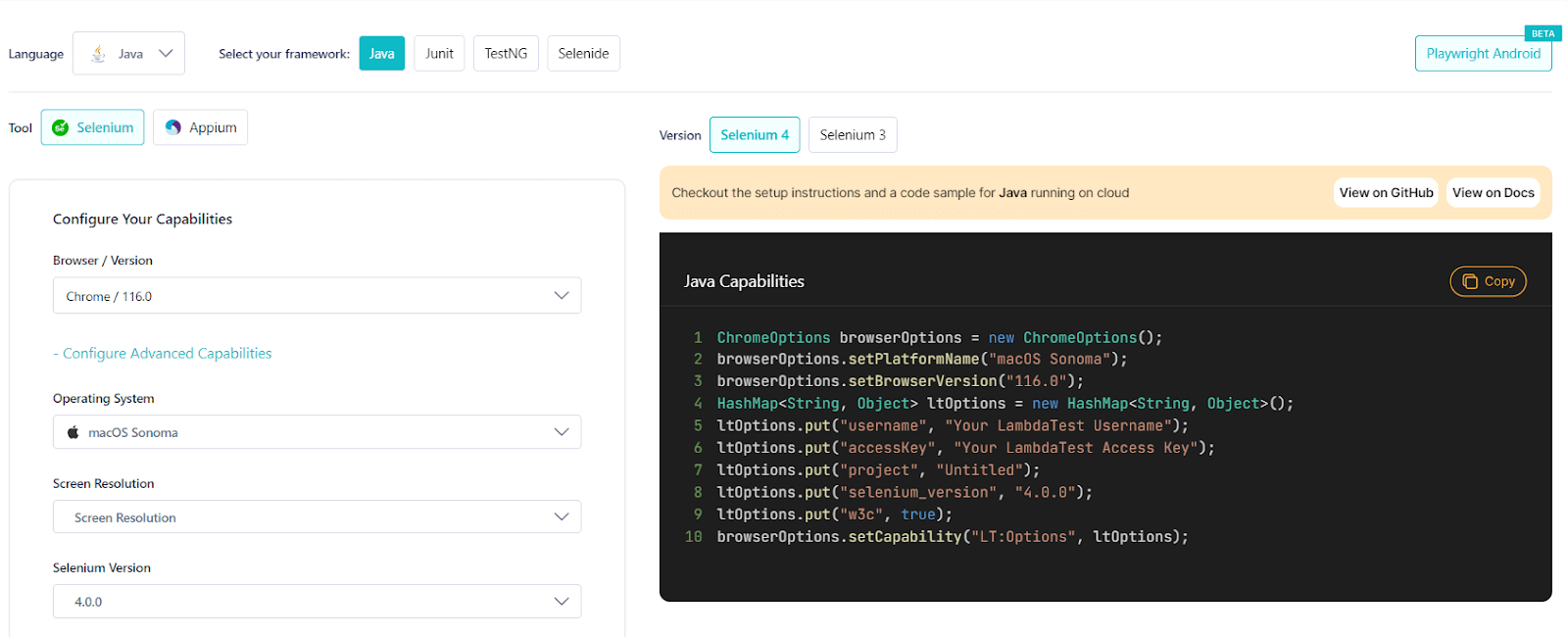
To prepare you for the upcoming release, TestMu AI now supports macOS Sonoma for automation testing. With this, you can run automated tests across 3000+ real browsers running real macOS Sonoma. and also Test on Real macOS Sonoma Online to ensure a seamless user experience.
You can generate the desired capabilities to test on macOS Sonoma from the TestMu AI Automation Capabilities Generator.
Command Annotations to Log Contextual Information
A test script contains essential information about the test, like what it’s about, when different test scenarios start and end, and other stuff you might want to see on the console to debug and fix issues.
To help you search and navigate to specific parts of a test, command annotation can help. They are like helpful notes or comments that you can add to your test scripts for clarifying what each step does, determine when to perform actions based on conditions, display the data being used, skip or ignore tests temporarily, and even work with specific testing tools.
TestMu AI now supports command annotations for test automation. If you use command annotations, you can integrate configurations into your tests that will log down test information on TestMu AI Automation Dashboard.
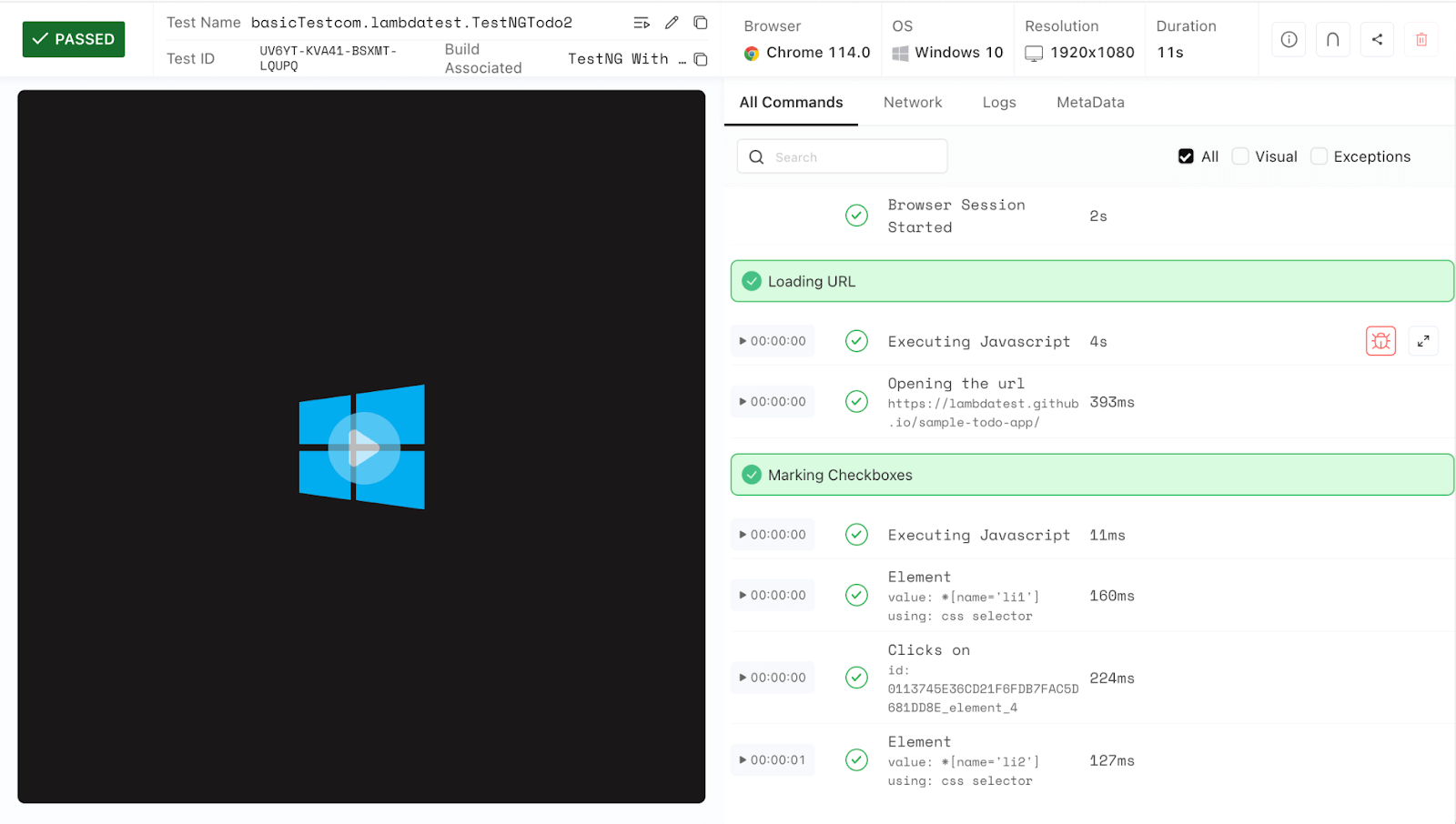
You can find these logs on the TestMu AI Automation Dashboard next to the command logs. It makes it easy to look for quickly and move to a specific part of your test and figure out what went wrong if any tests don’t work.
Granular Level Visibility for Mobile App Testing
We have further optimized our mobile app testing platform, enhancing control and privacy when it comes to mobile application testing.
This new feature make sure all your apps you upload are only visible to specific users by default. This improvement is meant to give you more control and privacy over your mobile apps. If you want to share an app with other folks in your organization, just use the visibility parameter and set it to team when you upload the app.
To use this feature, please check out our support documentation – Commonly Used API for Mobile App Testing.
Espresso App Automation Using Sharding
In App Automation, we rolled out a cool new feature that’s going to make your life a whole lot easier.
Well, now you can run Espresso tests even faster and smarter with HyperExecute on real Android devices. With this new feature, you can break down Espresso test cases into smaller groups called shards. Then, instead of running them one by one, you can run these shards simultaneously on real device cloud.
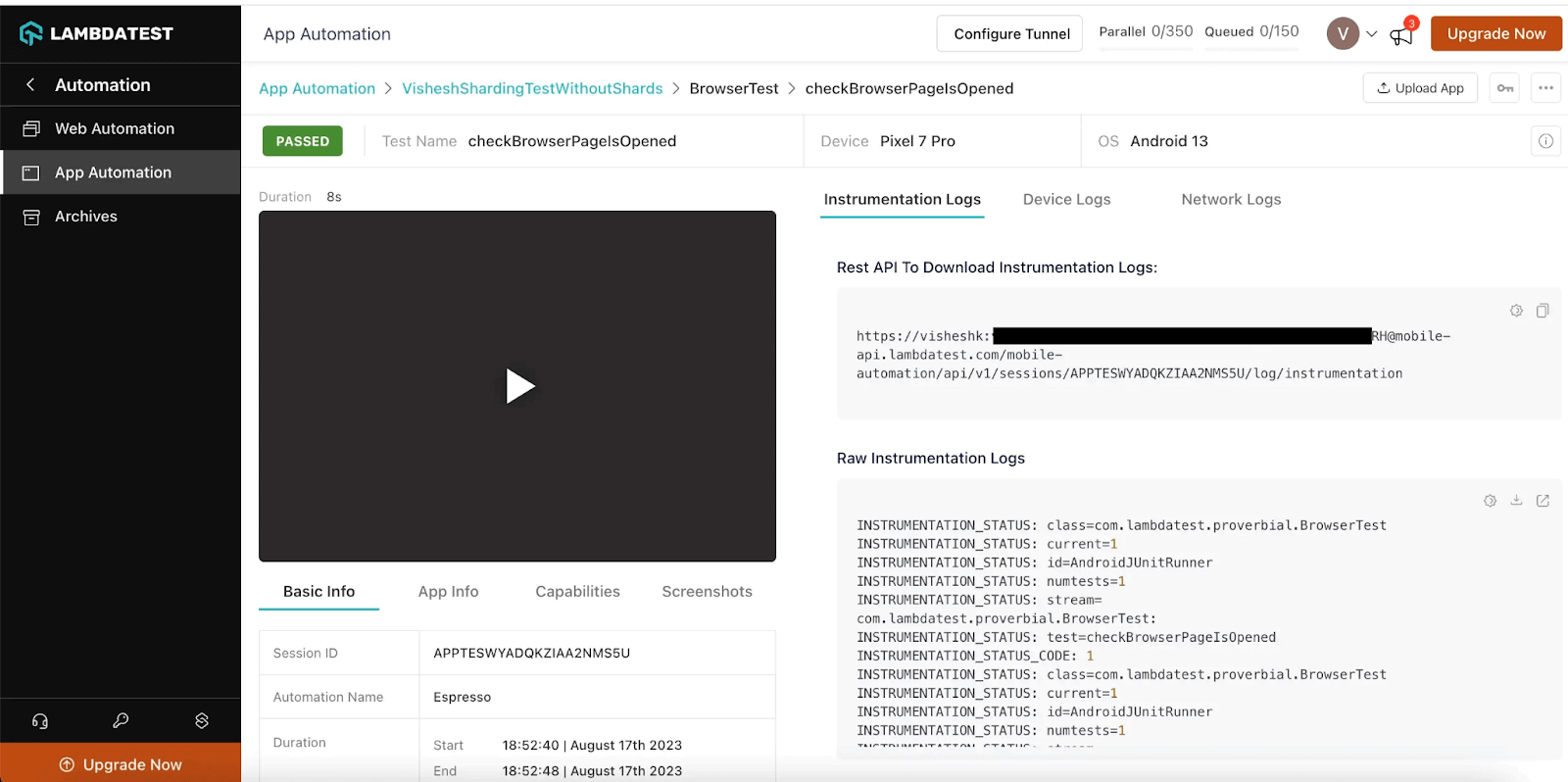
What does this mean for you? It means you can save a ton of time during your testing cycles. No more waiting for one test to finish before starting the next. It’s like having multiple testers working on different parts of your app at the same time.
If you are wondering how to get started with this feature, we’ve got you covered. Just head over to our support documentation – Sharding for Espresso.
Background Services in HyperExecute
TestMu AI HyperExecute has added another new feature in its bucket – Background Services.
Background Services in HyperExecute are crucial for running extended-duration Application Servers. You can trigger these services using background or backgroundDirectives in the HyperExecute YAML config file, providing flexibility to manage server execution. These features allow you to optimize performance and tailor HyperExecute to your needs.
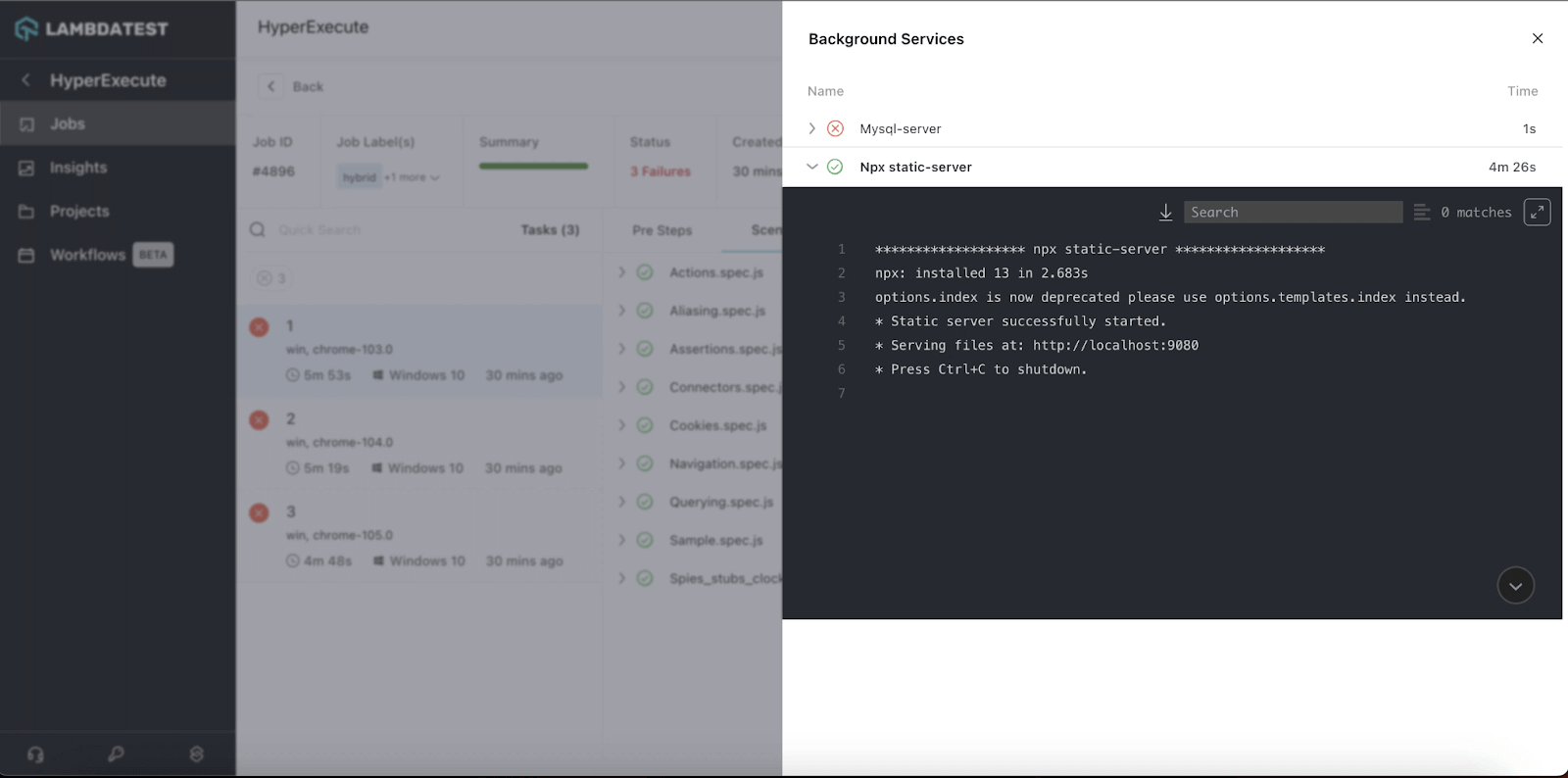
Here are the benefits that Background Services offers:
- They are handy for keeping web applications and servers up and running smoothly, ensuring your online services remain accessible to users without interruptions.
- For database systems that require continuous operation, these services help maintain data availability and reliability.
- If you are running a file-sharing platform or a streaming service, Background Services ensure uninterrupted access to files or media content.
- Messaging and chat applications can benefit greatly from Background Services, as they make sure that messages are delivered quickly and chats remain active.
- Background Services can also be crucial when offering APIs to other applications. They ensure that the APIs are available 24×7, allowing seamless interaction with your services.
To use this feature, check out this getting started tutorial – Background Services.
Bonus Addition: We have also rolled out the newest integration of HyperExecute with TeamCity. To try this integration, refer to our support documentation – TeamCity Integration With HyperExecute.
View Your Test Case Insights in Analytics
TestMu AI Analytics now adds new widgets – Test Cases Health Snapshot and Test Cases View for HyperExecute that help you analyze your test execution at the test case level. With this feature, you can access detailed information about the quantity and types of test cases using customizable widgets and advanced filters.
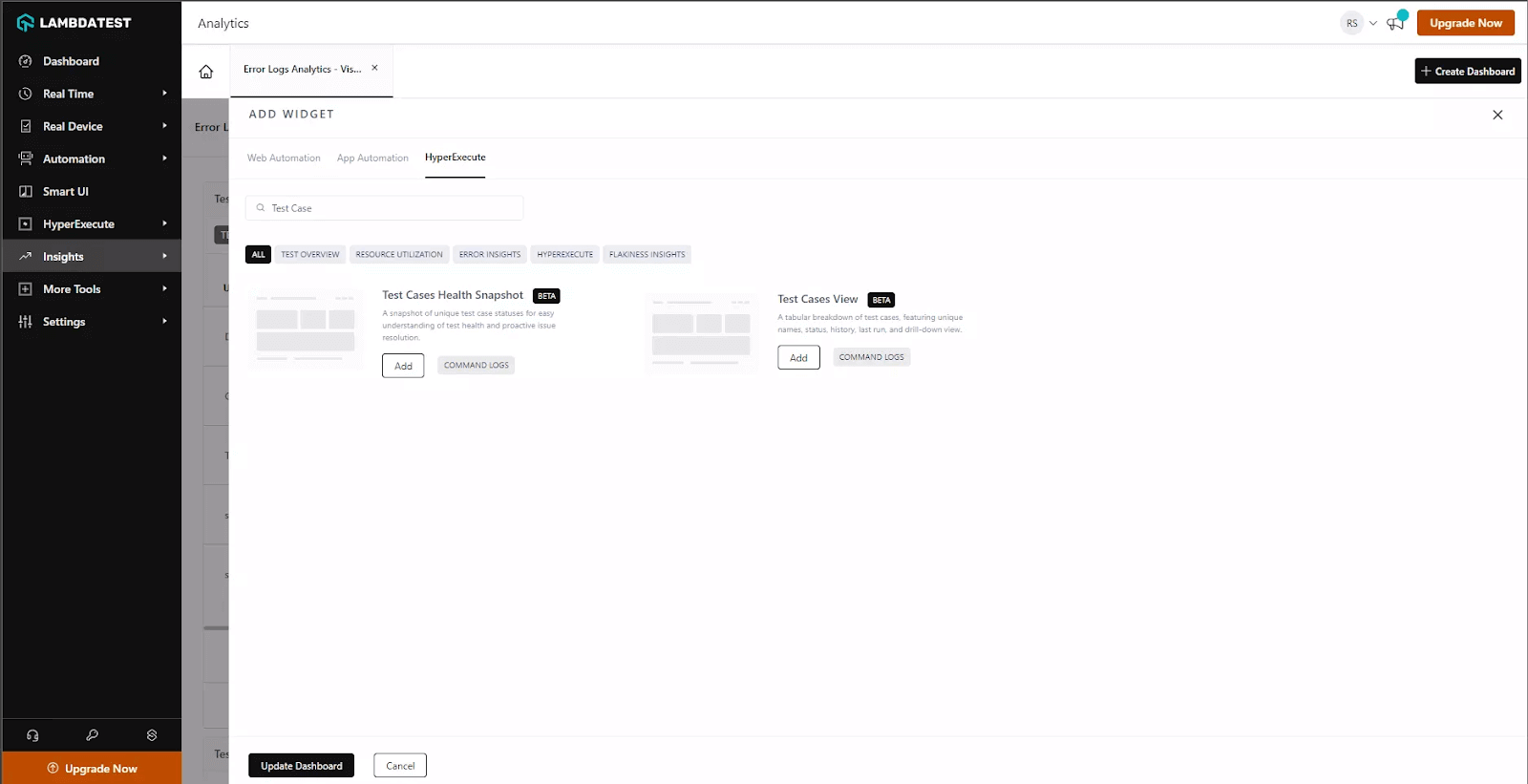
Here’s what you can do with Test Cases View widget:
- You can track the performance of your specific test cases.
- You can get a comprehensive view of test case status trends over the past 90 days, ensuring consistency in your testing efforts.
- Use advanced filters to track user-specific data and other metadata, making it easier to report to stakeholders effectively.
- Incorporate WebHooks into your test scripts to capture real-time test insights and receive instant data updates and monitoring.
To use this widget, please refer to this documentation – Test Case Insights.
Test Your PDF Files With SmartUI
Sometime back, we introduced the SmartUI testing platform to scale your visual regression testing experience. Keeping this approach ahead, we’re now live with another new feature update– SmartUI PDF testing.
This new feature will take your testing to the next level, ensuring that PDF documents are of the highest quality and accuracy. With SmartUI PDF testing, you can now check PDF files for any differences in text, layout, graphics, or other elements. Plus, you can generate detailed reports to make your PDF testing experience smooth and effective.
This feature is available exclusively to subscribers of our Enterprise plan on SmartUI. For more information or if you have any questions, please get in touch with our Sales team.
For more information about PDF testing, please refer to our blog on SmartUI PDF Comparison.
To start your PDF testing, visit the documentation – SmartUI PDF testing.
Live With SmartUI CLI
To take your visual regression testing at level up, we have now released a SmartUI CLI that lets you do visual regression testing from your command line at ease. This CLI makes visual testing easier and more accessible, allowing users to perform visual regression tests from the command line and integrate them into automated testing workflows.
Getting started with SmartUI CLI is simple. You need to:
- Install the necessary dependencies.
- Create a URL file.
- Configure your project token.
- Create and configure SmartUI config.
- Execute the tests on SmartUI cloud using CLI.
To perform visual regression testing using CLI, refer to the documentation – Getting Started with TestMu AI Smart UI CLI.
New Integration with Userback
Userback is one of the handy bug tracking tools that helps teams collect user feedback effortlessly. It lets users share their feedback through screenshots, annotations, and comments, making it simple for teams to grasp user suggestions or issues.
Now, when you integrate TestMu AI with Userback, you get a seamless solution for keeping track of and dealing with bugs that crop up during web or app testing. Thanks to this integration, developers can smoothly report bugs from TestMu AI to their Userback account.
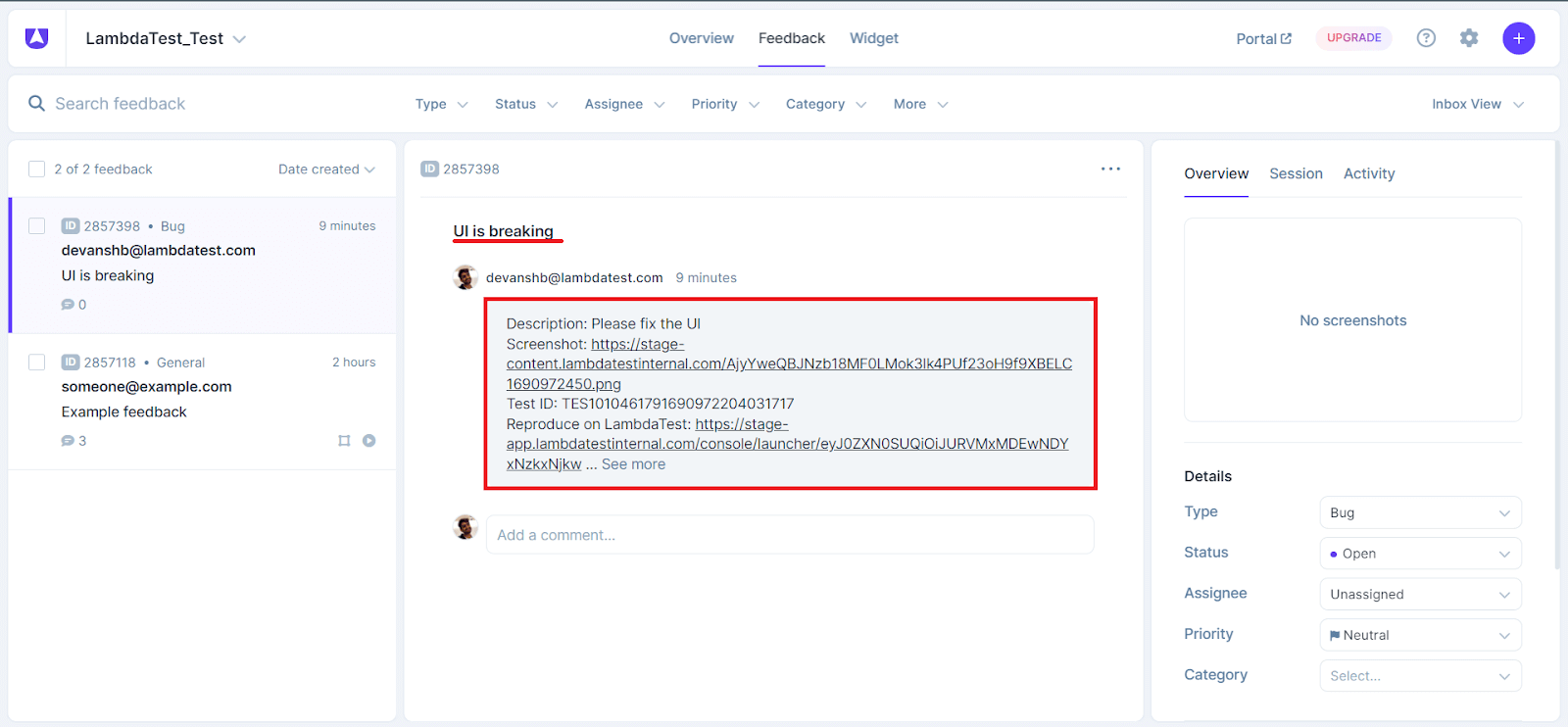
This eliminates the need for manual work and streamlines the process, making bug handling a breeze. It’s a user-friendly and efficient way to manage bugs, making the testing experience much smoother.
If you’re interested in learning more about this integration, you can check out our comprehensive documentation on how to integrate TestMu AI with Userback.
Ready to Test?
At TestMu AI, our unwavering commitment is to consistently enhance your testing experience by offering a range of products and features aimed at helping you excel in your testing projects.
Give these new features a shot and share your experience/feedback with us on the TestMu AI Community.
Additionally, in case you missed any of the recently hosted Testµ Conference 2023 sessions, you can subscribe to the TestMu AI YouTube Channel and access the Testµ’23 Playlist to catch up on these insightful sessions.
Meanwhile, to stay updated with the latest features and enhancements, visit TestMu AI Changelog.
Author

Salman Khan
Blogs: 138


Salman is a Test Automation Evangelist and Community Contributor at TestMu AI, with over 6 years of hands-on experience in software testing and automation. He has completed his Master of Technology in Computer Science and Engineering, demonstrating strong technical expertise in software development, testing, AI agents and LLMs. He is certified in KaneAI, Automation Testing, Selenium, Cypress, Playwright, and Appium, with deep experience in CI/CD pipelines, cross-browser testing, AI in testing, and mobile automation. Salman works closely with engineering teams to convert complex testing concepts into actionable, developer-first content. Salman has authored 120+ technical tutorials, guides, and documentation on test automation, web development, and related domains, making him a strong voice in the QA and testing community.


Did you find this page helpful?
More Related Blogs
TestMu AI forEnterprise
Get access to solutions built on Enterprise
grade security, privacy, & compliance
- Advanced access controls
- Advanced data retention rules
- Advanced Local Testing
- Premium Support options
- Early access to beta features
- Private Slack Channel
- Unlimited Manual Accessibility DevTools Tests