

Power Your Software Testing with AI Agents and Cloud
The Native AI-Agentic Cloud Platform to Supercharge Quality Engineering. Test Intelligently and Ship Faster.


- TestMu AI (Formerly LambdaTest)
- /
- Blog
- /
- What Is AI-Augmented Software Testing? A Complete Guide for QA Teams
What Is AI-Augmented Software Testing? A Complete Guide for QA Teams
Learn AI-augmented software testing, its benefits, use cases, and how QA teams can speed up testing, reduce maintenance, and improve release confidence.
Last Updated on:
AI-augmented software testing is one of the fastest-growing practices in modern QA. Yet many teams still confuse it with full test automation, and end up either underinvesting in it or expecting it to do things it was never designed for.
AI-augmented testing uses artificial intelligence and machine learning to assist human testers across the software testing lifecycle, making testing faster, more accurate, and easier to maintain, without removing the human judgment that quality assurance genuinely requires.
Overview
AI-augmented software testing uses machine learning to assist human testers by automating repetitive groundwork like script creation and locator repair. QA teams can deploy KaneAI by TestMu AI, an AI-native testing agent, to achieve fast, self-healing test execution across a real device cloud.
- Workflow efficiency: AI-augmented software testing blends human expertise with machine learning to handle repetitive groundwork like script creation, locator repair, and failure triage, allowing testers to focus on strategy and exploratory coverage.
- Natural language script authoring: Natural language script authoring translates user stories, plain English instructions, and recorded sessions into executable test scripts that adapt automatically when application logic shifts.
- Smart test prioritization: Smart test prioritization ranks the test queue using code change signals, defect history, and feature criticality so the riskiest scenarios run first.
- Auto locator repair: Auto locator repair detects DOM changes mid-run and rewrites broken selectors using fallback strategies, freeing teams from constant manual maintenance after UI updates.
- Predictive defect insights: Predictive defect insights map current code changes against historical bug patterns to highlight modules most likely to break, directing exploratory effort toward genuine risk areas.
- Failure clustering and diagnosis: Failure clustering and diagnosis groups related failures by probable cause and surfaces concise diagnostic summaries, replacing manual log mining with actionable insights.
- Visual regression detection: Visual regression detection performs pixel-level comparisons across browsers, viewports, and devices to catch layout, rendering, and responsiveness issues that functional tests overlook.
- Mobile AI testing: Mobile AI testing extends natural language authoring, self-healing, and parallel execution to real iOS and Android devices to keep mobile coverage on par with web.
- Frequent UI releases: KaneAI watches the live DOM, restores broken locators on the fly, and validates fixes before the next execution wave to cut maintenance drag.
- Large test suites: KaneAI ranks scenarios by change impact and historical defect signals, returning early results from high-risk subsets while executing the full suite in parallel on the cloud grid.
- Closing sprint lag: KaneAI reads user stories to draft ready-to-run cases, allowing QA engineers to refine edge conditions instead of authoring tests from scratch.
- Seamless integration: KaneAI operates as an AI-native testing agent trained on test intent that integrates with Selenium, Playwright, and Cypress workflows on the TestMu AI real device cloud.
What Is AI in Software Testing and Why Does It Matter
AI in software testing applies machine learning to recognize patterns, predict defects, generate test cases, and detect anomalies, helping QA teams scale quality at modern release velocity.
AI in software testing means applying machine learning and pattern recognition to tasks that traditionally demanded human analysis, recognizing patterns in test data, predicting which code areas are likely to break, generating test cases from plain-language descriptions, and monitoring test runs for anomalies in real time.
It matters now because release velocity has outpaced what manual testing or brittle automation alone can reliably sustain. Release cycles that once ran quarterly now run weekly or daily. Application surfaces span web, mobile, APIs, and third-party integrations simultaneously. Manual testing cannot keep up with these pressures, and traditional automation without AI breaks too frequently to scale reliably.
According to Gartner’s Market Guide for AI-Augmented Software Testing Tools, adoption of AI-driven testing solutions is expected to grow rapidly as enterprises modernize their quality engineering practices. This acceleration is not driven by hype, but by a fundamental challenge: traditional quality assurance processes struggle to keep pace with modern software delivery speeds without significant transformation.
AI-Augmented Testing vs Full AI Testing: What Is the Difference
AI-augmented testing keeps humans in control while AI assists with tasks; full AI testing hands strategy and execution entirely to autonomous systems with minimal human oversight.
The two terms appear interchangeably in vendor marketing, but the distinction affects every adoption decision your team makes. AI-augmented testing keeps humans in the driver's seat; full AI testing hands over strategy and execution entirely to autonomous systems, the model this guide to Agentic Quality Assurance explains in depth.
Getting this wrong leads to mismatched expectations, teams either under-invest because they think augmentation means full autonomy, or they over-invest, expecting a tool to replace judgment it was never built to replace.
| Aspect | Full AI Testing | AI-Augmented Testing |
|---|---|---|
| Core Role of AI | AI is the primary driver of testing | AI acts as a support tool for humans |
| Human Involvement | Minimal human involvement | Human testers remain central |
| Test Design | AI designs tests autonomously | Humans design tests, AI assists |
| Test Execution & Management | Fully handled by AI systems | AI helps automate parts of execution |
| Learning & Improvement | ML models continuously improve coverage independently | AI improves specific tasks but under human guidance |
| Scope of Automation | End-to-end automation (design, execution, maintenance) | Task-level automation (data generation, defect prediction, etc.) |
| Ownership of Testing Strategy | AI-led | Human-led |
| Exploratory & Edge Case Testing | Limited or AI-driven | Primarily handled by humans |
| Best Fit | Mature, stable applications with large historical datasets | Teams of any maturity level |
| Examples | Autonomous test bots, LLM agents maintaining test libraries | Tools for test data generation, locator repair and failure clustering |
| Workflow Integration | Often replaces existing workflows | Layers onto existing workflows |
| Risk | Misaligned expectations if autonomy is overestimated | Lower risk due to human oversight |
For most QA teams, AI-augmented testing is the practical starting point. It delivers measurable efficiency gains without requiring a full architectural overhaul or removing human judgment from high-stakes decisions.
Think of it as the difference between an AI automation layer that replaces your team and one that makes your team genuinely faster.

Note: Perform self-healing test automation with Selenium on the cloud. Try TestMu AI Now!
Key Capabilities of AI-Augmented Software Testing Tools
Key capabilities include AI-generated test scripts, risk-based prioritization, self-healing maintenance, defect prediction, intelligent failure analysis, visual AI, and mobile testing.
Understanding what these tools actually do, not just what they promise, is the fastest way to match a capability to a genuine team bottleneck.
- AI-Generated Test Scripts from Natural Language: AI converts plain English descriptions, user stories, or recorded interactions into executable test scripts. When the application changes, the AI updates scripts automatically rather than requiring manual rewrites.
- Risk-Based Test Prioritization: AI ranks tests before each run using code change impact, historical defect data, and business criticality. The highest-risk tests run first. Feedback arrives in minutes rather than after a full suite completes.
- Self-Healing Test Maintenance: Self-healing test automation detects breakages and repairs locators automatically when UI elements change. Teams stop spending sprint time keeping existing scripts green and start spending it on new coverage, the single highest-ROI entry point for most teams new to AI testing.
- Defect Prediction: By correlating historical defect patterns with current code changes, AI identifies which modules carry the highest risk before testing begins. Exploratory effort goes where it actually matters.
- Intelligent Failure Analysis: AI groups failures by probable root cause and surfaces diagnostic summaries after each run. Engineers make decisions rather than mining logs. Mean time to resolution drops significantly.
- Visual AI Testing: Visual artificial intelligence performs pixel-level comparison across browsers, screen sizes, and device types, catching layout regressions and rendering issues that functional tests miss entirely.
- AI Mobile Testing: As application surfaces extend to native and hybrid mobile, AI mobile testing capabilities allow the same NLP-driven authoring, self-healing, and parallel execution to apply across real iOS and Android devices, not just emulators.
Benefits of AI-Augmented Testing for Software QA Teams
AI-augmented testing delivers faster feedback across the SDLC, reduced maintenance burden, earlier defect detection, and broader coverage without proportional headcount growth.
The efficiency claims around AI testing are widely made but unevenly supported. The four benefits below have the strongest published evidence and the most consistent real-world validation across enterprise adoption studies.
- Faster Feedback Across the SDLC: Parallel execution combined with risk-based prioritization means meaningful test results arrive in minutes rather than after full-suite waits. Techstrong Research found that 45% of businesses experience CI/CD pipeline failures at least once a week, largely because feedback loops are too slow to catch problems before they compound.
- Sharply Reduced Maintenance Burden: According to the World Quality Report 2022–2023, maintenance and upkeep consume a substantial share of test automation effort and budget, often slowing delivery due to duplication and frequent rework across frameworks. Self-healing AI directly addresses this challenge by automatically repairing broken locators, reducing manual intervention, minimizing redundancy, and improving overall testing efficiency.
- Earlier, Cheaper Defect Detection: Catching defects at the unit or integration stage costs an order of magnitude less than catching them in staging or production. AI that predicts defect-prone areas makes that shift-left approach realistic rather than aspirational.
- Coverage Without Headcount: AI scales test authoring and execution in ways human teams cannot match through hiring alone. The constraint stops being people and starts being strategy.
Real-World Use Cases for AI-Augmented Testing
Top use cases include self-healing tests to cut maintenance overhead, risk-based prioritization to shorten feedback loops, and natural language test authoring to close the sprint gap.
These three use cases are drawn from documented enterprise implementations and peer-reviewed research; each one maps to a specific bottleneck QA teams encounter at scale.
Use Case 1: Self-Healing Tests Reduce Maintenance Overhead
The problem: UI updates break automated test scripts continuously. A team running Selenium or Cypress against a product that ships every two weeks can expect 20 to 30 percent of its suite to fail after each release. Two engineer-days per sprint disappear into locator repairs before any new testing work can begin.
For Selenium-heavy stacks specifically, this guide to Selenium AI covers how self-healing locators, AI-assisted test generation, and MCP-based agents collapse those two engineer-days of locator repair into automated background work the suite handles on its own.
How AI-augmented testing helps: AI monitors the application DOM and detects when elements change. It identifies the updated locator using multiple fallback strategies, repairs the affected test, and confirms the fix before the next run. This is how self-healing test automation works in practice, not as a future concept, but as a background process running between every deployment. This is intelligent automation doing the work that was previously the most time-consuming and least valuable part of a QA engineer's week.
What the evidence shows: A peer-reviewed study published in the World Journal of Advanced Engineering Technology and Sciences (Karnam, 2025, Vol. 15, Issue 02, pp. 1560–1571) examined AI- and machine learning–driven test automation. The analysis reported a 40% reduction in testing cycles for enterprises adopting AI- and machine learning–driven test automation.
Field data from Quinnox's self-healing case study corroborates this at a higher scale: a global retailer whose UI changes were breaking 30–40% of automated scripts weekly saw a 95% reduction in script maintenance and achieved 2× faster regression cycles after deploying an AI-driven self-healing tool.
Use Case 2: Risk-Based Prioritization Cuts Feedback Loop Time
The problem: A software team running 4,000 automated tests on every commit waits 90 minutes for results. Developers stop running tests locally because the wait is not worth it. Defects slip through because the team deprioritizes testing under deadline pressure. This is the exact failure mode that AI test automation was designed to prevent.
How AI-augmented testing helps: AI analyses code change metadata and historical defect data to rank test cases by likely defect relevance. The first execution wave runs the 400 highest-risk tests and returns results in under 10 minutes. The full suite runs in parallel for comprehensive coverage. AI regression testing at scale, with smart prioritization, changes the relationship between developers and the test suite entirely.
What the evidence shows: Bajaj Finserv Health, a fintech platform with over 35 million users and a 90% mobile user base, faced the exact failure mode described above: frequent UI updates were breaking automated scripts, and manual regression testing was delaying every deployment cycle.
After adopting TestMu AI's AI-native testing platform, Bajaj Finserv reduced test execution time by 70%, brought escaped defects below 3%, achieved a 17% reduction in test maintenance, and expanded test coverage by 38%, moving from ad-hoc releases to reliable weekly deployments. As Abhijeet Teware, Head of QA at Bajaj Finserv, put it in a published review on Microsoft Community Hub: the team scaled automation coverage 40× between 2022 and 2024, shifting the bulk of regression away from manual execution entirely.
TestMu AI – The New LambdaTest is built for the AI era of software testing.
Use Case 3: Natural Language Test Authoring Closes the Sprint Gap
The problem: A product owner writes detailed user stories each sprint. The QA team manually translates them into test cases over three to four days, consistently trailing development by a full sprint. Coverage on lower-priority features gets cut under time pressure. This is not a discipline problem. It is a throughput problem that AI tools for developers and QA teams are purpose-built to solve.
How AI-augmented testing helps: NLP-powered AI reads the user story and generates draft test cases automatically. The QA engineer reviews, adjusts edge cases, and approves rather than authoring from scratch. What took three days takes three hours. When this capability is paired with AI unit test generation earlier in the pipeline, teams can build meaningful coverage at every layer without a proportional increase in effort.
What the evidence shows: An industrial study published on arXiv demonstrated that LLM-powered approaches can generate test scenarios directly from natural language requirements with expert-validated quality in 36.7% of cases rated very high quality, reducing the effort and risk of overlooking edge cases.
The Artificial Intelligence Evolution journal published a study on NLP-based test case generation (Ayenew and Wagaw, January 2024), covering 13 research articles from 2015 to 2023, which confirmed that NLP techniques significantly reduce manual test authoring effort. The skills shift is already visible in practice: AI/ML competency demand among QA professionals rose from 7% to 21% in a single year, per the 2026 State of Testing Report.

How to Use KaneAI for AI-Augmented Software Testing?
To use KaneAI, open the dashboard, create a web test, describe the scenario in plain English, review the generated steps, and execute across browsers on the real device cloud.
The scenario: A returning customer logs in, searches for a product, and adds it to the cart. The entire test is authored from a single plain-English instruction on the TestMu AI eCommerce Playground, a fully functional test store with live login, product search, and cart flows.
The QA team needs to verify that a logged-in user can search for a MacBook Air, add it to the cart, and confirm that the cart updates correctly. Traditionally, this is a three-to-four-hour scripting job per browser, plus ongoing locator maintenance every time the cart UI updates. With KaneAI, here is how the same test gets authored and run.
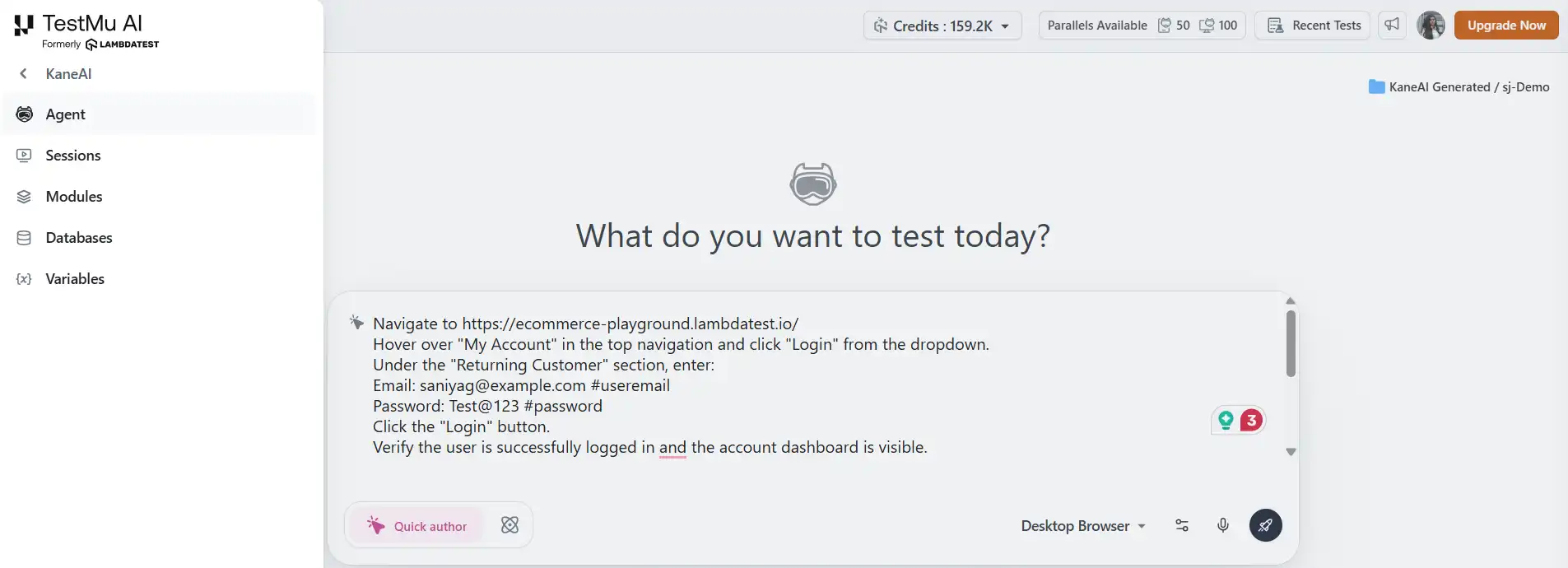
- Open KaneAI and start a new web test: From the TestMu AI dashboard, click KaneAI in the left panel → Create a Web Test. A live browser agent opens with a natural language input panel beside it.
- Type your test intent, exactly as you would describe it to a teammate: Paste this into the KaneAI input panel:
- Navigate to TestMu AI eCommerce Playground.
- Hover over "My Account" in the top navigation and click "Login" from the dropdown.
- Under the "Returning Customer" section, enter: Email: saniyag@example.com #useremail Password: Test@123 #password
- Click the "Login" button. Verify the user is successfully logged in and the account dashboard is visible.
- Click on "Home" in the top navigation. In the search bar, type "MacBook Air" and press Enter.
- From the search results, click on the product titled "MacBook Air".
- Verify the product detail page loads and the product title is "MacBook Air".
- Click on the cart and verify the product "MacBook Air" appears with the correct price.
- Review what KaneAI generates: KaneAI parses the instruction and produces discrete, executable steps with assertions built in at each stage:
That is the full authoring input, written the way a QA engineer would brief a colleague, not the way a developer writes Selenium locators.
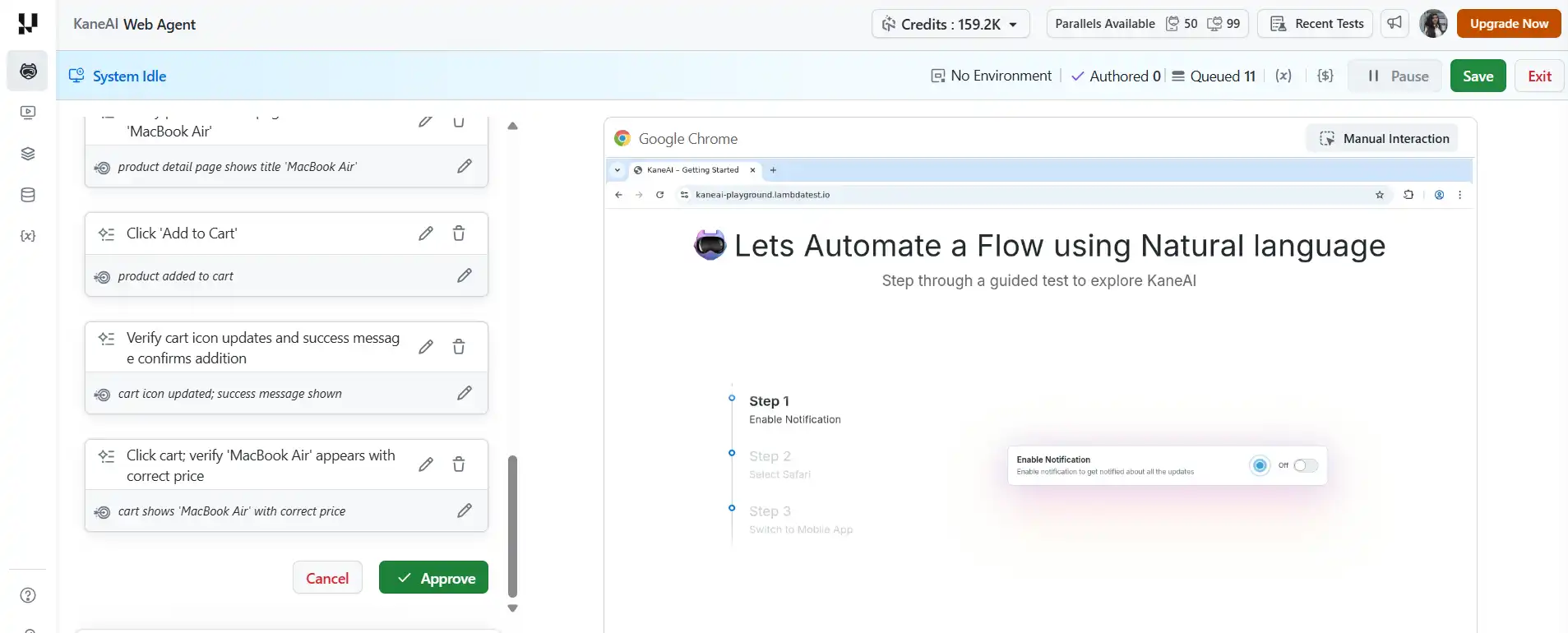
The QA engineer reviews, adjusts if needed, for example, adding a step to dismiss any cookie consent banner if it appears, and approves. Total time from blank screen to approved test: under 10 minutes.
Result:
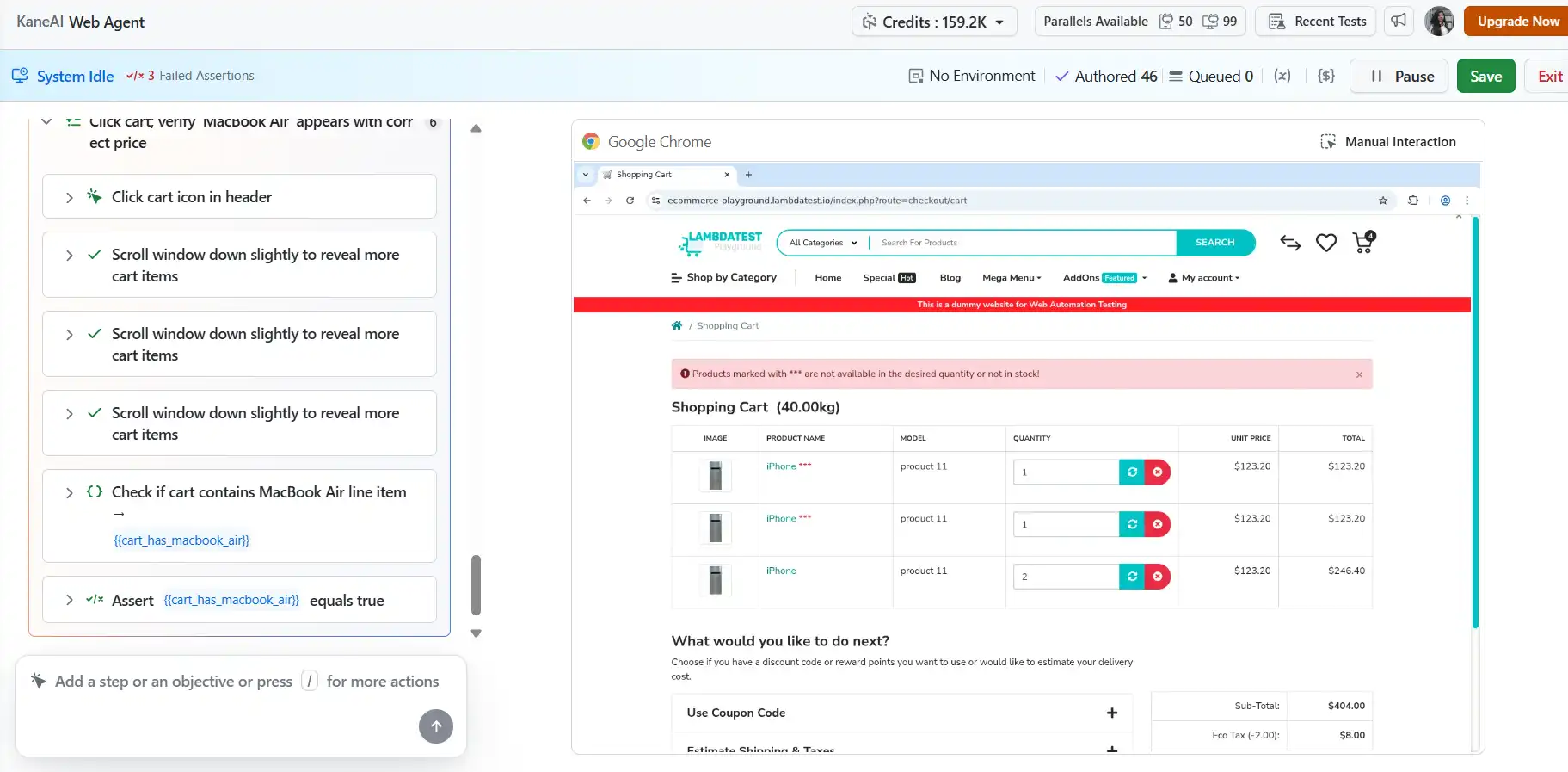
With KaneAI, once your test is ready, it can execute simultaneously across Chrome, Firefox, and mobile Safari on TestMu AI's real device cloud, with results returning in a single dashboard showing pass/fail per step, per browser, and screenshots at every assertion point.
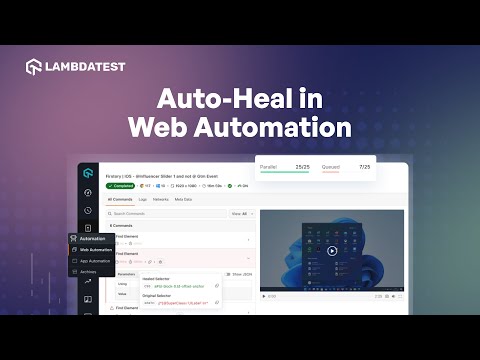
When a UI update changes a locator, KaneAI's Auto-Heal detects the breakage during execution, references the original natural language intent of the step, scans the updated DOM, and repairs the locator before the run completes, rather than leaving a silent failure in the next morning's ticket queue.
To get started with self-healing test automation, follow this support documentation on Auto-Heal for Automation Scripts in KaneAI.
When the test is stable, KaneAI converts it into production-ready Selenium, Playwright, or Cypress code that drops directly into a GitHub Actions or Jenkins workflow without manual cleanup.
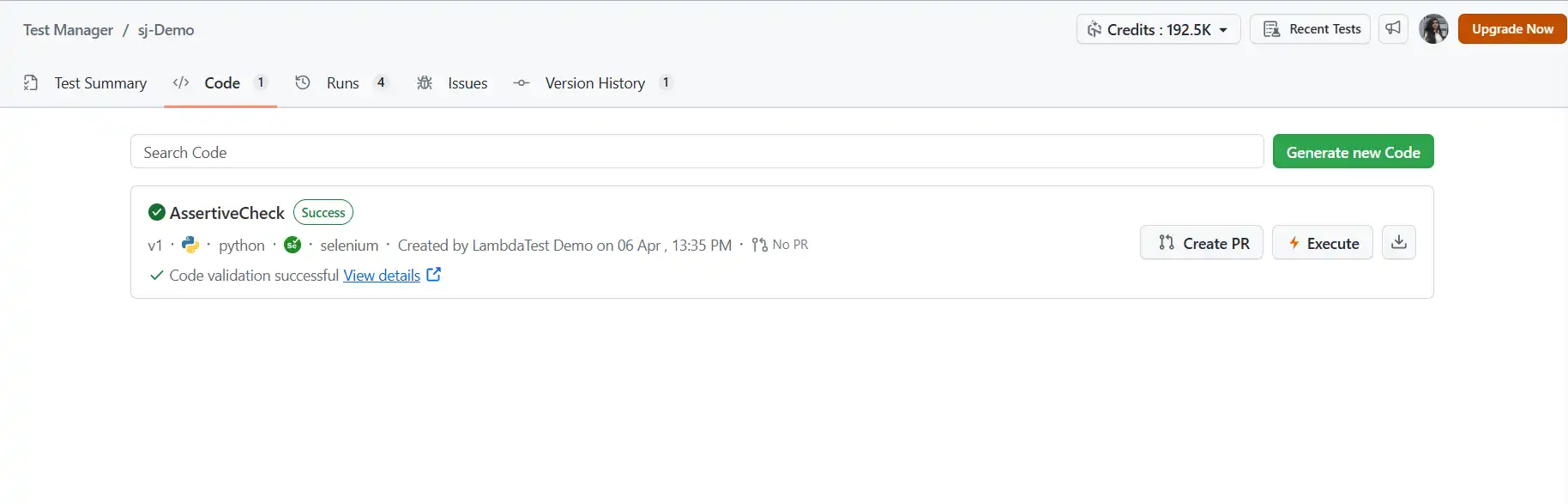
KaneAI generates automation scripts across multiple frameworks and languages directly from natural language inputs. To get started, refer to the KaneAI Automation Code Generation documentation.
Challenges of AI-Augmented Testing and How to Address Them
Common challenges include learning curves, data quality, false positives, over-automation, integration complexity, and data privacy, each addressable with thoughtful adoption practices.
AI testing tools deliver genuine efficiency gains. The six challenges below are the ones teams encounter most frequently, along with practical ways to navigate each.
Teams that understand the constraints going in make better adoption decisions and avoid the most common failure modes.
Challenge 1: The Initial Learning Curve
Engineers experienced with Selenium or Playwright need real enablement, not just tool onboarding, to work effectively with NLP-driven authoring and AI analytics.
KaneAI Fix: Tests are authored in plain English, so non-technical team members can contribute from day one. Engineers who want to go deeper can review the generated test code directly inside KaneAI, making it a learning tool as much as a productivity tool.
Challenge 2: Data Quality and Availability
AI models that predict defects need historical execution data. Teams with sparse test history or inconsistent defect tagging will see weaker predictions in early adoption.
KaneAI Fix: KaneAI draws on TestMu AI's aggregated cloud execution data to bootstrap initial predictions, so teams see meaningful signal from the first few runs rather than waiting months to build their own history.
Challenge 3: False Positives and Negatives
No AI model is perfectly accurate. Defect prediction produces both false positives and false negatives. Treating AI outputs as definitive rather than advisory creates blind spots that hurt quality.
KaneAI Fix: KaneAI surfaces failure analysis with confidence scores and supporting evidence, not binary signals. Engineers see why something was flagged and make the final call, keeping the process genuinely collaborative.
Challenge 4: Risk of Over-Automation
Efficiency gains create pressure to automate everything. Exploratory testing, accessibility evaluation, and the quality judgment skilled testers bring to unfamiliar code changes all still require human involvement.
Solution: Use the time recovered from maintenance and script authoring to invest more in exploratory coverage and edge case design.
Challenge 5: Integration with Existing Toolchains
Introducing AI tooling alongside existing Selenium, Playwright, or Cypress frameworks, plus your CI/CD pipeline, can involve real compatibility work if integration is treated as an afterthought.
KaneAI Fix: KaneAI works alongside existing frameworks rather than replacing them, with native integrations for GitHub Actions, Jenkins, GitLab CI, Jira, and Linear. Teams adopt it incrementally without disrupting what already works.
Challenge 6: Privacy and Security of Test Data
Test environments frequently contain production-representative data. Teams in regulated industries face real compliance obligations that need to be surfaced before adoption, not after.
Solution: Before adopting any AI testing platform, verify data residency policies, access controls, encryption standards, and compliance certifications relevant to your industry. Ask specifically how test data is handled in model training and whether opting out is available.
Is AI-Augmented Testing Right for Your Team? Key Questions to Ask
AI-augmented testing fits teams spending heavy time on maintenance, lagging in test authoring, facing slow CI feedback, or scaling coverage without proportional headcount growth.
Not every team is at the same maturity level, and the ROI case for AI testing tools is stronger for some bottlenecks than others. These diagnostic questions help you identify where your team has the most to gain, and where to start.
Use these to assess where the most immediate value is for your specific situation.
Do you spend more than 20 percent of QA time on test maintenance?
If yes, self-healing AI delivers fast, measurable ROI and is the most common high-impact entry point for teams new to AI test automation.
Does QA consistently trail development by a sprint because test authoring is slow? NLP-driven test generation closes that gap directly. If your team is writing test cases manually from user stories, this is the capability that changes the dynamic most quickly and is the most visible benefit of AI for non-technical stakeholders.
Do developers wait more than 20 minutes for test feedback after a commit? Risk-based prioritization as part of a broader DevOps AI strategy can have an immediate and visible impact on developer experience and release discipline.
Does your team have historical test data to train predictions on?
More history produces a better AI signal. Teams with limited history should look for artificial intelligence platforms like KaneAI that use cloud-aggregated baseline data to compensate during early adoption.
Is your application surface stable enough to reward automation investment?
AI automation makes test suites more resilient to change, but highly volatile prototypes may not yet warrant the investment. Applications moving toward stable feature sets are the best candidates for intelligent test automation at scale.

Final Thoughts on AI-Augmented Testing Tools for QA Teams
AI-augmented testing tools deliver real efficiency gains in maintenance, authoring, and feedback loops, but require thoughtful adoption with clear goals and human judgment retained.
AI-augmented software testing tools are not a silver bullet, and the teams that get the most from them are the ones that go in clear about what they are actually solving. The value is real, the evidence is growing, and the efficiency gains in maintenance, authoring speed, and feedback loops are achievable within the first few sprints for most teams. The honest trade-offs around data dependency, learning curves, and the ongoing need for human judgment do not diminish that value. They just require teams to adopt thoughtfully rather than reactively.
For teams ready to move from evaluation to execution, KaneAI by TestMu AI offers the most complete implementation of AI-augmented testing available today. It was built specifically for QA workflows, integrates into the pipelines and frameworks your team already uses, and treats AI testing as a discipline in its own right rather than a feature bolted onto something else. The result is a testing practice where the repetitive, high-volume, maintenance-heavy work is handled by AI, and your engineers spend their time on the quality decisions that actually require their expertise.
Citations
- AI and machine learning-driven test automation: Revolutionizing software testing practices
- World Quality Report 2022–2023
- Self-Healing Test Automation: Benefits, Use Cases & Real-World Examples
- How Bajaj Finserv Cut Test Execution Time by 70% and Brought Escaped Defects Below 3%
- Customer review: TestMu AI HyperExecute is a game changer | Microsoft Community Hub
- [2404.12772] Generating Test Scenarios from NL Requirements using Retrieval-Augmented LLMs: An Industrial Study
- Gartner’s Market Guide for AI-Augmented Software Testing Tools
- The 2024 State of Testing Report
- Software Test Case Generation Using Natural Language Processing (NLP): A Systematic Literature Review | Artificial Intelligence Evolution
- Auto-Heal for Automation Scripts in KaneAI
- KaneAI Automation Code Generation
Author

Saniya Gazala
Blogs: 47


Saniya Gazala is a Product Marketing Manager and Community Evangelist at TestMu AI with 2+ years of experience in software QA, manual testing, and automation adoption. She holds a B.Tech in Computer Science Engineering. At TestMu AI, she leads content strategy, community growth, and test automation initiatives, having managed a 5-member team and contributed to certification programs using Selenium, Cypress, Playwright, Appium, and KaneAI. Saniya has authored 15+ articles on QA and holds certifications in Automation Testing, Six Sigma Yellow Belt, Microsoft Power BI, and multiple automation tools. She also crafted hands-on problem statements for Appium and Espresso. Her work blends detailed execution with a strategic focus on impact, learning, and long-term community value.


Frequently asked questions
Did you find this page helpful?
More Related Blogs
TestMu AI forEnterprise
Get access to solutions built on Enterprise
grade security, privacy, & compliance
- Advanced access controls
- Advanced data retention rules
- Advanced Local Testing
- Premium Support options
- Early access to beta features
- Private Slack Channel
- Unlimited Manual Accessibility DevTools Tests