
Browser Infrastructure for AI Agents with Browser Cloud
Give Your AI Agents Real Cloud Browsers with Session Persistence, a Localhost Tunnel, and Session Replay.

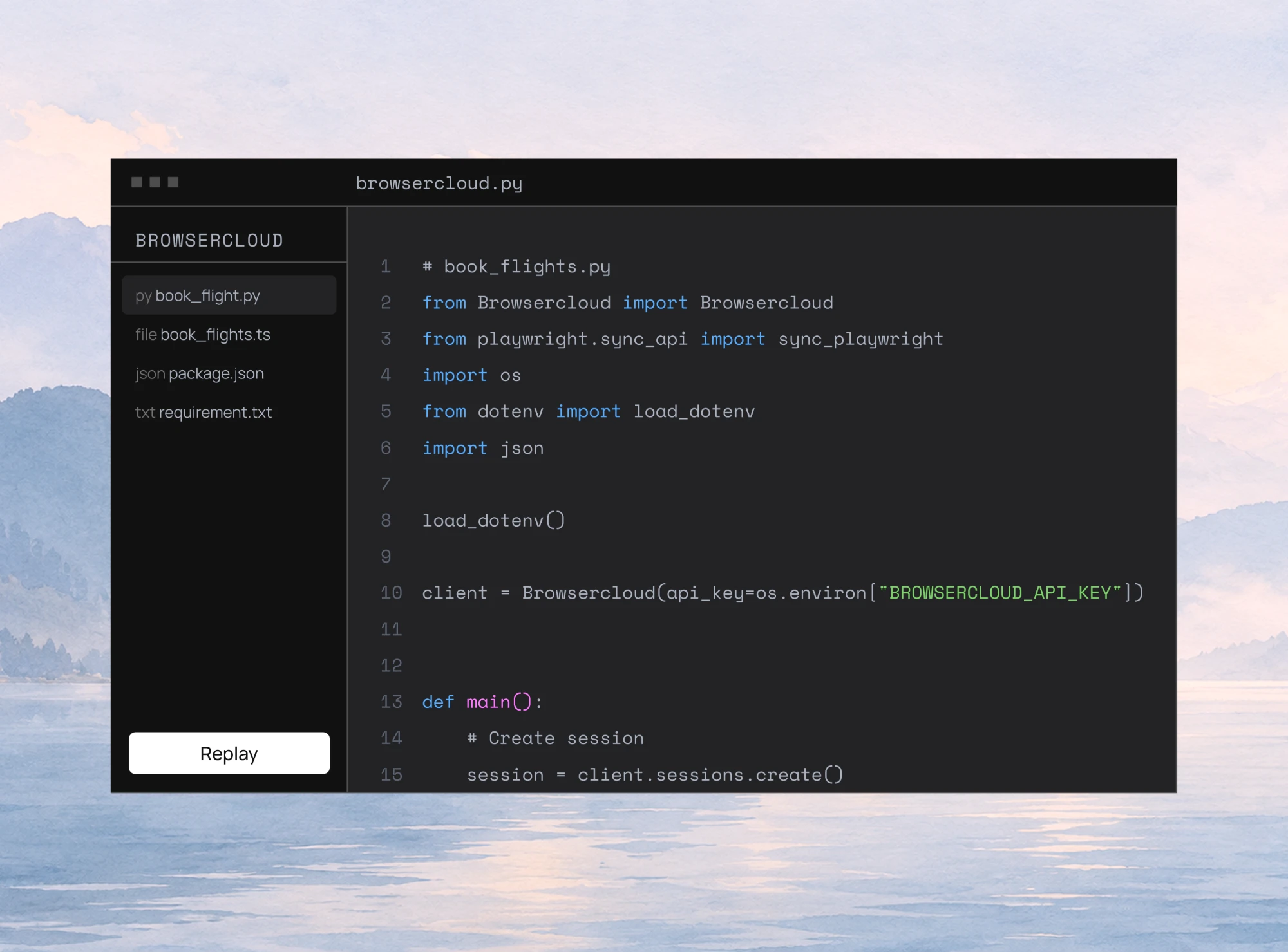
Automation Testing Using Browser Agents
See how AI agent browser automation works, how it differs from scripted tests, and how to build a browser agent with Ollama, Qwen3 and TestMu AI Browser Cloud.
Published on:
Automation testing has become an essential part of modern software development, enabling teams to deliver high-quality applications faster through reliable and repeatable browser automation. While traditional frameworks excel at executing predefined scripts, they often require continuous maintenance as applications evolve.
AI agents are transforming this approach by introducing intelligence and decision-making into browser automation. Instead of following code statements, browser agents can understand natural language instructions, plan actions, interact with web applications autonomously, and adapt to UI changes.
They can perform tasks such as logging in to applications, filling out forms, navigating complex workflows, validating outcomes, and extracting data, all while making context-aware decisions during execution.
TL;DR
AI agent browser automation, also called AI browser automation, runs browser tasks from a natural language goal instead of a coded script: an AI agent plans the steps, picks elements from page context, and acts in a real browser. TestMu AI's Browser Cloud supplies that browser and records each session with video, logs and a step timeline.
- Natural language objective: In AI agent browser automation, the tester describes an outcome, such as logging in, creating a record and checking the confirmation, and the AI browser agent converts it into navigation, data entry, clicks and validations at run time.
- Context-based element identification: An AI browser agent picks elements from page structure, attributes and visible text instead of only hardcoded IDs, CSS selectors or XPath, so many UI changes no longer break the run.
- Browser AI Agent: The open-source Browser AI Agent is a TypeScript project that plans each step with the Qwen3:8b model on Ollama and executes the actions in a Browser Cloud session. Runs the LLM locally: Yes. Runs the browser locally: No.
- Scripted Playwright or Selenium tests: Scripted tests stay faster and more predictable than an AI browser agent for simple, repetitive regression checks, because the agent reasons before every browser action, so a hybrid suite keeps both.
- TestMu AI Browser Cloud: Browser Cloud runs agent sessions in real cloud browsers through Playwright, Puppeteer or Selenium, keeps cookies and login state between sessions, and reaches localhost apps through a built-in tunnel.
How to Run a Browser Agent on Browser Cloud
- Install the Browser Cloud SDK from npm.
- Add your TestMu AI username and access key to a .env file.
- Create a Playwright session and hand its page to the agent's browser tools. The Browser Cloud SDK setup guide covers installation and client initialization.
What Is AI Agent Browser Automation?
AI agent browser automation is an intelligent approach to browser automation in which an AI agent understands a user's objective, plans the required steps, and executes them by interacting with a real web browser. Instead of relying solely on predefined scripts and hardcoded locators, the agent can interpret natural language instructions, reason about the current state of a web application, and determine the sequence of actions needed to complete a task.
Unlike traditional automation, where every click, input, and assertion must be explicitly programmed, AI agent browser automation focuses on what needs to be accomplished rather than how each action should be performed. For example, a tester can provide a prompt such as:
"Log in to the application, create a new customer, verify the confirmation message, and capture a screenshot."
The AI agent interprets the high-level objective, determines the sequence of actions required to achieve it, and executes those actions in the browser. This may include navigating to web pages, identifying UI elements, entering data, interacting with controls, validating expected outcomes, and capturing execution artifacts such as video, screenshots, and logs.
How AI Agent Browser Automation Works
While the exact implementation varies across platforms, the underlying concept remains largely the same. An AI agent combines reasoning capabilities with browser automation to convert a user's natural language prompt into a sequence of executable browser actions.
The following high-level workflow illustrates how AI agent browser automation typically operates:
- Understand the objective: The AI agent interprets a natural-language instruction provided by the user.
- Plan the execution: The agent breaks the objective into a sequence of browser actions, such as navigation, data entry, validation, and evidence collection.
- Execute in a real browser: Using browser infrastructure such as Browser Cloud, the agent performs these actions in a real browser session such as Chrome.
- Validate and report: The agent verifies the expected outcome and generates artifacts such as video, screenshots, and test execution logs.
This separation of responsibilities is important. The AI agent provides the intelligence and decision-making, while Browser Cloud provides the scalable browser environment in which those decisions are executed. Together, they enable autonomous browser automation for testing, data extraction, workflow automation, and other browser-based tasks.
As AI agents continue to evolve, they are changing how browser automation is designed and executed. By combining intelligent planning with cloud-based browser execution, they simplify the automation process. It also enables QA teams to automate complex end-to-end workflows more efficiently while focusing on validating application quality rather than maintaining test scripts.
How Is It Different From Traditional Browser Automation?
Traditional browser automation has been the foundation of automated web testing for many years. It enables testers to automate repetitive tasks by executing predefined scripts that interact with web elements in a fixed sequence. While this approach is highly effective for stable and predictable applications, it becomes increasingly difficult to maintain as web applications evolve.
One of the biggest challenges is that traditional automation depends heavily on explicit instructions. Every interaction, such as locating an element, entering data, clicking a button, or verifying a result, should be manually defined. If the application interface changes, even slightly, automation scripts may fail and require updates.
As applications become more dynamic with responsive layouts, asynchronous content, and frequently changing user interfaces, maintaining test suites often consumes a significant portion of a team's automation effort.
Another limitation is the lack of contextual understanding. Traditional automation executes exactly what it has been programmed to do and cannot reason about the application's current state. If an unexpected popup appears, a button changes its position, or an additional verification step is introduced, the automation cannot adapt unless those scenarios have been explicitly accounted for in the test script.
AI agent browser automation takes a fundamentally different approach. Instead of following a rigid sequence of predefined instructions, the AI agent begins with a high-level objective expressed in natural language. It interprets the user's intent, plans the required browser interactions, and dynamically determines how to accomplish the task based on the application's current state.
Because the agent continuously observes and evaluates the browser during execution, it can adapt to many common UI changes without requiring immediate script modifications. Rather than relying solely on static element definitions, it uses contextual information to identify the appropriate controls and determine the next action required to achieve the intended outcome.
This goal-oriented execution significantly reduces the effort involved in creating and maintaining browser automation. With AI agent browser automation, testers can focus on describing the expected business workflow, while the AI agent is responsible for translating that objective into browser interactions.
The following table provides a detailed comparison of Traditional Browser Automation Vs AI Agent Browser Automation:
| Criteria | Traditional Browser Automation | AI Agent Browser Automation |
|---|---|---|
| Automation approach | Executes predefined scripts written by testers | Executes tasks based on natural language instructions. |
| Test Creation | Requires writing and maintaining automation code | Workflows can be created using natural language with minimal or no coding. |
| Execution Style | Follows a fixed sequence of pre-defined steps | Plans, reasons, and dynamically determines the next action during execution. |
| Element Identification | Primarily relies on manually defined locators such as IDs, CSS selectors, or XPath. | Uses page structure, element attributes, visible text, and contextual information to identify and interact with web elements. |
| Handling UI changes | UI changes often require locator and script changes | Can adapt to many UI changes by identifying elements based on context. |
| Error Recovery | Stops execution unless explicit recovery logic is implemented. | Can evaluate failures, retry actions, or choose alternative paths where appropriate. |
| Maintenance Effort | High, especially for frequently changing applications. | Lower due to adaptive execution and reduced dependency on static locators. |
| Dynamic Content Handling | Requires custom synchronization and wait strategies. | Continuously observes page state and adapts during execution. |
| Complex workflow automation | Requires explicit programming for every decision branch. | Can execute multi-step browser workflows from a single natural language prompt by planning and performing the required actions sequentially. |
| Best Suited For | Stable, predictable applications with well-defined workflows. | Dynamic applications, exploratory testing, end-to-end workflows, and AI-assisted automation. |
What Can You Automate With AI Browser Agents?
AI browser agents can automate a wide range of browser-based tasks that traditionally require custom automation scripts. Instead of writing code for every interaction, we describe the objective in natural language, and the agent plans and executes the required browser actions.
End-to-End Business Workflows
AI browser agents excel at automating complete user journeys that span multiple pages and interactions. A single prompt can initiate a workflow, navigate through the application, validate results, and report the outcome.
Example: Log in to the HR application, create a new employee, assign the employee to the Sales department, verify the employee appears in the directory, and capture a screenshot of the profile.
Quality Assurance and Testing
AI browser agents can be super helpful for quality assurance teams. These teams can leverage these agents to run functional and non-functional tests across multiple browsers and websites.
AI browser agents can simulate end-to-end user journeys, identify issues such as broken links and non-functional forms, and generate detailed execution reports to help teams validate application functionality and improve the overall user experience.
E-Commerce and Retail
AI browser agents can automate many repetitive tasks across e-commerce platforms. They can navigate product catalogs, validate pricing information, verify product availability, update inventory records, and test end-to-end customer journeys such as product search, cart management, and checkout.
They can also help with web scraping and enable retailers to automate routine browser-based workflows while reducing manual effort.
Sales and CRM Workflows
Sales teams can use AI browser agents to automate browser interactions across CRM systems and business applications. For example, agents can navigate prospect directories, populate lead information into CRM platforms, validate customer records, and automate repetitive administrative tasks.
By handling these routine activities, sales teams can spend more time building customer relationships and less time performing manual data entry.
Financial Services and Accounting
In financial and accounting applications, AI browser agents can automate browser-based workflows such as validating transaction records, reconciling data across portals, downloading reports, and verifying invoice details. AI agents can help in monitoring transactions, managing invoices, and generating financial reports.
They can navigate secure financial portals, retrieve transaction details, validate financial records, and categorize expenses based on predefined business rules.
Which AI Agents and Tools Support Browser Automation?
The AI browser automation ecosystem is evolving rapidly, with tools ranging from AI-powered browser agents to cloud browser infrastructure. While some solutions focus on understanding natural language and planning browser actions, others provide the scalable browser environments required to execute those actions reliably.
Some of the widely used tools include:
- Browser Use: It is an open-source framework that enables AI agents to interact with web browsers using natural language and large language models. It is commonly used for browser automation, web research, and data extraction.
- Browserbase + Stagehand: Browserbase provides cloud browser infrastructure, while Stagehand adds AI-powered browser interactions and natural language capabilities with Playwright-style APIs for building browser agents.
- Playwright MCP: It connects AI assistants to Playwright, allowing them to inspect web pages, interact with browser elements, and perform browser automation through standardized tools instead of writing every automation step manually.
- Browser Cloud by TestMu AI: It is a managed browser infrastructure designed for AI agents. It supports Playwright, Selenium, and Puppeteer, while offering features such as cloud browser sessions, session persistence, observability, localhost tunneling, and AI agent skills for integrating with tools like Claude, Cursor, Gemini, and custom AI agents.
In practice, these tools are often used together rather than independently. An AI agent interprets a natural language request, plans the required browser interactions, and delegates execution to a browser automation framework or cloud browser platform.
This combination allows teams to automate complex browser workflows, end-to-end testing, web scraping, and repetitive browser tasks with significantly less manual coding than traditional browser automation approaches.
How to Set Up AI Agent Browser Automation
Getting started with AI agent browser automation is straightforward. Instead of writing test scripts manually, we configure an AI agent with a browser execution environment and let the agent interpret natural language instructions into browser actions.
Understanding the Browser AI Agent
Before diving into the setup, it's helpful to understand how the Browser AI Agent works.
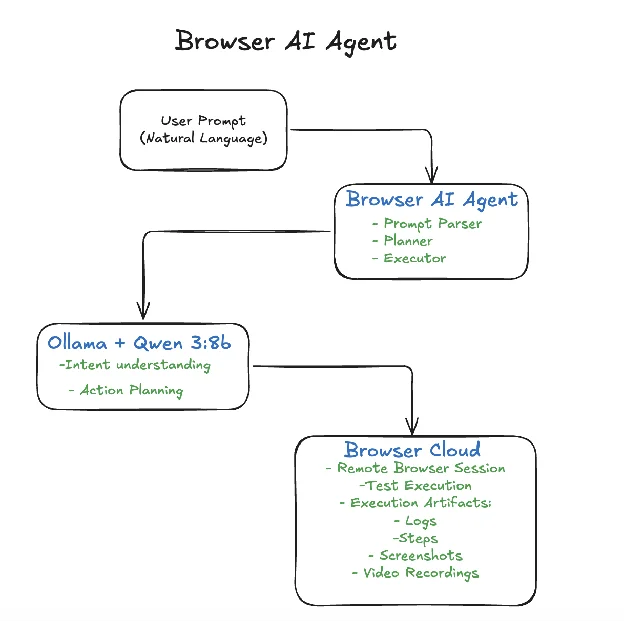
The Browser AI Agent accepts natural language instructions and determines how to execute them. It uses a local large language model to understand the user's intent, plan the sequence of browser actions, identify the appropriate page elements, and execute those actions in a remote browser hosted on Browser Cloud.
The Browser AI Agent is written in TypeScript. It combines Ollama, the Qwen3:8b large language model, and Browser Cloud. Ollama runs the Qwen3:8b model locally, enabling the agent to interpret user prompts and generate an execution plan. Browser Cloud then provides a scalable browser environment where the planned actions are executed and monitored.
The overall architecture is shown below:
With this Browser AI Agent in place, let's see how to configure it to use Browser Cloud and execute browser automation tests using a simple natural language prompt.
Configure Browser Cloud in AI Agent
The following steps should be followed to configure Browser Cloud in AI Agent:
Step 1: Install the Browser Cloud SDK
Install the Browser Cloud package using npm:
npm install @testmuai/browser-cloudStep 2: Configure Browser Cloud Credentials
Create a .env file (or update the existing one) with your Browser Cloud credentials:
LT_USERNAME=<your_lambdaTest_username>
LT_ACCESS_KEY=<your_lambdaTest_access_key>
These credentials are used to authenticate with Browser Cloud and create remote browser sessions.
Step 3: Import and Initialize the Browser Client
A browser.ts file has been created to import the Browser client into the AI Agent project.
import "dotenv/config";
import { Browser } from "@testmuai/browser-cloud";

export class BrowserClient {
  private readonly client: Browser;

  constructor() {
    this.client = new Browser();
  }

  get instance(): Browser {
    return this.client;
  }
}
This class creates a single reusable instance of the Browser Cloud client by initializing the Browser from @testmuai/browser-cloud. It provides controlled access to this instance through the instance getter, allowing the rest of the application to interact with Browser Cloud without repeatedly creating new client objects.
Step 4: Create a Browser Session
A new browser session should be created before executing any browser actions.
import { BrowserClient } from "./browser.js";
import { BrowserSession } from "./types.js";
import { config } from "../config/config.js";

export class SessionManager {
  private readonly client = new BrowserClient();

  async create(): Promise<BrowserSession> {
    const sdk = this.client.instance;

    const session = await sdk.sessions.create({
      adapter: "playwright",
      lambdatestOptions: {
        build: "Browser AI Agent",
        name: "AI Session",
        platformName: config.platformName,
        browserName: config.browserName,
        browserVersion: config.browserVersion,
        "LT:Options": {
          username: config.LT_USERNAME,
          accessKey: config.LT_ACCESS_KEY,
          video: true,
          console: true,
        },
      },
    });

    const connection = await sdk.playwright.connect(session);

    return {
      id: session.id,
      browser: connection.browser,
      context: connection.page.context(),
      page: connection.page,
    };
  }

  async release(session: BrowserSession): Promise<void> {
    try {
      await session.browser.close();
    } finally {
      await this.client.instance.sessions.release(session.id);
    }
  }
}
The SessionManager class is responsible for creating and managing browser sessions in Browser Cloud. The values for the platform name, browser name, and browser session are read from the .env file.
It starts a new Playwright-compatible browser session using the configured browser and TestMu AI settings, then returns the browser, context, and page objects needed for automation.
When the session is no longer required, it closes the browser and releases the cloud session to free up resources.
Step 5: Connect the AI Agent to the session
Once the session is created, the session information should be passed to the browser service so AI-generated actions such as navigation, clicking, typing, etc. are executed in the remote browser using Browser Cloud.
import { SessionManager } from "./session.js";
import { BrowserSession } from "./types.js";
import { BrowserResult } from "../models/browser-result.js";
import { LocatorResolver } from "./locator-resolver.js";

export class BrowserService {
  private readonly sessionManager = new SessionManager();
  private session?: BrowserSession;
  private resolver?: LocatorResolver;

  async start(): Promise<void> {
    if (!this.session) {
      this.session = await this.sessionManager.create();
    }
  }

  async close(): Promise<BrowserResult> {
    if (this.session) {
      await this.sessionManager.release(this.session);
      this.session = undefined;
    }

    return {
      success: true,
      message: "Browser session closed.",
    };
  }

//...
The BrowserService class acts as the central interface for managing browser interactions throughout the AI agent. It initializes a browser session on demand using the SessionManager and maintains that session for reuse across multiple actions.
When automation is complete, it cleanly closes the browser and releases the cloud session, ensuring that resources are properly cleaned up.

Provide a Natural Language Prompt
The Browser AI Agent expects a prompt.txt file with the scenarios described in plain English
Navigate to https://ecommerce-playground.lambdatest.io/
Enter "iPhone" into the textbox with placeholder "Search for Products"
Click on the "Search" button, and wait for the results page to load
Verify the page title contains "iPhone"
The Browser AI agent reads the prompt.txt file and parses it into steps for further execution. It analyzes each instruction using Ollama, running the Qwen3:8b model. The model understands the intent of each step, determines the browser actions required, locates the appropriate elements on the page, and generates the sequence of browser commands needed to execute the test.
Execute the Test on Browser Cloud
The Browser AI agent sends the generated automation commands to Browser Cloud. The cloud browser performs each action, including navigating to the application, locating the search field, entering the text, clicking the Search button, waiting for the results page to load, and validating that the page title contains "iPhone".
================================================================================
Browser AI Agent
================================================================================
[2026-08-05T13:31:58.753Z] [INFO] [APP] Application started
[2026-08-05T13:31:58.753Z] [INFO] [APP] Reading prompt from: /Users/faisalkhatri/github/browser-ai-agent/prompt.txt
================================================================================
New Request
================================================================================
[2026-08-05T13:31:58.759Z] [INFO] [USER] Navigate to https://ecommerce-playground.lambdatest.io/
Enter "iPhone" into in the textbox with placeholder "Search for Products"
Click on the "Search" button next to the search field, and Wait for the results page to load
Verify the page title contains "iPhone"
[2026-08-05T13:31:58.759Z] [INFO] [APP] Execution plan contains 4 step(s)
================================================================================
Executing Step 1
================================================================================
[2026-08-05T13:31:58.760Z] [INFO] [STEP] Navigate to https://ecommerce-playground.lambdatest.io/
[2026-08-05T13:31:58.773Z] [INFO] [AGENT] Invoking AI agent
[2026-08-05T13:32:09.999Z] [INFO] [TOOL: ] navigate -> https://ecommerce-playground.lambdatest.io/
[2026-08-05T13:33:26.960Z] [INFO] [TOOL: ] navigate -> https://ecommerce-playground.lambdatest.io/index.php
[2026-08-05T13:34:08.453Z] [INFO] [STEP] #1 navigate (41492 ms)
[2026-08-05T13:34:08.455Z] [INFO] [INPUT] {
  "url": "https://ecommerce-playground.lambdatest.io/index.php"
}
[2026-08-05T13:34:08.455Z] [INFO] [OUTPUT] {
  "success": true,
  "message": "Navigation completed.",
  "data": {
    "url": "https://ecommerce-playground.lambdatest.io/index.php"
  }
}
[2026-08-05T13:34:08.455Z] [SUCCESS] [STEP] navigate completed successfully
[2026-08-05T13:34:08.456Z] [SUCCESS] [TOOL] Navigation completed: https://ecommerce-playground.lambdatest.io/index.php
[2026-08-05T13:34:57.637Z] [SUCCESS] [AGENT] Execution completed in 178864 ms
[2026-08-05T13:34:57.639Z] [INFO] [AGENT] Final Response:
[2026-08-05T13:34:57.639Z] [INFO] [ASSISTANT] The browser has successfully navigated to the URL `https://ecommerce-playground.lambdatest.io/index.php`. The page is now ready for further interactions.
================================================================================
Execution Summary
================================================================================
[2026-08-05T13:41:09.918Z] [INFO] [SUMMARY] Step 1: navigate | PASSED | 20242 ms
[2026-08-05T13:41:09.918Z] [INFO] [SUMMARY] Step 2: fill | PASSED | 245 ms
[2026-08-05T13:41:09.918Z] [INFO] [SUMMARY] Step 3: click | PASSED | 793 ms
[2026-08-05T13:41:09.918Z] [INFO] [SUMMARY] Step 4: get_title | PASSED | 326 ms
[2026-08-05T13:41:09.918Z] [INFO] [SUMMARY] Total Steps : 4
[2026-08-05T13:41:09.918Z] [INFO] [SUMMARY] Passed : 4
[2026-08-05T13:41:09.918Z] [INFO] [SUMMARY] Failed : 0
[2026-08-05T13:41:09.919Z] [INFO] [APP] Shutting down Browser AI Agent
[2026-08-05T13:41:09.923Z] [SUCCESS] [APP] Browser session closed
[2026-08-05T13:41:09.923Z] [INFO] [APP] Application stoppedThis approach combines the reasoning capabilities of an AI model with the reliability and scalability of cloud-based browser execution.
Review the Execution Results
One of the biggest advantages of running AI-driven browser automation on Browser Cloud is the rich execution data available after every run. We can inspect:
- Step-by-step execution timeline
- Detailed execution logs
- Screenshots captured during the test
- Full video recording of the browser session
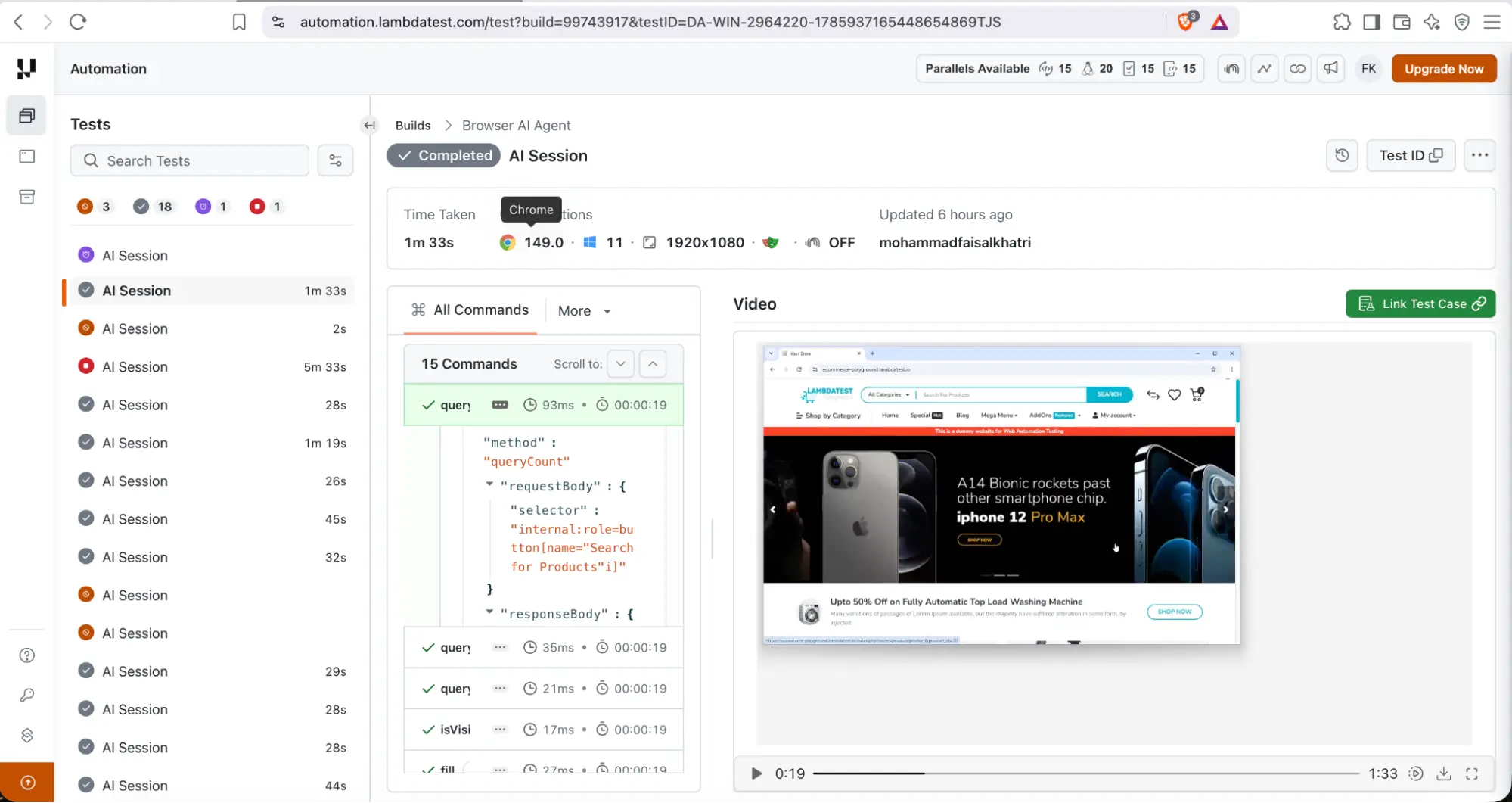
These artifacts make it much easier to understand how the AI agent executed each instruction, verify the results, and troubleshoot failures when they occur. Instead of relying solely on console logs, we can gain complete visibility into the browser session, making AI-powered automation more reliable, easier to debug, and more practical for real-world testing workflows.
What Infrastructure Do AI Browser Agents Need?
An AI agent does not interact with web applications on its own. It requires a browser environment where it can execute actions. This is where browser infrastructure platforms such as Browser Cloud by TestMu AI play an important role.
Browser Cloud provides managed, real browser sessions that AI agents can control programmatically. Rather than maintaining local browser instances or browser grids, teams can connect their existing automation frameworks or AI agents to cloud-hosted browser sessions.
Browser Cloud supports popular automation frameworks including Playwright, Puppeteer, and Selenium, allowing organizations to reuse their existing automation code while benefiting from scalable browser infrastructure.
In addition to browser execution, Browser Cloud offers capabilities designed for AI-driven workflows, including:
- Managed cloud browser sessions
- Session persistence for cookies, local storage, and authenticated state
- Built-in support for accessing localhost and private environments through a tunnel
- Session replay with video recordings, console logs, network logs, and step-by-step debugging
- Browser sessions that can be controlled through SDKs, an MCP server, or AI agent integrations such as Claude, Gemini, OpenAI Computer Use, and custom agents
Together, AI agents and cloud-based browser infrastructure make browser automation more intelligent and scalable. AI agents determine the actions to perform, while the browser infrastructure executes them, enabling faster, more reliable, and more efficient automation workflows.
What Are the Challenges and Limitations of AI Agents?
While AI agents are transforming browser automation, they are not a replacement for well-designed test automation strategies. Like any technology, they have limitations that teams should consider before adopting them at scale.
- Accuracy Depends on Prompt Quality: AI agents rely on clear and specific instructions. Ambiguous or incomplete prompts can lead to unexpected actions or inconsistent results. Well-defined objectives and expected outcomes generally produce more reliable automation.
- Dynamic Applications Can Still Be Challenging: Although AI agents are more adaptable than traditional scripts, highly dynamic user interfaces, complex custom components, or frequently changing application workflows can still impact execution reliability.
- Human Oversight Is Still Required: AI agents can automate browser interactions and validations, but critical business workflows and high-risk scenarios should still be reviewed by an expert. Keeping humans in the loop helps ensure accuracy, reliability, and alignment with business requirements.
- Performance and Execution Time: Planning and reasoning before performing browser actions can introduce additional execution time compared to deterministic automation scripts. For large regression suites, a hybrid approach that combines AI agents with traditional automation is often more practical.
- Security and Access Management: Automating workflows that involve authentication, multi-factor authentication (MFA), or sensitive business data requires careful handling of credentials, permissions, and secure browser sessions. Organizations should follow established security and compliance practices when using AI agents.
- Not Every Test Needs an AI Agent: AI agents are particularly effective for complex, exploratory, or end-to-end browser workflows. However, simple and repetitive test cases are often better suited to conventional automation frameworks, which remain faster and more predictable for deterministic scenarios.
Conclusion
AI browser agents are redefining browser automation by combining the reasoning capabilities of AI agents with the reliability of modern browser automation frameworks and cloud browser infrastructure. By enabling teams to automate complex workflows using natural language, they reduce the effort required to create and maintain automation while improving productivity.
As AI browser automation continues to evolve, more teams are using AI agents to simplify complex browser workflows and reduce the effort involved in building and maintaining automation. Platforms like Browser Cloud by TestMu AI provide the browser infrastructure that enables these agents to execute browser tasks reliably at scale.
AI agents are a valuable addition for end-to-end testing, repetitive browser tasks, and dynamic web applications. As the technology continues to evolve, AI browser agents are set to play an increasingly important role in the future of automation testing.
Giving an AI agent a browser? TestMu AI's Browser Cloud runs each task in a real, isolated Chrome session in the cloud, so the browser stays off your laptop.
Author

Faisal Khatri
Blogs: 37


Mohammad Faisal Khatri is a Software Testing Professional with 17+ years of experience in manual exploratory and automation testing. He currently works as a Senior Testing Specialist at Kafaat Business Solutions and has previously worked with Thoughtworks, HCL Technologies, and CrossAsyst Infotech. He is skilled in tools like Selenium WebDriver, Rest Assured, SuperTest, Playwright, WebDriverIO, Appium, Postman, Docker, Jenkins, GitHub Actions, TestNG, and MySQL. Faisal has led QA teams of 5+ members, managing delivery across onshore and offshore models. He holds a B.Com degree and is ISTQB Foundation Level certified. A passionate content creator, he has authored 100+ blogs on Medium, 40+ on TestMu AI, and built a community of 25K+ followers on LinkedIn. His GitHub repository “Awesome Learning” has earned 1K+ stars.
Reviewer

Mayank Bhola
Reviewer
Mayank Bhola is Co-Founder and Head of Products at TestMu AI, where he leads the entire product portfolio across KaneAI, Kane CLI, HyperExecute, SmartUI, the Real Device Cloud, Accessibility, and other software testing product lines. As an early Lead Architect he designed and built the company's flagship Tunnel technology from scratch, created the React-based automation platform, and architected the data-intensive pipelines and FAAS services that scale it. He brings more than 10 years of experience in software development and product engineering, with earlier roles as Head of Technology at Juggernaut Books and Senior Software Engineer at PressPlay TV and Zomato. Mayank holds a B.Tech in Computer Engineering from JIIT Noida.


FAQs
Did you find this page helpful?
More Related Blogs

TestMu AI forEnterprise
Get access to solutions built on Enterprise
grade security, privacy, & compliance
- Advanced access controls
- Advanced data retention rules
- Advanced Local Testing
- Premium Support options
- Early access to beta features
- Private Slack Channel
- Unlimited Manual Accessibility DevTools Tests