

Power Your Software Testing with AI Agents and Cloud
The Native AI-Agentic Cloud Platform to Supercharge Quality Engineering. Test Intelligently and Ship Faster.


- TestMu AI (Formerly LambdaTest)
- /
- Blog
- /
- 9 Best ADA Compliance Tools I Tested in October 2026
9 Best ADA Compliance Tools I Tested in October 2026
I seeded a city bill-pay page with 18 WCAG 2.1 AA bugs, the ADA Title II standard, and tested 9 ADA compliance tools on what they catch and what they miss.
Published on:
ADA compliance tools check your web pages and apps against WCAG and tell you which barriers to fix first, but a passing scan does not prove a person using a keyboard or a phone can pay a bill. The Department of Justice's ADA web accessibility guidance warns that a "clean" report does not necessarily mean everything is accessible.
To rank these tools, I built a city bill-pay page with 18 known WCAG 2.1 AA bugs, the standard ADA Title II sets, and ran a few of the tools against three versions of it. The ranking weighs what each tool catches, the evidence it leaves for a compliance record, and how it covers the bugs no scanner flags.
TL;DR
The best ADA compliance tools are TestMu AI, for WCAG 2.1 AA scans inside CI test suites across websites and native mobile apps, and axe DevTools, for fixing pages in the browser. Every scanner I ran passed a page that still failed reflow and focus checks, which TestMu AI's Guided Tests and Keyboard Scan are built to cover.
Best ADA Compliance Tools by Use Case
- Best for CI across web and mobile apps: TestMu AI - scans WCAG 2.1 AA inside Selenium, Playwright, Cypress, and Appium suites, and schedules recurring scans from a sitemap.
- Best for in-browser fixes: axe DevTools - its axe-core engine caught 11 of the 12 rule-detectable bugs on my test page in 98 ms.
- Best free checker for WCAG 2.1 rules: IBM Equal Access - the only scanner to flag the orientation lock, and it marks uncertain results as needing review.
- Best for compliance documentation: Level Access - pairs automated scanning and expert audits with VPAT and ACR documentation.
ADA Title II deadlines now fall on April 26, 2027 for governments serving 50,000 or more people and April 26, 2028 for smaller ones.
Our Review Standards
I compared each tool on WCAG 2.1 AA detection, the evidence it leaves for an ADA compliance record, coverage across websites, mobile apps, and documents, and support for the checks automation cannot make. I ran a few of the tools hands-on and assessed the rest on their documentation, and TestMu AI, our product, is held to the same criteria. For a wider list that includes general-purpose scanners, see these accessibility testing tools.
9 Best ADA Compliance Tools, Compared
| Tool | Best for | ADA evidence it produces | Price model |
|---|---|---|---|
| TestMu AI (Formerly LambdaTest) | CI and scheduled scans across web and mobile apps | WCAG reports per build with PDF and CSV export | Plans on the TestMu AI pricing page |
| axe DevTools | In-browser fixes | Saved and shared scan results | Free extension; paid tiers |
| IBM Equal Access | Free WCAG 2.1 rule coverage | Reports with violations and needs-review items | Free, open source |
| Level Access | Enterprise compliance programs | VPATs and ACRs, expert audits | Not listed on the homepage |
| Siteimprove Accessibility | Monitoring large sites and documents | Findings mapped to ADA Title II and WCAG 2 | Not listed on the product page |
| Pa11y | Free CI gate | Command-line reports and exit codes | Free, open source |
| Accessibility Insights for Web | Guided WCAG 2.1 AA assessment | Assessment results per requirement | Free, open source |
| Pope Tech | Universities and Canvas courses | Dashboards and custom reports | Free plan; paid tiers |
| WAVE | Content editors checking one page | In-page error and alert icons | Browser extensions; subscription API |
1. TestMu AI (Formerly LambdaTest)
TestMu AI Accessibility Testing runs axe-core scans inside the Selenium, Playwright, Cypress, and Appium suites you already run on its cloud. Each issue is reported with its WCAG success criterion, a Critical to Minor severity, the failing element, and fix guidance, against WCAG 2.0, 2.1, or 2.2 at the level you choose.
Key features
- Scan hook in existing tests - call
lambda-accessibility-scanafter each page state, or turn on autoscan in Selenium to scan every navigation. - Scheduled monitoring - accessibility test scheduling scans URLs from a sitemap, CSV file, or crawler daily, weekly, or monthly, so new pages get checked without new test code.
- Native mobile apps - the App Scanner and the Appium hook scan Android and iOS apps on real devices, and the Title II rule covers mobile apps.
- Exportable evidence - reports export as PDF or CSV, an input to the VPAT or ACR your team writes.
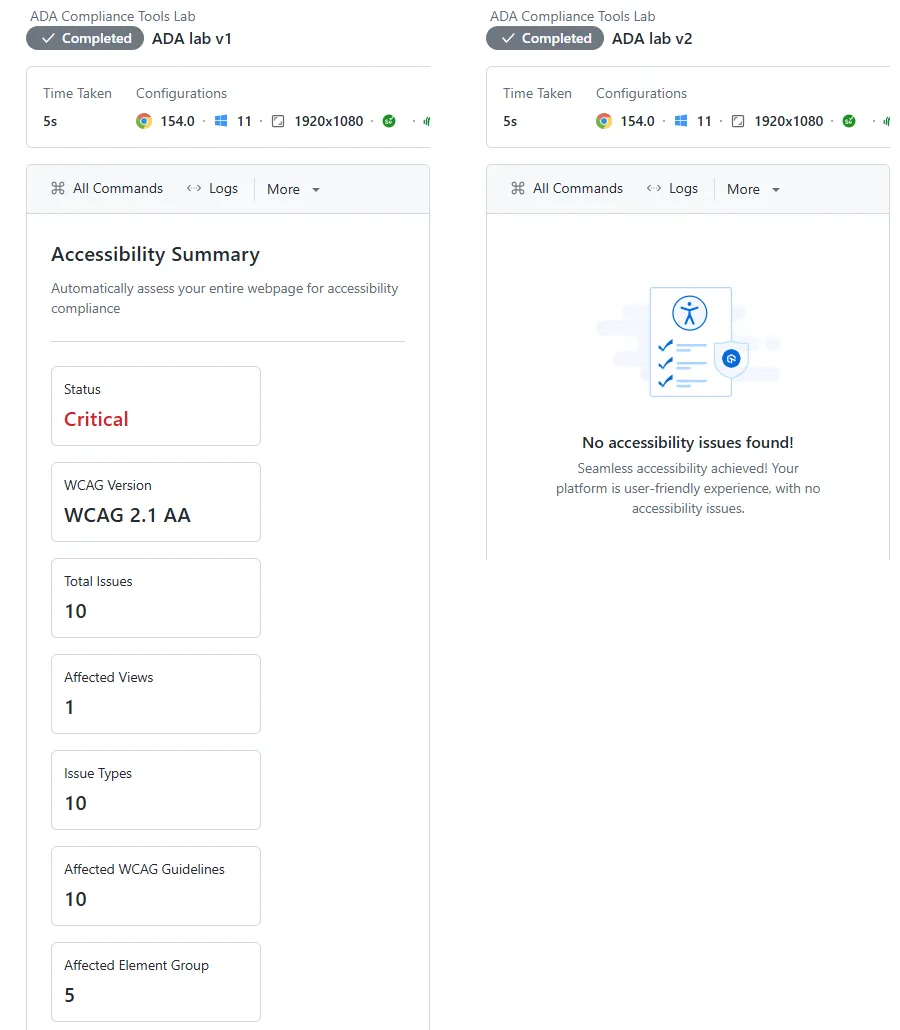
Lab result: scanning my test page on Chrome 154 and Windows 11 through a TestMu AI tunnel, it reported 10 issues on the broken version (3 Critical, 6 Serious, 1 Moderate) and confirmed the fixed version clean, at about 5 seconds per session.
Pros
- One setup covers CI runs, scheduled site scans, and native apps, with a shareable report link for every session.
- Guided Tests and the Keyboard Scan target the focus and keyboard barriers that every scanner in my test passed.
Good to know: Playwright scans on the grid need real Chrome rather than Playwright's bundled Chromium, so set browserName to Chrome in your capabilities.
Pricing: plans are listed on the TestMu AI pricing page.
2. axe DevTools
axe DevTools is Deque's browser extension built on axe-core, the open-source rules engine that TestMu AI's scanner also runs. Deque states a commitment to zero false positives.
Key features
- Free extension - axe-core scans in the browser, with results you can save and share.
- Intelligent Guided Tests - guided checks for issues automation alone misses, in the paid tiers and a 14-day free trial.
- Linter and mobile - axe DevTools Linter checks static code, and axe DevTools for Mobile tests apps in your pipeline.
Lab result: I ran axe-core 4.14.0, the current engine behind the extension, rather than the extension interface. It flagged 11 of the 12 rule-detectable bugs in 98 ms, including the label-in-name mismatch on the Pay now button, and missed the orientation lock.
Pros
- Tied for the highest detection in my test, with every hit reported as a definite violation.
- The free tier is enough to start fixing a page today.
Cons
- Guided tests sit in the paid tiers.
- The extension checks the page in front of you, so site-wide monitoring needs another tool.
Pricing: free extension; paid tiers are priced on Deque's site.
3. IBM Equal Access Accessibility Checker
IBM's open-source toolkit includes browser extensions for Chrome, Firefox, and Edge plus the accessibility-checker package for Node tests. It checks against IBM's accessibility requirements and WCAG 2.1 and 2.2, and it separates definite violations from items that need human review.
Key features
- Test-framework package - accessibility-checker runs inside Selenium, Puppeteer, and Playwright tests, and a separate wrapper covers Cypress.
- Needs-review results - uncertain findings are reported as potential violations instead of being dropped.
Lab result: accessibility-checker 4.0.34 flagged 10 of the 12 rule-detectable bugs as violations and the session-timeout refresh as a potential violation. It was the only scanner to catch the orientation lock (1.3.4), and it missed the viewport tag that blocks zoom.
Pros
- The widest coverage of the WCAG 2.1 additions in my test.
- Free under the Apache 2.0 license, in the browser and in CI.
Cons
- It listed potential focus-visible problems on every version, including the one where each control had a 3px outline, so its review items need human triage.
- No scheduled monitoring or mobile app scanning.
Pricing: free and open source.
4. Level Access
Level Access groups its platform into Audit and Test (automated scanning and manual evaluation), Build and Fix (remediation and developer tools), and Governance and Reporting (monitoring, documentation, and program management). It suits organizations that need procurement-ready compliance documents alongside the testing.
Key features
- VPATs and ACRs - product accessibility documentation, plus manual testing and audits by experts.
- Level CI and Mobile Testing - accessibility testing in CI/CD pipelines and native iOS and Android testing.
- LevelDocs - generates accessible PDFs from Microsoft Office files.
Evidence: not lab-tested; scored on Level Access's website, checked in October 2026.
Pros
- Testing, audits, and conformance documents come from one vendor.
- Training through Level Access Academy for teams new to WCAG.
Cons
- Built for enterprise programs rather than one developer fixing one page.
- I could not verify rule-level detection without an account.
Pricing: not listed on the homepage.
5. Siteimprove Accessibility
Siteimprove Accessibility monitors public sites, authenticated pages, PDFs, documents, and apps, and maps findings to WCAG 2, ADA Title II, Section 508, and the European Accessibility Act. Its agents rank issues by the risk they carry.
Key features
- Monitoring behind logins - scans internal and authenticated pages, including content behind VPNs.
- Developer workflow - works in VS Code, Claude Code, Figma, and CI/CD.
- Expert services - 10+ specialists holding CPWA, CPACC, or WAS certifications run manual audits and write VPATs.
Evidence: not lab-tested; scored on Siteimprove's product page, checked in October 2026.
Pros
- Findings are mapped to ADA Title II, which helps a government team report against the rule.
- Documents and logged-in pages sit in the same program as the public site.
Cons
- Sized for organization-wide rollouts.
- I could not verify rule-level detection without an account.
Pricing: not listed on the product page.
6. Pa11y
Pa11y is an open-source command-line checker that runs HTML_CodeSniffer by default and can also run axe-core. Pa11y CI runs it across a list of URLs in your pipeline and fails the build when reported issues reach the threshold you set.
Key features
- Build gating - Pa11y CI exits with code 2 when issues reach the threshold, which defaults to 0.
- Errors by default - warnings and notices are reported only when you turn on
includeWarningsandincludeNotices.
Lab result: Pa11y 10.0.0 covered 10 of the 12 rule-detectable bugs in 1.3 seconds, but only 7 as errors. The autocomplete, label-in-name, and zoom-blocking viewport bugs came back as warnings, which a default Pa11y CI gate does not report.
Pros
- A real build gate at no cost.
- It also caught an in-page link pointing at an id that did not exist.
Cons
- Turn on warnings to see WCAG 2.1 issues, then expect noise you must triage.
- Web pages only.
Pricing: free and open source under LGPL-3.0.
7. Accessibility Insights for Web
Accessibility Insights for Web is Microsoft's open-source extension for Chrome and the new Microsoft Edge. Its Assessment mode walks you through WCAG 2.1 Level AA, the same standard the Title II rule names.
Key features
- FastPass - automated checks for about 50 requirements plus a tab stops view, in under five minutes.
- Assessment - about 20 manual tests with step-by-step instructions and fix guidance.
Evidence: not lab-tested; scored on Microsoft's documentation. Its tab stops view is built to expose the missing focus outlines my test page kept after every scanner passed it.
Pros
- Free guided manual testing mapped to WCAG 2.1 AA.
- Each manual test explains how to fix what it finds.
Cons
- An assessment takes manual effort on every page.
- No build gate or scheduled scans.
Pricing: free and open source.
8. Pope Tech
Pope Tech scans websites and Canvas course content with WebAIM's WAVE engine and adds dashboards, manual-test tracking, and training. Its focus on higher education fits public universities, which fall under Title II.
Key features
- Free plan - 1 website, up to 25 pages, 2 users, and unlimited rescanning.
- Manual testing - scheduling and tracking for the checks a scan cannot make.
- Canvas integration - checks course content inside the Canvas LMS.
Evidence: not lab-tested; scored on Pope Tech's website and pricing page.
Pros
- Site-wide WAVE results without running the extension page by page.
- Course content gets the same checks as the public site.
Cons
- The free plan covers a small site only.
- No native mobile app scanning listed.
Pricing: free plan; paid tiers are listed on Pope Tech's pricing page.
9. WAVE
WAVE is WebAIM's evaluation tool, available as Chrome, Firefox, and Edge extensions that place icons for errors, alerts, and structure on the page itself. The extension runs entirely in your browser, so no page data is sent to the WAVE server.
Key features
- Private pages - checks intranet, password-protected, and dynamically generated pages.
- Visual results - shows each problem where it sits in the layout.
Evidence: not lab-tested; scored on WebAIM's WAVE extension documentation.
Pros
- Readable for content editors without a developer nearby.
- Safe for sensitive pages because the scan stays in the browser.
Cons
- One page at a time.
- Pipeline use needs the subscription API.
Pricing: the extensions install from the browser stores; the API is a subscription service.
What Does ADA Compliance Require for Websites?
For state and local governments, the requirement is now specific. The DOJ's Title II web and mobile app rule makes WCAG 2.1 Level AA the technical standard for web content and mobile apps, with these compliance dates:
| Public entity | Standard | Compliance date |
|---|---|---|
| Population of 50,000 or more | WCAG 2.1 Level AA | April 26, 2027 |
| Population under 50,000 | WCAG 2.1 Level AA | April 26, 2028 |
| Special district governments | WCAG 2.1 Level AA | April 26, 2028 |
Those dates reflect an Interim Final Rule the DOJ published on April 20, 2026. The rule also lists exceptions, including archived web content, preexisting conventional electronic documents, and content posted by third parties.
Businesses open to the public fall under Title III, where the DOJ has no regulation setting detailed standards. Its web guidance points to WCAG and the Section 508 Standards as helpful guidance and gives businesses flexibility in how they comply. Federal agencies follow Section 508, covered in this list of Section 508 compliance testing tools.
WCAG 2.1 added criteria for users with cognitive or learning disabilities, users with low vision, and users with disabilities on mobile devices. Eight of my 18 seeded bugs target those additions, because a tool tuned only for WCAG 2.0 misses the standard Title II now names. For how Level A and AA differ, see this guide to WCAG conformance levels.

Note: TestMu AI scans against WCAG 2.1 AA, the Title II standard, inside the Selenium, Playwright, and Cypress suites you already run, and schedules recurring scans from your sitemap. Try TestMu AI free.
How I Tested the Tools
I built a test web page styled as a city utility's "Pay Your Water Bill" form, with 18 known WCAG 2.1 AA bugs: 12 that rule engines can detect and 6 that need a person to judge. I made v2 by fixing every issue any scanner reported as an error or violation, and v3 by also fixing the judgment bugs.
| Seeded bug | WCAG criterion | Category |
|---|---|---|
| Page has no lang attribute | 3.1.1 | Rule-detectable |
| Page has no title | 2.4.2 | Rule-detectable |
| City seal image has no alt text | 1.1.1 | Rule-detectable |
| Account number field has no label | 1.3.1, 4.1.2 | Rule-detectable |
| Help text at 2.43:1 contrast | 1.4.3 | Rule-detectable |
| Viewport tag blocks zoom | 1.4.4 | Rule-detectable |
| Invalid autocomplete value on the email field | 1.3.5 (new in 2.1) | Rule-detectable |
| Session timeout refresh after 5 minutes | 2.2.1 | Rule-detectable |
| "Pay now" button named "Submit form" | 2.5.3 (new in 2.1) | Rule-detectable |
| Inline !important letter and line spacing | 1.4.12 (new in 2.1) | Rule-detectable |
| Account icon link has no text | 2.4.4, 4.1.2 | Rule-detectable |
| Layout rotates in portrait orientation | 1.3.4 (new in 2.1) | Rule-detectable |
| Input borders at 1.41:1 contrast | 1.4.11 (new in 2.1) | Needs human judgment |
| Invalid field shown only by a red border | 3.3.1 | Needs human judgment |
| "Payment scheduled" message has no status role | 4.1.3 (new in 2.1) | Needs human judgment |
| Fixed 1100px layout scrolls sideways on a phone | 1.4.10 (new in 2.1) | Needs human judgment |
| Focus outline removed from every control | 2.4.7 | Needs human judgment |
| Fee tooltip appears on hover only | 1.4.13 (new in 2.1) | Needs human judgment |
Every tool I ran used Chrome 154. axe-core 4.14.0, Pa11y 10.0.0 with its default HTML_CodeSniffer runner, and IBM accessibility-checker 4.0.34 ran locally, while TestMu AI ran Selenium on its cloud grid (Windows 11, WCAG 2.1 AA) and reached my local server through a tunnel. To run the same scan on your own pages, use this setup and swap in your URL:
const { Builder } = require('selenium-webdriver');

const capabilities = {
  browserName: 'Chrome',
  browserVersion: 'latest',
  'LT:Options': {
    platformName: 'Windows 11',
    build: 'ADA Compliance Scan',
    name: 'WCAG 2.1 AA scan',
    user: process.env.LT_USERNAME,
    accessKey: process.env.LT_ACCESS_KEY,
    // With selenium-webdriver 4.x, keep the accessibility capabilities inside LT:Options
    accessibility: true,
    'accessibility.wcagVersion': 'wcag21aa',
    'accessibility.bestPractice': false,
    'accessibility.needsReview': true,
  },
};

(async () => {
  const hub = 'https://' + process.env.LT_USERNAME + ':' + process.env.LT_ACCESS_KEY + '@hub.lambdatest.com/wd/hub';
  const driver = await new Builder().usingServer(hub).withCapabilities(capabilities).build();
  try {
    await driver.get('https://www.testmuai.com/selenium-playground/input-form-demo/');
    const result = await driver.executeScript('lambda-accessibility-scan');
    console.log(result); // "Lambda accessibility scan completed"
  } finally {
    await driver.quit();
  }
})();
For the six judgment bugs, I drove each version with Playwright: a 320px-wide viewport for reflow, a Tab walk that logged every focus outline, an empty submit for error messages, and a valid submit for the status message.
Test Results
The scanners agreed on the WCAG 2.0 basics and split on the criteria WCAG 2.1 added:
| Seeded bug | axe-core 4.14.0 | TestMu AI | IBM Equal Access | Pa11y |
|---|---|---|---|---|
| No lang, no title, image alt, field label, contrast, empty link | 6 of 6 | 6 of 6 | 6 of 6 | 6 of 6 |
| Session timeout refresh (2.2.1) | Yes | Yes | Needs review | Yes |
| Viewport blocks zoom (1.4.4) | Yes | Yes | No | Warning |
| Invalid autocomplete (1.3.5) | Yes | Yes | Yes | Warning |
| Inline text spacing (1.4.12) | Yes | Yes | Yes | No |
| Label in name (2.5.3) | Yes | No | Yes | Warning |
| Orientation lock (1.3.4) | No | No | Yes | No |
| Rule-detectable bugs flagged | 11 of 12 | 10 of 12 | 11 of 12 | 10 of 12 |
| Judgment bugs flagged | 0 of 6 | 0 of 6 | Focus as needs review | 0 of 6 |
TestMu AI's report shows it ran axe-core 4.12.0, and running that version locally returned the same 10 rules with the same 3 Critical, 6 Serious, 1 Moderate split; label-in-name checks arrive with the newer engine. All four tools returned zero violations on v2, apart from IBM's standing focus warnings.
The Playwright walk showed what the clean v2 reports missed:
v2:
  1.4.10 reflow at 320px: scrollWidth=1148px FAIL (horizontal scroll)
  1.4.11 input border rgb(217, 217, 217) vs white = 1.41:1 FAIL
  2.4.7 focus: a#home=NONE, a#icon-link=NONE, input#acct=NONE, input#email=NONE, input#amount=NONE, span#tip=NONE, button=NONE
  1.4.13 tooltip shown on keyboard focus: false
  3.3.1 error after empty submit: aria-invalid=null text=null
  4.1.3 status message: "Payment scheduled. Confirmation 48213." role=null aria-live=null

v3:
  1.4.10 reflow at 320px: scrollWidth=320px pass
  1.4.11 input border rgb(118, 118, 118) vs white = 4.54:1 pass
  2.4.7 focus: a#home=solid 3px, a#icon-link=solid 3px, input#acct=solid 3px, input#email=solid 3px, input#amount=solid 3px, span#tip=solid 3px, button=solid 3px
  1.4.13 tooltip shown on keyboard focus: true
  3.3.1 error after empty submit: aria-invalid=true text="Enter your 10-digit account number."
  4.1.3 status message: "Payment scheduled. Confirmation 48213." role=status aria-live=null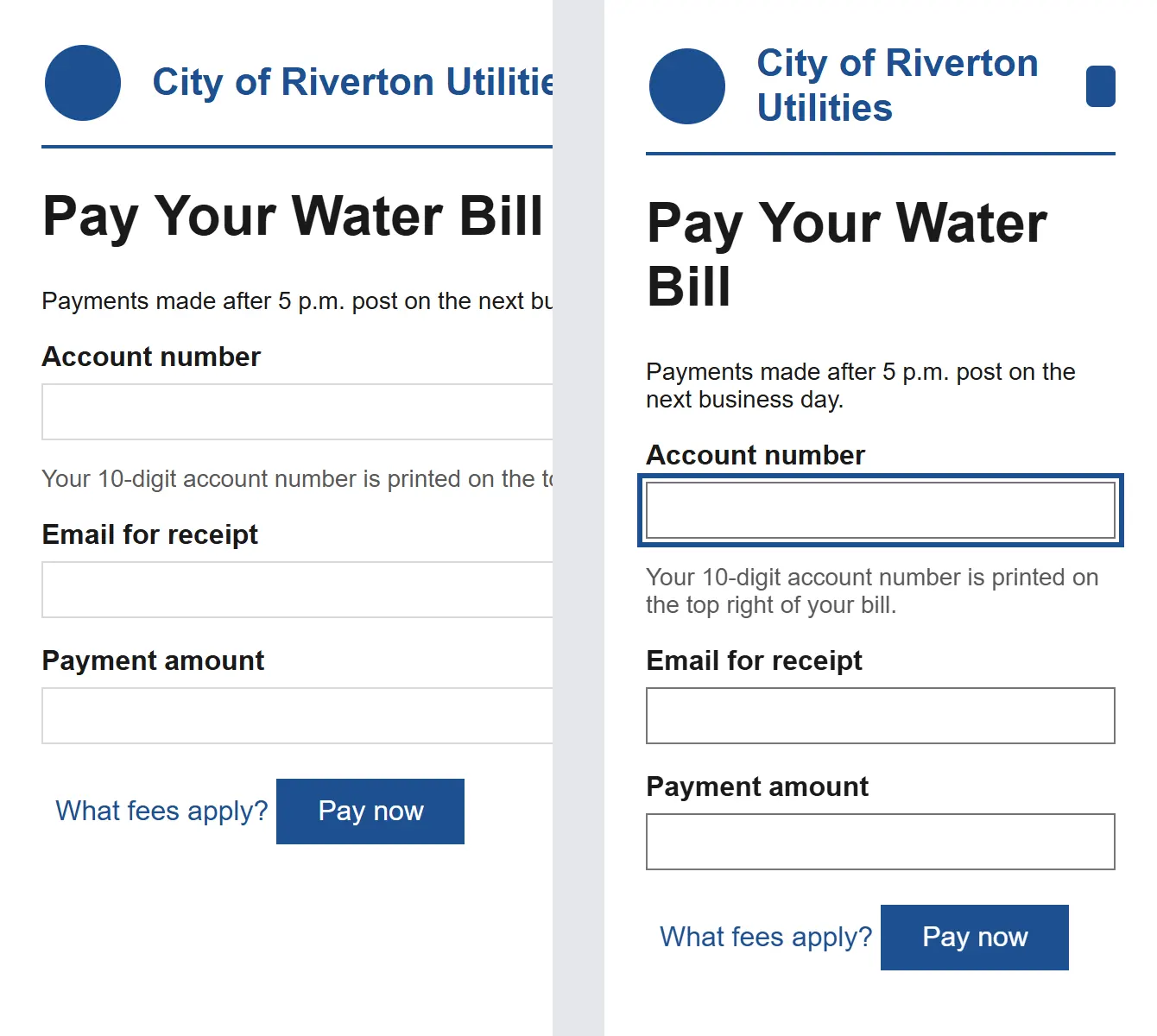
On v2, a phone user scrolled sideways to read the form, keyboard users saw no focus at all, and an empty submit gave screen reader users no error. Fixing all six took a max-width layout, 4.54:1 borders, a focus-visible outline, a text error with aria-invalid, a status role, and a tooltip that also opens on focus.
TestMu AI ranks first because the Title II rule covers web content and mobile apps, and it scans both from the same CI runs and schedules. For in-browser fixes on web pages, axe DevTools caught the most rule-detectable bugs.

How to Choose an ADA Compliance Tool
Pick by who owns the fixes and what you must prove:
- Government web and app teams - test against WCAG 2.1 AA and include native apps; TestMu AI's app accessibility testing runs on real Android and iOS devices.
- Developers fixing pages - pair the free axe DevTools extension with IBM Equal Access, since each caught a bug the other missed.
- Free pipeline gate - Pa11y CI with warnings turned on, or IBM's accessibility-checker in your existing tests.
- Procurement and legal documentation - Level Access or Siteimprove, both of which offer VPAT services and expert audits.
- Universities on Canvas - Pope Tech.
- Content editors - WAVE in the browser, or a one-page check with the free WCAG accessibility checker.
Whichever tool you pick, run the loop that caught my v2 page:
- Set WCAG 2.1 AA as the scan target and scan every page template in CI, as covered in this guide to accessibility testing in CI/CD.
- Load each template at 320px wide and confirm nothing scrolls sideways.
- Tab through every control and confirm each one shows a visible focus indicator; the Keyboard Scan in Accessibility DevTools assists with this check.
- Submit every form empty and with valid data, and confirm the errors and confirmations are announced, following this guide to screen reader testing.
- Keep each dated report as evidence, and fix what the scans find with the steps in this roundup of accessibility remediation tools.
Conclusion
Start this week by adding one of these ADA compliance tools to the CI job for your highest-traffic form, then load that page at 320px and tab through it yourself. If your suites already run on TestMu AI, enable the WCAG 2.1 AA scan with the accessibility automation docs, and use this WCAG testing guide for the manual checks.
To build the manual side of the skill, take the Accessibility Testing 101 certification.
Note: This article was researched and drafted with AI assistance, then reviewed, fact-checked, and published by Rahul Mishra, Lead Member of Technical Staff at TestMu AI, whose listed expertise includes Accessibility Testing and ADA Compliance. Every statistic, link, and product claim was verified against primary sources, including ADA.gov and the W3C. Read our editorial process and AI use policy for details.
Author

Rahul Mishra
Blogs: 17

Rahul Mishra is a Lead Member of Technical Staff at TestMu AI (formerly LambdaTest), leading frontend engineering and accessibility testing across the quality engineering platform. He mentors frontend engineers, runs code reviews and sprint planning, optimizes React.js rendering performance, and makes product features accessible to users with disabilities through WCAG and ADA-compliant accessibility audits. He brings 10+ years of experience across React.js, VueJS, TypeScript, Swift, Objective-C, and AWS, with earlier work as a Technical Lead at VectoScalar Technologies. Rahul holds a B.E. in Information Technology.
Reviewer

Shubham Soni
Reviewer
Shubham Soni is a Senior Member of Technical Staff at TestMu AI (formerly LambdaTest), building the Real Device Cloud and real-time testing infrastructure. He optimized the WebRTC services that power live testing to sub-100ms latency with adaptive bitrate streaming, led a frontend migration from Angular to React that cut page load time from 5-6 seconds to 1-1.5 seconds, and contributes to the official Device SDK. He led a team of four to build an accessibility testing product covering manual and automated testing and mentored a team of six on a real-time testing product. He brings over eight years of experience and earlier scaled a cloud code platform to 200K+ monthly users. Shubham holds a B.Tech in Computer Science.


ADA Compliance Tools FAQs
Did you find this page helpful?
More Related Blogs
TestMu AI forEnterprise
Get access to solutions built on Enterprise
grade security, privacy, & compliance
- Advanced access controls
- Advanced data retention rules
- Advanced Local Testing
- Premium Support options
- Early access to beta features
- Private Slack Channel
- Unlimited Manual Accessibility DevTools Tests