

Next-Gen App & Browser Testing Cloud
Trusted by 2 Mn+ QAs & Devs to accelerate their release cycles


How to emulate different Android versions and devices?
To emulate different Android versions and devices, create a separate Android Virtual Device (AVD) in Android Studio for each API level and hardware profile you need, or use a standalone emulator like Genymotion or MEmu. For fast, scalable coverage without local setup, a cloud-based Android emulator or real device cloud lets you launch any Android version and model on demand.
Android is highly fragmented: thousands of device models run dozens of OS versions, screen sizes, and chipsets. Emulation lets you reproduce that variety on a single machine so you can catch layout, compatibility, and behavior issues before real users do.
What Does It Mean to Emulate an Android Version or Device?
An Android emulator is software that reproduces both the hardware and the operating system of a physical Android device on your computer or in the cloud. Because it runs the real Android OS and app binaries, an emulator behaves much closer to an actual phone than a simulator, which only mimics software behavior. Emulating a specific version means loading the system image for a chosen API level (for example, API 34 for Android 14), while emulating a specific device means matching that device's screen resolution, density, and hardware profile.
This distinction matters when you plan mobile app testing. A single device model can behave differently across OS versions, and a single OS version renders differently across screen densities, so you usually need to vary both dimensions.
Method 1: Android Studio AVD Manager
The Android Emulator ships with Android Studio and is the most common way to emulate versions and devices locally. You create an Android Virtual Device (AVD), choose a hardware profile, and pick a system image for the Android version you want. You can keep multiple AVDs, one per API level, and launch whichever you need.
You can manage everything from the AVD Manager UI, or use the command line for repeatable setups:
# List available system images (API levels)
sdkmanager --list | grep "system-images"

# Install a system image for Android 13 (API 33)
sdkmanager "system-images;android-33;google_apis;x86_64"

# Create an AVD named Pixel_7_API_33
avdmanager create avd -n Pixel_7_API_33 \
  -k "system-images;android-33;google_apis;x86_64" \
  --device "pixel_7"

# Launch the emulator
emulator -avd Pixel_7_API_33

# Confirm the connected device and its Android version
adb shell getprop ro.build.version.release
Repeat the create step with different API levels and device profiles to build a small local matrix. This method is free and integrates tightly with debugging, but each system image is large and multiple emulators are heavy on RAM and CPU.
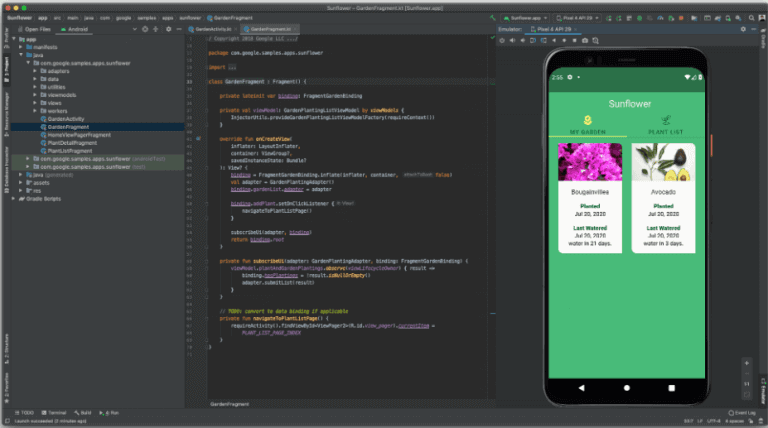
Here is an example of an Android Emulator running on Android Studio.
Method 2: Standalone Emulators (Genymotion, MEmu, Android-x86)
Several third-party tools emulate Android outside of the Android Studio pipeline:
- Genymotion: A developer-focused emulator that runs on the desktop or in the cloud. It offers a wide catalog of virtual devices and Android versions and is popular for functional testing and QA automation.
- MEmu: A lightweight emulator that runs well on Intel and AMD processors and supports multiple simultaneous instances, useful for running several app or game sessions at once.
- Android-x86: An open-source port of Android that you install as an ISO inside VirtualBox, VMware, or QEMU/KVM. It is handy for booting older releases in a virtual machine.
These tools give you more device variety than the stock emulator, but you still maintain each one locally and provisioning legacy versions can be fiddly.
Method 3: Cloud-Based Android Emulators
Maintaining in-house emulators is cumbersome once you need many versions in parallel. A cloud-based Android emulator online runs a real Android version in your browser, so you can emulate versions and devices without any local install. Platforms like TestMu AI offer Android emulators on an online browser farm of 3000+ browsers and OSes, removing the pain of setting up local system images.
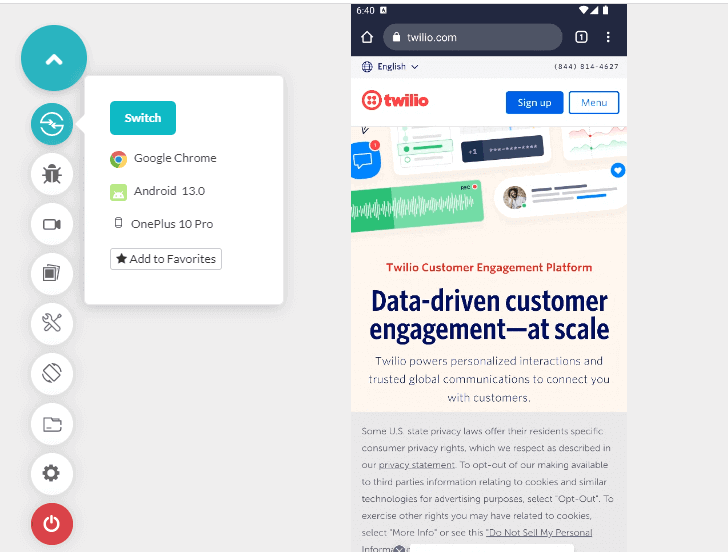
Shown below is an emulation of an Android device - the OnePlus 10 Pro running Android 13 on the TestMu AI platform.
Cloud emulators are best for early functional, UI, and regression coverage across many version and device combinations, and they scale far more easily than local hardware.
Emulators vs. Real Devices: When Emulation Is Not Enough
Emulation is fast and cheap, but it has limits. Because emulators render in software, they do not reflect real CPU, GPU, memory, or battery behavior, and they cannot reproduce hardware sensors, camera quality, or true network conditions faithfully. Use each approach where it fits:
- Emulators: early development, layout checks, functional and regression tests across many versions.
- Real devices: performance benchmarks, battery and thermal behavior, camera, biometrics, and final release sign-off.
A real device cloud bridges the two, letting you start on emulators and finish on genuine hardware without buying a device lab. You can also reduce operational costs while keeping data behind your firewall using a private real device cloud, selecting from a wide range of iOS and Android devices set up to your specifications.
Common Mistakes and Troubleshooting
- Missing system image: The AVD will not start if you have not downloaded the system image for that API level. Install it via the SDK Manager first.
- No hardware acceleration: Without Intel HAXM, AEHD, or the WHPX/KVM hypervisor enabled, the emulator boots extremely slowly. Confirm virtualization is enabled in the BIOS.
- Testing one version only: Passing on Android 14 does not guarantee Android 9. Always cover the oldest supported API level in your matrix.
- Trusting emulator performance: Never quote frame rates or battery drain from an emulator. Validate those metrics on real devices.
- Wrong ABI: An x86_64 image runs faster on most desktops than an ARM image, but some apps with native ARM libraries need an ARM system image to run correctly.
Testing Across Real Browsers and Devices at Scale
Building and maintaining a local matrix of every Android version and model quickly becomes impractical. Cloud platforms such as TestMu AI let you run tests across 3000+ real browsers, devices, and OS combinations, including both emulators and genuine Android hardware. You can validate a web app or native APK across many Android versions in parallel, cutting turnaround time while keeping coverage broad. Pairing emulators for quick checks with real device testing for final validation gives you the fastest path to confident releases.
Conclusion
Emulating different Android versions and devices comes down to three practical options: the Android Studio AVD Manager for tight local control, standalone tools like Genymotion or MEmu for extra device variety, and cloud emulators for scale without setup. Emulation covers most functional and UI work, but real devices remain essential for performance and release sign-off. A blended strategy, backed by a real device cloud, gives you both speed and accuracy.
Frequently Asked Questions
Can you emulate different Android versions on one machine?
Yes. In Android Studio you create a separate Android Virtual Device for each API level and hardware profile you want. Each AVD stores its own system image, so you can keep Android 10, 13, and 15 side by side and launch whichever version you need to test.
What is the difference between an Android emulator and a simulator?
An emulator reproduces both the hardware and the operating system of an Android device, so it runs the real OS and app binaries. A simulator only mimics the software behavior and environment. For Android, emulation gives more accurate results than simulation.
Are Android emulators good enough for release testing?
Emulators are ideal for early functional, UI, and regression checks. They are not reliable for performance, battery, camera, or network-condition numbers because software rendering does not reflect real CPU, GPU, or memory behavior. Run final release validation on real devices.
How do I test my app on an older Android version?
Open the AVD Manager, download the system image for the older API level (for example API 26 for Android 8), and create a virtual device using it. Tools like Genymotion and cloud device clouds also let you spin up legacy Android versions on demand.
Do I need Android Studio to emulate Android devices?
Not always. Android Studio ships a built-in emulator, but cloud-based Android emulators run a real Android version in your browser with no local install. Genymotion and MEmu are standalone options that do not require the full Android Studio IDE.
What is the best way to test across many Android versions quickly?
A cloud device cloud is fastest. Instead of building and maintaining dozens of local AVDs, you select any Android version and device model from a hosted grid and run your test in seconds, in parallel, without provisioning hardware.
Related Questions
- How to run iOS app on Android?
- How to configure simulators settings?
- How to check the iOS version?
- Best platforms for testing mobile applications on real 5G networks?
- How can real device testing help identify performance issues in low bandwidth environments?
- Why can’t Selenium handle different operating systems or browser versions?

KaneAI - Testing Assistant
World’s first AI-Native E2E testing agent.

TestMu AI forEnterprise
Get access to solutions built on Enterprise
grade security, privacy, & compliance
- Advanced access controls
- Advanced data retention rules
- Advanced Local Testing
- Premium Support options
- Early access to beta features
- Private Slack Channel
- Unlimited Manual Accessibility DevTools Tests