

Power Your Software Testing with AI Agents and Cloud
The Native AI-Agentic Cloud Platform to Supercharge Quality Engineering. Test Intelligently and Ship Faster.


- TestMu AI (Formerly LambdaTest)
- /
- Learning Hub
- /
- Version Control: A Beginners Guide With Best Practices
Version Control: A Beginners Guide With Best Practices
Learn the importance of version control, popular tools, and best practices to simplify collaboration and enhance software development workflows.
Last Updated on:
Managing changes in files and code is crucial, especially when multiple developers work on the same project. Without an organized system, teams overwrite each other's work, lose important updates, or lose the ability to answer a basic question: who changed this, and why?
Version control, also called source control or revision control, solves this by recording every change to a file over time. It keeps a full history, flags conflicts between competing edits, and restores previous versions on demand. Among professional developers, working without it is now the rare exception.
TL;DR
- Version control records every change to a codebase, so any earlier state can be restored and every edit is attributed.
- Git is distributed: each clone holds the full history, so commits and branches work without a server.
- Subversion is centralized, keeping history on one server, which suits teams needing strict access control.
- A branch isolates work in progress, and merging it back produces a conflict only where the same lines changed.
- Version control system, source control and revision control all name the same thing.
- Repository, commit, branch, merge, conflict, clone, push and pull are the eight terms that cover daily use.
What Is Version Control?
The official Git documentation defines it in a single line: version control is a system that records changes to a file or set of files over time so that you can recall specific versions later.
You will also see the practice called source control or revision control, and the tool itself called a version control system (VCS). Treat these as interchangeable names for the same idea. No meaningful distinction rides on which one a team happens to use.
A VCS lets multiple developers work on the same codebase at once without overwriting each other's work. Every change is stored in a repository along with the author, timestamp, and a message explaining its purpose, which is what turns a folder of files into an auditable history you can search, compare, and reverse.
That history is the point. When a bug reaches production, version control answers three questions a backup cannot: what changed, who changed it, and what the code looked like before.
Key Features of Version Control
Below are the key features of version control:
- Commit History: Logs who made changes and when, enabling progress tracking and reversion to previous states if needed.
- Branching and Merging: Allows independent development of features or bug fixes, then merges them back into the main codebase after completion.
- Collaboration: Enables multiple developers to work simultaneously without overwriting each other's work.
- Access Control: Restricts project access and actions to authorized users, maintaining security and deployment integrity.
- Conflict Resolution: Detects and flags competing code changes, requiring manual resolution rather than silently discarding one side.
- Backup and Recovery: Stores all project versions, allowing recovery to a stable version in case of errors or data loss.
- Code Review and Documentation: Supports code review and keeps commit history as a running record of why the code looks the way it does.

Note: Trigger a full cross-browser test run on every commit and catch regressions before they merge. TestMu AI runs your suite across 3,000+ browser and OS combinations. Try TestMu AI free!
Common Version Control Terminology
The concept is simple enough, but version control comes wrapped in its own vocabulary, and most of the confusion beginners hit is vocabulary confusion rather than concept confusion. Learning these terms now makes the rest of this guide easier to follow, and they carry across Git, Subversion, and Mercurial even though the exact commands differ.
| Term | What It Means |
|---|---|
| Repository (repo) | The data structure that stores your files plus the complete history of every change made to them. The project and its memory in one place. |
| Commit | A set of changes saved to the repository as one unit, packaged with an author, a timestamp, and a message. As a verb, the act of saving them. |
| Branch | An independent line of development split off at a point in time. Work on a branch does not affect the main branch until it is merged. |
| Merge | Applying the changes from one branch onto another, combining two lines of development back into one. |
| Conflict | What happens when two changes touch the same lines and the system cannot decide which wins. It stops and asks a human to resolve it. |
| Clone | Creating a full local copy of a remote repository, including its history. How you start work on an existing project. |
| Push | Uploading your local commits to a remote repository so the rest of the team can see them. |
| Pull | Fetching changes from the remote repository and merging them into your local copy. The opposite direction of a push. |
| Pull request / merge request | A proposal to merge one branch into another, opened for review before it lands. Called a pull request on GitHub and Bitbucket, a merge request on GitLab. Same idea. |
| Checkout | Switching your working copy to a different branch or to a specific past commit. |
| Tag | A permanent label on a specific commit, normally used to mark a release such as v2.1.0. |
| Blame | A view showing which commit and author last modified each line of a file. Less accusatory than it sounds, and the fastest way to find context. |
These are easier to see than to read about. Below is real output from a small demo repository with two commits on a feature branch. The graph lists both commits, and the last block shows the author, date, message, and exactly which lines changed:
$ git log --oneline --graph --all
* 723452b Add MFA flag to login
* b25822e Add login helper

$ git branch
* feature/user-login
  main

$ git log -1 --stat
commit 723452b
Author: Zikra Mohammadi
Date:   2026-07-11 11:30:00 +0530

    Add MFA flag to login

 login.py | 2 +-
 1 file changed, 1 insertion(+), 1 deletion(-)
Three things worth noting. The short strings 723452b and b25822e are commit hashes, the unique IDs used to reference or revert a specific change. The asterisk in the branch list marks the branch you are currently on. And 1 file changed, 1 insertion(+), 1 deletion(-) is the whole diff summary, which is what a reviewer scans first on a pull request.
Why Is Version Control Important?
Version control is not only a safety net for code. Google's DORA research program lists version control as a core technical capability and states that research consistently shows comprehensive use of version control predicts continuous delivery. How well a team uses version control is a measurable predictor of how well it ships.
Here is what it gives a development team:
- Parallel collaboration: Several developers change the same codebase at once. Each works on a separate branch, and the system reconciles the results instead of letting the last save win.
- A reversible history: Every commit is a restore point. A bad release rolls back to the last known-good commit instead of waiting on a hotfix.
- Attribution: Each line traces to the author and the change that introduced it, so a review question goes to the right person instead of the whole channel.
- Isolation for risky work: An experiment lives on its own branch and either merges back or gets deleted. The main branch stays releasable either way.
- Conflict detection: When two people edit the same lines, the system flags a conflict and stops the merge rather than silently discarding one side.
- An automation trigger: A commit or pull request is an event a pipeline can listen for, which is what makes automated builds and tests on every change possible.
The last point is the one teams underuse. Once changes are tracked as discrete events, CI/CD pipelines can run the test suite against every commit, so a regression surfaces while the author still remembers the change.
VCS vs. SCM: What Is the Difference?
These two acronyms get used as synonyms, and mostly that is harmless. The distinction is scope: a version control system (VCS) tracks changes to files, while source code management (SCM) covers the whole practice of managing code and the collaboration around it.
| Dimension | Version Control System (VCS) | Source Code Management (SCM) |
|---|---|---|
| What it tracks | Changes to any files: code, documents, designs, configuration. | Source code specifically, plus the process that surrounds it. |
| Scope | The mechanism: commits, branches, merges, history. | The practice: that mechanism plus code review, branching policy, and release workflow. |
| Typical concerns | Can I recover this version? Who changed this line? | Who approves this merge? Which branch ships? Did the tests pass? |
| Where Git sits | Git is a VCS. It stores and tracks the changes. | Git is also SCM. Branching, merging, and pull request workflows are code management. |
So is Git a VCS or SCM? It is both, which is why the terms blur. Git tracks versions (VCS) and provides the branching and review workflow teams manage code with (SCM). Every SCM tool contains a VCS, but not every VCS is used as SCM: tracking revisions of a contract is version control, and nobody would call it source code management.
The practical takeaway is that when a job description asks for SCM experience, it is asking whether you can run a branching strategy and a code review process, not just whether you can commit.
Types of Version Control
VCS has various types, each suitable for unique project needs. Understanding each type will help you choose the right approach for managing code changes efficiently.
Below are the various types of VCS:
Local Version Control Systems (LVCS)
LVCS is the simplest form of version control. In this system, each user has a local copy of the project and tracks changes on their machine. The system records the history of each file in a database, making it easy for users to revert to previous versions. However, LVCS is not ideal for collaborative work because it lacks synchronization features. It is mainly used by individual developers on small projects.
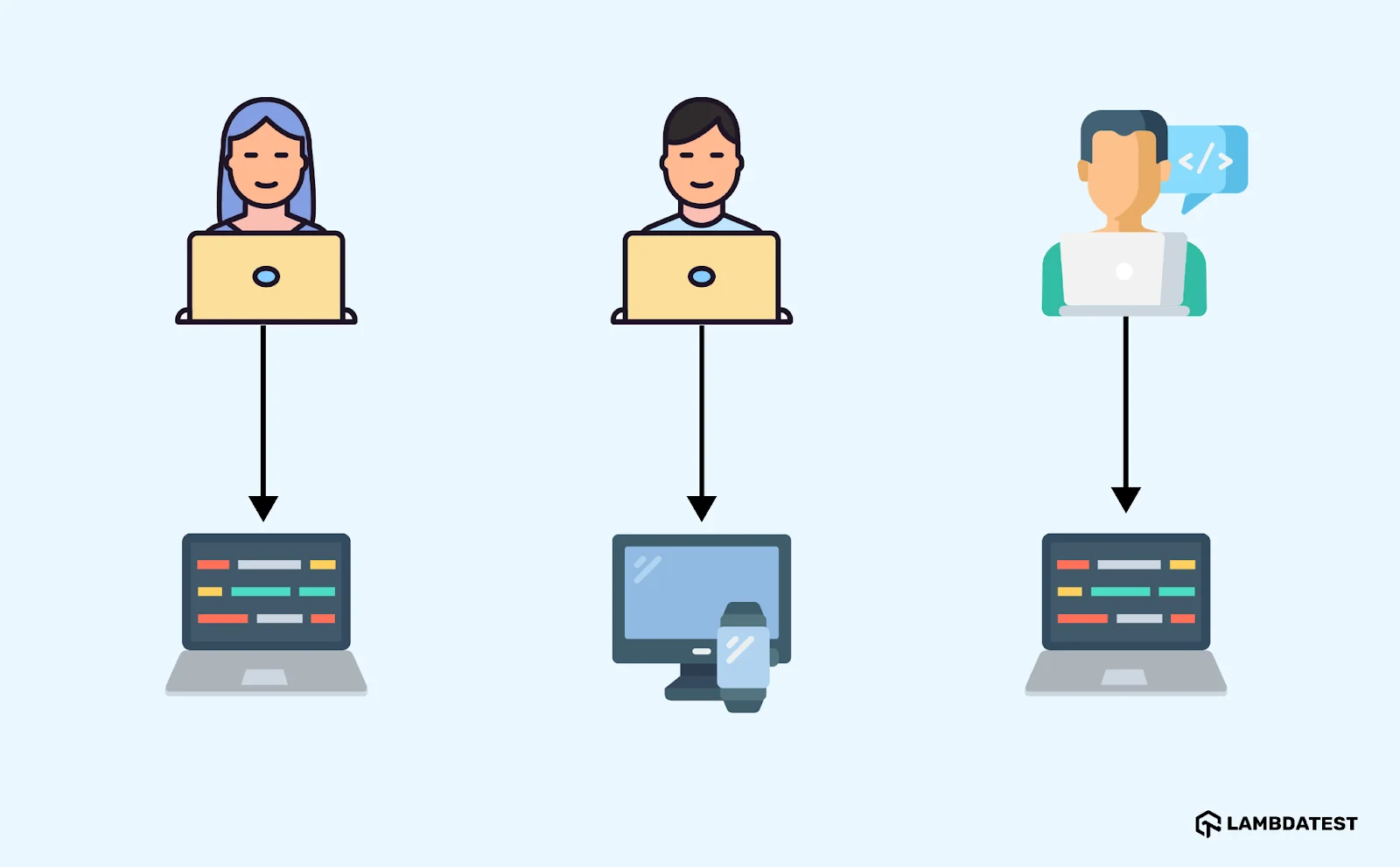
Since there is no centralized repository, it becomes difficult to collaborate or share updates in real time. The absence of network-based collaboration makes LVCS inefficient for teams. This system is best suited for single users and small projects that do not require frequent updates.
Centralized Version Control Systems (CVCS)
CVCS stores project files on a central server. Developers access and modify their local copies of files, then commit changes back to the server. This approach ensures that everyone works with the same set of files, but it relies on the central server. If the server goes down, the project becomes inaccessible, and developers cannot commit changes until it is restored.
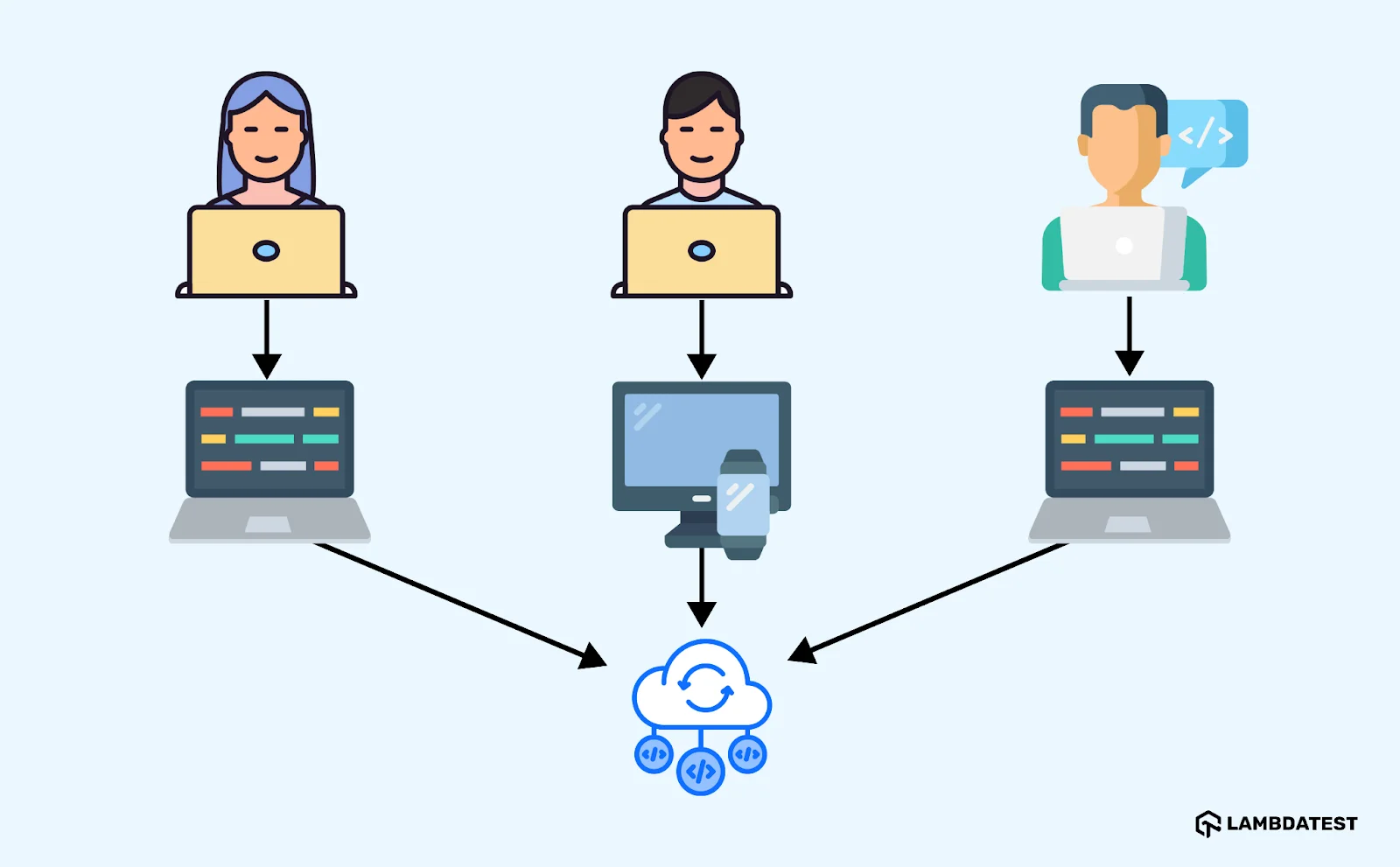
While this model enables collaboration, it introduces a single point of failure. If the server has problems, everyone's work halts. CVCS suits teams that need central management of files, but it is a weaker fit for large, distributed teams because file access and updates depend on that one server.
Distributed Version Control Systems (DVCS)
DVCS gives each user a full copy of the project repository, so developers can work offline and commit changes later. Since there is no single point of failure, DVCS is more resilient than centralized systems. Tools like Git allow parallel development, and changes are merged when needed. Because of its flexibility and fault tolerance, DVCS is ideal for larger, distributed teams.
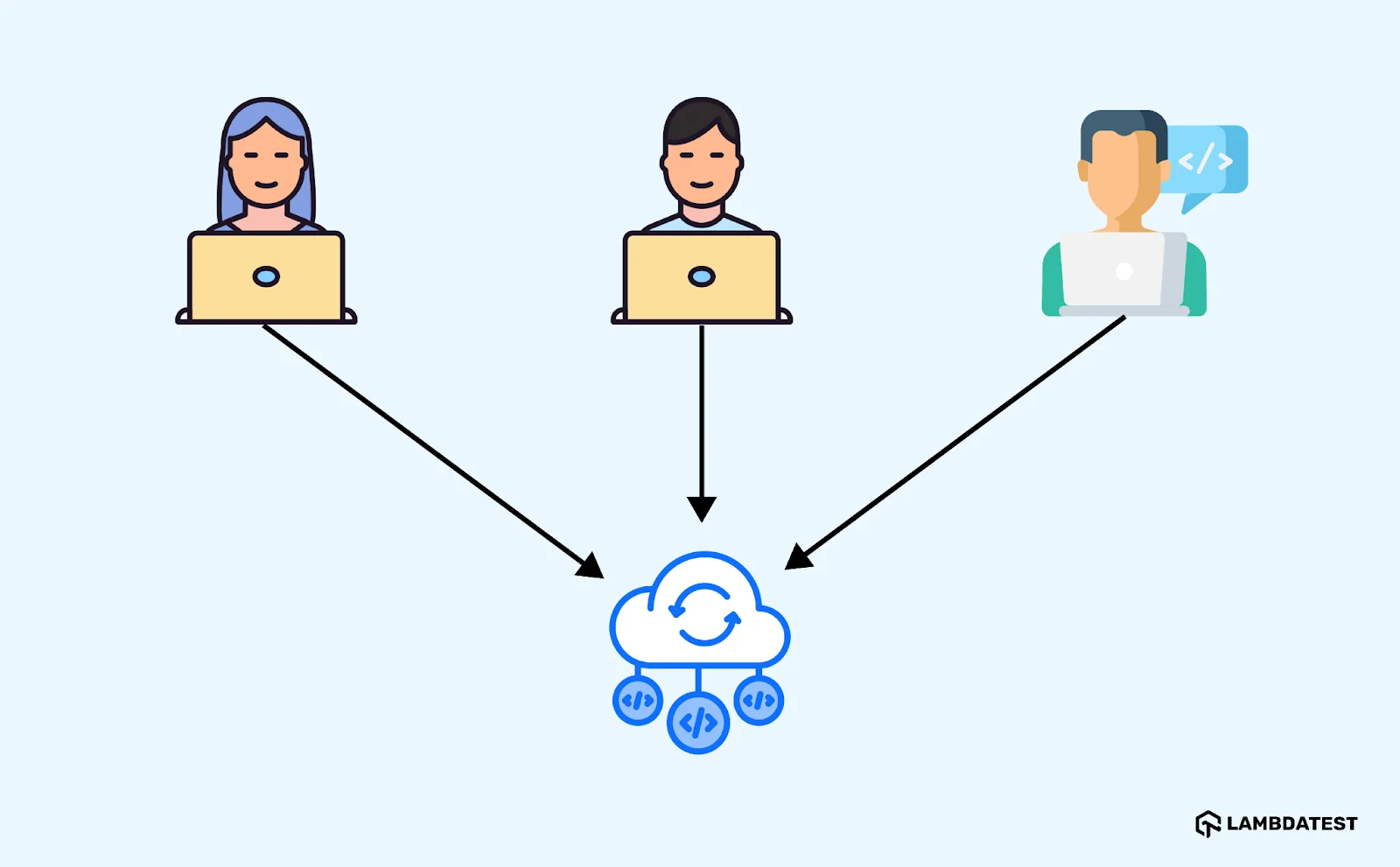
With DVCS, there is no need for constant server availability. Developers commit locally and sync with the central repository when convenient. This decentralized model increases reliability and allows flexible, independent workflows across multiple developers.
Locking vs. Optimistic Concurrency
Cutting across those three models is a second choice: what happens when two people want the same file. Lock-based systems reserve a file while it is being edited, so nobody else can change it until the lock is released. This eliminates conflicts entirely, at the cost of bottlenecks when someone forgets to unlock a file before going on holiday.
Optimistic systems assume conflicts are rare and let everyone edit freely, merging automatically where changes do not overlap and flagging a conflict where they do. Git works this way. The trade is flexibility for occasional manual conflict resolution, which is why optimistic concurrency won for text and locking survives for binary assets that cannot be merged line by line.
For most new projects the choice is already made: distributed and optimistic, using Git. Centralized and lock-based systems hold ground where large binary files matter, which is why they persist in game development and hardware teams rather than in web development.

Who Uses Version Control Systems?
Software developers are the largest group by far, but the practice is older than software and reaches well beyond engineering teams.
- Software developers: The core audience, and close to unanimous about it. Version control is table stakes in professional software work, and the tooling choice is more settled here than in almost any other part of the stack.
- QA and test engineers: Test code is code. Automation suites live in the same repository as the application, get reviewed in the same pull requests, and are versioned so a test failure can be traced to the commit that caused it.
- DevOps and platform teams: Infrastructure as code puts Terraform files, Kubernetes manifests, and pipeline definitions under version control, so a server configuration is reviewed and rolled back exactly like application code.
- Game developers: Games carry large binary assets such as textures, audio, and models that cannot be merged line by line. These teams favor systems with strong support for large files and file locking, so two artists never edit the same asset at once.
- Writers and documentation teams: Docs-as-code keeps documentation in Markdown next to the software it describes, so a feature change and its documentation update ship in the same pull request.
- Designers: Design tools now ship versioned files and branching, borrowing the model directly from software.
- Legal and business teams: The oldest use of all. Contract redlining and legal blacklining track revisions between parties, and predate software version control by decades.
The common thread is not code. It is any file that several people change over time, where being able to answer what changed and undo it matters.
Popular Version Control Tools
The market is far less crowded than the number of options suggests. The Stack Overflow Developer Survey 2022 asked 71,379 developers which version control systems they use: 93.87% said Git, 5.18% Subversion, and 1.13% Mercurial, while 4.31% used none at all. Among people still learning to code, 17% reported using no version control system. In practice, the decision is Git unless a specific constraint says otherwise.
Below are the most widely used version control tools:
- Git: The most used distributed version control system and the default for new projects. It tracks changes, creates branches cheaply, and works offline. Hosting platforms such as GitHub, GitLab, and Bitbucket are built around Git and add code review, issue tracking, and project management on top of it.
- Subversion (SVN): A centralized system that keeps the codebase in one central repository. It is straightforward to learn, handles large binary files better than Git does by default, and remains common in legacy projects and organizations that want strict central control.
- Mercurial: A distributed system like Git, with a simpler and more consistent command set. It performs well on large repositories and keeps a loyal following, though its user base is a fraction of Git's.
- Centralized systems built for large binary assets: A distinct category aimed at teams whose files cannot be merged line by line, such as game studios handling textures, audio, and 3D models. These tools pair file locking with fast synchronization of very large files, a problem general-purpose text-oriented systems handle poorly.
- CVS (Concurrent Versions System): One of the earliest version control systems, now largely replaced by Git and SVN. It offers only basic capabilities and survives mostly in legacy codebases that were never migrated.
Whichever tool tracks your code, the value multiplies when a commit triggers a test run. Connecting your repository to a test automation cloud means each change is verified across browsers and operating systems before it reaches a reviewer, rather than after it reaches a user.
Best Practices for Version Control
The tool enforces almost none of this. These conventions are what separate a history you can debug from a log of "fixed stuff" commits.
- Commit often, in small units, with messages that explain why: A commit should be one logical change. The message should say why the change was made, since the diff already shows what changed. "Fix login redirect for expired sessions" is useful in six months; "bug fix" is not.
- Use branches for features, fixes, and experiments: Branching keeps work off the main branch until it is ready. Descriptive names such as feature/user-login or bugfix/missing-image tell the team what a branch is for without opening it.
- Merge regularly and resolve conflicts early: A branch that lives for weeks drifts from main and turns into a painful merge. Pull from main frequently so conflicts arrive in small, understandable pieces.
- Tag important milestones and releases: Tagging the commit you shipped gives you an exact reference point. When production breaks, you can diff the current state against the tag instead of guessing which commit went out.
- Keep the repository clean and organized: Use .gitignore to keep build output, dependencies, and local config out of history. Never commit secrets: Git history is permanent, and a deleted key still lives in every past commit and every clone.
- Review changes through pull or merge requests: A pull request is where the diff summary earns its keep. Small, focused pull requests get real review; a 3,000-line one gets approved unread.
- Make every commit trigger the tests: Version control tells you what changed. CI tells you whether it still works. Connecting the two is what turns a history into a safety net.
That last practice is where version control and testing meet, and it is where most of the friction lives: the suite gets slower as it grows, until running it on every commit stops being realistic. TestMu AI's HyperExecute is built for that problem. It is an AI-native test orchestration cloud that runs suites up to 70% faster than traditional grids by putting the test script and its execution environment on the same machine instead of shipping commands across a hub-and-node network.
Two of its options are built directly around version control. The sourcePayload setting fetches test code straight from Git, so a run pulls from the repository instead of uploading a local copy. And collectLocalGitData captures the git diff and repository data with each job, so a failed test is tied to the exact change that produced it. It plugs into GitHub Actions, GitLab, Jenkins, Bitbucket, CircleCI, and Azure DevOps through the same pattern everywhere: download the CLI, supply credentials, run against a YAML config. The HyperExecute documentation covers the setup, and our guide to automation testing in a CI/CD pipeline shows where the test stage fits.

Conclusion
Start here: run git --version to confirm Git is installed, clone the repository you work in, and make one small commit with a message that explains why rather than what. That single habit, repeated, is most of what version control asks of you.
From there, the leverage comes from wiring the repository to your tests. Version control tells you what changed and lets you undo it; a pipeline tells you whether the change broke anything, while it is still cheap to fix. Teams that connect the two catch regressions in minutes instead of finding them in a bug report.
When your suite outgrows the time budget of a per-commit run, TestMu AI can run it across 3,000+ browser and OS combinations and 10,000+ devices in its real device cloud on every change. Point your first build at the branch you are already working on, and let the pipeline tell you what the commit message cannot.
Citations
- Git Documentation, About Version Control (linked in "What Is Version Control?"): git-scm.com/book/en/v2/Getting-Started-About-Version-Control
- Git Reference Manual, which names git "the stupid content tracker" and describes it as a fast, scalable, distributed revision control system: git-scm.com/docs/git
- Git's original README, source of the "global information tracker" backronym: github.com/git/git (commit e83c516)
- Stack Overflow Developer Survey 2022, Version Control section (linked in "Popular Version Control Tools"): survey.stackoverflow.co/2022
- DORA, Version Control capability (linked in "Why Is Version Control Important?"): dora.dev/capabilities/version-control
Author

Zikra Mohammadi
Blogs: 18


Zikra brings 5+ years of hands-on expertise in AI, web development, and software testing to her role as a technical content strategist. Certified in AI, manual, and automation testing, she breaks down complex ideas into step-by-step guides, tutorials, and reference docs, helping teams unlock the full power of AI-driven, codeless automation on web and mobile.
Reviewer

Himanshu Sheth
Reviewer
Himanshu Sheth is the Director of Marketing (Technical Content) at TestMu AI, with over 8 years of hands-on experience in Selenium, Cypress, and other test automation frameworks. He has authored more than 130 technical blogs for TestMu AI, covering software testing, automation strategy, and CI/CD. At TestMu AI, he leads the technical content efforts across blogs, YouTube, and social media, while closely collaborating with contributors to enhance content quality and product feedback loops. He has done his graduation with a B.E. in Computer Engineering from Mumbai University. Before TestMu AI, Himanshu led engineering teams in embedded software domains at companies like Samsung Research, Motorola, and NXP Semiconductors. He is a core member of DZone and has been a speaker at several unconferences focused on technical writing and software quality.


Version Control FAQs
Did you find this page helpful?
More Related Learning Hubs
TestMu AI forEnterprise
Get access to solutions built on Enterprise
grade security, privacy, & compliance
- Advanced access controls
- Advanced data retention rules
- Advanced Local Testing
- Premium Support options
- Early access to beta features
- Private Slack Channel
- Unlimited Manual Accessibility DevTools Tests