

Power Your Software Testing with AI Agents and Cloud
The Native AI-Agentic Cloud Platform to Supercharge Quality Engineering. Test Intelligently and Ship Faster.


- TestMu AI (Formerly LambdaTest)
- /
- Learning Hub
- /
- What Is AI Test Management? A Complete Guide for QA Teams
On This Page
- What Is AI Test Management?
- How AI Transforms Testing
- Core Capabilities
- AI-Driven Test Data Management (TDM)
- AI in SAP Test Management
- AI-Powered Exploratory Test Management
- Agile Test Management and Sprint Cycles
- How to Implement It
- KaneAI Walkthrough
- Choosing a Platform
- CI/CD Integration
- Metrics and KPIs
- Challenges
- Best Practices
- Conclusion
The global AI-enabled testing market was valued at USD 1.01 billion in 2025 and is projected to reach USD 4.64 billion by 2034 at an 18.30% CAGR, according to Fortune Business Insights.
That growth reflects a fundamental shift: manual test management, with its spreadsheets and hand-maintained suites, is giving way to AI-powered systems that plan, generate, prioritize, and analyze tests automatically.
This guide covers what AI test management is, how it works at each stage of the test lifecycle, and how to implement it step by step using TestMu AI's KaneAI.
AI Overview
To streamline QA, implement AI test management to plan, generate, prioritize, execute, and analyze software tests automatically. Teams should use TestMu AI's KaneAI for plain-text test generation and self-healing, and Test Management to map test cases directly to requirements and flag coverage gaps before release.
- Test data management: Test Data Management (TDM) - Generates synthetic data, masks production data for GDPR and HIPAA compliance, and provisions data on demand for QA and ETL pipelines.
- SAP test management: SAP test management - Scopes regression by transport impact and survives Fiori's dynamically generated element IDs to replace traditional SAP Solution Manager workflows.
- Exploratory test management: Exploratory test management - Deploys autonomous agents to navigate applications, surface edge cases, and convert active sessions into reproducible test scripts.
- Agile test management: Agile test management - Drafts BDD scenarios directly from Jira stories during refinement so testing can begin on day one of the sprint.
- KaneAI: KaneAI - Generates test cases from plain text, self-heals broken tests, and integrates with CI/CD pipelines as TestMu AI's AI-native testing agent.
- Test Management: Test Management tool - Links each test case to its originating requirement and flags coverage gaps before release to ensure complete traceability.
What Is AI Test Management?
AI test management is the application of artificial intelligence to the planning, creation, execution, and analysis of software tests. It goes beyond automated test execution (running pre-written scripts) to assist with the decisions and maintenance that currently require human effort.
Traditional test management relies on testers to write test cases, select which tests to run, triage failures, and update suites as the application changes. AI test management handles these tasks through machine learning models, natural language processing, and predictive analytics.
How Does AI Transform the Test Lifecycle?
The test lifecycle has four stages, and AI intervenes differently at each one. According to Capgemini's World Quality Report 2025, 89% of organizations are already piloting or deploying Gen AI-augmented QA workflows, and those that do report an average 19% productivity boost.
- Planning: AI scans requirements against historical defect density maps and produces a prioritized test plan in minutes. High-risk modules get more coverage; stable modules get less.
- Test creation: Testers describe a scenario in plain English and AI produces a complete test case with steps, expected results, and test data. Instead of writing cases from scratch, teams shift to reviewing and refining AI-generated drafts.
- Execution: Smart test selection sends only change-affected tests to the queue, cutting execution time without reducing meaningful coverage. Self-healing locators keep tests passing through UI changes without manual maintenance.
- Analysis: Test Intelligence detects flaky tests, groups failures with the same error signature into clusters, and pinpoints the exact exception or step that broke. Engineers fix the root cause once rather than triaging each failure individually.
Core Capabilities of AI-Powered Test Management
Not all AI test management platforms offer the same depth. These seven capabilities separate mature platforms from tools that merely add an AI label to existing features.
- Natural language test authoring: Generate test cases by typing a plain-language description. The AI interprets intent, maps it to UI elements, and produces executable steps without requiring testers to know locator syntax.
- Self-healing locators: When a developer renames a button or restructures a page, KaneAI updates affected steps and surfaces the diff for human review, eliminating the manual work of finding and fixing broken locators.
- Risk-based test prioritization: Change-impact analysis maps each commit to the test cases that exercise the changed code, then ranks the suite by defect risk so CI/CD pipelines run the most important tests first.
- Requirement traceability: Test Management links each test case to the Jira story, bug, or feature it validates, with two-way sync so execution results are visible directly inside Jira. Our Jira test management guide covers how that link is established and what Jira can and cannot track on its own.
- Defect pattern detection: Machine learning models analyze failure history and flag recurring defect clusters, helping teams identify systemic code quality issues rather than treating every bug as isolated.
- Flaky test detection: Test Intelligence charts a flakiness timeseries across every run, ranks flaky tests by severity, and groups failures with the same error signature so teams fix the root cause once.
- Predictive coverage analysis: Models estimate how much of the application is covered by the current suite and identify high-risk modules with insufficient tests, guiding where new test cases add the most value.

Note: TestMu AI's KaneAI delivers all seven of these capabilities on a single platform, from NLP test authoring to self-healing and flaky test detection. Start for free and generate your first AI test case in minutes.
AI-Driven Test Data Management (TDM) in QA
Test data management is the practice of provisioning the data your tests need: creating it, keeping it realistic, keeping it compliant, and refreshing it between runs. In QA, TDM is what decides whether a suite can run repeatably and legally. A test that passes only because yesterday's data happened to be in the right state is not a test.
Most teams start by cloning production. It is fast, it is realistic, and the moment that clone contains real personal data it is a compliance problem under GDPR, HIPAA, or CCPA. It is also slow to refresh and expensive to store. AI changes the economics of the alternatives across four jobs.
- Synthetic data generation: Models learn the statistical shape and relational structure of production and emit records that never belonged to a real person but behave like they did. The hard parts are referential integrity, since a synthetic order must reference a synthetic customer that actually exists, and edge-case distribution. If 0.3% of your accounts sit in an unusual state, naive generation drops them, and those are precisely the rows that break code. See generative AI for test data generation for how this works in practice.
- Masking sensitive data for compliance: Classification is the part AI genuinely improves. Models detect that a free-text notes column contains phone numbers, or that an oddly named field holds national IDs, which is the discovery work nobody does by hand across a few thousand columns. The masking itself must be deterministic, meaning the same input always produces the same output, or joins across systems break and your masked environment becomes useless for integration testing. Refer to this guide on data masking.
- Dynamic provisioning and subsetting: Rather than one shared environment everyone fights over, data is provisioned per test or per pipeline run and reset afterward. Subsetting pulls a representative slice instead of a full copy, and data virtualization tools such as Delphix give each tester a writable copy in seconds without duplicating the database.
- ETL and data pipeline testing: For ETL testing, the data is the system under test, so you need adversarial rows on purpose: nulls, malformed dates, encoding mismatches, and boundary values. Generating those deliberately is faster than waiting for production to produce them.
The table below compares the five techniques you will actually choose between.
| Technique | What It Does | Watch Out For |
|---|---|---|
| Production cloning | Full copy of the production database | Compliance exposure, storage cost, and slow refresh cycles |
| Masking / anonymization | Replaces sensitive values in place while keeping structure | Must be deterministic or cross-system joins break |
| Subsetting | Extracts a referentially intact slice of a large database | Naive slices silently drop rare edge-case records |
| Synthetic generation | Model-generated records with no link to real people | Inherits the blind spots of the data it learned from |
| Data virtualization | Lightweight writable copies per tester or pipeline | Adds an infrastructure dependency to your test environments |
The established tooling here is worth knowing by name: Informatica for enterprise TDM suites, Delphix for virtualization and masking, Tonic for synthetic data aimed at dev and test environments, and K2view for entity-based provisioning.
One caveat matters more than the tool choice. Synthetic data inherits the blind spots of whatever it learned from. If production has never seen a scenario, a model trained on production will not invent it. Synthetic data solves volume and privacy; it does not discover unknown edge cases, and those still come from a human who understands the domain. For the fundamentals, refer to these guides on test data and synthetic testing.
AI in SAP Test Management: Modernizing Legacy Workflows
SAP test management is the discipline of planning, executing, and tracking tests across an SAP landscape as changes move from development through quality assurance to production. It has traditionally been run out of SAP Solution Manager, and it is one of the few testing domains where the constraints are structural rather than cultural.
SAP Solution Manager, usually shortened to SolMan, is SAP's application lifecycle management platform. Teams use it for test management via its Test Suite, for change control via Change Request Management (ChaRM), and for transport and system monitoring. Mainstream maintenance for SolMan 7.2 runs to 31 December 2027, and SAP positions SAP Cloud ALM as its cloud-native successor, recommending that customers complete the transition before 2028.
That date is worth reading carefully rather than treating as a cliff. Customers who take the optional extended maintenance for SAP Business Suite 7, which runs to the end of 2030, get extended maintenance for SolMan 7.2 at no additional cost, though the extended scope is narrower and covers a defined set of capabilities including the test suite and change control management. Either way the direction is fixed, which is why SAP teams are re-evaluating test tooling now rather than treating it as a problem for later.
Four things make SAP testing genuinely harder than testing a web app:
- Change travels as transports: Modifications move across the landscape as transport requests through the Change and Transport System. A single transport can touch shared objects, so a change made for one module surfaces as a defect in a process nobody associated with it. Working out what a transport actually put at risk is the core problem of SAP regression scoping.
- The UI fights automation: Unless a developer explicitly assigns a stable ID, SAPUI5 generates element IDs itself at runtime, producing identifiers like __view0--__page0 and __view0--__table0. SAP's own documentation is blunt about the consequence: these generated IDs change whenever the application's control structure changes. Selector-based scripts bound to them break on refactors that changed nothing a user would notice, which is why so many SAP automation efforts stall after the pilot.
- Processes span modules: An order-to-cash test crosses SD, MM, and FI, and frequently leaves SAP entirely for a bank, a tax service, or a logistics provider. No single module owner can validate it end to end.
- The release cadence changed: SAP S/4HANA Cloud Public Edition ships two major releases a year, in February and August, with patches and hot fix collections landing every two weeks in between. Regression testing that used to be an annual event is now continuous, and manual effort that was tolerable once a year is not tolerable every fortnight.
AI addresses these directly. Self-healing locators are the answer to Fiori's generated IDs, because multi-attribute matching resolves an element by its label, position, and surrounding context rather than an ID that was never stable to begin with. Change-impact analysis maps transport contents to the test cases that exercise the affected objects, turning full-suite regression into a targeted run. NLP authoring lets the business analyst who understands the order-to-cash process write the test, which matters because in SAP the person with the domain knowledge is almost never the person who can write code. And SAP test data is a TDM problem, so the techniques in the previous section apply directly.
The limit worth stating plainly: AI has no knowledge of your custom Z-code or the business rules your organization encoded into it over fifteen years. It can keep a test running through a UI change and tell you what a transport touched. It cannot tell you whether the pricing logic your team wrote in 2011 is still correct. That judgment stays with the people who own the process. For SAP testing fundamentals, refer to this SAP testing tutorial.
AI-Powered Exploratory Test Management
Exploratory testing is simultaneous learning, test design, and execution. It is not unstructured clicking, and the distinction matters because the structure is what makes it manageable.
A concrete example of an exploratory test is a charter rather than a script: explore the checkout flow using expired and declined payment methods to discover error-handling and recovery gaps, timeboxed to 60 minutes. The tester decides what to try as they learn. They might enter an expired card, retry with a valid one, abandon the payment halfway, refresh during processing, or hit back after the charge succeeds. The output is a set of findings and notes, not a pass or fail against predefined steps.
Session-based test management is what turns that into a managed activity. Work is organized into chartered, timeboxed sessions with notes and a debrief, which gives exploratory testing the one thing it historically lacked: a record. This is the test management half of exploratory test management, and it is where AI has the most to offer.
- Autonomous exploration: Agents navigate an application on their own, infer what it does, decide their next action rather than replaying a fixed script, and flag anomalies such as crashes, console errors, dead ends, and states the app cannot recover from. Testomat.io's Explorbot and TestMu AI's KaneAI both work this way.
- Breadth coverage humans skip: An agent will patiently try every field on every form in every reachable state. People do not, because it is boring, and boredom is a reliable predictor of where coverage thins out.
- Sessions become durable artifacts: Historically an exploratory finding lived in a tester's notes and evaporated. Agents generate reproducible scripts from their sessions instead, so the output feeds your regression suite rather than disappearing after the debrief. Explorbot, which is open source and runs on your own infrastructure, exports its sessions as real Playwright files you can import and run in CI like any other suite.
The honest limit is a sharp one. An agent explores the application as built, not as intended, because it has no model of what the software is supposed to do. It will find a crash. It will not tell you a business rule is wrong. A human exploring checkout notices that a 40% discount on a $5 item is suspicious; an agent sees a transaction that completed successfully and moves on. Agents find broken. Humans find wrong. Use agents for breadth and regression capture, and spend your testers' attention on the judgment that requires knowing what the product is for. For tooling options, refer to this blog on exploratory testing tools.
Agile Test Management: Aligning AI with Sprint Cycles
The agile method of testing means testing continuously inside the sprint alongside development rather than as a phase that follows it. In practice, most teams know the theory and still hit the same wall: the sprint is two weeks, development finishes on day eight, and testing is compressed into whatever is left. Quality becomes a function of how much time was not spent building.
AI attacks that compression at the point where it starts, which is authoring. When test cases are generated from the story rather than written after the code, testing begins on day one instead of day eight.
- BDD scenarios generated from Jira stories: A user story and its acceptance criteria contain most of what a Given/When/Then scenario needs. AI drafts the scenarios at story-writing time, so the team reviews concrete behavior during refinement rather than discovering ambiguity in the last two days of the sprint. TestRail added AI BDD scenario generation in version 9.5, converting plain-text requirements into structured Gherkin. Testsigma goes at the same problem from the planning end: its Sprint Planner agent detects a new Jira sprint the moment it starts and pulls every story into test management, so there is a draft suite waiting before anyone has written code.
- Risk-scoped sprint planning: AI maps the stories in the sprint to the areas of the application they touch and the regression those areas historically require, which turns "how much testing does this sprint need" from a guess into an estimate.
- Suites that survive continuous delivery: Self-healing is what keeps a suite viable when the UI changes every sprint. Without it, maintenance grows until the suite is abandoned, which is the normal end state of agile automation efforts.
- Traceability back to the story: Two-way sync between test cases and Jira issues means the sprint review can answer what was tested, not just what was built.
A generated scenario looks like this, and its quality is entirely determined by the quality of the acceptance criteria it came from:
Feature: Checkout payment handling

  Scenario: Expired card is rejected with a recoverable error
    Given a customer has items in their cart
    When they submit payment with an expired card
    Then an error explains the card has expired
    And the cart contents are preserved
    And they can retry with a different payment method
That scenario is only possible because someone wrote acceptance criteria specifying that the cart survives a failed payment. Feed AI a story that says "as a user I want to log in so that I can access my account" with no criteria attached and you get a plausible-looking happy path that tests nothing anyone was worried about. AI amplifies the quality of your stories in both directions, which means the three amigos conversation matters more once you adopt it, not less. For the underlying syntax, refer to these guides on Gherkin and Cucumber and agile testing.
How to Implement AI Test Management Step by Step
AI test management adoption works best as a phased rollout. Attempting to migrate an entire test suite at once creates risk; piloting on a bounded scope lets you build confidence and measure ROI before expanding.
- Audit your existing suite. Run a flakiness report to find intermittently failing tests and a duplication check to remove redundant cases. Clean data in means clean AI output; a broken suite produces AI-amplified noise.
- Define your baseline metrics. Measure test maintenance hours per sprint, defect escape rate, and average build time before introducing AI. Without a baseline you cannot quantify improvement or know whether the tool is working.
- Choose a scoped pilot area. Pick one feature area or team that ships frequently. A high-velocity team surfaces AI maintenance value faster than a low-change module.
- Connect your issue tracker. Integrate with Jira, GitHub Issues, or your existing tracker. AI test case generation is most accurate when it reads acceptance criteria directly from stories.
- Generate and review AI test cases. Use NLP authoring on the pilot area's stories, review each case for accuracy, and add them to your suite. Most generated cases will be accurate enough to add directly after a quick review.
- Wire into CI/CD and measure. Enable smart test selection so only change-affected tests run on each commit. After four to six sprints, compare baseline metrics against post-AI numbers before expanding.
KaneAI and TestMu AI: A Live Walkthrough
TestMu AI's KaneAI is an AI-native testing agent built for the full test management cycle.
The screenshot below shows KaneAI's Web Agent executing natural language test steps in a live browser session. The steps were written in plain English and KaneAI ran them against a real web application with no manual scripting involved.
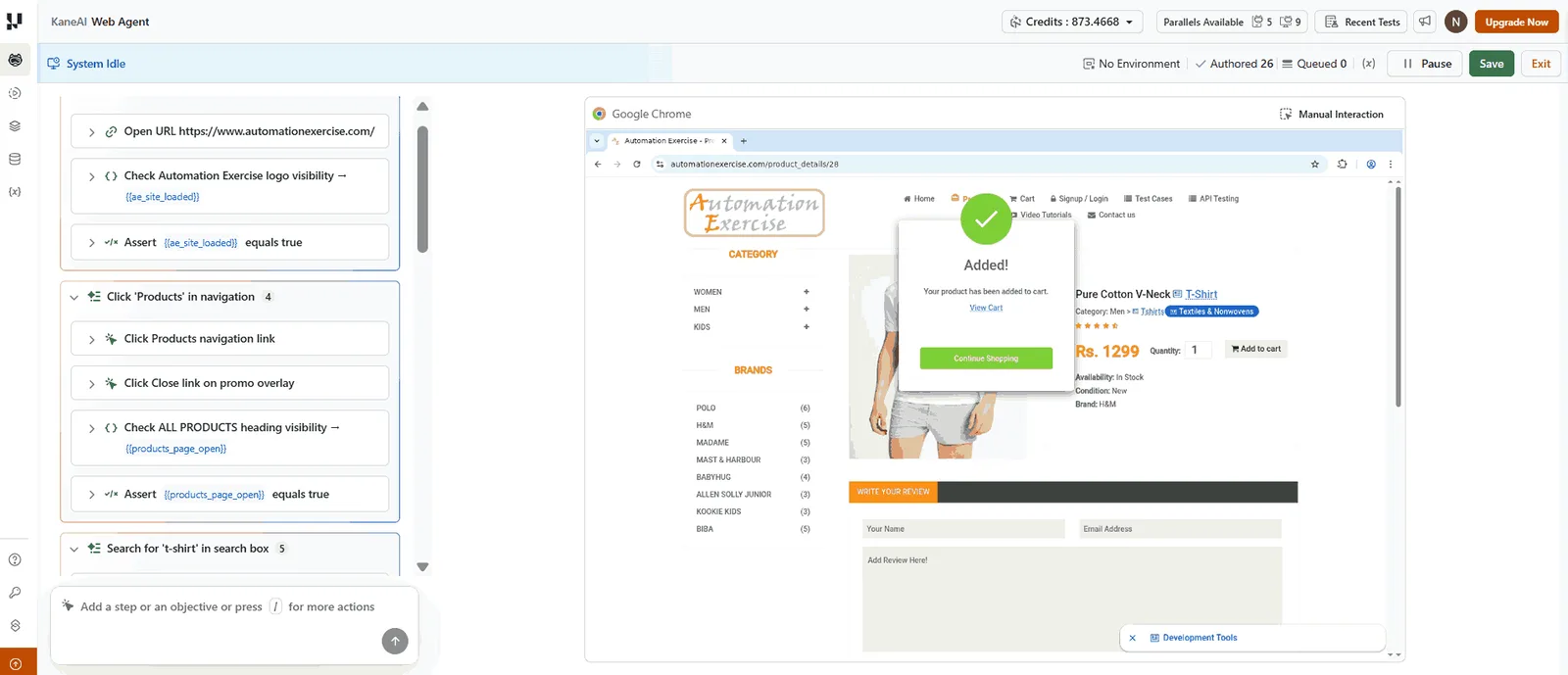
A QA engineer types a plain-language description and KaneAI generates a complete test case with steps, expected result, and test data. That test case is immediately runnable on TestMu AI's cloud infrastructure across 10,000+ real devices and browsers.
When an element's attribute or locator changes in the next sprint, KaneAI detects the change, updates the affected steps, and surfaces the diff for review. A tester approves the update in one click rather than hunting for broken locators manually.
For teams managing test artifacts, TestMu AI's Test Management links each KaneAI-generated case to the originating Jira story, bug, or feature, providing two-way traceability between tests and the issues they validate.
The KaneAI getting-started documentation covers initial setup, connecting your first integration, and authoring your first AI test case.
To validate your AI test management skills, TestMu AI offers the KaneAI Certification, a structured exam covering GenAI test automation fundamentals and practical KaneAI workflows.

What to Look for in an AI Test Management Platform
Evaluating AI test management platforms requires going beyond demo-day impressions. Use this framework to compare options on the criteria that actually affect daily QA work.
| Criterion | What to Ask | Why It Matters |
|---|---|---|
| NLP accuracy | Does it generate runnable test cases from plain-language descriptions without heavy editing? | Low accuracy means your team spends more time fixing AI output than writing tests manually. |
| Self-healing depth | Which element attributes does it use for healing? Does it handle dynamic IDs and shadow DOM? | Shallow healing (ID-only) fails on modern SPAs; multi-attribute healing handles real-world apps. |
| CI/CD integration | Does it have native plugins for GitHub Actions, Jenkins, and GitLab CI? | Manual export/import workflows break the automation loop and slow feedback cycles. |
| Requirement traceability | Can it link test cases to Jira stories and flag stale tests when requirements change? | Without traceability, teams discover missed coverage after release, not before it. |
| Explainability | Does the AI explain why it prioritized or flagged a test, or does it produce opaque scores? | QA leads need to trust and override AI decisions; black-box scores block adoption. |
| Flaky test classification | Does it distinguish environment failures from genuine defects, or does it flag all failures equally? | Undifferentiated failure reports cause alert fatigue and mask real quality signals. |
| Scalability | Can it manage 10,000+ test cases across multiple projects without degrading analysis quality? | Platforms that work well at 200 tests often slow to a crawl at 5,000 - test at your realistic scale. |
Applying that framework to the platforms most often shortlisted gives a rough map of where each one concentrates its AI. The categories matter as much as the names: a test management system that added AI authoring solves a different problem than an AI-native agent that also manages tests.
| Platform | Category | Where Its AI Is Focused |
|---|---|---|
| Test Manager (TestMu AI) | AI-native test management platform | Test case generation from tickets, PRDs, and design flows, with a memory layer that scans the existing repository to close coverage gaps, two-way Jira and Azure DevOps sync, and execution plus reporting in one workspace |
| TestRail | Test management system | AI test case generation, plus AI BDD scenario generation added in TestRail 9.5 that turns plain-text requirements into Gherkin, layered onto an established management and reporting core |
| PractiTest | Test management system | SmartFox AI assistant for test case generation, duplicate and coverage-gap detection, and prioritizing runs by value and risk |
| Testsigma | Low-code automation platform | Natural language authoring, plus agentic test management whose Sprint Planner detects new Jira sprints and pulls their stories into test management automatically |
| Testomat.io | Test management with BDD focus | Explorbot, an open-source AI agent that runs autonomous exploratory sessions and exports real Playwright files, alongside BDD and framework synchronization |
The Test Manager documentation shows what the management side covers in practice: organizing cases into plans and cycles, syncing them with Jira, and reconciling automated results back to test runs.
The distinction worth holding onto while you evaluate: a management system with AI authoring bolted on still expects you to bring your own automation and execution. An AI-native platform authors, heals, executes, and reports in one loop. Which you need depends on whether your bottleneck is organizing tests or maintaining them. If it is maintenance, a QA agent closes that loop for you: it turns a scenario described in natural language into a running test, re-points the steps when a locator moves, and hands the change back to a tester to approve.
For cross-browser and real-device coverage, ensure the platform integrates with a cloud testing grid. TestMu AI's Test Intelligence layer overlays AI-driven flaky test detection and root cause analysis directly on top of any test run, giving teams analytics without switching tools.
Integrating AI Test Management Into CI/CD
KaneAI integrates with CI/CD pipelines via a REST API call to TestMu AI's test runner. You create a test run in Test Management, copy its ID, and trigger execution from your pipeline using that ID. The workflow below shows how to wire this into GitHub Actions.
name: KaneAI Test Automation

on:
  push:
    branches: [main, develop]
  pull_request:
    branches: [main]

jobs:
  kaneai-run:
    runs-on: ubuntu-latest
    steps:
      - name: Trigger KaneAI test run on TestMu AI
        run: |
          curl --location 'https://test-manager-api.lambdatest.com/api/atm/v1/hyperexecute' \
            --header 'Content-Type: application/json' \
            --header 'Authorization: Basic ${{ secrets.LT_BASIC_AUTH }}' \
            --data '{
              "test_run_id": "${{ vars.KANEAI_TEST_RUN_ID }}",
              "concurrency": 2
            }'
        # LT_BASIC_AUTH: base64-encoded "username:accesskey" stored as a GitHub secret
        # KANEAI_TEST_RUN_ID: copied from the test run URL in TestMu AI Test Manager
KaneAI executes test runs through HyperExecute, TestMu AI's intelligent test execution engine. The API response returns a `job_id` and a direct link to the HyperExecute job dashboard where you can monitor pass/fail status in real time.
See the KaneAI CI/CD integration docs for the full parameter reference, including concurrency, region, and environment configuration options.
Metrics and KPIs to Measure AI Test Management ROI
Capgemini's World Quality Report 2025 found that 89% of organizations are piloting or deploying Gen AI-augmented QA workflows, yet one-third report minimal gains from those investments. The difference between meaningful ROI and minimal gains comes down to which metrics the team tracks from day one.
Teams that measure only labor hours saved miss the quality and velocity gains that compound over time. TestMu AI's Test Management surfaces pass/fail rates, defect trends, and coverage metrics in real-time dashboards synced with Jira, as shown below.
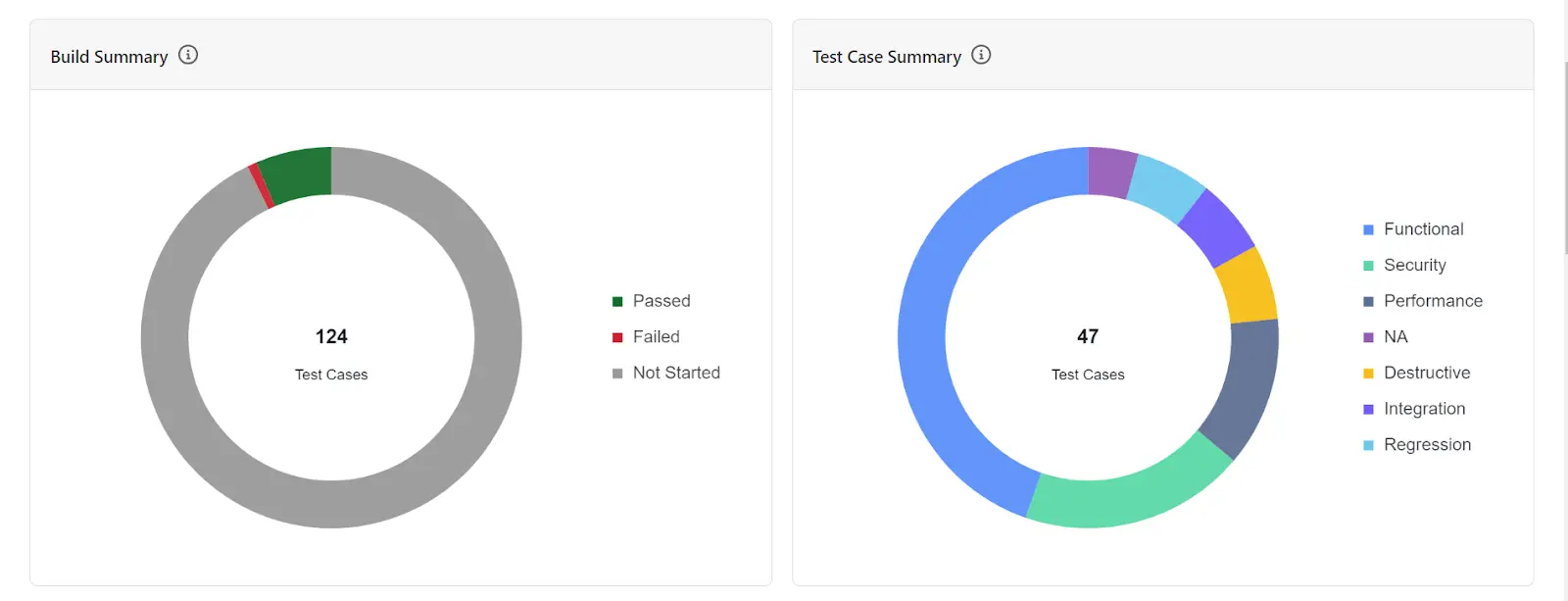
Use the six metrics below as your measurement framework. Establish a baseline before rollout, then track each metric sprint-over-sprint to see where AI is delivering and where it needs tuning.
| Metric | Definition | AI Test Management Impact |
|---|---|---|
| Defect escape rate | Bugs found in production vs. bugs found during testing | AI-prioritized runs cover the highest-risk code paths on every commit, catching more defects before they reach production |
| Test maintenance hours / sprint | Hours spent updating broken or outdated tests each sprint | Self-healing eliminates locator-fix work that previously consumed significant sprint time each cycle |
| Test execution time | Time from code commit to test results available | Smart selection runs only change-affected tests on each commit, cutting on-commit execution time significantly |
| First-pass yield rate | Percentage of builds that pass all tests on first run | Flaky test suppression raises yield, reducing false reruns and wasted pipeline minutes |
| Test case creation time | Hours from requirement to runnable test case | NLP authoring cuts the time from requirement to runnable test case compared to writing scripts by hand |
| Coverage depth | Percentage of requirements with at least one linked test case | AI traceability flags uncovered requirements; coverage gaps become visible before release |

Challenges in Adopting AI Test Management
Capgemini's World Quality Report 2025 found that 64% of teams cite integration complexity as a top adoption barrier and 50% lack sufficient AI/ML expertise in-house. These are structural obstacles, and each has a known mitigation.
- Low-quality training data from legacy suites: AI models trained on unmaintained suites learn the wrong patterns. Audit and prune before migration - clean data is faster than correcting bad AI output.
- Over-reliance on AI output without review: Teams that accept 100% of generated cases miss domain-specific edge cases. Treat AI output as a starting draft and budget time for human review. Several free test case management tools include AI test-generation credits on their free plans, so the workflow can be evaluated before paying for seats.
- Integration complexity with existing tooling: Teams using three or more tools face friction at setup. Platforms with pre-built integrations for Jira, Jenkins, and GitHub cut setup from weeks to days.
- Resistance from testers over role displacement: Reframe AI as handling maintenance so testers can focus on exploratory testing and quality strategy. Force-multiplier framing drives faster adoption than headcount-reduction framing.
- Measuring the wrong metrics at rollout: Tracking only labor hours saved undercounts the value. Add defect escape rate and first-pass yield from day one to build executive confidence for scaling.
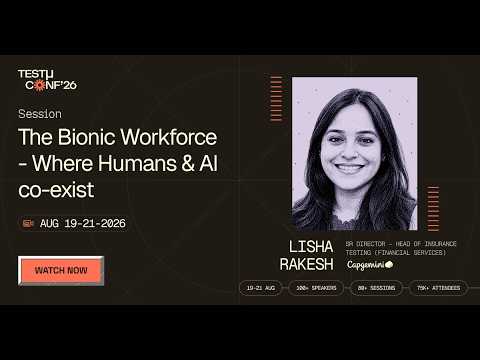
Of these five, role displacement and the in-house expertise gap are the ones tooling cannot fix on its own. In this TestMu Conf 2026 session, The Bionic Workforce - Where Humans & AI Co-exist, Lisha Rakesh argues that with GenAI and autonomous agents, testing stops being a sequence of manual checks or scripted automations and becomes an ecosystem where humans and AI jointly assure quality.
Best Practices for AI Test Management
These practices separate teams that see sustained value from AI test management from those that stall after the pilot.
- Tag AI-generated tests separately. Label AI-generated cases in your test management system so you can track their pass rate and maintenance rate independently. That split data shows where AI output is underperforming and needs prompt tuning.
- Keep humans in the loop on strategy. Use AI for generation and maintenance; reserve human judgment for decisions involving business risk, regulatory context, or stakeholder commitments the AI cannot see.
- Enforce requirement traceability from day one. Link every AI-generated test case to its originating story. Traceability is cheap to set up early and expensive to retrofit later.
- Run the full suite on a nightly schedule. Smart selection on commit gives speed; the nightly run gives the coverage data that keeps risk scoring accurate. Both modes are required.
- Review AI prioritization accuracy quarterly. Compare the model's ranked test output against actual sprint defect outcomes every quarter. When high-priority AI tests miss defects that lower-ranked tests would have caught, adjust the risk-scoring weights for your application's specific failure patterns.
- Separate AI analytics by environment. Staging environments produce meaningful defect pattern data; local dev environments produce noise. Weight staging results more heavily in your AI analysis configuration.
- Version-control your test cases. Store AI-managed test artifacts in the same repo as application code so changes are traceable and reversible through the same pull request workflow.
Conclusion
AI test management moves quality work from reactive maintenance to proactive coverage.
Teams that implement it systematically - auditing their existing suite first, piloting on a high-change feature area, and measuring against clear baselines - see measurable reductions in defect escape rate and maintenance overhead over time.
For how this looks when purpose-built agents share one memory layer across planning, authoring, and execution, see agentic test management.
Start with TestMu AI's KaneAI for NLP test authoring and self-healing, then connect it to your issue tracker and CI/CD pipeline. Expand to Test Intelligence for flaky test detection and root cause analysis as your suite grows.
The KaneAI getting-started guide walks through initial setup, your first integration, and your first AI-generated test case.
For foundational concepts, the test management learning hub covers core principles, and the AI automation guide covers how AI applies across the broader software delivery lifecycle.
Note: This article was researched and drafted with AI assistance, then reviewed, fact-checked, and published by Naima Nasrullah, Community Contributor at TestMu AI, whose listed expertise includes Software Testing and Automation Testing. Every statistic, link, and product claim was verified against primary sources. Read our editorial process and AI use policy for details.
Author

Naima Nasrullah
Blogs: 15

Naima Nasrullah is a Community Contributor at TestMu AI, holding certifications in Appium, Kane AI, Playwright, Cypress and Automation Testing. She writes practical, hands-on content that helps QA engineers and developers build reliable test automation frameworks across web and mobile platforms. Drawing on her expertise in automation testing, Naima breaks down complex tools and workflows into clear, actionable guidance that readers can apply directly to their own projects and testing pipelines.


AI Test Management FAQs
Did you find this page helpful?
More Related Blogs
TestMu AI forEnterprise
Get access to solutions built on Enterprise
grade security, privacy, & compliance
- Advanced access controls
- Advanced data retention rules
- Advanced Local Testing
- Premium Support options
- Early access to beta features
- Private Slack Channel
- Unlimited Manual Accessibility DevTools Tests