

Next-Gen App & Browser Testing Cloud
Trusted by 2 Mn+ QAs & Devs to accelerate their release cycles


On This Page
- What is a Use Case?
- Purpose of a Use Case
- Use Case Diagram
- Advantages of a Use Case
- Example of a Use Case
- Best Practices to Create a Use Case
- What is a Test Case?
- Purpose of a Test Case
- Advantages of a Test Case
- Example of a Test Case
- Best Practices to Create a Test Case
- Difference Between Use Case vs Test Case
- Use Case vs Test Case: Role in Test Automation
- How to Perform Use Case Testing with TestMu AI?
- Conclusion

Use Case vs Test Case: Key Differences
Learn about key differences between use case vs test case, their components, advantages and best practices to create them, and more.

Veethee Dixit
December 28, 2025
The terms Use Case and Test Case are two of the most critical concepts in any Software Development Life Cycle (SDLC) and play an important role in ensuring the functionality and reliability of software products. However, these terms are often misunderstood. Both use cases and test cases have different objectives, and understanding their differences is essential for software teams to effectively design, develop, and validate their products.
In this blog on use case vs test case, we will learn and understand more about these key terms, including their definitions, differences, examples, and best practices.
What is a Use Case?
A use case is a software development concept that describes the interactions between a system and a user, highlighting specific goals to achieve. An external software or a human can simulate these interactions to reach a goal.
In addition to documenting use cases, teams often visualize them with overview diagrams to enhance understanding of the process. These diagrams should include various components involved in system interactions, such as a list of crucial actions and the relationships between these actions.
They offer a detailed narrative of the interaction between external systems or users with systems. They include steps such as outputs, inputs, and expected behaviors.
Single-use cases consider business requirements, specifications, and systems during design. A well-designed use case can be beneficial in subsequent cycle testing and development phases. Additionally, the process outlined in a use case can be a solid foundation for other guides, including test cases.
The QA teams can better understand error-prone areas during the interaction with design features and the system with the help of use cases. It graphically represents a document that explains the steps any actor has to perform while testing the system.
Below are the components of a use case.
- Actor: An individual or a group of people interacting with the system.
- System: A software/service/product under test.
- Goal: User outcome indicating success.
- Stakeholder(s): An individual, company, or group involved in a project directly or indirectly and an entity that might impact or get impacted by the project outcome.
- Primary actor: A stakeholder initiating a system interaction to achieve a goal.
- Pre-conditions: A system’s environment and state must be met before you can run a specific test.
- Triggers: Events, the occurrence of which causes a use case to start.
- The basic flow of success scenario: A flow of a use case demonstrating an ideal case in a scenario where nothing goes wrong.
In the next section of this blog on use case vs test case, we will learn about the purpose of a use case.
Purpose of a Use Case
A use case plays a crucial role in system analysis by identifying, clarifying, and categorizing system requirements. It consists of plausible interaction sequences between users and systems within a specific environment related to a fixed target. It should include all system activities that are significant to users in a system.
Each use case describes a specific user goal and how they interact with a system to achieve it. It also outlines how a system can succeed or fail in achieving the user goal.
Here are some critical purposes of a use case:
- Understanding User Behavior: Use cases are crucial in creating products that deliver high-quality user experiences and meet diverse user needs. It also illuminates a user’s journey by capturing their actions and system interactions. It also underscores how end users move towards achieving their target from initially intending the same by detailing every step and the corresponding system response.
- Predicting Potential Errors and Minimizing Them: It is one of the most crucial aspects of use case analysis. When you offer a comprehensive overview of how a system responds and user behaviors, use cases facilitate anticipation of potential issues and their proactive resolution. Such an approach helps mitigate risks of expensive errors that might arise as a project progresses.
- Identifying UI Issues: It highlights complex, confusing, or error-prone user interface aspects by stimulating the user journey.
- Exposing security vulnerabilities: It uncovers system areas vulnerable to security vulnerabilities and breaches, thus facilitating proactive rectification.
- Catching compatibility problems: It plays a crucial role in revealing incompatibilities between various system parts, allowing developers to tackle these problems before they affect user
- Highlighting performance issues: It can throw light on performance issues in the early stages of development, thanks to detailed descriptions of system responses and user actions.
- Promoting Communication and Collaboration: Use case analysis is valuable for promoting communication and collaboration with the client and the team. It provides a concise, clear, and shared understanding of expected outcomes and project requirements, serving as an essential reference point for stakeholders.
- Clarity in Requirements and Goals: Setting clear goals and establishing precise requirements are among the most significant outputs of use case analysis. After understanding the user journey and how users interact with the system, developers can only pinpoint software objectives.
Such valuable insight can be instrumental when designing any software solution that addresses users’ needs by anticipating their requirements. It ensures a satisfying and seamless UX. Moreover, developers can easily create user-centric, engaging, and intuitive software through a thorough analysis of user behavior.
Let’s check out four prominent examples of use case analysis, assisting in predicting and minimizing potential errors.
experience.
The phase in which you perform the use case analysis review is also crucial because, at this stage, every party involved scrutinizes the use case for errors, omissions, or any logical inconsistencies. Thorough and regular reviews ensure the use case aligns with project goals and user requirements, minimizing the risk of project derailing.
Rigorous use case reviews throughout a project’s lifecycle can foster better team alignment and open communication, improving the chances of a successful project.
These goals shape the software’s needs to meet for the output to be successful. Use case analysis needs to list and define functional requirements like system capabilities and features and non-functional requirements such as security measures, user experience requirements, and performance criteria.
Precision in outlining requirements and goals minimizes ambiguity and ensures that everyone involved in the project understands the end goal. This streamlined development process can lead to an end product that meets or even exceeds user expectations.

Note: Run test across 3000+ browsers and OS combinations. Try TestMu AI Today!
In the below section of this blog on use case vs test case, we will explore the use case diagram in detail.
Use Case Diagram
A use case diagram visually represents a Unified Modeling Language (UML) live system. They are high-level diagrams meant to assist an entire scrum team understand the system under test. Using a use case diagram helps define a basic event flow inside the system. Once the system is clear, teams can define and discuss workflows.
Business analysts typically create these use case diagrams in the early stages of development. However, they can be used at any stage. It helps teams brainstorm every scenario the system can perform. They also help identify any missing scenarios that may have been overlooked during integration.
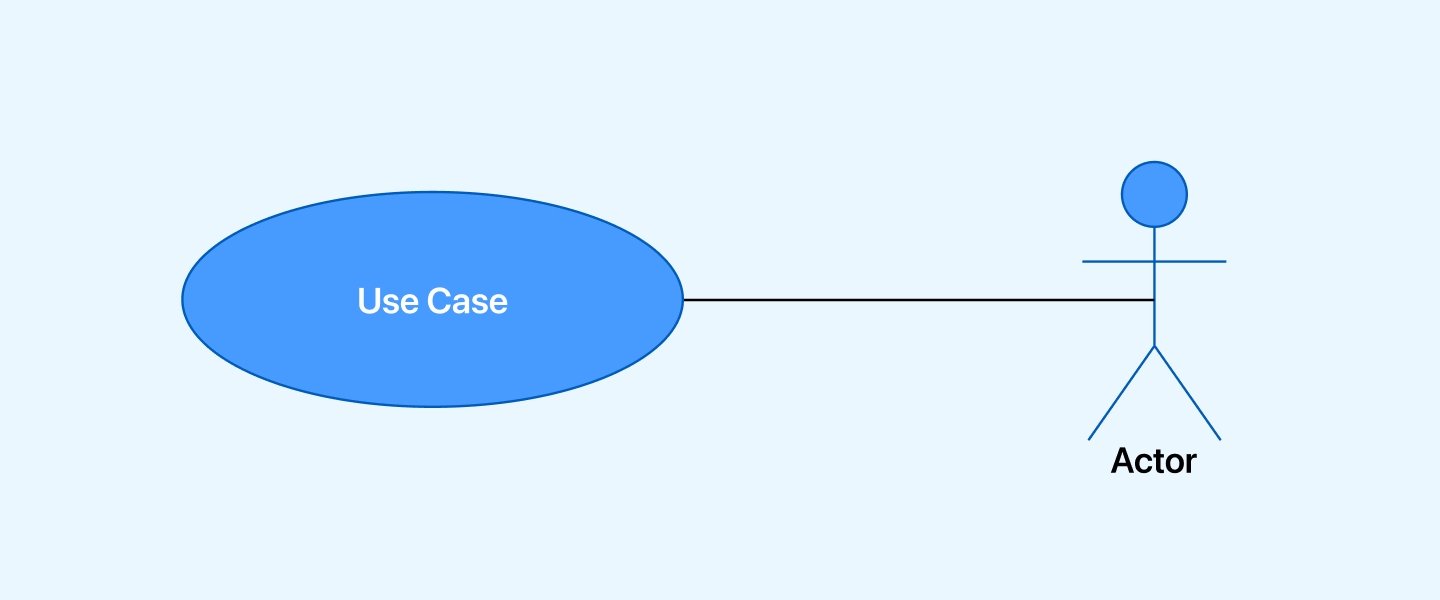
An oval surrounding the name represents the use case, a stick figure above the name represents the actor, and a line represents every action between a use case and an actor.
In the below section of this blog on use case vs test case, we will learn the advantages of implementing a use case.
Advantages of a Use Case
Now that we have understood what a use case is and its purpose. Let’s learn the advantages of a use case.
A use case has several benefits, some of which include:
- Alignment with business requirements: It describes their relationship to different business tasks by contextualizing requirements.
- Creation of test cases with the help of use cases: It is reusable by capturing requirements from every iteration into test cases and as a development guide for professionals.
- Deriving user interfaces and wireframes from use cases: It emphasizes user interaction and system interaction. It enables the UI designer to participate in development in parallel with or before the software developer.
- Bridging the gap between scenarios and whole stories: When you turn a use case into a scenario or a story, it becomes super easy to describe it concretely. In a way, use cases enable remarkable storytelling.
- Prioritizing functionality by decomposing system scope: It is valuable for scoping as it makes using a phased delivery approach easier for different projects. You can quickly add or remove them with a priority change from software projects.
Example of a Use Case
Now that we have a basic understanding of a use case, let’s move on to an example of writing a use case. For instance, the primary use case of an online food delivery app is to offer individuals a platform to place food orders online. The application can track and receive orders, process payments, and interact with the restaurant carrying out the delivery.
Some use cases for the food delivery app include:
- System: Online food delivery app.
- Goal: Users can place orders for food online.
- Pre-condition: Users need access to the system online to enter their valid credentials.
- Primary actor: Customers ordering food and making payments online.
- Main scenario or basic flow: Customers can explore available restaurant options and order food items based on their preferences and convenience. The use case may also involve interactions between restaurant employees and customers using the food delivery apps.
- Triggers: Open the app, search the restaurant, select the food, add an item to the cart, and process the payment.
- Expected flow: Tracking the anticipated results of every iteration helps development teams understand the overall functionalities of a system to execute code requirements efficiently.
- Post-condition: The system generates notifications containing order details after payment completion.
To validate the use case flow, you can perform use case testing. Use case testing is a critical aspect of software testing that involves validating the system’s functionality against the defined use cases. It ensures that the system behaves as expected and meets user requirements. By testing each use case, Quality Assurance (QA) teams can identify and resolve any errors or issues in the system’s behavior, ensuring a high-quality product that aligns with user expectations.
In the next section of this blog on use case vs test case, we will learn some of the best practices to create a use case.
Best Practices to Create a Use Case
Having the use case is an essential part of SDLC. However, if you want to create compelling use cases, follow these best practices to leverage the full benefits of the use case.
Some best practices to create a use case are mentioned below.
- Ensure that each step in a use case describes an action or interaction, making the flow of events clear and actionable.
- Limiting the number of use cases helps reduce complexity and makes it easier to manage and understand the system’s behavior.
- Use clear and concise language to describe each step, making it easier for stakeholders to understand and review.
- Focus on capturing the system’s overall functionality without getting bogged down in minor details.
- Instead, use verbs such as “verify” and “validate” to describe conditions or checks within the use case, reducing confusion and complexity.
- Since UI elements can change frequently in an agile framework, it’s best to focus on describing the functional aspects of the system.
- Keep use cases focused on describing how the system should behave rather than how it should be implemented.
So far, we have learned everything about a use case. In the following sections of this blog on use case vs test case, we will learn about a test case and how it differs from a use case.
What is a Test Case?
A test case is a document that consists of various testing elements to ensure the software feature is working as expected. It covers test steps and descriptions, expected outcomes, final results, and more. Since test cases focus on validating a software feature’s functionality, the tester has to compare expected and actual results. In the end, if the behavior of the software is as per the requirements, then the test passes. Otherwise, it fails.
In addition, test case documentation comes in handy while keeping the team on the right track with any upcoming tasks. You can reuse test cases for the future as per the requirement.
Below are the components of a test case.
- Pre-conditions: Any conditions that must be met before the test case can be executed.
- Test Case ID: A numeric or alphanumeric identifier QA engineers and testers use to group test cases into test suites.
- Test Case Name: A title describing the functionality or feature is verified by the test.
- Test Case Description: A detailed explanation of the function to be tested.
- Test Setup: Identifies the requirements and conditions necessary for correctly executing the test case.
- Test Data: It refers to the input data or values needed to execute the test case, such as usernames and passwords for testing email login.
- Test Steps: Step-by-step instructions on how to execute the test case.
- Expected Outcome: An outline of how the system should respond to each test step.
A Quality Assurance (QA) professional needs strong writing skills, attention to detail, and a deep understanding of the test application. They also require some out-of-the-box thinking for writing test cases. The test cases should be written so any team member can execute them.
For example, Person A is a tester who wrote test cases for an application. If Person A is out of the office and there’s an urgent need to run the test cases written by Person A, someone else should be able to execute them. However, if Person A didn’t write the test cases properly—perhaps Person A omitted preconditions, included incomplete steps, or used incorrect test data—no one else in the team could execute the tests except Person A.
Test cases should be written so anyone in the team can understand and execute them. Writing test cases in simple terms is advisable so that any team member, not just a QA professional, can run the test. That is why writing effective test cases is important, covering all essential details to avoid such dependencies.
In the section below of this blog on use case vs test case, we will learn the purpose of a test case before discussing its advantages and best practices.
Purpose of a Test Case
The primary purpose of a test case is to provide a detailed description of how a specific feature or aspect of a software system should be tested. However, the purposes and reasons behind creating them aren’t limited to these points alone.
There are various other purposes to prepare test cases. Some of them include:
- Verifying and validating: It helps teams verify different aspects and features of the software product to validate how compliant they are against specific requirements.
- Tracking test coverage: It helps teams efficiently track and monitor the testing process to ensure complete test coverage.
- Maintaining consistency: It ensures that once you prepare a test case document during the initial testing stages, the entire team will be able to maintain a high level of consistency throughout the Software Testing Life Cycle (STLC).
- Reusability: It enables other testers to use these test cases to eliminate similar defects and issues in case they encounter them in the future by writing test cases using relevant information.
- Ease of automation: Testers can utilize test cases to create automated test scripts. The best part is you can easily automate these, enabling teams to use any test case management, test management, or automated testing tools.
- Knowledge sharing: It allows teams to share their testing strategy and knowledge with other team members and project stakeholders.
In the below section of this blog on use case vs test case, we will learn some of the advantages of a test case.
Advantages of a Test Case
An organization’s ability to offer an outstanding user experience and innovative functionalities usually depends on how robust its testing process is. Well-written test cases can help IT teams make significant strides and improve the quality and management of the overall project. Knowing the advantages makes writing test cases easy for the testing team.
Below are some of the advantages of a test case.
- Increased test coverage: Since every test case serves a specific functionality, you can quickly expand test coverage with a robust test suite. Moreover, reusable test cases facilitate expanded test coverage since they use various configurations to execute test cases, such as operating systems, web browsers, etc.
- Save time: When you write test cases correctly, the time taken to review and execute them decreases. Since a lead tester, project manager, or QA manager writes test cases instead of actual testers, offering straightforward and clear testing instructions will help team members avoid lengthy meetings or sending relentless emails to clarify ambiguities or vague points.
- Uncovering problems during SDLC: It’s essential to understand optimistic scenarios and their limitations while writing test cases. Providing such information requires a 100% understanding of the service or product under test to proactively highlight design or functionality gaps.
Below is an example of a test case covering the basic login functionality for Yahoo. It demonstrates writing a test case based on the test case components defined.
Example of a Test Case
In this section of this blog on use case vs test case, we will look at an example of a test case that tests Yahoo’s login page for a better understanding.
- Pre-conditions: The user must have a pre-existing Yahoo account with a valid email address and password.
- Test Case ID: YAHOO-001
- Test Case Name: Yahoo Login Functionality Verification
- Test Case Description: Verify that a registered user can successfully log into their Yahoo account.
- Test Setup: Yahoo web application, supported browser (e.g., Chrome, Firefox).
- Test Data:
- Valid Yahoo email address: [email protected]
- Valid Yahoo password: password123
- Test Steps:
- Open a web browser.
- Navigate to Yahoo’s official website (https://www.yahoo.com/).
- Locate and click on the Sign In button.
- Enter the valid Yahoo email address in the Email field.
- Click on the Next button.
- Enter the valid Yahoo password in the Password field.
- Click on the Sign In button.
- Expected Outcome: The user should be successfully logged into their Yahoo account and directed to the Yahoo inbox page displaying new messages.
In the below section of this blog on use case vs test case, we will learn the best practices for creating a test case.
Best Practices to Create a Test Case
A test case is only helpful if you know how to use it effectively. While test cases can save time, increase test coverage, and uncover issues during the software development process, it’s essential to use them correctly. To ensure your test cases are practical, consider the following best practices.
- Test cases should be easy to understand and simple so any team member can execute them.
- Use assertive and straightforward language in test cases, such as “click the sign-in button” or “enter user credentials.”
- Keep customer requirements in mind when creating test cases to ensure they meet user expectations.
- Add all necessary steps in a test case and the author’s name for clarification and troubleshooting.
- Ensure that test case IDs and descriptions are unique to classify them while tracking bugs.
- Map all requirements to the test case to ensure comprehensive coverage.
- Expected results should always be stated using “must be” or “should be” to define the expected outcome clearly.
- Make test cases generic so that they can be reused across different scenarios.
- Always peer review test cases to ensure completeness and correctness, enhancing the robustness of the test suite.

Now that we have learned about a use case and test case in detail, let us compare the use case vs test case below.
Difference Between Use Case vs Test Case
Use cases are typically created during the design and requirement phase of the SDLC. They serve as a means to document and explain the interactions required between the system and the user to achieve the user’s objectives. Use cases help the development team understand the steps to fulfill user goals. Additionally, use cases can be used to derive more detailed functional requirements for new systems.
Test cases are derived from use cases and are used in the testing phase of the SDLC. They validate whether the Application Under Test (AUT) functions according to the specified requirements.
Some of the striking differences highlighted in the following table offer a clear understanding between a use case and a test case.
| Use Cases | Test Cases |
|---|---|
| It captures the workings of software for executing a specific process via different paths. | A crucial part of test documentation covering various possible scenarios for functionality testing. |
| It intends to grasp a series of steps for individual functionalities to meet user goals. | Ensures complete coverage of different requirements to validate software functionality. |
| It’s not meant for execution. | The core purpose is designing and executing tests. |
| Based on users’ views and customer requirements. | Based on Software Requirement Specification (SRS) and functional requirements. |
| It helps avoid defects or errors in software. | Tracks defects and ensures their removal from the product. |
| It only covers some of the details of software functionality. | Requires comprehensive coverage of all requirements and functionalities. |
| Derives Business Requirement Specifications (BRS). | Derives from use cases. |
| Basis for the preparation of test cases. | There is no use in preparing use cases. |
| Prepared by business analysts. | Prepared by testing engineers or teams. |
| Depicts the workflow of sequential steps in the product. | Comprises specified input data and desired results. |
| Offers inputs to developers. | Input for testers for testing purposes. |
Now, we understand how a use case differs from a test case. In the following section of this blog on use case vs test case, we will learn about the role of test automation in conjunction with a use case and a test case.
Use Case vs Test Case: Role in Test Automation
Test automation is a must for achieving quicker and more precise testing cycles during the software testing process. Identifying different features and functionalities that must be automated is crucial to creating thorough and reliable test scripts.
That’s where use cases play a pivotal role in establishing a solid foundation for automated testing. You can create a structured approach to automated testing by defining different use cases.
On the other hand, test cases provide specific conditions to be tested, serving as inputs to various automated scripts.
Organizations can minimize human error and detect defects early in the development cycle by automating test cases, ultimately delivering high-quality software faster. Understanding the difference between use cases and test cases makes implementing various test automation strategies easier, ensuring highly effective software testing processes.
To leverage the true capabilities of test automation, consider using a cloud-based testing platform like TestMu AI. It is an AI-powered test orchestration and execution platform that lets you run manual and automated tests at scale with over 3000+ real devices, browsers, and OS combinations.
By integrating TestMu AI into your testing workflow, you can leverage the capabilities offered by the platform to execute test cases.
To execute your test cases, follow these steps:
- Define your use cases: Write the details of use cases that outline user interactions with your application.
- Create test cases: Based on the defined use cases, create the test cases that cover all the scenarios.
- TestMu AI integrations: Use the APIs to automate the execution of your test cases across different browsers and devices.
- Run tests: Run your automated tests on TestMu AI.
- Analyze results: Review test results generated by TestMu AI to identify any issues or bugs in your application.
This platform allows you to integrate your existing test cases and execute them in various environments. You can define your test scenarios in test cases and then use TestMu AI to automate the execution of these scenarios.
Test scenarios and test cases are fundamental concepts in software testing. They serve as the foundation for describing and executing tests. Follow this guide to understand the key difference between the test scenario vs test case.
To get started with the TestMu AI platform, watch the video tutorial below.
You can Subscribe to the TestMu AI YouTube Channel for more updates and tutorials on web application testing, Selenium, Cypress, Playwright, real-time testing, and more.
In the below section of this blog on use case vs test case, we will learn how to perform use case testing over a cloud platform like TestMu AI.
How to Perform Use Case Testing with TestMu AI?
TestMu AI allows you to execute your defined use cases across various browsers and devices, ensuring your application’s functionality meets user expectations.
Before getting familiar with the platform, we will define the use case.
Let’s denote the actor as ‘A’ and the system as ‘S’. Most web applications typically include a standard login functionality that requires testing.
- The actor enters the login credentials.
- The system validates the password.
- If the password is correct, the user gains access.
- If the password is incorrect, the system displays an error message.
Manual testing on TestMu AI:
To begin the manual testing process, we will use Selenium Playground as a demo site to validate the actions based on the given use case.
However, before we start testing, we must follow the steps outlined below.
- Create an account on TestMu AI.
- Click on the Real Time from the left menu option.
- Select the Desktop option under the Web Browser Testing menu, enter the URL, select OS, browser, browser version, and resolution, and click Start.
- Now click on the Login link from the header.
- Enter the Email and the Password, and then click LOGIN.
- As you can see, we have entered the wrong credentials and need help logging in as per the use case given.
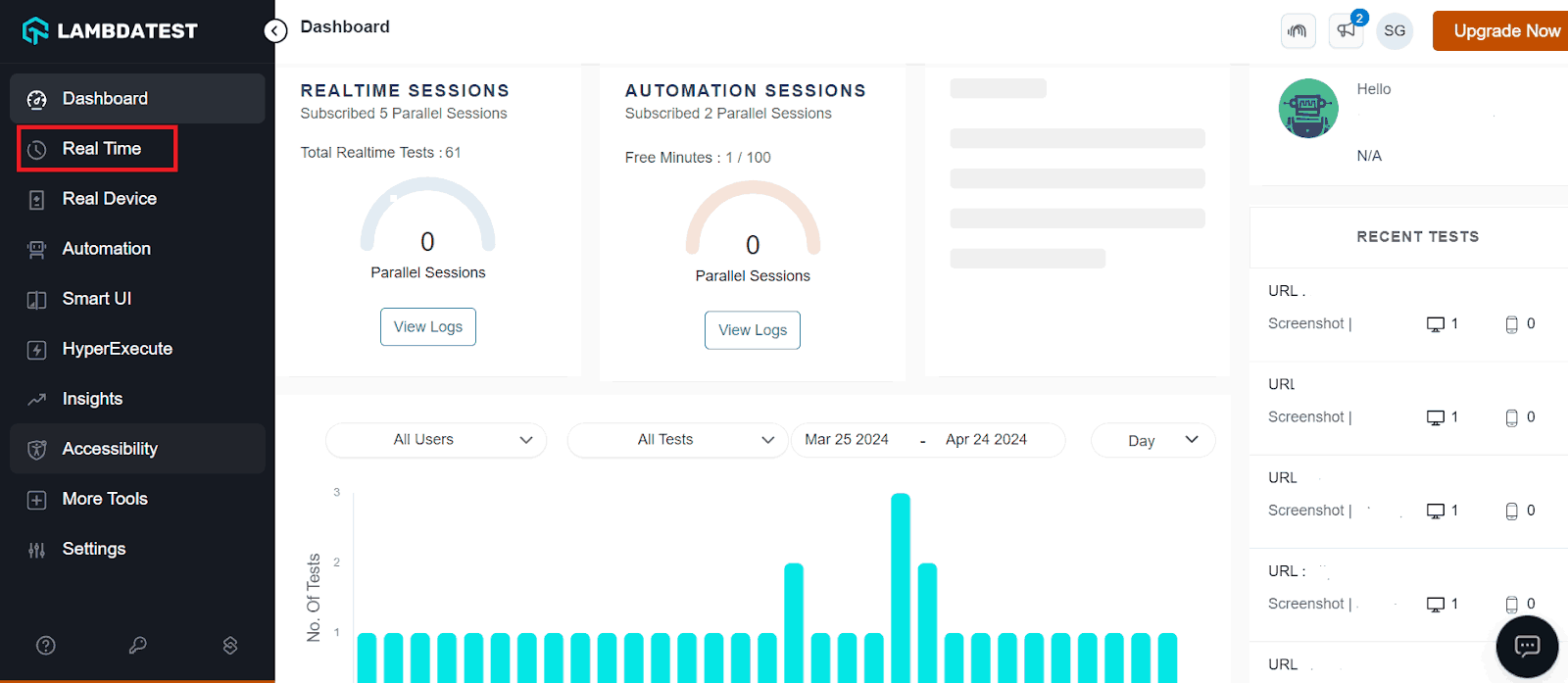
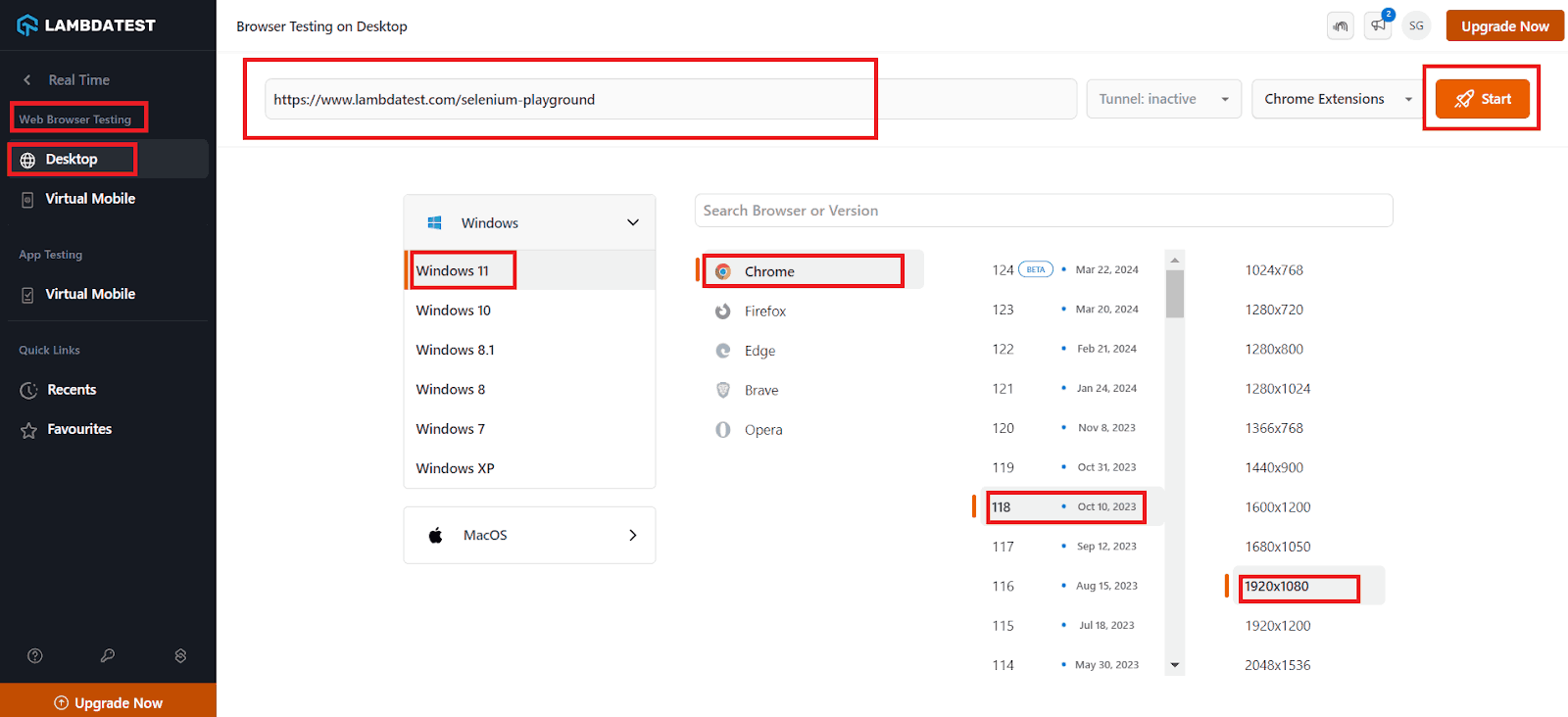
It will launch a cloud-based virtual machine where you can carry out manual testing.
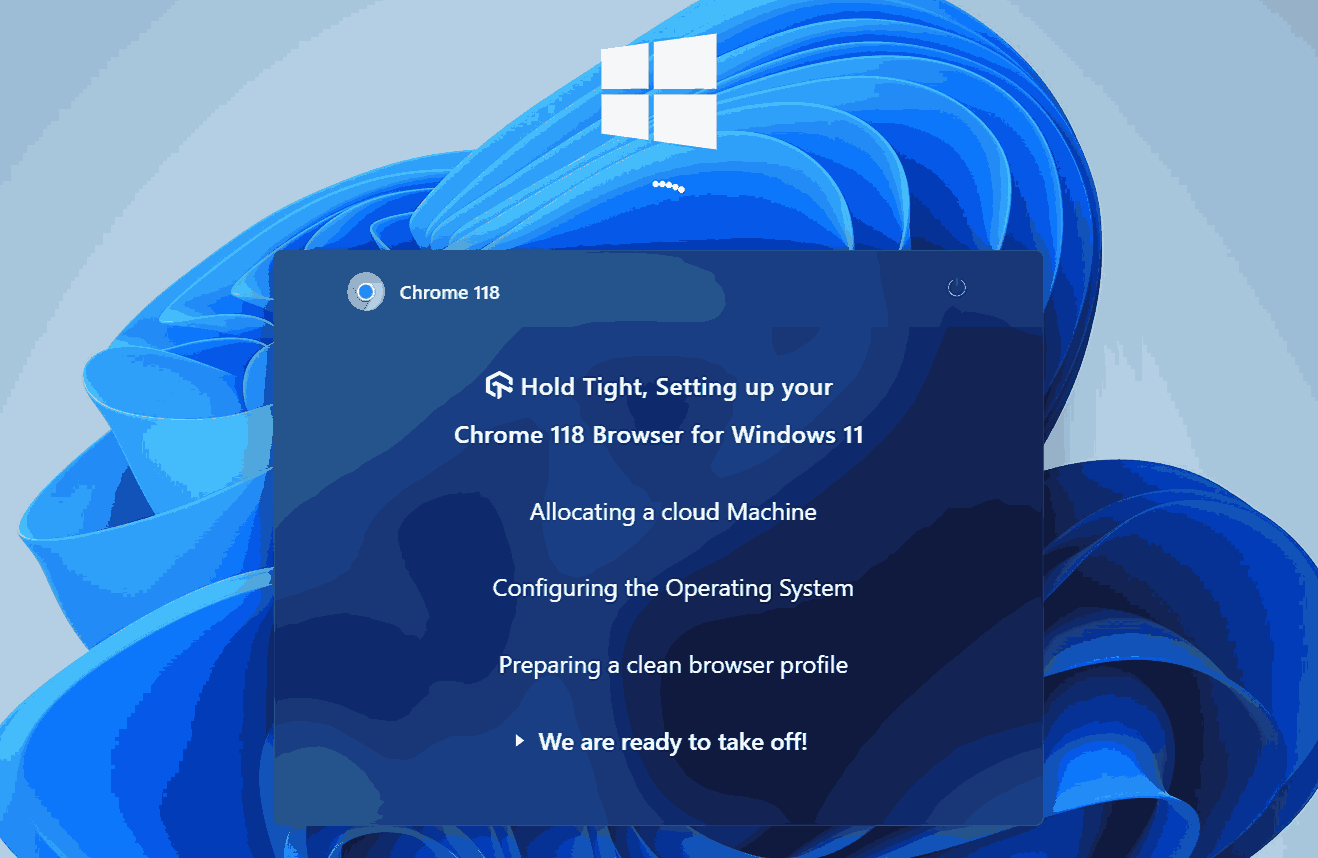
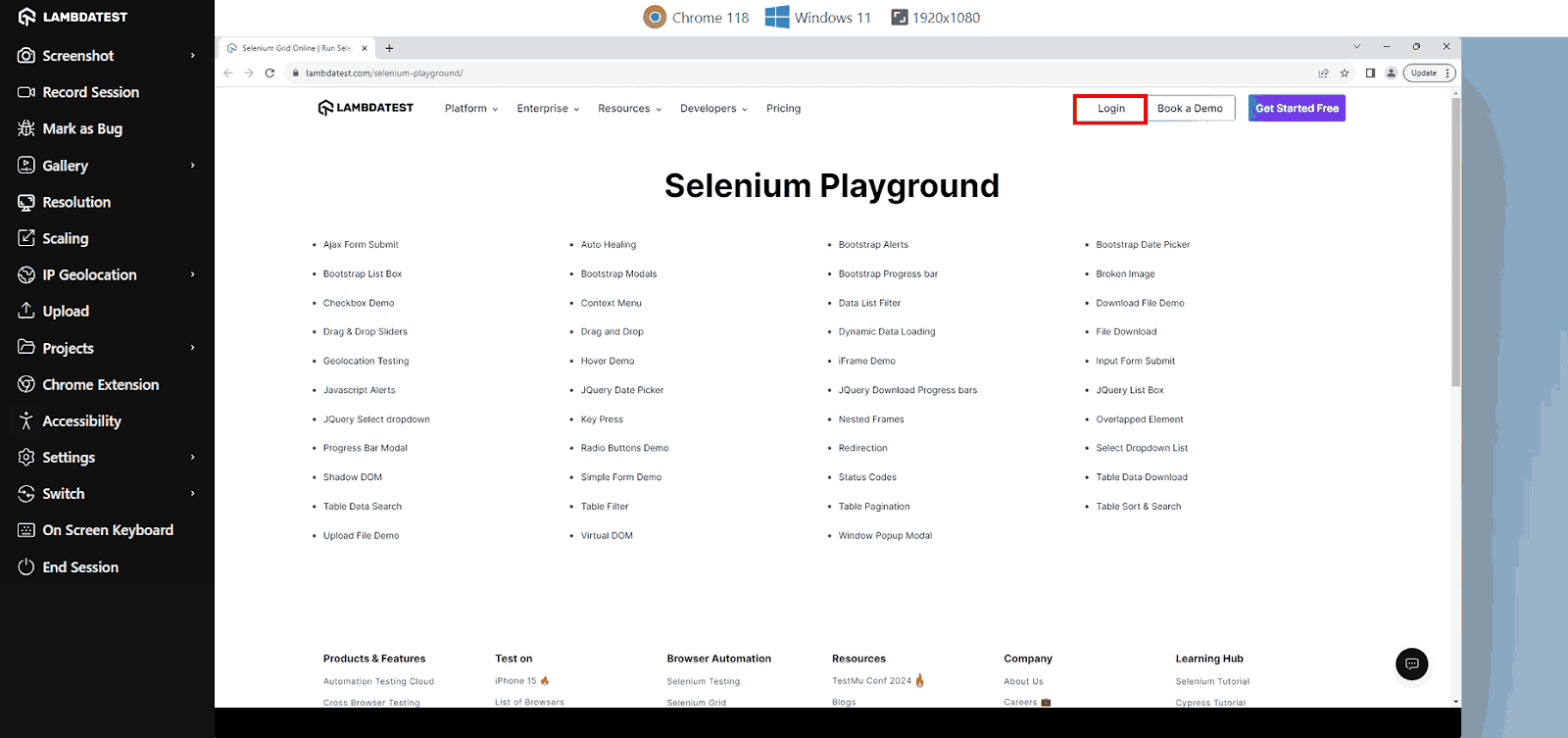
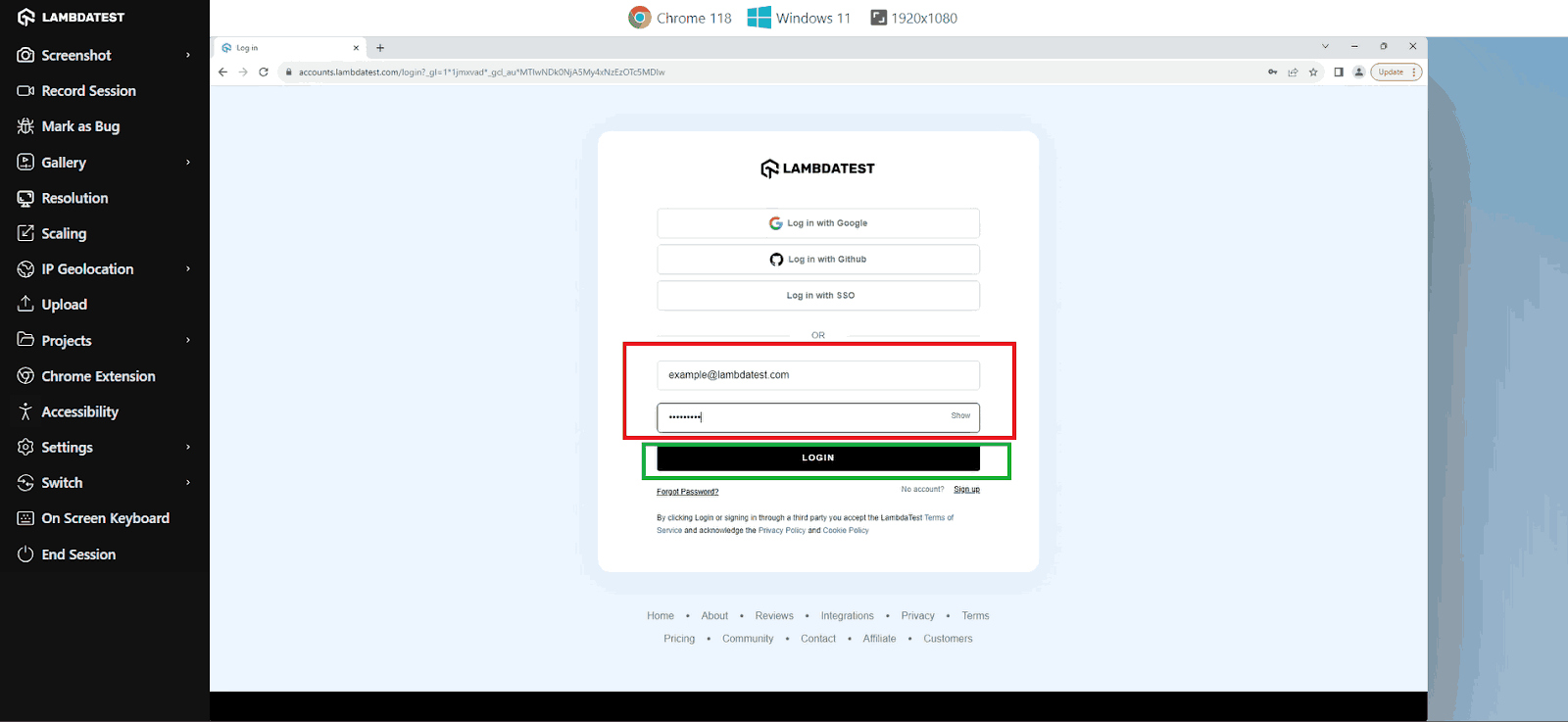
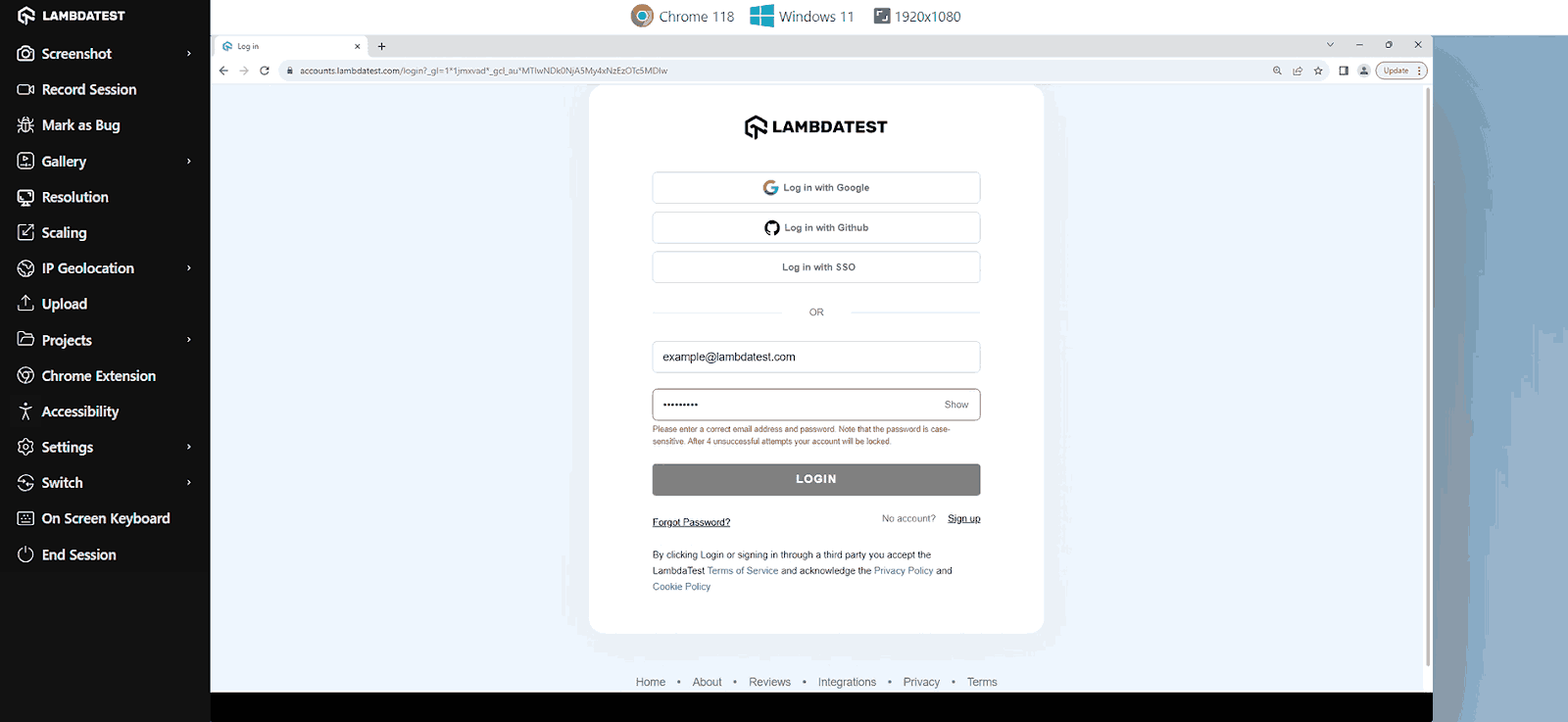
With the options in the left menu, you can mark a bug using the Mark as Bug option, take screenshots using the Screenshot option, and change the geolocation using IP Geolocation. Additionally, you can test your application on various browsers by switching the resolution, versions, OS, and browser using the Switch option. You can explore more options that fit your needs.
With manual testing, testers execute test cases manually without using automation testing tools. However, this process involves significant human effort and time, making it prone to errors and inconsistencies.
To overcome the challenges faced in manual testing, you can move from manual to automated testing, where automation testing helps you perform repetitive tasks accurately and cover a wide range of scenarios, improving test coverage.
Now, let us look into how to perform automation testing with TestMu AI for the given use case.
Automated testing on TestMu AI:
Let’s look at the automated testing process on the TestMu AI cloud.
- Log in to your TestMu AI account.
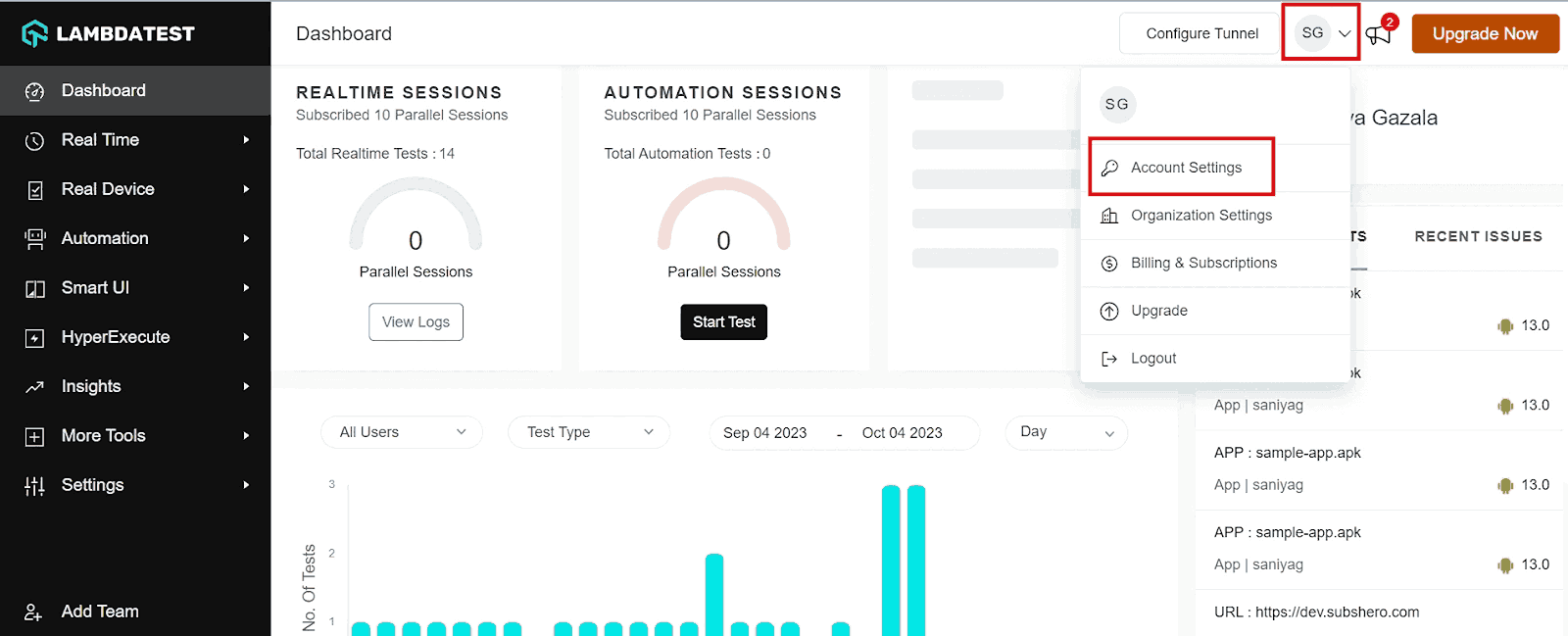
- Obtain your Username and Access Key by clicking on your Profile avatar in the TestMu AI dashboard and selecting Account Settings.
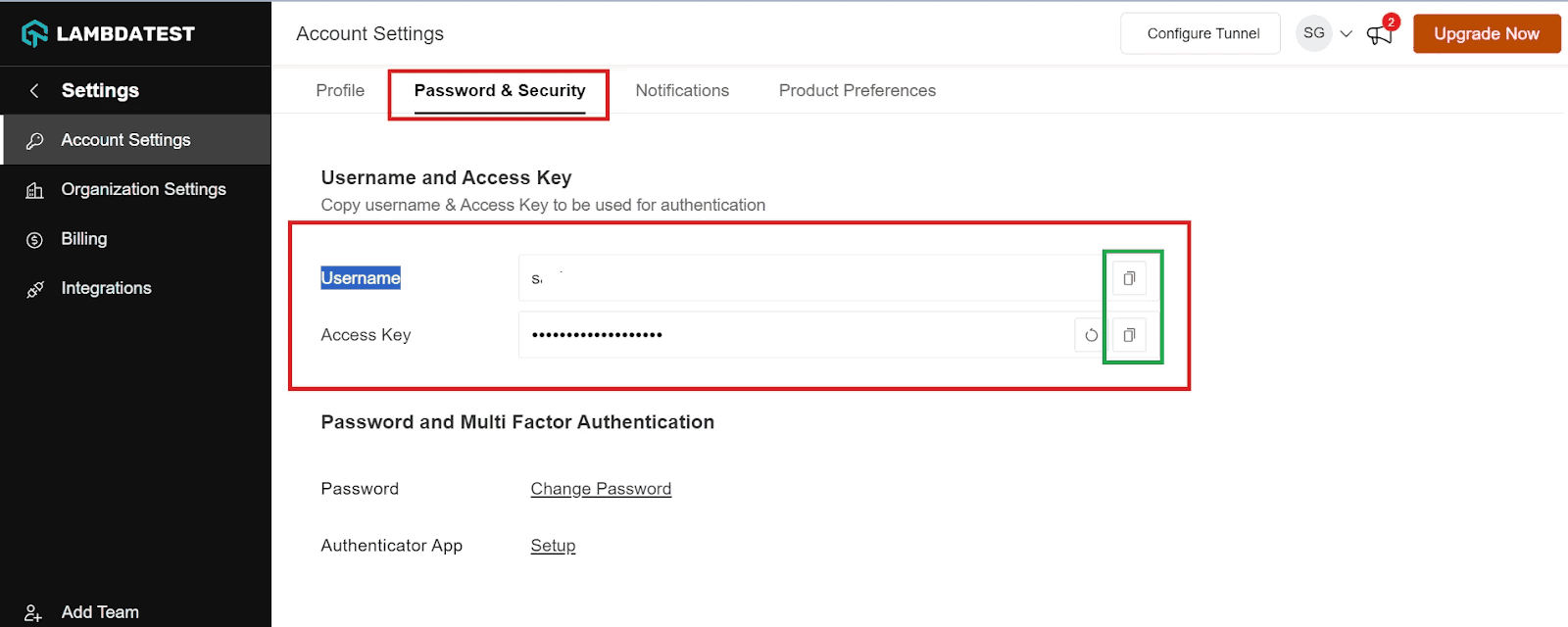
- Copy your Username and Access Key from the Password & Security tab.
- Generate Capabilities using the TestMu AI Capabilities Generator, specifying your desired browser and its various operating systems according to your requirements.
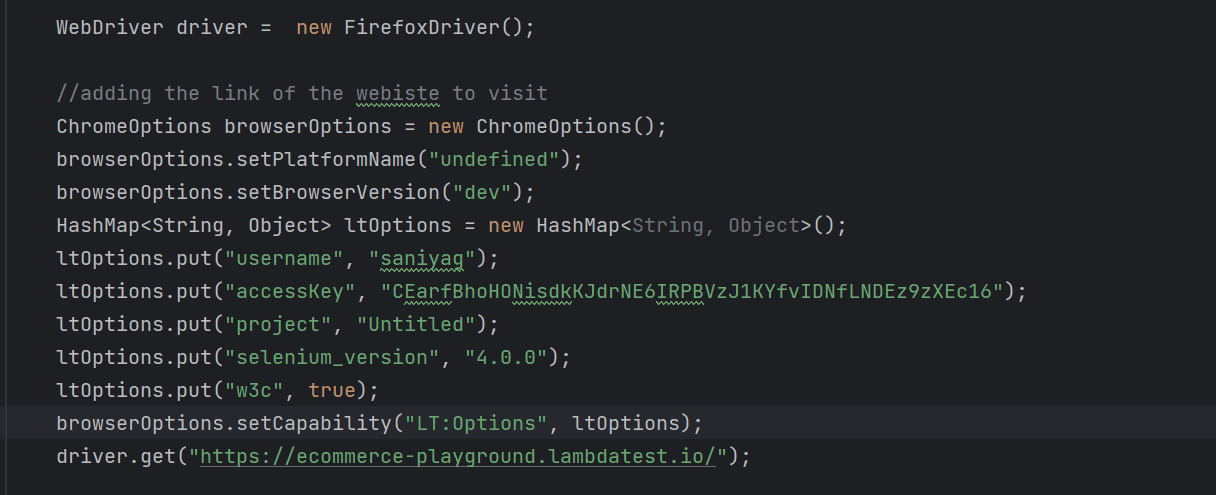
- Paste your Username, Access Key, and capabilities into your test script as shown below.
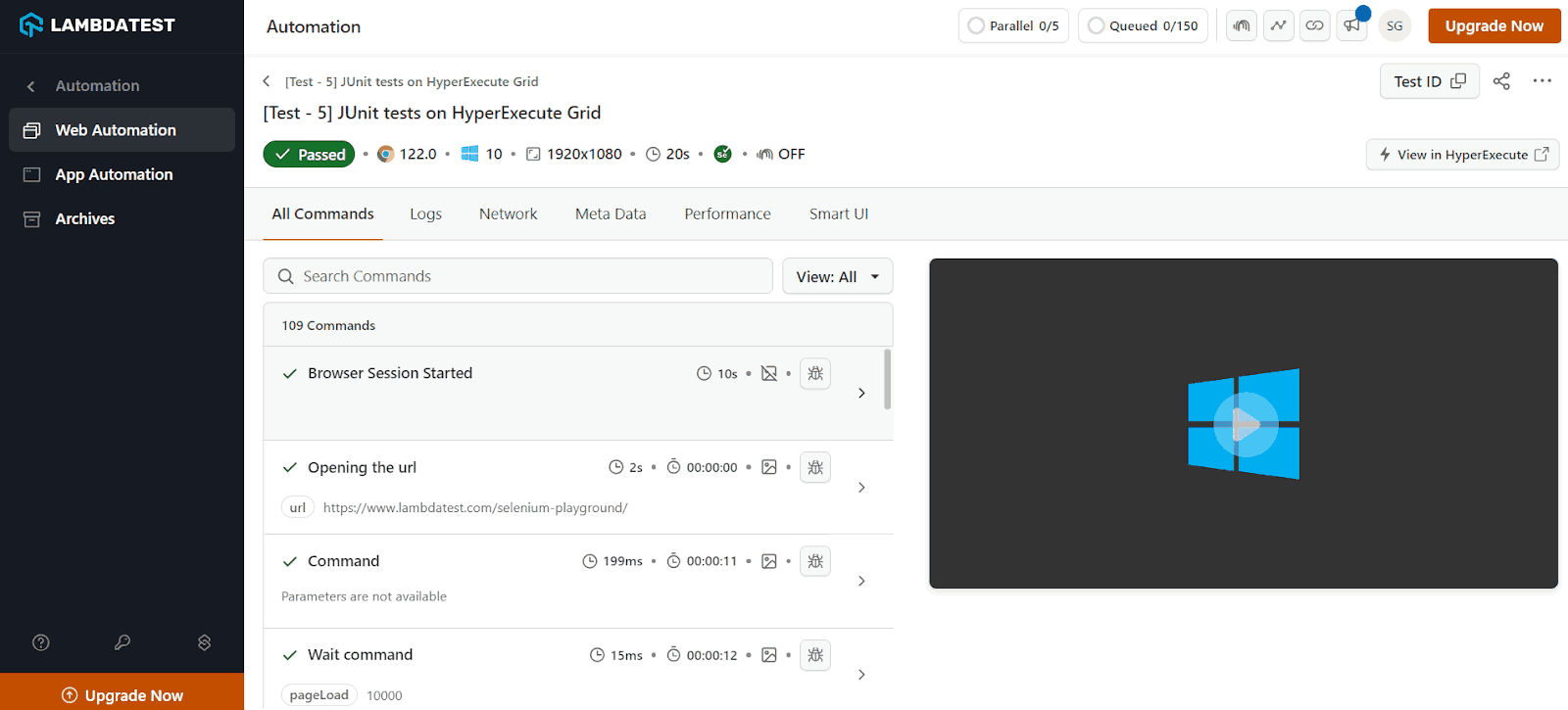
- Run the test and see the result on the TestMu AI Dashboard.
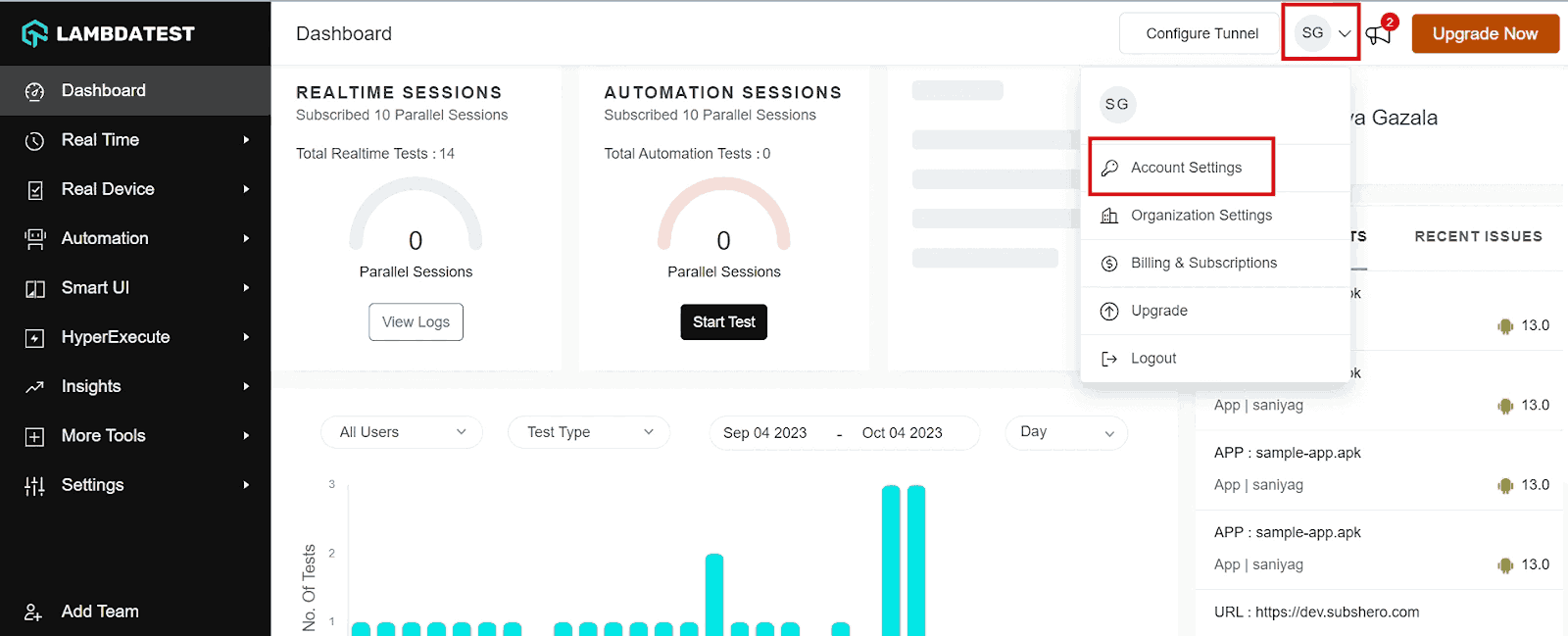
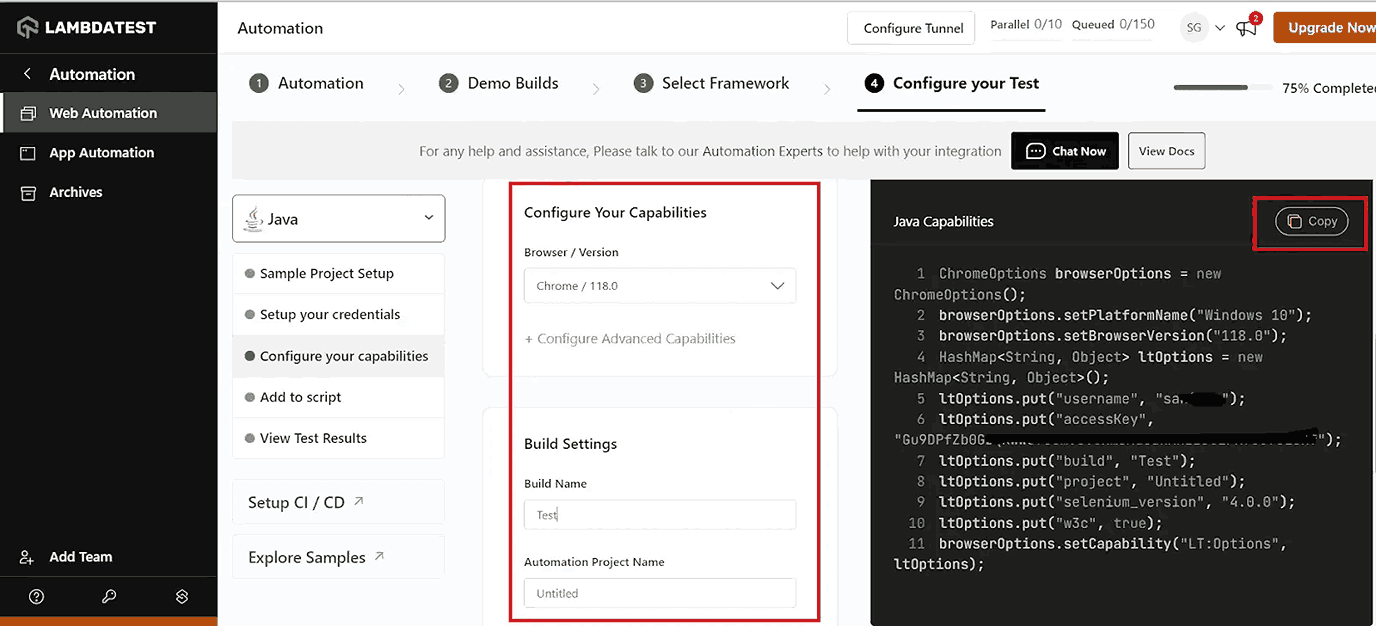
The capabilities will vary depending on your programming language and automation testing frameworks.
Conclusion
When comparing use case vs test case, it is crucial to consider necessary real user conditions during testing to ensure the seamless functioning of applications in the real world. It’s also vital to test on real devices instead of relying entirely on simulators and emulators to increase the accuracy of results. Once you understand the difference between use cases and test cases, you can save time and effort while testing software. Testers can ensure that the software is high quality, meets user requirements, and keeps functioning as intended by using both use cases and test cases effectively.


Frequently asked questions
Did you find this page helpful?
More Related Hubs
TestMu AI forEnterprise
Get access to solutions built on Enterprise
grade security, privacy, & compliance
- Advanced access controls
- Advanced data retention rules
- Advanced Local Testing
- Premium Support options
- Early access to beta features
- Private Slack Channel
- Unlimited Manual Accessibility DevTools Tests